The popular independent game marketplace, itch.io, has announced a significant enhancement to its desktop application, introducing a fully integrated graphical user interface (GUI) for its powerful ‘butler’ command-line interface (CLI) tool. This pivotal update, available in the latest version of the itch.io app (v26.12.0 or higher), is set to revolutionize how developers upload and manage game builds, making the process more accessible, efficient, and user-friendly. Previously requiring comfort with terminal commands, the sophisticated patch-based upload system of ‘butler’ is now directly accessible within the app, democratizing advanced distribution capabilities for a broader spectrum of indie creators.
Background Context: The Evolution of Itch.io and ‘butler’
Since its inception in 2013, itch.io has carved out a unique niche in the digital distribution landscape, becoming a vital platform for independent game developers to publish and sell their creations. Known for its developer-centric policies, flexible pricing, and strong community focus, itch.io has consistently sought to empower creators with tools that simplify the often-complex process of game publishing.
One such critical tool developed by itch.io was ‘butler,’ introduced in the mid-2010s. ‘butler’ was designed to address a fundamental challenge in game distribution: efficiently updating game files. Traditional methods often involved uploading entire new game builds whenever a small change was made, leading to significant bandwidth consumption and lengthy download times for both developers and players. ‘butler’ innovated by implementing a delta-patching system. Instead of re-uploading the entire game, ‘butler’ would analyze the differences between the new build and the previously uploaded version, generating and pushing only the changed data. This "patch" approach drastically reduced upload and download sizes, making game updates faster and more economical.
However, ‘butler’ initially existed solely as a command-line interface tool. While highly effective and appreciated by developers comfortable with programming and terminal environments, its CLI nature presented a barrier to entry for many independent creators who lacked extensive technical expertise or preferred visual interfaces. This divide meant that a significant portion of itch.io’s developer community could not fully leverage the efficiency benefits of ‘butler,’ often resorting to less optimal full-file uploads via web browsers. The platform recognized this gap, prompting the strategic decision to bridge the accessibility divide.
Addressing Developer Needs: The GUI Integration
The integration of ‘butler’ into the itch.io desktop app with a dedicated GUI represents a direct response to longstanding developer feedback and a commitment to lowering the technical hurdles associated with game development and distribution. The new "Upload" section within the app allows developers to interact with ‘butler’s powerful functionalities through an intuitive graphical interface, eliminating the need to memorize commands, navigate file paths manually in a terminal, or troubleshoot CLI-specific issues.
This move aligns with broader industry trends where user-friendly interfaces are increasingly paramount for complex tools. By abstracting the command-line intricacies, itch.io aims to make its advanced patching technology available to every developer, regardless of their technical background. This not only streamlines the publishing process but also encourages more frequent updates, bug fixes, and content additions, ultimately leading to a more dynamic and polished gaming experience for players. The strategic decision reflects a clear understanding of the indie developer ecosystem, where creators often wear multiple hats and appreciate tools that save time and reduce cognitive load.
Key Features of the New Upload Section
The newly introduced "Upload" section within the itch.io app boasts several features designed to provide a seamless and comprehensive build management experience:
The Builds Page: Centralized Build Management
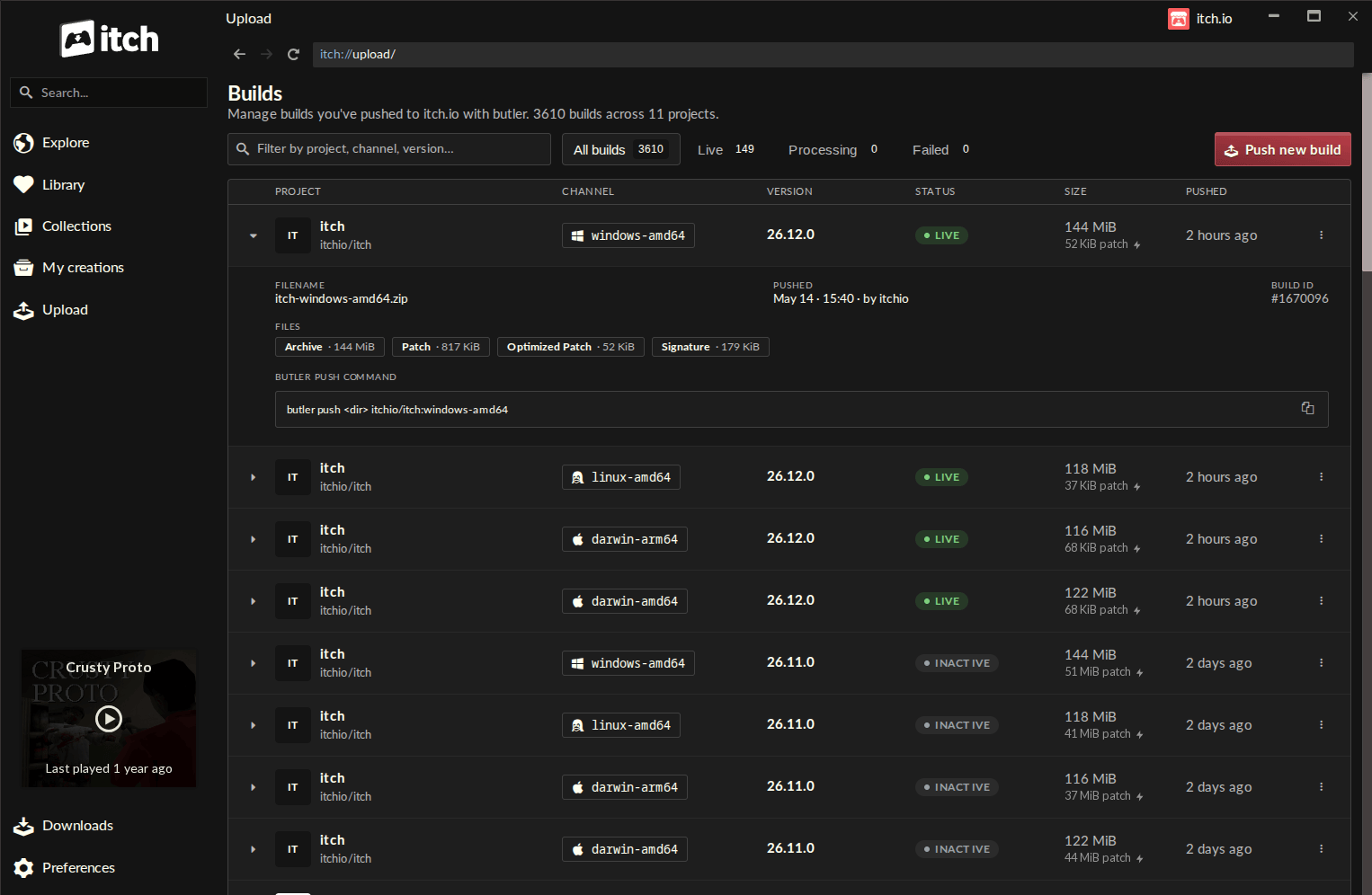
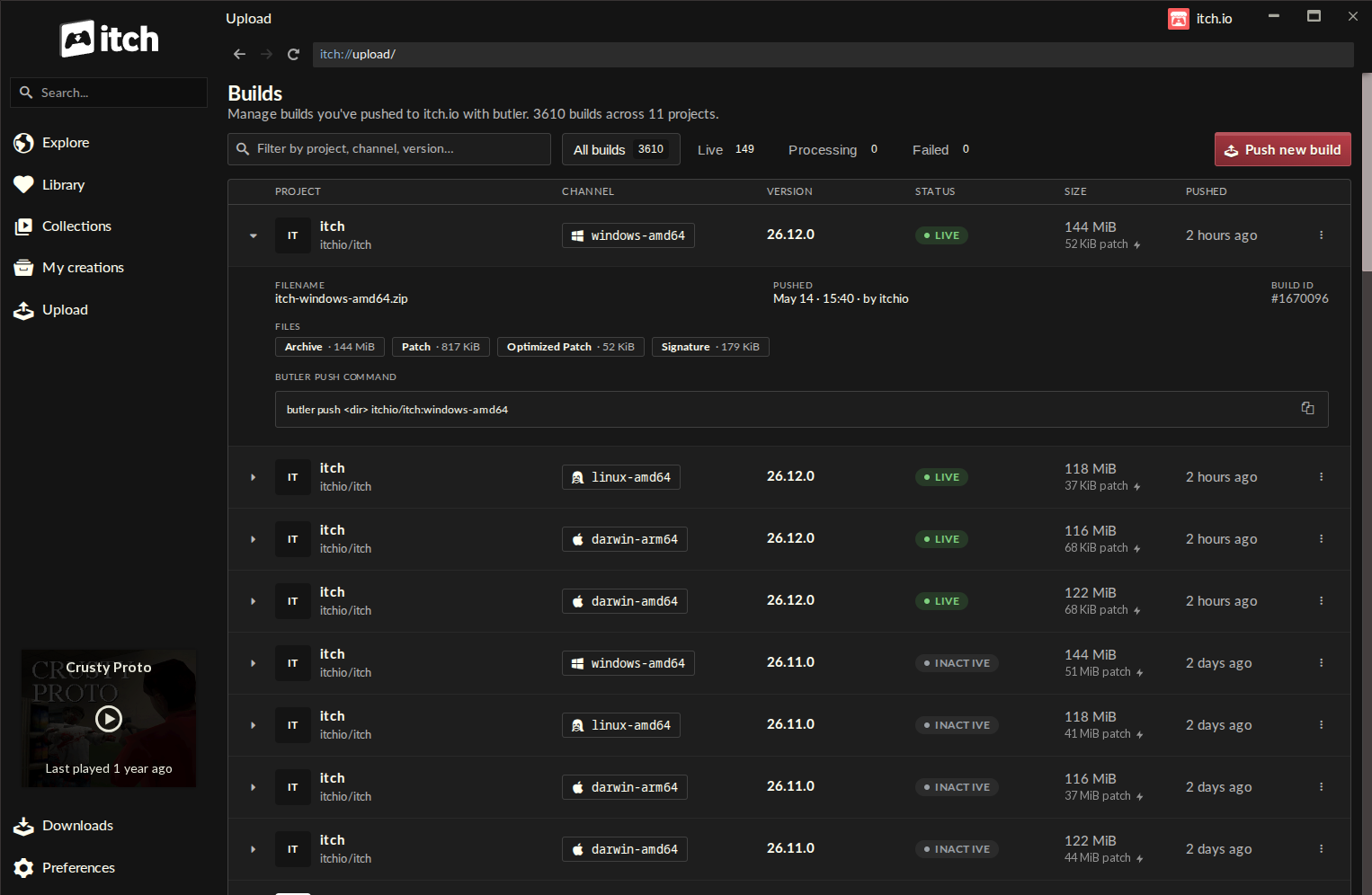
A new "Builds" page is now accessible via a dedicated "Upload" entry in the app’s sidebar. This centralized dashboard provides a clear overview of every build associated with any project the logged-in account has editing privileges for. Each entry on this page displays crucial information:
- Project Name: Identifies the game or application.
- Channel: Specifies the distribution channel (e.g.,
windows-beta,linux-arm64,macos-preview). - Version: The build’s designated version number, offering clear iteration tracking.
- Status: Indicates the upload status.
- File Size: The size of the specific build.
- Push Timestamp: When the build was last uploaded.
This consolidated view empowers developers to monitor their entire portfolio of builds at a glance, facilitating better organization and version control, especially for developers managing multiple projects or platforms.
Pushing a New Build: A Streamlined Process
The core functionality of pushing new builds has been significantly simplified. From the "Builds" screen, developers can initiate an upload by clicking the "Push new build" button, which opens a dedicated push dialog. The process is guided and straightforward:
- Project Selection: Developers first select the project they wish to update from a dropdown list.
- Channel Management: They can then choose an existing channel or define a new one by typing its name, offering flexibility for different release tracks (e.g., stable, beta, alpha, specific OS versions).
- Version Assignment: An optional version number can be assigned, which is highly recommended for proper version control and communication with players.
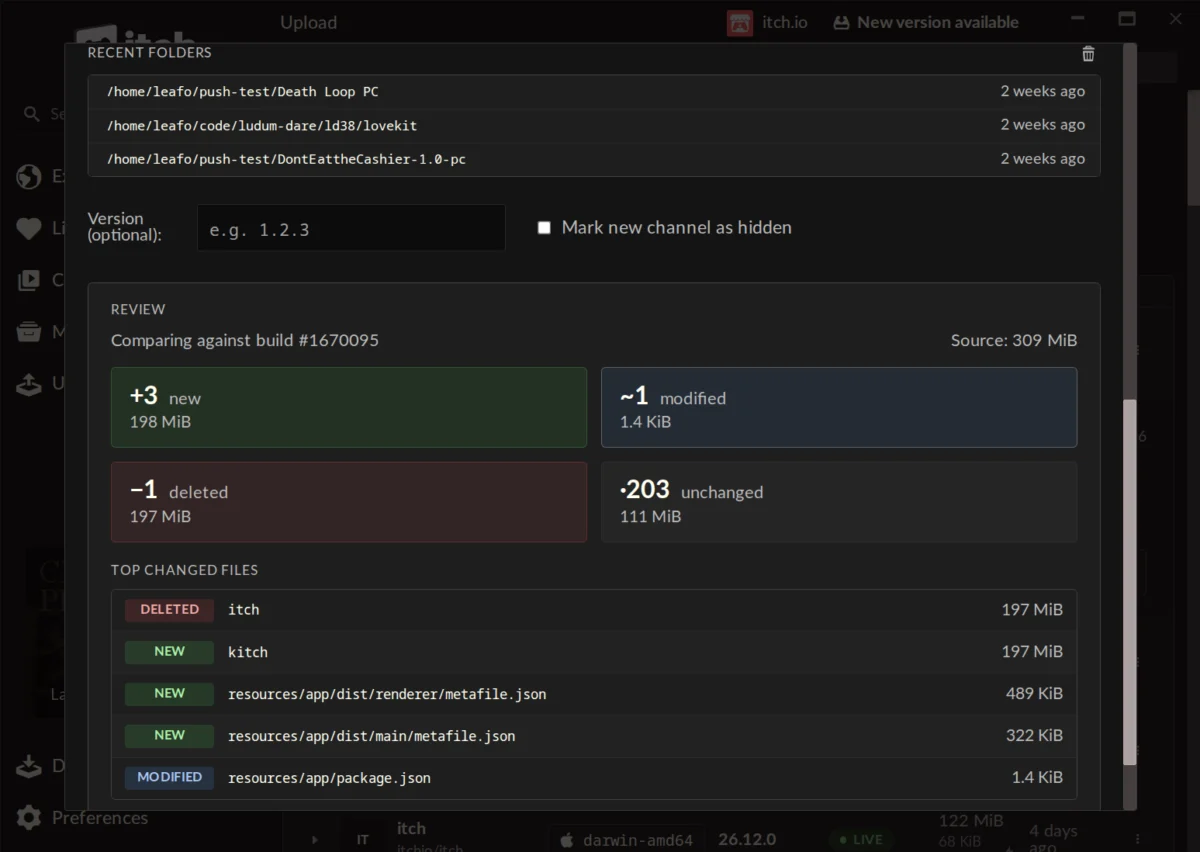
- File Input: The core of the upload involves simply dragging and dropping a folder containing the game files or a
.ziparchive into the designated area. The app also maintains a list of recent folders, allowing quick access to frequently used build directories.
Pre-Upload Preview and Delta Analysis
One of the most valuable additions is the ability to generate a detailed preview of changes before commencing an upload. This feature leverages ‘butler’s intelligence to compare the local build with the last version pushed to the chosen channel. The preview displays:
- File Change Summary: A breakdown of how many files are new, modified, deleted, or unchanged.
- Size Impact: The cumulative size for each category of change.
- Largest Changed Files: A list highlighting the files with the most significant modifications.
This pre-upload analysis serves as a critical safeguard, allowing developers to catch potential mistakes (e.g., accidentally including debugging files, forgetting to update a critical asset) and gain a clear understanding of the patch’s scope. For a game that might have hundreds or thousands of files, this transparency is invaluable, minimizing errors and ensuring only intended changes are propagated.
Automatic ‘butler’ Updates and Account Management
The version of ‘butler’ embedded within the itch.io app is automatically updated, relieving developers of the burden of manual maintenance. This ensures they always benefit from the latest optimizations and features of the underlying patching technology. Furthermore, the app leverages the credentials of the currently logged-in itch.io account for uploads, simplifying authentication. This is particularly beneficial for developers managing multiple accounts or working on collaborative projects, as the itch.io app supports quick switching between profiles.
Technical Underpinnings: How ‘butler’ Optimizes Distribution
At the heart of this new GUI functionality lies the robust technology of ‘butler,’ which operates on principles of delta compression and patch-based delivery. When a developer uses ‘butler’ (now via the GUI), the initial push of a game to a new channel uploads the entire build. However, subsequent pushes to the same channel trigger a sophisticated comparison process.
‘butler’ intelligently scans the new build and compares it byte-by-byte against the previous version stored on itch.io’s servers. It then calculates the "delta" – only the bits that have changed. This delta is compressed and uploaded as a patch. For players using the itch.io app, when an update is available for a game they own, the app downloads only this small patch, significantly reducing download sizes and times. This is particularly impactful for games with frequent, minor updates, as it can reduce download volumes by 70-90% or even more, depending on the nature of the changes.
Upon successful upload of the patch, itch.io’s backend servers further process and optimize it, often re-compressing the data to make it even smaller for end-user distribution. This multi-layered optimization strategy benefits everyone: developers save upload bandwidth and time, players enjoy quicker updates, and itch.io’s infrastructure handles data more efficiently. This technical advantage is a cornerstone of itch.io’s commitment to providing a superior experience for both creators and consumers.
Impact on Developers: Streamlined Workflows and Accessibility
The integration of ‘butler’ into the itch.io app’s GUI has profound implications for the developer community:
- Enhanced Accessibility: The most immediate benefit is the dramatic improvement in accessibility. Developers who were previously intimidated by the command line can now effortlessly utilize ‘butler’s advanced features, broadening the pool of creators who can efficiently manage their game builds. This democratizes powerful tools, aligning with itch.io’s mission to support indie development.
- Streamlined Workflow: The visual interface reduces cognitive load and accelerates the upload process. Developers no longer need to switch between different applications or contexts (e.g., IDE, terminal, browser) to manage builds. Everything is consolidated within the familiar itch.io app.
- Reduced Error Potential: The pre-upload preview feature acts as a crucial safety net, allowing developers to verify changes before committing to an upload. This minimizes the risk of pushing incorrect or incomplete builds, saving time and potential embarrassment.
- Time and Bandwidth Savings: By leveraging delta patching, developers save significant time on uploads, especially for large games with minor updates. This also translates to reduced internet bandwidth consumption, a tangible cost-saving for developers in regions with data caps or slower connections.
- Encourages Frequent Updates: The ease of updating incentivizes developers to push more frequent bug fixes, small content additions, and performance improvements without the overhead of full re-uploads. This fosters a more iterative development cycle and keeps games fresher for players.
Benefits for Players: Enhanced Update Experience
While primarily a developer-focused update, the benefits extend directly to the end-users of the itch.io app:
- Faster Downloads: Players experience significantly quicker game updates, as they only download the changed portions of a game rather than the entire build. This is particularly noticeable for large games or those with frequent updates.
- Reduced Bandwidth Consumption: Less data is transferred for updates, saving players’ internet bandwidth, which is a crucial advantage for those with limited data plans or slower connections.
- Seamless Game Maintenance: The automatic update mechanism of the itch.io app, now powered by the more efficient ‘butler’ patching, means players can keep their games up-to-date with minimal effort, ensuring they always have access to the latest version.
- Improved Game Quality: By encouraging developers to push more frequent updates, players ultimately benefit from more polished, stable, and feature-rich games.
Industry Context and Competitive Landscape
In the highly competitive digital distribution market, platform features for developers play a critical role in attracting and retaining creators. Major platforms like Steam and Epic Games Store also offer sophisticated build management and patching systems, often integrated into their SDKs or developer portals. Itch.io’s integration of ‘butler’ into a user-friendly GUI helps it maintain competitive parity while staying true to its indie-focused ethos.
This move reinforces itch.io’s position as a robust and developer-friendly platform. By combining advanced technical capabilities with an accessible interface, itch.io strengthens its appeal to a wide range of indie developers, from hobbyists to small studios. It demonstrates a commitment to evolving its ecosystem to meet the practical needs of its community, ensuring that its tools remain relevant and empowering.
Developer Reactions and Community Feedback
Initial reactions from the developer community have been overwhelmingly positive. Users lauded the ease of use and organizational benefits introduced by the GUI. Comments on the official announcement highlighted the transformation from a "complicated and fiddly" CLI experience to an "easy and organized" process.
One developer, Augustopolonio, stated, "Great feature! It’s so easy and organized to update a game now! Thanks!" Another, Warpzone, shared, "Honestly? This is a lot faster than manually updating the webpage. Great job, itch. I used butler some years ago, but I remember it being complicated and fiddly. Maybe even a bit fragile. The itch app has none of these problems." This sentiment was echoed by others, with Traxiss praising the "self-enforcing nature of the Compare step," indicating improved confidence in the upload process. Hopelessdecoy commented, "This is a very cool change, makes the app a lot more useful. Might move my software here. Thanks Itch team!!" The update is seen as significantly enhancing the app’s utility and attracting new software developers to the platform.
While largely positive, some feature requests also emerged, such as the ability to convert existing games not originally uploaded with ‘butler’ to the new system. Itch.io lead developer, Leafo, acknowledged this, explaining that "a butler push needs additional metadata alongside the file that’s computed when you’re uploading" and while not immediately planned, it could be a future addition. This open dialogue reflects itch.io’s community-driven development approach.
Future Outlook and Strategic Implications
The integration of the ‘butler’ GUI is more than just a convenience update; it’s a strategic move that positions itch.io for continued growth and relevance in the indie game space. By making powerful tools accessible, itch.io fosters a more vibrant development environment, encouraging more creators to publish and maintain their games on the platform. This leads to a richer content library for players and strengthens the overall itch.io ecosystem.
This commitment to improving developer experience is a key differentiator for itch.io. As the platform continues to mature, such thoughtful integrations are likely to become a benchmark for how it supports its diverse community of creators. It underscores a philosophy where technological advancement is directly channeled into practical, user-centric solutions.
Availability and How to Access the Update
The itch.io app automatically updates itself, so most users will receive this new functionality without manual intervention. Developers can also manually check for updates from the Preferences screen within the app to ensure they are on the latest version. To access the new "Upload" tab and ‘butler’ GUI, users will need at least version v26.12.0 of the itch.io app. For those new to the platform, the itch.io app can be downloaded directly from the official website. Comprehensive documentation for ‘butler’s command-line capabilities remains available for developers who prefer or require terminal-based operations.
This update marks a significant milestone for itch.io, empowering developers with a more efficient, accessible, and error-resistant workflow for distributing their creations, ultimately benefiting the entire independent gaming community.
About the Author