Saving and loading game data, a fundamental yet often complex component of modern game development, has been significantly streamlined within Unreal Engine 5, thanks to its integrated SaveGame system. This robust framework empowers developers to efficiently manage persistent game states, ensuring player progress is reliably stored and retrieved with minimal programmatic overhead. The system’s design emphasizes ease of use, particularly through Blueprint scripting, making sophisticated data management accessible to a broader range of developers.

The ability to save and load game progress is not merely a convenience; it is a cornerstone of player engagement and retention in the contemporary gaming landscape. Players expect their efforts and achievements to be preserved across sessions, and any disruption to this expectation can lead to significant frustration, potentially causing abandonment of a title. Industry data consistently highlights the critical role of stable save systems in maintaining player satisfaction. According to a 2023 survey by the Game Developers Conference, issues related to data persistence were cited as a significant contributor to negative user reviews and decreased play time for a substantial percentage of games. Historically, implementing such systems required considerable custom coding, often introducing complex bug vectors and consuming valuable development resources. This challenge was particularly pronounced for indie studios or smaller teams with limited budgets and timelines.
Unreal Engine 5 addresses these historical complexities head-on with its purpose-built SaveGame class. This foundational element is pre-configured to handle the serialization and deserialization of variables, abstracting away the intricate file I/O operations that traditionally burdened developers. The system functions by writing specified game data to a designated file on the user’s local machine, which can then be read back into the game state using a few straightforward functions. This approach ensures data integrity and provides a standardized method for persistence across various platforms.
The SaveGame system supports a vast array of variable types, encompassing nearly all data structures commonly used in game development, from simple integers and booleans to complex vectors, arrays, and custom data types. This flexibility allows developers to capture virtually every aspect of a player’s journey, including character position, inventory items, quest progress, environmental changes, and player statistics. The engine automatically handles the underlying data conversion, allowing developers to focus on defining what data needs to be saved rather than how it is saved.
The files generated by the SaveGame system are stored in standard, user-specific locations tailored to each operating system. On Windows, these are typically found in the Local Appdata folder; on macOS, within Library/Application Support; and on Linux, in /home/username/.local/share. This adherence to platform-specific conventions ensures compatibility and proper permission handling, contributing to a seamless user experience.
Establishing the Core Save Class
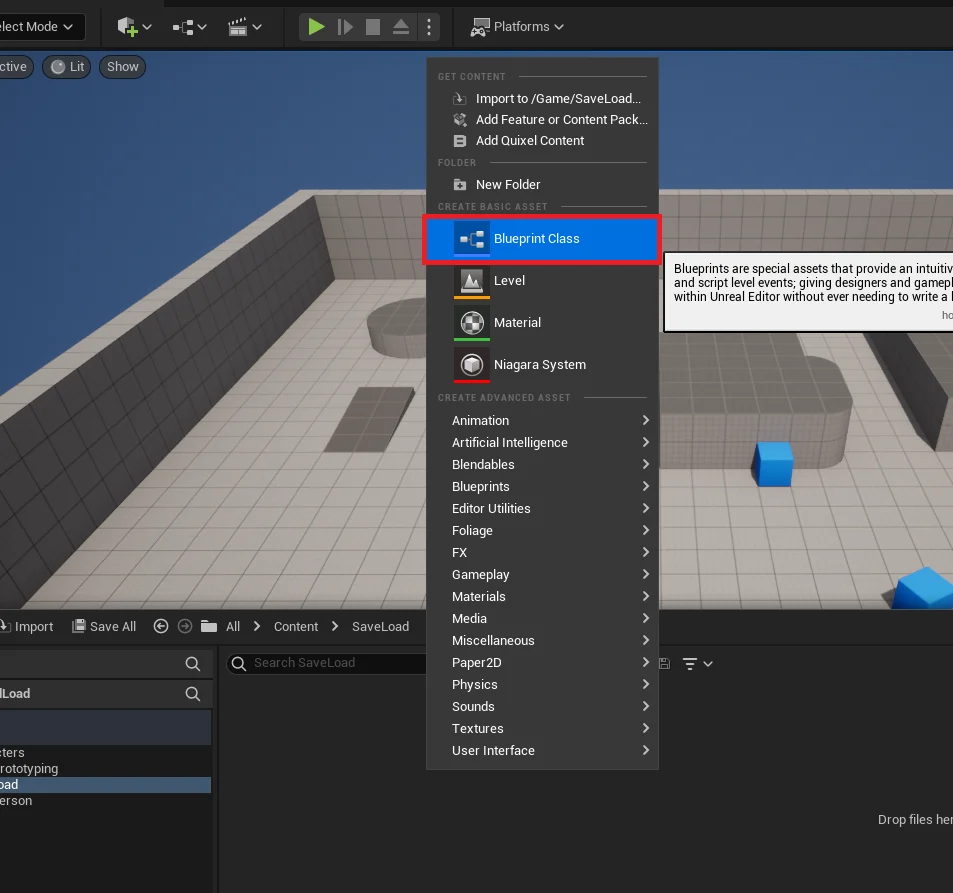
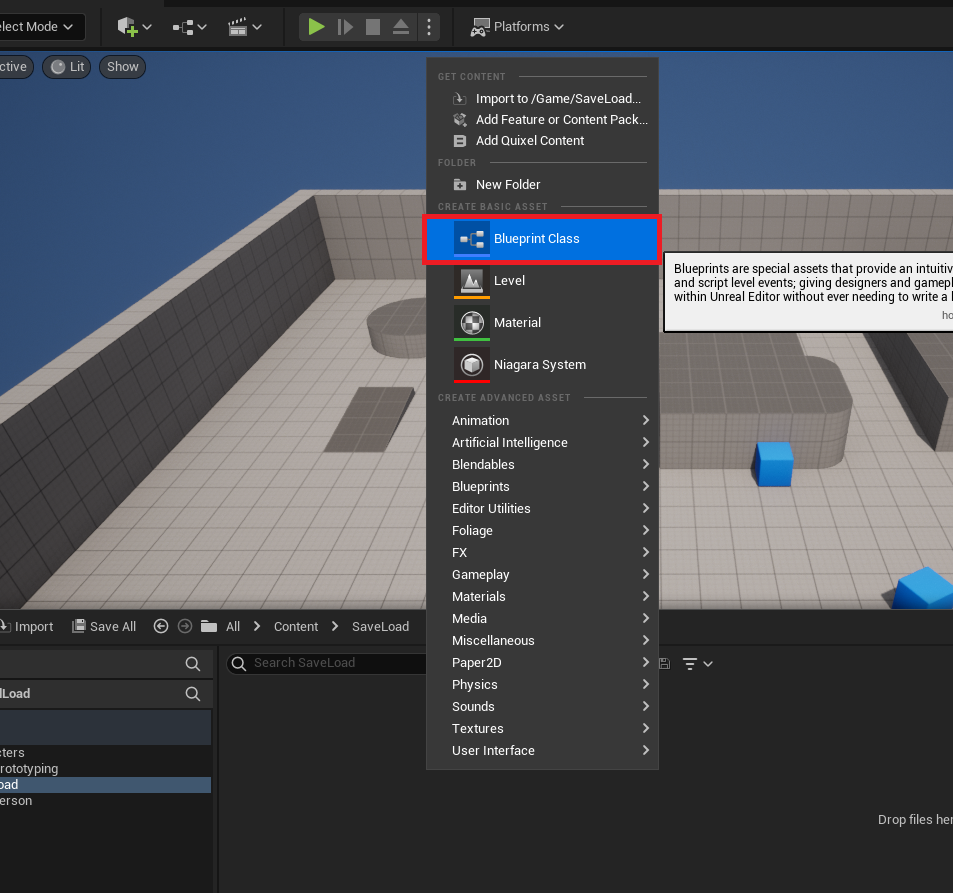
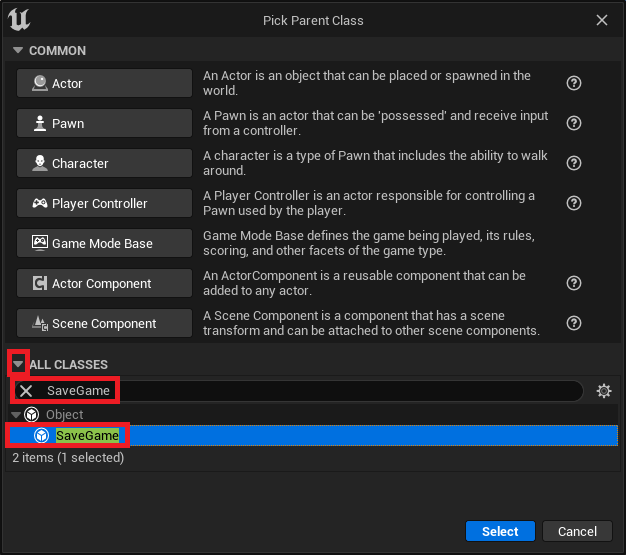
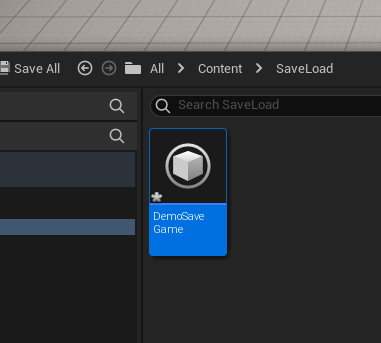
The implementation process begins with the creation of a dedicated SaveGame Blueprint class. This custom class acts as the blueprint for the save file itself, defining the structure and types of data that will be stored. Developers initiate this by navigating to the content drawer within the Unreal Engine editor, creating a new Blueprint class, and selecting SaveGame as its parent. Naming conventions are crucial here, as this custom class will be referenced throughout the saving and loading logic. For instance, a class named DemoSaveGame would serve as the central repository for all data intended for persistence.
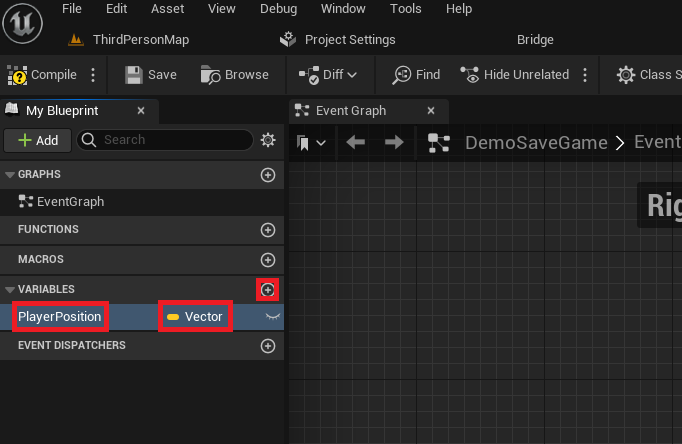
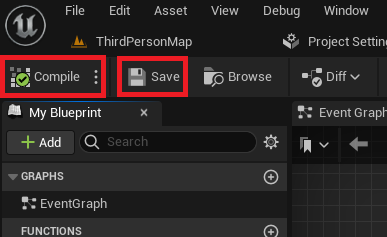
Once the SaveGame class is established, developers populate it with the specific variables pertinent to their project. For a typical gaming scenario, this might include a Vector variable to store the player’s last known position, Integer variables for health or currency, Array variables for inventory items, or Boolean variables to track completed objectives. Each variable added to this SaveGame Blueprint will automatically be eligible for serialization and deserialization, meaning its value can be written to and read from the save file. After defining these variables, compiling and saving the Blueprint ensures that these structural changes are applied, making the SaveGame class ready to interact with the game’s runtime logic.
Implementing Core Save and Load Logic
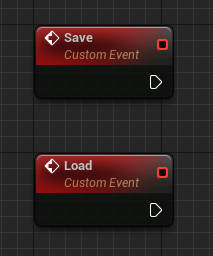
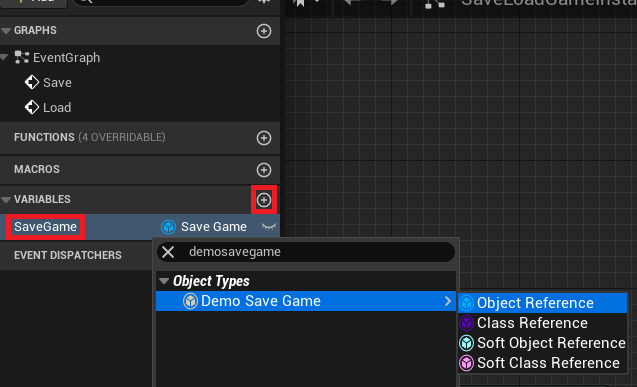
The central orchestration of saving and loading functionality typically resides within a custom Game Instance. The Game Instance is a unique Blueprint class in Unreal Engine that persists throughout the entire lifespan of a game session, even across level changes. This makes it an ideal location to manage global game state and, crucially, to house the save/load operations. Within this Game Instance, developers define two custom events: "Save" and "Load." These events serve as the entry points for triggering the respective data management processes. A new variable, typed as a reference to the custom SaveGame class (e.g., DemoSaveGame), is also created within the Game Instance to hold an instance of the active save object.
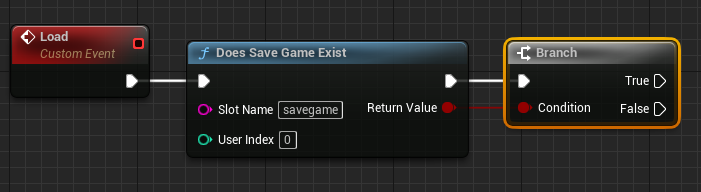
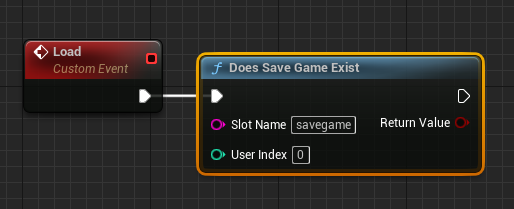
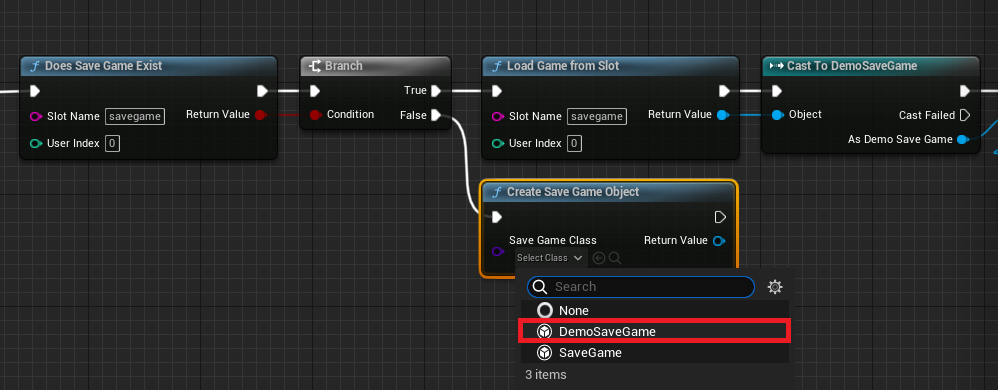
The "Load" event’s logic begins by checking for the existence of a save file using the "Does Save Game Exist" node, specifying a unique "Slot Name" (e.g., "savegame"). This slot name acts as an identifier for the particular save file on disk. A branch node then directs the execution flow based on whether a file corresponding to that slot name is found.

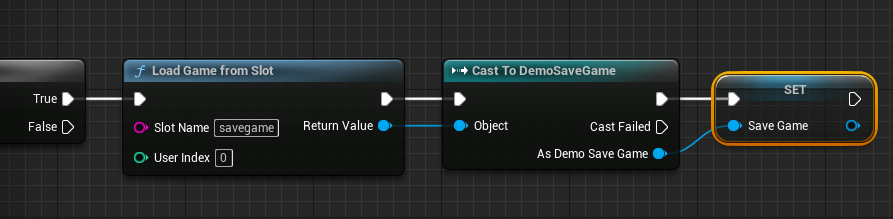
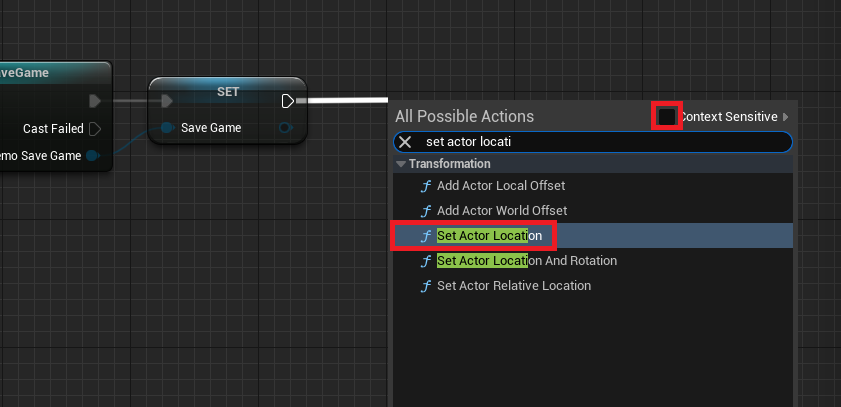
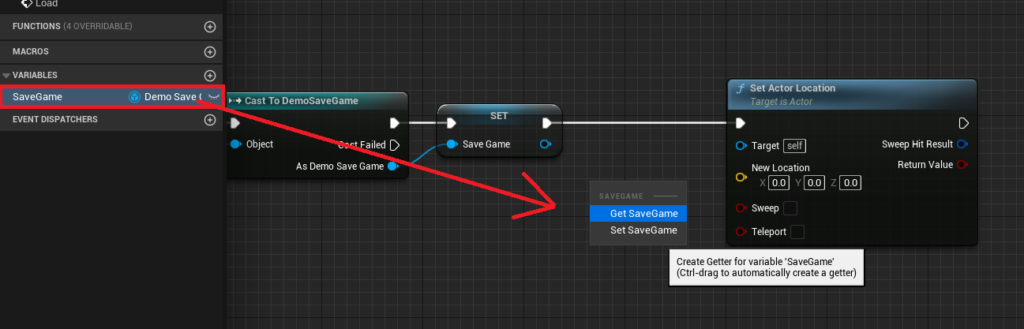
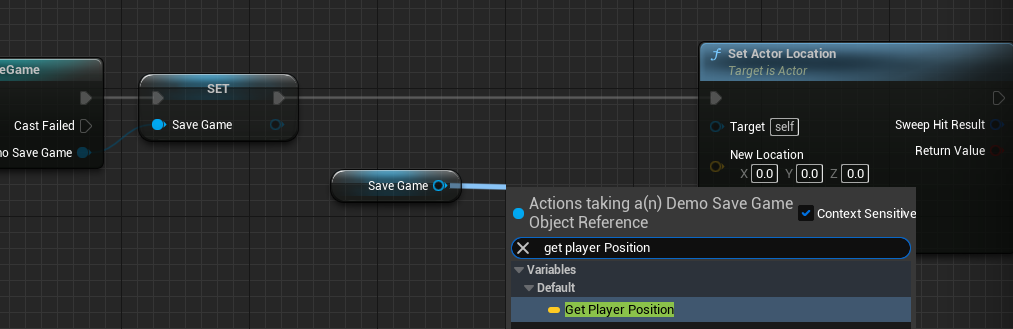
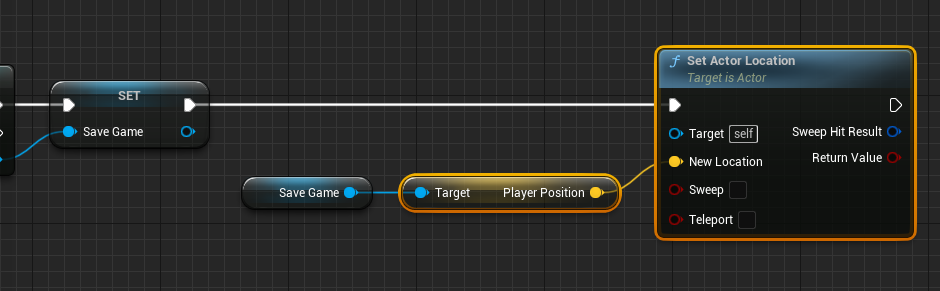
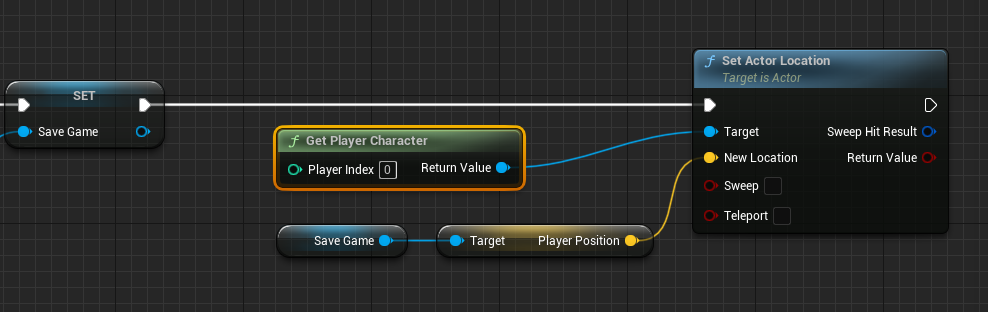
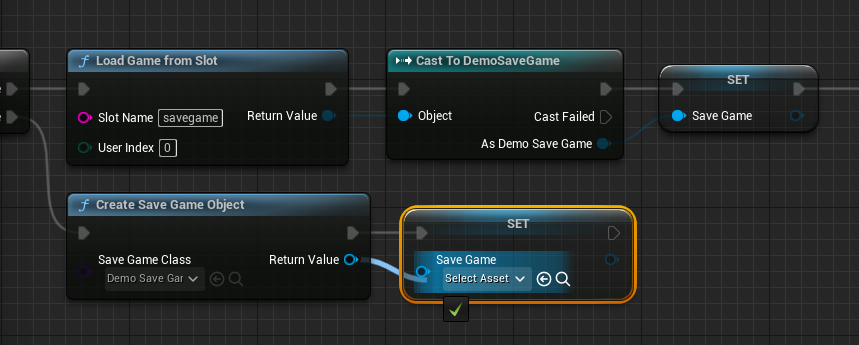
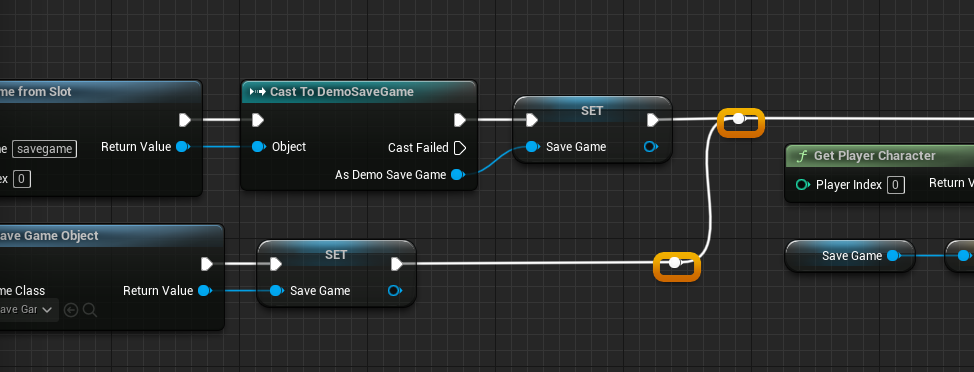
If a save file does exist (the "True" branch), the system proceeds to load the data using the "Load Game From Slot" node, again referencing the same slot name. The returned SaveGame object is then cast to the custom SaveGame class (e.g., "Cast to DemoSaveGame") to access its specific variables. This loaded object is then assigned to the Game Instance‘s SaveGame variable, making the loaded data accessible globally. In a common application, the player character’s location might be retrieved from the loaded SaveGame object and applied to the player using a "Set Actor Location" node, effectively teleporting the player to their last saved position.

Conversely, if no save file is found for the specified slot (the "False" branch), a new SaveGame object must be created. This is achieved using the "Create Save Game Object" node, specifying the custom SaveGame class. This newly instantiated object is then assigned to the Game Instance‘s SaveGame variable, preparing it to hold new game data. This ensures that even on a player’s first session, a valid SaveGame object is always present, preventing null reference errors and preparing the system for its first save operation.
The "Save" event follows a similar logic, but focuses on writing current game data to the file. It first checks if the Game Instance‘s SaveGame variable is valid using an "Is Valid" node. This check is crucial to ensure that either a game has been loaded or a new SaveGame object has been created.
If the SaveGame object is valid, the current state of the game is captured. For instance, the player character’s current location is obtained using "Get Player Character" and "Get Actor Location" nodes. This Vector value is then set on the PlayerPosition variable within the active SaveGame object. If the SaveGame object is not valid, a new one is created (similar to the "False" branch of the load logic) before proceeding to save the player’s position.
Finally, the updated SaveGame object is written to disk using either "Save Game to Slot" or "Async Save Game to Slot" node, again specifying the chosen slot name. The choice between synchronous and asynchronous saving depends on the volume of data being saved. For small amounts of data, the synchronous node is often sufficient. However, for games saving substantial information, the "Async Save Game to Slot" is highly recommended. This asynchronous approach performs the file operation in the background, preventing potential hitches or frame rate drops that could occur during large synchronous writes, thereby maintaining a smooth player experience.
Integrating Player Input for Functionality
To make the save and load functionality accessible to players, it must be linked to in-game actions. This is typically done within the Player Character Blueprint class, often triggered by keyboard inputs. For example, pressing the ‘1’ key could be configured to trigger the "Save" event, and the ‘2’ key to trigger the "Load" event. This involves getting a reference to the Game Instance (which holds the save/load logic), casting it to the custom Game Instance class, and then calling the respective "Save" or "Load" custom events. This direct linkage ensures that player actions seamlessly translate into data persistence operations.
Broader Implications for Game Development
The robust and accessible SaveGame system in Unreal Engine 5 carries significant implications for the broader game development community. For independent developers and smaller studios, it dramatically lowers the barrier to entry for creating games with professional-grade data persistence. By providing a built-in, reliable solution, Unreal Engine allows these teams to allocate more resources to creative design, gameplay mechanics, and artistic execution, rather than wrestling with complex low-level programming challenges. This democratizes the creation of more ambitious and polished gaming experiences.
For larger studios, the standardized SaveGame system promotes efficiency and reduces the likelihood of critical bugs related to data corruption. The Blueprint-centric approach fosters collaboration between programmers and designers, as designers can often implement basic save/load functionality without deep coding knowledge. This can accelerate prototyping and iteration cycles, contributing to faster development timelines and more agile project management.
Furthermore, the system’s cross-platform compatibility ensures that games developed with Unreal Engine 5 can reliably save and load data across various devices and operating systems, which is crucial in today’s multi-platform gaming ecosystem. As the gaming industry continues its rapid expansion, tools that enhance developer productivity and game stability, like Unreal Engine 5’s SaveGame system, are not just beneficial—they are increasingly essential for meeting player expectations and fostering innovation. The focus on a streamlined, integrated approach underscores Epic Games’ commitment to providing powerful yet user-friendly tools that empower developers to create compelling interactive experiences.
About the Author