Unreal Engine 5, Epic Games’ flagship development platform, offers a suite of powerful tools designed to streamline the creation of immersive and complex interactive experiences. Among these, Data Tables stand out as an exceptionally useful feature, providing programmers and designers with a robust mechanism to define, organize, and access pre-configured lists of information. This data-driven approach is increasingly vital in modern game development, where projects demand high scalability, flexibility, and efficient collaborative workflows.
The Foundational Role of Data Management in Modern Game Development
Historically, game development often relied on hardcoding values directly into source code or using disparate, less structured methods like external text files or custom serialization. This approach, while functional for smaller projects, quickly became unmanageable as games grew in scope and complexity. Balancing game mechanics, adding new items, adjusting enemy statistics, or updating quest parameters frequently required code changes, recompilations, and extensive testing cycles, slowing down iteration and increasing the risk of errors.
The shift towards data-driven design emerged as a critical solution to these challenges. This paradigm advocates for separating game logic from game data, allowing core systems to be designed generically while their behavior is dictated by external, easily modifiable datasets. Unreal Engine 5’s Data Tables are a prime example of this philosophy in action, providing a centralized, accessible, and editor-friendly asset for storing structured data. They empower development teams to manage vast amounts of game information—from item attributes and character stats to localization strings and quest objectives—in an organized and highly efficient manner. This separation not only accelerates development but also enhances collaboration, as designers can directly modify game parameters without requiring programmer intervention, fostering a more agile and iterative creative process.
Understanding Unreal Engine 5 Data Tables: A Centralized Data Repository
At its core, a Data Table in Unreal Engine 5 is an asset that stores a collection of structured data, akin to a spreadsheet or a simple database table. Each row in a Data Table represents a unique entry, and each column corresponds to a specific data field. Crucially, every Data Table is based on a Struct (Structure), which acts as a template defining the types and names of the data fields that each row will contain. This strict typing ensures data integrity and consistency across the project.
This structured data is stored as a native asset within the Unreal Engine project, making it readily available throughout the development lifecycle. Developers can create and populate Data Tables directly within the Unreal Editor, observing changes in real-time. This "what you see is what you get" approach means that data entered during design time is persistently saved and can be accessed and utilized by game logic during runtime. For instance, imagine managing an inventory system for a role-playing game (RPG). Instead of hardcoding the damage, rarity, and sell price for every sword, shield, or potion, these values can be neatly organized within a Data Table. Each row might represent a unique item (e.g., "BronzeSword," "SilverShield"), with columns for its damage output, rarity tier, and monetary value. This centralized management significantly simplifies game balancing, content expansion, and iterative design.
The utility of Data Tables extends far beyond simple item definitions. They can be employed for:
- Character Statistics: Defining base health, attack power, defense, and unique abilities for different enemy types or playable characters.
- Quest Definitions: Storing objectives, rewards, dialogue references, and prerequisites for various quests.
- Localization Data: Mapping unique keys to localized text strings for multiple languages.
- Game Configuration: Storing global settings, level parameters, or difficulty adjustments.
- AI Behavior Parameters: Defining different states, timings, and decision thresholds for AI agents.
The ease of retrieval and update from anywhere in the game’s codebase, whether through Blueprints or C++, makes Data Tables an indispensable tool for maintaining a single, consistent source of truth for critical game data.
The Prerequisite Foundations: Enums and Structs
Before a Data Table can be instantiated, its underlying structure must be defined. This typically involves creating two fundamental Blueprint assets: Enumerations (Enums) and Structures (Structs). These assets serve as the blueprints for the data types and organization within the Data Table.
Creating an Enumeration (Enum): Defining Categorical Data
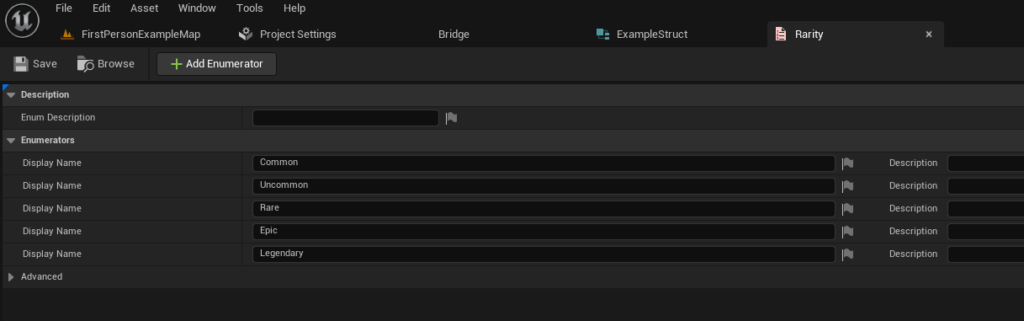
An Enumeration is a user-defined data type that consists of a set of named integer constants. In game development, Enums are invaluable for representing distinct categories or states in a type-safe and readable manner. For our RPG item example, an item rarity Enum is a perfect fit to categorize item quality, such as "Common," "Uncommon," "Rare," "Epic," and "Legendary."
The process of creating an Enum is straightforward:
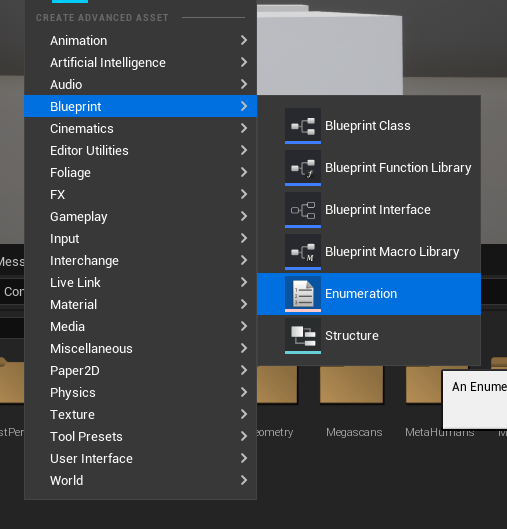
- Right-click in the Content Browser.
- Navigate to the "Blueprints" category and select "Enumeration."
- Assign meaningful names to the Enum values (e.g.,
ERarity_Common,ERarity_Uncommon). Each entry in the Enum corresponds to an integer value, which Unreal Engine handles internally. This provides a clear, descriptive way to assign rarity levels to items without relying on arbitrary numerical values, improving code readability and reducing potential errors.
Creating a Structure (Struct): Defining the Data Schema
The Struct is the backbone of the Data Table. It defines the specific data fields (variables) that will comprise each row. Think of a Struct as a custom composite data type that groups related variables of different types under a single name. For our RPG item, the Struct would define the properties that every item in the Data Table will possess.
To create a Struct:
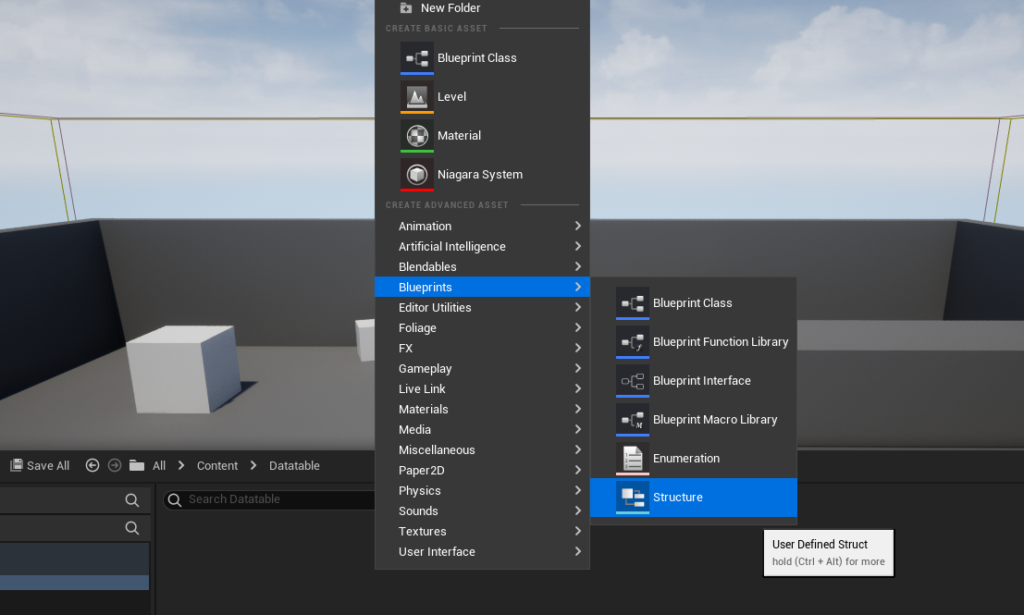
- Right-click anywhere in the Content Browser.
- Navigate to the "Blueprints" category and select "Structure."
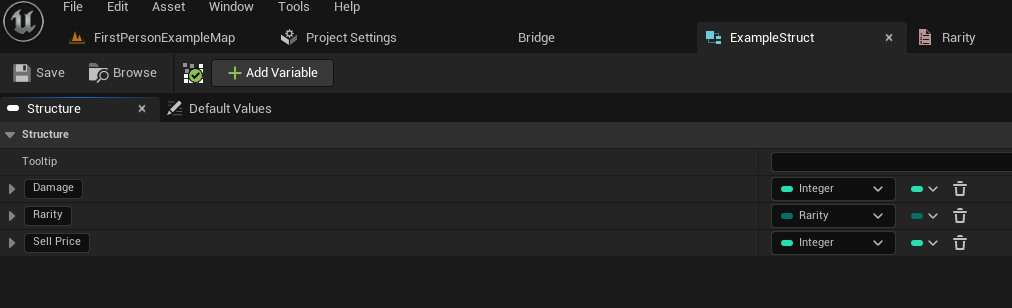
- Within the Struct editor, add new variables for each data field required. For our example, this would include:
Damage(Type: Integer or Float)Rarity(Type: Our custom Rarity Enum created earlier)SellPrice(Type: Integer)
By defining these variables within the Struct, we establish a strict schema. Every row added to the Data Table based on this Struct will automatically contain these three fields, ensuring that all item data adheres to a consistent format. This approach mirrors database table design, where a table schema dictates the columns and their data types, guaranteeing structured and predictable data entries.
Constructing the Data Table: Bringing It All Together
With the foundational Enum and Struct in place, creating the Data Table itself is the final step in setting up the data asset.
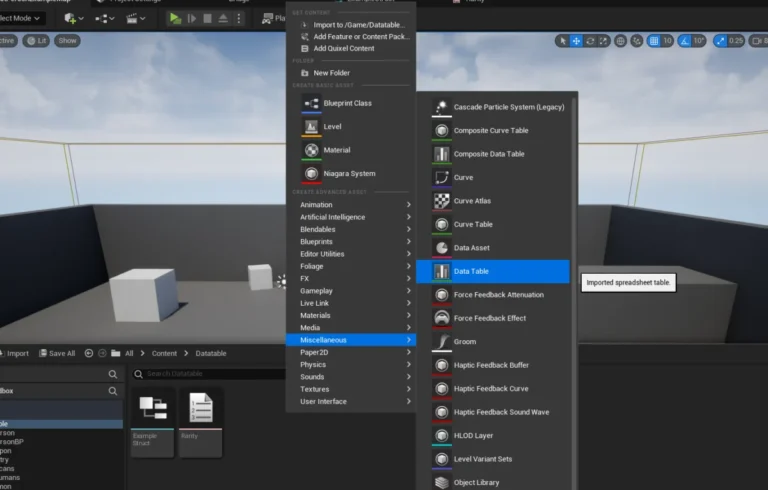
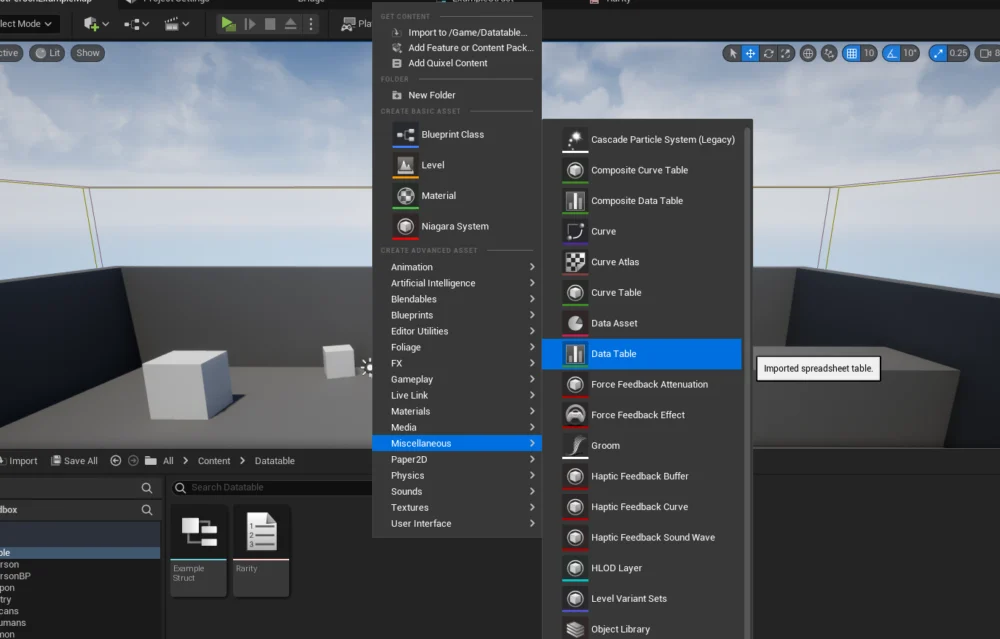
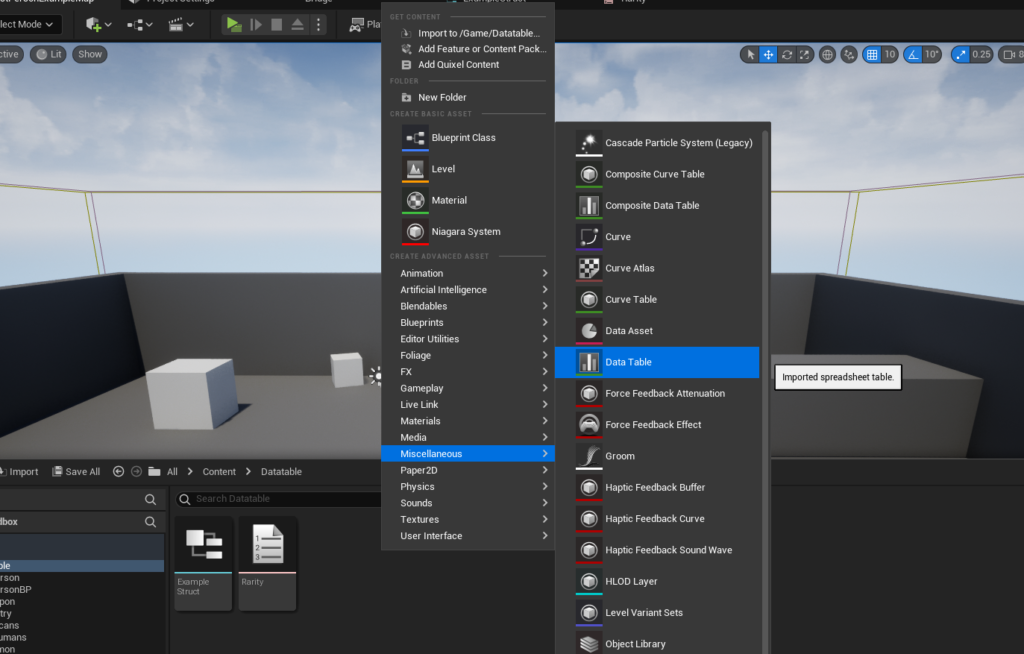
- Right-click in the Content Browser.
- Select the "Miscellaneous" category and choose "Data Table."
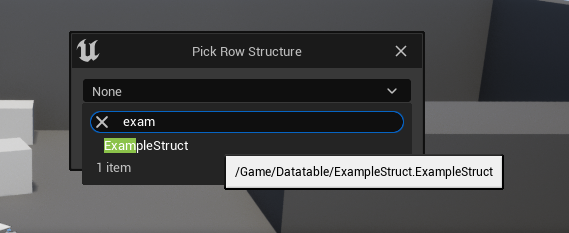
- A crucial pop-up window will appear, prompting the developer to select the Struct that the Data Table will use as its row structure. In our running example, this would be the
ExampleStructcontainingDamage,Rarity, andSellPrice. This selection irrevocably links the Data Table to its schema, ensuring type consistency for all future data entries.
Populating the Data Table: Empowering Content Creators
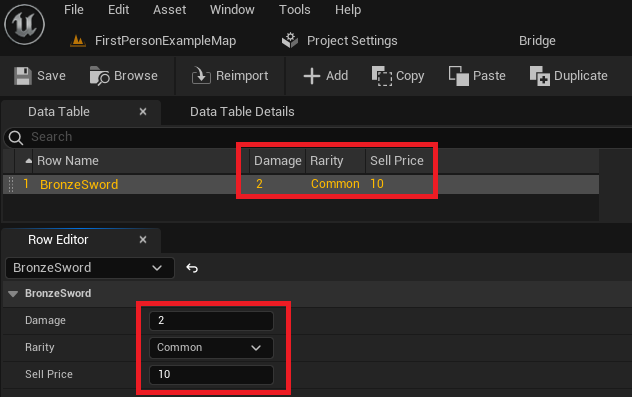
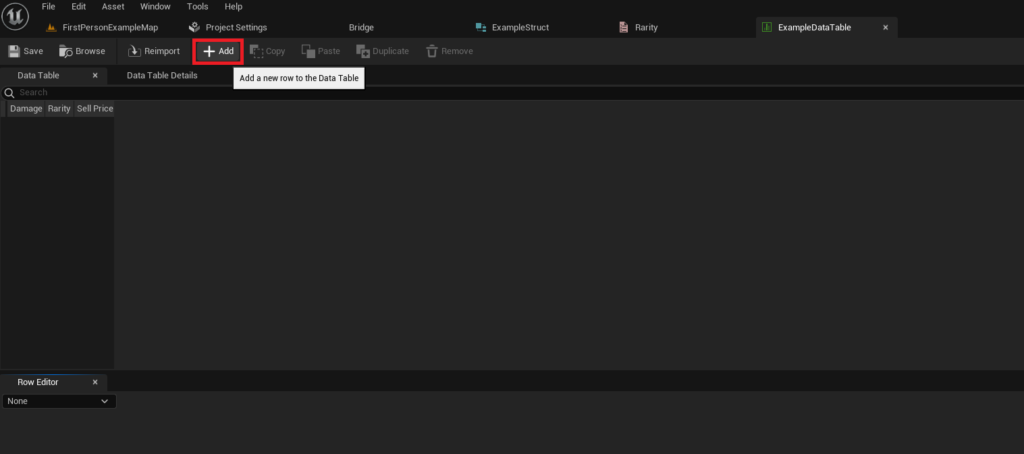
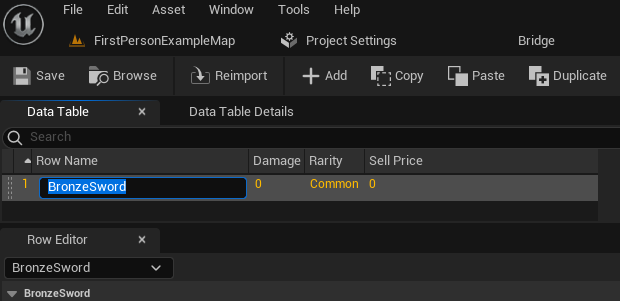
Once created and configured, the Data Table opens in a dedicated editor, resembling a spreadsheet interface. This intuitive environment is where content creators, game designers, and level designers can directly input and manage game data.
- Adding Rows: By pressing the "Add" button, a new row is appended to the Data Table. Each new row automatically inherits the default values defined in the associated Struct.
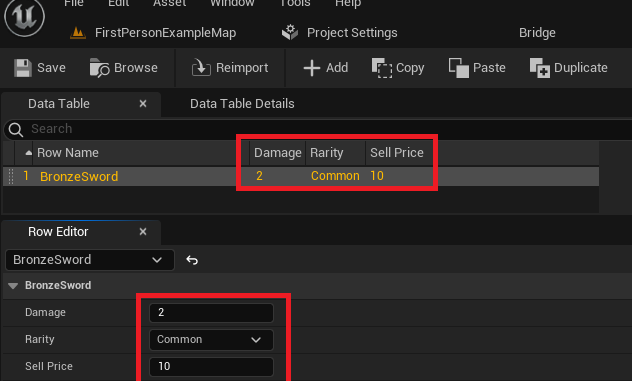
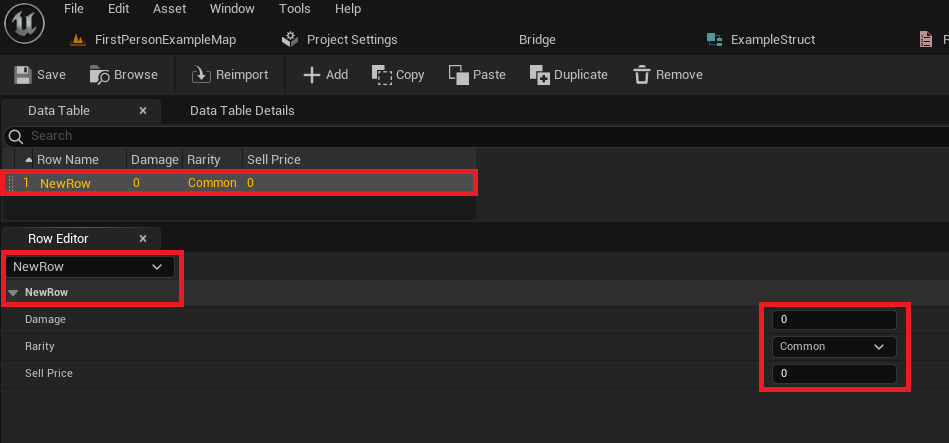
- The Row Editor: Below the main table view, a "Row Editor" panel provides a detailed view of the currently selected row’s data fields. Here, values for
Damage,Rarity, andSellPricecan be adjusted. The Rarity field, linked to our Enum, will present a convenient dropdown menu with options like "Common," "Uncommon," etc., preventing typos and ensuring valid inputs. - Naming Rows: A critical aspect of Data Table management is assigning unique and descriptive names to each row. These "Row Names" act as primary keys, serving as the unique identifiers used to retrieve specific data entries at runtime. For instance, naming a row "BronzeSword" allows the game logic to fetch the specific data for that item. Clear and consistent naming conventions are paramount for large projects to maintain organization and facilitate efficient data access.
The ability to directly manipulate these values within the editor, without touching a single line of code, represents a significant leap in development efficiency. Designers can rapidly prototype item stats, balance game economies, and iterate on content, saving changes with a simple save command (and frequent saving is always recommended to prevent data loss!). This immediate feedback loop fosters creativity and allows for quick adjustments based on playtesting or design requirements.
Accessing Data Tables: Integrating Information into Game Logic
The true power of Data Tables is realized when their stored information is accessed and utilized by game logic, whether implemented in Blueprints or C++. Unreal Engine provides robust nodes for interacting with Data Tables, enabling both specific lookups and iterative processing.
Retrieving Specific Rows: The Get Data Table Row Node
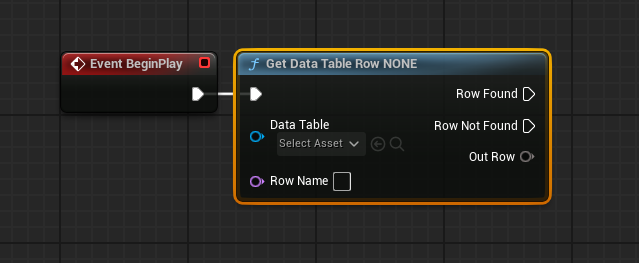
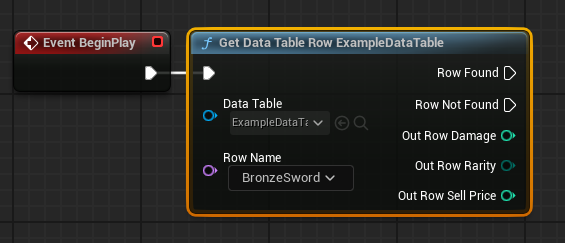
To retrieve data for a particular entry (e.g., the "BronzeSword"), the Get Data Table Row Blueprint node is employed.
- Node Setup: This node requires two primary inputs:
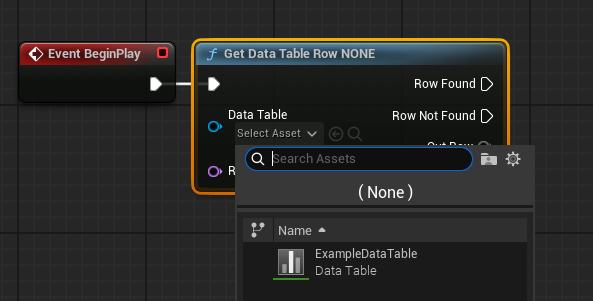
- Data Table Reference: A direct link to the Data Table asset itself. This is typically set by selecting the desired Data Table from a dropdown menu in the node’s details panel.
- Row Name: The unique identifier (the name assigned in the editor, e.g., "BronzeSword") of the row whose data is to be retrieved. This can be directly typed in, or for convenience, if the Data Table Reference is set, the node will provide a dropdown list of all available row names.
- Output Pins: The
Get Data Table Rownode offers critical output pins:- Row Found (Execution Pin): This pin executes subsequent logic if a row matching the provided
Row Nameis successfully found. - Row Not Found (Execution Pin): This pin executes if no row with the specified
Row Nameexists in the Data Table, allowing for robust error handling. - Out Row (Struct Pin): If the row is found, this pin outputs a copy of the Struct containing all the data fields for that row.
- Row Found (Execution Pin): This pin executes subsequent logic if a row matching the provided
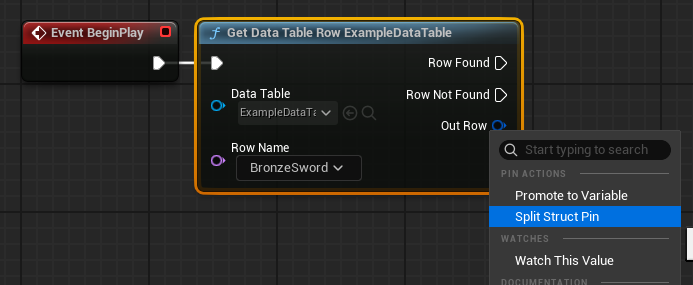
Splitting the Struct Pin: For easier access to individual data fields within the Out Row Struct, developers can right-click the Out Row pin and select "Split Struct Pin." This action expands the single Struct pin into individual pins for each variable (e.g., Damage, Rarity, SellPrice), making the data directly usable in Blueprints. This streamlined access allows game logic to query an item’s damage, determine its rarity, or calculate its selling price with minimal effort.
Looping Over Data Table Rows: Iterative Data Processing
For scenarios requiring processing all or multiple entries in a Data Table (e.g., populating a shop inventory, calculating total enemy strength in an area, or displaying all available quests), iterative access is necessary.
Get Data Table Row NamesNode: This node, when provided with a Data Table reference, returns anArraycontaining all theRow Namespresent in that Data Table.For Each LoopNode: TheArrayofRow Namescan then be fed into aFor Each Loopnode. This loop will iterate through eachRow Namein the array.- Combined Retrieval: Inside the
Loop Bodyof theFor Each Loop, anotherGet Data Table Rownode can be used. TheArray Elementpin (which outputs the currentRow Namefrom the loop) is connected to theRow Nameinput of theGet Data Table Rownode. This setup effectively retrieves the data for each row, one by one, allowing developers to perform operations on every entry in the Data Table. This pattern is incredibly powerful for dynamically generating content, performing mass calculations, or validating data across an entire dataset.
Broader Impact and Strategic Advantages in Game Development
The implementation of Data Tables in Unreal Engine 5 offers far-reaching benefits that extend beyond simple data storage:
- Enhanced Game Design Flexibility and Balancing: Designers can easily tweak parameters for items, characters, or game mechanics directly in the editor. This agility supports rapid prototyping, A/B testing of different values, and fine-tuning game balance without necessitating code changes or developer intervention. This dramatically shortens iteration cycles and allows for more nuanced game design.
- Streamlined Localization: Data Tables are an ideal solution for managing localization data. A single Data Table can hold keys mapped to localized text strings for various languages, simplifying the process of adapting a game for global audiences. Game logic requests a string by its key, and the appropriate localized text is retrieved based on the player’s language setting.
- Facilitating Content Updates and Modding: For live-service games, Data Tables allow for quick content updates or hotfixes to game parameters without requiring full client patches. Similarly, for games that support modding, Data Tables can be exposed to modders, enabling them to create their own items, enemies, or game configurations, thereby extending the game’s lifespan and community engagement.
- Improved Collaboration: By providing a clear, accessible interface for data, Data Tables foster better collaboration between programmers, designers, and content creators. Designers can independently manage data, freeing up programmers to focus on core systems and features. This clear division of labor optimizes team efficiency.
- Scalability for Complex Projects: As games grow in scale with thousands of unique items, characters, or environmental elements, Data Tables provide an organized and performant way to manage this complexity. The engine’s optimized data access ensures that even large Data Tables can be queried efficiently at runtime.
- Integration with Advanced Systems: Data Tables integrate seamlessly with other sophisticated Unreal Engine 5 systems, such as the Gameplay Ability System (GAS), UI frameworks, and AI behavior trees. For example, GAS abilities can query Data Tables for specific spell parameters or character buffs, and UI elements can retrieve text or images for display.
From an industry perspective, Epic Games’ continued investment in designer-friendly tools like Data Tables underscores a commitment to empowering a broader range of development roles. This approach resonates with a growing number of studios seeking to maximize efficiency and flexibility in an increasingly competitive market. The adoption of such data-driven methodologies is not merely a convenience but a strategic imperative for developing robust, scalable, and maintainable interactive experiences.
Conclusion
Unreal Engine 5 Data Tables are a cornerstone of efficient and collaborative game development. By providing a structured, persistent, and easily accessible method for storing game data, they empower development teams to build complex worlds with greater agility and less friction. The process, from defining an Enum for categorical values and a Struct for data schema, to populating the Data Table and integrating its data into game logic via Blueprints, is designed for clarity and usability. Whether retrieving specific entries or iterating through entire datasets, Data Tables offer a robust solution that streamlines workflows, enhances game design flexibility, and ultimately contributes to the creation of higher-quality interactive experiences. For any Unreal Engine 5 project aiming for scalability, maintainability, and effective team collaboration, mastering Data Tables is not just beneficial—it is essential.
About the Author