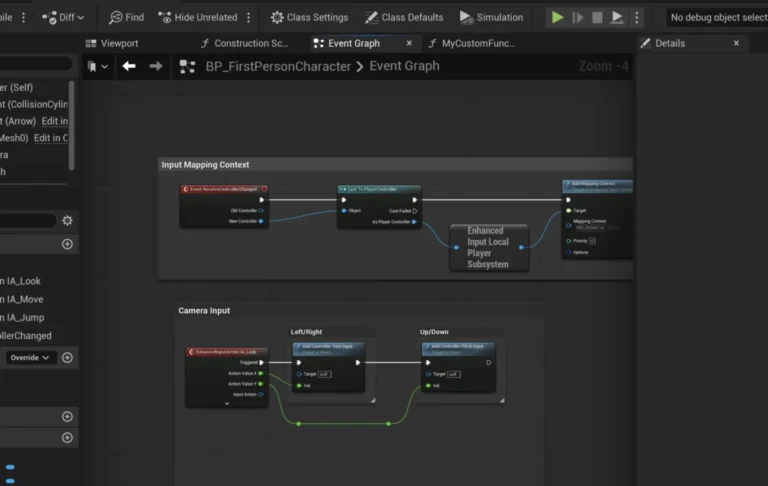
In the rapidly evolving landscape of video game development, creators frequently grapple with the dichotomy between rapid prototyping and the stringent demands of performance and advanced functionality. Unreal Engine 5 (UE5), a leading platform in the industry, offers a powerful visual scripting system known as Blueprints, celebrated for its accessibility, quick iteration cycles, and ability to empower designers and non-programmers. However, as projects grow in complexity and scale, Blueprint-driven logic can encounter performance bottlenecks that impede optimization efforts, necessitating a more robust and efficient coding solution. This is where the strategic integration of C++ Blueprint Function Libraries emerges as a critical tool, allowing developers to harness the raw speed and power of C++ while maintaining the agility and collaborative benefits of Blueprints.
The Foundational Challenge: Bridging Visual Scripting and Native Code
For many years, game development in engines like Unreal has navigated a fundamental tension. On one side, visual scripting systems like Blueprints offer an intuitive, drag-and-drop interface, significantly lowering the barrier to entry for aspiring developers and enabling rapid iteration for established teams. Designers can implement complex game logic, UI interactions, and even entire gameplay systems without writing a single line of traditional code. This fosters creativity and accelerates the prototyping phase, a crucial advantage in competitive development cycles.
On the other side stands C++, the engine’s native programming language. C++ provides unparalleled performance, direct access to low-level hardware features, sophisticated memory management, and the ability to integrate external libraries or develop highly optimized algorithms. Many advanced engine features, complex AI behaviors, intricate physics simulations, or large-scale data processing tasks inherently benefit from C++’s efficiency. The challenge arises when Blueprint code, while excellent for logic flow, begins to strain system resources during computationally intensive operations. Attempts to optimize such Blueprint sections often reach a ceiling, leading to compromises in game performance or requiring a complete and disruptive restructuring of the project to migrate critical systems entirely to C++. Moreover, certain advanced C++ features or functionalities simply do not have equivalent Blueprint nodes, limiting the scope of what can be achieved purely through visual scripting.
A Historical Perspective on Hybrid Development in Unreal Engine
The journey towards seamless C++ and Blueprint integration has been a continuous evolution for Epic Games. In its earlier iterations, Unreal Engine relied heavily on UnrealScript, a proprietary scripting language that offered a balance between ease of use and performance. With the advent of Unreal Engine 4, Epic made a pivotal shift, moving to C++ as the primary development language and introducing Blueprints as a first-class visual scripting solution. This decision aimed to democratize development while providing professional studios with the high-performance capabilities of C++.
Initially, the interaction between C++ and Blueprints, while functional, presented its own set of considerations. Developers had to carefully plan which parts of their game logic would reside in C++ for performance and which in Blueprints for design flexibility. The C++ Blueprint Function Library, as it stands today, represents a mature refinement of this hybrid approach. It was conceived as a lightweight, non-instantiable class designed specifically to expose static C++ functions directly to the Blueprint environment. This architectural choice minimizes overhead, ensuring that developers can inject optimized C++ logic precisely where it’s needed, without forcing a complete rewrite or complex data transfer mechanisms. With the release of Unreal Engine 5, emphasizing features like Nanite and Lumen for unprecedented visual fidelity and large-scale worlds, the demand for highly optimized code has only intensified, making tools like the C++ Blueprint Function Library more indispensable than ever for maintaining smooth framerates and responsive gameplay.
The Mechanics and Advantages of C++ Blueprint Function Libraries
A C++ Blueprint Function Library is, at its core, a static collection of utility functions written in C++ that can be called from any Blueprint graph without needing an object reference. This characteristic is paramount, as it means these functions are globally accessible, much like a standard library.
The advantages offered by this integration are multifaceted:
- Performance Enhancement: Industry benchmarks and anecdotal evidence from countless development studios consistently highlight significant performance gains when migrating computationally intensive Blueprint sections to optimized C++. Tasks involving complex mathematical calculations, large array manipulations, pathfinding algorithms, or real-time data processing can see speedups ranging from 2x to 10x, and in extreme cases, even more. This directly translates to smoother gameplay, higher framerates, and a more polished user experience.
- Access to Native Functionality: C++ provides direct access to the full breadth of the Unreal Engine API and any underlying operating system functionalities. This includes advanced threading models, intricate memory management techniques, custom data structures, and integration with third-party SDKs that might not expose Blueprint-compatible interfaces. The Function Library effectively "unlocks" these capabilities for Blueprint users, allowing them to leverage powerful C++ features without needing to write C++ code themselves.
- Improved Efficiency and Resource Management: Beyond raw execution speed, C++ offers finer control over system resources. Developers can implement more efficient memory allocation and deallocation strategies, reduce garbage collection overhead, and manage CPU cycles more judiciously. This is particularly crucial for mobile game development or projects targeting lower-spec hardware, where every millisecond and byte counts.
- Seamless Integration: One of the most compelling aspects is the minimal disruption it causes to existing Blueprint workflows. The C++ functions appear as standard nodes in the Blueprint editor, complete with input and output pins, categories, and tooltips. This ease of integration allows teams to iteratively optimize specific performance hotspots rather than undertaking a costly and time-consuming project overhaul.
Practical Implementation: Creating a C++ Blueprint Function Library in UE5
To leverage a C++ Blueprint Function Library, developers first need a C++ enabled Unreal Engine project and an Integrated Development Environment (IDE) such as Visual Studio (for Windows), Xcode (for macOS), or Rider (cross-platform). These IDEs are essential for writing, compiling, and debugging C++ code, transforming it into executable modules that the Unreal Engine can incorporate.
The process begins within the Unreal Editor:

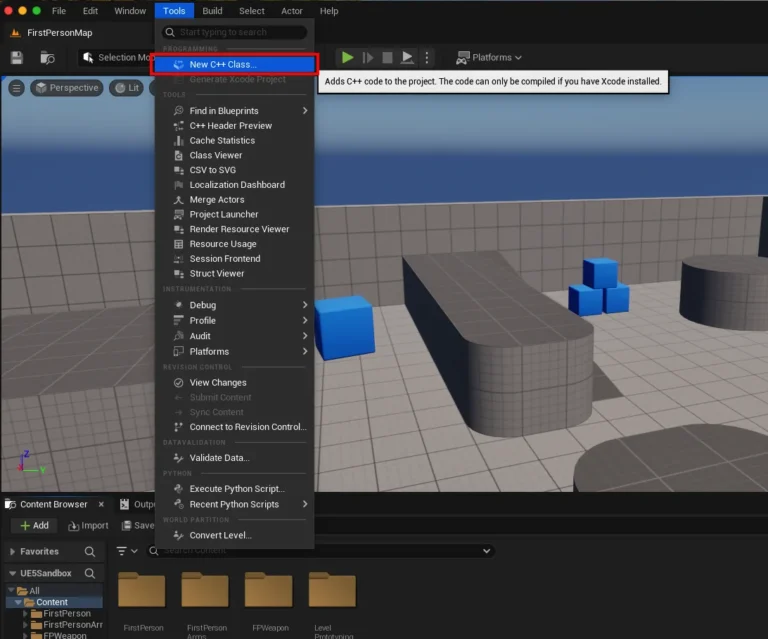
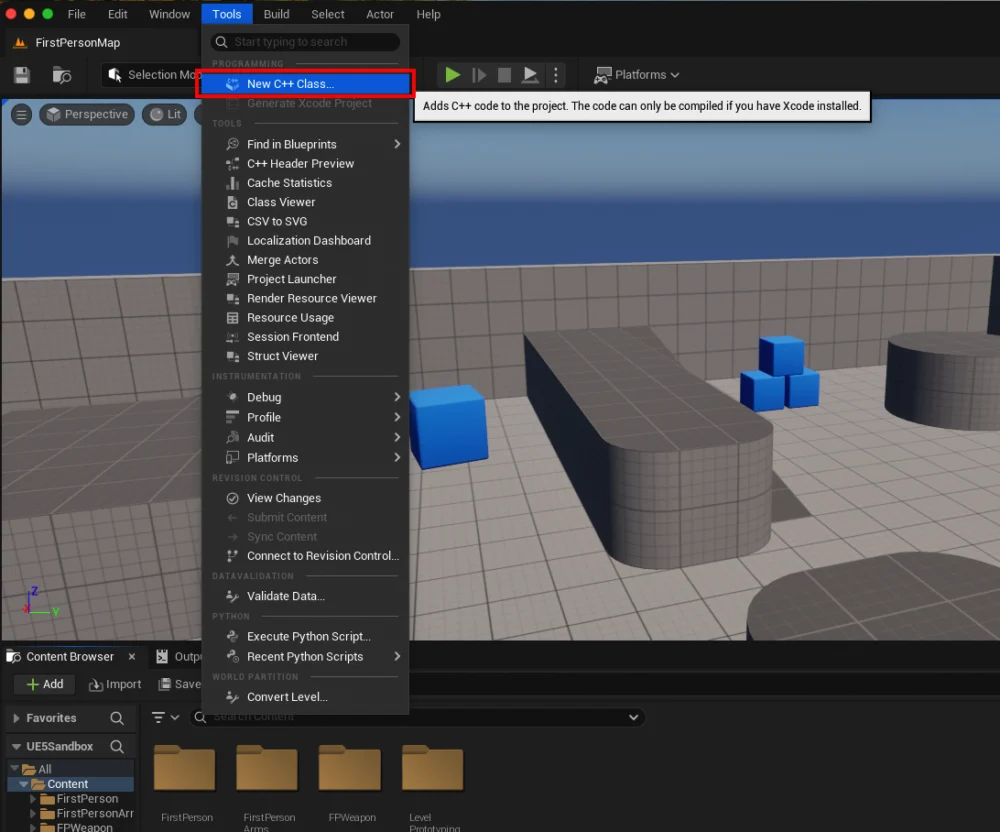
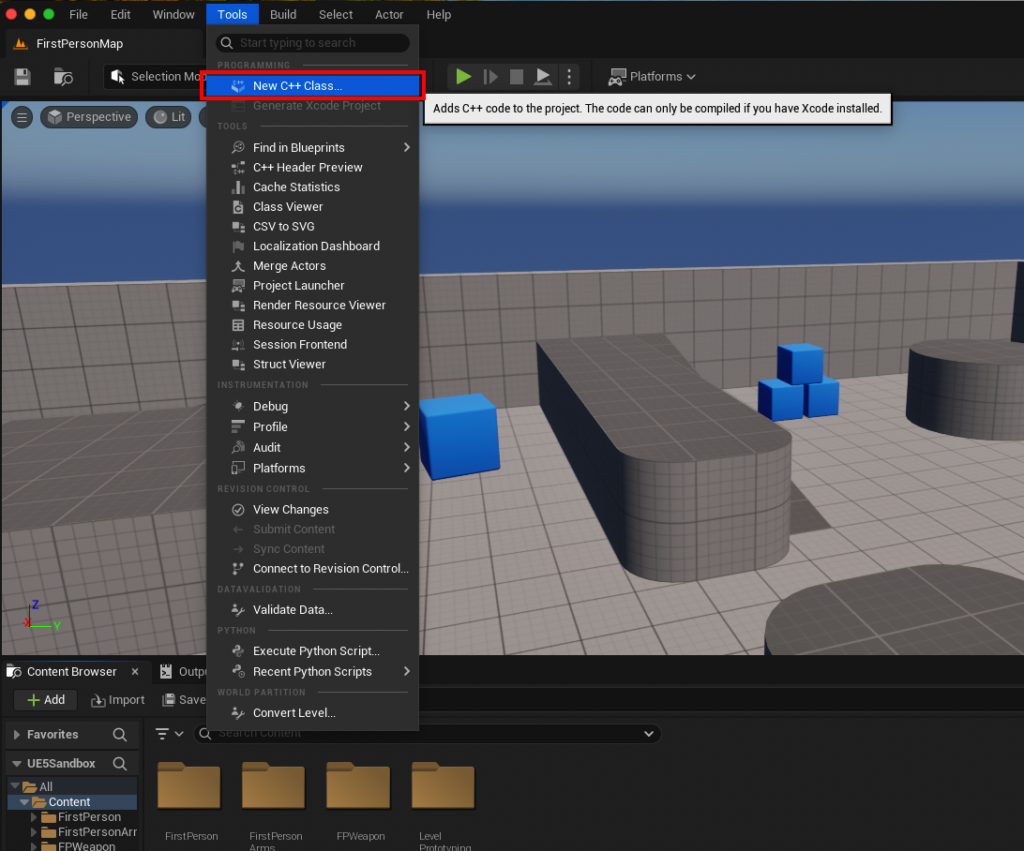
- Verifying Project Type: Developers must ensure their project is C++ enabled. This can be quickly checked by navigating to the "Tools" dropdown menu and looking for the "New C++ Class" option. If it’s present, the project supports C++; if not, the engine will prompt the user to convert it or install the necessary IDE components.
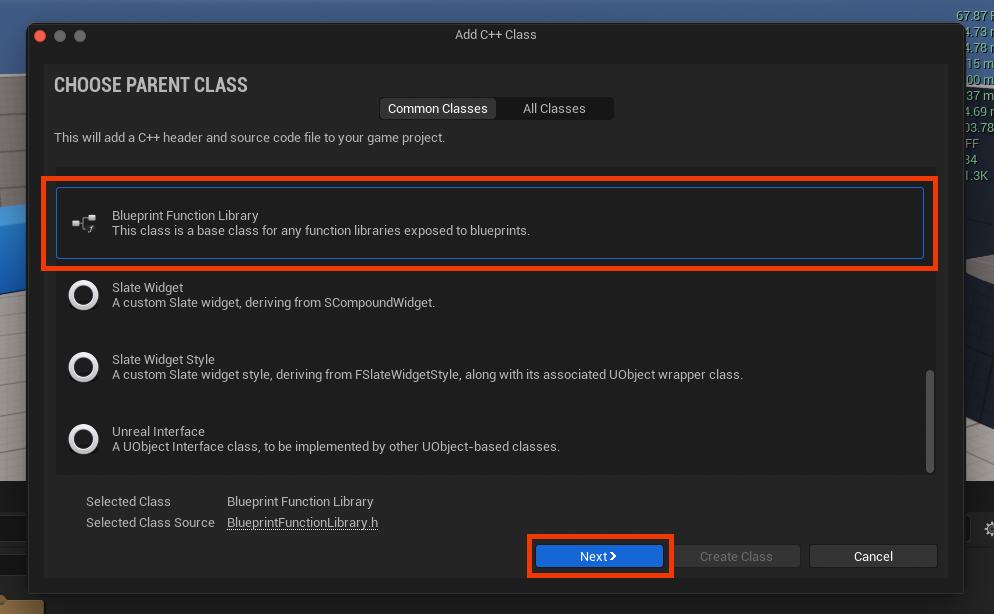
- Creating the New C++ Class: Selecting "New C++ Class" opens a wizard. Here, the crucial step is to scroll through the list of parent classes and choose "Blueprint Function Library." This selection ensures that the generated C++ class inherits the necessary
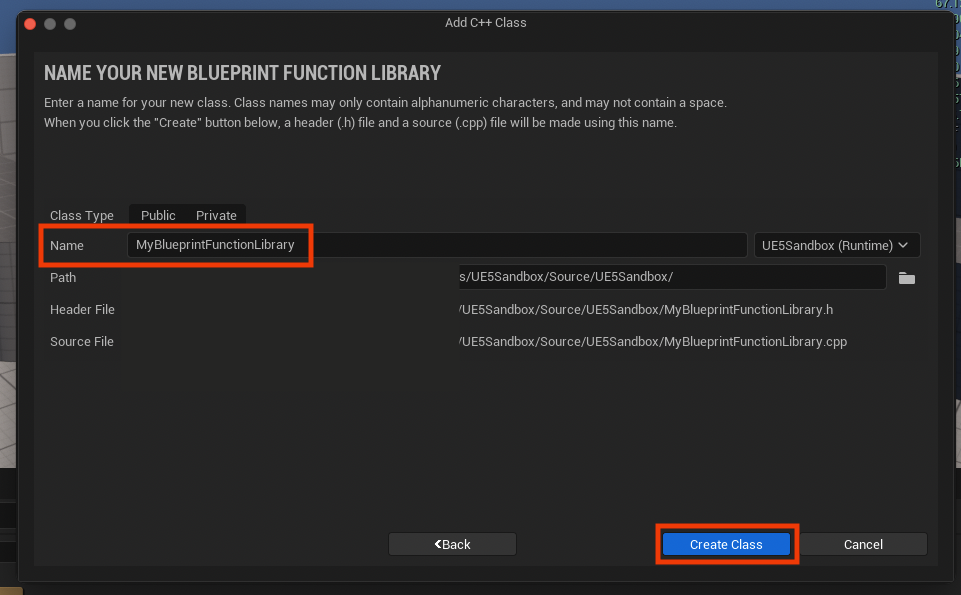
UObjectboilerplate and macros to correctly expose its functions to the Blueprint system. - Naming Convention: The next step involves naming the new class. Adhering to Unreal Engine’s naming conventions, which typically involve PascalCase (e.g.,
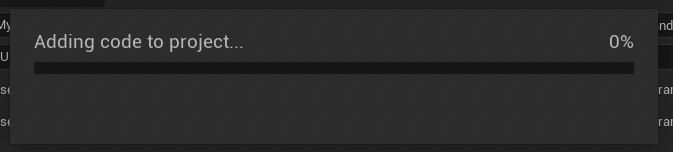
MyBlueprintFunctionLibrary), is recommended for clarity and consistency. This name will also determine the filenames (.hand.cpp) generated for the class. - Initial Compilation: Upon creation, Unreal Engine automatically compiles the new C++ files. This process generates the initial framework for the function library and integrates it into the project’s build system. Developers must wait for this compilation to complete before proceeding to modify the code.
Inside the IDE: Crafting the Functionality
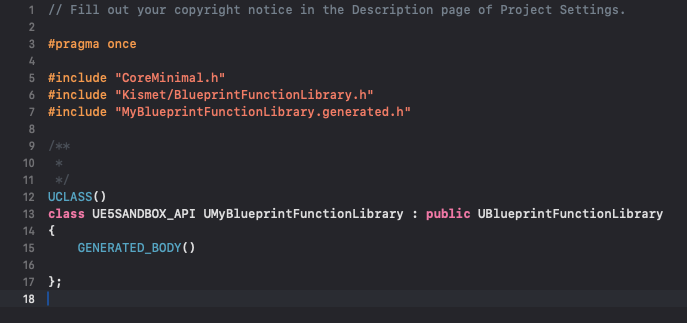
Once the initial files are generated, the developer transitions to their chosen IDE. Two files will be visible: a .h (header) file and a .cpp (source) file, both bearing the chosen class name (e.g., MyBlueprintFunctionLibrary.h and MyBlueprintFunctionLibrary.cpp).
-
The Header File (
.h): Declarations and Exposure
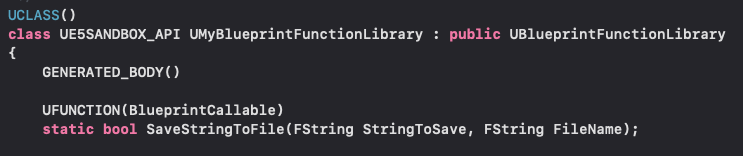
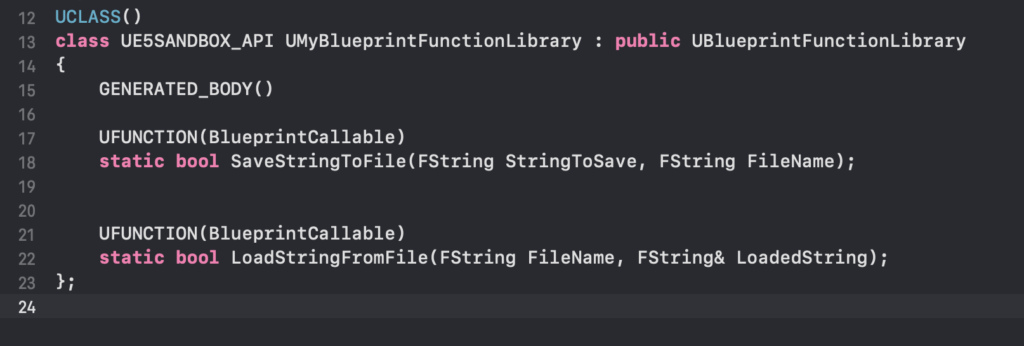
The header file is where the functions are declared and marked for Blueprint compatibility. Key elements include:UCLASS(meta=(Blueprintable)): This macro, typically auto-generated, marks the class as Blueprint-compatible.UFUNCTION(BlueprintCallable, Category="Utilities|FileOperations"): This macro is vital.BlueprintCallablemakes the function available for execution in Blueprints.Categoryhelps organize the node in the Blueprint editor’s context menu, making it easier for designers to find. Other specifiers likeBlueprintPure(for functions without side effects) orDisplayNamecan also be used.static bool SaveStringToFile(FString StringToSave, FString FileName);: Thestatickeyword is paramount. It signifies that the function belongs to the class itself, not an instance of the class, allowing it to be called directly without creating an object. The function signature defines its inputs and outputs, which will translate directly to Blueprint pins.
For example, a simple file read/write system might declare two static functions:
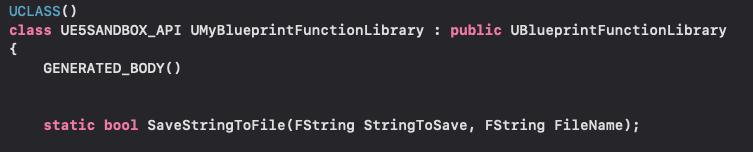
UCLASS() class UMyBlueprintFunctionLibrary : public UBlueprintFunctionLibrary GENERATED_BODY() public: UFUNCTION(BlueprintCallable, Category="File Operations") static bool SaveStringToFile(const FString& StringToSave, const FString& FileName); UFUNCTION(BlueprintPure, Category="File Operations") static FString LoadStringFromFile(const FString& FileName, bool& OutSuccess); ; -
The Source File (
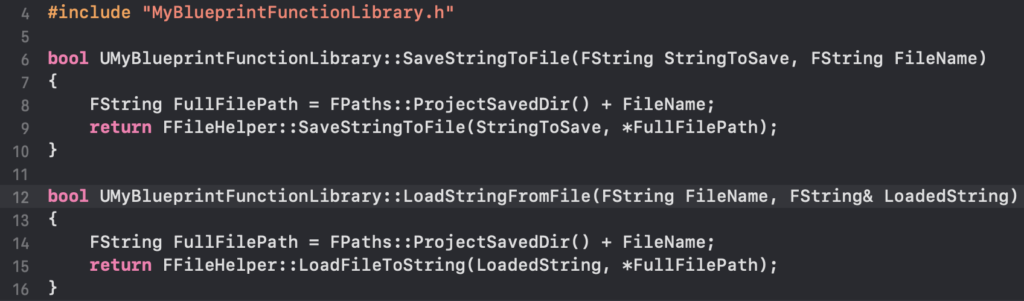
.cpp): Implementation
The.cppfile contains the actual C++ implementation of the declared functions. This is where the core logic resides, leveraging Unreal Engine’s extensive C++ API. For the file read/write example, theFFileHelperclass within Unreal Engine is an ideal candidate.#include "MyBlueprintFunctionLibrary.h" #include "Misc/FileHelper.h" #include "HAL/PlatformFilemanager.h" bool UMyBlueprintFunctionLibrary::SaveStringToFile(const FString& StringToSave, const FString& FileName) // Get the project's Saved directory FString Path = FPaths::ProjectSavedDir() + FileName; return FFileHelper::SaveStringToFile(StringToSave, *Path); FString UMyBlueprintFunctionLibrary::LoadStringFromFile(const FString& FileName, bool& OutSuccess) FString ResultString = TEXT(""); FString Path = FPaths::ProjectSavedDir() + FileName; OutSuccess = FFileHelper::LoadFileToString(ResultString, *Path); return ResultString;After implementing the functions, the project must be compiled again. This compiles the new C++ code into the engine’s module, making the functions available to the Blueprint editor.
Blueprint Accessibility and Practical Demonstration
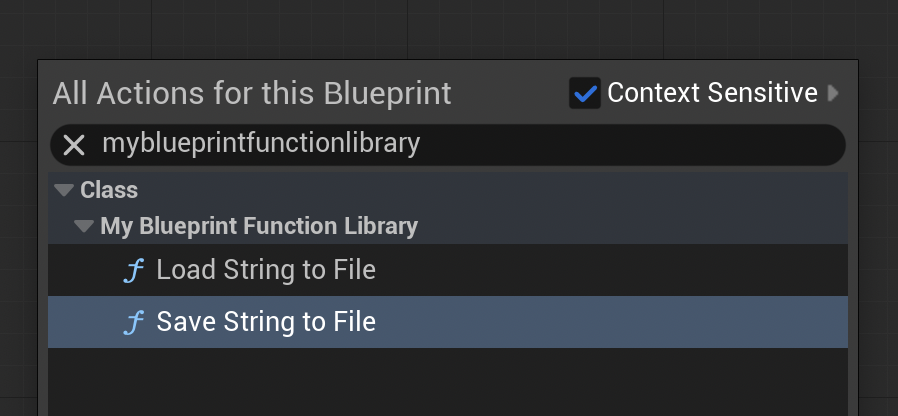
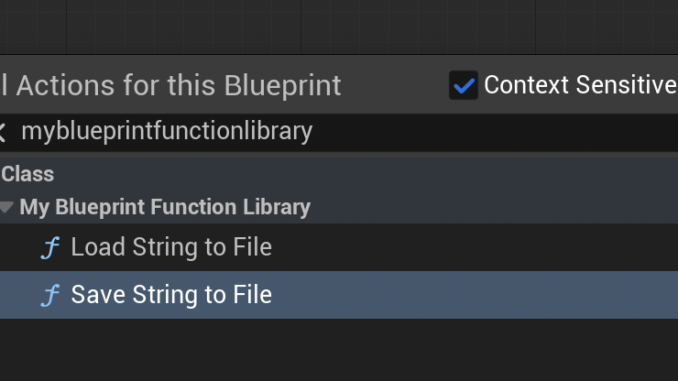
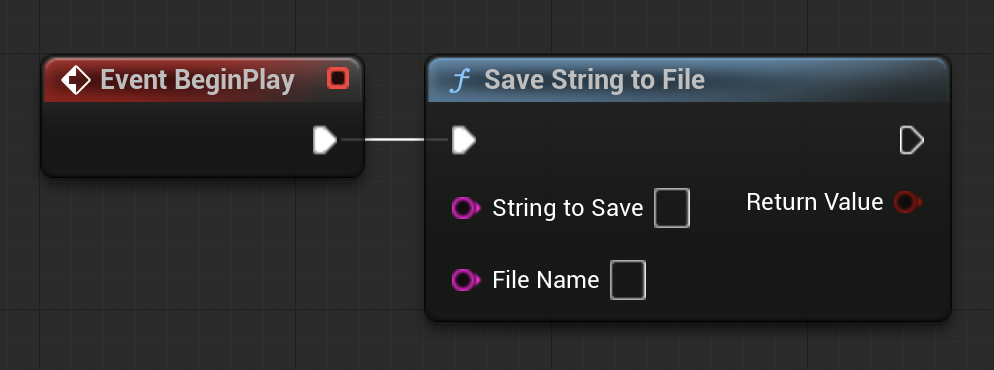
Once compiled, the C++ functions become immediately accessible within any Blueprint editor. By right-clicking on an empty space in a Blueprint graph and typing the name of the function (e.g., "Save String To File" or "Load String From File"), the corresponding C++ node will appear, categorized as specified in the UFUNCTION macro.
A practical demonstration quickly validates the efficacy of this approach:
- Saving Data: In a Level Blueprint, connecting the "Save String To File" node to an
Event BeginPlayevent allows a developer to specify a string (e.g., "Save Test") and a filename (e.g., "textfile-test.txt"). Upon running the game in the editor, this C++ function executes, saving the provided string to the specified file within the project’s/Saveddirectory. Verification involves simply navigating to this directory and opening the.txtfile to confirm its contents. - Loading Data: To test the loading functionality, a developer might manually create a
loadtest.txtfile in the/Saveddirectory and populate it with a string like "Loading Test." Then, in the Level Blueprint, an "Load String From File" node can be connected toEvent BeginPlay, providing the filename. The output string from this node can then be connected to a "Print String" node. When the game is played, the C++ function reads the file, and the Blueprint prints its contents directly to the screen, confirming successful data retrieval.
This simple file I/O example illustrates the fundamental principle: complex, performant C++ operations are encapsulated and exposed as intuitive Blueprint nodes, empowering designers to interact with functionality that would otherwise be beyond their immediate reach or introduce performance overhead if implemented purely in Blueprints.
Broader Impact and Strategic Implications for Game Development
The widespread adoption of C++ Blueprint Function Libraries has profound implications for game development workflows, team dynamics, and project scalability:
- Streamlined Collaboration: This hybrid approach fosters better collaboration between C++ programmers and Blueprint designers. Programmers can develop robust, optimized tools and systems in C++, which designers can then integrate and utilize creatively in Blueprints without needing deep C++ knowledge. This reduces communication overhead and allows each discipline to focus on its strengths.
- Enhanced Project Scalability: Projects can begin with rapid prototyping in Blueprints and, as they mature, selectively optimize performance-critical sections using C++ Function Libraries. This allows for iterative development without sacrificing long-term performance goals, ensuring projects can scale effectively from initial concept to full release.
- Modular and Maintainable Codebases: By centralizing complex, performance-sensitive logic in C++ libraries, developers can create more modular and maintainable codebases. C++ offers stronger type checking and better encapsulation, leading to fewer runtime errors and easier debugging compared to deeply nested Blueprint graphs for complex systems.
- Expanded Functionality: The ability to expose virtually any C++ functionality to Blueprints opens up new avenues for gameplay mechanics, engine modifications, and integrations that might otherwise be prohibitively complex or impossible with Blueprints alone. This includes custom physics interactions, advanced AI decision-making algorithms, or real-time data analysis.
- Future-Proofing Projects: As hardware capabilities evolve and player expectations for game fidelity and responsiveness increase, the demand for optimized code will only grow. Projects built with a judicious blend of Blueprints and C++ Function Libraries are better positioned to adapt to these changing demands, ensuring longevity and competitive performance.
In conclusion, the C++ Blueprint Function Library in Unreal Engine 5 is not merely a technical feature; it represents a strategic solution to a perennial challenge in game development. By offering a robust bridge between the agility of visual scripting and the power of native code, it empowers development teams to achieve both rapid iteration and exceptional performance. This capability is indispensable for creating high-fidelity, responsive, and scalable games that push the boundaries of interactive entertainment, solidifying Unreal Engine 5’s position as a versatile and powerful platform for creators worldwide.
About the Author