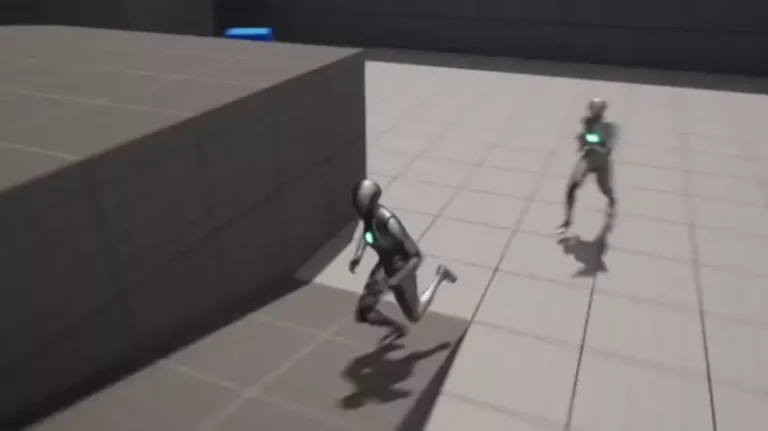
The ability for artificial intelligence (AI) characters and enemies to dynamically track and follow a player is a cornerstone feature in the vast majority of modern video games, contributing significantly to immersion, challenge, and narrative progression. While seemingly complex, the implementation of such functionality within a robust development environment like Unreal Engine 5 (UE5) is remarkably streamlined, often requiring only a handful of visual scripting nodes known as Blueprints. This guide delves into the precise methodology for enabling AI characters to relentlessly pursue or accompany the player, building upon foundational AI navigation principles established in previous development stages.
The evolution of artificial intelligence in video games represents a journey from rudimentary, scripted behaviors to highly dynamic, reactive, and often unpredictable digital entities. Early game AI relied heavily on predefined paths and simple state machines, where enemies would patrol fixed routes or react to player presence within a very limited scope. As computing power advanced and game design ambitions grew, the demand for more believable and challenging AI became paramount. This led to the development of sophisticated pathfinding algorithms, decision-making trees, and behavioral AI systems that could simulate more intelligent adversaries, helpful companions, or interactive non-player characters (NPCs). Unreal Engine, since its inception, has been at the forefront of providing tools that empower developers to craft these intricate AI behaviors. With UE5, Epic Games has continued to push the boundaries, offering advanced systems that democratize complex AI development, making it accessible not only to large AAA studios but also to independent developers and hobbyists.
Central to Unreal Engine 5’s accessibility and power is its Blueprint visual scripting system. Blueprints allow developers to create game logic, define object behaviors, and manage intricate systems without writing a single line of C++ code. This visual approach, where nodes representing functions or variables are connected to form execution flows, significantly reduces the barrier to entry for game development and accelerates prototyping and iteration cycles. For AI, Blueprints are particularly transformative, enabling designers and programmers alike to quickly conceptualize, implement, and refine AI behaviors with immediate visual feedback. This includes everything from simple movement patterns to complex decision-making processes and perception systems, all visually represented and easily debugged. The integration of Blueprints with core engine features like the Navigation Mesh (NavMesh) system provides a powerful synergy for creating robust and intelligent AI.
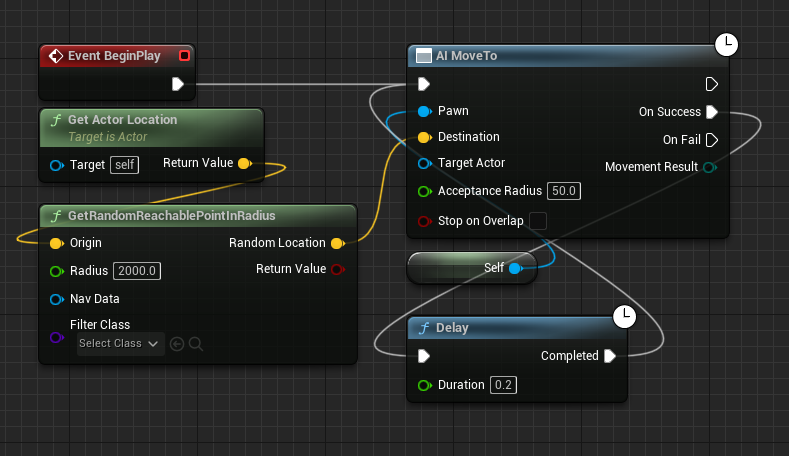
The process of instructing an AI character to chase the player in Unreal Engine 5 begins with a pre-existing AI setup, typically one that already leverages a NavMesh for basic movement within the game world. A NavMesh is an essential component for AI navigation, acting as a navigable surface that AI agents can traverse. It defines the walkable areas, allowing AI to pathfind efficiently around obstacles, up slopes, and through complex environments. In a prior guide focused on NavMesh setup, a basic blueprint configuration might have been established to allow AI characters to move randomly around the level. This initial setup usually involves nodes that determine a target location and then command the AI to move there.
To transition from random movement to player pursuit, the first critical modification involves the removal of specific blueprint nodes responsible for generating random destinations. Specifically, the ‘Get Actor Location’ node, when used in conjunction with a random point generator, and the ‘GetRandomReachablePointInRadius’ node are identified for deletion from the AI’s blueprint graph. These nodes are designed to identify a random position within a specified radius around the AI character itself, serving the purpose of creating patrol routes or aimless wandering. Their removal is a deliberate step to redirect the AI’s focus from self-generated random targets to a specific, dynamic target: the player character. This initial clean-up ensures that the AI’s movement logic is unburdened by conflicting directives, preparing it for a new, player-centric objective.
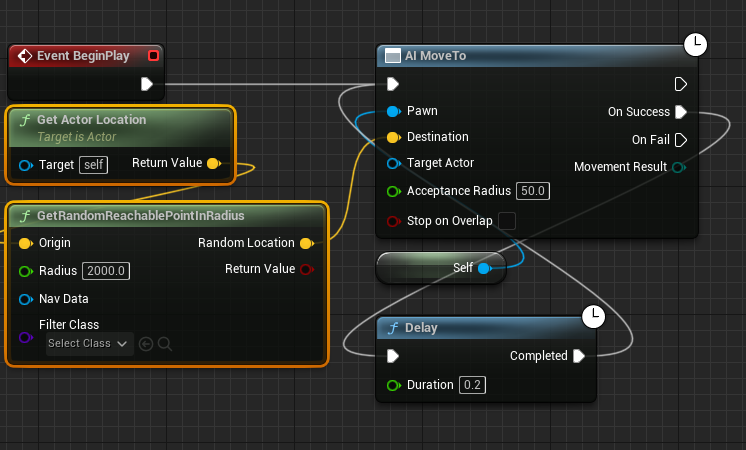
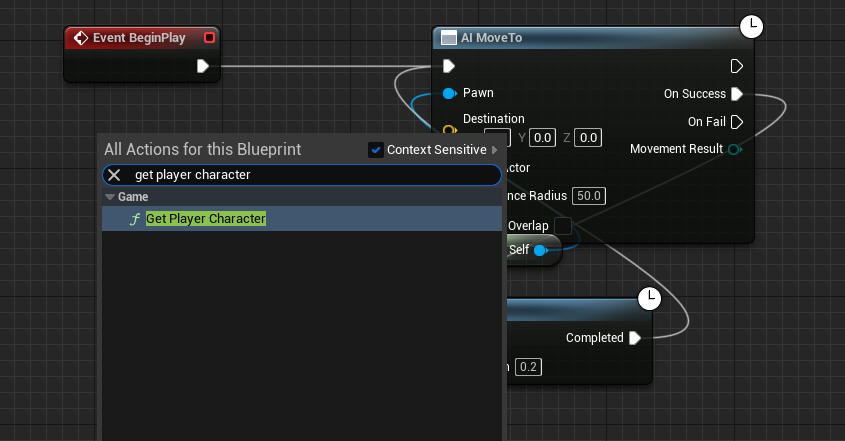
Following the removal of the random target generation nodes, the next step is to introduce the mechanism for identifying and acquiring the player’s current position. This is achieved by adding a new ‘Get Player Character’ node to the blueprint graph. This node serves as a direct reference to the player-controlled character within the game world. Upon execution, it returns a reference to the active player character, which is crucial for establishing the AI’s target. The ‘Get Player Character’ node is fundamental because it provides the dynamic coordinates necessary for the AI to track the player in real-time, regardless of the player’s movement or location within the NavMesh.
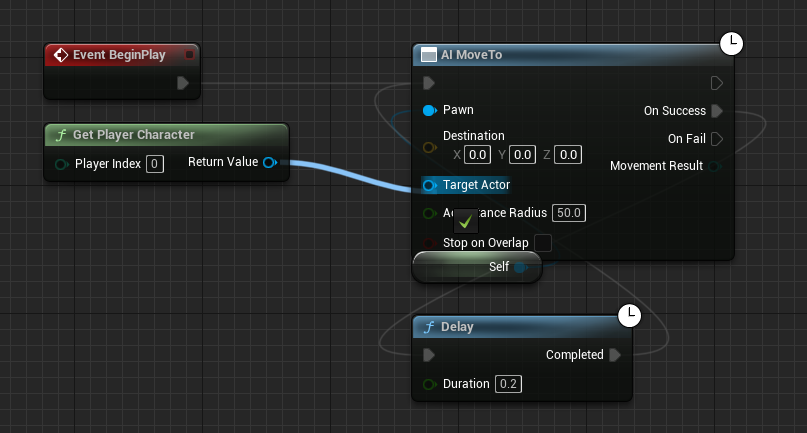
With the player character now identifiable, the subsequent action involves connecting the output of the ‘Get Player Character’ node to the primary AI movement command. Specifically, the blue ‘Return Value’ pin, which outputs the reference to the player character, is connected to the blue ‘Target Actor’ pin on the ‘AI MoveTo’ node. The ‘AI MoveTo’ node is the central command for AI navigation, instructing an AI controller to move its controlled pawn to a specified location or actor. By linking the player character reference to the ‘Target Actor’ pin, the AI’s movement directive is fundamentally transformed. Instead of moving to a static coordinate or a randomly generated point, the AI is now continuously commanded to move towards the player character’s current location. This direct linkage establishes the core chasing behavior, making the AI dynamically responsive to player movement.
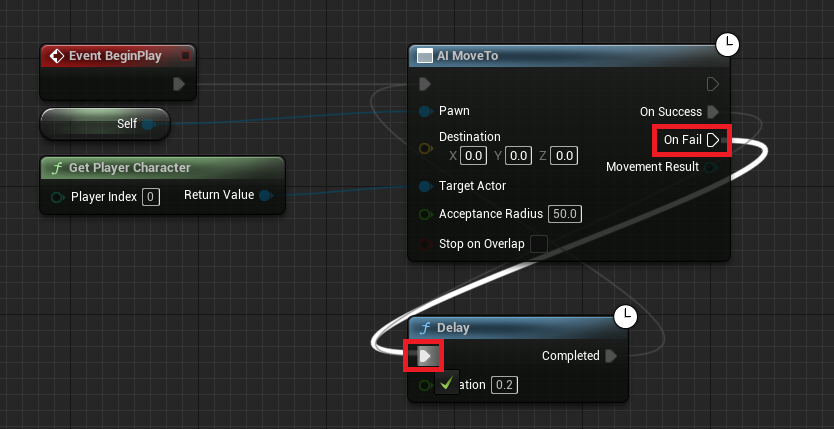
A crucial aspect of robust AI design, particularly for persistent pursuit, involves handling potential failures in movement commands. In dynamic game environments, AI movement can occasionally fail due to various reasons: the player might move to an unreachable area (e.g., outside the NavMesh, or into an area temporarily blocked), the NavMesh might be undergoing recalculations, or other environmental factors could impede pathfinding. To ensure the AI maintains its pursuit regardless of these temporary setbacks, the ‘On Fail’ execution pin of the ‘AI MoveTo’ node is connected to a ‘Delay’ node. This ‘Delay’ node, in turn, loops back to re-execute the ‘AI MoveTo’ command after a short pause. This configuration creates a resilient feedback loop: if the AI successfully reaches its target (the player), the ‘On Success’ pin would typically trigger subsequent actions or simply loop back to ‘AI MoveTo’ for continuous tracking. However, if the movement command fails, the ‘On Fail’ connection immediately triggers the ‘Delay’, pausing briefly before attempting the ‘AI MoveTo’ command again. This retry mechanism is vital for maintaining continuous AI engagement, ensuring that the AI relentlessly attempts to reach the player, thereby preventing situations where the AI simply gives up or gets stuck. This continuous retrying ensures the AI remains a persistent threat or companion, adapting to the player’s actions and the environment’s complexities.
Upon completing these blueprint modifications, it is imperative to compile and save the blueprint editor. This action processes the visual script into executable code, applying all changes to the AI character’s behavior within the Unreal Engine environment. Without compilation and saving, the newly configured chase logic will not be active when the game is played in the editor or packaged for deployment. This standard development practice ensures that all implemented logic is correctly integrated and functional.
The implications of this seemingly straightforward AI following system are profound for game design and player experience. This basic mechanic serves as a foundational building block for a vast array of AI behaviors, extending far beyond simple enemy pursuit. In the context of enemies, a basic chase can be augmented with complex attack patterns, line-of-sight checks, and stealth detection mechanics, transforming a simple follower into a formidable adversary. For companion NPCs, this system enables loyal allies to stick by the player’s side, providing support, carrying items, or participating in combat. Quest-giving NPCs can use this to guide players to specific locations, triggering dynamic events as the player approaches. Furthermore, AI characters that follow the player can be used for environmental storytelling, reacting to player presence in subtle ways that enhance atmosphere and immersion without direct interaction. This adaptability makes the ‘AI following player’ blueprint a cornerstone for dynamic gameplay experiences across genres, from open-world adventures and role-playing games to horror titles and action-packed thrillers.
The broader industry impact of such accessible and powerful AI development tools, exemplified by Unreal Engine 5’s Blueprints, cannot be overstated. It represents a significant step towards the democratization of game development, lowering the barrier to entry for aspiring creators who may not possess extensive programming backgrounds. This accessibility empowers smaller teams and independent developers to create games with sophisticated AI mechanics that were once the exclusive domain of large, well-resourced studios. For established development houses, Blueprints facilitate rapid prototyping and iteration, allowing designers to experiment with AI behaviors quickly and efficiently, refining gameplay loops with minimal overhead. The global video game market, valued at over $200 billion annually and continually growing, increasingly demands immersive and intelligent game worlds. Player satisfaction is often tied to the perceived intelligence and responsiveness of in-game AI, making robust AI tools a critical differentiator. Epic Games, through its continuous investment in Unreal Engine, including features like Nanite and Lumen that create stunning visual fidelity, combined with powerful scripting tools like Blueprints, reinforces its vision of providing developers with the means to create groundbreaking interactive experiences. This commitment ensures that even complex AI behaviors are within reach, contributing to a richer, more engaging future for interactive entertainment.
In conclusion, the implementation of AI character following in Unreal Engine 5, achieved through a precise sequence of Blueprint node manipulations, underscores the engine’s power and accessibility. By methodically modifying an existing AI movement blueprint—deleting random target generation, introducing player character targeting, and establishing a robust retry mechanism for failed movements—developers can create persistent and dynamic AI pursuit. This foundational mechanic, while seemingly simple, unlocks a multitude of advanced game design possibilities, enabling diverse AI behaviors for enemies, companions, and interactive NPCs. The ease of implementation through visual scripting not only streamlines the development process for professionals but also significantly lowers the barrier to entry for new creators, solidifying Unreal Engine 5’s position as a pivotal tool in shaping the future of interactive storytelling and gameplay.
About the Author