The integration of sophisticated artificial intelligence (AI) controlled characters has become an indispensable element in contemporary video game development, serving to deepen immersion, enrich narrative, and provide dynamic gameplay experiences for players. Within the expansive ecosystem of game development engines, Unreal Engine 5 (UE5) stands out for its robust and accessible tools that empower developers to implement complex AI behaviors with relative ease. Central to this capability is the engine’s navigation mesh (NavMesh) system, a foundational technology that allows AI entities to intelligently traverse intricate virtual environments. This article delves into the technical underpinning of UE5’s NavMesh and basic AI character setup, exploring its significance, implementation, and broader implications for the gaming industry.
The Evolution of In-Game Intelligence

The journey of AI in video games has been a fascinating progression, from rudimentary decision trees and predefined patrol paths to the complex, emergent behaviors seen today. In the early days of gaming, AI characters often relied on simple waypoint systems, where developers manually plotted discrete points for characters to follow. While effective for linear levels, this method proved cumbersome and inefficient for open-world or highly dynamic environments. Grid-based pathfinding, such as A* search on a tilemap, offered more flexibility but struggled with non-uniform terrain and varying character sizes.
The introduction of navigation meshes marked a significant leap forward. A NavMesh is essentially a 3D surface generated over the walkable areas of a game level, simplifying the complex geometry into a navigable grid or set of interconnected polygons. This abstract representation allows AI agents to calculate efficient paths through the environment without needing to process every single polygon of the level geometry. The benefits were immediate: smoother, more believable movement, faster pathfinding calculations, and greater adaptability to diverse level designs.
Unreal Engine, from its earlier iterations (UE3, UE4) to the current UE5, has consistently refined its AI navigation systems, making them a cornerstone of its powerful toolkit. These advancements have democratized access to sophisticated AI, enabling both large studios and independent developers to create compelling interactive experiences. UE5 builds upon this legacy, offering improved performance, more intuitive workflows, and seamless integration with other engine features.
Unreal Engine 5: Empowering Advanced Navigation
Implementing AI navigation in Unreal Engine 5 revolves primarily around two core components: the NavMesh itself and the correct setup of the AI character’s behavior. The process, while conceptually straightforward, requires precise configuration to avoid common pitfalls that can hinder AI functionality.
Defining Navigable Spaces: The NavMeshBoundsVolume
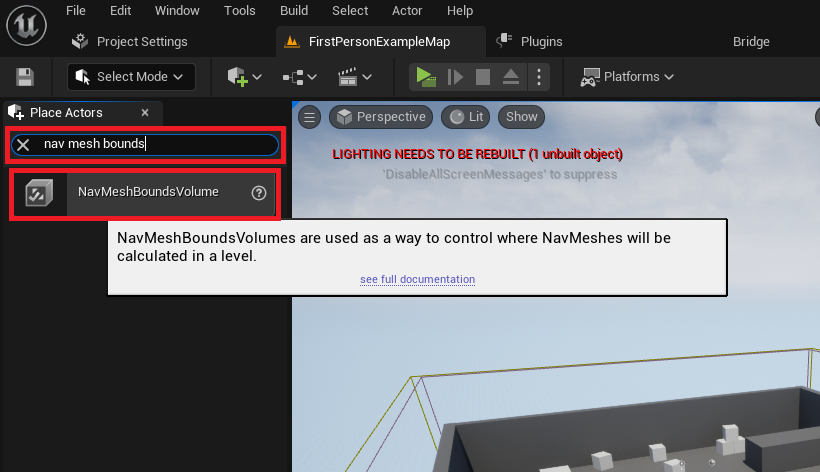
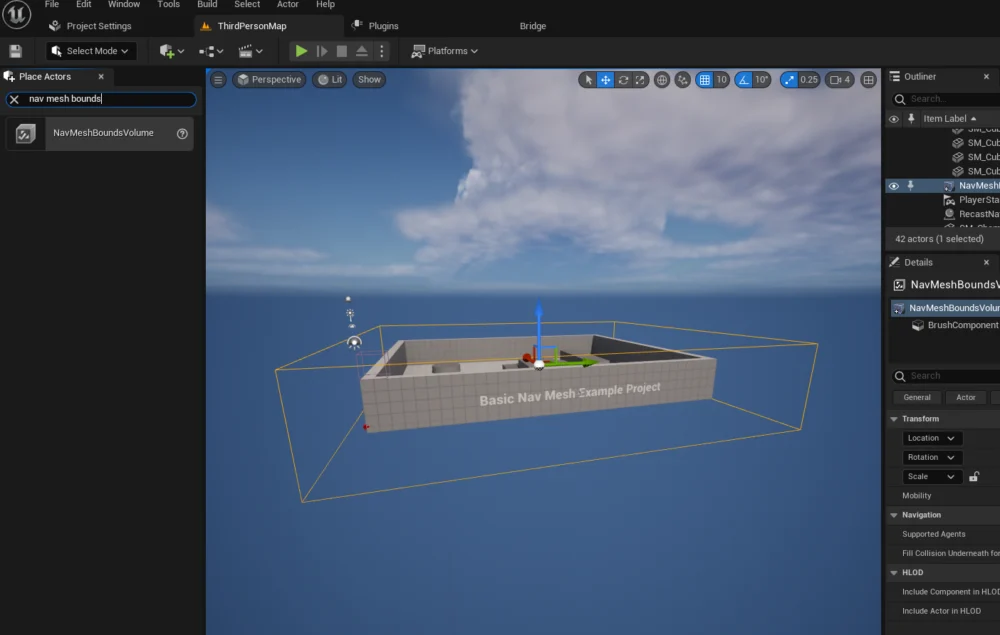
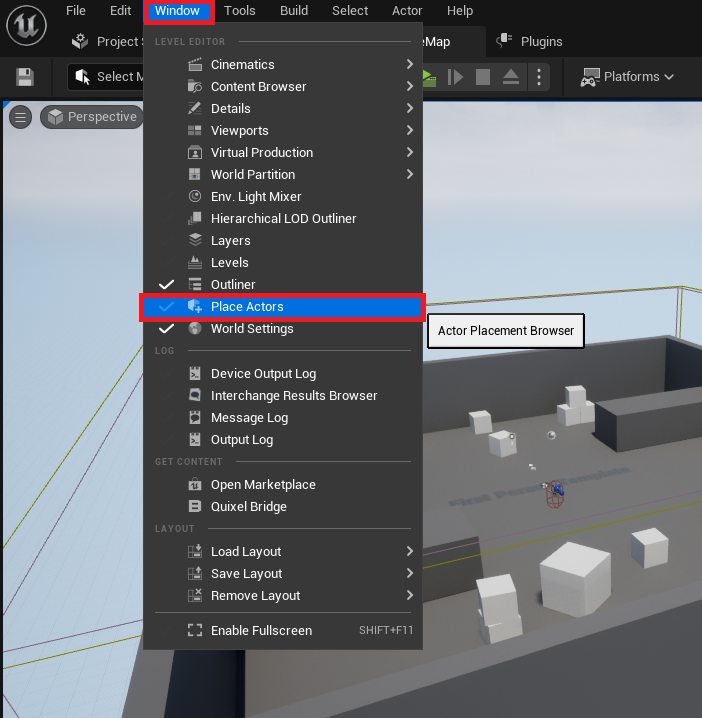
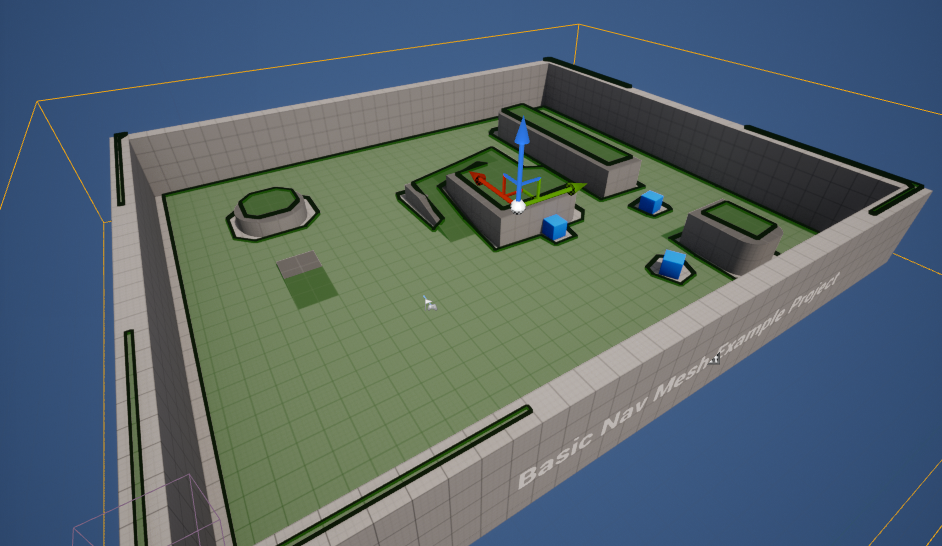
The first critical step in enabling AI characters to navigate a UE5 level is the generation of a NavMesh. This is achieved through the use of a NavMeshBoundsVolume. Developers initiate this by accessing the "Place Actors" window, typically found under the "Window" menu in the editor, which provides a comprehensive library of basic objects and volumes. Within the "Volumes" category, the NavMeshBoundsVolume can be dragged directly into the level.
Once placed, the NavMeshBoundsVolume acts as a bounding box, defining the precise area within which the NavMesh will be generated. Its scale and position are paramount; it must encompass all areas where AI characters are intended to move. This volume can be adjusted to fit any desired area, from small rooms to expansive open worlds. The size of the NavMeshBoundsVolume directly impacts generation time and performance. Larger volumes naturally require more computational resources and time to generate the NavMesh, unless dynamic generation methods are employed. Dynamic NavMesh generation, a more advanced feature, allows for the NavMesh to be updated in real-time in response to changes in the environment, such as opening doors, destructible terrain, or moving platforms, further enhancing the realism and interactivity of game worlds.
Generating the Pathfinding Grid: Practicalities and Performance
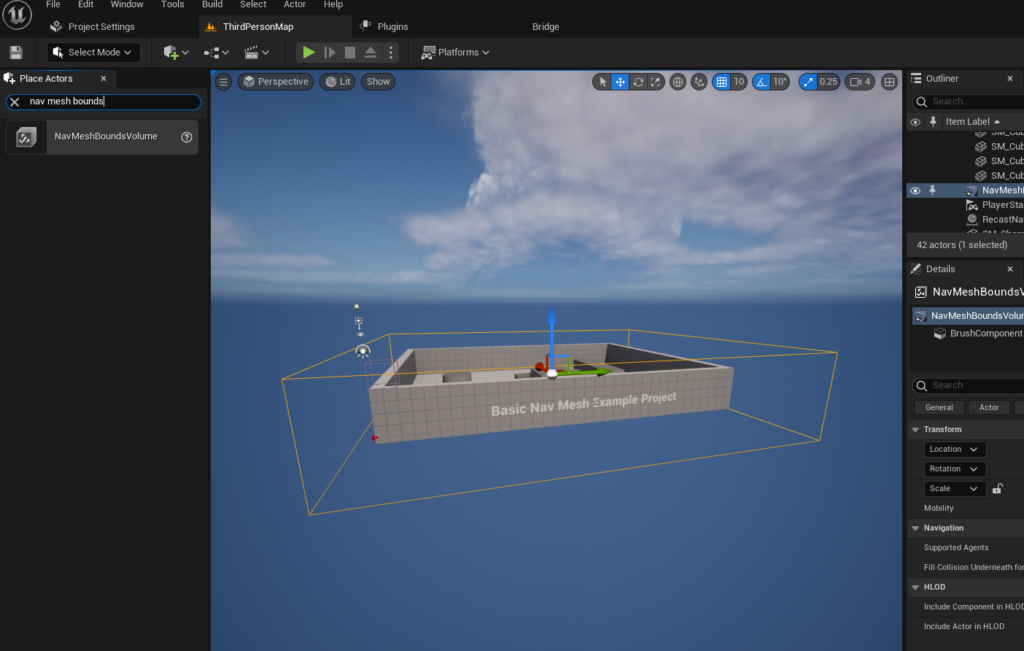
The NavMesh itself is not immediately visible upon placing the NavMeshBoundsVolume. To visualize the generated navigable surface, developers can press the ‘P’ key on their keyboard. This hotkey toggles the debug view, rendering the NavMesh as a series of green polygons overlaid on the walkable surfaces of the level. This visual feedback is crucial for confirming that the NavMesh has been generated correctly and covers all intended areas, highlighting any gaps or inaccessible regions that might prevent AI movement. Issues such as uneven terrain, obstacles too small to be properly excluded, or incorrect NavMeshBoundsVolume placement can often be identified and rectified through this debug visualization.
The parameters controlling NavMesh generation, while not directly detailed in the initial setup, are vital for fine-tuning AI behavior. These include settings like Agent Radius, Agent Height, Agent Max Slope, and Agent Step Height. These values define the characteristics of the AI agents that will be using the NavMesh, dictating how close they can get to walls, what slopes they can traverse, and what height differences they can step over. Properly configured, these parameters ensure that the NavMesh accurately reflects the physical capabilities and collision bounds of the AI characters, preventing them from getting stuck or attempting to navigate impossible terrain. Optimizing these settings is a critical part of ensuring both efficient pathfinding and believable AI movement.
Crafting Intelligent Character Movement
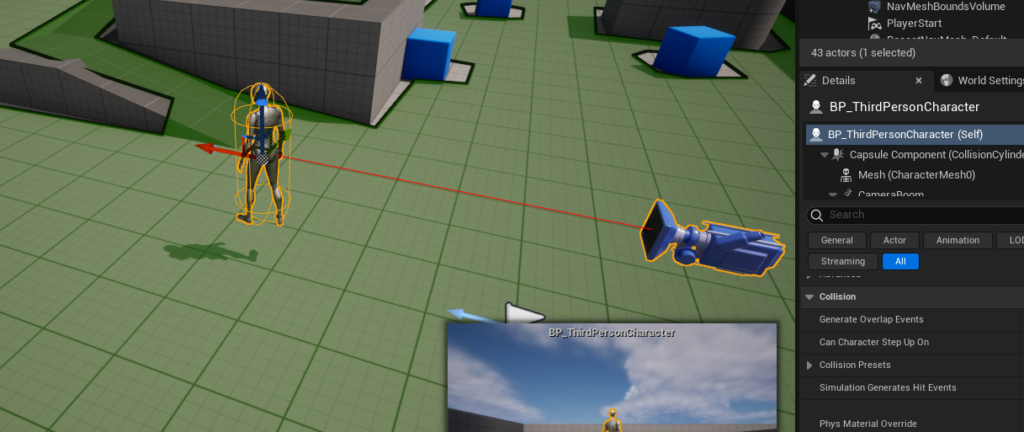
With the NavMesh correctly established, the next phase involves configuring the AI character to utilize this navigation data. For demonstration purposes, many developers begin with the Third Person Template provided by Unreal Engine 5, which includes a pre-animated character blueprint, ideal for testing AI navigation capabilities.
Blueprint-Driven AI: The AI MoveTo Node
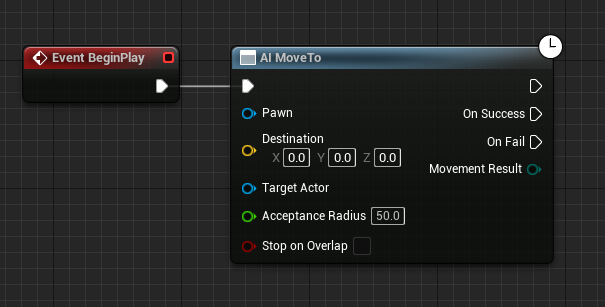
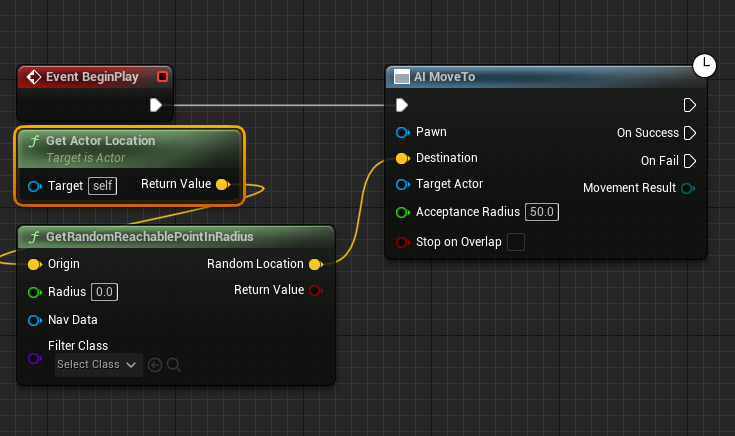
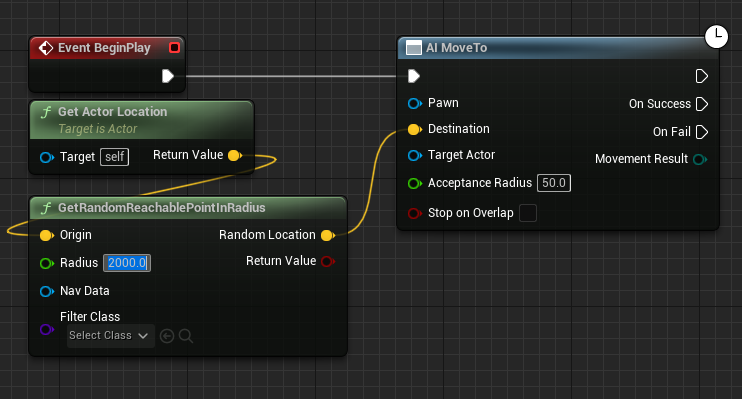
The core of AI character movement in UE5 is often managed through the Blueprint visual scripting system. To enable a character to navigate, its blueprint needs to incorporate specific nodes. First, an instance of the character blueprint must be dragged into the level. Inside the character’s blueprint editor, the Event BeginPlay node serves as the starting point for AI logic. Connected to this is the AI MoveTo node, a powerful command that instructs an AI Pawn (the character) to move towards a specified destination. This node is the primary interface for triggering AI pathfinding and movement along the NavMesh.
Dynamic Roaming: GetRandomReachablePointInRadius
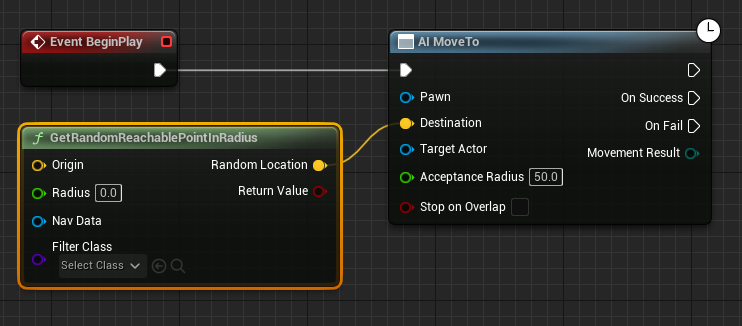
To create more dynamic and less predictable AI behavior, such as wandering or patrolling, the AI MoveTo node is often combined with other utility nodes. The GetRandomReachablePointInRadius node is particularly useful for this. This node, when connected to the Destination input of the AI MoveTo node, calculates a random, reachable point within a specified radius from an origin point.
The Origin for this random point generation is typically provided by a Get Actor Location node, which retrieves the current world position of the AI character itself. This ensures that the AI’s random movement is localized around its current position, preventing it from attempting to move to unreachable or illogical locations far across the map. The Radius input, a crucial green pin, determines the maximum distance the AI will consider for its random destination. For instance, setting this value to "2000" (Unreal units, typically centimeters) allows the AI to roam within a 20-meter sphere around its current location. This combination of nodes facilitates complex, yet controlled, wandering behaviors without requiring manual waypoint creation.
Ensuring Continuous Behavior: Looping AI Logic
To ensure the AI character continuously navigates the level, a Reference to Self node is connected to the Pawn input of the AI MoveTo node, identifying the character itself as the agent performing the movement. Finally, to create a persistent wandering loop, a Delay node is introduced. This node is connected to the On Success output pin of the AI MoveTo node. Once the AI successfully reaches its random destination, the Delay node pauses the execution of the blueprint for a specified duration (e.g., 2-5 seconds). After this delay, the execution flow loops back to the AI MoveTo node, prompting the AI to calculate a new random destination and repeat the process. This creates an endless cycle of movement, making the AI character appear to wander intelligently within the defined NavMesh area.
Once these blueprint connections are established and compiled, clicking "Play" in the Unreal Engine 5 editor will activate the AI character, which will then begin autonomously navigating towards random locations within the generated NavMesh, demonstrating the practical application of these integrated systems.
The Impact on Game Development and Player Experience
The robust AI navigation tools within Unreal Engine 5 have profound implications for both game development methodologies and the ultimate player experience.
Enhancing Immersion and Gameplay
For players, well-implemented AI navigation translates directly into a more believable and engaging game world. Characters that can intelligently navigate complex environments, avoid obstacles, and pursue or evade players realistically contribute significantly to immersion. This is critical for various genres, from stealth games where enemies patrol naturally, to open-world RPGs where NPCs wander and interact with their surroundings credibly, and even to simulation games where autonomous entities perform tasks efficiently. Poor AI navigation, conversely, can break immersion, leading to frustration as characters get stuck, walk through walls, or exhibit otherwise illogical behaviors.
Streamlining Development Workflows
For developers, UE5’s NavMesh system dramatically streamlines the creation of sophisticated AI. By automating much of the pathfinding calculation, developers are freed from the arduous task of manually plotting paths or coding complex collision avoidance algorithms. This efficiency allows them to focus on higher-level AI behaviors, such as decision-making, combat tactics, or social interactions, rather than getting bogged down in basic movement logic. The visual debugging capabilities, like the ‘P’ key visualization, further accelerate development by providing immediate feedback on NavMesh generation and potential issues. This accessibility means even smaller teams or individual developers can create games with believable AI, previously a domain often restricted to larger studios with dedicated AI programmers.
Epic Games’ Vision for Accessible AI
Epic Games, the creator of Unreal Engine, consistently emphasizes providing powerful yet accessible tools to the global developer community. The intuitive nature of the NavMesh and Blueprint system aligns perfectly with this philosophy. By abstracting complex pathfinding algorithms into easy-to-use volumes and nodes, Epic empowers a wider range of creators to push the boundaries of interactive entertainment. This commitment extends to ongoing updates and improvements, ensuring that UE5 remains at the forefront of AI development capabilities.
Challenges and Future Directions in AI Navigation
Despite the advancements, challenges remain. Optimizing NavMesh generation for massive open worlds or procedurally generated environments still requires careful consideration. Handling highly dynamic environments where geometry constantly changes (e.g., destructible environments, shifting terrain) pushes the limits of real-time NavMesh updates. Furthermore, while the current system excels at pathfinding, integrating it with more advanced AI decision-making systems like Behavior Trees or Utility AI, and leveraging machine learning for emergent AI behaviors, represents the ongoing frontier. The future of AI in games will likely see even greater integration of these technologies, leading to characters that not only navigate intelligently but also adapt, learn, and make decisions in increasingly nuanced ways, blurring the lines between scripted behavior and true autonomy.
In conclusion, Unreal Engine 5’s NavMesh and AI character setup tools are fundamental to creating compelling and believable virtual worlds. By providing developers with robust, efficient, and accessible methods for implementing intelligent navigation, UE5 continues to empower innovation across the gaming industry, ensuring that AI characters remain a dynamic and integral part of the player experience. As game development continues to evolve, these foundational technologies will undoubtedly serve as the bedrock for increasingly sophisticated and immersive interactive entertainment.
About the Author