Unreal Engine 5 (UE5) leverages Data Tables as a fundamental and highly efficient mechanism for managing structured information within game projects, offering developers a robust framework to define, store, and access pre-configured lists of critical game data. This powerful feature is instrumental in creating scalable, maintainable, and collaborative development environments, moving beyond the limitations of hardcoding and disparate data sources.
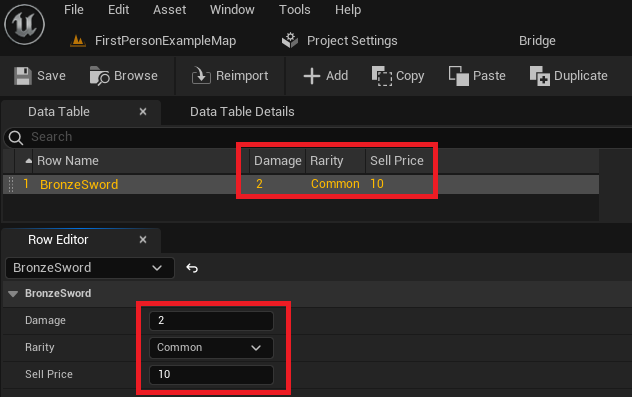
At its core, a Data Table in UE5 functions as a centralized repository for game-related values, organized into rows and columns, much like a spreadsheet. Each row represents a unique entry, identified by a specific key (Row Name), while columns correspond to defined data fields. The structure of these columns, including their data types, is dictated by a Blueprint Structure (Struct), which serves as the foundational schema for the Data Table. This architectural choice ensures data consistency and integrity across the entire project.
The advent of structured data tools like Data Tables has significantly streamlined game development workflows. Prior to the widespread adoption of such mechanisms, developers frequently resorted to embedding critical game parameters directly into code or Blueprints. This approach, while functional for small projects, quickly becomes unmanageable as game scope expands, leading to challenges in modification, debugging, and collaborative efforts. Data Tables address these issues by externalizing data, allowing designers to tweak values without requiring programmer intervention or recompilation, thereby accelerating iteration cycles and improving project agility. Industry analysis suggests that well-implemented data management strategies, such as those afforded by Data Tables, can reduce iteration times for game balancing and content updates by as much as 30-40%, particularly in projects with extensive item inventories, character statistics, or quest lines.
Understanding the Core Components: Structs and Enums
The efficacy of Data Tables in Unreal Engine 5 is intrinsically linked to two other vital Blueprint assets: Enumerations (Enums) and Structures (Structs). These components work in concert to establish the robust data typing and organizational framework that Data Tables require.
1. Enumerations (Enums): Standardizing Categorical Data
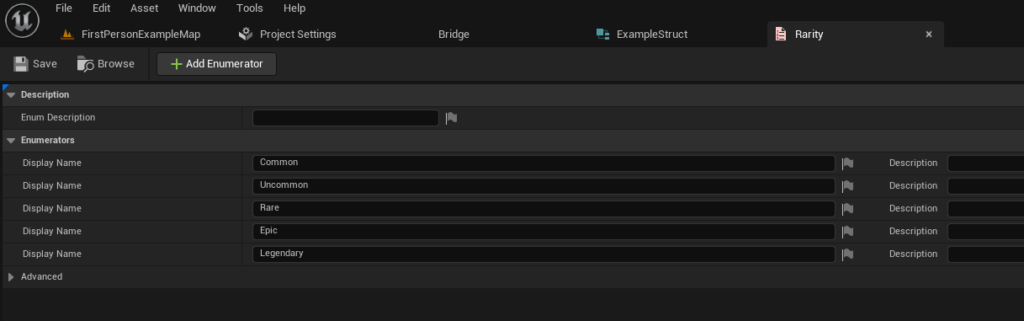
Before defining the overarching structure of data, developers often first establish Enumerations. An Enum is a user-defined data type that consists of a set of named integer constants. In game development, Enums are invaluable for representing fixed categories or states in a human-readable format, preventing errors that could arise from using raw strings or integers. For instance, in an RPG, item rarity is a perfect candidate for an Enum, with defined values like "Common," "Uncommon," "Rare," "Epic," and "Legendary."
The process of creating an Enum in UE5 is straightforward:
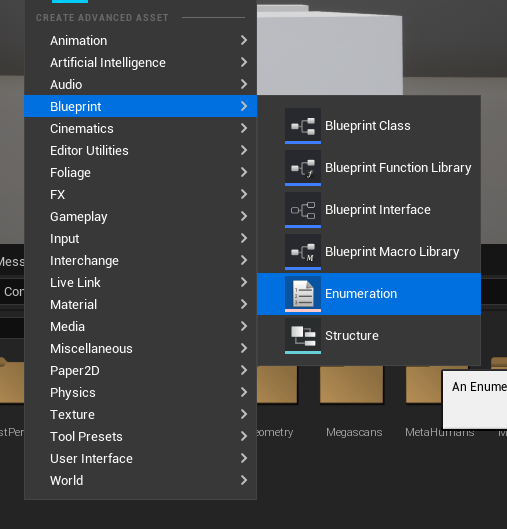
- Right-click in the Content Browser.
- Navigate to the "Blueprint" category and select "Enumeration."
- Assign a descriptive name (e.g.,
E_ItemRarity). - Open the newly created Enum and define its members (e.g.,
Common,Uncommon,Rare,Epic,Legendary), each corresponding to an underlying integer value. This ensures that any data field referencing item rarity will be constrained to these predefined options, eliminating typos and standardizing categorization across the project. This standardization is crucial for maintaining consistency, especially when multiple developers are contributing to the same database.
2. Structures (Structs): Defining the Data Schema
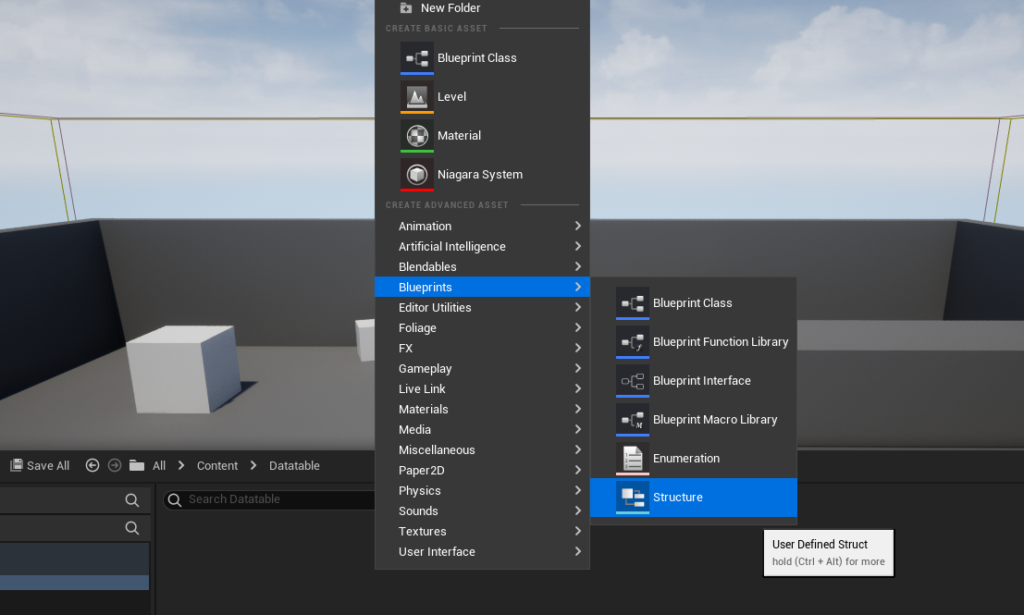
With categorical data standardized via Enums, the next logical step is to define the Structure (Struct) that will serve as the template for each row in the Data Table. A Struct is a composite data type that groups several variables (members) of different data types under a single name. For a Data Table, a Struct acts as the blueprint for what kind of information each entry will hold.
To create a Struct:
- Right-click in the Content Browser.
- Navigate to the "Blueprints" category and select "Structure."
- Name the Struct descriptively (e.g.,
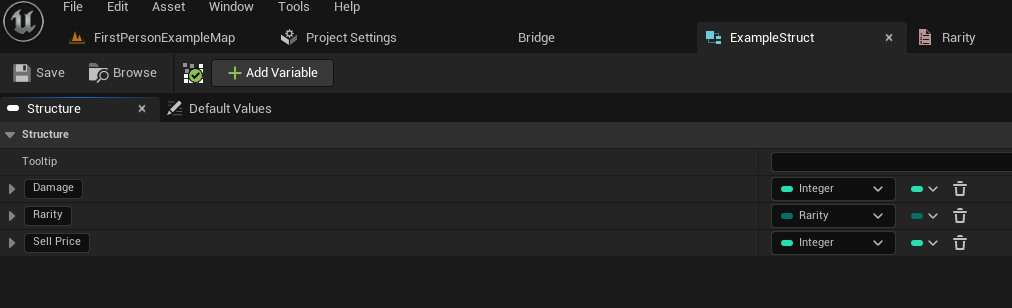
F_RPGItemData). - Open the Struct and add member variables corresponding to the desired data fields for an item. For a typical RPG item, these might include:
Damage(Type: Integer or Float): Represents the offensive power.Rarity(Type:E_ItemRarityEnum): Utilizes the previously created Enum for item quality.SellPrice(Type: Integer): Defines the value when sold to vendors.ItemName(Type: Text): The display name of the item.ItemDescription(Type: Text): A brief lore or functional description.Icon(Type: Texture2D or Soft Object Reference): A visual representation of the item.
By defining these fields within a Struct, developers establish a rigid, yet flexible, data schema. Every row subsequently added to the Data Table based on this Struct will automatically possess these predefined fields, ensuring that all item entries maintain a consistent set of attributes. This structured approach is fundamental for scalability, as it allows for the management of potentially thousands of items, each with a guaranteed set of properties.
Creating and Populating the Data Table
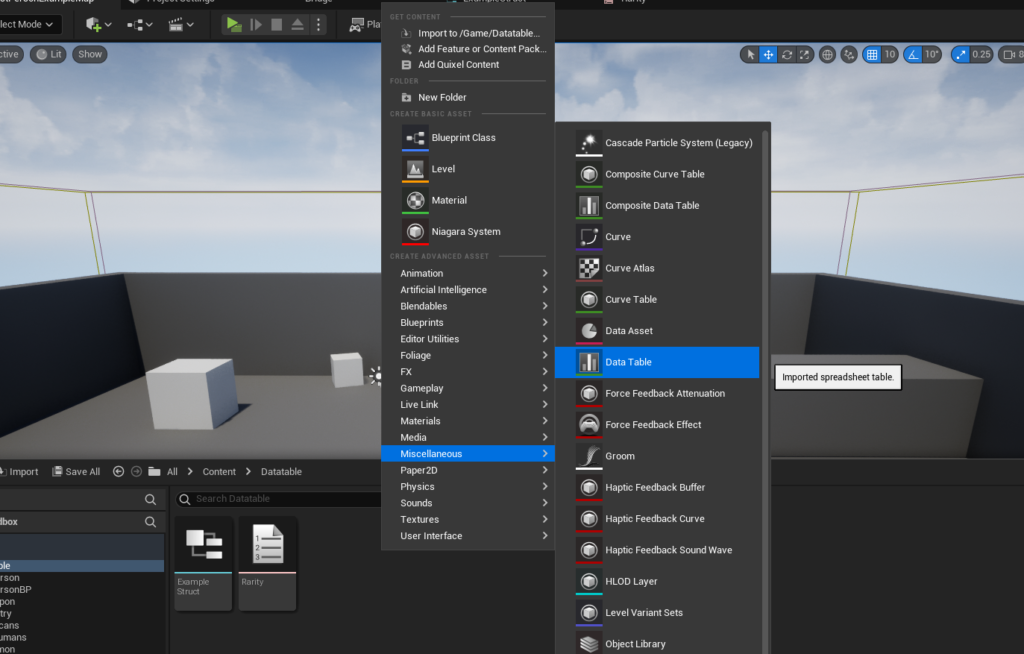
Once the foundational Enum and Struct are established, the creation of the Data Table itself becomes a straightforward process. This asset will house the actual data entries that game systems will query at runtime.
1. Data Table Creation:
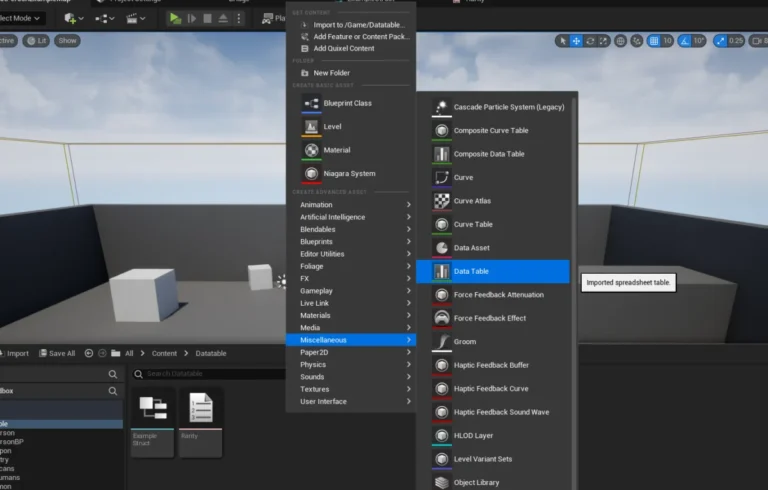
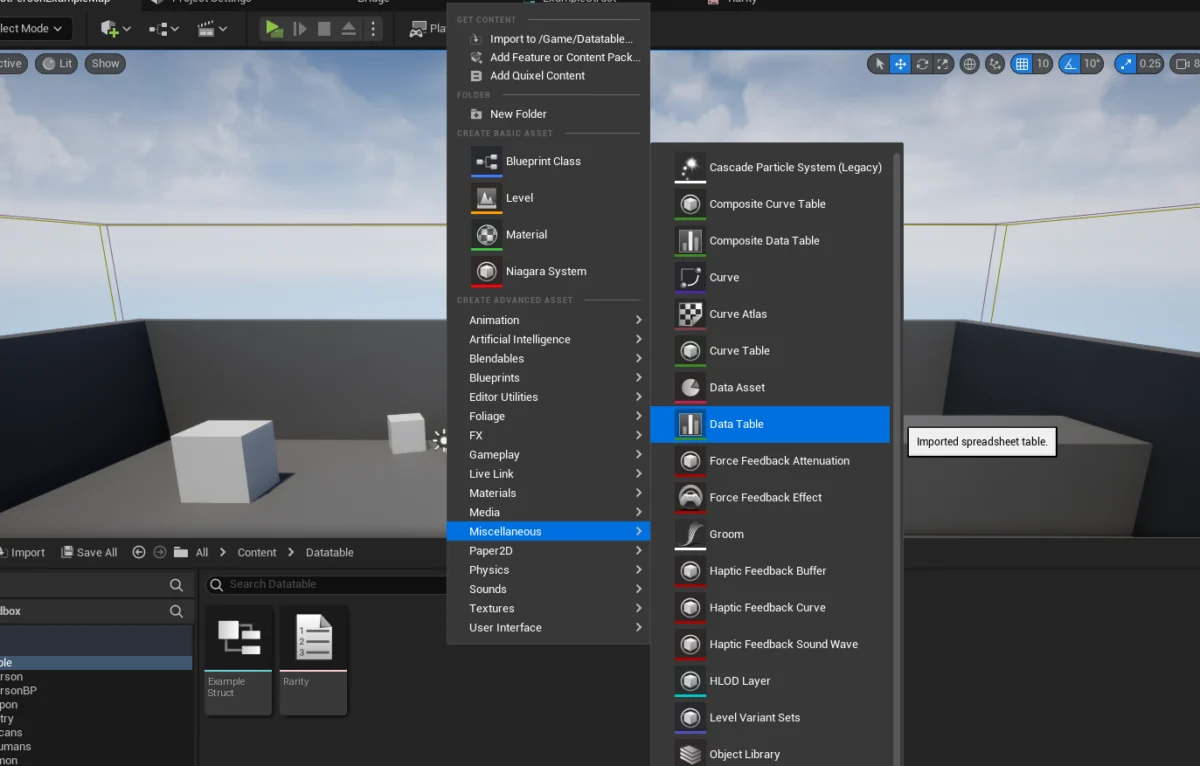
- Right-click in the Content Browser.
- Navigate to the "Miscellaneous" category and select "Data Table."
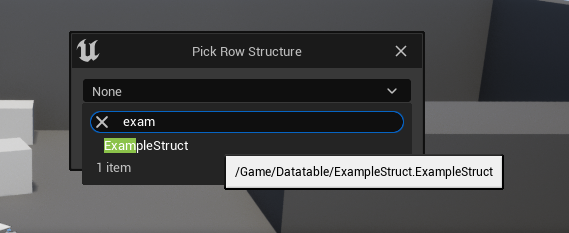
- A prompt will appear, asking the developer to select the "Row Structure." This is where the previously created Struct (e.g.,
F_RPGItemData) is chosen. This selection irrevocably links the Data Table to the defined schema, ensuring all rows conform to its structure. - Name the Data Table (e.g.,
DT_RPGItems).
2. Populating the Data Table with Entries:
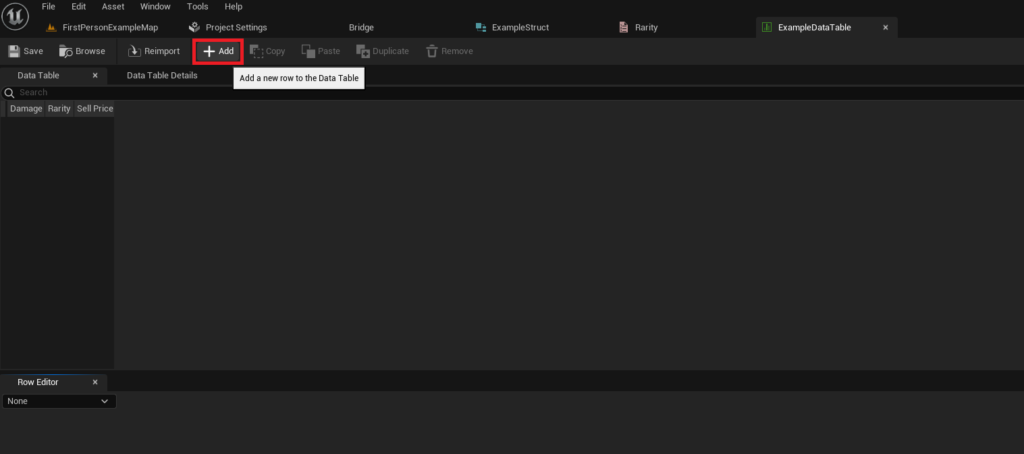
Upon opening the newly created Data Table, developers are presented with a tabular interface. This visual editor is one of the most significant advantages of Data Tables, as it empowers designers and content creators to input and modify game data without touching a single line of code or Blueprint logic.
- Adding Rows: The "Add" button allows for the creation of new rows. Each new row automatically inherits all the fields defined in the chosen Struct, initialized with default values.
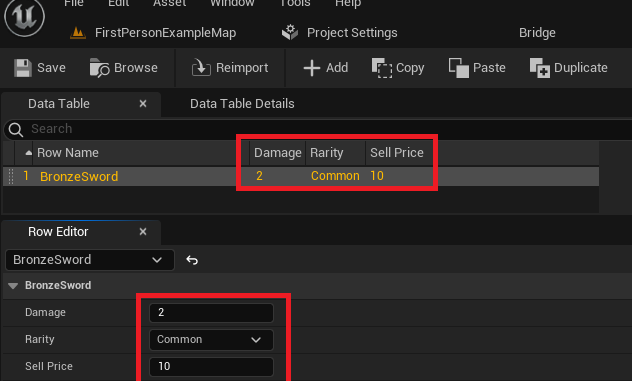
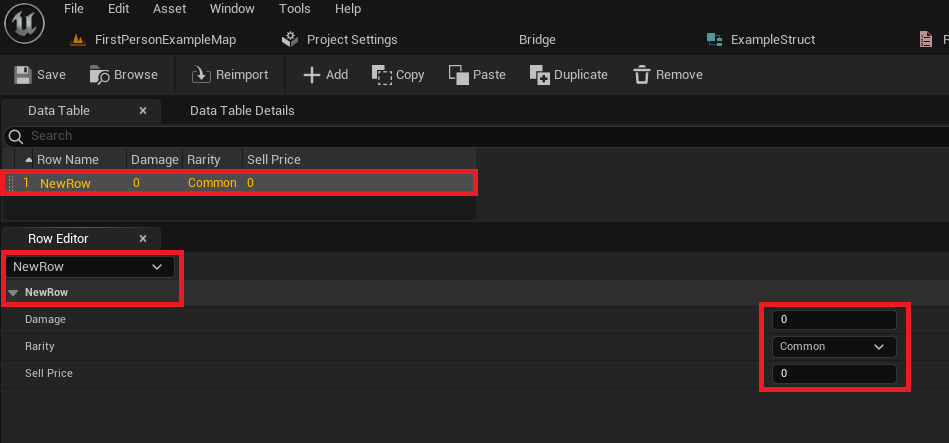
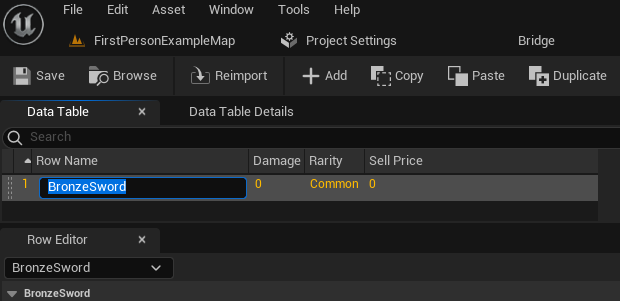
- Row Names (Keys): Crucially, each row is identified by a unique "Row Name." This name acts as the primary key for accessing specific data entries at runtime. It is imperative that these names are unique and descriptive (e.g., "BronzeSword," "HealingPotion," "QuestItem_MacGuffin"). These names are case-sensitive and should be chosen carefully for ease of reference in Blueprints or C++ code.
- Data Entry: Below the table view, a "Row Editor" panel displays the fields of the currently selected row, mirroring the Struct’s definition. Developers can modify the
Damage,Rarity,SellPrice,ItemName,ItemDescription, andIconvalues directly. The changes are immediately reflected in the table view above. This iterative process of adding rows and defining their values forms the bulk of content creation for data-driven game elements. - Saving Changes: As with any asset in Unreal Engine, frequent saving is crucial to prevent loss of work. The Data Table asset persists all entered data within the editor and at runtime, making it a reliable source of truth.
A typical project might involve multiple Data Tables: one for item definitions (DT_RPGItems), another for enemy stats (DT_EnemyStats), a third for quest details (DT_Quests), and perhaps even one for localization strings (DT_Localization). This modular approach further enhances organization and manageability.
Accessing and Utilizing Data at Runtime
The true power of Data Tables manifests when game systems need to access and utilize the stored information during gameplay. Unreal Engine 5 provides straightforward Blueprint nodes for retrieving data, both for individual entries and for iterating through the entire table.
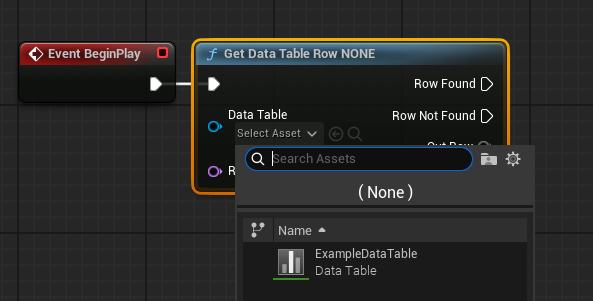
1. Accessing a Specific Row: Get Data Table Row
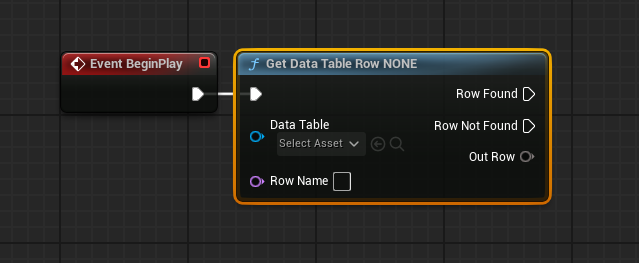
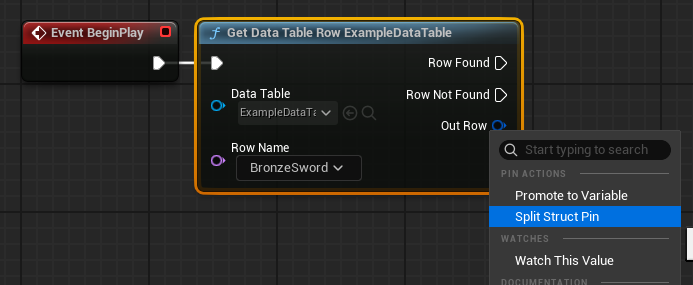
The primary method for retrieving a single entry is the Get Data Table Row node. This node requires two key inputs:
- Data Table: A direct reference to the Data Table asset (e.g.,
DT_RPGItems). This can be set directly in the node’s properties or passed dynamically via a variable. - Row Name: The unique string identifier (key) of the row to be retrieved (e.g., "BronzeSword"). This can be a literal string or a variable.
The node provides two execution pins:
- Row Found: Executes if a row matching the provided
Row Nameis successfully found. - Row Not Found: Executes if no matching row is found, indicating a potential error or invalid key.
The most critical output is Out Row, which returns a copy of the Struct containing all the data for the retrieved row. To access individual fields within this Struct (e.g., Damage, Rarity), the Out Row pin can be right-clicked and "Split Struct Pin" selected. This expands the pin into separate output pins for each member variable of the Struct, allowing developers to easily connect them to other Blueprint nodes for processing, display, or game logic. For example, the Damage value could be used in a combat calculation, Rarity could determine visual effects, and SellPrice could update a player’s inventory UI.
2. Looping Over All Rows: Get Data Table Row Names and For Each Loop
In scenarios where game logic needs to process every entry in a Data Table—such as populating a shop inventory, evaluating all possible item drops, or performing a mass balancing check—looping capabilities are essential.
Get Data Table Row Names: This node takes a Data Table reference as input and outputs an Array ofNametype, containing all theRow Names(keys) present in that Data Table.For Each Loop: The output array fromGet Data Table Row Namescan then be connected to aFor Each Loopnode. This loop iterates through each element (Row Name) in the array.- Combining for Iteration: Inside the
Loop Bodyof theFor Each Loop, theArray Element(which is the currentRow Namebeing processed) can be fed into aGet Data Table Rownode. This effectively retrieves the full data Struct for each row in sequence.
This powerful combination allows developers to perform operations on every item, enemy, or quest defined in the Data Table, enabling dynamic content generation, complex filtering, and comprehensive data processing with minimal effort. For instance, a shop UI could use this loop to generate a list of all sellable items, dynamically pulling their names, icons, and prices from the Data Table.
Broader Impact and Strategic Implications
The strategic use of Data Tables in Unreal Engine 5 extends far beyond simple data storage; it fundamentally shapes the development pipeline and the final product’s quality.
- Enhanced Collaboration: Data Tables serve as a "single source of truth" for game data. Designers can populate and balance content (item stats, enemy health, quest parameters) in the editor, while programmers focus on logic, confident that they are accessing consistent and up-to-date values. This reduces miscommunication and integration errors, fostering a more efficient collaborative environment.
- Rapid Iteration and Game Balancing: Game development is an iterative process. Data Tables allow designers to quickly adjust numerical values—such as weapon damage, character movement speed, or enemy resistances—without requiring code changes or lengthy rebuilds. This agility is invaluable for fine-tuning gameplay, responding to playtester feedback, and achieving desired game balance.
- Scalability and Content Expansion: As games grow in scope, the volume of data can become overwhelming. Data Tables provide a structured, organized way to manage hundreds or even thousands of unique items, abilities, NPCs, or environmental parameters. This scalability is crucial for large open-world games, RPGs, or titles with extensive customization options.
- Localization Support: Data Tables can be effectively used to store localized text strings for UI elements, dialogue, item descriptions, and more. By creating separate columns or even separate Data Tables for different languages, games can seamlessly support multiple locales, making the product accessible to a global audience.
- Reduced Development Risk: By externalizing data, developers reduce the risk of introducing bugs through code changes. Data validation, while not inherent in Data Tables, can be implemented through Blueprint logic to ensure that entered values fall within acceptable ranges, further enhancing data integrity.
- Performance Considerations: While Data Tables are asset-based, their data is loaded efficiently at runtime, making them a performant choice for static or semi-static game data that doesn’t change frequently during gameplay.
Conclusion
Unreal Engine 5’s Data Tables represent a cornerstone of modern game development, providing an indispensable tool for structured data management. By understanding and effectively utilizing Enums, Structs, and the Data Table asset itself, developers can create highly organized, easily modifiable, and scalable game projects. This approach fosters superior collaboration, accelerates iteration cycles, and ultimately contributes to the creation of more robust and engaging interactive experiences. For any serious Unreal Engine developer, mastering Data Tables is not merely a technical skill but a strategic imperative for building efficient and future-proof games.
About the Author