The independent game development platform, itch.io, has rolled out a significant enhancement to its desktop application, introducing a graphical user interface (GUI) for its powerful command-line upload tool, Butler. This update marks a pivotal moment for developers leveraging the platform, enabling direct, streamlined project updates within the familiar environment of the itch.io app, eliminating the prior necessity of engaging with a terminal for build management. Developers utilizing the latest version of the itch.io app (v26.12.0 or newer) will now discover a dedicated "Upload" section, designed to democratize access to Butler’s efficient build pushing capabilities.
The Strategic Importance of Butler: A Technical Overview
At its core, Butler is itch.io’s proprietary command-line interface (CLI) engineered for uploading game builds to the platform. Unlike conventional file uploads that transmit entire project archives with every update, Butler operates on a sophisticated patching system. When a developer pushes a new build to an existing "channel" – a customizable tag like windows-beta, linux-arm64, or macos-preview – Butler intelligently compares the new build against the previous version. It then calculates and transmits only the delta, or the changes, between the two builds. This differential patching mechanism is fundamental to its efficiency.
The initial upload of a project through Butler transmits the complete build. However, subsequent pushes to the same channel are dramatically optimized. Butler identifies modified, added, or deleted files, packaging only these differences into a compact patch. This intelligent approach yields substantial benefits for both developers and players. For developers, it translates to significantly faster upload times, especially for minor updates to large projects. For players using the itch.io app, game updates are similarly efficient, downloading only the necessary patch rather than the entire game file. This drastically reduces download sizes, conserves bandwidth, and accelerates the updating process, thereby enhancing the overall user experience. Post-upload, itch.io’s backend servers further re-compress and optimize these patches, ensuring maximum efficiency and minimal data footprint. Industry estimates suggest that delta patching can reduce data transfer volumes by upwards of 70-90% for iterative updates, translating to potentially petabytes of saved data across the platform annually given itch.io’s extensive library of several hundred thousand titles.
A Chronology of Developer Tools at itch.io
Itch.io, founded in 2013 by Leaf Corcoran, emerged as a vital platform for independent game developers, emphasizing a creator-first approach with flexible revenue sharing and a commitment to openness. From its inception, the platform recognized the unique challenges faced by indie developers, particularly concerning game distribution and updates.
Initially, developers primarily uploaded builds via web browsers, a straightforward but often inefficient method for frequent updates. Recognizing the need for a more robust and developer-centric solution, itch.io introduced Butler as a standalone command-line tool. This marked a significant leap forward, offering unparalleled control over build management, versioning, and the critical delta patching feature. Butler quickly became an indispensable tool for many developers comfortable with terminal environments, offering a level of precision and efficiency unmatched by simple file uploads. Its ability to manage multiple platform-specific channels and provide robust version control was particularly appealing to studios managing complex projects and diverse player bases.
However, the inherent nature of a command-line interface presented a barrier to entry for a segment of the developer community. Many hobbyists, emerging creators, or those less familiar with scripting and terminal commands found Butler’s text-based interface daunting. This created a dichotomy: while power users embraced Butler’s capabilities, others continued to rely on less efficient web-based uploads or struggled to integrate Butler into their workflow. The itch.io desktop application, itself a progressive step in player experience, initially served primarily as a game launcher and library manager. The integration of Butler directly into the app represents the culmination of a long-standing developer request and itch.io’s continuous commitment to lowering the technical hurdles for content creators.
Bridging the Accessibility Gap: A GUI for All Developers
The introduction of Butler’s GUI within the itch.io app directly addresses the accessibility gap that existed with the CLI-only version. This move democratizes access to a powerful tool previously reserved for those proficient in command-line operations. For many developers, particularly those new to game creation or working in non-technical roles within small teams, the prospect of typing commands into a terminal can be intimidating. The new GUI streamlines this process, transforming complex commands into intuitive clicks and drag-and-drop actions.
This enhancement is expected to onboard a wider array of creators onto Butler’s efficient update system. Hobbyist developers, educational users, and those focusing solely on game design without extensive programming backgrounds can now benefit from faster uploads and more professional build management. By removing the "terminal barrier," itch.io reinforces its position as an inclusive platform dedicated to supporting the full spectrum of independent game development. Early reactions from the community, as observed in developer forums and social media, indicate widespread appreciation for this user-friendly approach, with many expressing relief at no longer needing to consult documentation or memorize commands for routine updates.
A Guided Tour of the New Upload Experience
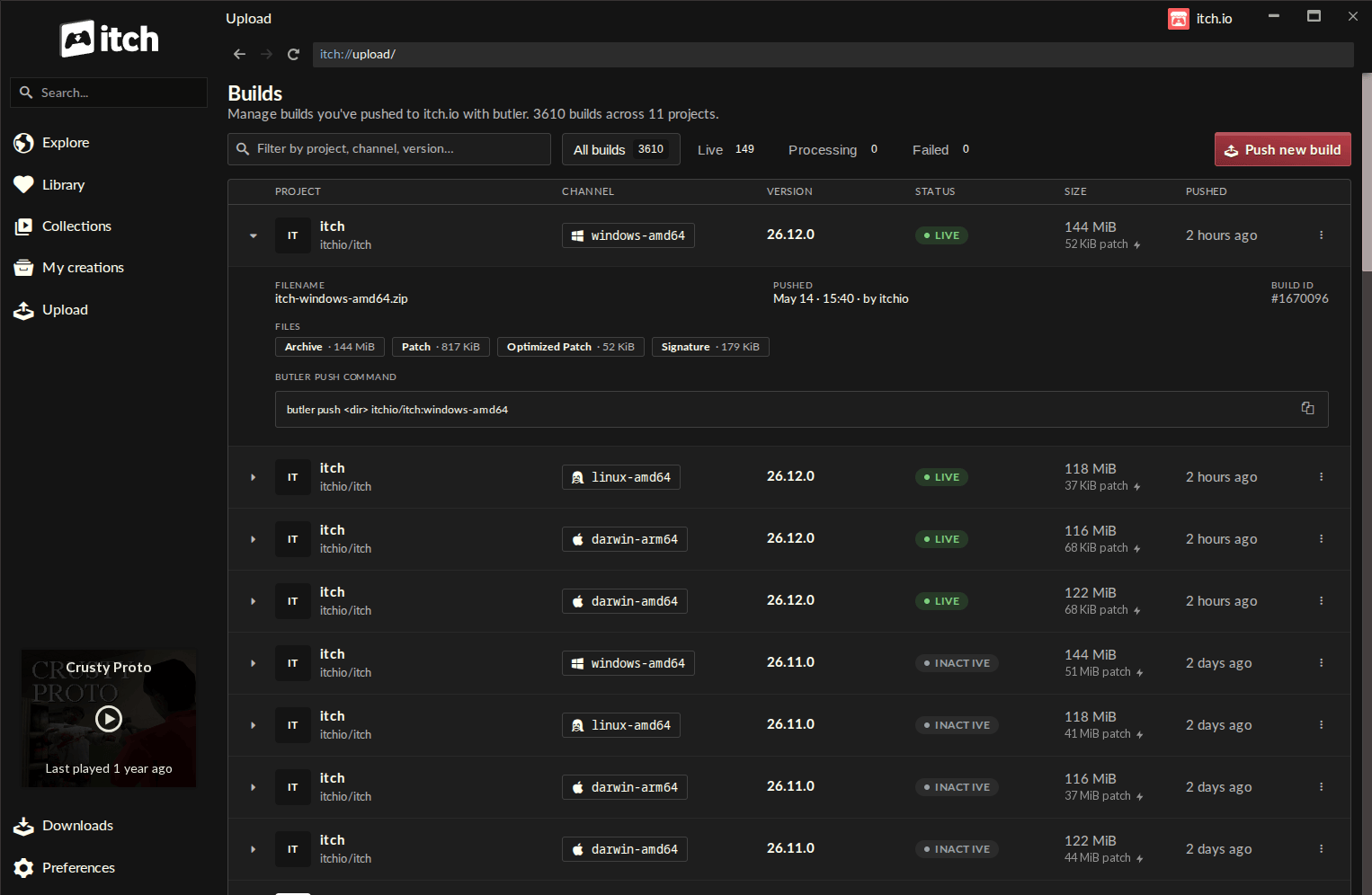
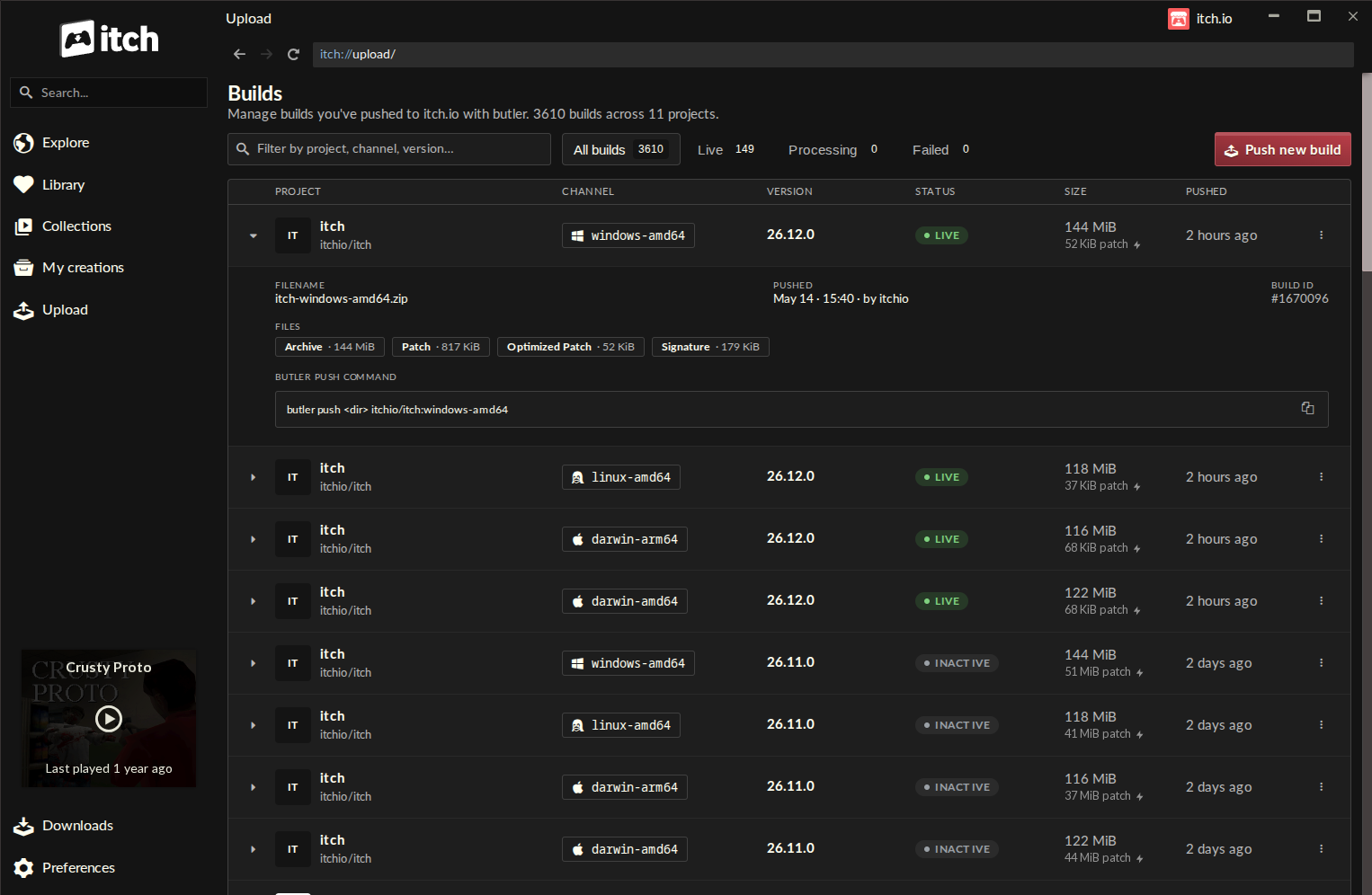
The newly integrated Butler functionality is housed within a dedicated "Upload" section, prominently featured in the itch.io app’s sidebar. Clicking this entry navigates users to the "Builds" page, a comprehensive dashboard designed for managing all project builds associated with the logged-in account.
The Builds Page: This central hub provides an at-a-glance overview of a developer’s entire portfolio of builds. Each entry in the list details critical information:
- Project Name: Clearly identifies the game or software title.
- Channel: Specifies the target distribution channel (e.g.,
windows-stable,mac-alpha). - Version: Displays the assigned version number, aiding in chronological tracking and user communication.
- Status: Indicates the build’s current state (e.g., "Pushed," "Processing," "Failed").
- File Size: Shows the total size of the build, useful for monitoring and optimization.
- Pushed Date: Provides a timestamp of the last update, ensuring clear revision history.
This organized view significantly improves build management, particularly for developers handling multiple projects or numerous channels for a single title. It transforms what was once a manual tracking process into an automated, readily accessible record within the app.
Pushing a New Build: From the "Builds" page, developers can initiate a new upload by clicking the "Push new build" button, which opens an intuitive push dialog. The process is designed for clarity and ease of use:
- Project Selection: A dropdown menu allows developers to select the specific project they wish to update.
- Channel Management: Users can either choose an existing channel from a list or create a new one by simply typing a desired name. This flexibility supports agile development cycles and diverse testing strategies.
- Optional Versioning: Developers can optionally assign a version number to their build. While not strictly mandatory for Butler to function, consistent versioning is a best practice for project organization and communicating updates to players.
- File Input: The core of the upload process involves dropping a folder or a .zip file containing the build directly into the designated area. The app also maintains a "recent folders" list, allowing quick re-selection of previously used locations, saving time on repetitive tasks.
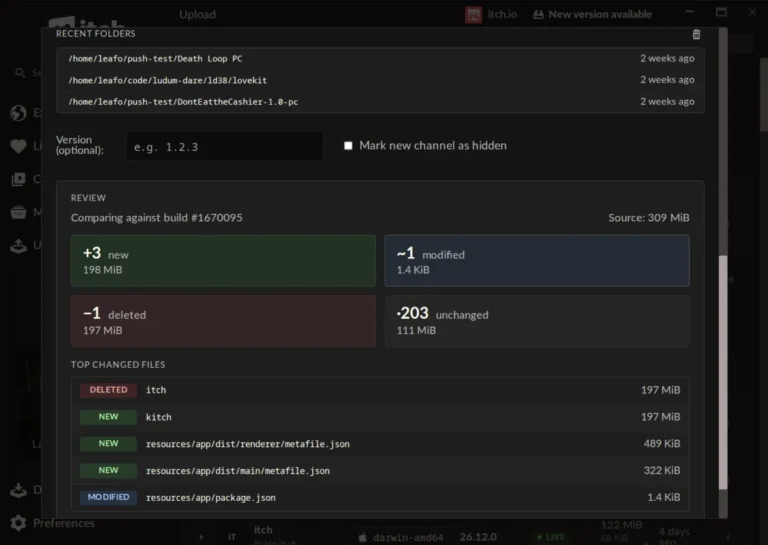
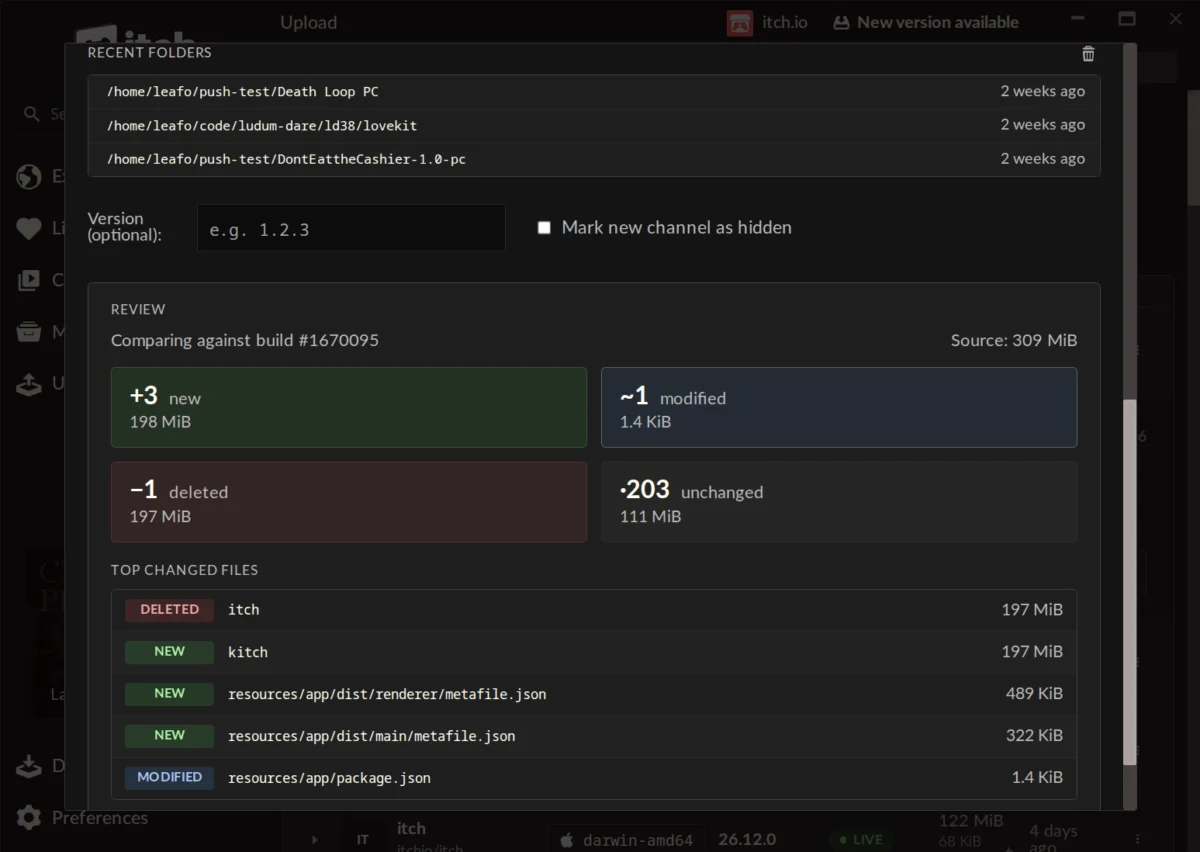
The Preview Feature: A Critical Safeguard: Before committing to an upload, the new GUI offers a powerful "Preview" feature. This allows developers to generate a detailed report of what has changed since the last build on the selected channel. The preview provides:
- File Count Breakdown: Number of new, modified, deleted, and unchanged files.
- Size Breakdown: The data volume associated with each category.
- Largest Changed Files: A list highlighting the most significant alterations.
This diagnostic tool is invaluable for preventing errors. Developers can verify that only intended changes are being pushed, identify accidental inclusions or exclusions, and gain a clear understanding of the patch’s scope. This proactive insight helps maintain build integrity and minimizes the risk of inadvertently releasing broken or incomplete updates, a common pitfall in game development.
Under the Hood: Automation and Optimization
The convenience extends beyond the user interface. The Butler version embedded within the itch.io app is automatically updated, freeing developers from the task of manually downloading and configuring new Butler versions. This "always up-to-date" approach ensures developers consistently benefit from the latest optimizations and features without any administrative overhead.
Furthermore, the integration leverages the user’s logged-in account credentials from the itch.io app. This eliminates the need for separate authentication tokens or API keys, simplifying the workflow and enhancing security. For developers managing multiple itch.io profiles, the app’s quick profile-switching functionality extends seamlessly to Butler uploads, allowing effortless management of builds across different accounts. This level of automation and integration underscores itch.io’s commitment to creating a friction-free development environment.
Broader Implications for the Indie Ecosystem
This significant update carries several broader implications for the indie game development ecosystem and itch.io’s competitive standing:
- Enhanced Developer Productivity: By simplifying the update process, developers can allocate more time to creation and less to technical publishing hurdles. Faster, more reliable updates encourage more frequent iterations and bug fixes, leading to higher quality games.
- Increased Platform Stickiness: A more user-friendly and efficient toolset makes itch.io a more attractive platform for developers, potentially increasing the volume and quality of content available. This could draw developers who might otherwise opt for platforms with perceived easier publishing workflows.
- Improved Player Experience: The underlying delta patching benefits players directly through faster, smaller updates. This is particularly crucial for users with limited bandwidth or data caps, ensuring a smoother and more accessible gaming experience.
- Democratization of Advanced Features: By wrapping a powerful CLI tool in an accessible GUI, itch.io effectively democratizes an advanced publishing feature. This aligns with the platform’s ethos of empowering all creators, regardless of their technical proficiency.
- Competitive Edge: While itch.io often caters to a different niche than larger storefronts like Steam, providing robust and easy-to-use developer tools strengthens its overall offering. It positions itch.io as a serious contender for indie developers looking for supportive and efficient distribution channels.
Community Reception and Future Outlook
Initial feedback from the developer community has been overwhelmingly positive. Developers have praised the "ease and organization" of the new system, noting a significant improvement in workflow efficiency. Comments highlight the intuitive nature of the app and the valuable "Compare step" (the preview feature) for preventing errors. While some developers expressed interest in converting older, non-Butler uploaded projects to the new system—a feature currently not supported due to the metadata requirements of Butler—the overall sentiment reflects a strong appreciation for the enhanced user experience. Itch.io has acknowledged this feedback, indicating that such a conversion feature could be considered for future development, demonstrating responsiveness to its community’s needs.
The integration of Butler’s GUI into the itch.io app is not merely a cosmetic change; it represents a strategic evolution in how the platform supports its developer community. By making advanced build management accessible to everyone, itch.io continues to foster an environment where creativity can thrive, unhindered by technical complexities. This update solidifies itch.io’s reputation as a forward-thinking platform dedicated to the indie spirit, promising a future of even more seamless and efficient game development and distribution.
Accessing the Update
The itch.io app is designed for automatic updates, meaning most users will receive this functionality without manual intervention. Developers can, however, manually check for updates via the app’s Preferences screen to ensure they have the latest version. New users to the itch.io ecosystem can download the app directly from itch.io/app. To utilize the new "Upload" tab and its integrated Butler features, users must have at least v26.12.0 of the itch.io app installed. For those who still prefer or require the command-line functionality, the comprehensive Butler documentation remains available at itch.io/docs/butler, outlining all its advanced features and usage. The itch.io team eagerly anticipates the new projects and updates that developers will now push with unprecedented ease and efficiency.
About the Author