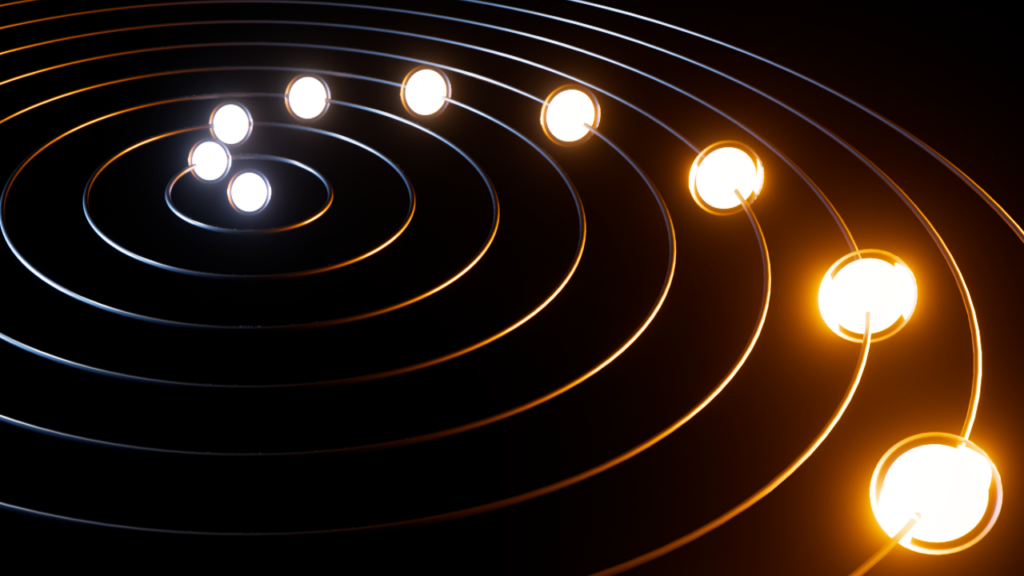
A recent tutorial released by BlenderNation, created by TiFi Design, offers a comprehensive guide to achieving "mesmerizing orbital motion" within Blender’s powerful Geometry Nodes system. The video tutorial, published on March 1, 2026, delves into the intricate node-based workflow, demonstrating how to construct complex animations that simulate celestial movements and other dynamic orbital patterns. This release highlights the growing accessibility and sophistication of procedural animation techniques within the open-source 3D creation suite, Blender.
The tutorial, available on YouTube, provides viewers with a step-by-step breakdown of the process, empowering both intermediate and advanced Blender users to replicate the effect. Geometry Nodes, a feature introduced in Blender 2.92 and significantly expanded in subsequent versions, allows users to generate and manipulate geometry procedurally. This means that rather than manually modeling every element, users can define rules and parameters that the software then uses to construct and animate complex scenes. The "orbital motion" effect demonstrated by TiFi Design likely leverages these procedural capabilities to create a visually captivating animation without requiring tedious keyframing for each individual object’s path.
The Power of Procedural Animation in Blender
The core of TiFi Design’s tutorial lies in the application of Geometry Nodes to create dynamic, looping animations. Procedural animation, in general, offers several advantages over traditional keyframe animation. Firstly, it allows for greater flexibility and control. Changes to initial parameters can ripple through the entire animation, enabling rapid iteration and refinement. Secondly, it is highly efficient for generating complex patterns that would be prohibitively time-consuming to animate manually. This is particularly relevant for simulations involving multiple interacting elements, such as planetary systems, particle flows, or intricate mechanical movements.

Geometry Nodes, in particular, has democratized these advanced techniques within the Blender community. Previously, achieving such sophisticated procedural animations might have required extensive scripting or specialized third-party tools. Now, with the intuitive node-based interface, users can visualize the flow of data and operations, making the creation process more accessible and understandable. The "mesmerizing orbital motion" effect likely involves nodes that control position, rotation, and scaling over time, potentially utilizing mathematical functions to define precise elliptical or circular paths. Common nodes for such an effect might include Curve to Mesh, Transform, Vector Math, Time nodes, and various noise or texture nodes to add subtle variations and organic qualities to the motion.
Background and Context: The Evolution of Geometry Nodes
The development and widespread adoption of Geometry Nodes represent a significant milestone in Blender’s evolution. First introduced as a somewhat experimental feature, its capabilities have been steadily enhanced with each major release. The decision to integrate Geometry Nodes as a core feature reflects the Blender Foundation’s commitment to providing users with powerful, non-destructive, and flexible creative tools.
The timeline of Geometry Nodes’ integration can be traced back to Blender 2.92 (released in February 2021), where the initial nodes were made available. Subsequent releases, notably Blender 3.0 (December 2021) and Blender 3.1 (March 2022), saw substantial expansions and optimizations, solidifying its position as a primary animation and modeling tool. The tutorial by TiFi Design, dated March 1, 2026, indicates that the technique being taught is likely built upon the most recent advancements in Blender’s Geometry Nodes, suggesting a high level of sophistication and efficiency achievable with current versions.
This progression has fostered a vibrant ecosystem of artists and developers creating tutorials, add-ons, and shareable node setups. TiFi Design’s contribution is part of this ongoing wave of knowledge sharing, aimed at demystifying complex workflows and inspiring new creative possibilities within the Blender community. The focus on "orbital motion" is a classic example of a visually appealing effect that benefits immensely from procedural generation.

Technical Aspects and Potential Implementations
While the specific nodes and connections used in TiFi Design’s tutorial are not detailed in the provided snippet, a "mesmerizing orbital motion" animation typically involves several key principles within Geometry Nodes:
- Path Generation: The foundation of orbital motion is the creation of a path. This could be achieved by generating a curve object (e.g., a circle, ellipse, or even a more complex Bezier curve) within Geometry Nodes. Alternatively, a series of points could be distributed along a mathematical function that describes an orbit.
- Object Instancing: To create the orbiting elements (e.g., planets, moons, or abstract shapes), the
Instance on Pointsnode is crucial. This node allows users to place copies of another object (the "instance") onto each point of a generated geometry (in this case, the points along the orbital path). - Animation of Position/Offset: The core of the animation lies in moving these instances along their respective paths. This is typically done by animating a factor that controls the position along the curve or the distribution of points. A
Timenode, often multiplied by a speed factor, can drive this animation, creating a continuous loop. - Rotation and Orientation: To ensure the orbiting objects maintain a consistent orientation relative to their path or a central point, rotation can be applied. This might involve aligning the instances to the tangent of the curve or using a separate calculation to orient them towards a central focus.
- Scaling and Variation: For added visual interest, the size (scale) of the orbiting objects can be varied. This could be done randomly, based on their position in the orbit, or driven by texture nodes to create subtle differences.
- Material and Shading: The visual appeal is further enhanced by assigning materials to the instanced objects. This might involve procedural shaders to create planet surfaces, nebulae, or other cosmic textures, contributing to the "mesmerizing" quality.
The term "mesmerizing" suggests that TiFi Design’s approach likely goes beyond a simple, rigid orbit. It might incorporate elements like:
- Non-linear motion: Introducing subtle accelerations or decelerations.
- Interacting elements: Creating systems where multiple objects orbit each other or a central body.
- Dynamic environmental effects: Adding background elements like stars, nebulae, or subtle camera movements that enhance the sense of depth and motion.
- Color and light interplay: Utilizing color gradients and lighting to emphasize the movement and create visual harmony.
Supporting Data and Community Impact
The release of such tutorials directly contributes to the growth and accessibility of 3D art and animation. BlenderNation, as a prominent platform for Blender news and tutorials, plays a vital role in disseminating this knowledge. Statistics from similar tutorial releases on BlenderNation often show tens of thousands of views, indicating a significant demand for learning advanced techniques. The engagement metrics, such as likes, comments, and shares, provide tangible evidence of the tutorial’s impact within the community.
TiFi Design, identified as a "Blender enthusiast and YouTuber," explicitly states their mission is to "help others learn how to do cool stuff in Blender." Their YouTube channel, linked in their author bio, likely serves as a hub for their educational content. The success of such creators is often measured by subscriber growth and the positive feedback received from users who have successfully applied their teachings.

The implications of this tutorial extend beyond individual learning. It showcases the evolving capabilities of open-source software in competing with professional, proprietary animation suites. As Geometry Nodes become more powerful and user-friendly, they empower independent artists and smaller studios to produce high-quality visual content that was once only achievable with significant budgets and specialized software. This democratization of advanced animation techniques can lead to increased innovation and a more diverse landscape of visual media.
Analysis of Implications
The "mesmerizing orbital motion" tutorial by TiFi Design exemplifies a broader trend in digital art: the increasing reliance on procedural generation and node-based workflows. This approach offers a paradigm shift from traditional manual creation, emphasizing logic, rules, and data manipulation. The implications are far-reaching:
- Efficiency and Scalability: Procedural workflows are inherently more efficient for creating complex and repetitive elements. An artist can define a system for generating orbits, and then easily scale it up to include hundreds or thousands of orbiting objects, each with subtle variations, without manually animating each one.
- Non-Destructive Workflow: Geometry Nodes operate non-destructively. This means that the original mesh data remains intact, and all modifications are applied as a series of operations. This allows for easy iteration, refinement, and experimentation without fear of permanently altering the base geometry.
- Interoperability and Sharing: Node setups can often be shared between users, fostering collaboration and allowing for the rapid adaptation of existing systems. This can accelerate the development of new techniques and workflows within the community.
- Artistic Exploration: By abstracting the creation process, procedural tools like Geometry Nodes can free artists from tedious tasks, allowing them to focus more on conceptualization and artistic direction. The ability to rapidly generate and iterate on complex patterns can lead to unexpected and novel artistic outcomes.
- Education and Skill Development: The availability of high-quality tutorials on platforms like BlenderNation is crucial for disseminating knowledge and fostering skill development. As more artists become proficient in tools like Geometry Nodes, the overall quality and complexity of digital art are likely to increase.
In conclusion, TiFi Design’s tutorial on creating "mesmerizing orbital motion" in Blender’s Geometry Nodes is more than just a technical guide. It represents a snapshot of the ongoing evolution of 3D content creation, highlighting the power of procedural workflows, the accessibility of open-source software, and the collaborative spirit of the digital art community. As these tools continue to advance, we can expect to see even more innovative and breathtaking visual experiences emerge from artists around the globe.
About the Author