In the ever-evolving landscape of video game development, the ability to host robust and scalable multiplayer experiences is paramount for titles aiming for broad appeal and sustained player engagement. A foundational element in achieving this is the implementation of a dedicated server infrastructure, a critical development often detailed in technical guides for aspiring and professional game creators alike. Such a guide, recently highlighted by couchlearn.com, provides an in-depth walkthrough for building and configuring a dedicated server for Unreal Engine 5 (UE5) projects, emphasizing its significance for competitive shooters, cooperative survival games, and social sandbox environments.
The transition from peer-to-peer (P2P) hosting to dedicated servers represents a pivotal shift for game developers seeking to offer superior performance, enhanced security, and unwavering reliability for their player bases. Unlike P2P models where one player’s device acts as the host, introducing potential vulnerabilities and performance bottlenecks, a dedicated server operates independently as a centralized game instance. This separation ensures a consistent and fair gameplay environment, unaffected by individual player hardware limitations or network fluctuations. The comprehensive guide outlines the entire process, from initial project settings and server compilation to local execution, providing a clear roadmap for developers navigating the complexities of modern multiplayer game architecture.
The Imperative of Dedicated Servers in Modern Gaming
The demand for high-quality multiplayer experiences has surged in recent years, driven by the popularity of esports, massively multiplayer online (MMO) titles, and a global gaming community that thrives on shared interactive worlds. As game complexity and player counts increase, the limitations of P2P networking become starkly apparent. P2P setups, while cost-effective for smaller games with limited player interaction (typically 2-16 players), often suffer from "host advantage," susceptibility to cheating, and significant performance degradation if the host’s internet connection or hardware is inadequate. These issues can lead to desynchronization, unfair play, and ultimately, a diminished player experience that erodes community trust and retention.
Dedicated servers, by contrast, are designed to circumvent these challenges. They are standalone machines or virtual instances, typically hosted in data centers with high-bandwidth connections and robust processing power, solely dedicated to running the game’s server logic. This setup means the server "does not spawn a player character" and "does not count as a connected player," focusing purely on maintaining the game world’s state, processing game mechanics, and relaying information between connected clients. This architectural choice is particularly crucial for genres requiring precise hit detection, low latency, and a consistent game state across all participants, such as competitive fighting games or fast-paced shooters where even milliseconds of lag can determine victory or defeat.
The benefits extend beyond performance. Dedicated servers offer a more secure environment, making it significantly harder for malicious actors to exploit game mechanics or inject cheats directly into the server-side code. They also provide a centralized point for logging game events, applying anti-cheat measures, and performing server-side validations, contributing to a fairer and more enjoyable experience for all legitimate players. For developers, this translates into greater control over the game environment, easier debugging, and a more professional presentation of their multiplayer offering.
Essential Foundations for Server Deployment
Before embarking on the dedicated server build, developers must ensure their Unreal Engine 5 project meets specific prerequisites. A fundamental requirement is a working multiplayer UE5 project, ideally one that has already implemented session management. The guide explicitly references a companion guide on "Multiplayer Sessions in Unreal Engine 5," underscoring the interconnected nature of these development phases. This ensures that the game client can correctly discover, create, and join multiplayer sessions hosted by the server.
Crucially, the server build necessitates a source build of Unreal Engine, rather than a version downloaded directly from the Epic Games Launcher. This distinction is vital because the Launcher version typically provides pre-compiled binaries optimized for client-side gameplay, whereas a source build offers the flexibility to compile custom configurations, including dedicated server executables. Epic Games provides comprehensive documentation on "Downloading Source Code in Unreal Engine," guiding developers through the process of obtaining and compiling the engine from its GitHub repository. This step, while requiring additional setup, grants developers granular control over the engine’s compilation process, enabling them to tailor the build specifically for server operations.
Furthermore, for effective session browsing and management, the guide highlights the necessity of installing the AdvancedSessions plugin into the project. This third-party plugin, widely adopted within the Unreal Engine community, extends the engine’s native session functionalities, providing more robust and flexible tools for creating, finding, and joining multiplayer sessions. Its integration is critical for ensuring that the dedicated server’s hosted sessions are correctly advertised and discoverable by client applications, thereby facilitating seamless player connectivity.
Streamlining Server Initialization: Automatic Session and Map Configuration
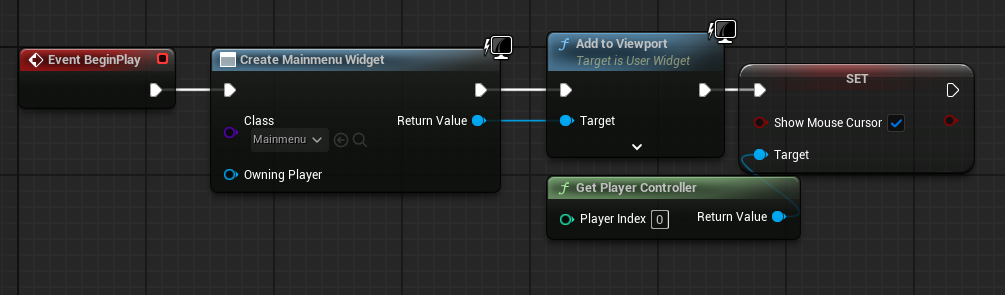
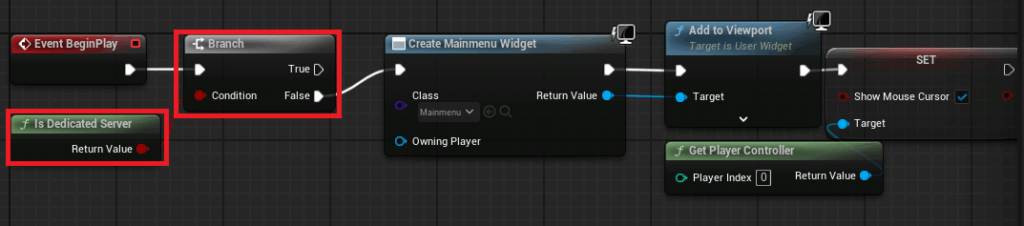
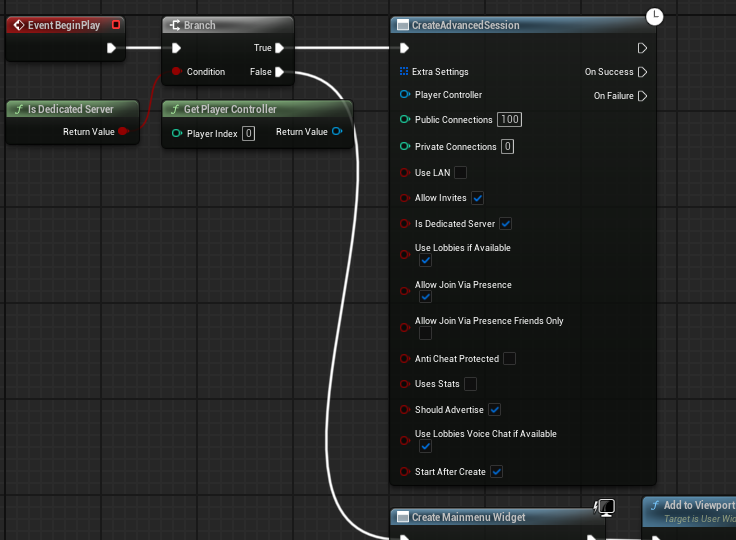
A key aspect of setting up a dedicated server is ensuring it operates autonomously, without requiring manual intervention to start a game session or load a specific map. The guide details how to configure the server to automatically create a session and load the appropriate game level upon launch. This involves modifying the project’s main menu level blueprint to incorporate a conditional check using the "Is Dedicated Server" node.
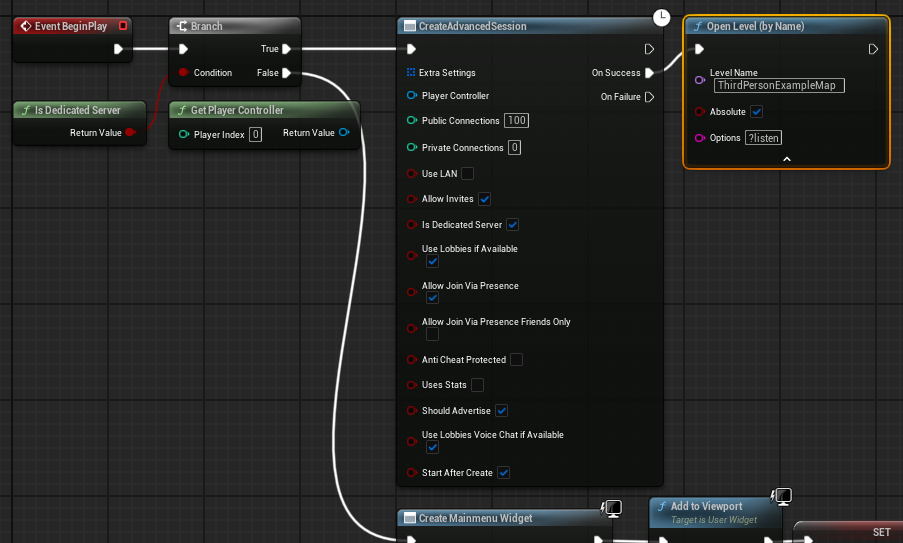
In a standard client build, the main menu level blueprint typically creates a user interface widget to allow players to navigate menus, find games, or start new ones. For a dedicated server, this menu interface is entirely superfluous and would consume unnecessary resources. By adding an "Is Dedicated Server" branch, the system can bypass the menu creation logic when running as a dedicated server. If the condition is true (i.e., it is a dedicated server), the system proceeds directly to create an "Advanced Session" with predefined settings. This session creation is the server’s way of announcing its availability to potential clients. Upon successful session creation, the server then opens the desired game level using the "?listen" option, signaling that it is ready to accept incoming player connections. This ensures that the server is instantly operational and available for players without displaying any graphical interface.
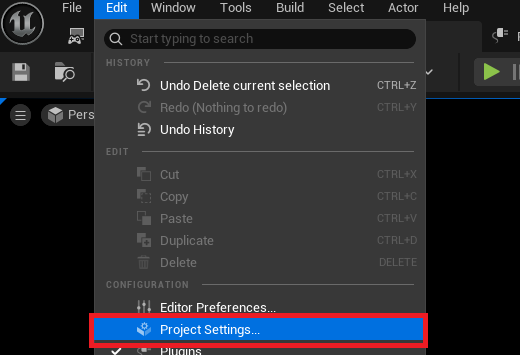
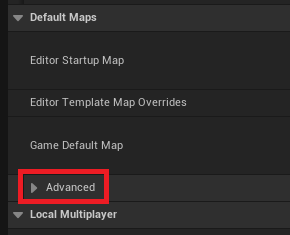
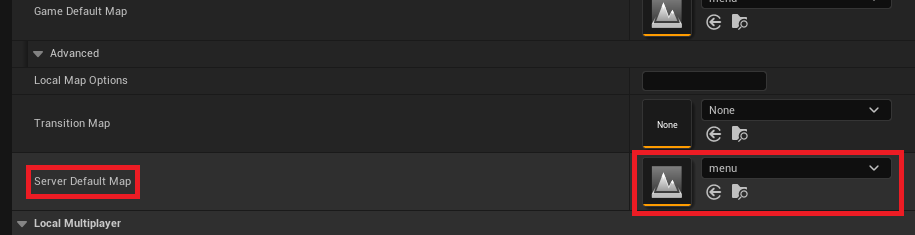
Complementing this, developers must specify a "Server Default Map" within the Project Settings. By default, Unreal Engine servers might load an generic "Entry" map, which is unsuitable for hosting actual gameplay. Navigating to the "Maps & Modes" section under Project Settings and expanding the "Default Maps" advanced options allows developers to designate a specific game map, such as a "menu" or primary gameplay map, as the server’s starting point. This configuration ensures that the dedicated server initializes into the correct game environment, ready for players to join and commence gameplay.
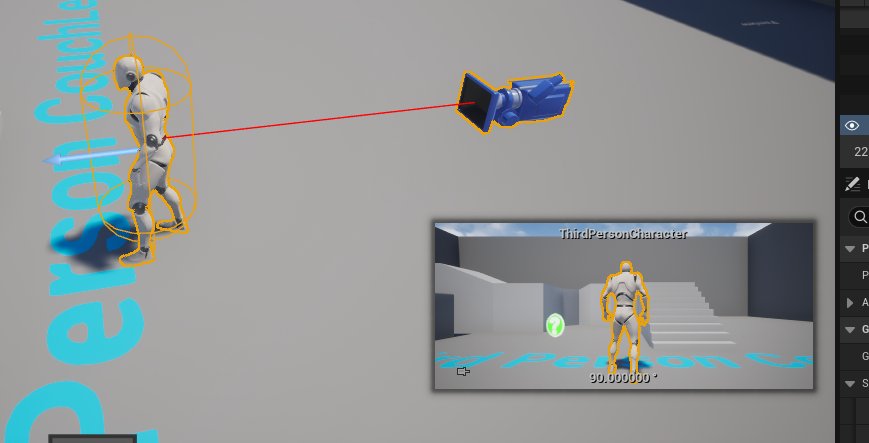
A final, yet significant, optimization involves removing any default character blueprints from the server’s initial level. In client builds, a default character might be spawned for the local player. However, a dedicated server "no longer needs a character spawned for the authority (server host)" as it does not participate in gameplay as a player. Eliminating these unnecessary character spawns prevents wasted resources and ensures that the server focuses solely on its role as the game world’s backend, devoid of any visual or interactive elements tied to a non-existent player.
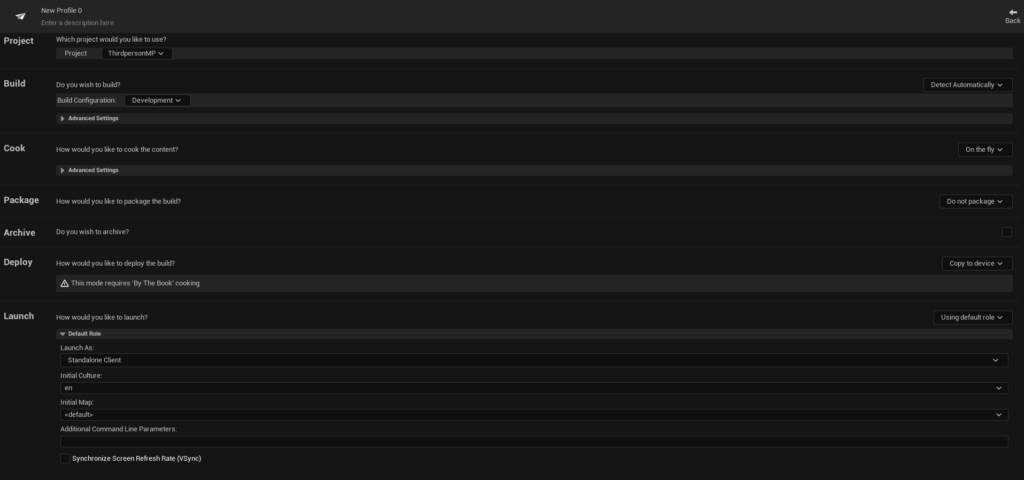
Leveraging the Project Launcher for Server Deployment

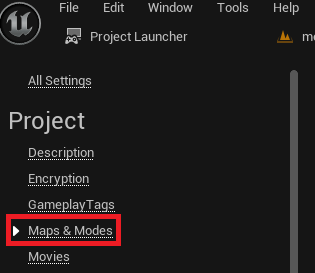
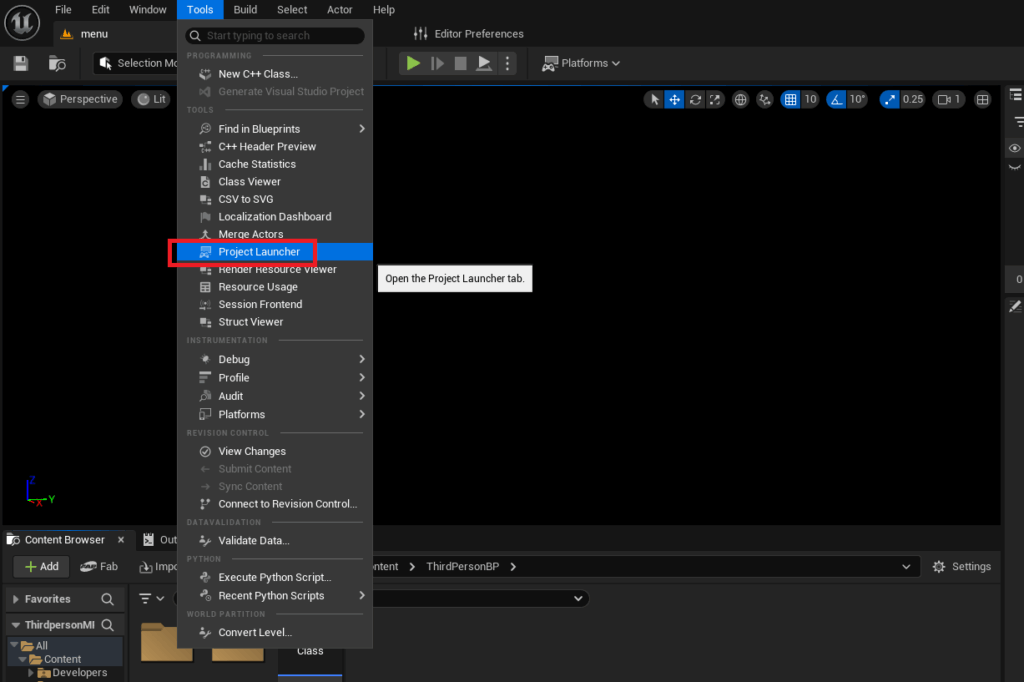
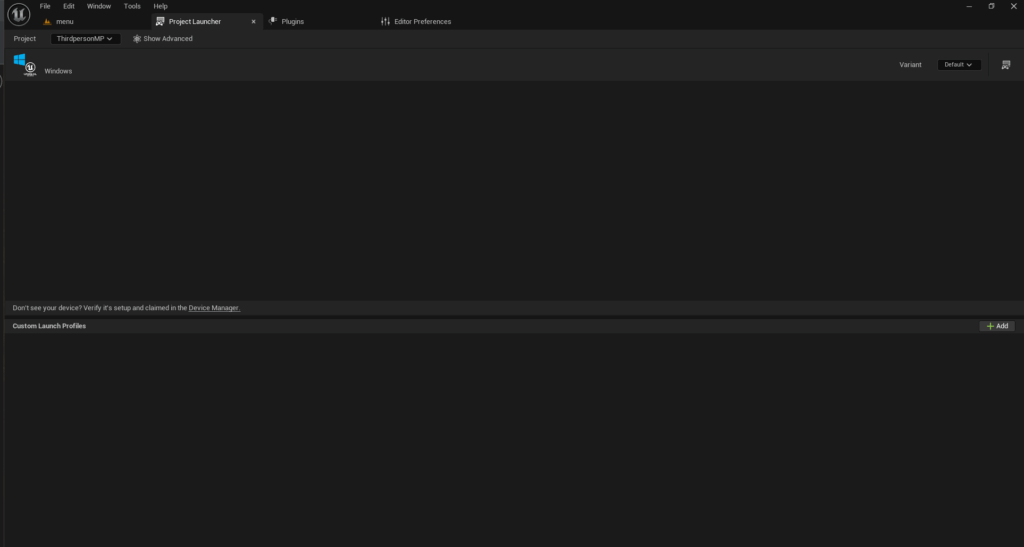
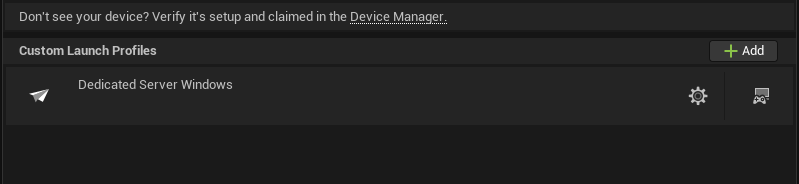
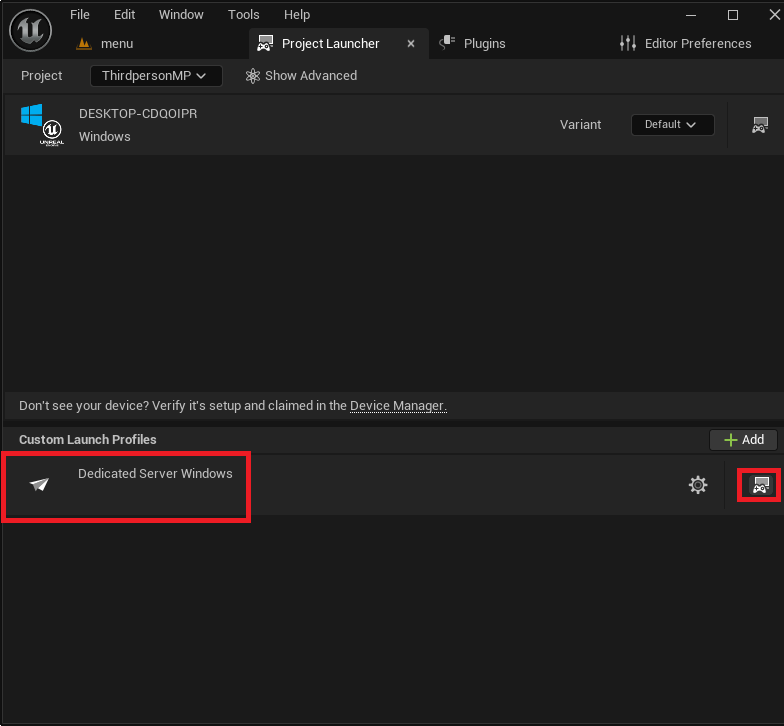
Unreal Engine provides a powerful integrated tool known as the "Project Launcher," which streamlines the process of building and deploying various versions of a game, including dedicated servers. Accessible through the "Tools" menu, the Project Launcher allows developers to create custom profiles that define specific build configurations.
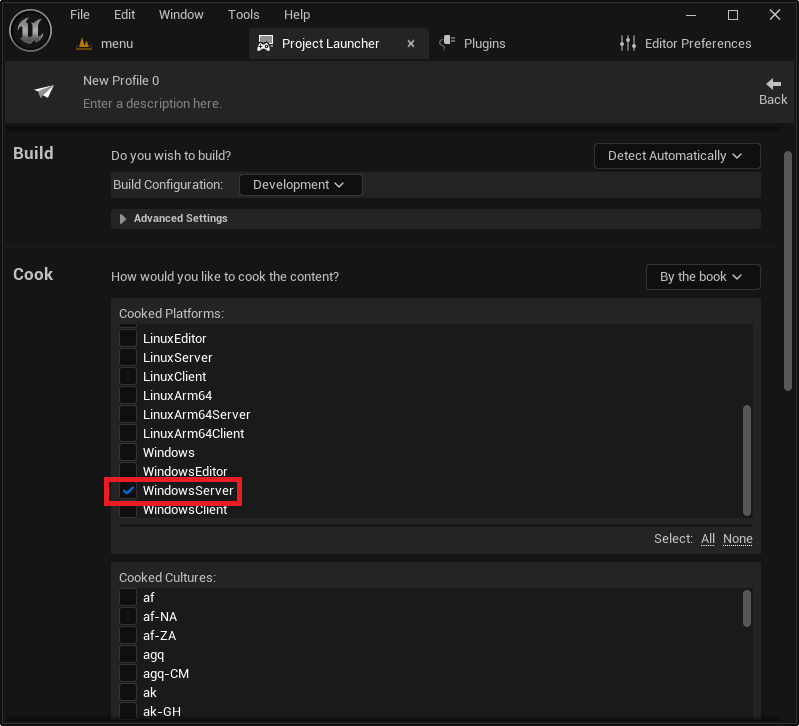
The process of creating a custom profile for a dedicated server involves several key steps:
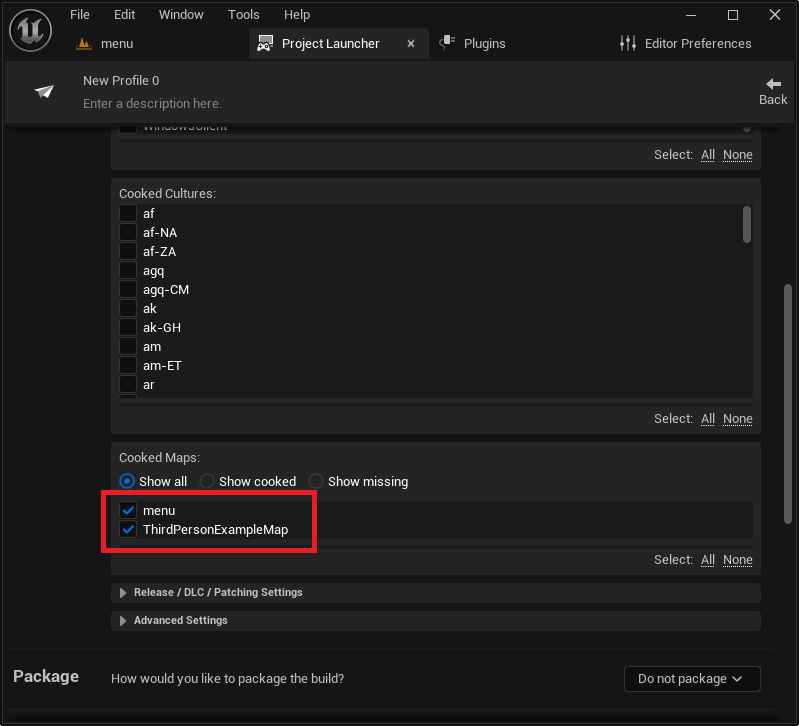
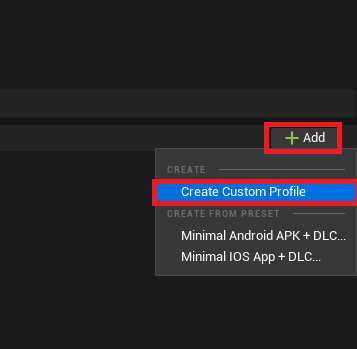
- Profile Creation: Initiating a "Create Custom Profile" action within the Project Launcher opens a comprehensive menu of options for tailoring the build.
- Cook Settings: The "Cook" section requires changing the default "On the fly" option to "By the book." This signifies a complete pre-compilation of all necessary game content, ensuring the server has everything it needs to run independently.
- Platform Selection: Developers must then select the target server platform. For Windows-based hosting, "WindowsServer" is chosen. For Linux environments, "LinuxServer" (x86/64) or "LinuxArm64" (for ARM-based systems) can be selected, catering to diverse deployment infrastructures, from traditional data centers to emerging edge computing solutions.
- Map Inclusion: All maps intended for use on the server, including the default server map and any gameplay levels, must be explicitly added to the "Cooked Maps" list. This ensures that the server build contains all necessary level data.
- Packaging Options: The "Package" section needs to be set to "Package & store locally," which instructs the Project Launcher to compile the server executable and its associated files into a designated folder on the developer’s local machine. Developers can customize this output directory for organizational purposes.
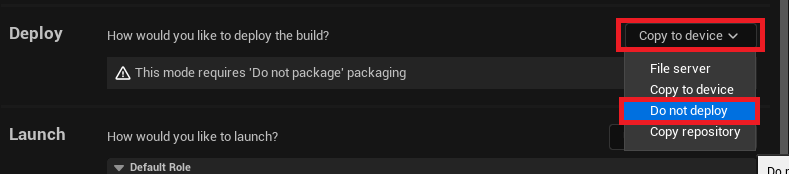
- Deployment Settings: The "Deploy" option should be set to "Do not deploy," as the goal is to create local build files rather than automatically push them to a device, which is typically handled separately for dedicated server hosting.
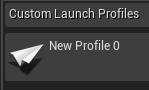
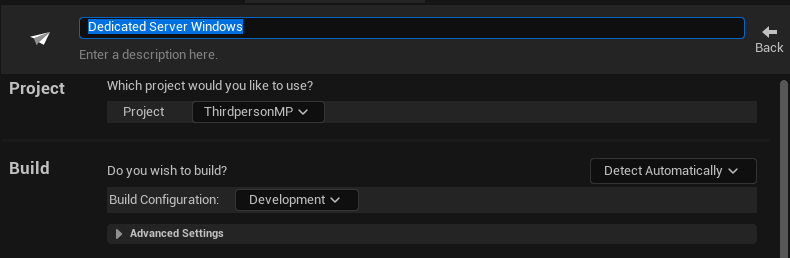
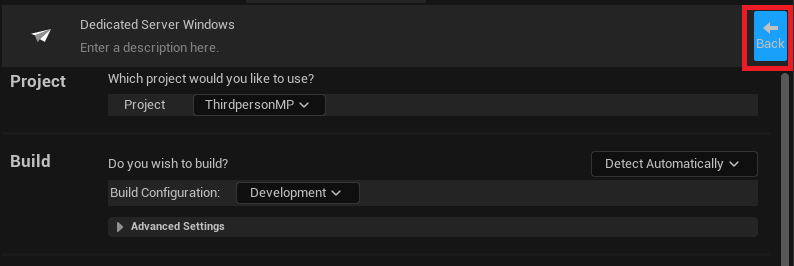
- Profile Naming: Finally, assigning a descriptive name to the custom profile, such as "MyGameDedicatedServer," allows for easy identification and reuse of the configuration.
Building and Testing the Dedicated Server
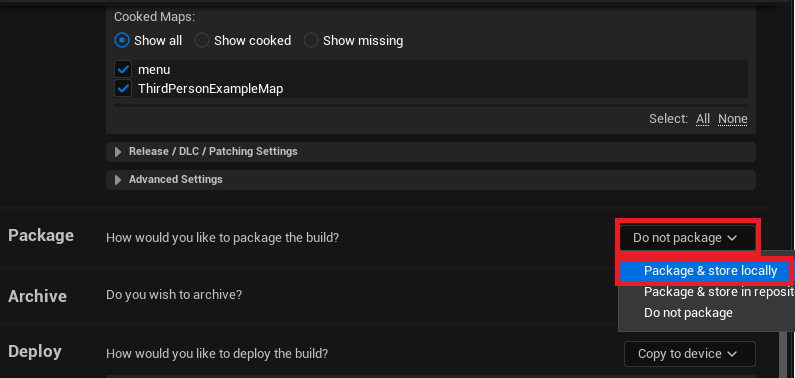
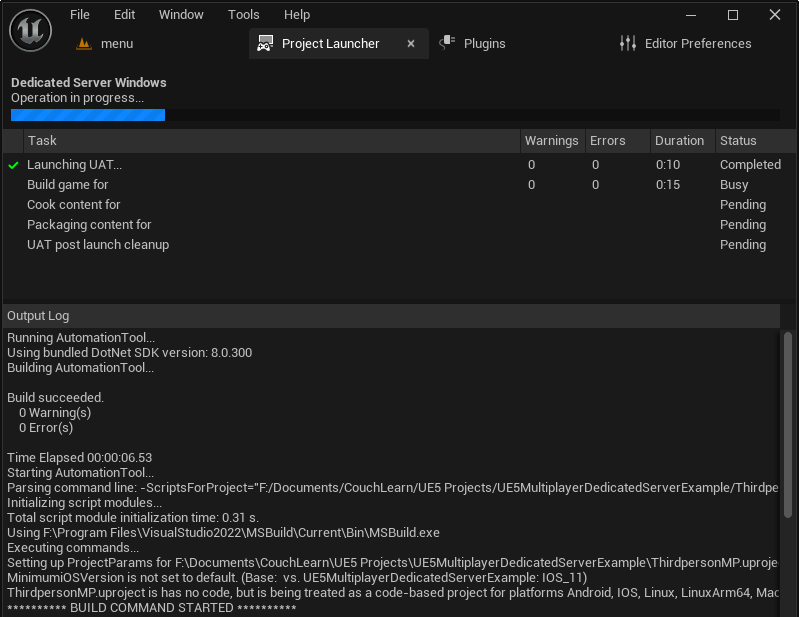
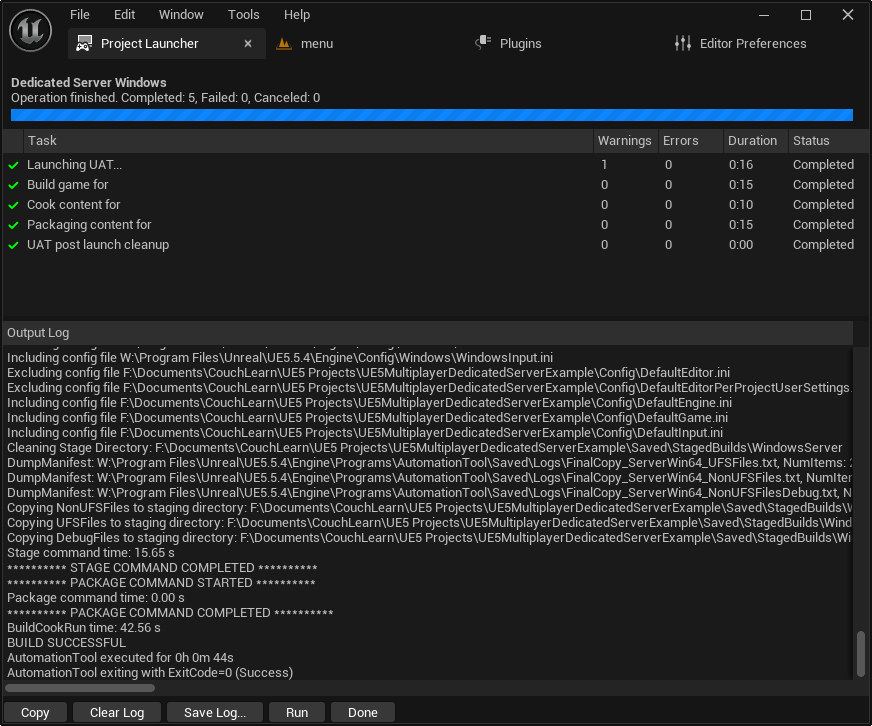
Once the custom profile is meticulously configured, the actual build process is initiated by pressing the "Launch" button within the Project Launcher. This triggers an automated sequence of cooking content, compiling code, and packaging the server files according to the defined profile. The initial build, particularly for larger projects or the first time a profile is run, can be time-consuming, ranging from tens of minutes to several hours, depending on project scope and hardware specifications. The Project Launcher provides a detailed log of the build progress, indicating successful completion upon its conclusion.
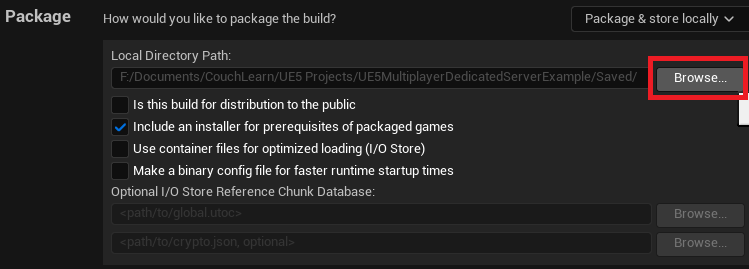
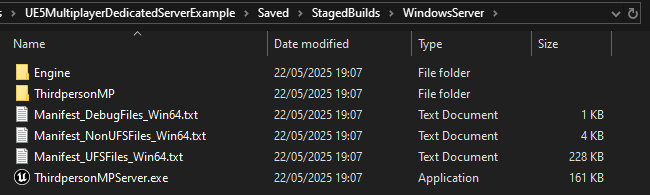
After a successful build, the dedicated server executable and its associated data files will be located in the specified output folder, typically within the project’s Saved/StagedBuilds/[PlatformName] directory (e.g., Saved/StagedBuilds/WindowsServer).
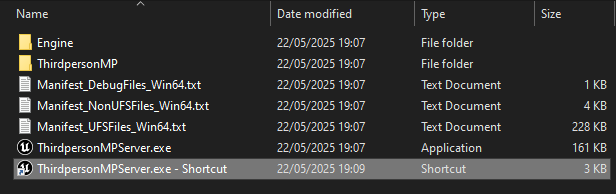
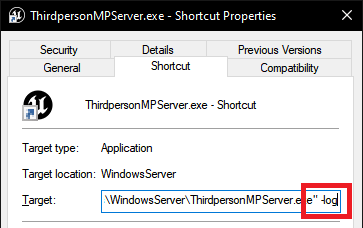
To facilitate local testing and debugging, a shortcut to the server executable (Server.exe) can be created. A crucial step for visibility and control is to modify the shortcut’s target path by appending the -log launch option. This command-line argument forces the server to open in a visible console window, displaying all logging messages in real-time. This provides invaluable feedback on the server’s initialization, session creation, and any potential errors, allowing developers to monitor its status and ensure proper functionality.
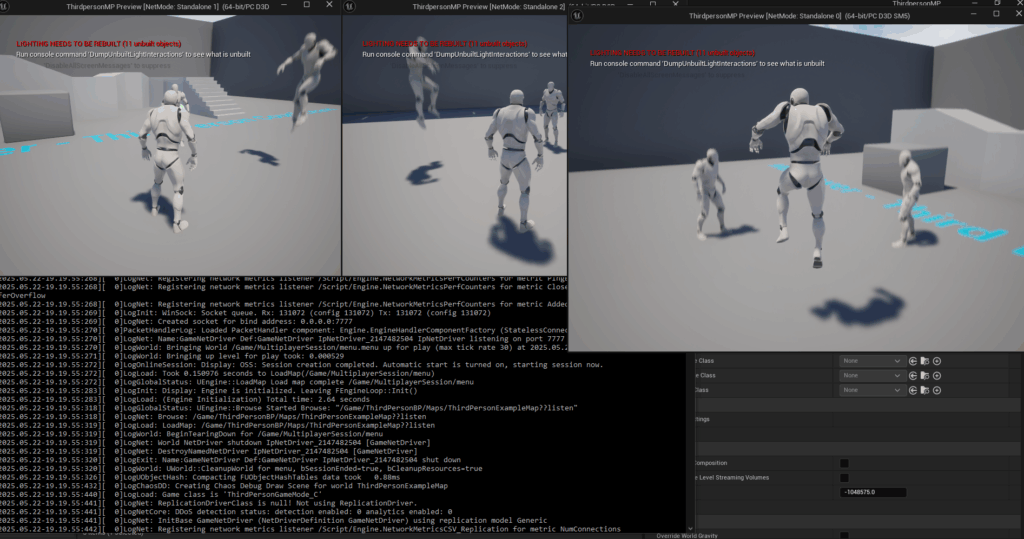
Upon launching the server shortcut, the console window will rapidly fill with text, indicating the server’s initialization sequence and the successful creation of a game session. At this point, the dedicated server is operational and actively awaiting client connections. From a client’s perspective, whether running in the Unreal Editor or as a separate client build, the dedicated server’s session should now be discoverable in the game’s session browser, ready for players to join. The demonstration with three clients connecting to a dedicated server highlights the seamless multiplayer experience, where all players can interact within the shared game world, with the server efficiently managing the game state without the need for a player-hosted instance.
Broader Impact and Implications for Game Development
The ability to efficiently build and deploy dedicated servers for Unreal Engine 5 games carries significant implications for the game development industry. For independent studios and large enterprises alike, it democratizes access to robust multiplayer infrastructure, previously a complex and often resource-intensive undertaking. By providing integrated tools like the Project Launcher and clear guidance, Epic Games empowers developers to create high-quality, scalable multiplayer experiences that can compete with established titles.
Enhanced Player Experience and Retention: Dedicated servers are a cornerstone of a positive player experience. Reduced latency, minimized desynchronization, and a fair playing field are critical factors in player satisfaction and long-term retention, particularly in competitive genres. Games that invest in reliable server infrastructure often see higher engagement and stronger community loyalty.
Improved Security and Anti-Cheat Measures: The server-authoritative nature of dedicated servers significantly strengthens a game’s security posture. By validating player actions and game states on the server, developers can effectively mitigate cheating and exploitation, fostering a more trustworthy environment for all players. This is a continuous battle, but dedicated servers provide the essential battleground.
Scalability and Global Reach: Dedicated servers can be deployed across various geographic regions, leveraging cloud computing services to provide low-latency connections for players worldwide. This global reach is essential for modern multiplayer games aiming for a broad international audience. The modular nature of server builds also allows for easier scaling of resources up or down based on player demand, optimizing operational costs.
Market Competitiveness: In a crowded market, the quality of a multiplayer experience can be a key differentiator. Games that consistently deliver stable, high-performance multiplayer stand out, attracting more players and fostering positive word-of-mouth. The availability of clear pathways to implement dedicated servers in UE5 enables more developers to meet this high standard.
Future Outlook: As cloud gaming and distributed server architectures continue to evolve, the principles of dedicated server deployment remain fundamental. Understanding how to build and configure these server instances is a transferable skill that will continue to be invaluable for game developers as they adapt to new hosting paradigms and technologies. The guide’s emphasis on flexibility (e.g., choosing between WindowsServer and LinuxServer) prepares developers for diverse deployment scenarios, from self-hosting to leveraging advanced cloud infrastructure services.
In conclusion, setting up a dedicated server for an Unreal Engine 5 game is not merely a technical step but a strategic decision that underpins the success and longevity of any multiplayer title. The detailed guidance provided by resources like couchlearn.com, coupled with Unreal Engine 5’s powerful toolset, equips developers with the knowledge and capabilities to build resilient, secure, and performant multiplayer experiences. This advancement is crucial for meeting the escalating expectations of players and ensuring that the next generation of online games delivers consistent, high-quality interaction for communities worldwide.
About the Author