The dynamic landscape of modern game development, powered by sophisticated engines like Unreal Engine 5 (UE5), increasingly relies on modularity and extensibility to meet escalating demands for efficiency and innovation. A cornerstone of this extensibility is the robust plugin ecosystem, which empowers developers to transcend the inherent limitations of visual scripting tools and integrate advanced functionalities directly into their projects. While Unreal Engine 5 offers unparalleled graphical fidelity and powerful development tools, certain high-performance features and complex system integrations remain exclusively accessible through C++ programming. This distinction often presents a challenge for developers primarily utilizing Blueprints, UE5’s visual scripting language, which prioritizes ease of use over direct hardware or system-level access. However, a vibrant global developer community has risen to bridge this gap, creating and sharing a vast array of plugins that introduce new Blueprint nodes and expand engine capabilities, democratizing access to powerful tools previously requiring deep C++ expertise.
This phenomenon underscores a critical aspect of contemporary software development: the collaborative evolution of tools through community contribution. Plugins serve as a testament to this, enabling developers to enhance their projects with specialized features ranging from advanced networking protocols and intricate UI elements to sophisticated AI behaviors and custom data management systems, all without delving into complex C++ codebases themselves. The process of integrating these plugins into an Unreal Engine 5 project, whether through the curated official marketplace or via manual installation from third-party sources, is a fundamental skill for any developer looking to maximize their productivity and the creative potential of their projects. Understanding these installation methodologies, along with the implications for project management, security, and overall development workflow, is paramount in today’s fast-paced game development environment.
The Foundational Role of Plugins in Unreal Engine 5 Development
Unreal Engine 5 stands as a titan in game development, celebrated for its cutting-edge rendering capabilities like Nanite and Lumen, and its intuitive Blueprint visual scripting system. Blueprints, with their drag-and-drop interface and node-based logic, have significantly lowered the barrier to entry for aspiring game developers, allowing rapid prototyping and iteration. However, for features requiring direct memory access, optimized performance, or complex interactions with external libraries and operating system APIs, C++ remains the preferred and often only viable pathway. This duality creates a natural demand for solutions that bring C++’s power to the Blueprint environment. Plugins address this need directly by encapsulating C++ functionalities into reusable modules that expose new nodes and tools to Blueprints, effectively extending the engine’s native capabilities without requiring developers to write a single line of C++.
The significance of this cannot be overstated. For independent developers and smaller studios, plugins can be game-changers, offering access to advanced features that would otherwise necessitate hiring specialized C++ programmers or investing significant time in custom development. This accessibility fosters innovation, allowing teams to focus on unique gameplay mechanics and artistic vision rather than wrestling with low-level programming challenges. Furthermore, for larger studios, plugins accelerate development cycles by providing off-the-shelf solutions for common problems, thereby reducing development costs and time-to-market. The sheer volume and diversity of available plugins, encompassing everything from advanced physics simulations to database integration and virtual reality toolkits, highlight their indispensable role in the Unreal Engine ecosystem.
Navigating the Official Channels: Unreal Marketplace Plugins
The most straightforward and often recommended method for acquiring and integrating plugins into Unreal Engine 5 projects is through the official Unreal Marketplace. Operated by Epic Games, the marketplace serves as a centralized hub for a vast array of assets, tools, and, crucially, code plugins. This platform provides a level of vetting and quality control that instills confidence in developers, ensuring that plugins generally adhere to certain standards of compatibility and reliability.
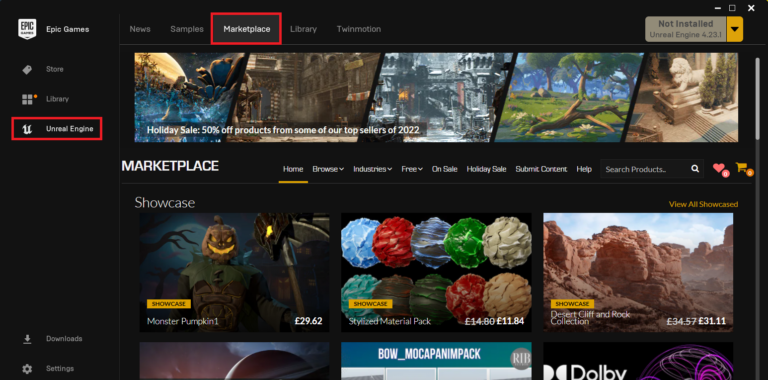
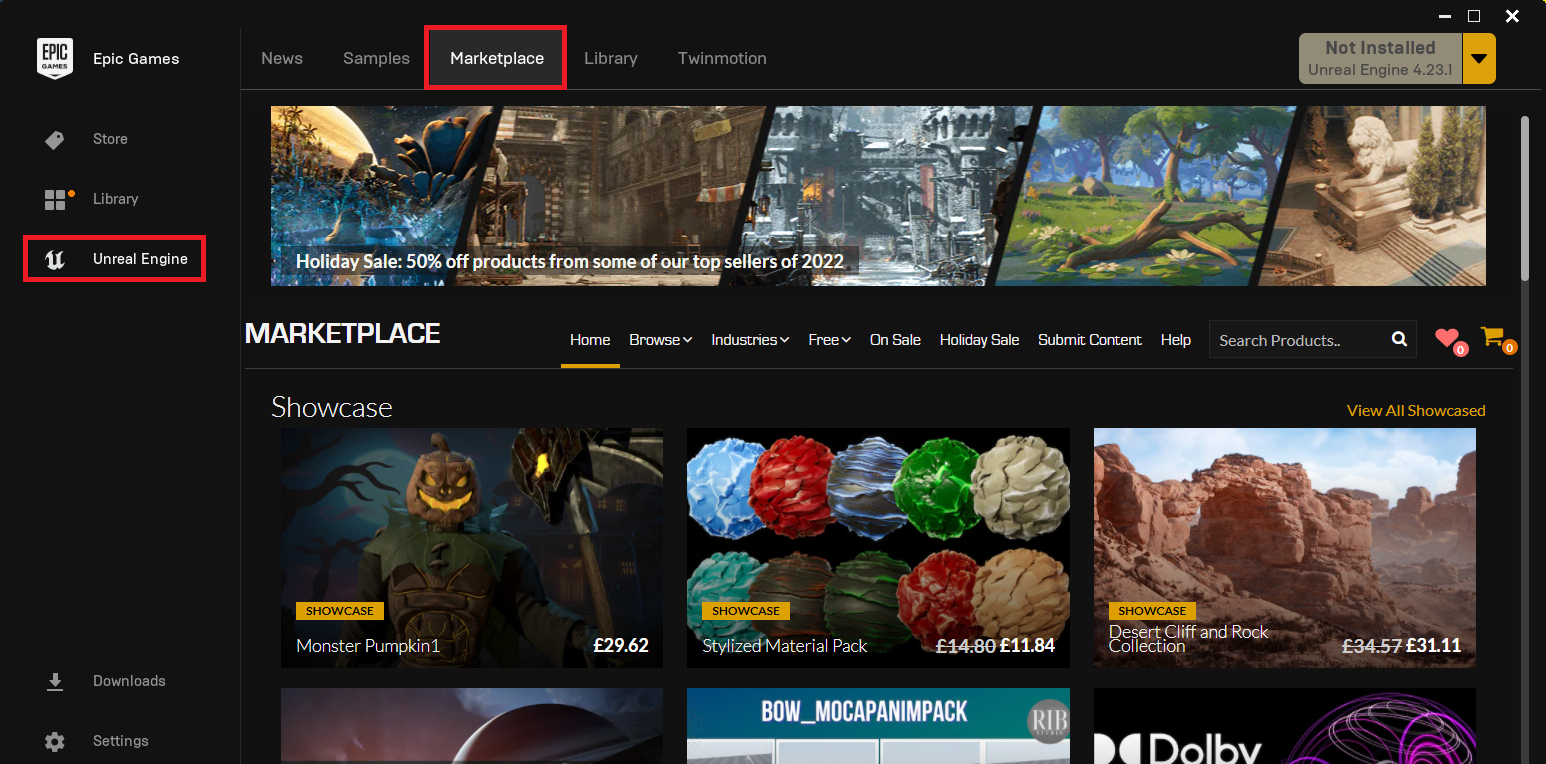
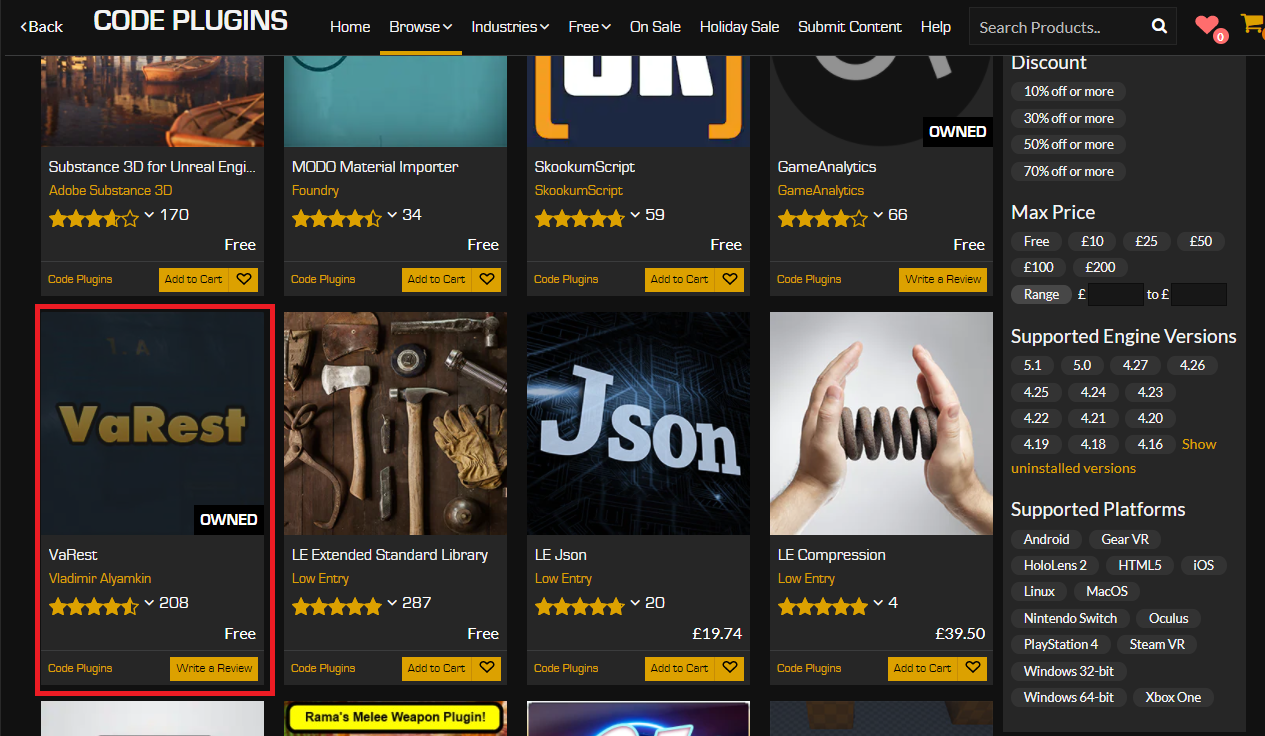
The process typically begins by launching the Epic Games Launcher, the primary portal for accessing Unreal Engine versions, projects, and the marketplace itself. Once within the Launcher, developers navigate to the "Unreal Marketplace" section. Here, the content is categorized, and a specific "Code Plugins" option allows users to filter for these essential extensions. This dedicated category ensures that developers can easily distinguish between purely artistic assets and functional code modules.
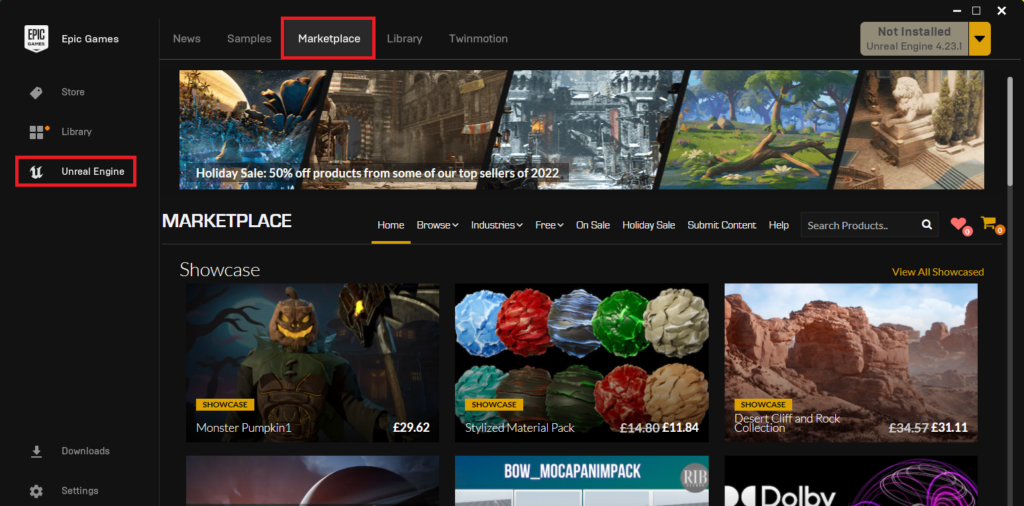
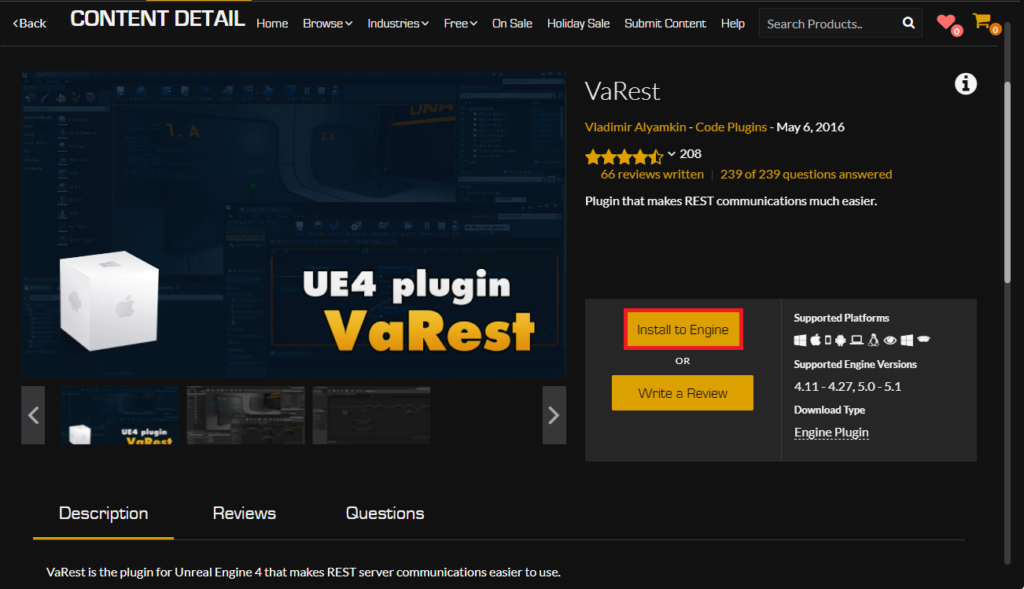
Upon identifying a desired plugin – for instance, a networking solution like the VaRest plugin, which facilitates RESTful API communication for dynamic online features – developers proceed with its acquisition. The marketplace operates on a transactional model, where plugins can be either free or paid. Even for free plugins, the system requires a "purchase" process to register ownership and enable installation. This step is critical as it links the plugin to the user’s Epic Games account, streamlining future updates and compatibility checks.
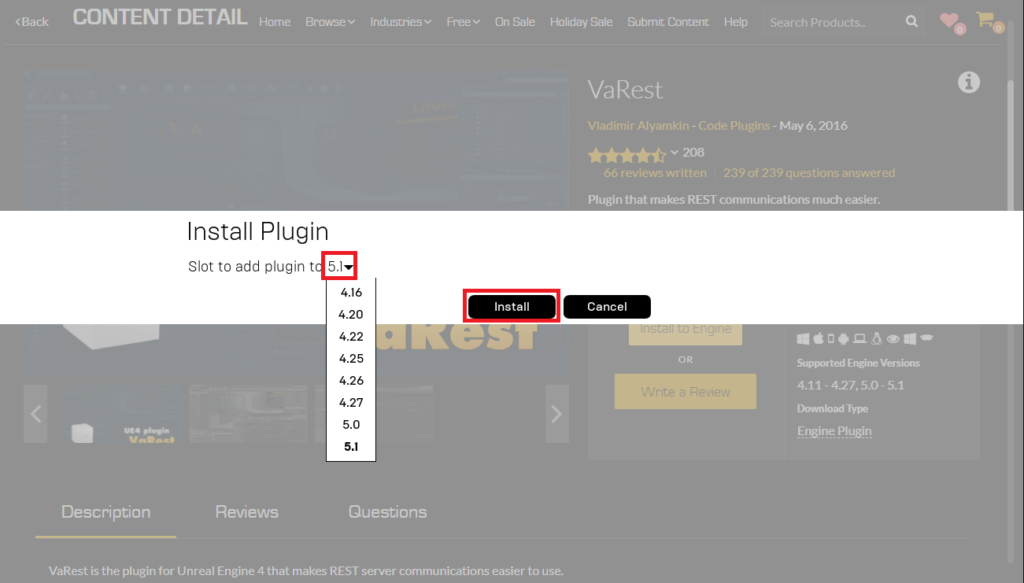
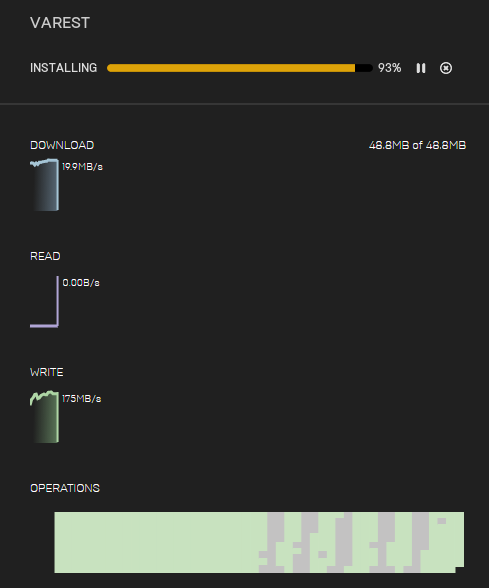
Following acquisition, the plugin is not immediately active within any Unreal Engine project. Instead, it must be installed to the Unreal Engine itself. This involves clicking an "Install to Engine" button, which then prompts the user to select the specific version of Unreal Engine 5 they wish to integrate the plugin with. This flexibility is vital, as different engine versions can have varying API compatibility, and developers often manage multiple projects across different UE5 iterations (e.g., UE 5.0, 5.1, 5.2). The installation process then downloads the plugin files directly into the chosen engine’s directory structure, typically under a "Plugins" folder within the engine installation path. The progress of this download is usually visible within the Epic Games Launcher’s "Downloads" tab, providing real-time feedback to the developer. Once the installation is complete, the plugin is technically present within the engine environment, but its utility for a specific project still requires an additional, crucial step.
Activating Marketplace Plugins within an Unreal Engine Project

A common misconception among new Unreal Engine users is that installing a plugin to the engine automatically enables it across all projects. This is not the case, and for good reason. Unreal Engine projects are designed to be as lean and efficient as possible. Enabling every installed plugin by default would bloat project sizes, increase compilation times, and potentially introduce unnecessary dependencies, impacting performance and build stability. Therefore, plugins must be explicitly enabled on a per-project basis.
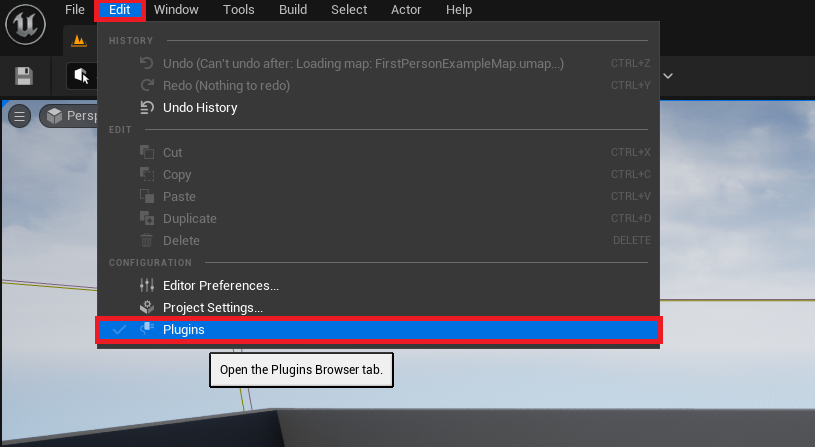
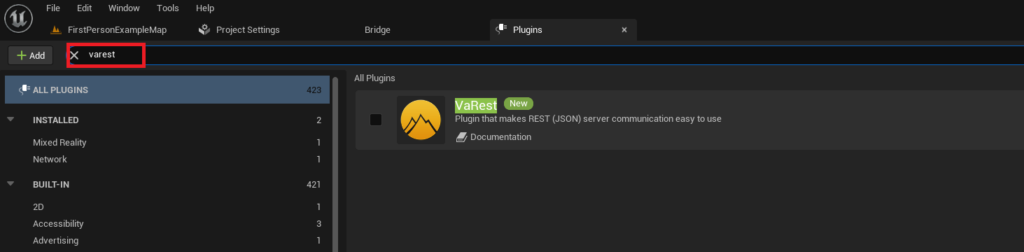
To activate a newly installed marketplace plugin, developers must open their target Unreal Engine 5 project. Within the editor, they navigate to the main menu, selecting "Edit" and then "Plugins." This action opens the Plugin browser, a comprehensive interface that lists all plugins available to the engine, both built-in and externally installed. To efficiently locate the recently added plugin, developers can utilize the search bar within this browser, typing the plugin’s name (e.g., "VaRest").
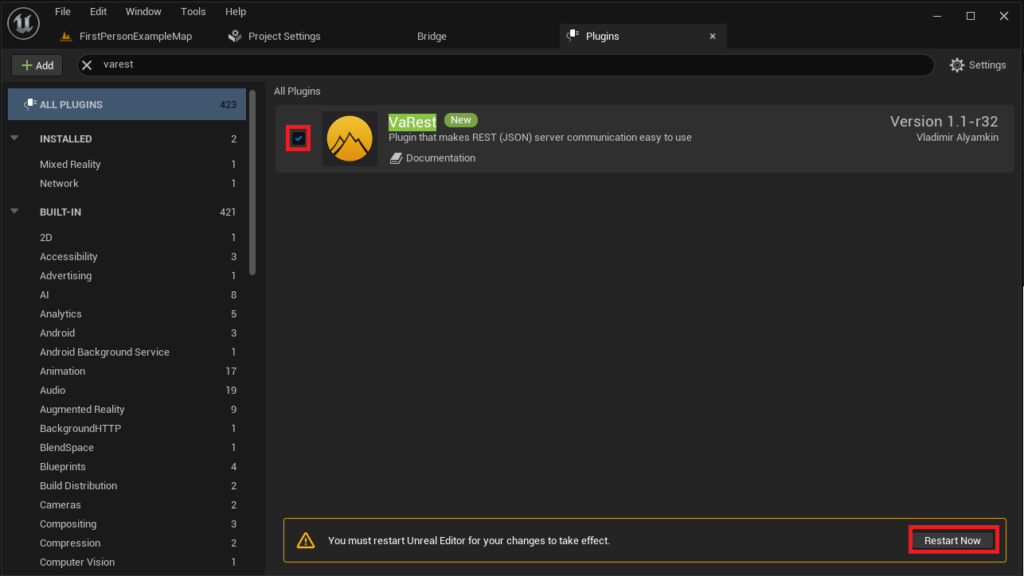
Once the plugin’s entry is found, it will typically appear with a checkbox next to its name. Clicking this checkbox toggles the plugin’s active status for the current project. Upon activation, the Unreal Engine editor will prompt the user to restart the editor. This restart is not merely a formality; it allows the engine to properly compile and load the plugin’s modules, integrate its new Blueprint nodes and C++ classes, and update the project’s dependency graph. Only after this restart is the plugin fully functional and accessible within the project, ready for use in both C++ and Blueprint scripting environments. This two-step process—installing to the engine, then enabling per project—is a deliberate design choice by Epic Games to maintain project integrity and optimize development workflows.
Advanced Plugin Integration: Manual Installation
While the Unreal Marketplace offers a streamlined and secure pathway for plugin acquisition, the open-source nature of much of the developer community means that many valuable plugins are distributed directly by their creators, often through platforms like GitHub, personal websites, or dedicated developer forums. This manual installation method, while offering greater flexibility and access to cutting-edge or niche tools, demands a higher degree of caution and technical proficiency from the developer.
The primary difference with manual installation lies in the sourcing and placement of the plugin files. Developers must first locate and download the plugin’s source code or pre-compiled binaries from a trusted third-party source. This immediately introduces a security disclaimer: extreme caution is advised when downloading untrusted files and code online. The integrity and security of a project can be severely compromised by malicious or poorly coded plugins. Developers must diligently verify the reputation of the plugin author and ensure the source is legitimate. Furthermore, compatibility is a critical concern; manually downloaded plugins must be explicitly compatible with the specific version of Unreal Engine 5 being used, as API changes between engine versions can easily break functionality.
Assuming a trusted source and verified compatibility, the manual installation process begins by ensuring the target Unreal Engine project directory contains a dedicated "Plugins" folder. If this folder does not exist (which is common for new projects or those that haven’t previously used local plugins), the developer must create it manually at the root level of their project directory (e.g., MyProject/Plugins). This folder serves as the designated location for all project-specific, manually installed plugins.
Once the "Plugins" folder is established, the developer copies the entire plugin directory (e.g., "VictoryPlugin" for Rama’s popular Victory BP Library, an example often cited in the community for its extensive Blueprint utilities) into this newly created or existing "Plugins" folder. This typically involves placing the root folder of the downloaded plugin, which contains all its necessary files, source code, and module definitions, directly inside MyProject/Plugins/. The structure is crucial; the engine expects a specific directory layout to correctly identify and load the plugin.
Enabling Manually Installed Plugins
Similar to marketplace plugins, manually installed plugins are not automatically active within a project. The same principles of project optimization and modularity apply. After copying the plugin files into the project’s "Plugins" folder, the activation process mirrors that of marketplace plugins.
The developer opens their Unreal Engine 5 project and navigates to "Edit" > "Plugins." Within the Plugin browser, they utilize the search function to find the manually installed plugin by its name. The engine’s plugin discovery system scans the project’s "Plugins" folder (as well as the engine’s global "Plugins" folder) to list all available modules. Once located, the checkbox next to the plugin’s name must be clicked to enable it for the current project. As with marketplace plugins, this action triggers a prompt to restart the Unreal Engine editor. This restart allows the engine to compile the plugin’s code (if it’s a source plugin and needs compilation for the specific engine version) and integrate its functionalities into the Blueprint and C++ environments. Only after this restart is the manually installed plugin fully operational, ready to extend the project’s capabilities.
Implications and Broader Impact of the Plugin Ecosystem
The robust plugin ecosystem within Unreal Engine 5 carries significant implications across various facets of game development and the broader tech industry.
Enhanced Productivity and Efficiency: By providing ready-to-use solutions for common and complex problems, plugins dramatically reduce development time. Developers no longer need to "reinvent the wheel" for features like advanced input handling, procedural generation, or third-party service integration. This efficiency translates into faster iteration cycles and quicker project completion. According to industry analyses, the strategic use of well-chosen plugins can reduce development hours for specific tasks by 30-50%, allowing teams to allocate resources to more creative or unique aspects of their games.
Fostering Innovation and Experimentation: Plugins act as incubators for new ideas and experimental features. Developers can leverage tools created by others to explore novel gameplay mechanics or technical solutions without the overhead of fundamental research and development. This collaborative innovation accelerates the evolution of game development practices and technologies within the Unreal Engine community.
Democratization of Development: The accessibility offered by Blueprint-exposed plugin functionalities empowers a wider range of creators, including those without extensive C++ backgrounds, to build sophisticated interactive experiences. This lowers the barrier to entry for indie developers, educational institutions, and hobbyists, fostering a more diverse and vibrant development landscape. The ease of adding complex features allows smaller teams to compete more effectively with larger studios by leveraging community-built tools.
Security and Trust Considerations: While the marketplace offers a degree of curation, manual plugin installation introduces inherent security risks. Untrusted code can harbor vulnerabilities, introduce bugs, or even contain malicious elements. This necessitates a strong emphasis on due diligence, encouraging developers to rely on well-known authors and reputable communities. Epic Games continually refines its marketplace submission guidelines and review processes to mitigate these risks, often stating its commitment to providing a secure and reliable platform for content creators. However, the responsibility for external downloads ultimately rests with the individual developer.
Growth of the Developer Community: The plugin ecosystem is a direct reflection of Unreal Engine’s active and passionate developer community. The willingness of individuals and small teams to create, share, and maintain these valuable tools speaks to a culture of collaboration and mutual support. This, in turn, strengthens the engine’s appeal and longevity, creating a positive feedback loop where more developers attract more tools, and vice-versa. Forums dedicated to Unreal Engine development frequently feature lively discussions around plugin development, troubleshooting, and feature requests, showcasing the dynamic interplay between creators and users.
Evolution of the Engine Itself: Feedback and popular features from community-developed plugins often inform Epic Games’ own development roadmap for Unreal Engine. What starts as a niche plugin might eventually inspire official engine features, demonstrating the symbiotic relationship between core engine development and community contributions. This organic evolution ensures that Unreal Engine remains responsive to the real-world needs and emerging trends of its user base.
Conclusion
The integration of plugins is an indispensable practice for any developer working with Unreal Engine 5. Whether through the curated and secure Unreal Marketplace or the more flexible but cautious route of manual installation, these extensions unlock a realm of possibilities, transforming the engine into an even more versatile and powerful tool. By understanding the distinct installation processes, the rationale behind project-specific activation, and the broader implications for development efficiency, innovation, and security, developers can effectively leverage the full potential of Unreal Engine 5. The thriving plugin ecosystem stands as a testament to the collaborative spirit of the global developer community, continually pushing the boundaries of what is achievable within interactive experiences and reinforcing Unreal Engine’s position at the forefront of digital creation. As Unreal Engine 5 continues to evolve, the role of plugins will undoubtedly expand, further cementing their status as essential components in the journey from concept to compelling interactive reality.
About the Author