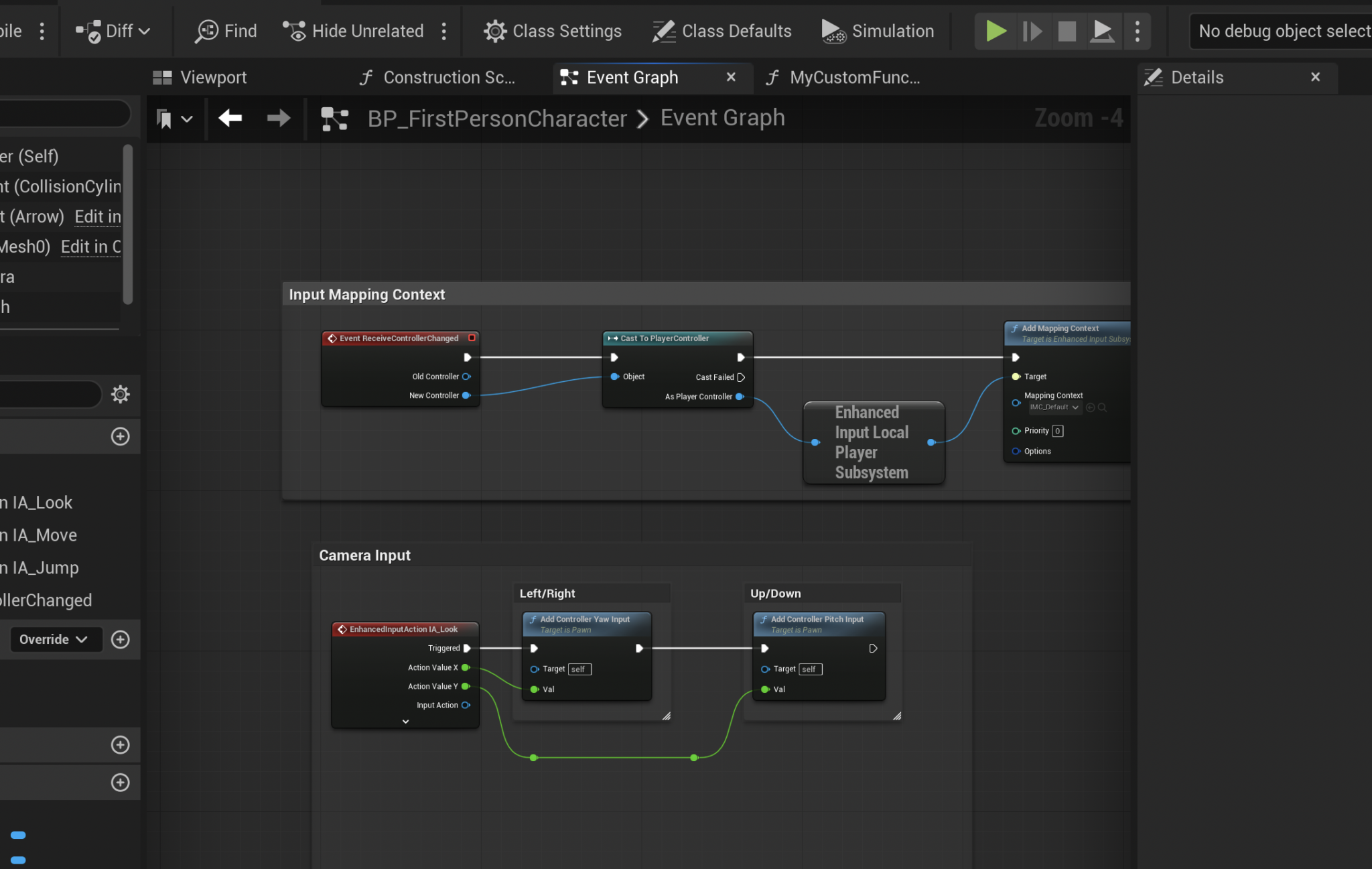
The concept of functions, fundamental across all programming paradigms, serves as a cornerstone for efficient and organized code development. In the realm of game development, particularly within Unreal Engine 5 (UE5), this principle is brought to life through Blueprint Functions. These self-contained blocks of logic are critical tools that enable developers to encapsulate specific operations, making their projects more manageable, scalable, and robust. This guide delves into the essence of Blueprint Functions, their implementation within UE5, and their broader implications for the game development ecosystem.
Understanding Blueprint Functions: The Core Concept
At its heart, a Blueprint Function in Unreal Engine 5 is a discrete unit of visual script designed to perform a specific task. Much like functions in traditional text-based programming languages such as C++ or Python, these Blueprint counterparts allow developers to define a sequence of actions, which can then be executed, or "called," from various points within a Blueprint actor. This inherent reusability is a primary advantage, preventing the need to duplicate identical logic across multiple sections of a game’s code.
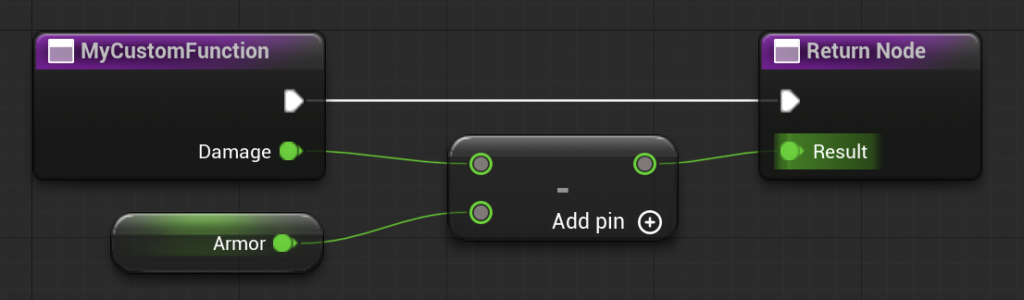
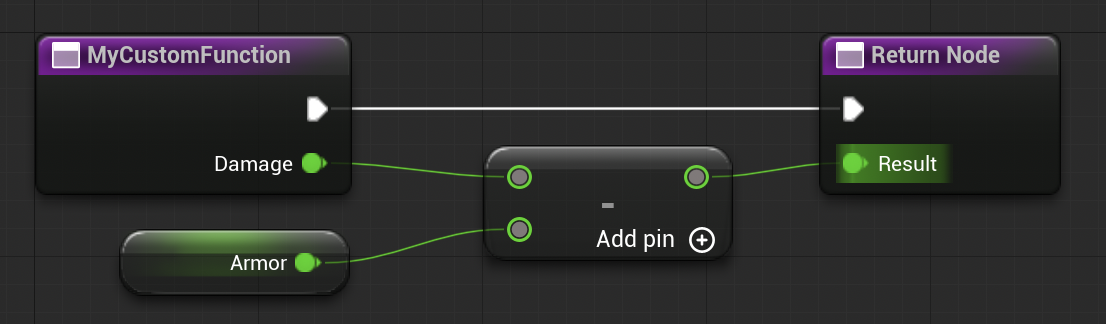
Blueprint Functions are distinguished by their ability to accept "input parameters" and produce "output parameters." These parameters provide a flexible interface, allowing the function to receive specific data to process and then return a result. For instance, instead of repeatedly scripting the same damage calculation logic every time a character takes a hit, a developer can create a single CalculateDamage function. This function would take the raw damage value and the character’s armor rating as inputs, process them, and then output the final, mitigated damage. Should the damage calculation formula need adjustment, only this single function requires modification, instantly updating all instances where it is called throughout the project. This centralized control over logic significantly streamlines development and maintenance, particularly in large-scale projects with complex gameplay systems. It is important to note that, by design, a Blueprint Function is created for and operates within the scope of a specific Blueprint actor, meaning its utility is contained to that particular entity.
Historical Context and Evolution of Visual Scripting
The introduction of visual scripting, epitomized by Unreal Engine’s Blueprints, marked a significant shift in game development, democratizing access to complex programming logic for a wider audience, including designers and artists. While traditional C++ coding remains vital for core engine development and high-performance systems, Blueprints provide an intuitive, node-based interface that abstracts away much of the syntactic complexity of coding. This visual approach allows for rapid prototyping and iteration, fostering a more collaborative environment where different team members can contribute to gameplay mechanics without requiring deep programming expertise.
Unreal Engine’s visual scripting system has evolved considerably since its inception. Initially known as Kismet in earlier versions of the engine, it matured into the more powerful and flexible Blueprint system in Unreal Engine 4. With the advent of Unreal Engine 5, Blueprints have seen further refinements, enhancing performance, debugging capabilities, and overall developer experience. The emphasis on modularity through functions, macros, and event graphs has become increasingly critical as game projects grow in complexity and scope. Industry data indicates a growing reliance on visual scripting tools, with many studios leveraging Blueprints to accelerate development cycles by 30-50% for gameplay logic, allowing programmers to focus on more intricate systems.
The Practical Application: Creating a Blueprint Function
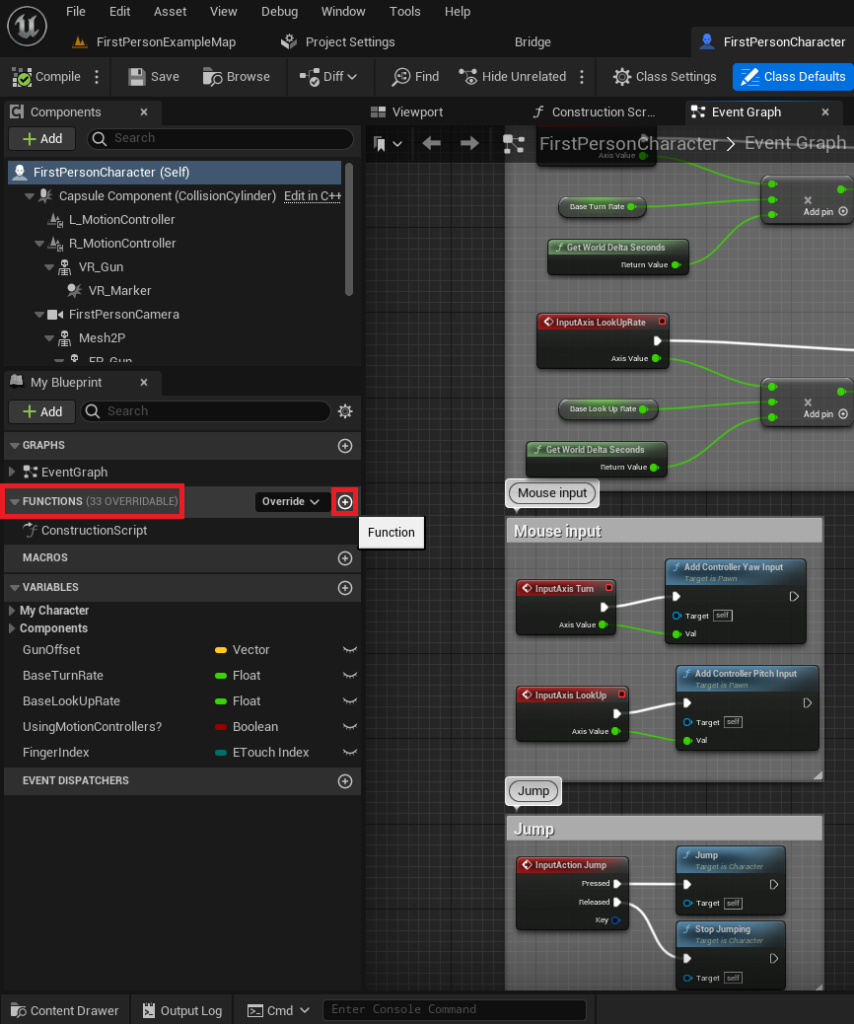
The process of creating a Blueprint Function in Unreal Engine 5 is designed to be intuitive, allowing developers to quickly establish modular pieces of logic. The journey typically begins by opening the specific Blueprint actor where the new function is intended to reside. For instance, when working with a character’s abilities, one might open the FirstPersonCharacter Blueprint from the standard First Person Shooter template provided by Unreal Engine.
Within the Blueprint editor’s interface, the "Functions" section, usually located on the left-hand side, serves as the central repository for all functions belonging to that particular Blueprint. To initiate the creation of a new function, a developer simply clicks the circular icon featuring a plus symbol situated next to the "Functions" dropdown. This action prompts the creation of a new, unnamed function, ready for customization.
-
Initializing a Function: Naming and Compilation
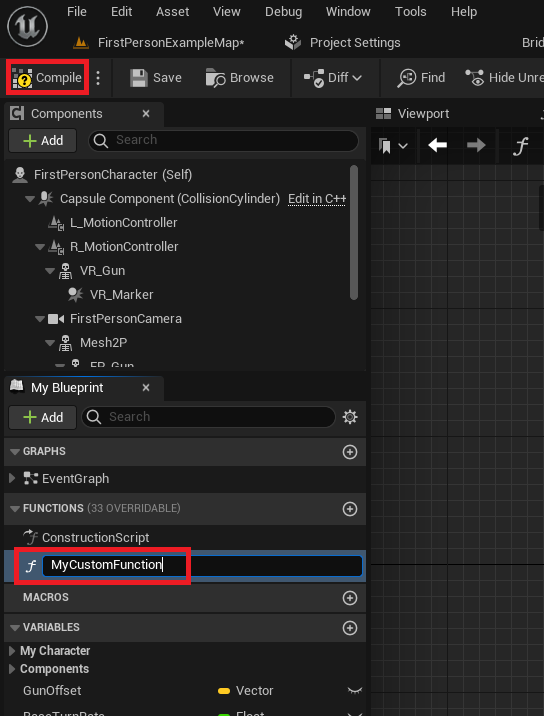
Following its creation, the function requires a descriptive name. Adhering to clear and readable naming conventions is a crucial best practice in game development. A well-named function, such asCalculateDamageorActivateAbility, immediately conveys its purpose, enhancing code clarity and maintainability, especially in collaborative environments or when revisiting older projects. Conversely, poorly named or ambiguous functions can significantly impede development efficiency and introduce confusion. After assigning a name, the developer must either press Enter or click anywhere within the Blueprint window to confirm the name, then click the "Compile" button. This compilation step integrates the newly defined function into the Blueprint, making it available for use within the project.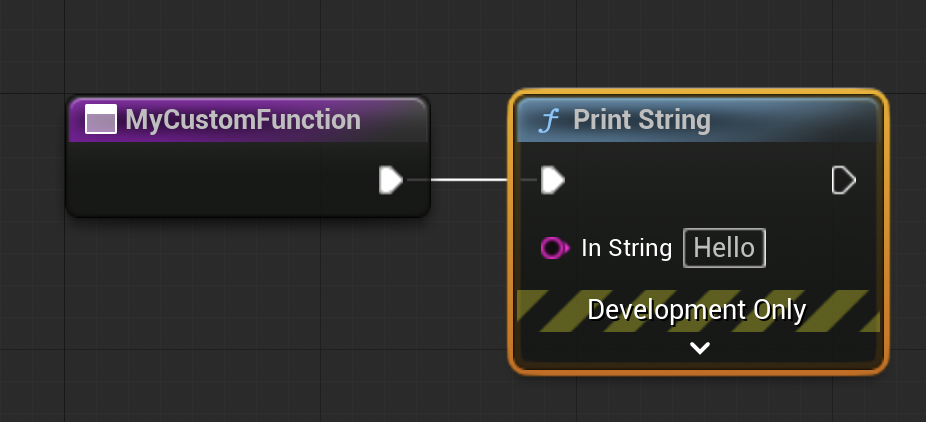
-
Implementing Basic Logic: The "Print String" Example
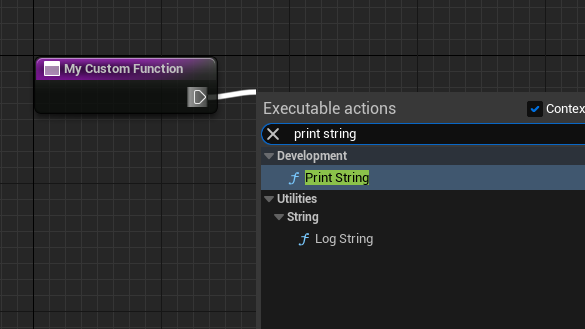
Once created and compiled, a new function is initially an empty shell. To imbue it with purpose, logic must be added. A fundamental introductory example involves configuring the function to print a string to the screen, a simple yet effective way to verify its execution. This involves navigating to the newly created function’s graph. From the white "exec pin" (execution pin) on the function’s entry node, a developer can drag a connection into the empty graph area. Releasing the mouse button opens a contextual menu displaying available Blueprint nodes. Selecting "Print String" from this menu automatically creates and connects the node, establishing a sequential flow of execution: when the function runs, it will execute thePrint Stringnode immediately thereafter. This visual connection clearly illustrates the flow of logic, a hallmark of the Blueprint system. The term "calling" a function is synonymous with "running" or "executing" it, a common piece of terminology in programming discourse.
Integrating Functions into Gameplay Flow: Event-Driven Execution
After defining a function’s internal logic, the next critical step is to determine when and how it will be activated within the game. Functions are typically "called" in response to specific "events" or from other pieces of logic within the Blueprint. Events are special nodes that trigger a sequence of actions under particular conditions. Unlike functions, events typically do not return values and can accommodate certain asynchronous nodes, such as delay nodes, which functions cannot.
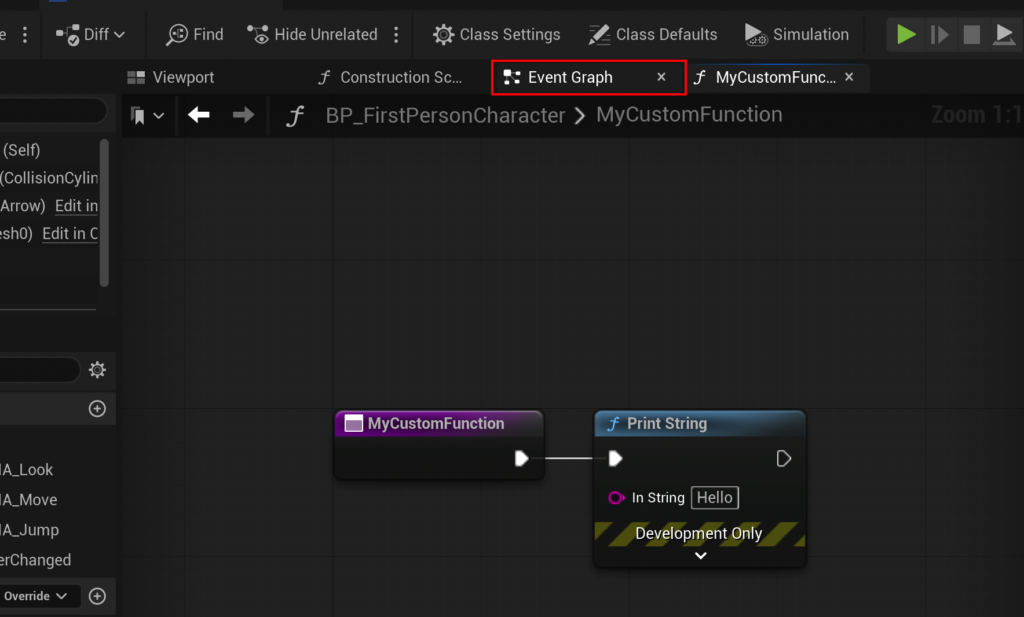
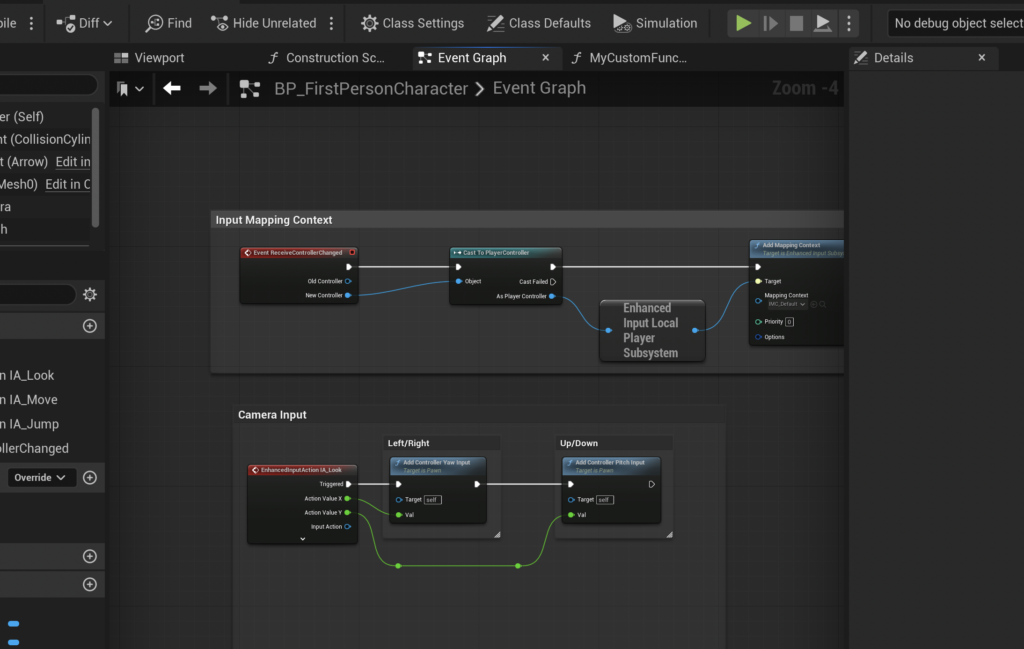
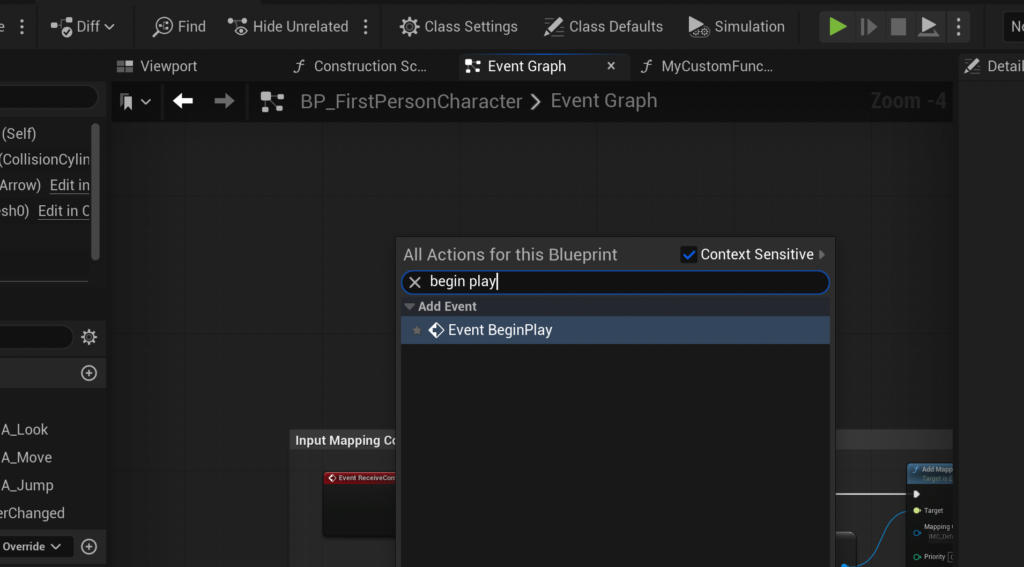
A common and straightforward method for testing functions is to integrate them with the Event Begin Play node. This event is automatically triggered when the Blueprint actor is spawned into the game world, or in the case of a player character, when the game starts. To establish this connection, the developer navigates back to the main "Event Graph" of the Blueprint actor. Within this graph, by right-clicking in an empty space, a contextual search menu appears, allowing the developer to locate and add the Event Begin Play node.
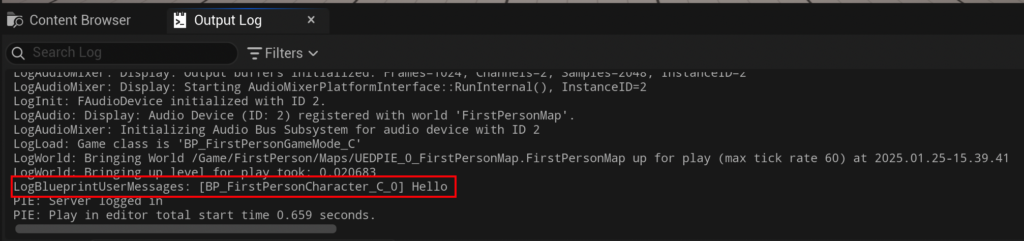
Once the Event Begin Play node is present, the function can be called directly from it. Similar to adding nodes within the function itself, a connection is dragged from the white "exec pin" of Event Begin Play into the graph. The search menu is again used, this time to find and select the custom function (e.g., MyCustomFunction). This creates a call node for the function, visually linking its execution to the Begin Play event. The final step involves compiling and saving the Blueprint. Upon launching the game, the Event Begin Play will fire, subsequently calling MyCustomFunction, which in turn executes its internal logic, such as printing "hello" to the output log. This demonstrates a complete, albeit simple, cycle of function creation, implementation, and execution.
Advanced Functionality: Parameters and Return Values
While a simple Print String function illustrates the basic concept, the true power of Blueprint Functions emerges with the use of input and output parameters. These allow functions to process dynamic data and provide meaningful results, moving beyond static operations to dynamic gameplay mechanics.
-
Defining Input Parameters for Dynamic Logic
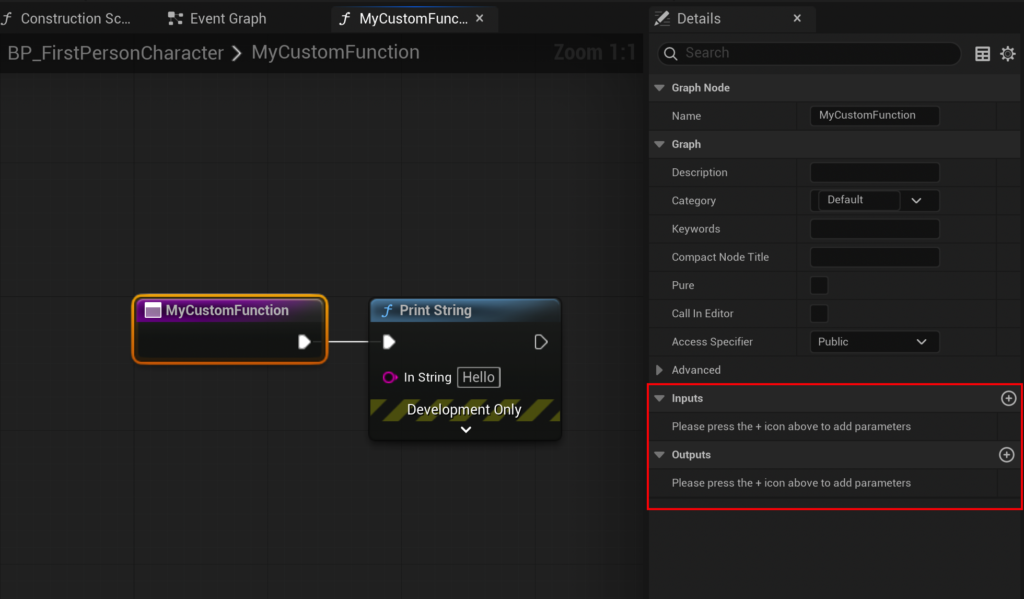
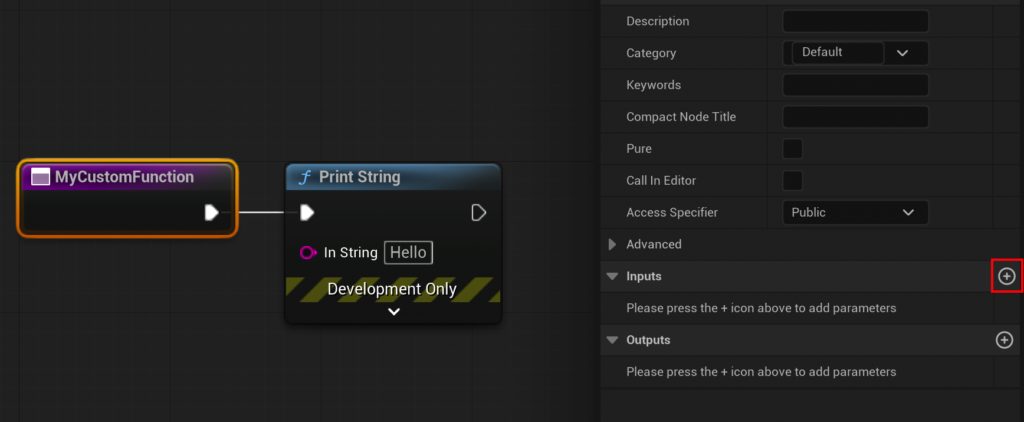
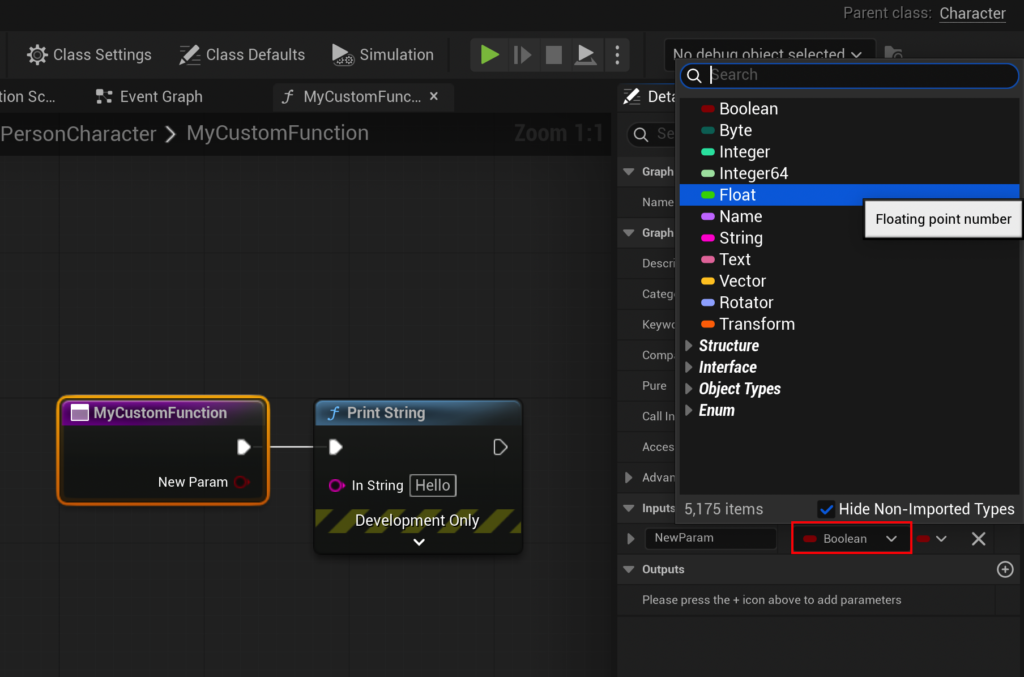
To create a function that performs more complex calculations, likeCalculateDamage, it needs to accept data. This is achieved by defining input parameters. Within the function’s graph, selecting the main function node (e.g.,MyCustomFunctionor the renamedCalculateDamagenode) reveals its "Details" panel on the right side of the editor. This panel contains "Input" and "Output" sections. By clicking the small "Add" button within the "Input" section, a new input parameter is created. For a damage calculation, this parameter would typically be aFloat(a floating-point number) and named "Damage." This new input parameter then appears as a green pin on the function’s entry node within the graph, ready to receive a numerical value when the function is called.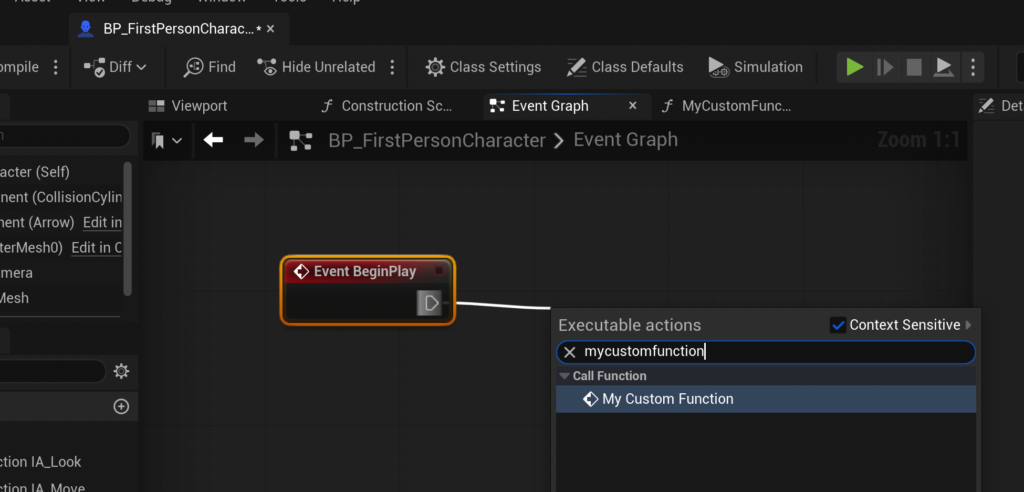
-
Incorporating Internal Logic and Variables
With input parameters defined, the function can now process the incoming data. For theCalculateDamagefunction, the goal is to subtract an armor value from the incoming damage. This involves dragging from the "Damage" input pin into the graph to create a "Subtract" node. To introduce an armor value, the bottom input pin of the subtract node can be dragged and "promoted to variable." This action creates a new variable, which can be named "Armor" and given a default numerical value (e.g., 15.0) in its own "Details" panel. This variable represents the character’s inherent defense. The subtract node then performs the calculation:Damage - Armor. This entire sequence of nodes, including the input parameter and the variable, forms the core logic of theCalculateDamagefunction. -
Returning Processed Values for Downstream Use
A function that calculates a value is most useful when it can "return" that result for other parts of the Blueprint to use. This is where output parameters come into play. Similar to creating input parameters, the "Details" panel of the function’s main node is used, but this time, the "Add" button in the "Output" section is clicked. A new output parameter is created, typically aFloattype for a numerical result, and named "Result."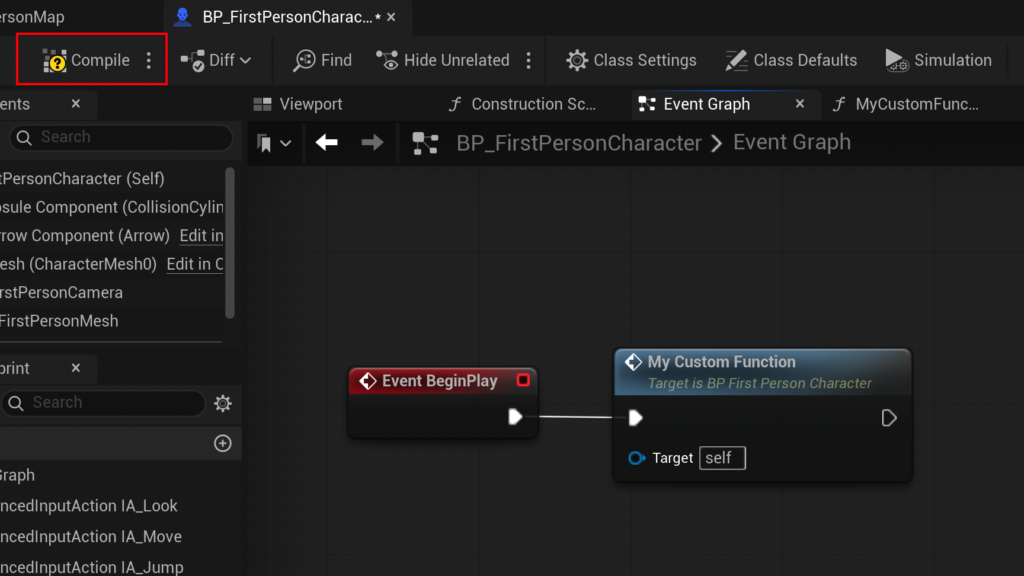
Upon creating an output parameter, Unreal Engine automatically generates a "Return Node" within the function’s graph. This node acts as the exit point for the function, and its output pins correspond to the defined output parameters. The calculated value from the subtract node (the
Damage - Armorresult) is then connected to the "Result" pin of the Return Node. This completes theCalculateDamagefunction: it takesDamageas input, subtractsArmor, and returns the finalResult. In the Event Graph, the call toMyCustomFunction(now conceptuallyCalculateDamage) will display both the "Damage" input pin and the "Result" output pin, allowing developers to feed values into the function and retrieve its processed output. For testing, the "Damage" input can be set to a value like 20.0, and the "Result" output can be connected to aPrint Stringnode to display the final calculated damage (e.g., 20 – 15 = 5) in the output log, confirming the function’s correct operation.
Key Limitations and Alternatives
While Blueprint Functions are incredibly versatile, they do have certain limitations that developers must be aware of. A notable restriction is the inability to directly incorporate "Delay" nodes within a function. Delay nodes are execution nodes that pause the flow of logic for a specified duration, often used for timed events, visual effects, or cooldowns. This limitation stems from the synchronous nature of functions; they are designed to execute their logic entirely within a single frame or very rapidly, without introducing pauses.
For scenarios requiring delayed execution or asynchronous operations, Unreal Engine provides "Custom Events." Custom Events offer similar modularity to functions but can accommodate Delay nodes and other asynchronous logic. Developers are encouraged to use Custom Events when their logic requires timing-dependent sequences that would otherwise halt a function’s immediate execution. This distinction is crucial for maintaining performance and preventing unforeseen issues in gameplay. The official documentation from Epic Games frequently highlights this design choice, guiding developers towards the appropriate tool for specific scripting needs.
Implications for Game Development and Efficiency
The widespread adoption and effective utilization of Blueprint Functions in Unreal Engine 5 have profound implications for modern game development.
- Enhanced Code Readability and Maintenance: By compartmentalizing logic into distinct functions, Blueprints become significantly easier to read and understand. This modularity reduces the cognitive load on developers, allowing them to grasp the purpose of a section of code quickly without needing to parse an entire sprawling graph. When bugs arise or features need modification, functions pinpoint the exact location for changes, dramatically cutting down debugging time and the risk of introducing new errors.
- Improved Collaboration: In team-based development, functions serve as clear contracts between different parts of the system. One developer can create a robust
ApplyStatusEffectfunction, and other developers can then confidently call this function, knowing its expected inputs and outputs, without needing to understand its intricate internal workings. This fosters parallel development and minimizes conflicts. - Scalability and Performance Optimization: While Blueprints are visual, well-structured functions contribute to overall project performance. Reusing functions means less redundant logic, which can lead to smaller Blueprint file sizes and potentially faster compilation times. For performance-critical sections, functions can often be refactored into C++ if needed, without disrupting the overall Blueprint structure.
- Lower Barrier to Entry: Functions empower junior developers and non-programmers (like level designers or technical artists) to contribute meaningful gameplay logic. By providing pre-built, reusable functions, senior developers can establish a robust framework that allows others to assemble complex behaviors without needing to write code from scratch. This inclusive approach broadens the talent pool capable of contributing to game creation.
- Facilitating Iteration and Prototyping: The ability to quickly create, modify, and test functions accelerates the prototyping phase. Ideas can be implemented and iterated upon rapidly, allowing designers to experiment with mechanics and get immediate feedback, which is vital in agile development environments.
The Broader Impact: Fostering Collaboration and Scalability
Beyond individual project benefits, the widespread adoption of Blueprint Functions contributes to a healthier, more collaborative game development ecosystem. Epic Games consistently updates Unreal Engine, often emphasizing tools that promote modularity and developer efficiency. This commitment is reflected in the continuous improvements to the Blueprint system, including enhancements that make functions more powerful and easier to use. Industry reports and developer surveys frequently cite Blueprints as a key factor in choosing Unreal Engine, particularly for indie studios and smaller teams seeking to maximize their output with limited resources.

The future of game development points towards increasingly complex projects demanding sophisticated tools for management and organization. Blueprint Functions, by enabling developers to break down intricate systems into manageable, reusable components, are not just a feature but a fundamental methodology. They facilitate the creation of rich, interactive experiences while ensuring that the underlying development process remains efficient, maintainable, and adaptable to evolving project needs.
Conclusion
Blueprint Functions in Unreal Engine 5 are an indispensable element of modern game development, embodying the principle of modular programming within a highly accessible visual scripting environment. From defining simple print statements to implementing complex damage calculations with dynamic inputs and outputs, functions provide the structure necessary to organize logic, promote reusability, and enhance project maintainability. Their seamless integration with event-driven execution paradigms allows for precise control over gameplay flow, while their inherent limitations, such as the absence of delay nodes, serve to guide developers towards optimal architectural choices using Custom Events when appropriate. By mastering Blueprint Functions, developers can significantly streamline their workflow, foster better team collaboration, and ultimately build more ambitious and robust interactive experiences within the powerful Unreal Engine 5 framework. These tools are not merely about writing less code; they are about writing smarter, more organized code that stands the test of time and complexity.
About the Author