The advent of modern gaming has unequivocally established game data persistence as a foundational pillar for immersive and engaging player experiences. In this landscape, Unreal Engine 5 (UE5), one of the industry’s leading game development platforms, offers a sophisticated and remarkably user-friendly built-in SaveGame system. This integrated solution empowers developers to effortlessly implement saving and loading functionalities, ensuring that players’ progress, settings, and in-game states are meticulously preserved across sessions. The system, designed with efficiency and flexibility in mind, allows for the straightforward serialization and deserialization of diverse game data to and from dedicated files, requiring minimal complex coding.
The Cornerstone of Modern Gaming: Data Persistence Defined
For decades, the ability to save game progress has been synonymous with player satisfaction and game longevity. From the rudimentary password systems of early console games to the complex state-saving mechanisms of today’s open-world epics, persistence ensures continuity. Without it, every play session would be a fresh start, eroding player investment and severely limiting the scope and scale of game narratives and mechanics. The importance of a robust save system cannot be overstated; it underpins player retention, encourages exploration, and validates the time players invest in a digital world. Modern games, characterized by sprawling environments, intricate character progression, and dynamic events, demand a save system that is not only reliable but also seamlessly integrated into the development workflow. Unreal Engine’s SaveGame system directly addresses this critical need, providing a standardized, engine-level solution that abstracts away much of the underlying complexity of file input/output operations.
Unreal Engine’s Integrated Solution: A Developer’s Advantage
Epic Games, the visionary creators behind Unreal Engine, have consistently prioritized tools that enhance developer productivity and enable ambitious game designs. The SaveGame system within Unreal Engine is a testament to this philosophy. Unlike bespoke solutions that require developers to craft their own serialization logic and file management, UE5 provides a pre-configured framework that significantly reduces development time and potential error points. This system is particularly beneficial for studios of all sizes, from individual indie developers to large AAA teams, by offering a consistent and reliable method for handling game state. Its seamless integration with Unreal Engine’s Blueprint visual scripting system further democratizes complex functionalities, allowing even those with limited programming experience to implement sophisticated save and load features. The system is designed to handle a wide array of variable types, making it adaptable to nearly any piece of data a game might need to store.
Technical Deep Dive: How the SaveGame System Works
At its core, the Unreal Engine SaveGame system revolves around a dedicated class named SaveGame. This class acts as a container for all the variables a developer wishes to persist. When a save operation is initiated, the values of these specified variables are captured and written to a file on the user’s local machine. Conversely, during a load operation, these values are read from the file and reinjected into the game’s active state. This elegant separation of data (within the SaveGame class) from the saving/loading logic (handled by engine functions) promotes modularity and maintainability.
The physical location of these save files is automatically managed by the engine, adhering to platform-specific conventions to ensure compatibility and proper user permissions. For instance, on Windows operating systems, save files are typically located within the user’s Local AppData folder. macOS users will find them in Library/Application Support, while Linux users’ saves are stored under /home/username/.local/share. This automatic handling of file paths is a significant convenience, preventing developers from needing to implement platform-specific file management routines. Critically, the system is highly versatile, capable of saving almost every standard variable type, including primitive types (integers, booleans, floats), complex types like Vectors and Rotators, and even custom structures or object references, provided they are properly configured for serialization.
Streamlining Development: Creating a Save Class
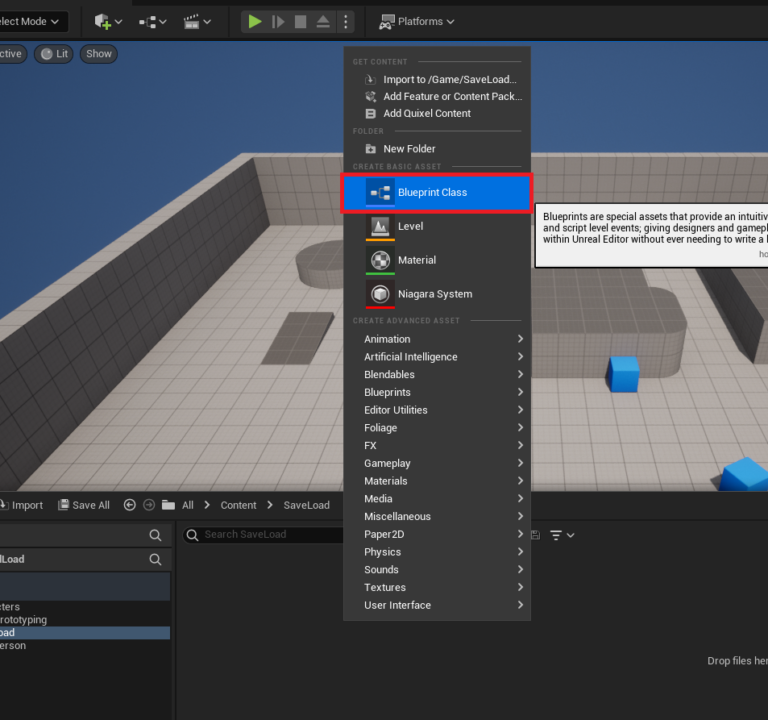
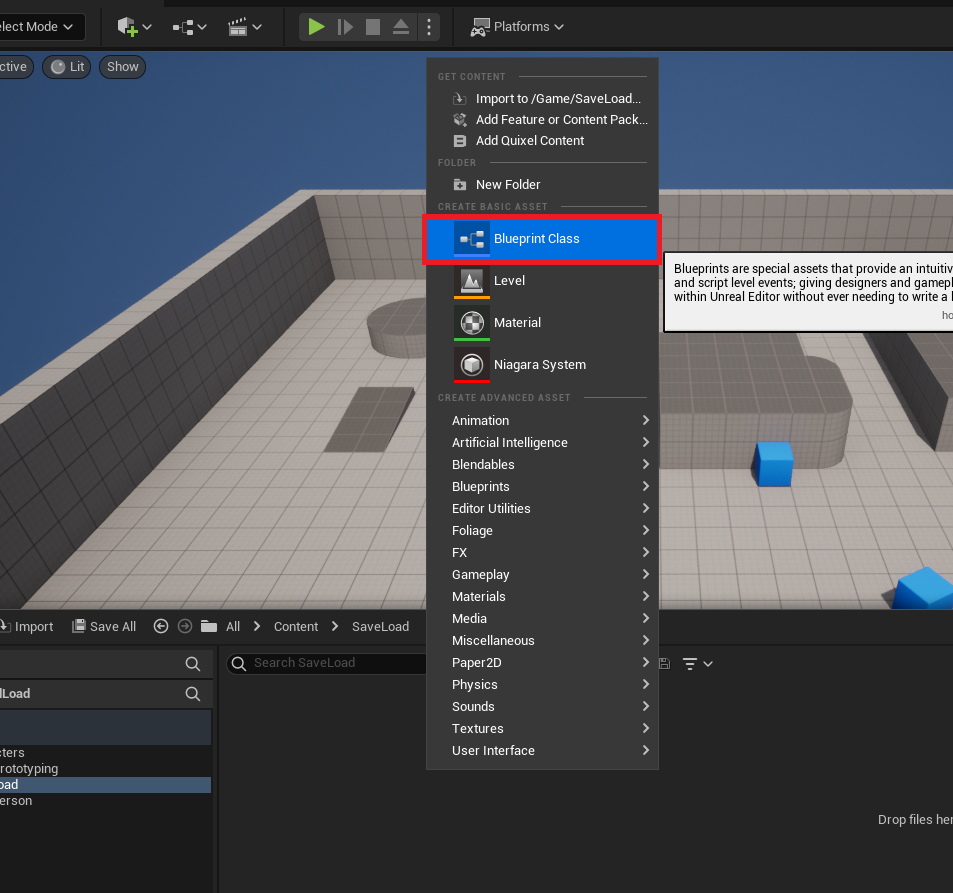
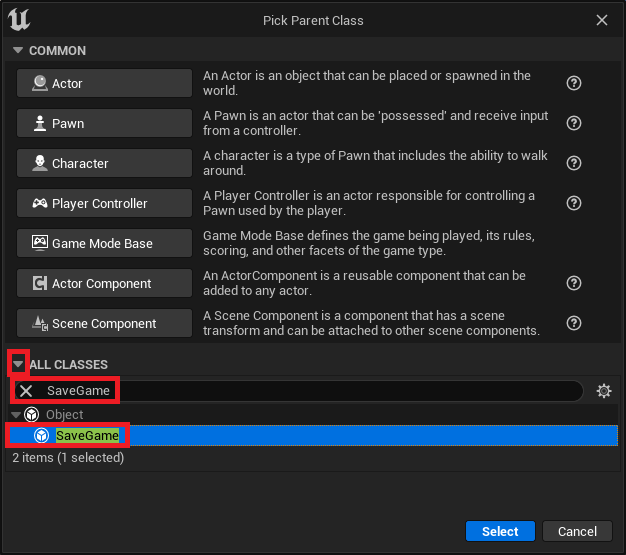
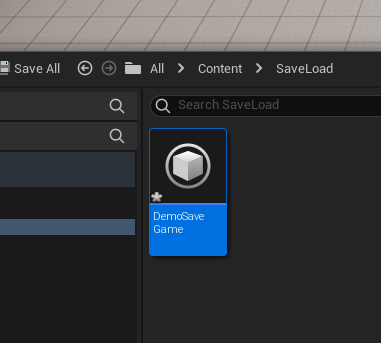
The initial step for any developer leveraging this system involves creating a custom SaveGame blueprint class. This process begins within the Unreal Editor’s content drawer, where a new Blueprint class is generated. By searching for "SaveGame" in the parent class selection, developers can quickly instantiate a new blueprint derived from the base SaveGame class. Naming this new class descriptively, such as "DemoSaveGame" or "PlayerProgressSave," is crucial for organization and subsequent referencing.

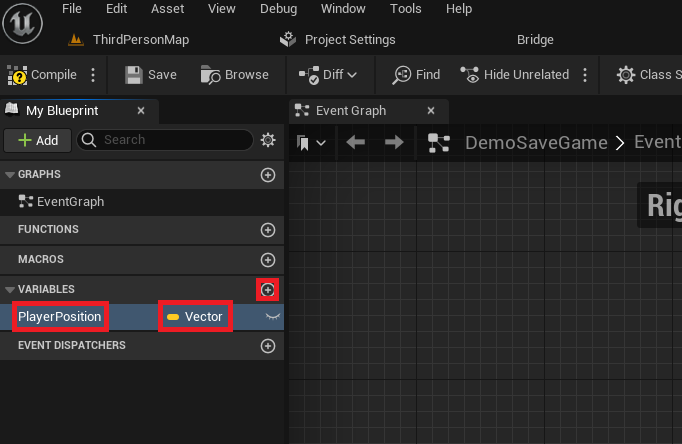
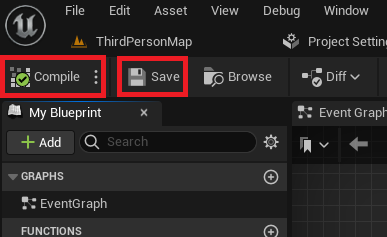
Once the custom SaveGame class is established, developers populate it with the specific variables that need to be saved. For example, to persist a player’s location, a Vector variable named "PlayerPosition" would be added to this class. This variable will then serve as the designated storage for the player’s coordinates within the save file. After defining all necessary variables, the class is compiled and saved, ensuring that these structural changes are applied and ready for use within the game’s logic. This straightforward setup procedure underscores the system’s accessibility, allowing developers to focus on what data needs to be saved rather than how the saving mechanism works internally.

Implementing Persistence: Save and Load Logic within the Game Instance
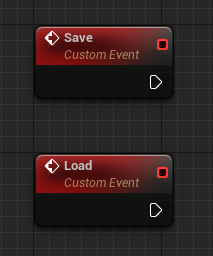
The core save and load functionality is typically orchestrated within a custom Game Instance. The Game Instance is an ideal location for such global state management as it persists throughout the entire lifespan of the game application, unlike other actors that might be destroyed and recreated. Developers usually define two custom events within their Game Instance: "Save" and "Load." These events act as entry points for triggering the respective persistence operations.
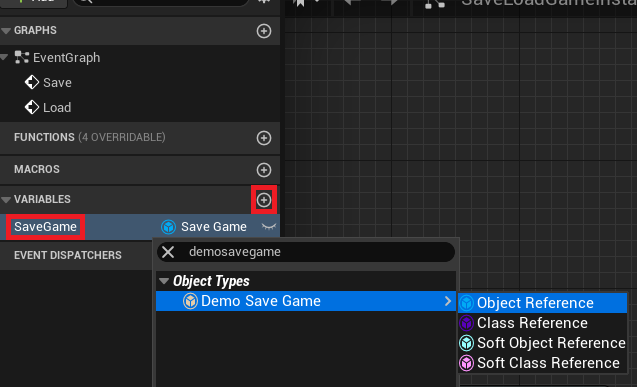
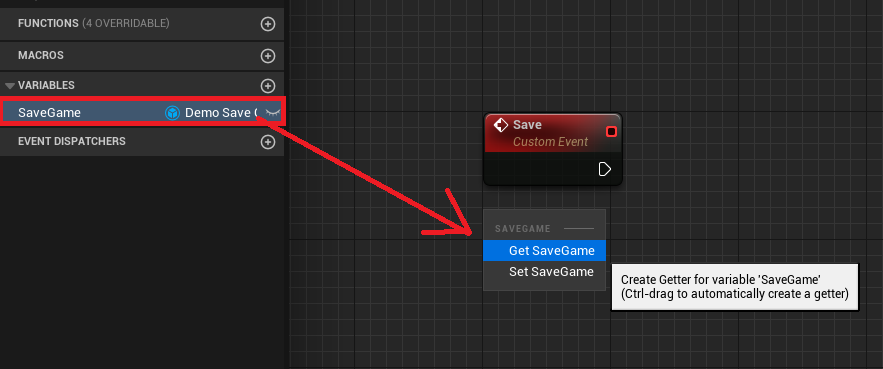
A critical component of this logic is a variable within the Game Instance itself, typed to the custom SaveGame class created earlier (e.g., "DemoSaveGame"). This variable will hold a reference to the active SaveGame object, allowing the game to interact with the saved data.
Loading Variables from the Save File: A Conditional Approach
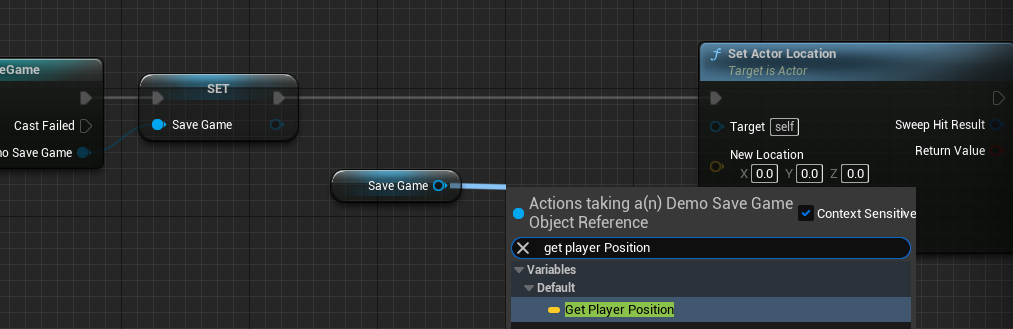
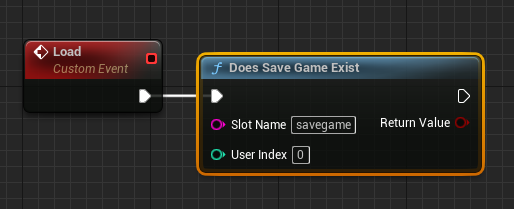
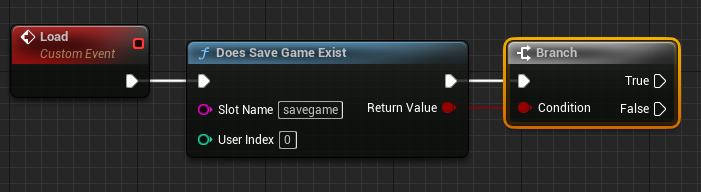
The "Load" event within the Game Instance follows a logical flow to handle both existing save files and initial game launches. The process begins with a "Does Save Game Exist" node. This node checks if a save file with a specified "Slot Name" already exists on the user’s machine. The "Slot Name" is a unique identifier for a particular save file; using different slot names allows for multiple save slots (e.g., "slot1," "slot2").
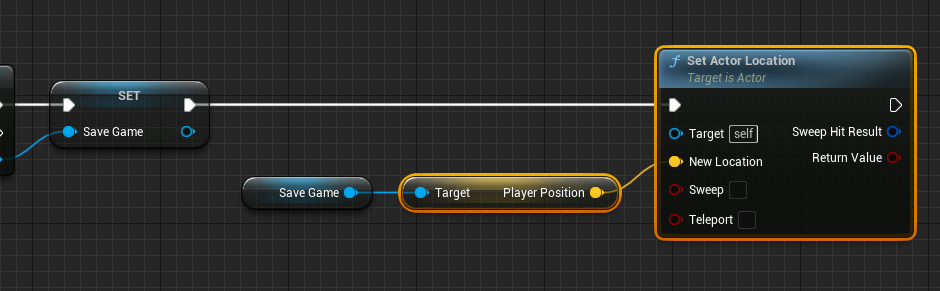
A subsequent Branch node then evaluates the outcome:
-
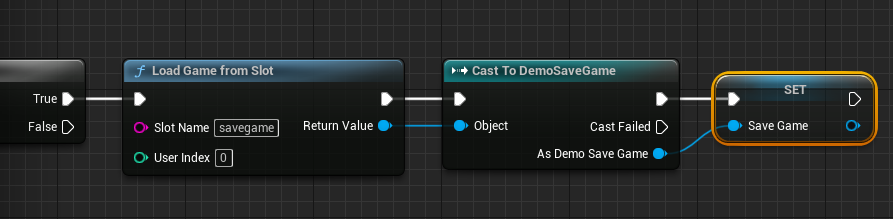
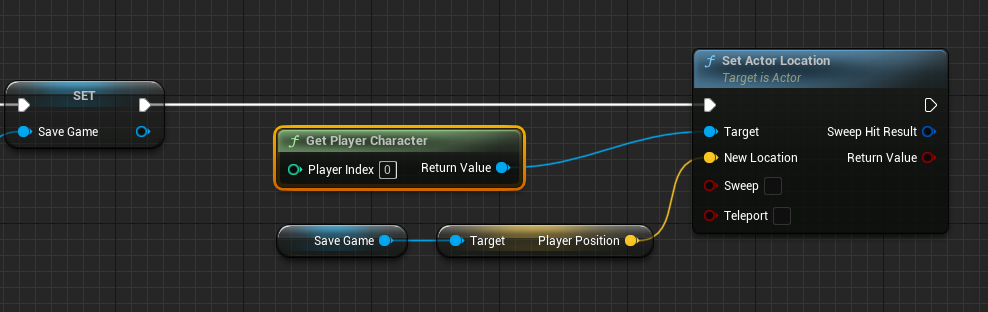
If a Save File Exists (True path): The system proceeds to a "Load Game From Slot" node, using the same "Slot Name." The output of this node, which is a generic
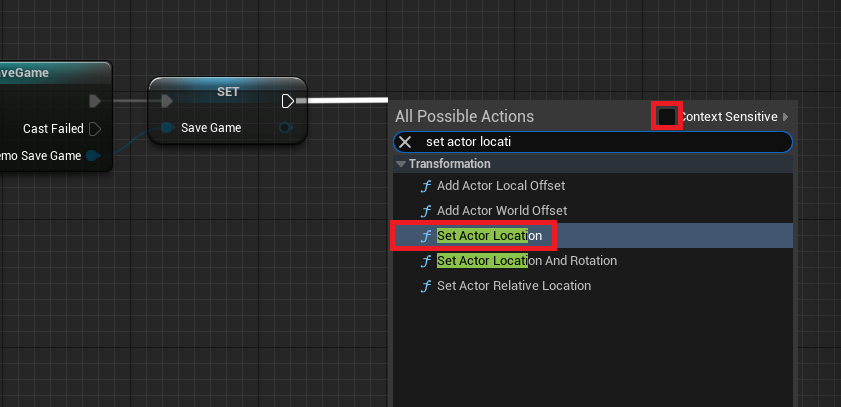
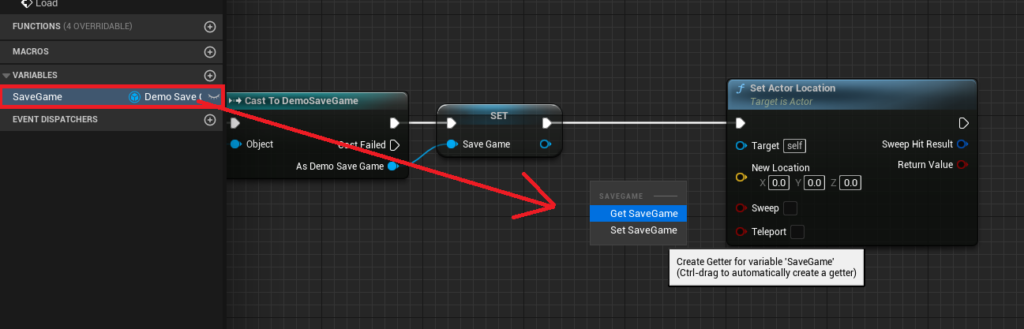
SaveGameobject, is then cast to the developer’s specificSaveGameclass (e.g., "Cast to DemoSaveGame"). This cast ensures that the loaded data can be accessed using the custom variables defined in that class. The Game Instance’s internalSaveGamevariable is then updated with this newly loaded object. Following this, game-specific logic is executed. For instance, to restore a player’s position, a "Get Player Character" node would retrieve the current player, and a "Set Actor Location" node would use the "PlayerPosition" variable (retrieved from the loadedSaveGameobject) to teleport the character to their last saved coordinates.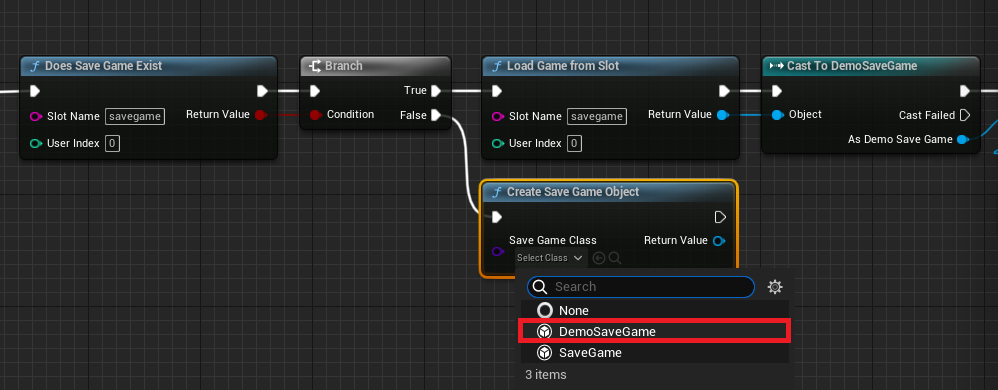
-
If No Save File Exists (False path): This scenario typically occurs on a player’s first launch or if they intentionally delete their save data. In this case, a "Create Save Game Object" node is used to instantiate a brand-new object of the custom
SaveGameclass. This newly created object is then assigned to the Game Instance’sSaveGamevariable, effectively initializing a fresh save state. This ensures that the game always has a validSaveGameobject to work with, whether loading existing data or starting anew.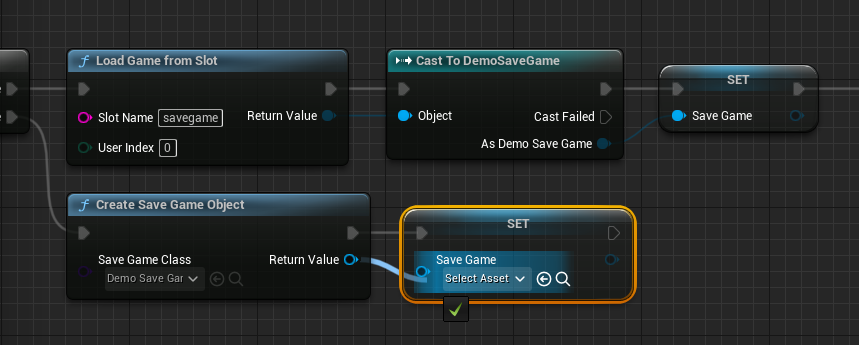
Saving Variables to the Save File: Ensuring Data Integrity
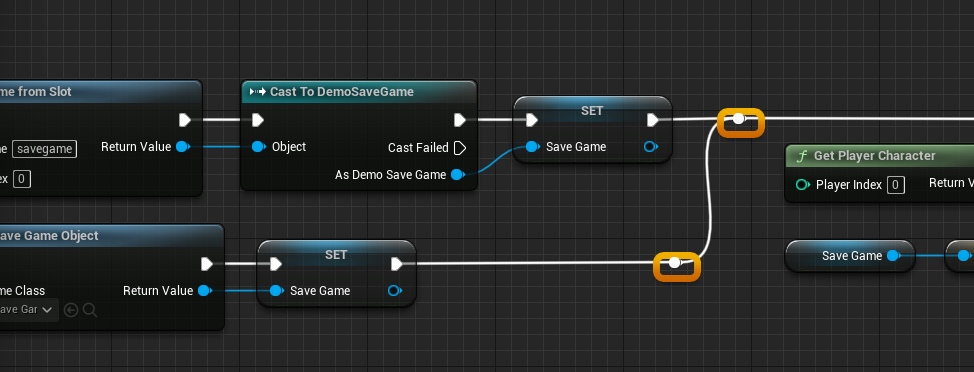
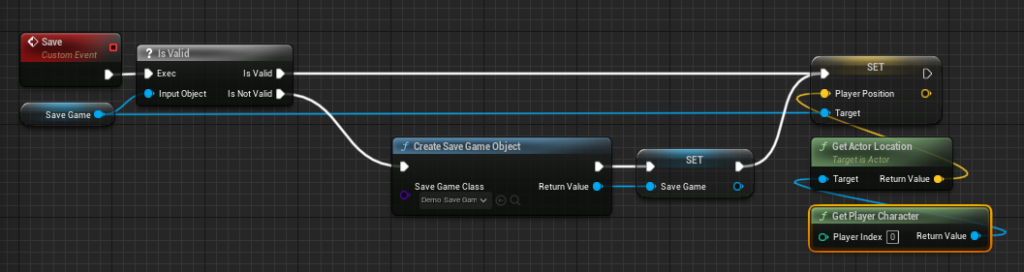
The "Save" event mirrors the loading process, but with the goal of writing current game state to disk. Before attempting to save, it is crucial to validate that the SaveGame object reference within the Game Instance is valid using an "Is Valid" node. This check prevents errors if a save operation is attempted before a SaveGame object has been properly loaded or created.
-
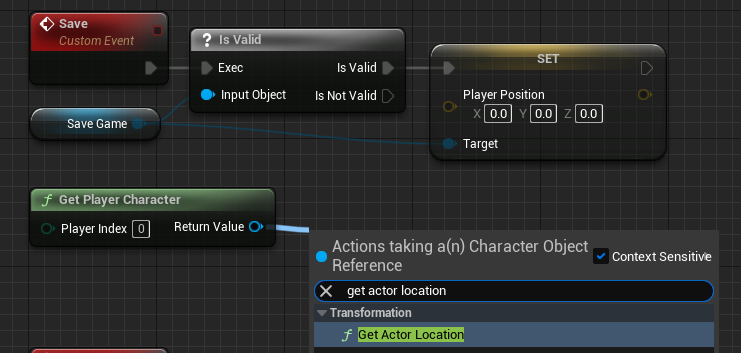
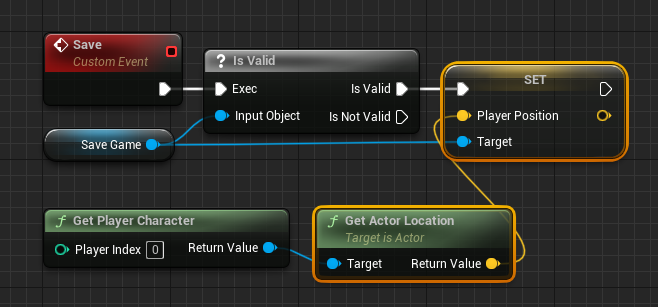
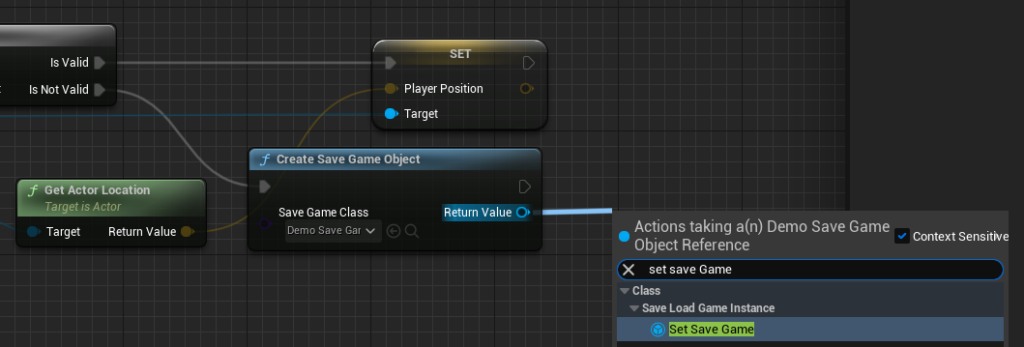
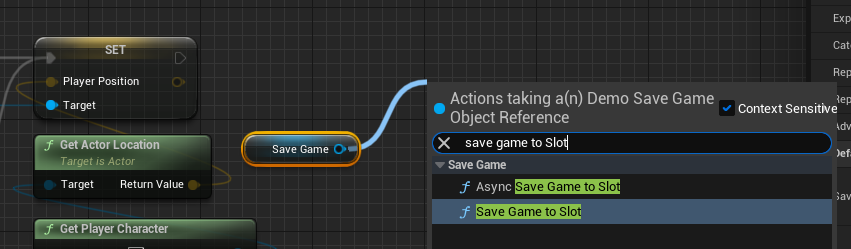
If the Save File Object is Valid (True path): The current game state is captured. For example, to save the player’s position, a "Get Player Character" node combined with a "Get Actor Location" node would retrieve the player’s real-time coordinates. This
Vectorvalue is then assigned to the "PlayerPosition" variable within theSaveGameobject using a "Set Player Position" node. Finally, a "Save Game to Slot" or "Async Save Game to Slot" node is called, passing theSaveGameobject and the designated "Slot Name." The choice between synchronous (Save Game to Slot) and asynchronous (Async Save Game to Slot) saving is critical: for small amounts of data, synchronous is acceptable, but for larger datasets, asynchronous saving is highly recommended to prevent hitches or freezes in gameplay, maintaining a smooth player experience.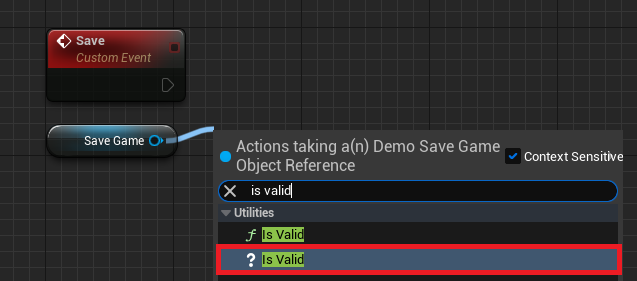
-
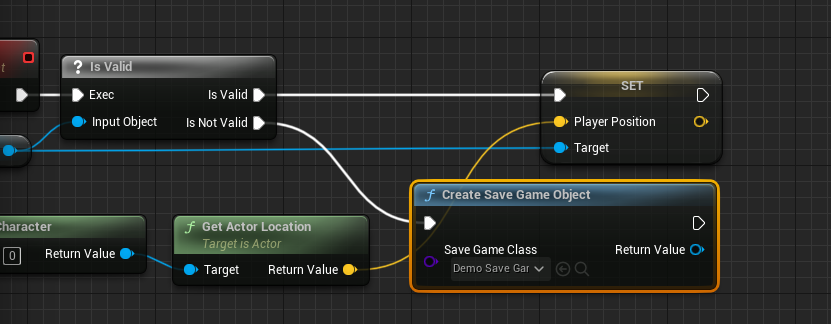
If the Save File Object is Not Valid (False path): Similar to the load process, if the
SaveGameobject is not valid, it must first be created using a "Create Save Game Object" node and assigned to the Game Instance’sSaveGamevariable. Following this initialization, the system then proceeds to capture and save the current game state as described in the "True path" above. This ensures that even if a save is triggered without a pre-existing save file or object, a new one is created and populated.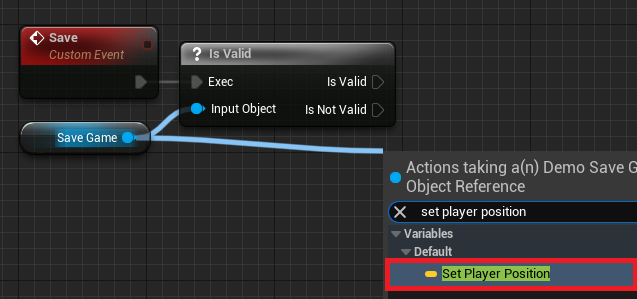
Triggering Save and Load: Player Input and Game Events
With the underlying Save and Load logic established within the Game Instance, the final step involves integrating these functionalities into the game’s interactive elements. Typically, developers map these operations to player input or specific game events. For instance, in a player character blueprint, a "Key Press Event" (e.g., pressing ‘1’ for save, ‘2’ for load) can be configured.
Upon a key press, the blueprint would first retrieve a reference to the custom Game Instance using "Get Game Instance" and "Cast To" nodes. From this cast Game Instance reference, the custom "Save" or "Load" events are then called. This setup means that when a player presses the designated key, the game’s current state (like the player’s position) is either written to the save file or loaded from it, instantaneously altering the player character’s location in the game world. This simple yet effective integration allows for immediate testing and practical application of the persistence system within the game environment.
Broader Industry Context and Implications
The ease of implementing data persistence in Unreal Engine 5 holds significant implications for the broader game development industry. Firstly, it lowers the barrier to entry for aspiring developers, allowing them to focus on creative game design rather than complex backend engineering. Secondly, for established studios, it frees up valuable development resources, enabling teams to allocate more time to refining gameplay, graphics, and narrative. This efficiency gain is particularly important in an industry where development cycles are increasingly demanding and competitive.
Moreover, the robust nature of Unreal Engine’s SaveGame system contributes directly to the overall quality and polish of games. Reliable save systems prevent data loss, a common source of player frustration and negative reviews. By providing a stable foundation for persistence, UE5 implicitly supports more ambitious game designs, including features like dynamic world states, player choices with lasting consequences, and extensive character customization that must be preserved. The system’s flexibility also hints at future possibilities, such as easier integration with cloud saving services or more sophisticated cross-platform save synchronization, though these often require additional layers of backend development.
In conclusion, Unreal Engine 5’s built-in SaveGame system is more than just a technical feature; it is a fundamental enabler of modern game development. By offering a streamlined, robust, and accessible method for handling game data persistence, it empowers developers to create richer, more continuous, and ultimately more enjoyable experiences for players worldwide. Its design reflects a deep understanding of developer needs and player expectations, solidifying Unreal Engine’s position as a leading choice for crafting the next generation of interactive entertainment.
About the Author