The modern gaming landscape increasingly demands sophisticated mechanisms for data persistence, allowing players to save their progress, inventory, and crucial game states seamlessly. Recognizing this fundamental need, Unreal Engine 5 (UE5) offers a robust, built-in SaveGame system that significantly streamlines the process of saving and loading game data to and from a file. This integrated solution empowers developers to implement complex data management with remarkable ease, ensuring a consistent and engaging player experience across various platforms. The system is designed to be highly accessible, particularly through its powerful Blueprint visual scripting interface, which abstracts much of the underlying complexity of file input/output operations.
Background and The Evolution of Game State Management
The journey of game saving has evolved dramatically since the early days of arcade high-score tables and rudimentary password systems. As games grew in scope and complexity, the necessity for persistent player data became paramount. Early console and PC games often relied on proprietary file formats or simple memory dumps, requiring developers to manually manage serialization and deserialization processes—a task fraught with potential errors and security vulnerabilities. The advent of modern game engines like Unreal Engine has revolutionized this aspect of development by providing high-level abstractions. Epic Games, the developer behind Unreal Engine, has consistently focused on delivering powerful yet user-friendly tools that democratize game creation, enabling studios of all sizes to produce titles with AAA-quality features. The SaveGame system in UE5 is a testament to this philosophy, offering a pre-configured class specifically designed for storing and retrieving game-critical information.
Industry analysts frequently point to the efficiency of development pipelines as a critical success factor in the competitive gaming market. Tools that accelerate the implementation of core features like saving and loading are invaluable. Prior to integrated solutions, a significant portion of development time could be consumed by creating and debugging custom save systems, diverting resources from creative endeavors. The Unreal Engine’s approach mitigates this, allowing developers to concentrate on designing compelling gameplay loops and rich narratives, confident that player progress can be reliably preserved.
Understanding the Unreal Engine 5 SaveGame Mechanism
At its core, the Unreal Engine 5 SaveGame system operates around a dedicated class, USaveGame. This class acts as a container for any variables a developer wishes to persist. When game data needs to be saved, the values of these variables within a USaveGame object are serialized and written to a file on the user’s machine. Conversely, during loading, the system reads this file, deserializes the data, and populates the USaveGame object’s variables, which can then be used to restore the game state.
The file locations for these save games are standardized across different operating systems, ensuring consistent behavior regardless of the deployment target. On Windows, save files are typically found in the user’s Local AppData folder. macOS users will find them within Library/Application Support, while Linux distributions place them in /home/username/.local/share. This standardization simplifies development and debugging, as developers know exactly where to locate persistent data for testing purposes.
A significant advantage of the USaveGame class is its broad compatibility. Nearly every standard variable type supported by Unreal Engine, from simple integers and booleans to complex vectors, transforms, and even custom Blueprint structures, can be seamlessly saved and loaded. This flexibility allows developers to capture a wide array of game data, including player positions, inventory items, quest progress, character statistics, and world states, all within a unified system.
Implementing Save and Load Functionality in Blueprints
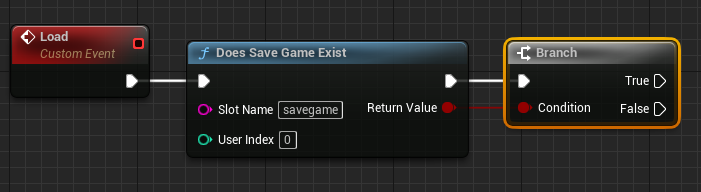
The implementation process for the SaveGame system in Unreal Engine 5 is predominantly handled through Blueprints, Epic Games’ visual scripting language, making it accessible even to developers without extensive C++ programming knowledge. The typical workflow involves several key stages, beginning with foundational setup and progressing to the logic for saving and loading data.

1. Creating the Custom Save Class:
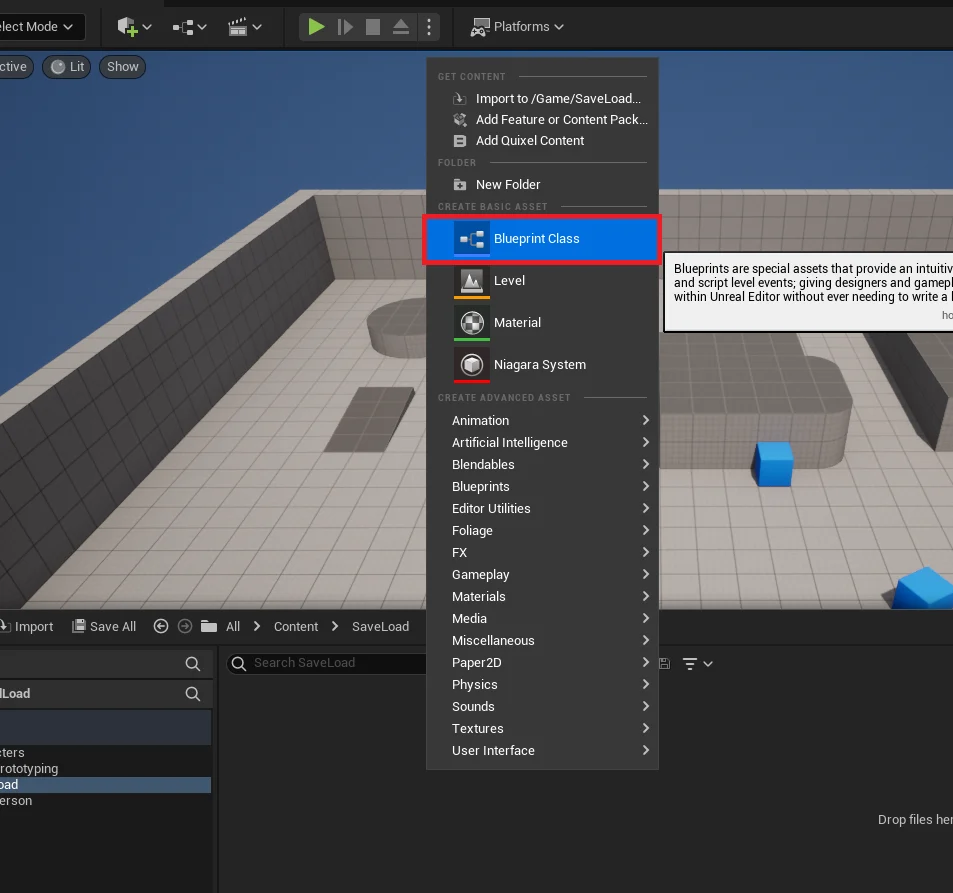
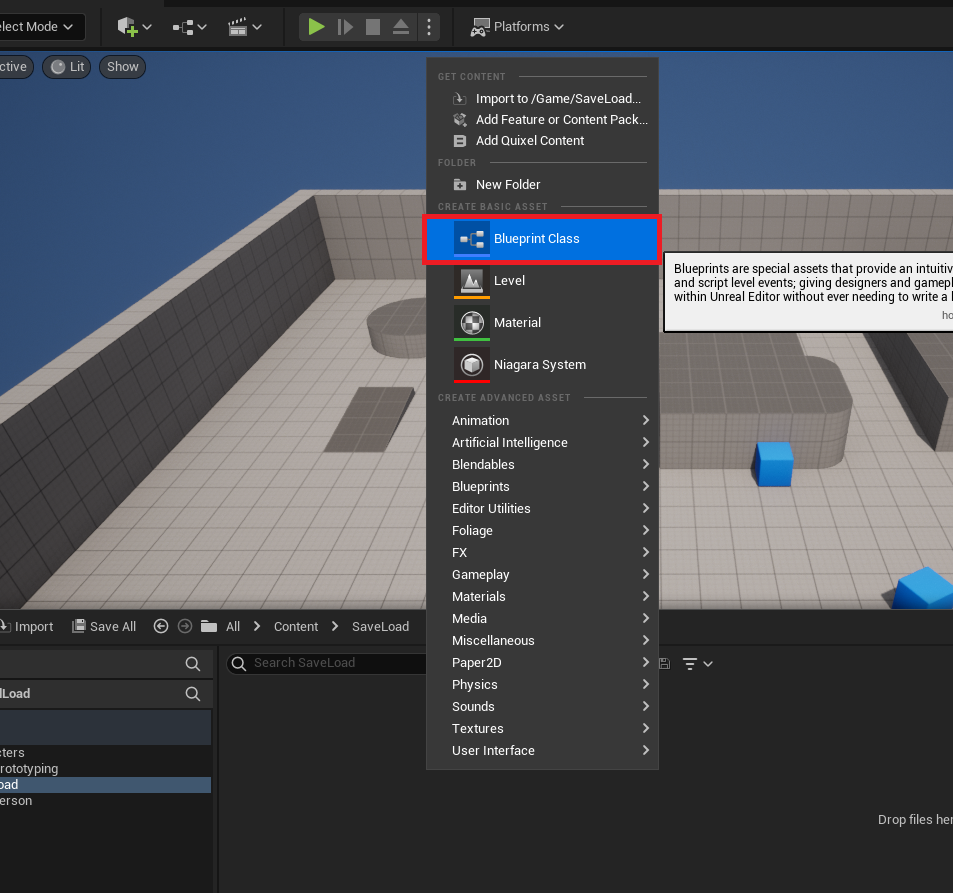
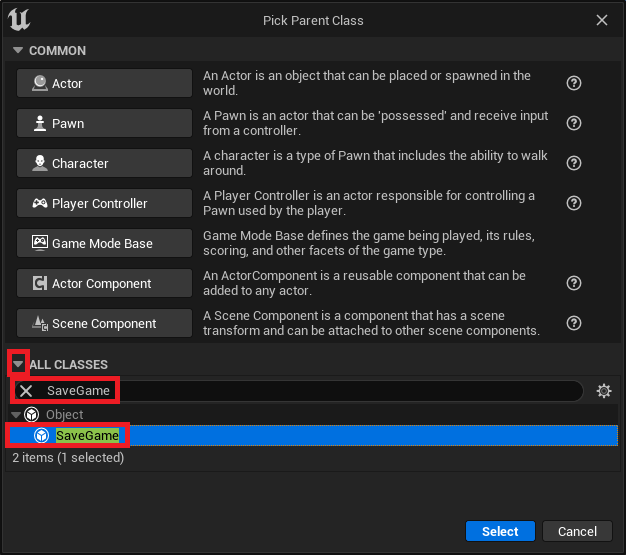
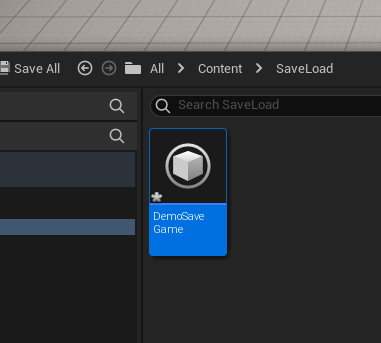
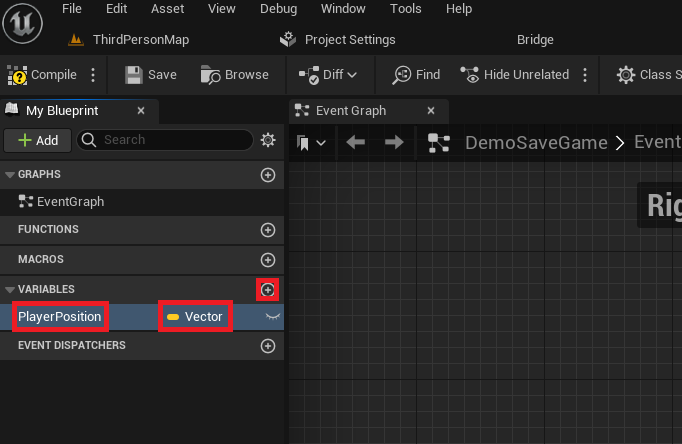
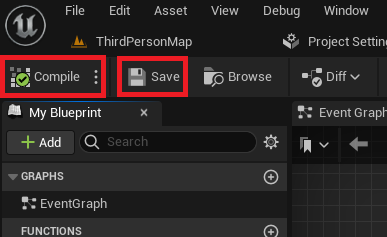
The initial step requires developers to define what data they intend to save. This is achieved by creating a new Blueprint Class that inherits from the SaveGame base class. For instance, a developer might name this BP_DemoSaveGame. Within this custom SaveGame Blueprint, variables are added to represent the data that needs to be persisted. A common example, and one used in many introductory guides, is a Vector variable named PlayerPosition, designed to store the exact location of the player character in the game world. Once these variables are defined, the Blueprint must be compiled and saved to ensure the changes are applied.

2. Integrating with the Game Instance:
For persistent data that needs to survive level changes and remain accessible throughout the game session, the Game Instance is the ideal location to manage the SaveGame object. The Game Instance is a special Blueprint class that spawns when the game starts and persists until the game exits, making it a reliable central point for managing global game state and save data.
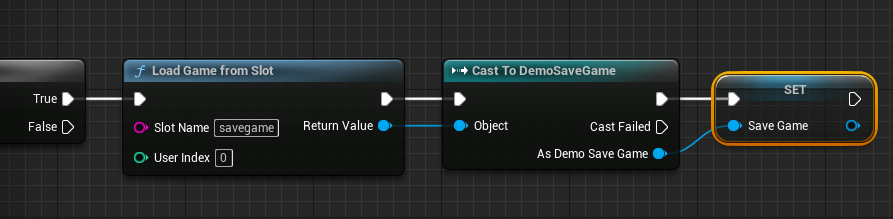
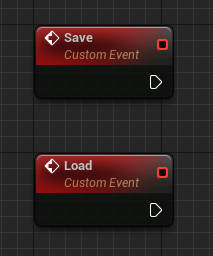
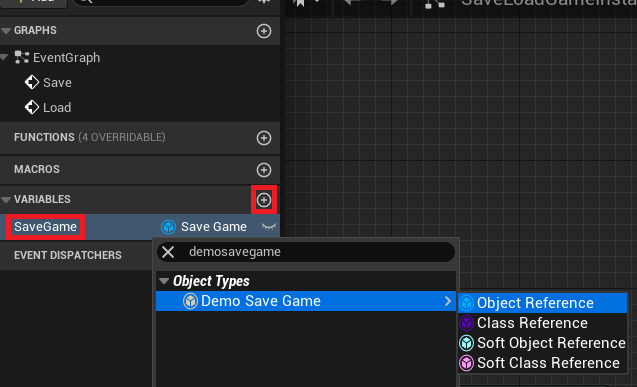
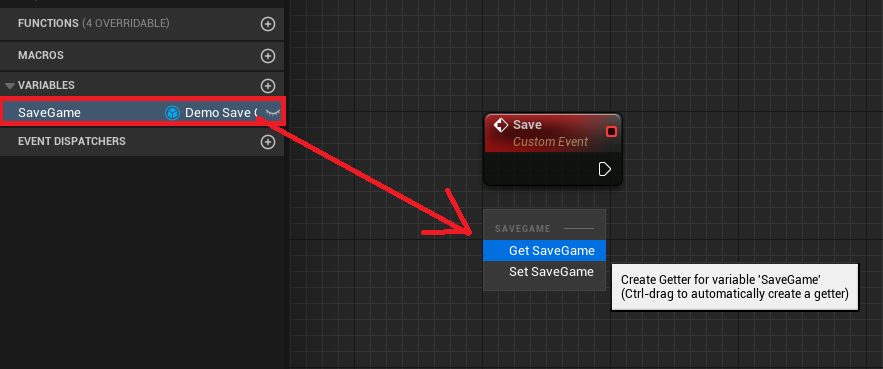
Within the custom Game Instance Blueprint, two custom events are typically created: SaveGameEvent and LoadGameEvent. These events will encapsulate the logic for interacting with the SaveGame system. Additionally, a variable of the custom SaveGame class type (e.g., BP_DemoSaveGame object reference) is added to the Game Instance. This variable will hold the actual instance of the SaveGame object in memory, allowing other parts of the game to access and modify the data before saving, or retrieve it after loading.
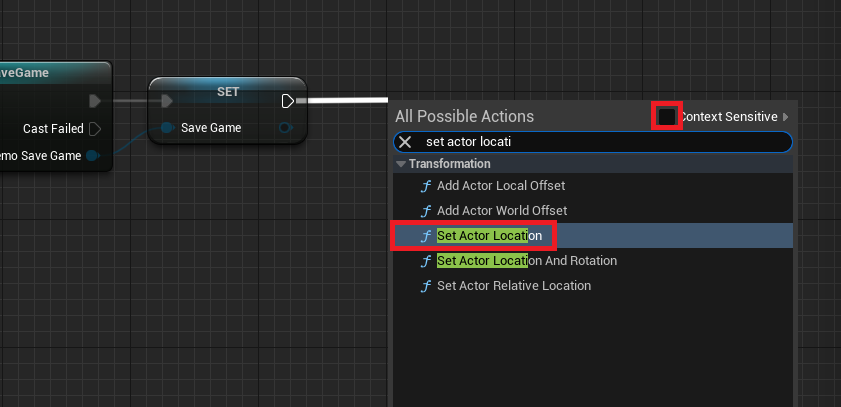
3. Implementing the Load Logic:
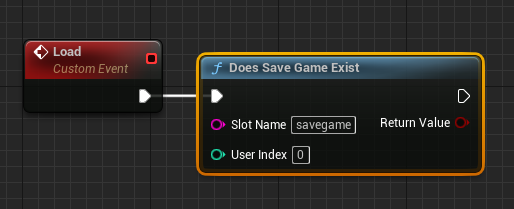
The LoadGameEvent orchestrates the retrieval of data from the save file. The first step in this process is to determine if a save file already exists for a given "slot name" using the Does Save Game Exist node. Each unique slot name corresponds to a different save file on disk, allowing for multiple save slots if desired.
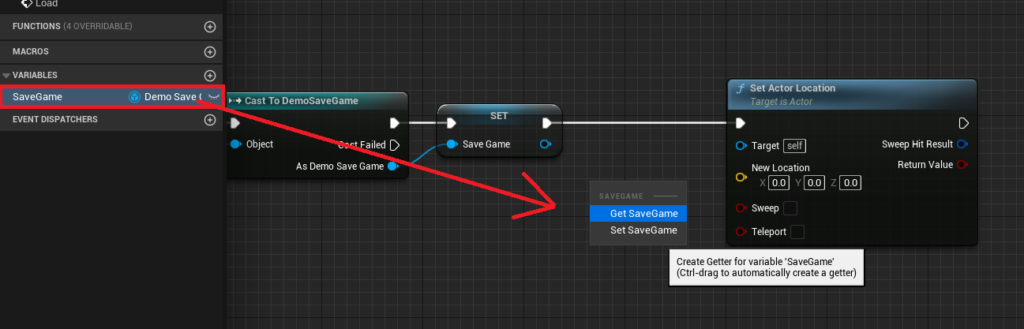
-
If a Save File Exists (True Branch): If
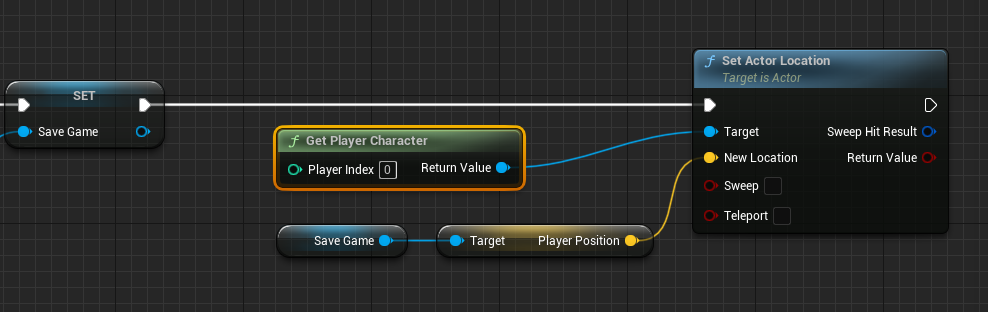
Does Save Game Existreturns true, indicating a previous save, the system proceeds to load that data. TheLoad Game From Slotnode is used, specifying the same slot name. The output of this node is a genericUSaveGameobject, which then needs to beCast Tothe developer’s specific custom SaveGame class (e.g.,Cast to BP_DemoSaveGame). This cast allows access to the custom variables declared within the class. The successfully cast object is then stored in theGame Instance‘sSaveGamevariable. From thisSaveGameobject, thePlayerPositionvariable can be retrieved. ThisVectorvalue is then used to update the player character’s location via aSet Actor Locationnode, targeting theGet Player Characterreference. This sequence effectively teleports the player to their last saved position.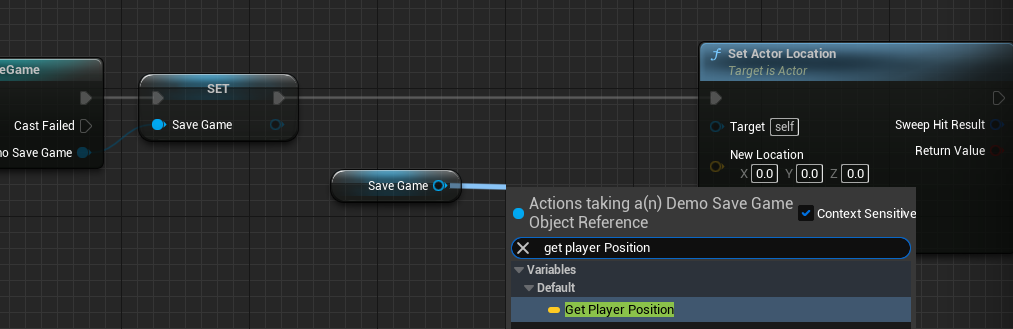
-
If No Save File Exists (False Branch): If
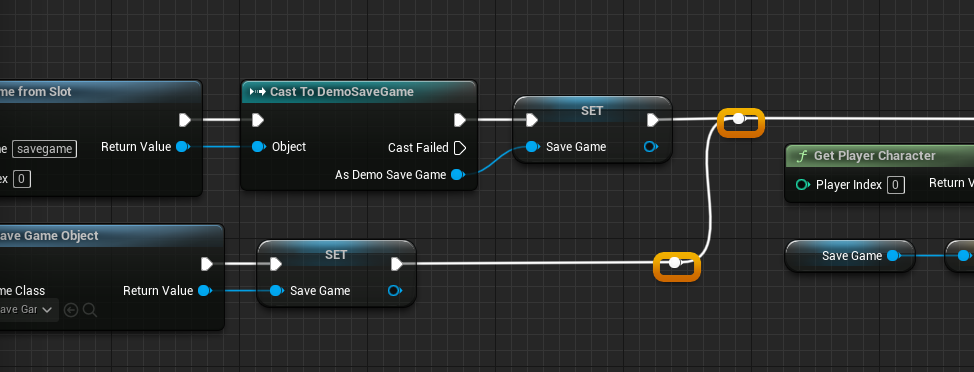
Does Save Game Existreturns false, it means no save file has been created yet. In this scenario, a newSaveGameobject must be instantiated in memory. This is done using theCreate Save Game Objectnode, specifying the custom SaveGame class (e.g.,BP_DemoSaveGame). The newly created object is then assigned to theGame Instance‘sSaveGamevariable. This ensures that even without a previous save, the game has a validSaveGameobject in memory to work with, which can then be populated with default values or initial game state data before the first save operation.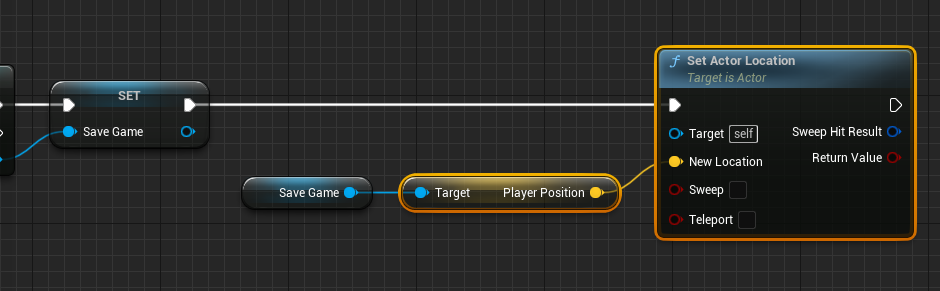
4. Implementing the Save Logic:
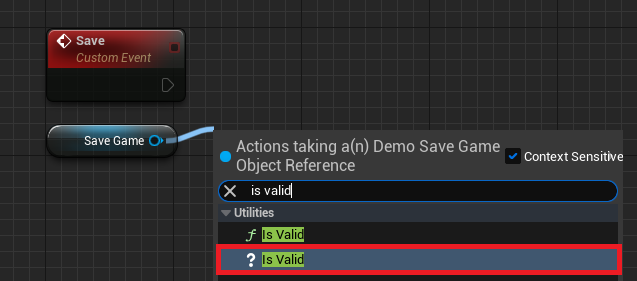
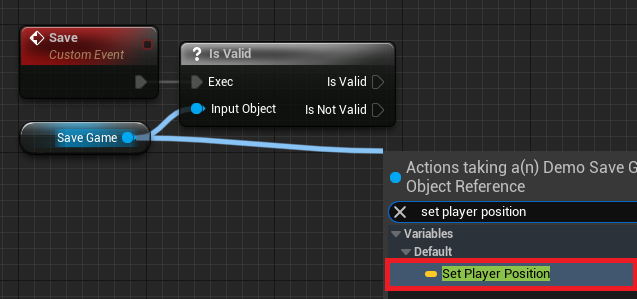
The SaveGameEvent handles the persistence of current game data to disk. Before attempting to save, it’s crucial to validate that the Game Instance‘s SaveGame variable holds a valid object reference, ensuring that either a file was loaded or a new object was created. An Is Valid node checks this.
-
If the SaveGame Object is Valid: If the
SaveGameobject is valid, the system proceeds to capture the current game state. For instance, to save the player’s position, aGet Player Characternode is used, followed by aGet Actor Locationnode to retrieve the character’s current world coordinates. ThisVectorvalue is then assigned to thePlayerPositionvariable within theSaveGameobject using aSet Player Positionnode.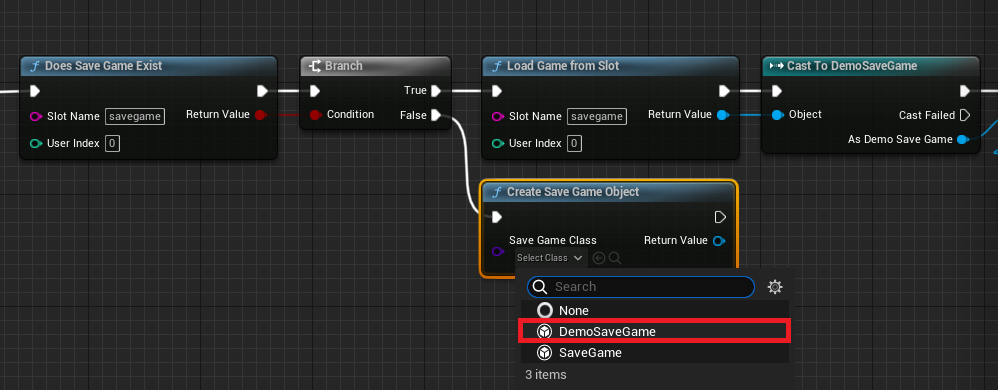
-
If the SaveGame Object is Not Valid: If the
SaveGameobject is not valid (which should ideally not happen if theLoadGameEventwas correctly called at game start), a newSaveGameobject is created viaCreate Save Game Objectand assigned to theGame Instance‘sSaveGamevariable. Following this, the player’s current position is obtained and set within this newly createdSaveGameobject, as described above.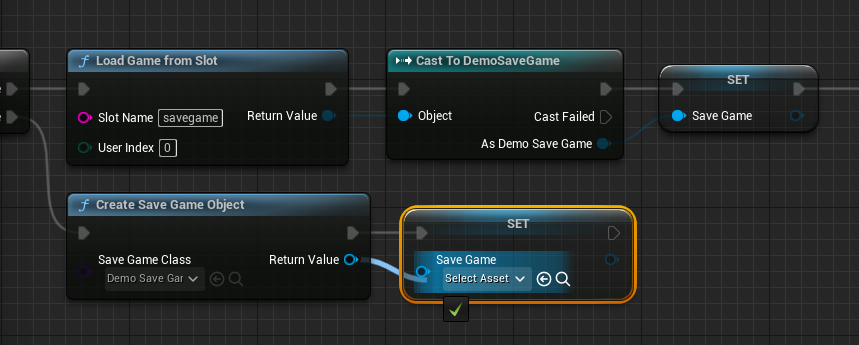
Once the SaveGame object’s variables have been updated with the latest game data, the final step is to commit these changes to disk. This is done using either Save Game to Slot or Async Save Game to Slot. Developers must use the same slot name as used during the loading process. The choice between synchronous (Save Game to Slot) and asynchronous (Async Save Game to Slot) saving depends on the amount of data being saved and the performance considerations. For smaller datasets, synchronous saving is often sufficient. However, for games with large amounts of data (e.g., complex world states, extensive inventories), Async Save Game to Slot is highly recommended to prevent hitching or freezing the game while the data is being written, thereby maintaining a smooth player experience.
5. Triggering Save and Load:
To make the save/load functionality accessible during gameplay, input events are typically used. In the player character’s Blueprint (e.g., ThirdPersonCharacterBP), a keyboard input event (e.g., pressing ‘1’ for save, ‘2’ for load) can be configured. When these keys are pressed, the Blueprint first obtains a reference to the Game Instance (using Get Game Instance) and then Cast To the custom Game Instance class. From this cast reference, the previously defined custom events (SaveGameEvent and LoadGameEvent) can be called, activating the respective save or load logic.
Implications and Broader Impact
The UE5 SaveGame system carries significant implications for game development and player experience:
- Enhanced Player Experience: Reliable save systems are a cornerstone of player satisfaction. The ability to pause progress and return to it later, or recover from unexpected crashes, significantly reduces player frustration and enhances overall engagement. Players consistently demand robust save features, and UE5’s system directly addresses this expectation.
- Empowering Developers: For indie developers and smaller teams, the Blueprint-driven SaveGame system drastically lowers the barrier to entry for implementing complex persistence. It allows them to focus creative energy on game design rather than low-level file management, fostering innovation. Even large studios benefit from the rapid prototyping capabilities and reduced development cycles.
- Facilitating Complex Game Worlds: With an efficient and easy-to-use save system, developers are empowered to design larger, more intricate game worlds with branching narratives, evolving environments, and vast amounts of dynamic data, knowing that all these elements can be reliably stored and retrieved. This is crucial for open-world games and RPGs where player choices and actions have long-lasting consequences.
- Data Integrity and Scalability: While the system simplifies implementation, it also provides a framework for maintaining data integrity. By centralizing save logic within the
Game Instanceand defining data structures within theSaveGameclass, developers can manage and scale their data persistence solutions more effectively as their games grow. The option for asynchronous saving further ensures that even games with extensive data sets can maintain high performance.
In conclusion, Unreal Engine 5’s integrated SaveGame system stands as a testament to Epic Games’ commitment to providing powerful and accessible tools. By abstracting the complexities of data serialization and file management into a user-friendly Blueprint interface, it not only simplifies a critical aspect of game development but also contributes directly to the creation of more immersive, stable, and enjoyable experiences for players worldwide. This system is a fundamental component for any modern game seeking to offer persistent progression and maintain player engagement.
About the Author