Unreal Engine 5 (UE5) Data Tables stand as a cornerstone for efficient and scalable game development, offering a robust mechanism for programmers and designers to establish and manage predefined lists of structured information. These powerful assets empower development teams to centralize critical game data, facilitating rapid iteration, enhanced collaboration, and streamlined content management. The fundamental principle behind Data Tables involves basing them on a user-defined struct, which dictates the precise types and organization of data each entry will hold. This approach ensures data consistency and simplifies retrieval across various game systems.
The utility of Data Tables extends across a multitude of game mechanics. For instance, they can meticulously define the attributes of diverse in-game items, ranging from weaponry and armor to consumables, specifying properties like damage values, rarity tiers, sell prices, and unique abilities. Similarly, enemy archetypes can be detailed with health pools, attack patterns, loot drops, and behavioral flags. Beyond items and enemies, Data Tables are invaluable for managing quest objectives, dialogue lines, level parameters, character statistics, spell effects, and even localization strings, providing a single source of truth for dynamic game content. This article delves into the architecture, creation, and implementation of Data Tables within an Unreal Engine 5 project, illustrating their profound impact on modern game development workflows.
The Evolution of Data Management in Game Development
The landscape of game development has steadily shifted towards data-driven design, a paradigm where game logic is separated from its underlying data. In earlier eras, much of a game’s content, such as item stats or enemy properties, might have been hardcoded directly into the game’s source code. This approach, while straightforward for small projects, quickly became unmanageable as games grew in complexity. Iterating on values, balancing gameplay, or adding new content required recompiling code, a time-consuming and error-prone process.
The introduction of external data files, such as XML or JSON, offered an improvement, allowing designers to modify data without programmer intervention. However, integrating these external formats often required custom parsing logic and lacked direct engine support, leading to potential inconsistencies and a steeper learning curve for non-technical team members. Unreal Engine’s Data Tables represent a significant evolution in this journey, providing an engine-native, visually intuitive, and highly integrated solution for structured data management. By leveraging the engine’s asset system, Data Tables offer a seamless workflow that benefits all disciplines within a development team, from concept to deployment. They encapsulate the best practices of data management, promoting clarity, consistency, and efficiency in content delivery.
Understanding Data Tables: The Core Concept
At its heart, an Unreal Engine 5 Data Table is an asset that stores a collection of structured data, indexed by a unique key, typically a string (the "Row Name"). Each entry, or "row," in the table conforms to a predefined data structure, known as a Struct. This struct acts as a template, dictating the columns (variables) and their respective data types that every row must possess. This powerful combination allows developers to define a consistent schema for their game data.
The data within a Data Table is stored directly within the Unreal Engine project, making it an intrinsic part of the asset pipeline. This asset-based approach offers several critical advantages:
- Editor Integration: Data can be created, viewed, and modified directly within the Unreal Editor, providing a user-friendly interface for designers and content creators.
- Runtime Accessibility: Data is readily available during gameplay, allowing game logic to query and utilize information efficiently without needing complex parsing.
- Persistence: Changes made to a Data Table in the editor are saved with the project, ensuring data integrity and consistency across development sessions.
- Single Source of Truth: By centralizing data, Data Tables minimize discrepancies and ensure that all parts of the game access the same, up-to-date information.
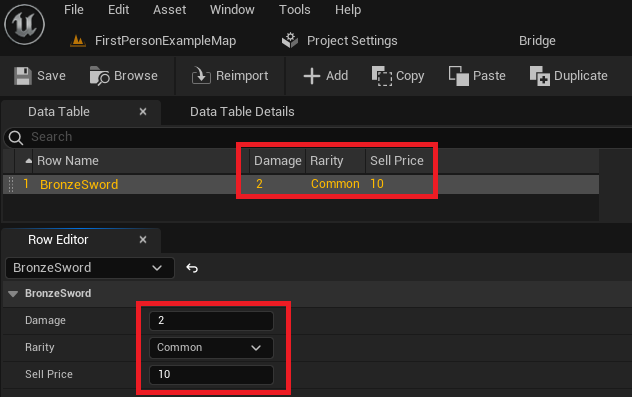
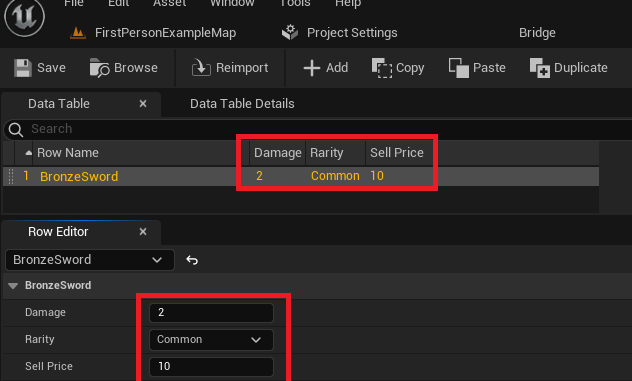
Consider the example of items or enemies in a role-playing game. Instead of individual Blueprint assets each holding their own stats, a Data Table can define the common structure for all items (e.g., ItemName, Damage, Rarity, SellPrice). Then, each row in the Data Table represents a specific item (e.g., "BronzeSword," "IronShield," "HealingPotion"), with its unique values for those defined properties. This system simplifies balancing, adding new content, and managing complex game systems.
Prerequisites for Data Table Creation: Enums and Structs
Before a Data Table can be brought into existence, two foundational data structures are typically required: Enumerations (Enums) and Structures (Structs). These elements define the building blocks of the structured data that the Data Table will ultimately hold.
1. Creating an Enumeration (Enum)
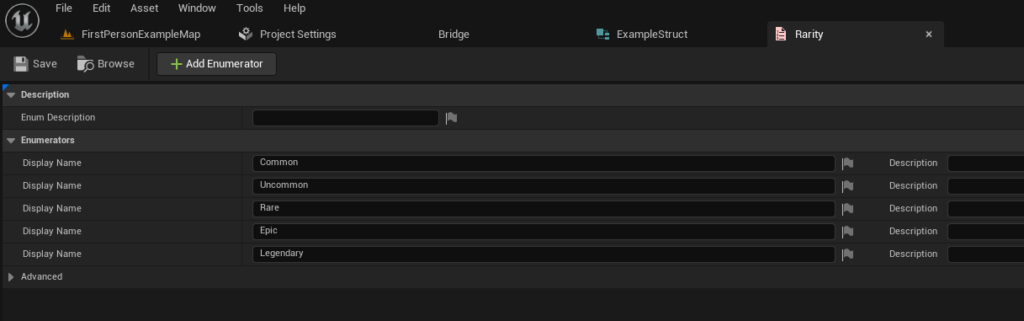
An Enum, short for enumeration, is a user-defined data type that consists of a set of named integer constants. It provides a way to define a list of discrete, symbolic values, making code more readable and less prone to errors compared to using raw integer values. In the context of game development, Enums are perfect for representing distinct states or categories. For example, an EItemRarity Enum could define qualities like Common, Uncommon, Rare, Epic, and Legendary.
To create an Enum in Unreal Engine 5:
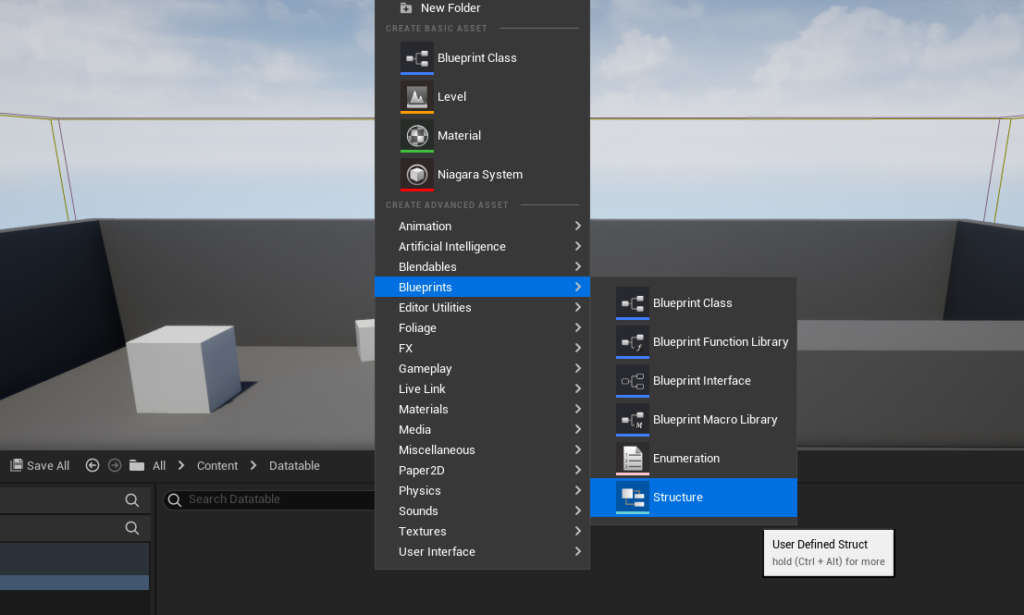
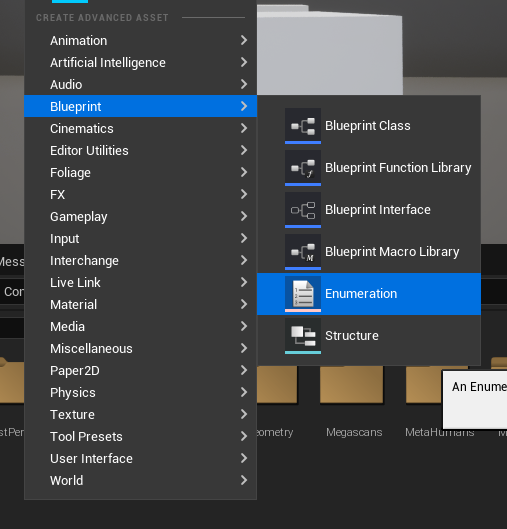
- Right-click within the Content Browser.
- Navigate to the "Blueprints" category.
- Select "Enumeration."
- Provide a descriptive name, typically prefixed with ‘E’ (e.g.,
EItemRarity).
Once created, the Enum asset can be opened to define its members. Each member should have a unique display name and an optional tooltip. For an item rarity example, values like EItemRarity::Common, EItemRarity::Uncommon, EItemRarity::Rare, EItemRarity::Epic, and EItemRarity::Legendary would be added. This structured approach ensures that rarity is consistently represented throughout the project, improving clarity and reducing potential input errors.
2. Defining a Custom Structure (Struct)
A Struct, or Structure, is a custom data type that groups together a collection of variables (members) of different data types under a single name. Unlike Enums, which define a set of distinct options, Structs define a composite data type, acting as a blueprint for a specific record of information. Critically, every Data Table must be based on a Struct that inherits from FTableRowBase. This inheritance is what allows the Struct to be used as a row type in a Data Table.
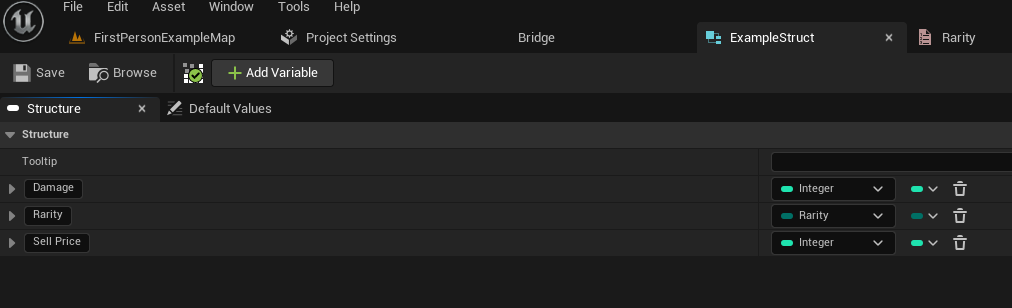
To create a Struct in Unreal Engine 5:
- Right-click anywhere in the Content Browser.
- Navigate to the "Blueprints" category.
- Select "Structure."
- Name the Struct appropriately, often prefixed with ‘F’ (e.g.,
FExampleItemData).
Upon opening the Struct, developers can add variables that will constitute the data for each row in the Data Table. For our RPG item example, these variables might include:
Damage: AnIntegerorFloatrepresenting the item’s attack power.Rarity: AnEItemRaritytype (the Enum we just created), ensuring that rarity values are consistent and selected from a predefined list.SellPrice: AnIntegerrepresenting the item’s value in gold.
Each variable within the struct can be configured with default values, which will then populate new rows in the Data Table upon creation. This step is crucial as it defines the schema and data types that every entry in the subsequent Data Table will adhere to, enforcing strong typing and data integrity.
Constructing the Data Table
With the Enum and Struct established, the final prerequisite for data definition is complete, allowing for the creation of the Data Table itself. This process directly links the defined FTableRowBase struct to the new table asset.
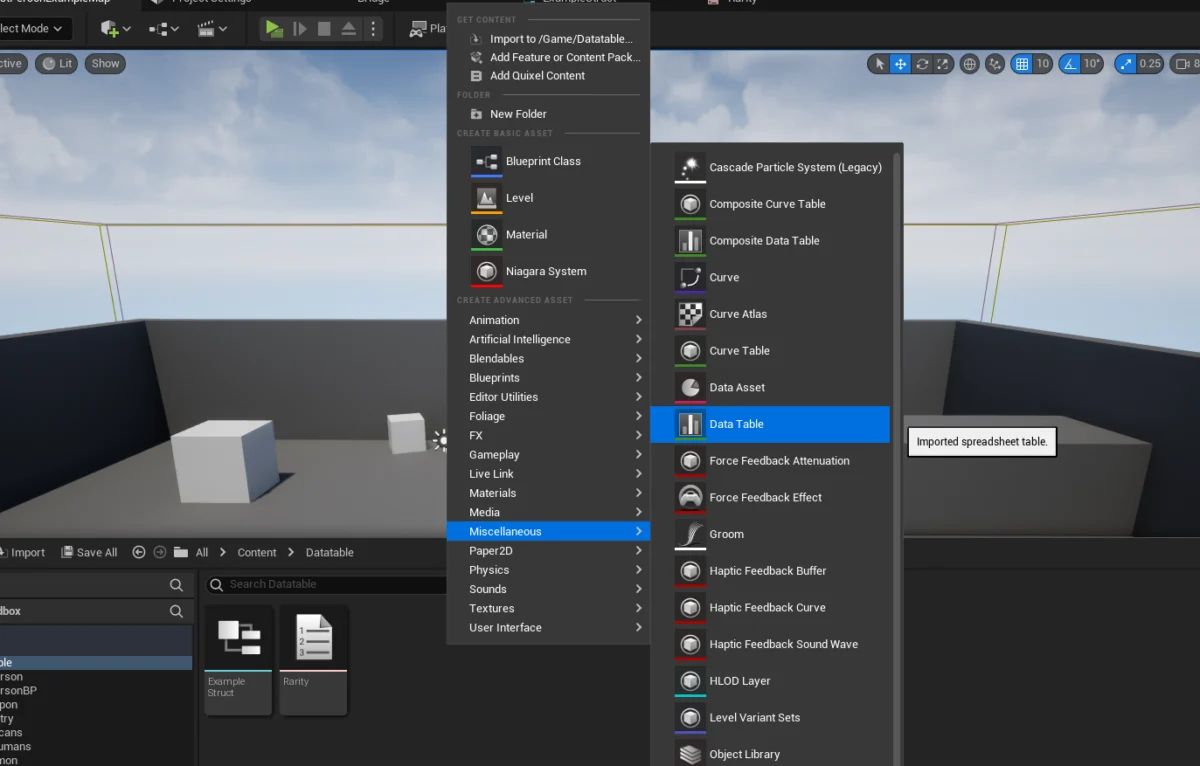
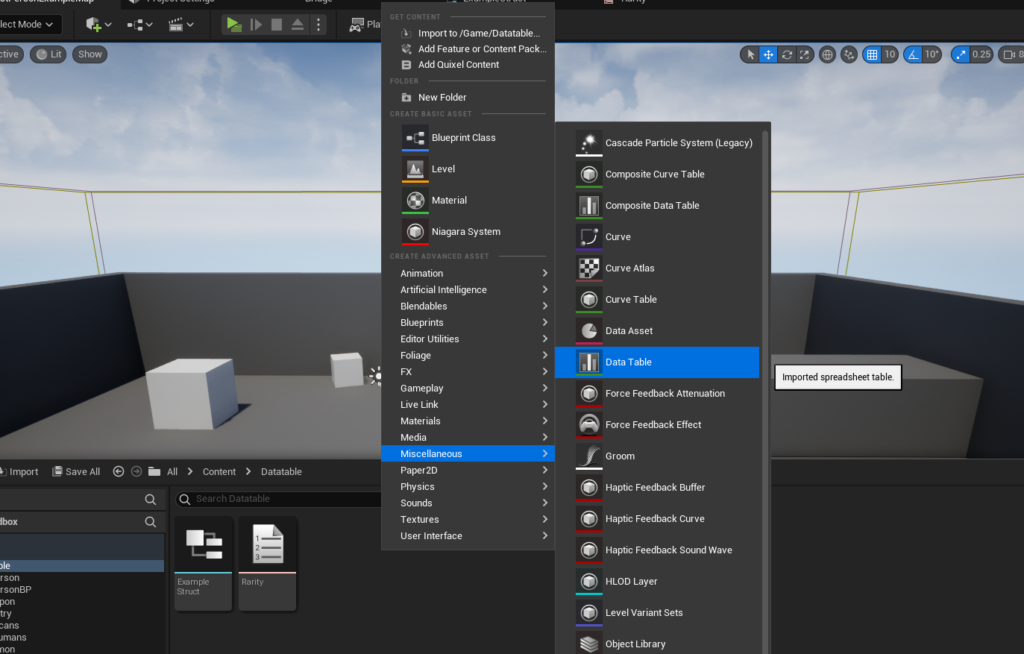
To create the Data Table:
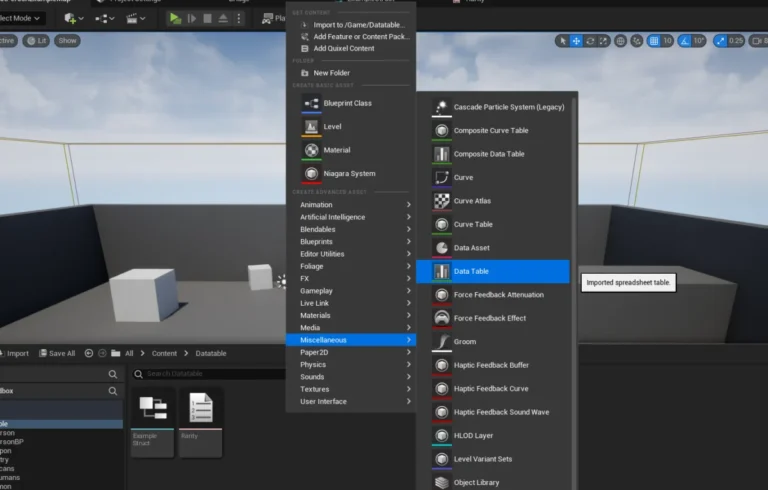
- Right-click in the Content Browser.
- Navigate to the "Miscellaneous" category.
- Select "Data Table."
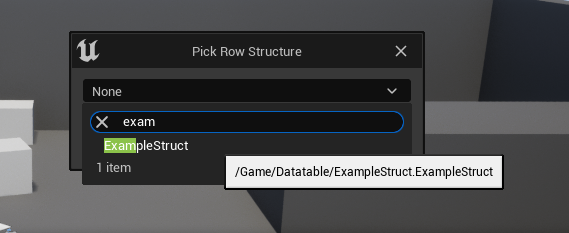
- A prompt will appear, asking which
Structto base the Data Table on. From the dropdown list, select the previously created Struct (e.g.,FExampleItemData). - Assign a suitable name, typically prefixed with ‘DT_’ (e.g.,
DT_ItemStats).
Upon creation, the Data Table asset will appear in the Content Browser. Double-clicking it opens the Data Table Editor, which presents a spreadsheet-like interface. Initially, the table will be empty, awaiting population.
Populating the Data Table with Values
The Data Table Editor is where the actual game data is entered and managed. This interface provides a visual and intuitive way to add, modify, and delete rows of data, each conforming to the structure defined by the associated FTableRowBase Struct.
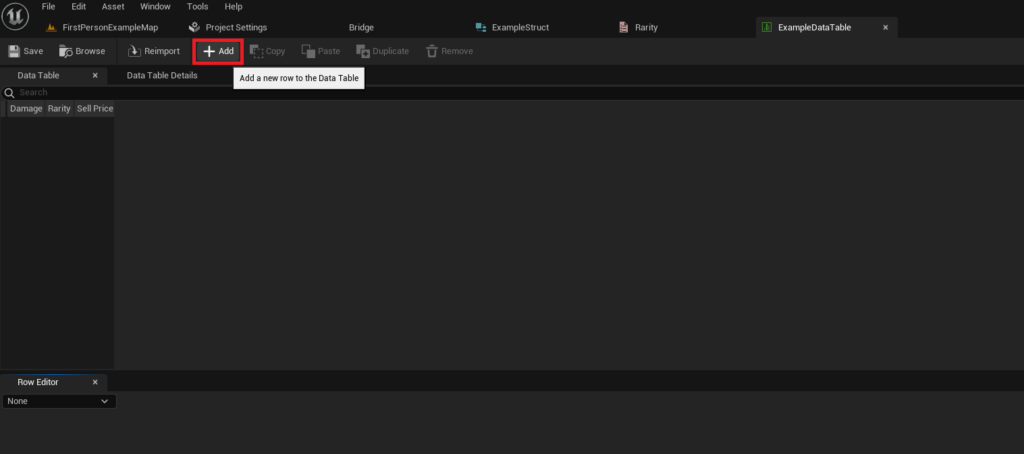
To add a new row:
- Click the "Add" button within the Data Table Editor.
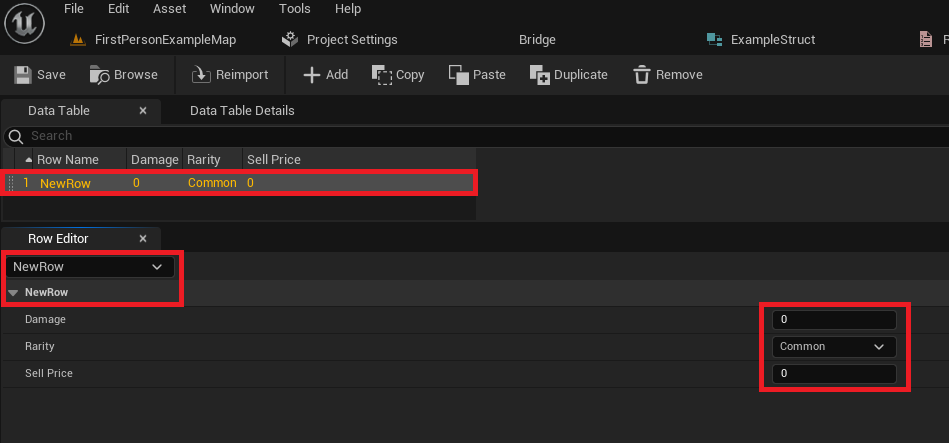
- A new row will appear, populated with default values derived from the Struct’s variable definitions.
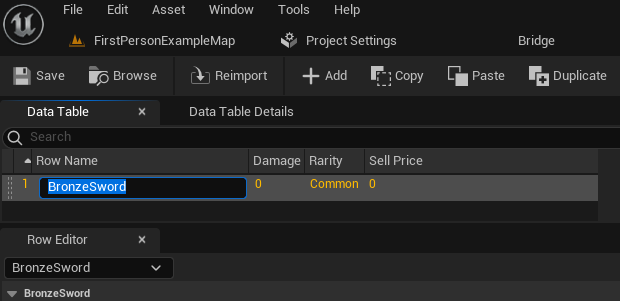
- Each row requires a unique "Row Name." This string identifier serves as the primary key for retrieving data from the table at runtime. For an item, this might be "BronzeSword," "IronShield," or "HealthPotion." Meaningful and consistent naming conventions are essential for ease of access and debugging.
- Below the main table view, the "Row Editor" panel displays the details of the currently selected row, allowing for granular modification of each variable (Damage, Rarity, Sell Price, etc.). Changes made in the Row Editor are immediately reflected in the table view above.
The power of Data Tables becomes evident as more entries are added. Developers can rapidly create a comprehensive catalog of game elements, each with its unique set of attributes, all organized under a consistent schema. This facilitates not only content creation but also game balancing. Designers can adjust values for damage, rarity, or price across numerous items simply by modifying entries in the Data Table, without needing to touch any Blueprint or C++ code. Regular saving of the Data Table asset is crucial to preserve changes, as with any other Unreal Engine asset.
Accessing Data from the Data Table
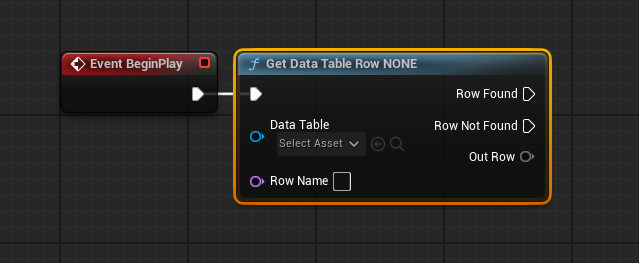
Once populated, the true value of Data Tables lies in their accessibility at runtime. Game logic, whether implemented in Blueprints or C++, can efficiently query the Data Table to retrieve specific sets of data based on their Row Name.
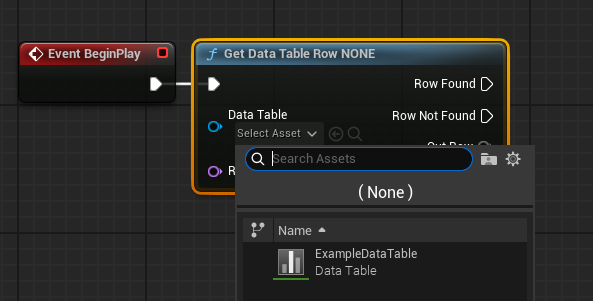
In Blueprints, the primary node for data retrieval is Get Data Table Row. This node requires two key inputs:
- Data Table: A reference to the Data Table asset itself (e.g.,
DT_ItemStats). This can be set directly in the node’s details panel via a dropdown selector, or passed in dynamically. - Row Name: The unique string identifier of the row whose data is to be retrieved (e.g., "BronzeSword"). This can be manually selected from a dropdown if the Data Table reference is set, or provided dynamically via a string variable.
The Get Data Table Row node offers two execution pins:
- Row Found: Executes if a row matching the provided
Row Nameis successfully located. - Row Not Found: Executes if no row with the specified
Row Nameexists in the Data Table. This pin is critical for robust error handling.
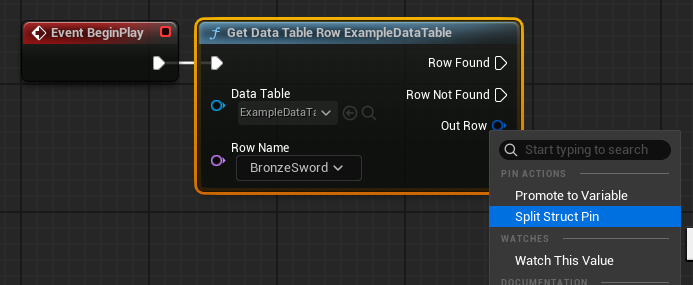
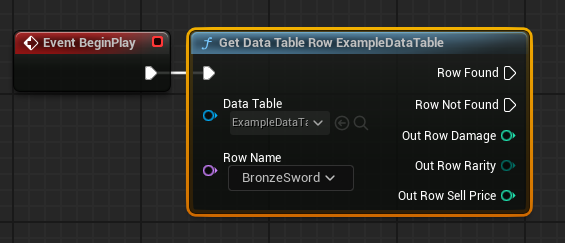
The most important output pin is Out Row. This pin returns a copy of the entire Struct (FExampleItemData in our example) for the retrieved row. To access individual variables within this Struct (e.g., Damage, Rarity, Sell Price), the Out Row pin can be right-clicked and "Split Struct Pin" selected. This expands the single Struct pin into individual output pins for each variable, making their values directly accessible for use in subsequent game logic, such as applying damage or displaying item information. The ability to select Row Name from a dropdown after setting the Data Table reference greatly assists designers by preventing typos and ensuring valid lookups.
Looping Over Data Table Rows
While accessing a single, specific row is common, scenarios often arise where game logic needs to process or display data from multiple, or even all, rows within a Data Table. For instance, populating a shop inventory, generating a list of available quests, or calculating total enemy power might require iterating through the entire table.
To achieve this in Blueprints, a two-step process is employed:
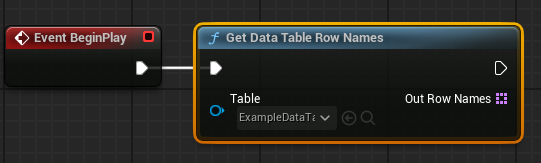
1. Get All Row Names: The Get Data Table Row Names node takes a Data Table reference as input and outputs an Array of Name types, where each element corresponds to a Row Name from the Data Table. This array essentially provides a list of all available keys in the table.
2. Iterate with a For Each Loop: The output array from Get Data Table Row Names is then connected to the Array input of a For Each Loop node. This loop node will execute its "Loop Body" once for each element (Row Name) in the array.
- Array Element: Within each iteration of the loop, the
Array Elementoutput pin provides the currentRow Namebeing processed. - Completed: The
Completedpin executes once all elements in the array have been processed.
Inside the "Loop Body," the Array Element (current Row Name) is fed into a Get Data Table Row node. This allows the game logic to retrieve the full Struct data for each row, one by one. The Out Row from this nested Get Data Table Row node can then be split to access individual variables, which can be used for display, calculations, or any other game system requirements. This combination of Get Data Table Row Names and For Each Loop provides a highly flexible and efficient way to process entire datasets stored within Data Tables.
Broader Impact and Implications for Game Development
The strategic implementation of Unreal Engine 5 Data Tables yields significant benefits across the entire game development lifecycle, profoundly influencing team collaboration, project scalability, and the agility of content iteration.
Enhanced Collaboration: Data Tables serve as a common language between different disciplines. Designers can directly input and balance game values without needing to request code changes from programmers. QA teams can easily verify data integrity. This fosters a more collaborative environment where content creators are empowered, and programmers can focus on core system development, confident that data management is handled efficiently. Industry experts frequently highlight the role of structured data assets like Data Tables in minimizing communication overhead and reducing bottlenecks in multi-disciplinary teams.
Scalability and Maintainability: As games grow in scope and complexity, the number of items, characters, abilities, and environmental parameters can quickly reach into the hundreds or thousands. Hardcoding or using disparate data sources becomes unmanageable. Data Tables provide a centralized, structured repository that scales gracefully with project size. Adding new content simply involves adding new rows, adhering to the existing Struct definition. This consistency makes the project easier to maintain over time, reducing technical debt and simplifying future updates.
Rapid Iteration and Game Balancing: The ability to modify game data directly within the editor, without recompiling code, dramatically accelerates the iteration process. Designers can tweak item stats, adjust enemy health, or modify quest rewards on the fly, immediately testing the impact of these changes. This rapid feedback loop is invaluable for fine-tuning gameplay balance, leading to a more refined and enjoyable player experience. This agility is particularly crucial in modern game development, where continuous updates and live service models demand quick adjustments.
Localization and Content Management: Data Tables are highly effective for managing localized text. A single Data Table can hold all in-game text, with columns for different languages. Game logic can then query the table based on the player’s selected language, ensuring dynamic and comprehensive localization without duplicating assets. This streamlines the localization pipeline and reduces the complexity of managing multi-language support.
Version Control Integration: As standard Unreal Engine assets, Data Tables seamlessly integrate with source control systems (e.g., Perforce, Git). This allows teams to track changes, revert to previous versions, and manage concurrent modifications, ensuring data integrity and preventing conflicts in a collaborative development environment.
Comparison with Alternative Methods: While other data storage methods exist (e.g., CSV files, custom JSON/XML parsers, or even direct C++ data structures), Unreal Engine’s Data Tables offer a superior combination of engine integration, editor usability, and performance. They leverage the engine’s asset pipeline, benefiting from automatic loading, dependency tracking, and efficient runtime access, often surpassing the convenience and robustness of external file formats requiring custom handling.
Conclusion
Unreal Engine 5 Data Tables are an indispensable tool for contemporary game development, offering a powerful, flexible, and integrated solution for managing structured game data. From defining the granular properties of in-game items to orchestrating complex gameplay systems, their utility is broad and impactful. By understanding and implementing the principles of Enums, Structs, and the Data Table asset itself, developers can create highly organized, maintainable, and scalable projects. The streamlined workflow for creation, population, and retrieval of data, coupled with benefits for team collaboration and rapid iteration, firmly establishes Data Tables as a cornerstone of efficient and data-driven game design within the Unreal Engine ecosystem. Mastering this feature empowers development teams to build richer, more dynamic, and ultimately more successful gaming experiences.
About the Author