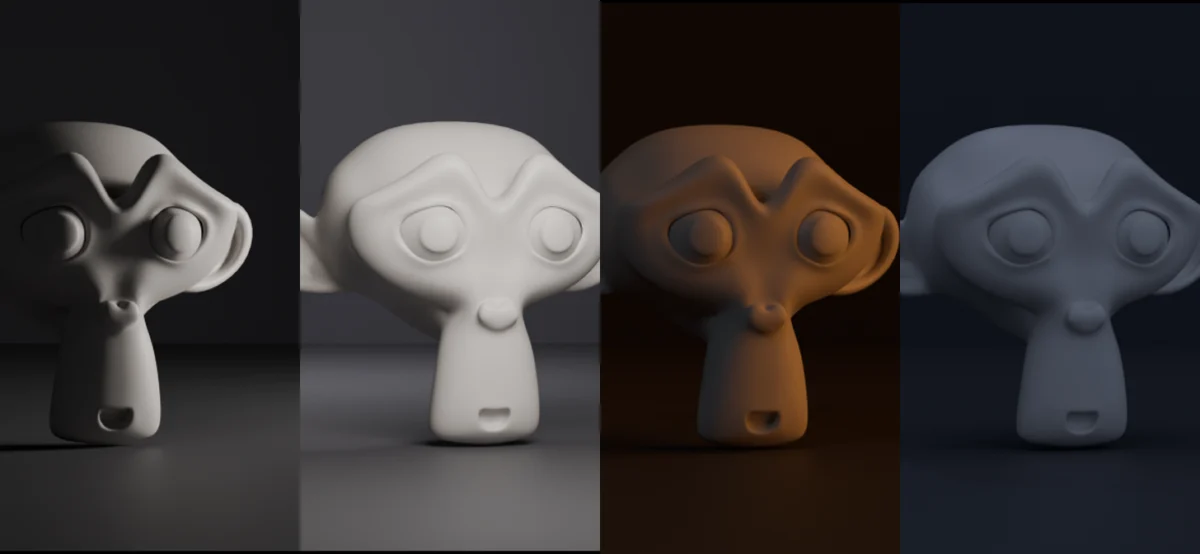
The digital art and 3D modeling community is abuzz with the release of "Light It Up," a powerful, free, and open-source add-on for Blender that promises to streamline the process of creating sophisticated studio lighting rigs. Developed by Rasheed Shaikh and readily available on the Blender Extensions platform for seamless drag-and-drop installation, Light It Up offers a compelling solution for both novice and experienced Blender users seeking to elevate their scene illumination. This innovative tool addresses common challenges in lighting workflows, providing a robust set of features designed for efficiency, flexibility, and artistic control.
Empowering Artists with Intuitive Studio Lighting
At its core, Light It Up automates the creation of studio lighting setups by leveraging a library of 17 pre-designed rigs. Each preset is accompanied by a rendered thumbnail, allowing users to visually select their desired lighting aesthetic rather than deciphering technical names. This intuitive approach significantly reduces the learning curve associated with complex lighting configurations. Once a preset is applied, users gain direct manipulation of individual Blender lights. Crucially, the add-on ensures that no lighting information is "baked" or obscured, meaning every light within the rig is fully accessible for modification – including repositioning, recoloring, and even deletion. This level of transparency fosters a deeper understanding of lighting principles and allows for complete artistic freedom.
The add-on introduces four master controls that govern the entire lighting rig simultaneously. These include overall intensity, color temperature, the key-to-fill ratio (a fundamental concept in photography and cinematography that balances the primary light source with its softer counterpart), and rotation. A key design element of these controls is their absolute nature. Instead of incremental adjustments that can lead to drift, each master control recalculates from the original values set by the preset. This ensures that users can confidently experiment with different settings, knowing they can always return to the exact starting point. For instance, adjusting intensity from 1.0 to 3.0 and then back to 1.0 will precisely revert the rig to its initial brightness.
Advanced Features for Enhanced Workflow
Beyond the core lighting presets, Light It Up incorporates advanced features to further enhance user productivity. The "Fit To Subject" function is a standout, intelligently sizing and positioning the entire lighting rig based on the bounding box of whatever object or group of objects the user has selected in their scene. This eliminates the tedious manual alignment process and ensures that the lighting is appropriately scaled to the scene’s subject matter.
Furthermore, the add-on supports custom preset saving. Users can now create and save their own unique lighting setups, integrating them seamlessly into the existing library alongside the built-in presets. A significant advantage of this feature is that saved custom presets are stored externally to the add-on’s installation folder. This design choice is critical for long-term usability, as it prevents the accidental deletion of user-created lighting configurations when the add-on is updated. This safeguards artistic investments and promotes ongoing experimentation without fear of data loss.
Addressing Critical Issues: Version 4.0.0 Improvements
The recent release of version 4.0.0 of Light It Up introduces three crucial fixes that address persistent issues, moving beyond mere cosmetic enhancements. These fixes are particularly noteworthy as they tackle core functional problems that could significantly hinder user workflow.
Firstly, a critical bug where clicking a second preset immediately after building a rig would cause the new rig to collapse to the world origin has been resolved. This issue was a major impediment to the common practice of rapidly testing multiple lighting looks, a fundamental part of the creative exploration process. Users can now confidently iterate through different presets without encountering this disruptive behavior.
Secondly, the add-on now correctly handles linked and instanced objects. Previously, these object types were measured as having zero size, leading to lighting rigs being generated at an incorrect scale. This fix ensures that lighting setups are accurately proportioned, regardless of whether the scene utilizes linked duplicates or instanced geometry, which are common optimization techniques in 3D workflows.
Thirdly, a bug related to imported characters, particularly those imported via FBX, has been fixed. Imported FBX files often bake axis conversions into their object transforms. This led to imported characters "tipping over" the entire lighting rig, disrupting the intended lighting orientation. The fix ensures that Light It Up correctly interprets object transforms, even those originating from external file formats, leading to more stable and predictable lighting placements for imported assets.
Technical Specifications and Compatibility
Light It Up is designed to be highly compatible with current Blender versions, supporting Blender 4.2 LTS through 5.2. It functions seamlessly with both the Cycles and EEVEE rendering engines, offering users the flexibility to choose their preferred rendering pipeline. The add-on is distributed under the GNU General Public License (GPL), an open-source license that guarantees users the freedom to run, study, share, and modify the software. This open-source nature fosters community involvement, allowing for collaborative development and ongoing improvements.
The Significance of Open-Source Lighting Tools in 3D Production
The availability of powerful, free, and open-source tools like Light It Up has a profound impact on the 3D production landscape. Historically, sophisticated lighting setups and specialized lighting plugins could be prohibitively expensive, creating a barrier to entry for independent artists, students, and smaller studios. Light It Up democratizes access to professional-grade lighting tools, enabling a wider range of creators to achieve high-quality visual results.
The reliance on pre-designed rigs with visual cues, coupled with the absolute master controls, represents a significant step forward in simplifying complex lighting tasks. This approach not only accelerates the workflow but also serves as an educational resource, allowing users to deconstruct and learn from professionally crafted lighting setups. The ability to customize and save these setups further empowers artists to develop their own signature styles and build reusable asset libraries, a crucial element in efficient production pipelines.
The timely fixes in version 4.0.0 underscore the active development and responsiveness of the Light It Up team to user feedback and identified issues. Addressing problems related to preset application, object scaling with linked/instanced data, and imported asset transformations demonstrates a commitment to robustness and real-world usability. These are not minor inconveniences but fundamental aspects of a stable and reliable 3D tool.
Broader Implications for the Blender Ecosystem
The success and adoption of add-ons like Light It Up are vital for the continued growth and evolution of the Blender ecosystem. By providing essential functionalities that might otherwise be complex or time-consuming to implement manually, these tools allow artists to focus more on their creative vision rather than technical hurdles. The Blender Extensions platform itself plays a crucial role in this, offering a centralized and user-friendly distribution channel for these valuable community-developed resources.
The GPL licensing ensures that Light It Up will remain accessible and that its source code can be examined and improved upon by the community. This collaborative spirit is a hallmark of open-source software and fosters innovation. As more artists and developers contribute to and benefit from such tools, the overall quality and capability of Blender as a comprehensive 3D creation suite continue to expand.
The development of Light It Up can be seen as a response to the growing demand for efficient and accessible tools within the rapidly expanding field of 3D visualization, game development, architectural rendering, and motion graphics. As these industries continue to leverage Blender, the need for streamlined workflows and specialized add-ons that enhance productivity and artistic output becomes increasingly paramount. Light It Up directly addresses this need, offering a solution that is both technically sound and artistically inspiring. Its integration into the Blender Extensions platform further solidifies its position as a valuable and readily available resource for the global 3D community.
About the Author