The concept of functions, fundamental to all programming paradigms, serves as a cornerstone for modular and efficient code organization within Unreal Engine 5 (UE5) development through its robust Blueprint visual scripting system. These self-contained blocks of logic are critical for streamlining development workflows, improving code readability, and ensuring the scalability of complex game projects. This guide delves into the practical application of Blueprint Functions, from their basic definition to advanced implementation, highlighting their profound impact on modern game development.
The Foundation: Understanding Blueprint Functions
At its core, a Blueprint Function is a self-contained sequence of visual script nodes designed to perform a specific task. Unlike a simple series of interconnected nodes, a function encapsulates this logic, allowing it to be executed, or "called," from multiple locations within a Blueprint without needing to duplicate the underlying code. This principle of "Don’t Repeat Yourself" (DRY) is a cornerstone of efficient software engineering and is elegantly addressed by Blueprint Functions. They support both input parameters, allowing data to be passed into the function for processing, and output parameters, enabling the function to return computed values or results back to the calling script.
Consider a scenario in a large game where damage calculation logic needs to be applied to various entities, such as player characters, non-player characters (NPCs), and environmental hazards. Instead of painstakingly recreating the damage formula—which might involve factoring in armor, resistances, critical hits, and elemental effects—each time it’s needed, a developer can create a single CalculateDamage Blueprint Function. This function would take raw damage as an input, process it against relevant character stats (like armor), and output the final damage dealt. Should the damage formula require an update, only this single CalculateDamage function needs modification, instantly propagating the change across all instances where it is called. This dramatically reduces development time, minimizes errors, and enhances maintainability. It is important to note that while incredibly powerful, Blueprint Functions are specific to the Blueprint Actor in which they are created, meaning a function defined in a ‘PlayerCharacter’ Blueprint cannot be directly called from an ‘EnemyCharacter’ Blueprint without additional communication methods.
A Brief History of Visual Scripting in Unreal Engine
The evolution of visual scripting in Unreal Engine underscores Epic Games’ commitment to democratizing game development. Earlier iterations of Unreal Engine featured Kismet, a rudimentary visual scripting tool that laid the groundwork for node-based logic. However, it was with Unreal Engine 3 and its subsequent evolution into Unreal Engine 4 that Blueprints truly came into their own, offering a comprehensive and powerful visual scripting solution. UE5 continues this legacy, refining the Blueprint system to be even more intuitive and integrated with its cutting-edge features. This shift has allowed designers, artists, and less experienced programmers to contribute directly to gameplay logic, fostering greater collaboration and accelerating prototyping cycles. Industry data from sources like the annual State of Unreal presentations often highlight the vast number of developers utilizing Blueprints, with surveys frequently showing a significant percentage of UE projects relying heavily on them for core gameplay mechanics.
Implementing a Basic Blueprint Function: The "Print String" Example
To illustrate the fundamental process of creating a Blueprint Function, a simple "Print String" example serves as an ideal starting point. This initial step focuses on defining a function and assigning it a basic action.
- Accessing the Blueprint Editor: The process begins by opening the target Blueprint Actor. For instance, in a First-Person Shooter template, the
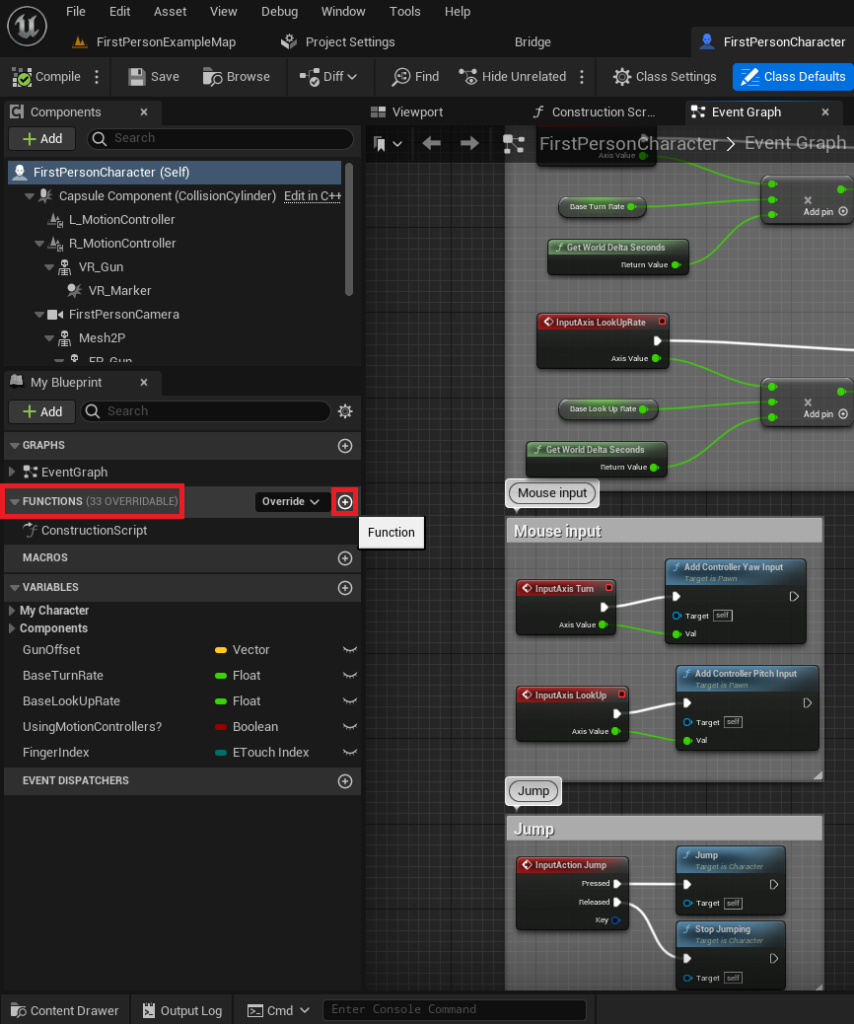
FirstPersonCharacterBlueprint is a common choice for initial scripting. - Locating the Functions Panel: Within the Blueprint Editor, the "Functions" section is typically found on the left-hand side. This panel serves as the central repository for all functions associated with that specific Blueprint.
- Function Creation: A new function is initiated by clicking the designated "plus" symbol within the "Functions" panel.
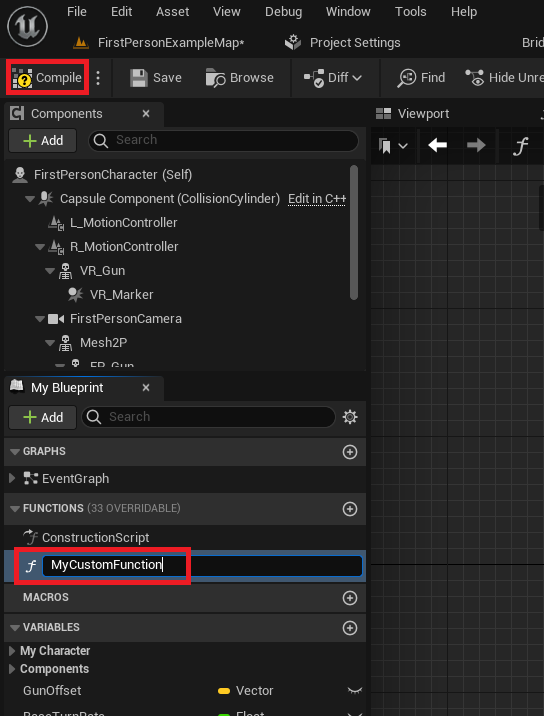
- Naming Convention and Compilation: Upon creation, the function is assigned a descriptive name. Adhering to clear and consistent naming conventions (e.g.,
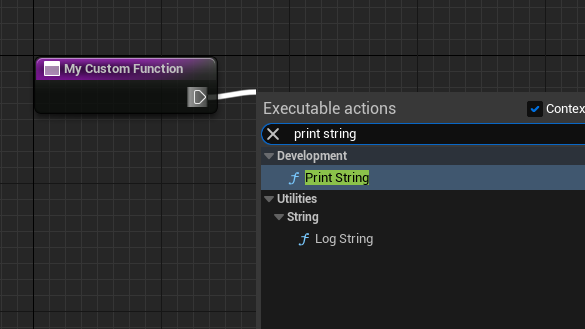
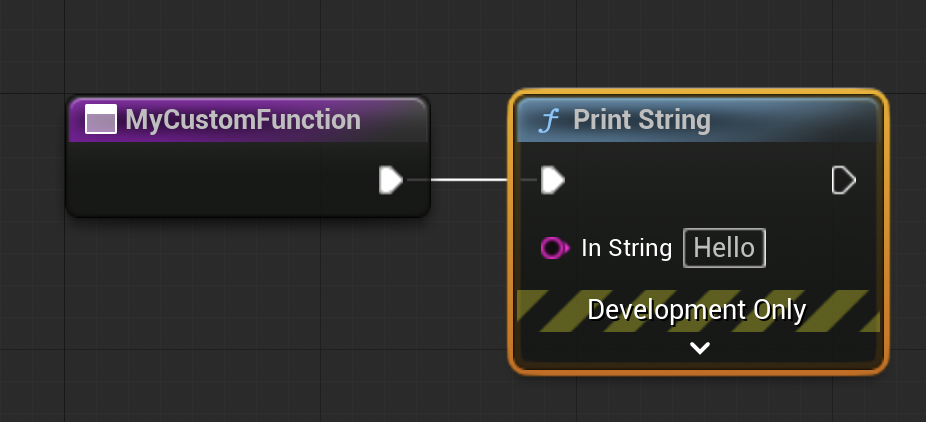
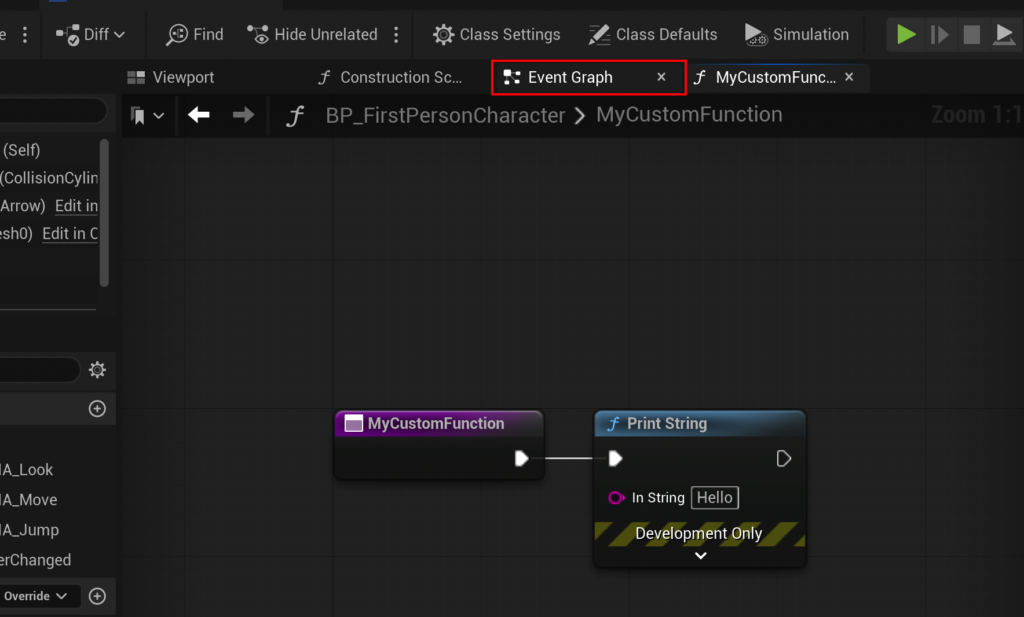
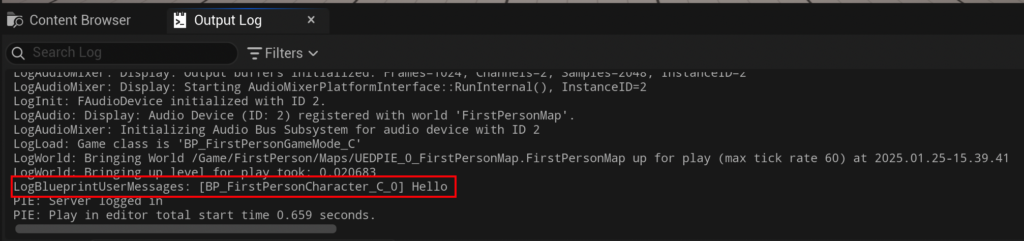
CalculateDamage,PerformAttack,UpdateHealth) is crucial for maintaining project clarity, especially in larger teams and complex projects. After naming, compiling the Blueprint (via the "Compile" button) integrates the new function into the Blueprint’s structure, making it ready for use. - Adding Functionality – The Exec Pin: With the function established, logic can be added. This involves dragging from the white "exec pin" of the function’s entry node within its dedicated graph. The "exec pin" signifies the flow of execution, allowing nodes to be chained together sequentially. Releasing the mouse click on the graph background opens a context menu, from which a "Print String" node can be selected and added. This automatically connects the "Print String" node to the function’s execution flow. When this function is called, it will now execute the "Print String" node, displaying "Hello" in the output log by default. The terminology "calling" a function is synonymous with "running" or "executing" it, a common convention across programming languages.
Integrating and Testing the Function
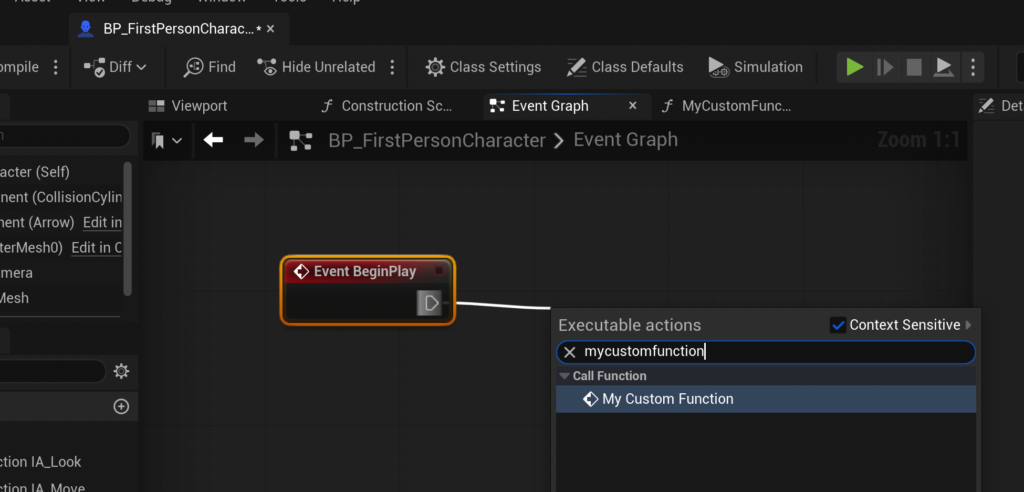
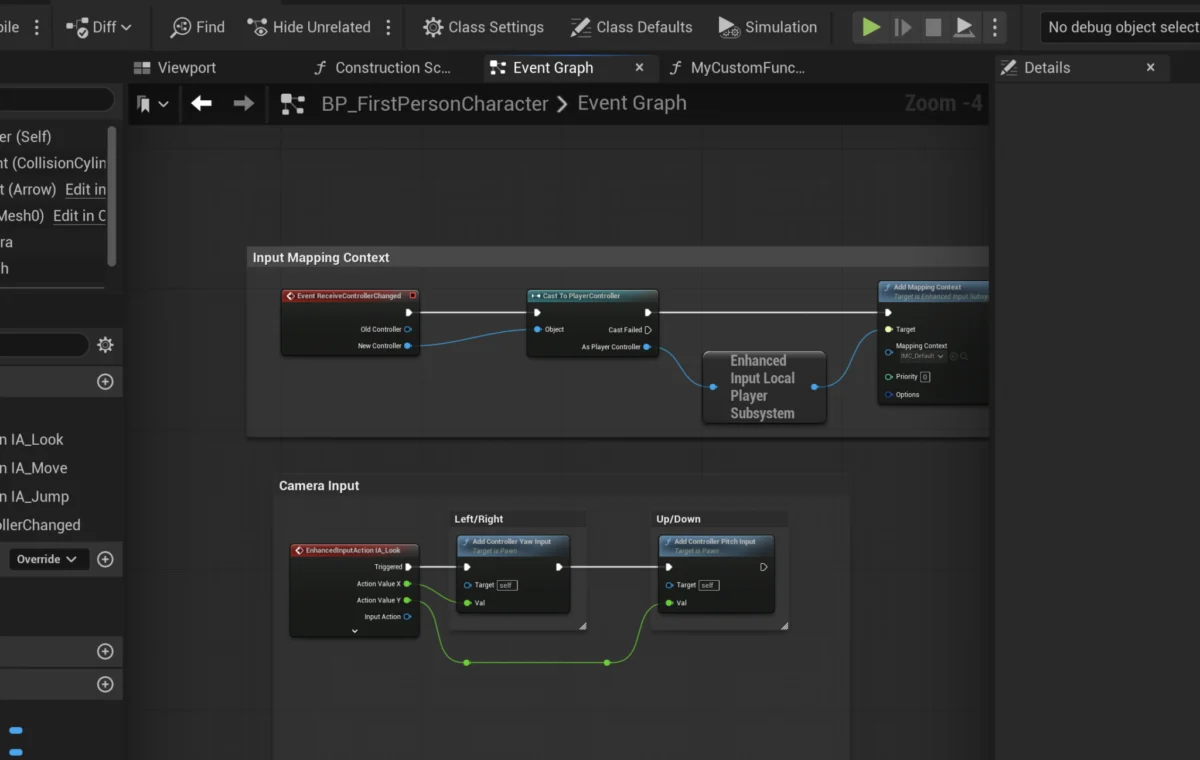
For a function to execute, it must be called from another part of the Blueprint, typically an Event Graph. Events, such as Event BeginPlay, are entry points that trigger actions in response to specific occurrences (e.g., when an actor is spawned into the game world).
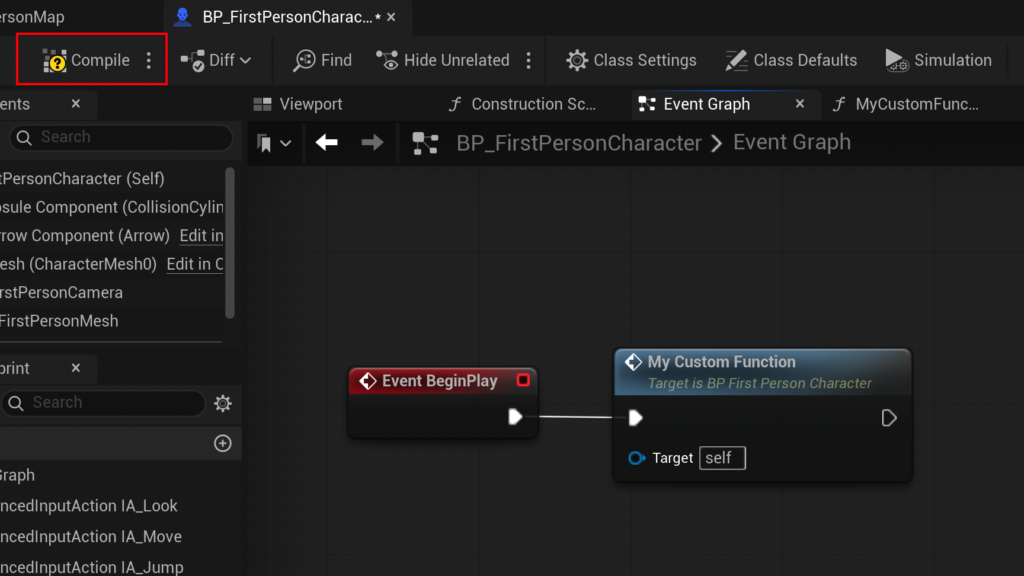
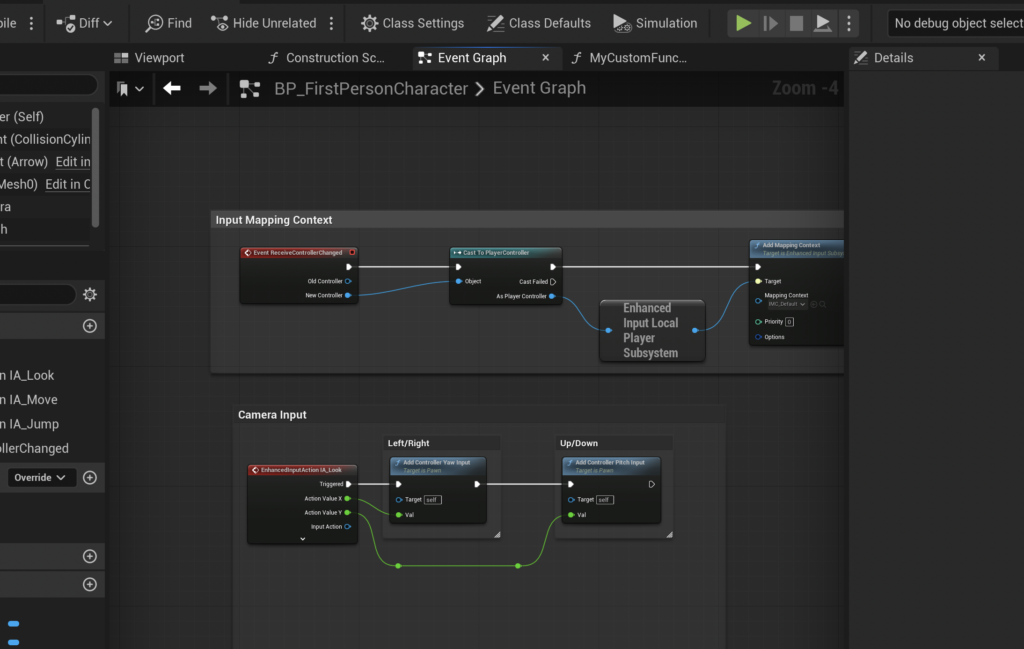
- Navigating to the Event Graph: The developer switches from the Function Graph back to the main Event Graph of the Blueprint.
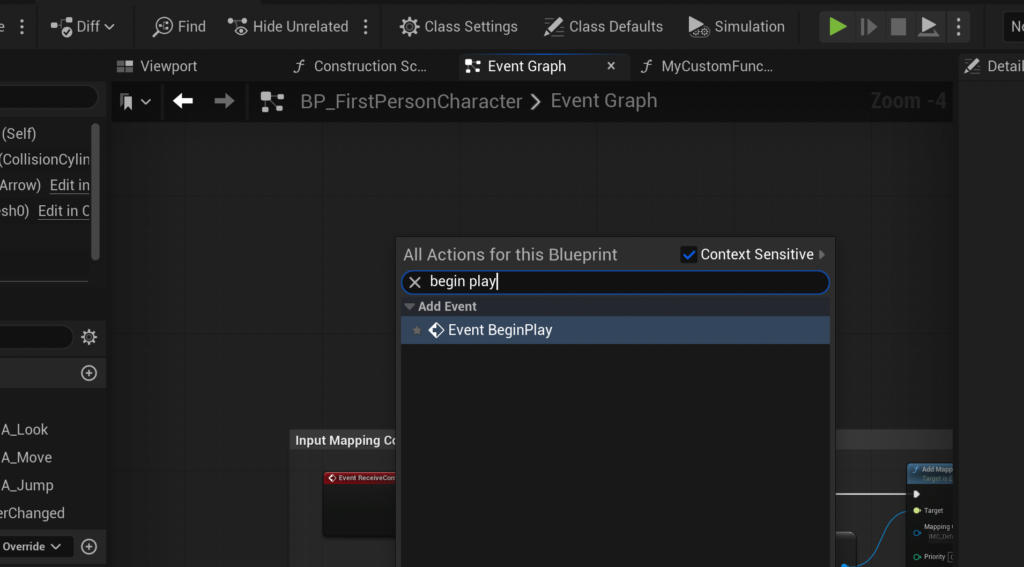
- Creating an Event: A right-click in an empty area of the Event Graph brings up a context menu where
Event BeginPlaycan be selected. This event automatically triggers when the game starts or when the actor is initialized. - Calling the Function: From the
Event BeginPlaynode’s exec pin, a drag-and-release action on the grid allows the developer to search for and select the newly created function (e.g.,MyCustomFunction). This creates a "call" node for the function, linking its execution to theEvent BeginPlay. - Final Compilation and Testing: After connecting the function call, the Blueprint must be compiled and saved. Running the game in the editor (e.g., clicking "Play" in the
FirstPersonMap) will then demonstrate the function’s execution, with "Hello" appearing in the Unreal Engine’s output log. This confirms the basic function setup and its successful integration into the Blueprint’s lifecycle.
Advanced Functionality: Input, Output, and Data Processing
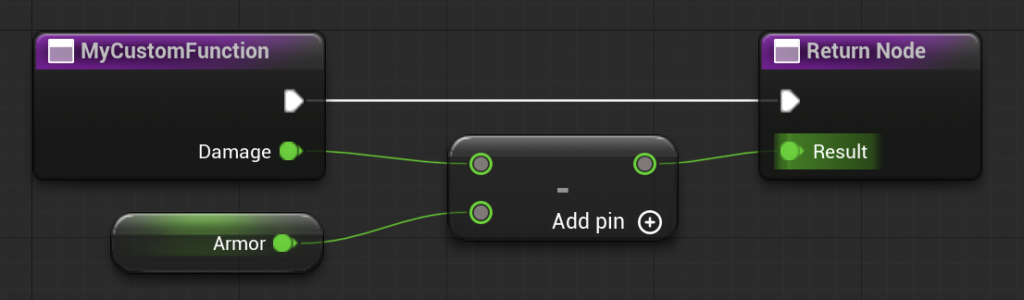
Beyond simple actions, Blueprint Functions truly shine when they process data. The CalculateDamage example, alluded to earlier, perfectly illustrates the power of input and output parameters. This function aims to simulate a damage reduction system, where incoming Damage is mitigated by a character’s Armor value.
Important Note on Asynchronous Operations: A key distinction between Blueprint Functions and Custom Events is that Functions do not support latent (asynchronous) nodes, such as Delay nodes. If a sequence of operations requires a pause or other asynchronous behavior, a Custom Event is the appropriate choice. This architectural design ensures that functions remain deterministic and predictable, crucial for performance and debugging.
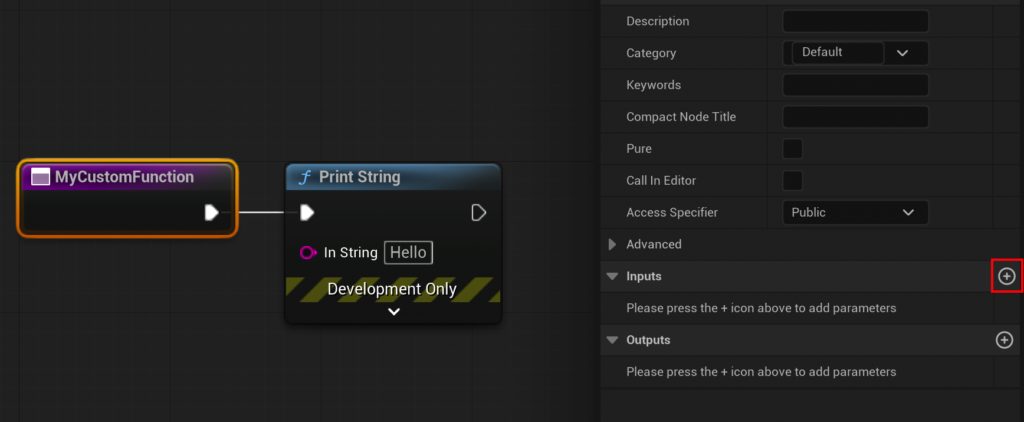
Building the CalculateDamage Function:

- Input Parameters:
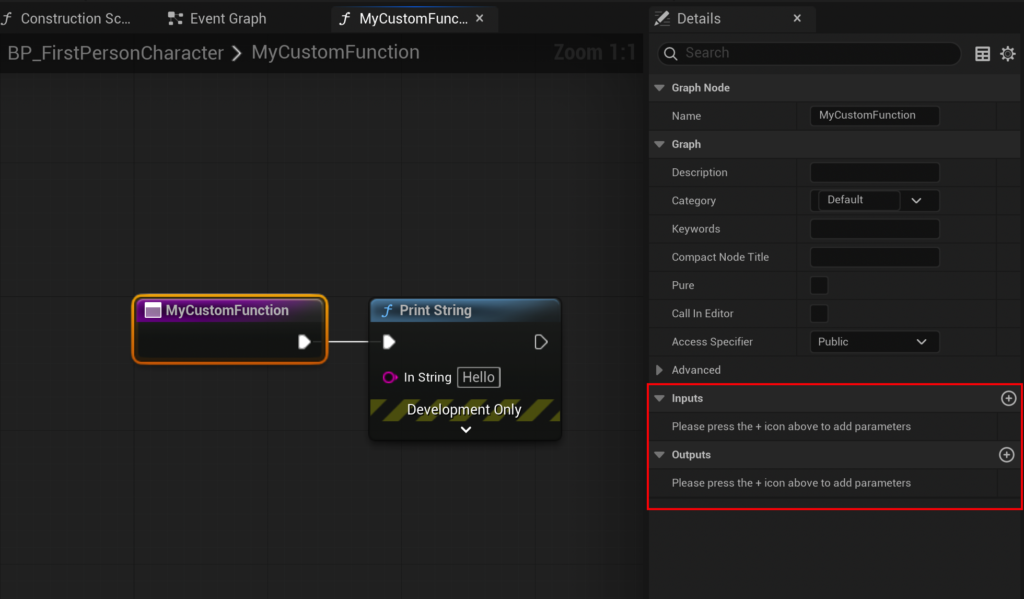
- Selecting the Function Node: The developer selects the function’s entry node (e.g.,
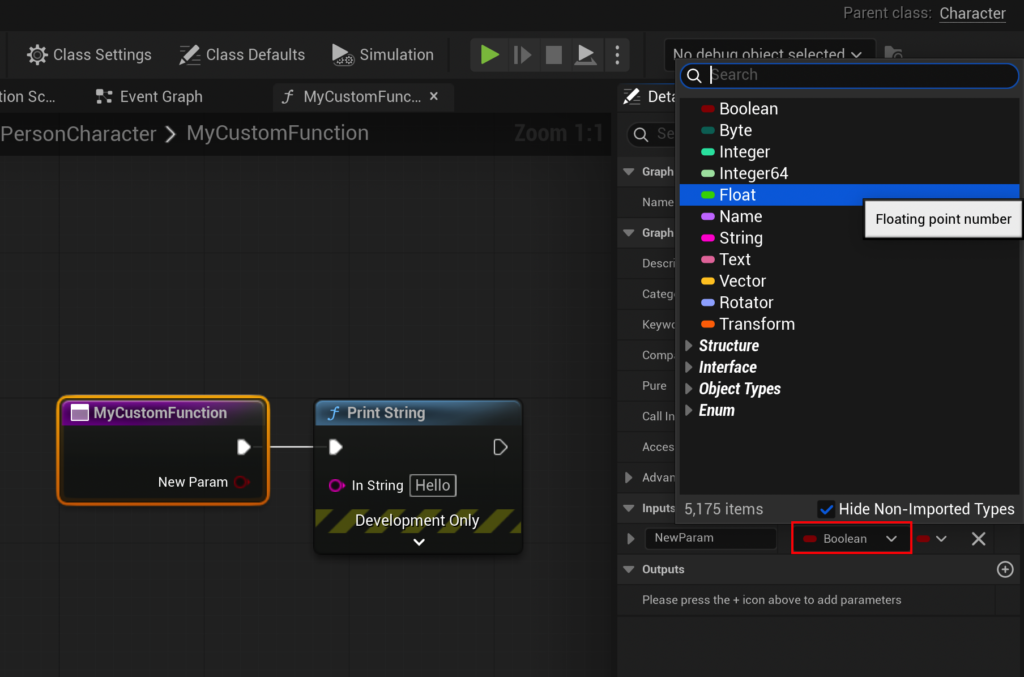
MyCustomFunctionorCalculateDamage) within its graph. - Adding an Input Parameter: In the "Details" panel on the right, under the "Inputs" section, a new parameter is added.
- Defining Type and Name: This parameter is set to a "Float" type (for numerical damage values) and named
Damage. This creates aDamagepin on the function’s entry node, ready to receive a numerical input.
- Selecting the Function Node: The developer selects the function’s entry node (e.g.,
- Implementing the Logic:
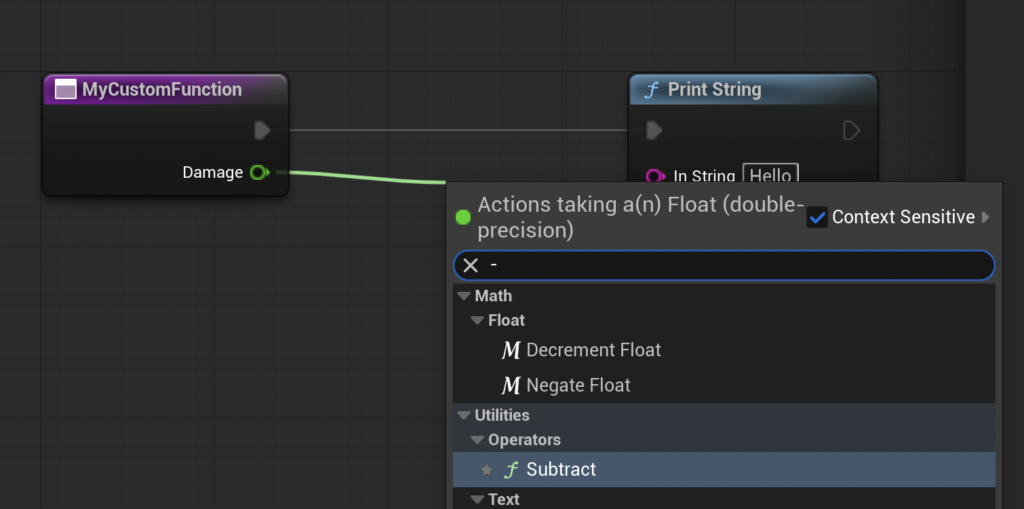
- Subtract Node: From the newly created
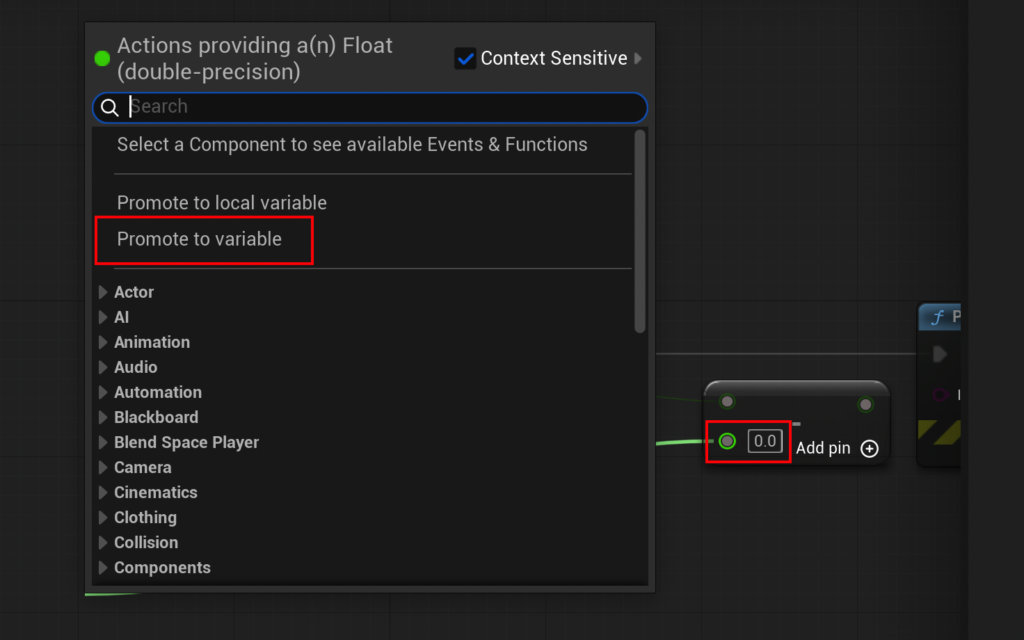
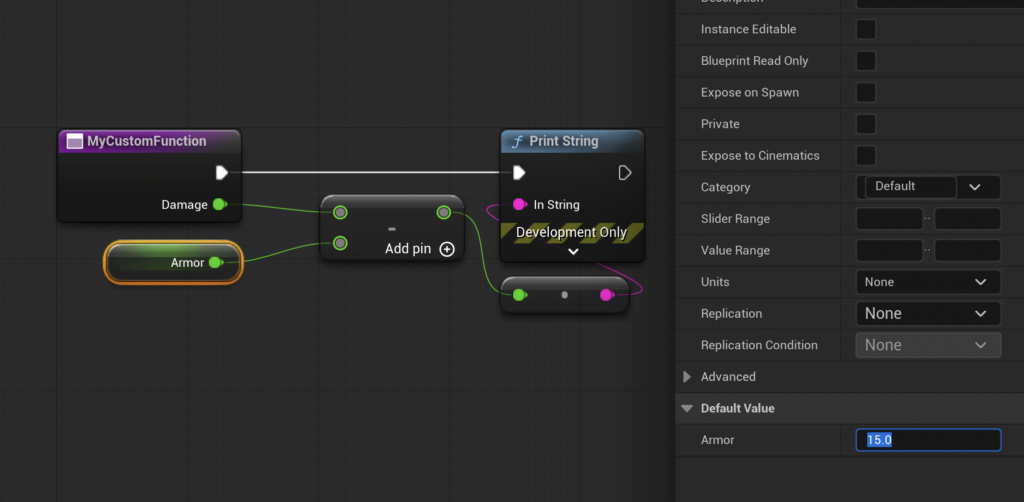
Damageinput pin, the developer drags into the graph and searches for a "Subtract (Float)" node. This node will perform the damage reduction. - Armor Variable: The second input pin of the subtract node (the one representing the amount to subtract) is then dragged into the graph, and the option "Promote to Variable" is chosen. This creates a new Blueprint variable, which is then named
Armor. - Setting Armor Value: The
Armorvariable is selected in the graph, and its default value is set in the "Details" panel (e.g., to15.0). This establishes the character’s armor rating. - Connecting Logic: The output of the "Subtract" node now represents the final damage after armor reduction.
- Subtract Node: From the newly created
- Output Parameters (Returning Values):
- Adding an Output Parameter: Similar to inputs, an output parameter is added in the "Details" panel under the "Outputs" section.
- Defining Type and Name: This output is also set to a "Float" type and named
Result. The creation of an output parameter automatically generates a "Return Node" within the function’s graph. - Connecting to Return Node: The output of the "Subtract" node (the calculated final damage) is connected to the
Resultpin of the "Return Node." This ensures that the function sends its computed value back to whatever called it. - Removing Temporary Nodes: The initial "Print String" node, used for basic testing, can now be removed as the function is designed to return a value rather than print it internally.
Demonstration and Validation of CalculateDamage
Back in the Event Graph, the MyCustomFunction (or CalculateDamage) node now displays both the Damage input pin and the Result output pin.
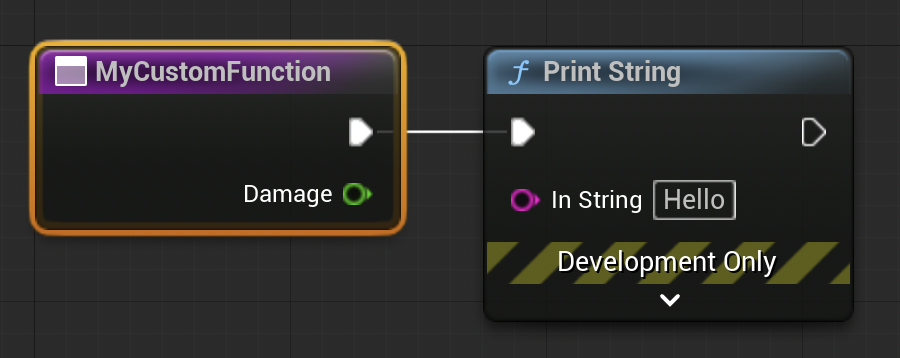
- Providing Input: The
Damageinput pin is set to a specific value (e.g.,20.0). - Retrieving Output: From the
Resultoutput pin, another "Print String" node is added. This allows the final calculated damage to be displayed in the output log. - Execution and Verification: After compiling and saving, running the game will now call the
CalculateDamagefunction with an input of20.0. Given theArmorvalue of15.0, the function performs20 - 15 = 5. The "Print String" node in the Event Graph then displays5in the output log, confirming the function’s successful calculation and return of the processed value. This exemplifies how functions encapsulate complex logic, making the main Event Graph cleaner and easier to understand, as it only needs to "call" the function and receive its "result."
Broader Implications and Industry Impact of Blueprint Functions
The effective utilization of Blueprint Functions extends far beyond individual damage calculations, fundamentally shaping the development landscape within Unreal Engine 5.
- Enhanced Efficiency and Productivity: By eliminating redundant code, functions drastically reduce the time developers spend on repetitive tasks. A single change in a function immediately affects all calling instances, saving countless hours in debugging and updates, especially across large and evolving projects. Epic Games consistently promotes Blueprints as a tool for rapid iteration, and functions are central to this philosophy.
- Improved Maintainability and Debugging: Modular code is inherently easier to maintain. When an issue arises, developers can isolate the problem to a specific function rather than sifting through sprawling, duplicated logic. This focused approach accelerates debugging and ensures a more stable codebase.
- Facilitating Collaboration: In team environments, functions act as well-defined interfaces. One developer can create a function (e.g.,
ApplyStatusEffect) with specified inputs and outputs, and other developers can then use this function without needing to understand its internal complexities. This fosters parallel development and reduces conflicts, a critical advantage in large-scale productions. - Accessibility and Democratization of Development: Blueprint Functions, as part of the visual scripting system, lower the barrier to entry for game development. Individuals with less traditional programming experience, such as game designers or technical artists, can implement sophisticated gameplay mechanics, character behaviors, and UI logic without writing a single line of C++ code. This empowers a broader range of creators and enriches the diversity of talent contributing to a project.
- Performance Considerations: While Blueprints generally incur a slight performance overhead compared to native C++ code, modern Unreal Engine optimizations have significantly minimized this gap for typical gameplay logic. Functions, by centralizing logic, can sometimes even lead to more optimized execution paths by reducing graph complexity and compile times compared to sprawling, unorganized Blueprint graphs. For performance-critical systems, developers often identify bottlenecks and refactor those specific functions into C++, demonstrating the complementary relationship between Blueprints and C++.
Conclusion
Blueprint Functions in Unreal Engine 5 are far more than just a programming concept; they are an indispensable tool that underpins efficient, scalable, and collaborative game development. From encapsulating simple print statements to orchestrating intricate damage calculations with dynamic inputs and outputs, these self-contained logic blocks empower developers to create cleaner, more manageable, and robust projects. As Unreal Engine 5 continues to push the boundaries of real-time rendering and interactive experiences, mastering Blueprint Functions remains a fundamental skill for anyone aspiring to build complex and engaging virtual worlds, ensuring that dream games are not only realized but also maintained and expanded upon with greater ease and precision. The strategic adoption of functions is a clear indicator of a mature and organized development pipeline, aligning perfectly with the demands of contemporary game production.
About the Author