The itch.io application has recently received a monumental upgrade, profoundly transforming the developer experience by integrating a user-friendly Graphical User Interface (GUI) for its powerful build upload tool, Butler. This significant enhancement, available in the latest version of the app, introduces a dedicated "Upload" section, enabling developers to push builds with Butler directly within the application, effectively eliminating the prior necessity of interacting with a command-line terminal. This strategic move by itch.io underscores a clear commitment to democratizing advanced development tools, making the process of publishing and updating projects more accessible and efficient for a broader spectrum of creators.
For years, Butler has been the cornerstone of efficient content delivery on itch.io, serving as the platform’s proprietary command-line interface (CLI) for managing game and software builds. Its core innovation lies in its differential patching mechanism. Unlike traditional file uploads that necessitate re-uploading an entire game file with every update, Butler intelligently identifies and transmits only the changes—the "patches"—between successive builds. This sophisticated approach dramatically reduces upload times for developers and, crucially, minimizes download sizes for players. When a developer pushes an update to an existing channel (such as windows-beta, linux-arm64, or macos-preview), Butler compares the new build against the previous one, calculates the differences, and uploads only the modified data. The first push naturally involves the entire build, but every subsequent push leverages this delta compression, ensuring that only the incremental changes are transferred. Post-upload, itch.io’s robust server infrastructure further optimizes and re-compresses these patches, ensuring maximum efficiency and the smallest possible file sizes for end-users. This translates into tangible benefits: faster updates, reduced bandwidth consumption for both creators and players, and a smoother overall experience.
Prior to this update, Butler’s command-line nature, while incredibly powerful and flexible for developers comfortable with terminal environments, presented a notable barrier to entry for many. Indie game development often attracts individuals from diverse backgrounds, not all of whom possess extensive command-line proficiency or prefer graphical interfaces for their daily workflows. The absence of a GUI meant that a segment of the developer community might have either foregone the advantages of Butler’s patching system, opting for less efficient full file uploads via web browsers, or invested considerable time learning CLI commands. The integration of Butler directly into the itch.io app addresses this disparity head-on, extending the benefits of advanced build management to all developers, regardless of their technical comfort level with command-line tools. This evolution aligns with a broader industry trend towards creating more intuitive and accessible tools, recognizing that a lower barrier to entry fosters greater innovation and content output.
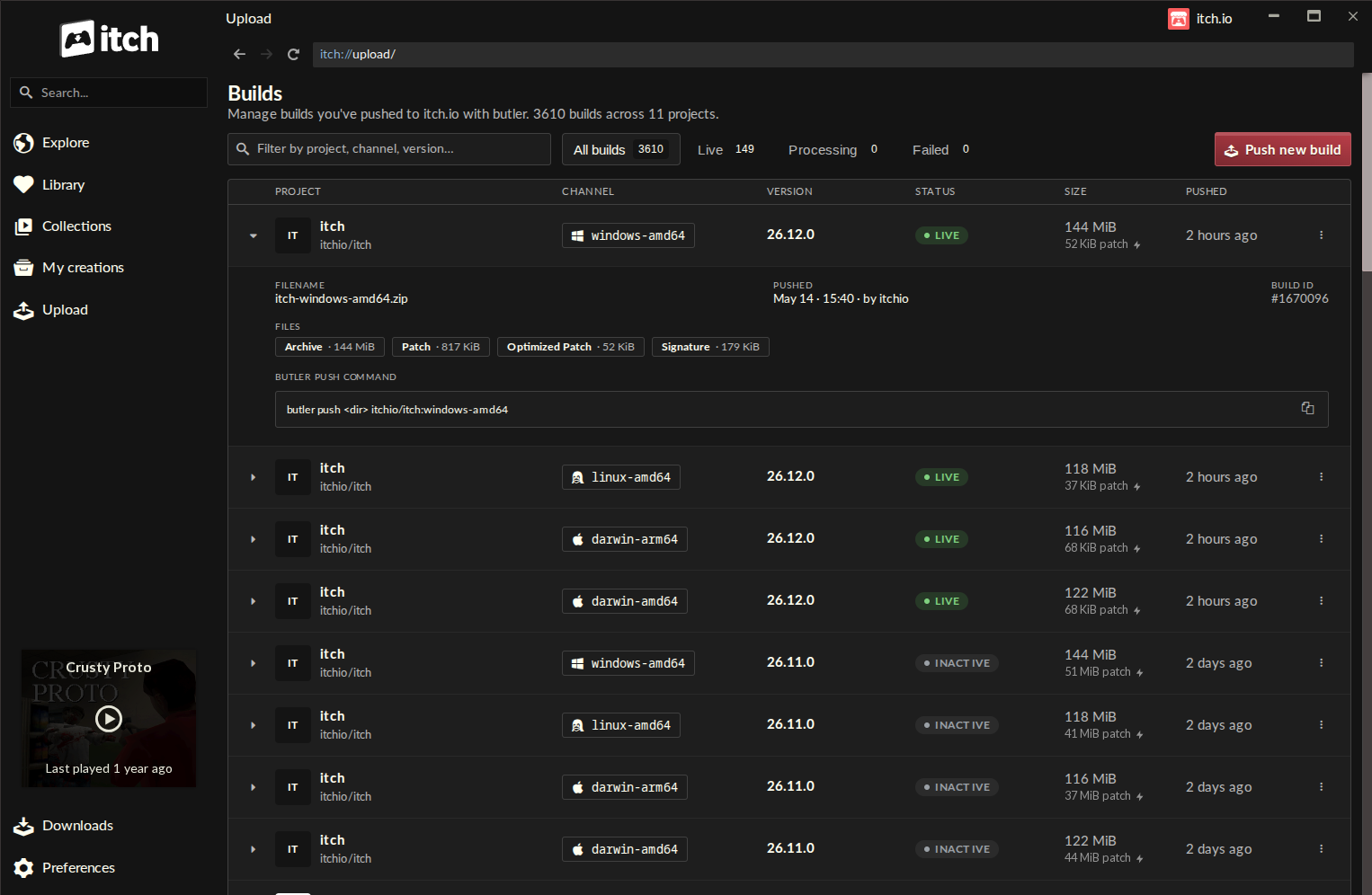
The introduction of the "Upload" section marks a pivotal moment in the itch.io app’s functionality. Accessible via a new entry in the sidebar, this section leads to the "Builds" page—a centralized hub for all project builds. This page offers developers an immediate and comprehensive overview of every build associated with any project their account has editing privileges for. Each entry in the Builds list is meticulously detailed, displaying critical information such as the project name, the specific channel it belongs to, the version number, its current status (e.g., uploaded, processing), the total file size, and the exact timestamp of its push. This level of transparency and organization is invaluable for developers managing multiple projects, various build versions, and different distribution channels, allowing for quick status checks and efficient build management at a glance.
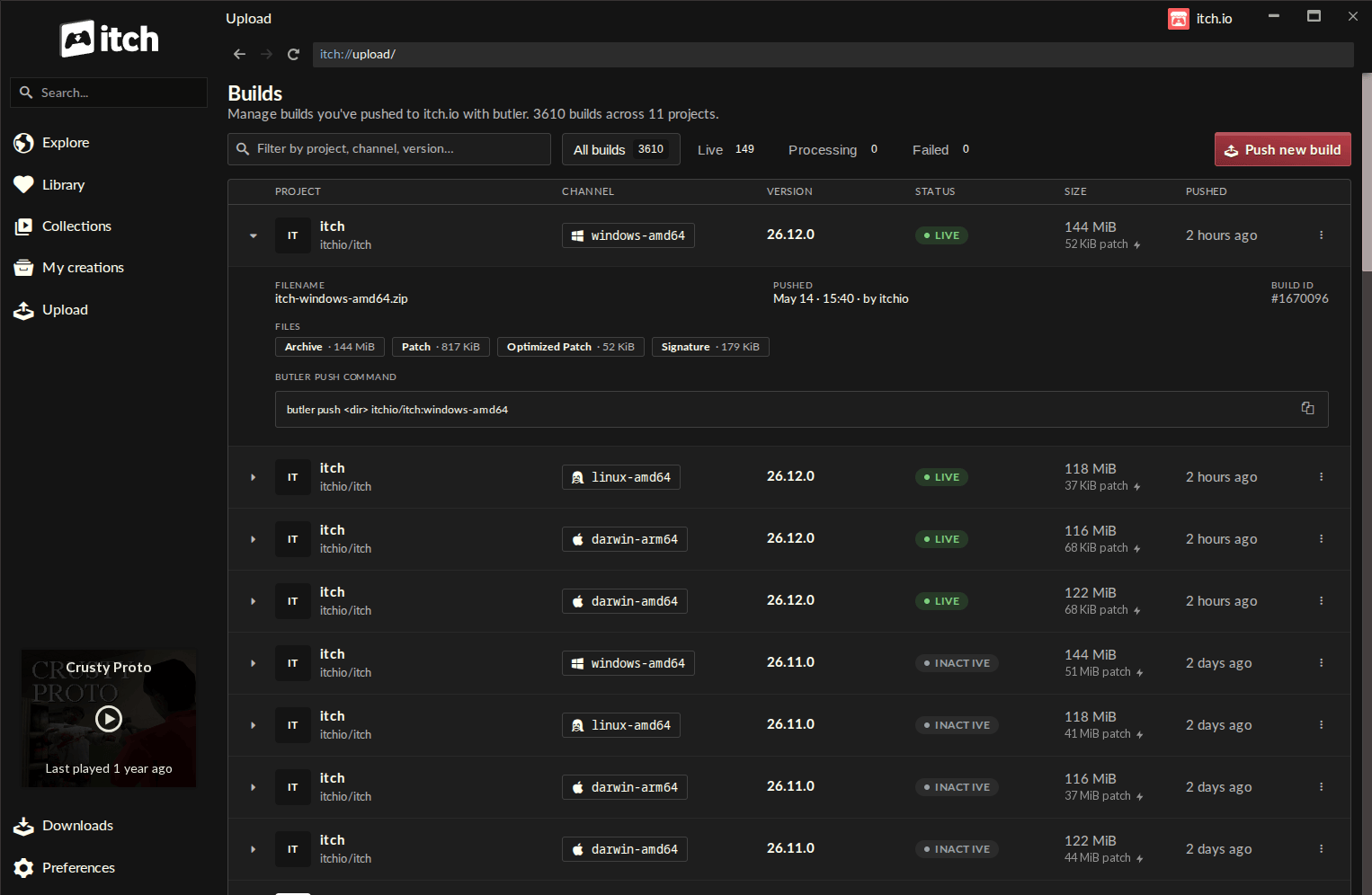
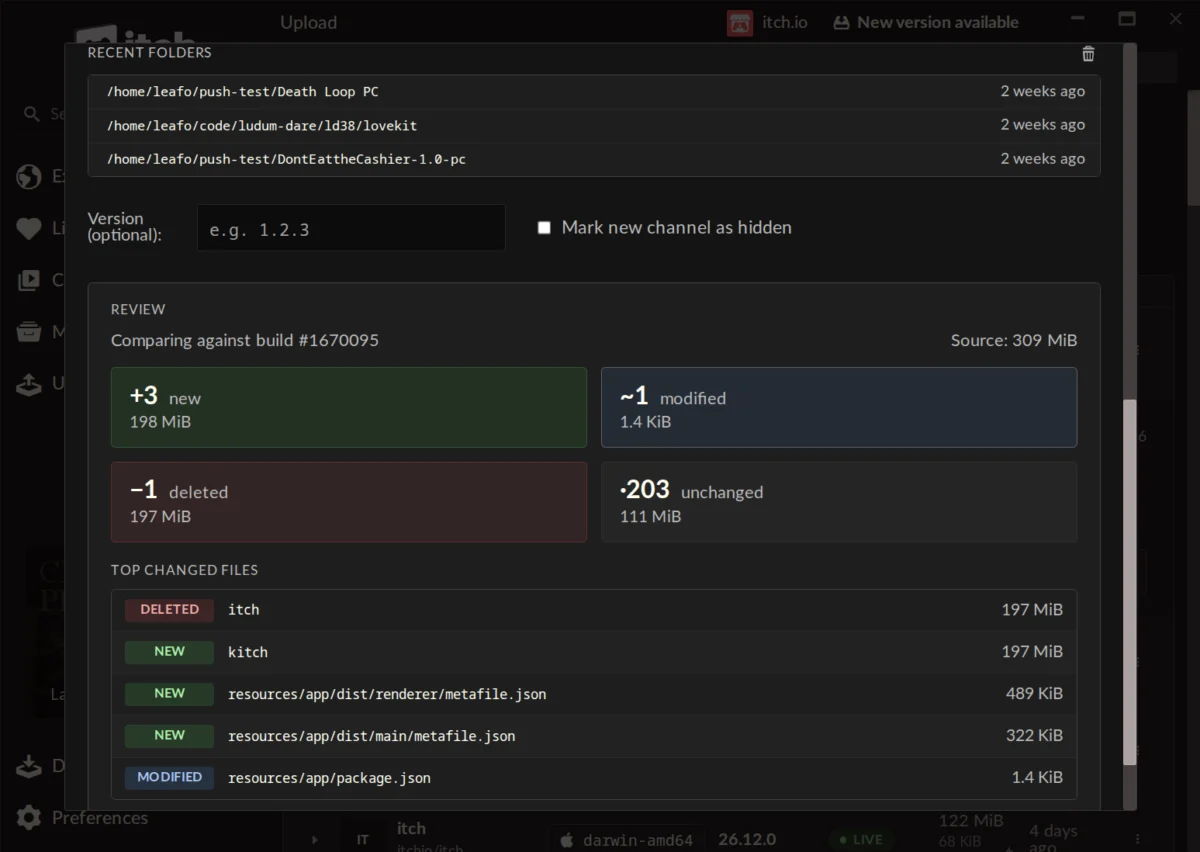
The core of this new functionality resides within the "Push new build" dialog, accessed via a prominent button on the Builds screen. This intuitive interface guides developers through the entire upload process with remarkable ease. The workflow begins with selecting a project from a dropdown list, followed by choosing an existing channel or creating a new one simply by typing its name. Developers can also optionally assign a version number to their build, a crucial step for maintaining clear revision history. The actual build files are uploaded by a simple drag-and-drop mechanism, supporting either a folder containing the game’s executable and assets or a compressed .zip file. To further streamline the process, a "recent folders" list conveniently provides quick access to locations from which builds have been previously pushed, saving time and reducing navigation.
One of the most innovative and developer-centric features within this new GUI is the pre-upload preview. Before initiating the actual upload, developers can generate a detailed summary of the changes between their current local build and the last version pushed to itch.io. This preview categorizes files into "new," "modified," "deleted," and "unchanged," providing size information for each group. Furthermore, it highlights a list of the largest changed files, offering critical insights into the scope and nature of the update. This proactive verification step is invaluable for preventing accidental uploads of incorrect or incomplete builds, helping developers spot potential mistakes, and ensuring a clear understanding of what is being pushed to their players. It adds a layer of confidence and control that was previously only achievable through careful manual comparison or reliance on complex version control systems outside of the itch.io ecosystem.
Maintaining the integrity and functionality of development tools is paramount, and itch.io has addressed this by ensuring that the version of Butler embedded within the app is automatically updated. This eliminates the burden on developers to manually track and install Butler updates, guaranteeing that they are always utilizing the latest, most stable, and most optimized version of the tool. Furthermore, the GUI-based Butler leverages the credentials of the developer’s currently logged-in itch.io account within the app. This seamless integration simplifies authentication and, when combined with the itch.io app’s multi-profile support, makes managing and pushing builds from various developer accounts or teams exceptionally straightforward. This capability is particularly beneficial for studios or individuals working on multiple projects under different profiles, offering a fluid and secure workflow.
The implications of this update extend far beyond mere convenience. By making Butler’s advanced patching technology universally accessible, itch.io is significantly lowering the barrier to entry for effective game distribution and maintenance. This empowers a new generation of indie developers, hobbyists, and even educational institutions to manage their projects with a level of professionalism previously reserved for those with specific technical skills or larger teams. The enhanced developer experience is likely to foster more frequent updates, bug fixes, and content additions, leading to more vibrant and continuously evolving games on the platform. Players, in turn, will benefit from these faster, smaller updates, improving overall satisfaction and encouraging greater engagement with their favorite titles. The efficiency gains in bandwidth and storage, both for developers and itch.io’s infrastructure, are also substantial, contributing to the platform’s long-term sustainability and scalability. This move positions itch.io as not just a marketplace, but a comprehensive and developer-friendly ecosystem that actively invests in tools to support its community’s growth and success.
Looking back, the chronology of itch.io’s development tools highlights a steady progression towards greater accessibility. Butler was initially conceived as a robust, backend solution to a common problem: how to efficiently update large game files. Its command-line interface served the immediate need but created a segment of users who might have found it daunting. The current integration represents the culmination of a clear product development strategy that prioritizes user feedback and experience. While specific details of other concurrent updates were not extensively detailed in the announcement, platform updates often include a suite of bug fixes, performance enhancements, and minor feature additions that collectively contribute to a more robust user experience, reinforcing itch.io’s commitment to continuous improvement.
Reactions from the developer community have been overwhelmingly positive. Comments from users like "augustopolonio" praising the new feature as "so easy and organized to update a game now!" and "warpzone" noting it’s "a lot faster than manually updating the webpage" reflect a widespread appreciation for the improved workflow. The sentiment from "hopelessdecoy" that this "makes the app a lot more useful" and might lead to moving more software to the platform underscores the potential for this update to attract new developers and retain existing ones by enhancing the platform’s utility. The itch.io team’s response to developer queries, such as the clarification regarding converting existing non-Butler uploads, further demonstrates their engagement and willingness to communicate openly about current capabilities and future possibilities. This direct interaction and responsiveness are crucial in building a strong, trust-based relationship with the developer community.
For developers eager to leverage this new functionality, the update process is designed to be seamless. The itch.io app features an automatic update mechanism, meaning most users will receive this enhancement without any manual intervention. However, for those who wish to expedite the process or confirm their version, a manual check for updates can be initiated directly from the Preferences screen within the app. New users to the itch.io ecosystem can easily download the application from the official itch.io website, ensuring immediate access to these cutting-edge tools. It is important to note that developers will need at least version v26.12.0 of the app to access the new "Upload" tab and its integrated Butler GUI. For those who still prefer or require the full power and flexibility of Butler’s command-line interface, comprehensive documentation remains available on the itch.io website, detailing every advanced feature and option.
In conclusion, the integration of Butler with a friendly GUI directly into the itch.io app marks a significant milestone in the platform’s evolution. It not only streamlines the crucial process of build management and deployment for developers but also democratizes access to a powerful, efficiency-enhancing technology. By reducing friction and enhancing usability, itch.io is fostering a more inclusive and productive environment for creators, ultimately enriching the entire indie game ecosystem. This strategic enhancement reaffirms itch.io’s position as a forward-thinking platform dedicated to empowering developers and delivering exceptional experiences to players worldwide. The community eagerly anticipates the creative projects and updates that this newfound ease of use will undoubtedly inspire.
About the Author