Unreal Engine 5 (UE5) has cemented its position as a powerhouse for game development, and among its many robust features, Data Tables stand out as an indispensable tool for streamlining content creation and system management. These powerful assets empower both programmers and designers to establish and access pre-defined lists of structured information, fundamentally altering how game logic and content parameters are handled. This article delves into the core mechanics, benefits, and broader implications of utilizing Data Tables within the UE5 ecosystem, exploring their role in fostering collaborative, scalable, and iteration-friendly development practices.
The Imperative of Data-Driven Design in Modern Game Development
The increasing complexity of contemporary video games demands sophisticated data management solutions. From intricate role-playing game systems featuring thousands of unique items, abilities, and characters, to sprawling open-world environments with dynamic events and multi-language localized text, the sheer volume of data can quickly become unmanageable if not organized effectively. Historically, developers might have resorted to hardcoding values directly into C++ or Blueprint scripts, scattering critical parameters across numerous files. While functional for smaller projects with limited data, this approach quickly becomes a significant bottleneck for larger teams and more ambitious titles. It hinders rapid iteration, dramatically increases the risk of errors, and makes content updates cumbersome and prone to introducing new bugs.
Another common strategy involved the use of external data formats such as XML, JSON, or CSV files. While offering greater flexibility and separation of concerns compared to hardcoding, integrating and validating these files often required developing custom parsers and serialization logic, adding considerable development overhead. Moreover, ensuring real-time updates and seamless integration with the game engine’s editor environment could be challenging. Unreal Engine’s Data Tables emerge as a compelling, native, in-engine alternative, offering a strongly typed, editor-integrated, and performance-optimized solution for declarative data management. They serve as a centralized "single source of truth," ensuring consistency and accessibility across all development phases. Epic Games, the creator of Unreal Engine, has consistently advocated for tools that empower designers and artists, allowing them to iterate on content and game mechanics without constant programmer intervention. Data Tables perfectly align with this philosophy, effectively bridging the gap between creative design vision and technical implementation.
Anatomy of an Unreal Engine 5 Data Table: Structure and Definition
At its core, a Data Table in Unreal Engine 5 is a robust collection of structured data, with each row representing a unique entry identified by a specific key, known as the Row Name. The fundamental building block for any Data Table is a Struct (FStruct). This user-defined data type acts as a meticulously crafted template, dictating the exact types and names of the columns (or fields) that each individual row in the Data Table will possess. For instance, if designing an inventory system for an RPG, a struct might define fields such as ItemName (String), BaseDamage (Integer), ItemRarity (Enum), SellPrice (Float), and IconTexture (Texture Reference). This inherent strong typing is a significant advantage, as it provides compile-time validation, ensures a clear and predictable data schema, and substantially reduces the likelihood of runtime errors caused by incorrect data types.
The process of establishing a Data Table in a typical Unreal Engine 5 project workflow generally begins with defining these foundational data elements:
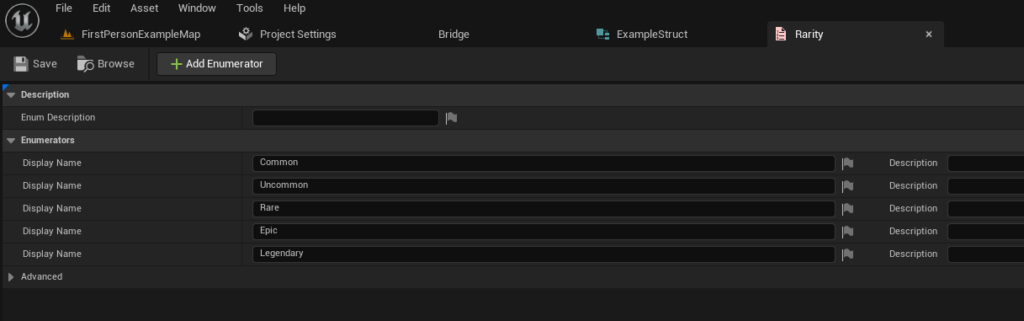
1. Enumerations (Enums) for Categorical Data
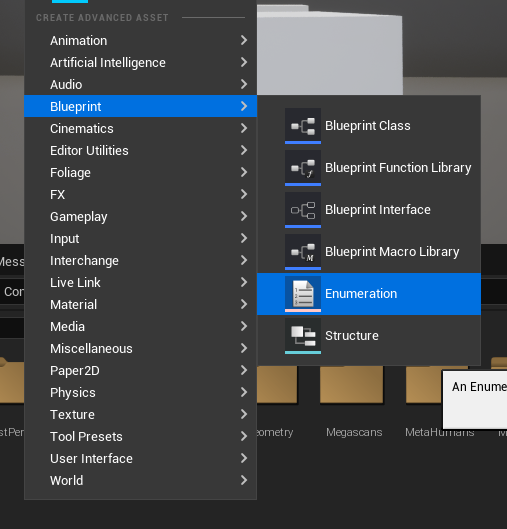
Before crafting a struct, developers often create enumerations. Enums provide a highly readable and less error-prone way to define a set of named integer constants, offering a superior alternative to using raw, magic integer values. In the context of game development, enums are invaluable for representing discrete states, categories, or classifications, such as EItemRarity (e.g., Common, Uncommon, Rare, Epic, Legendary) or EEnemyType (e.g., Melee, Ranged, Boss). By right-clicking anywhere in the Content Browser and selecting "Blueprint -> Enumeration," developers can quickly define these categorical values. For an item rarity example, one might define E_Common, E_Uncommon, E_Rare, E_Epic, E_Legendary, providing a clear, human-readable mapping for different quality levels. This structured approach significantly enhances both code clarity and overall maintainability.
2. Structures (FStructs) as Data Blueprints
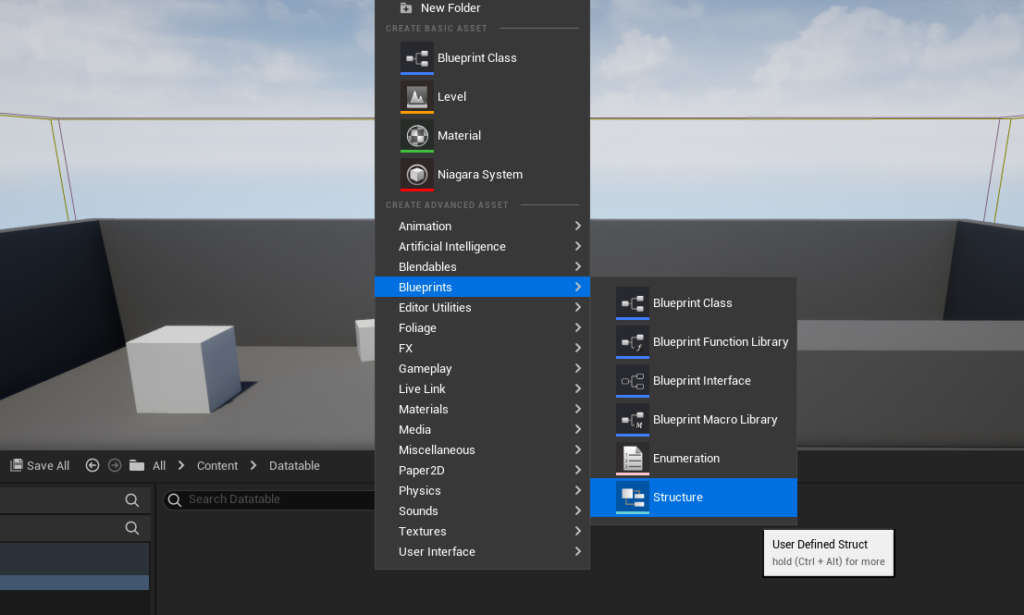
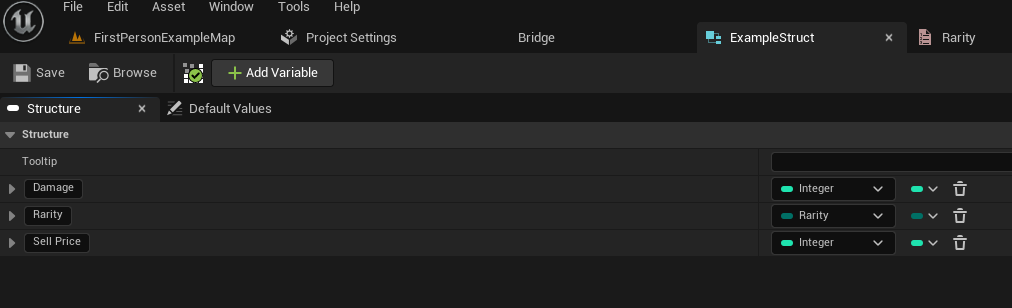
Once all necessary enums are in place, the next crucial step involves creating the struct that will serve as the precise blueprint for the Data Table’s rows. A struct is created by right-clicking in the Content Browser and selecting "Blueprint -> Structure." Within this newly created struct, developers proceed to add variables (fields) corresponding to all the desired data points. Each variable is meticulously assigned a specific data type, which can include primitive types (integers, floats, booleans, strings), object references (e.g., to textures, static meshes, or even other Blueprint classes), or even other custom structs and the previously defined enumerations. For a comprehensive "ItemData" struct, one might include:
ItemName(Text)BaseDamage(Float)Rarity(EItemRarity, referencing the enum created earlier)SellValue(Integer)ItemDescription(Text)Icon(Texture2D Object Reference)
This meticulous definition ensures that every single item entry in the Data Table adheres to a consistent and predictable schema, thereby facilitating predictable data access and manipulation throughout the project.
3. Creating the Data Table Asset
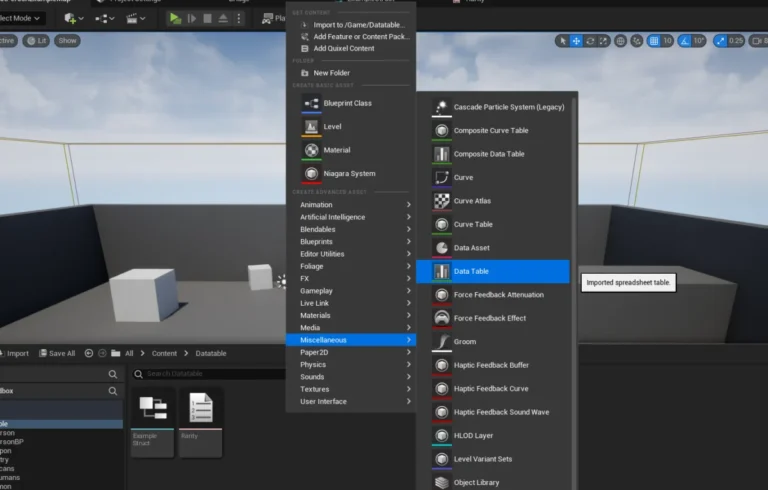
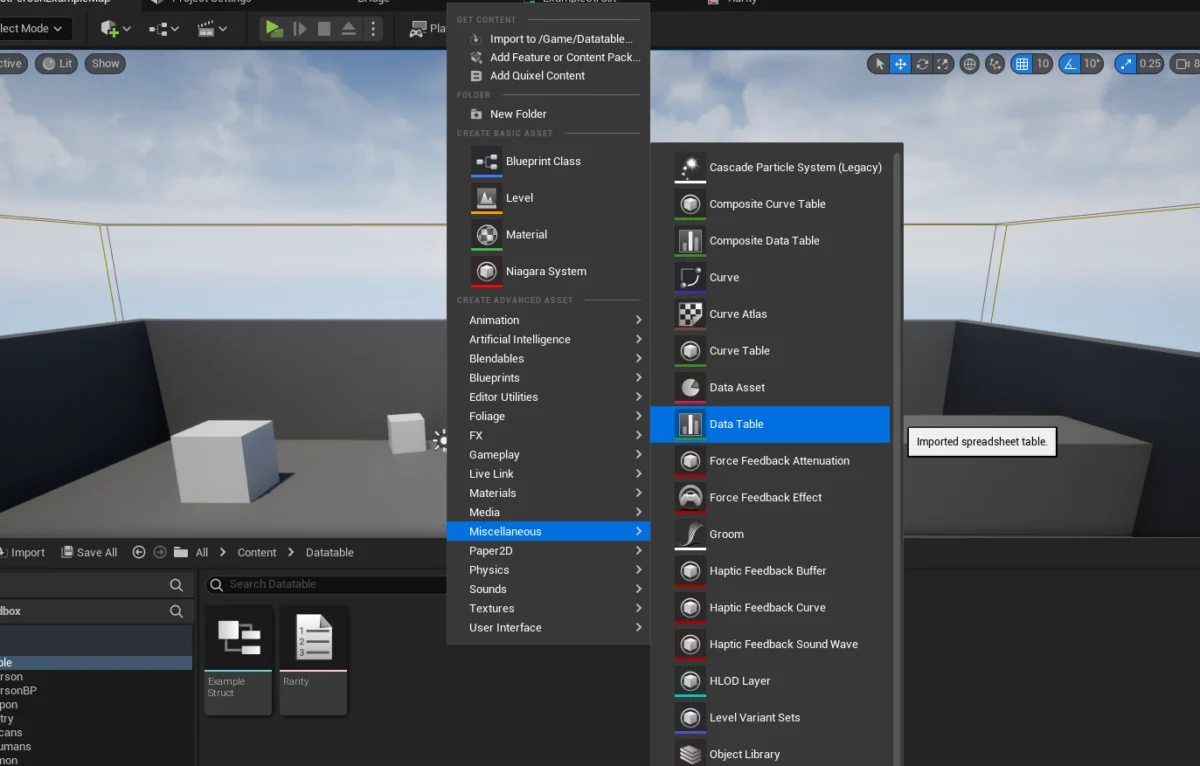
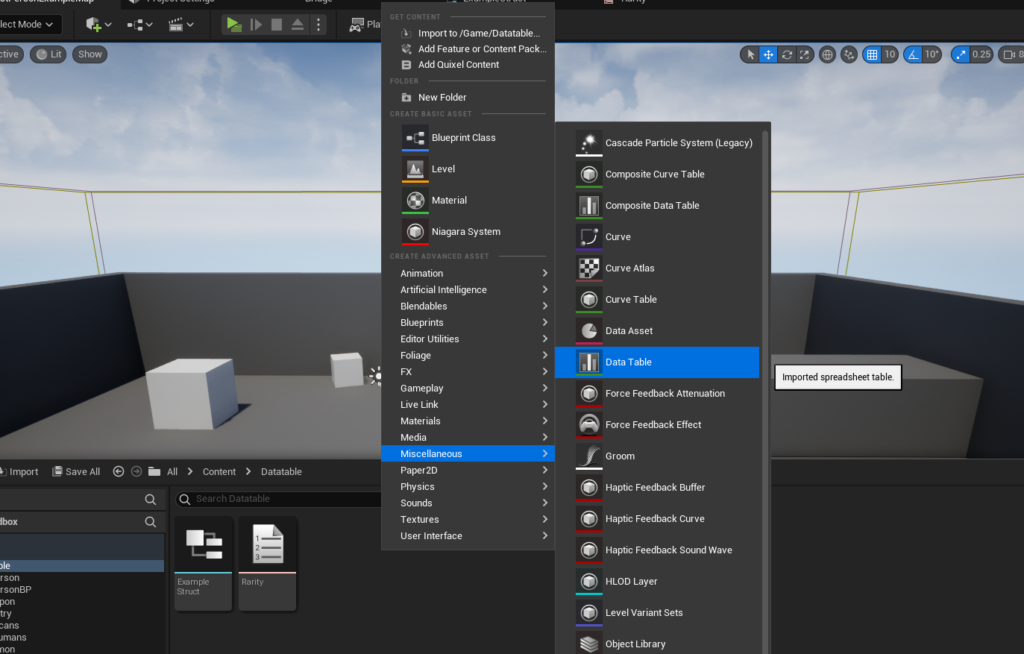
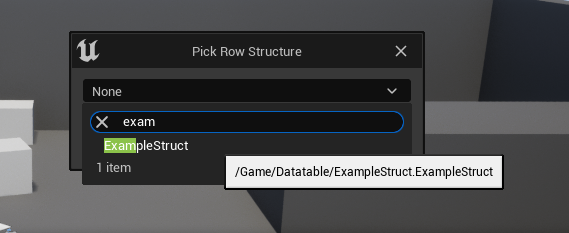
With the underlying struct meticulously defined, the Data Table asset itself can finally be created. This is accomplished by right-clicking inside the Content Browser and navigating to "Miscellaneous -> Data Table." Upon creation, the engine thoughtfully prompts the user to select the "Row Structure" – this is the pivotal moment where the previously created struct (e.g., FItemData) is linked. This crucial step binds the Data Table to its schema, ensuring that all subsequent data entries conform rigorously to the defined structure. The visual representation in the editor immediately reflects the chosen struct, presenting columns for each defined field.
Populating and Managing Data within the Editor
One of the most user-friendly and compelling aspects of Unreal Engine’s Data Tables is the intuitive in-editor experience provided for data population and management. Once a Data Table asset is created and meticulously linked to its struct, opening it within the Unreal Editor presents a familiar spreadsheet-like interface.
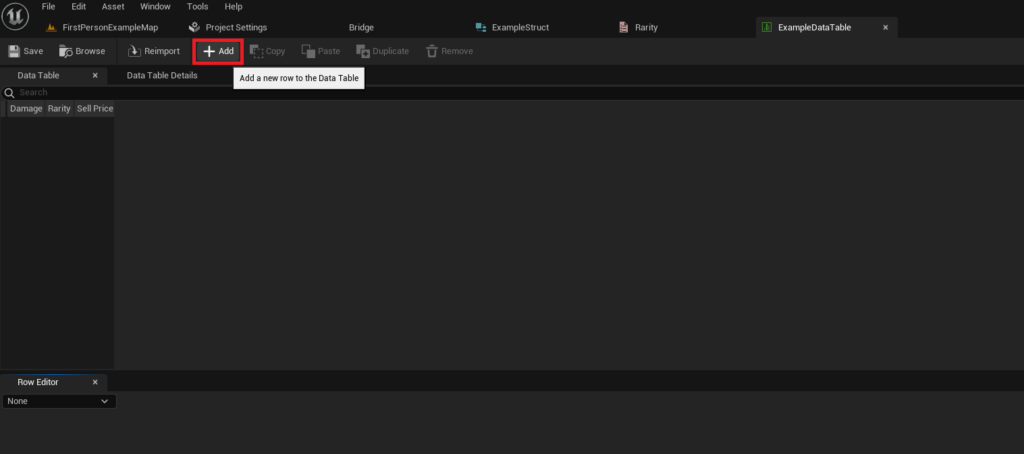
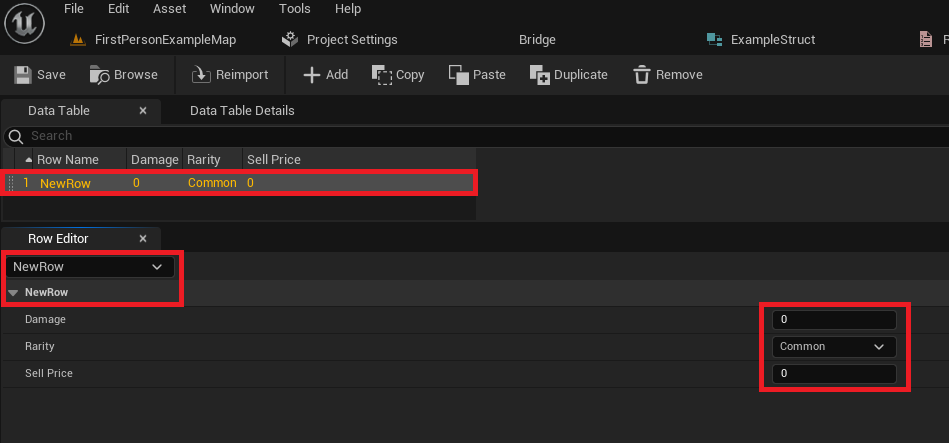
- Adding Rows: Developers can effortlessly add new rows to the Data Table using a prominent "Add" button. Each new row is initially assigned a default, generic name (e.g., "NewRow") and populated with default values based on the struct’s field definitions.
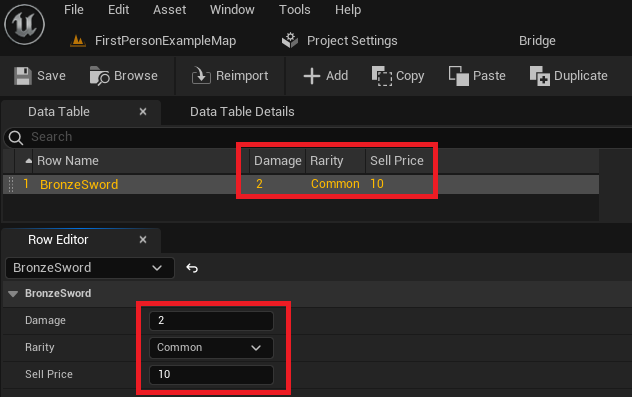
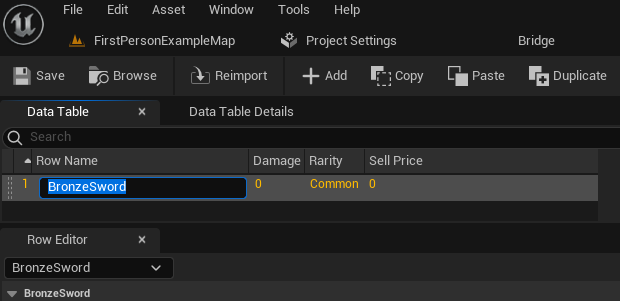
- Row Names as Unique Keys: A critical feature and fundamental concept is the "Row Name" field. This field serves as the unique identifier (or primary key) for each individual data entry within the table. Renaming these rows to meaningful and descriptive identifiers (e.g., "BronzeSword," "HealingPotion," "QuestLogEntry_001") is absolutely essential for efficient and unambiguous data retrieval later in the development process. These well-defined names are directly utilized in both Blueprints and C++ to fetch specific data sets.
- Inline Editing and Dedicated Row Editor: Data values can be directly modified and fine-tuned within the main table view, much like a spreadsheet. For more complex data types, multi-line text fields, or when extensive adjustments are required, a dedicated "Row Editor" panel located below the main table provides a detailed, expanded view of the currently selected row’s properties, making it exceptionally convenient to adjust all associated values. Any changes made in the Row Editor are immediately and dynamically reflected in the main table view above.
- Persistence and Rapid Iteration: All data meticulously entered into a Data Table is saved directly as an integral part of the Unreal Engine project asset. This robust persistence means that content designers can iterate on item stats, enemy behaviors, quest parameters, or UI text without requiring a programmer to recompile code or, in many cases, even restart the game. This significantly accelerates the iteration cycle, allowing for rapid prototyping, extensive balancing adjustments, and swift content updates. For instance, a game designer can tweak the damage values of all sword types in minutes, test the changes instantly, and then revert or refine them as needed, all without ever touching a line of code. This clear separation of data from core game logic is a cornerstone of efficient and collaborative game development. Regular saving of the Data Table asset is, of course, crucial to preserve these invaluable changes.
Accessing Data: Bridging Content and Logic
The true power and utility of Data Tables manifest in their seamless accessibility at runtime, both through Unreal Engine’s intuitive visual scripting language, Blueprints, and its robust C++ API.
1. Accessing Individual Rows via Blueprints
The primary and most frequently used node for retrieving specific data from a Data Table in Blueprints is Get Data Table Row. This node requires two key inputs for successful operation:
- Data Table Reference: A direct link or reference to the specific Data Table asset itself. This can be set directly in the node’s properties via a dropdown selector or passed dynamically through a variable.
- Row Name: The unique identifier (the precise name given to the row) for the specific data entry that needs to be retrieved. This can be selected from a convenient dropdown list if the Data Table reference is already set, or provided dynamically via a string variable connected to the node.
The Get Data Table Row node features two distinct execution pins: Row Found and Row Not Found. This intelligent design provides robust error handling, allowing developers to define separate logic paths for when a requested row is successfully retrieved versus when it doesn’t exist within the table. Crucially, it also outputs an Out Row pin. By right-clicking this Out Row pin and selecting "Split Struct Pin," developers can expand it to reveal all the individual fields (e.g., Damage, Rarity, Sell Price) defined in the underlying struct, making their values directly accessible for use in any subsequent game logic. For example, upon a player picking up an item, a Blueprint could call Get Data Table Row with the item’s unique ID, retrieve its full set of stats, and then apply them to the player character or inventory system.
2. Looping Through Data Table Rows via Blueprints
Often, developers need to process all or a specific subset of entries within a Data Table, rather than just a single row. For this common requirement, Unreal Engine provides the Get Data Table Row Names node. This node, when supplied with a Data Table reference, returns an Array containing all the FNames corresponding to the Row Names within that table.
This array can then be connected to a For Each Loop node. The For Each Loop efficiently iterates through each element of the array, executing its Loop Body for every single Row Name. Inside the loop, the Array Element output (which represents the current Row Name being processed) can be fed directly into a Get Data Table Row node. This powerful setup allows for efficient, programmatic processing of entire Data Tables, enabling dynamic generation of content, filtering items based on specific criteria (e.g., displaying only rare items), or performing calculations across all defined data entries. For instance, a shopkeeper’s inventory could be dynamically populated by looping through an "ItemData" Data Table and displaying only items with a SellValue greater than zero, ensuring a curated selection.
3. C++ Integration for Advanced Access
For developers primarily working in C++, Data Tables are equally accessible and powerful, offering fine-grained control and performance optimization. The UDataTable class provides the programmatic interface. To retrieve data, one would typically use functions like FindRow<FYourStructType>(FName RowName, const TCHAR* ContextString, bool bWarnIfRowMissing = true) or iterate through the table’s RowMap. C++ offers superior control over memory management and is often preferred for performance-critical systems or when integrating Data Tables with other native C++ game systems. This dual access (Blueprint and C++) ensures that Data Tables are versatile enough for any part of a project, from rapid visual prototyping to optimized core gameplay mechanics.
Broader Impact and Strategic Implications for Game Development
The comprehensive integration and versatile nature of Data Tables in Unreal Engine 5 extend far beyond simple data storage; they fundamentally influence development workflows, enhance project scalability, and promote best practices across the entire production pipeline.
- Accelerated Iteration and Game Balancing: Perhaps the most immediate and impactful benefit is the dramatic reduction in iteration time. Game designers can directly modify numerical values, text, and other content parameters within the familiar Unreal Editor environment without needing to recompile code or even restart the game in many cases. This unparalleled agility allows for rapid prototyping of new features, extensive and granular balancing passes for complex gameplay mechanics, and quick, responsive adjustments to UI elements or localization strings. This speed and flexibility are absolutely crucial in today’s fast-paced and competitive game development cycles.
- Enhanced Collaborative Workflows: Data Tables serve as a stable and shared data source, fostering seamless and efficient collaboration among multidisciplinary teams. Designers manage game parameters, artists define material properties and visual effects settings, and QA teams can easily verify data integrity and consistency, all without stepping on each other’s toes or requiring constant, potentially disruptive code merges. This "single source of truth" principle minimizes discrepancies, ensures everyone is working with the most current and accurate information, and drastically reduces communication overhead.
- Scalability for Projects of All Sizes: Whether developing an independent title with a small, agile team or a massive AAA blockbuster with hundreds of developers, Data Tables offer a highly scalable and robust solution. The ability to structure, categorize, and organize vast amounts of information prevents data sprawl and maintains organizational clarity, even as the project scope expands exponentially and new features are introduced.
- Simplified Localization and Modding Capabilities: The structured and centralized nature of Data Tables makes them an ideal solution for comprehensive localization efforts. Text fields for item descriptions, quest dialogue, or UI labels can be stored and managed with exceptional efficiency. When preparing for different languages, corresponding Data Tables or specific language-keyed columns can be swapped or referenced, significantly streamlining the often-complex and time-consuming localization pipeline. Similarly, for games that actively support modding, providing access to Data Tables allows modders to easily create new content, modify existing game parameters, or even introduce entirely new game systems without requiring deep programming knowledge, thereby fostering vibrant community engagement and extending the game’s lifespan.
- Robustness and Significant Error Reduction: By enforcing a strict, struct-based schema, Data Tables inherently promote strong data integrity. The strong typing prevents common errors associated with mismatched data types or malformed entries that might occur with less structured data storage methods. The
Row Found/Row Not Foundlogic available in Blueprints further enhances robustness, allowing developers to gracefully handle scenarios where requested data might be missing or invalid, preventing crashes and ensuring a smoother player experience. - Optimized Performance Efficiency: Data Tables are internally designed for efficient in-memory storage and rapid retrieval during runtime. This optimized access ensures that even very large tables, containing thousands of entries, do not significantly impact game performance, making them suitable for frequently accessed data such such as character stats, item properties, or enemy AI parameters.
Conclusion
Unreal Engine 5 Data Tables represent a cornerstone of modern, efficient, and collaborative game development. By providing an intuitive, strongly typed, and deeply editor-integrated method for managing structured information, they empower development teams to build more complex, dynamic, and polished games with greater agility, precision, and cross-disciplinary collaboration. From defining intricate item properties and diverse enemy behaviors to managing comprehensive localization
About the Author