Game development projects, particularly those scaled for modern interactive experiences in Unreal Engine 5, frequently encounter a critical juncture where the visual scripting language, Blueprint, reaches its performance ceiling. While Blueprint offers unparalleled agility and accessibility for designers and rapid prototyping, its interpreted nature can lead to execution slowdowns that even exhaustive optimization efforts within the visual scripting environment cannot fully mitigate. This inherent limitation often necessitates a strategic shift towards C++ integration, a process that traditionally involves a significant architectural overhaul, potentially disrupting established Blueprint workflows. However, a highly effective and elegantly integrated solution exists within Unreal Engine: the C++ Blueprint Function Library, offering a seamless bridge between the developmental velocity of Blueprint and the raw computational power and extended functionality of C++.
Understanding the Dual Nature of Unreal Engine: Blueprint vs. C++
Unreal Engine’s robust architecture is founded upon two primary development paradigms: C++ and Blueprint. C++, as the engine’s foundational language, provides direct memory access, compiled execution, and granular control over hardware, resulting in superior performance and access to the engine’s deepest functionalities. It is the language of choice for core engine features, complex algorithms, rendering pipelines, and performance-critical game logic. Conversely, Blueprint, a visual scripting system, abstracts much of the underlying complexity, allowing developers to create game logic, UI, and interactions through a node-based interface. Its advantages lie in rapid iteration, ease of learning, and excellent readability for designers and less code-savvy team members. This dual approach empowers teams to leverage the strengths of each, fostering collaboration and accelerating development cycles.
However, the advantages of Blueprint come with inherent trade-offs. Its interpreted execution introduces overhead compared to compiled C++ code. For tasks involving heavy mathematical computations, extensive data processing, or large-scale iterations (e.g., pathfinding algorithms, complex AI behaviors, custom physics calculations, or high-frequency updates), Blueprint can become a significant performance bottleneck. Industry benchmarks and countless developer experiences attest that C++ can deliver performance gains of several orders of magnitude in such scenarios. Furthermore, certain advanced engine features or external library integrations are exclusively accessible via C++, presenting a hard wall for Blueprint-only projects.
The Strategic Advantage of C++ Blueprint Function Libraries
The C++ Blueprint Function Library emerges as a pivotal tool for overcoming these limitations without forcing a complete paradigm shift. It is a specialized Unreal Engine class designed to expose C++ functions directly to the Blueprint environment. This allows developers to encapsulate performance-critical or C++ exclusive logic within optimized C++ code and then invoke these functions effortlessly from any Blueprint script. This hybrid approach offers several key benefits:
- Performance Optimization: computationally intensive Blueprint nodes can be refactored into C++ functions, resulting in significant performance improvements. This is particularly crucial for maintaining high frame rates and responsive gameplay in complex simulations or visually demanding titles.
- Extended Functionality: Developers gain access to the full spectrum of C++ features, including advanced data structures, complex memory management, direct interaction with operating system APIs, and third-party library integrations that are not exposed through standard Blueprint nodes.
- Seamless Integration: Unlike a complete project restructure to a C++ base, a Function Library integrates non-disruptively into existing Blueprint projects. It maintains the visual, node-based workflow for designers while providing a hidden layer of C++ power where needed.
- Code Reusability and Maintainability: Common, optimized functionalities can be centralized within a C++ Blueprint Function Library, promoting code reusability across multiple Blueprints and projects. This also simplifies maintenance, as updates to core logic only need to be applied in one C++ location.
- Team Collaboration: This approach facilitates a clear division of labor. Technical artists and game designers can continue to iterate rapidly in Blueprint, while C++ programmers focus on performance-critical systems and low-level engine interactions, ensuring that each team member leverages their expertise effectively.
Prerequisites for Integration: Setting the Stage for Hybrid Development
Before embarking on the creation of a C++ Blueprint Function Library, developers must ensure their Unreal Engine 5 environment is properly configured for C++ development. This typically involves having a suitable Integrated Development Environment (IDE) installed. For Windows users, Microsoft Visual Studio (with the "Game development with C++" workload selected) is the standard choice. macOS developers will rely on Xcode. Linux users often opt for Visual Studio Code or CLion with appropriate Unreal Engine plugins. Without one of these IDEs, Unreal Engine will prompt for installation when attempting to create a new C++ class, as they are essential for compiling C++ code into the project. A basic understanding of C++ syntax and object-oriented programming principles within the context of Unreal Engine is also expected for effective implementation.
Step-by-Step Implementation: Creating and Populating a C++ Blueprint Function Library
The process of introducing C++ functionality into a Blueprint project via a Function Library follows a clear, chronological path.
1. Project Configuration: Verifying C++ Enablement
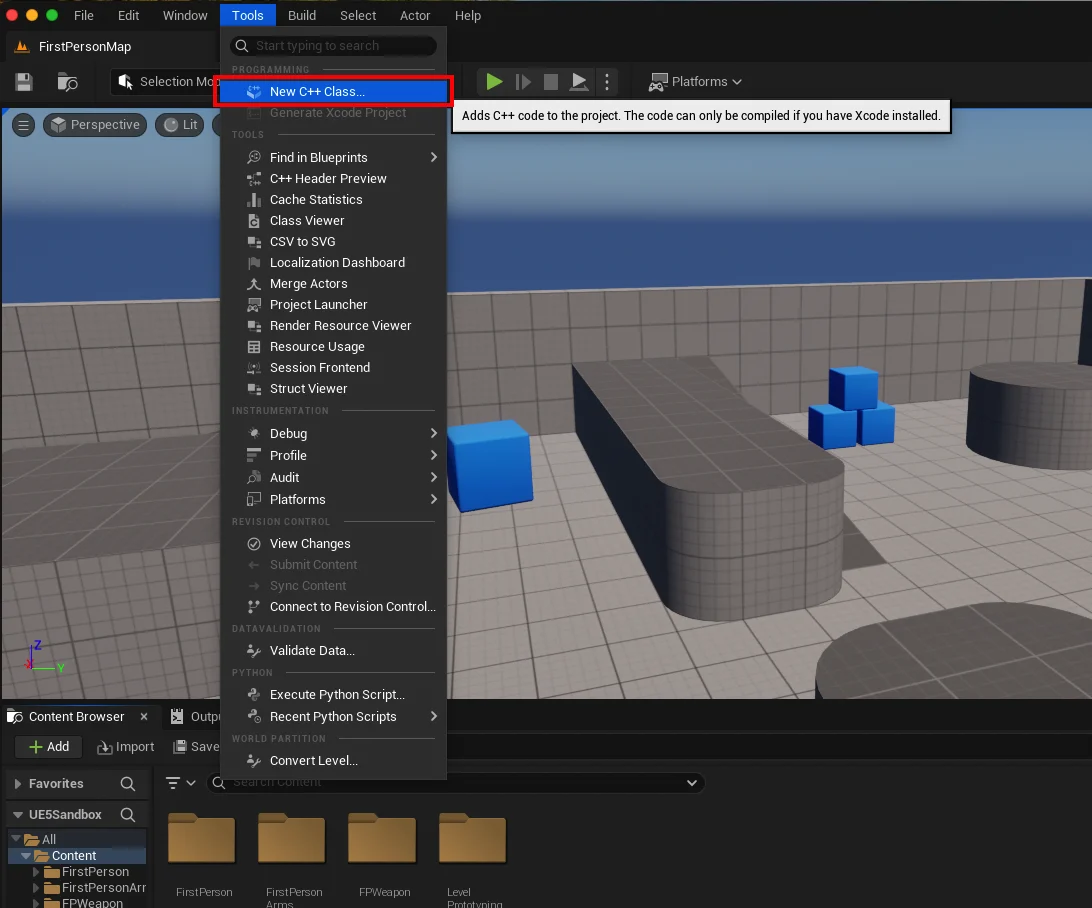
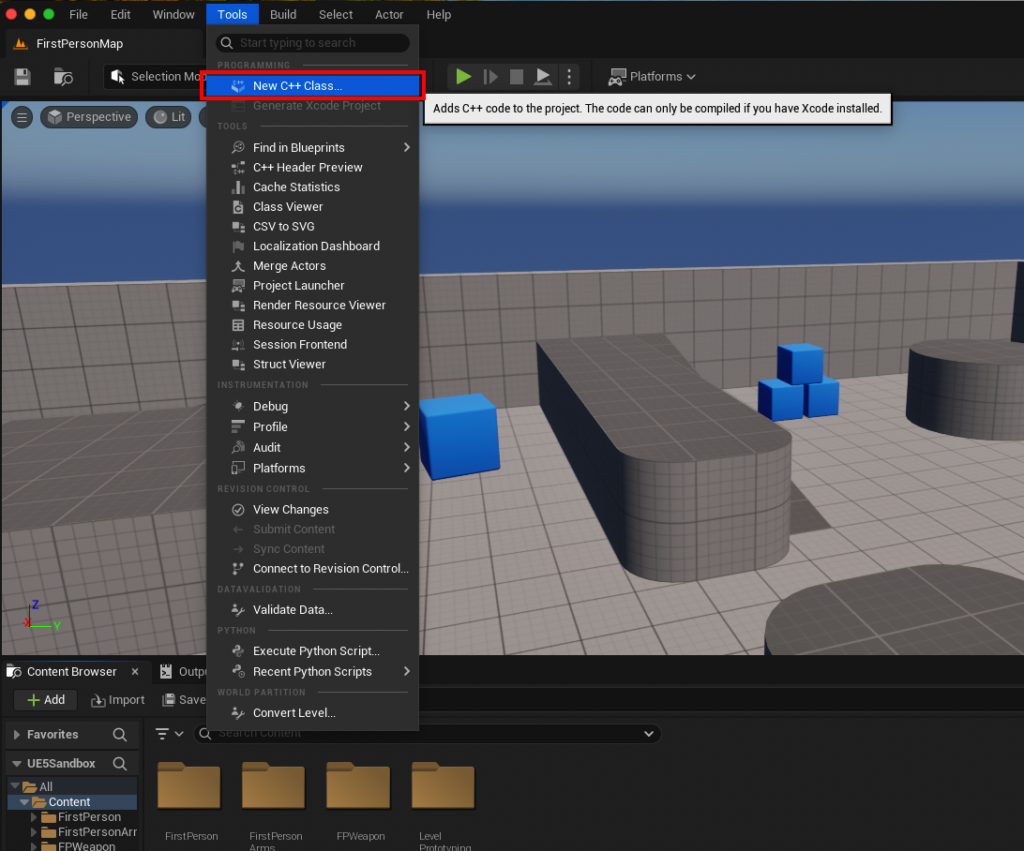
The initial step is to determine if the existing Unreal Engine project is already C++ enabled. This is straightforward: navigate to the "Tools" dropdown menu at the top of the Unreal Editor screen and select "New C++ Class." If the project is Blueprint-only, this action will prompt the user to install the necessary IDE components, effectively converting the project into a hybrid Blueprint/C++ project. If an IDE is already installed and detected, the process will move directly to class selection. For this guide, a macOS environment utilizing Xcode served as the development platform.
2. Class Creation and IDE Integration
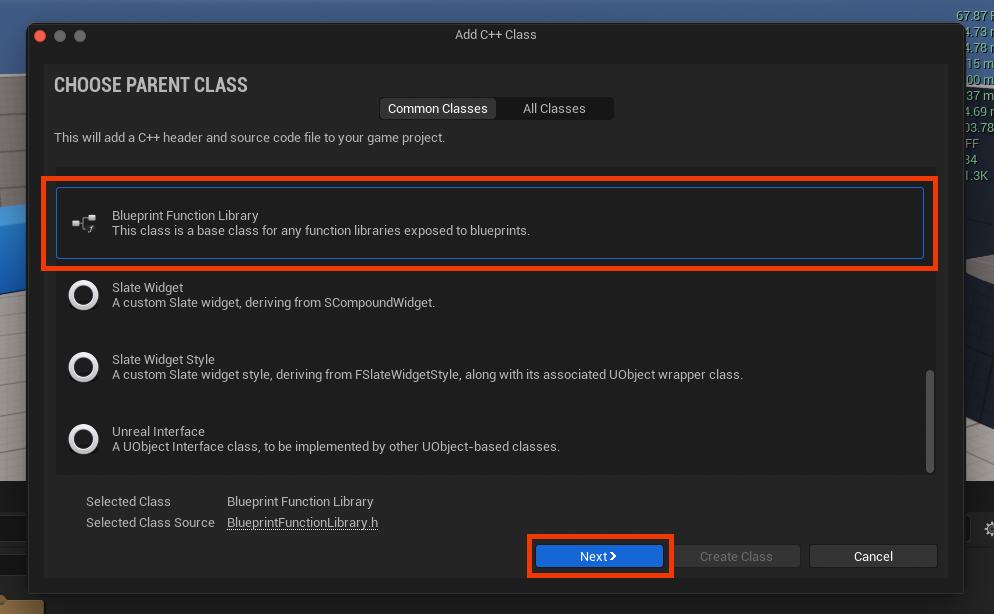
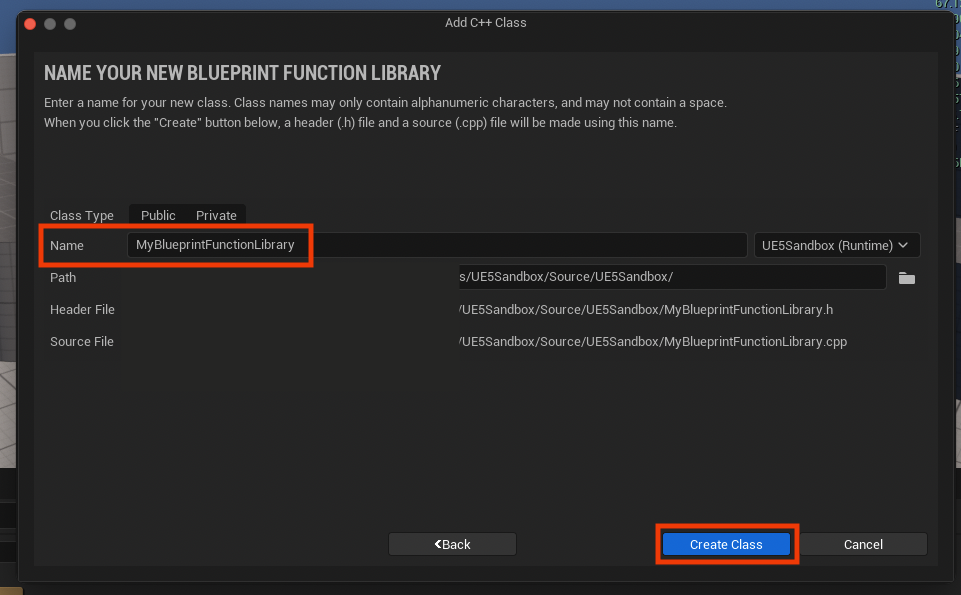
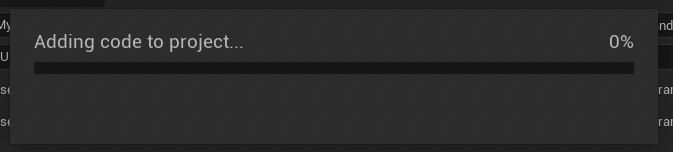
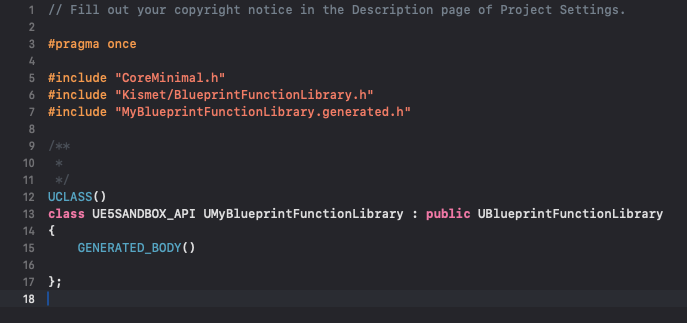
Upon initiating a new C++ class, a dialog box will appear, presenting a list of "Parent Classes." To create a Blueprint Function Library, developers must scroll down and select "Blueprint Function Library" as the parent class, then proceed by clicking the "Next" button. The next prompt will ask for a name for the new class. Adhering to Unreal Engine’s naming conventions, which typically involve PascalCase (e.g., MyBlueprintFunctionLibrary), is recommended for clarity and consistency. Choosing a descriptive name helps in easily identifying the library’s purpose within the project. After assigning a name and clicking "Create Class," the engine will compile the new C++ files. This compilation process can take a few moments, and it is crucial to allow it to complete before proceeding. Once finished, the newly generated .h (header) and .cpp (source) files for the MyBlueprintFunctionLibrary (or chosen name) will be visible within the project’s source folder in the chosen IDE.
3. Function Definition and Exposure
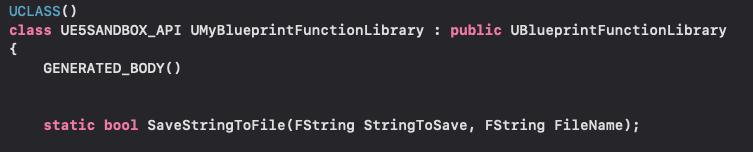
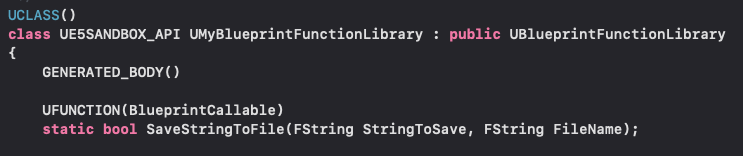
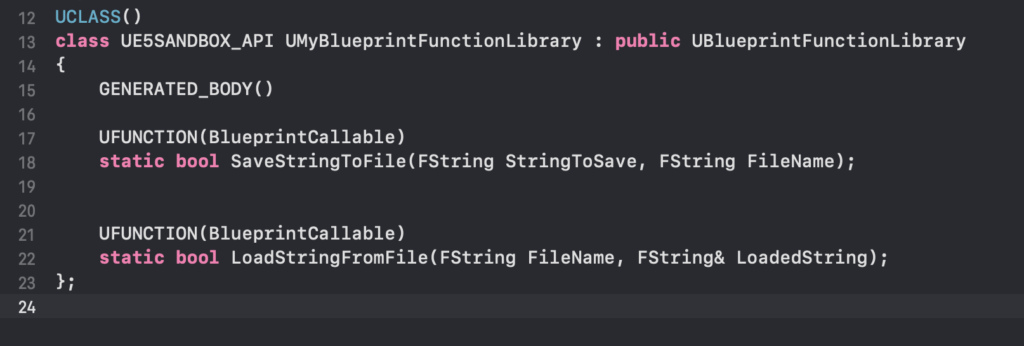
With the foundational files in place, the next phase involves defining the C++ functions that will be exposed to Blueprint. This begins in the header file (.h). Unreal Engine generates a basic template with the correct includes and class inheritance. To make a function accessible from Blueprint, two key elements are required:

staticKeyword: All functions within a Blueprint Function Library intended for direct Blueprint access must be declared asstatic. This allows the functions to be called without needing an instance of the class, making them globally accessible.UFUNCTIONMacro: This macro is vital for exposing the C++ function to the Unreal Engine reflection system, which then makes it discoverable and usable within the Blueprint editor. Various specifiers can be added to theUFUNCTIONmacro (e.g.,BlueprintCallable,BlueprintPure,Category,DisplayName) to control how the function behaves and appears in Blueprint. For general utility,BlueprintCallableis commonly used.
For instance, to create a simple file I/O system, two functions could be declared: one for saving a string to a file and another for loading a string from a file.
// MyBlueprintFunctionLibrary.h
#pragma once

#include "CoreMinimal.h"
#include "Kismet/BlueprintFunctionLibrary.h"
#include "MyBlueprintFunctionLibrary.generated.h"

UCLASS()
class MYPROJECT_API UMyBlueprintFunctionLibrary : public UBlueprintFunctionLibrary

    GENERATED_BODY()

public:
    UFUNCTION(BlueprintCallable, Category = "File I/O")
    static bool SaveStringToFile(FString SaveDirectory, FString FileName, FString SaveText, bool bAppend);

    UFUNCTION(BlueprintCallable, Category = "File I/O")
    static FString LoadStringFromFile(FString LoadDirectory, FString FileName, bool& bSuccess);
;
4. Practical Example: File I/O Implementation
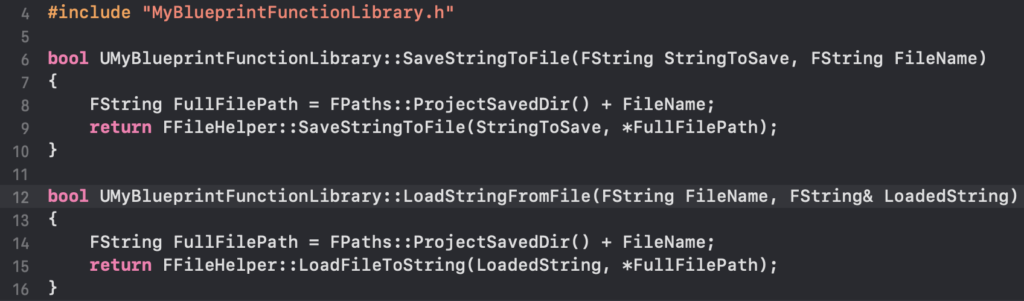
Once declared in the header, the functions must be implemented in the corresponding .cpp file. This is where the actual C++ logic resides. For the file I/O example, Unreal Engine’s FFileHelper class provides convenient static methods for reading and writing files.
// MyBlueprintFunctionLibrary.cpp
#include "MyBlueprintFunctionLibrary.h"
#include "Misc/FileHelper.h"
#include "HAL/PlatformFileManager.h"

bool UMyBlueprintFunctionLibrary::SaveStringToFile(FString SaveDirectory, FString FileName, FString SaveText, bool bAppend)

    // If directory doesn't exist, create it
    if (!IFileManager::Get().DirectoryExists(*SaveDirectory))

        IFileManager::Get().MakeDirectory(*SaveDirectory);


    // Combine directory and file name
    FString AbsoluteFilePath = SaveDirectory + "/" + FileName;

    // Save the string to the file
    return FFileHelper::SaveStringToFile(SaveText, *AbsoluteFilePath, FFileHelper::EEncodingOptions::AutoSet, &IFileManager::Get(), bAppend ? FILEWRITE_Append : FILEWRITE_None);


FString UMyBlueprintFunctionLibrary::LoadStringFromFile(FString LoadDirectory, FString FileName, bool& bSuccess)

    FString ResultString = TEXT("");
    FString AbsoluteFilePath = LoadDirectory + "/" + FileName;

    bSuccess = FFileHelper::LoadFileToString(ResultString, *AbsoluteFilePath);
    return ResultString;
This example demonstrates how to leverage low-level file system operations that would be cumbersome or impossible to implement purely in Blueprint. After implementing the C++ code, the project must be recompiled. This is a critical step that updates the Unreal Editor’s understanding of the new C++ classes and functions, making them available for use.
Seamless Blueprint Integration: Accessing C++ Functions
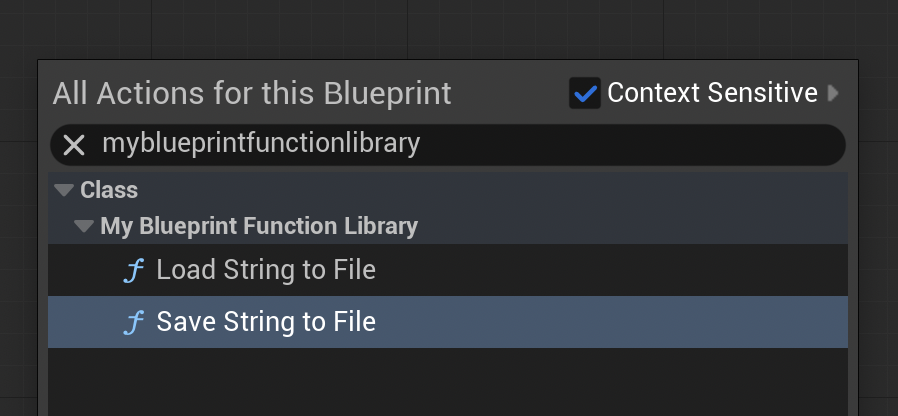
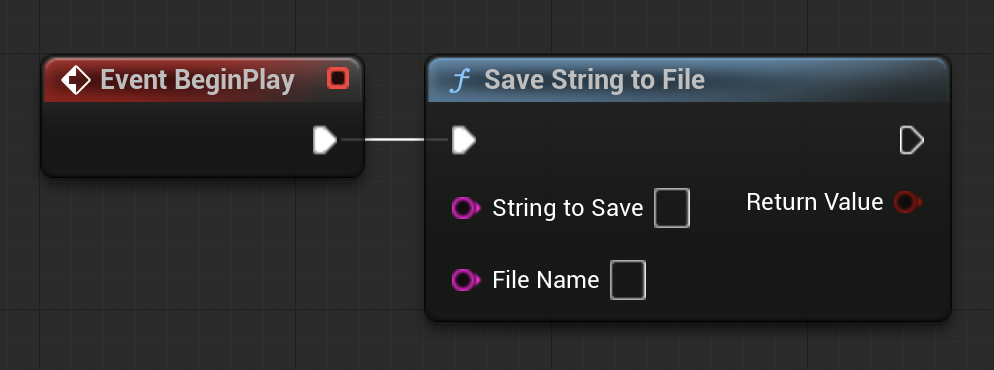
Upon successful compilation and relaunch of the Unreal Editor, the newly created C++ functions become instantly accessible within any Blueprint graph. By simply right-clicking in a Blueprint editor and typing the name of the function (e.g., "Save String to File" or "Load String from File"), the corresponding C++ function node will appear in the context menu. These nodes function identically to native Blueprint nodes, accepting inputs and providing outputs as defined in their C++ signatures. This seamless integration underscores the power of the C++ Blueprint Function Library, allowing designers to utilize highly optimized, complex C++ logic without ever needing to delve into the C++ codebase itself.
Real-World Application and Demonstration
To illustrate the practical utility, consider the file I/O functions. A developer could set up a BeginPlay event in a Level Blueprint to automatically save game state or debug information to a file. For example, connecting a "Save String to File" node, specifying a string like "Game Started Successfully" and a filename "log.txt" in the project’s /Saved folder, would create or append to that file upon game launch. Verification would involve navigating to the project’s /Saved directory to confirm the file’s creation and content.
Conversely, the "Load String from File" function provides robust data retrieval. Imagine a scenario where game configuration or player progress is stored in a text file (e.g., settings.txt). A Blueprint could, upon an event like "Load Game," call the "Load String from File" function, retrieve the contents of settings.txt, and then parse that string within Blueprint to apply game settings. A simple test involves pre-populating a loadtest.txt file in the /Saved directory with the text "Loading Test," then using the Blueprint node to load this file and print its content to the screen via a "Print String" node. Running the game would then display "Loading Test" on the screen, visually confirming the successful execution of the C++ function from Blueprint.
Broader Implications for Game Development
The strategic use of C++ Blueprint Function Libraries has profound implications for modern game development:
- Scalability: Projects can grow in complexity and scope without being constrained by Blueprint performance limitations. Performance-critical modules can be continuously optimized in C++ while the majority of the game logic remains accessible and iterable in Blueprint.
- Performance Targets: Meeting stringent performance targets for various platforms (PC, console, mobile) becomes more achievable. Specific bottlenecks identified through profiling can be surgically addressed with C++ implementations.
- Resource Management: Efficient memory management and resource handling, often critical for large-scale games, are more easily controlled and optimized in C++.
- Future-Proofing: As games become more ambitious and hardware evolves, the ability to tap into low-level C++ functionality ensures that projects can adapt and remain competitive.
- Modular Development: It encourages a modular approach where specific, high-performance utilities are developed as independent C++ libraries, enhancing organization and reusability across projects.
Conclusion
The C++ Blueprint Function Library stands as an indispensable tool in the Unreal Engine 5 developer’s arsenal. It represents a pragmatic and powerful solution for overcoming the inherent performance and feature limitations of Blueprint, seamlessly integrating the speed and versatility of C++ into the visual scripting workflow. By mastering the creation and deployment of these libraries, development teams can unlock significant performance gains, access advanced engine functionalities, and foster a more efficient, collaborative, and scalable development pipeline. This hybrid methodology empowers developers to build more ambitious, performant, and polished interactive experiences, truly leveraging the full potential of Unreal Engine 5.
Further Reading
For those seeking to deepen their understanding, Epic Games’ official documentation on Blueprint Function Libraries provides comprehensive technical details. Additionally, exploring various C++ guides for Unreal Engine can further expand the scope of possibilities in hybrid development.
About the Author