The itch.io desktop application has recently undergone a substantial overhaul, with the release of two significant updates, v26.15.0 and v26.17.0, followed by a critical hotfix, v26.18.0, to address a MacOS crashing issue. These updates represent a concerted effort by the itch.io development team to respond to long-standing community requests and tackle some of the platform’s unique technical challenges, particularly concerning large game bundles and advanced game configuration. The core focus of these enhancements lies in elevating the user experience through improved library management, granular per-game launch settings, increased flexibility for installing untagged content, and a more intuitive search interface.
Background: itch.io’s Unique Ecosystem and App Evolution
Since its inception, itch.io has carved out a distinctive niche in the digital games landscape, serving as a vibrant marketplace primarily for independent game developers. Renowned for its creator-friendly revenue splits, DRM-free philosophy, and diverse catalog encompassing everything from experimental art games to commercial indie hits, itch.io fosters a rich ecosystem. The official itch.io desktop app was introduced to provide users with a centralized, streamlined experience for managing their ever-growing game libraries, downloading content, and ensuring their installations remained up-to-date.
However, the very strengths of itch.io – its vast and eclectic collection, the freedom it affords developers, and its pioneering use of massive charity bundles – also presented unique technical complexities for the app. Unlike more curated, restrictive storefronts, itch.io’s open nature meant dealing with games across countless platforms, sometimes with incomplete metadata, and ownership records for bundles that could contain thousands of items. The app’s evolution has been a journey of adapting to this dynamic environment, continually striving to bridge the gap between the platform’s expansive offerings and a seamless user interface. The latest updates are a testament to this ongoing commitment, directly addressing some of the most pressing issues identified through the platform’s public issues tracker on GitHub, highlighting a development philosophy rooted in community feedback and transparency.
Revolutionizing Bundle Access: A Digital Library Transformed
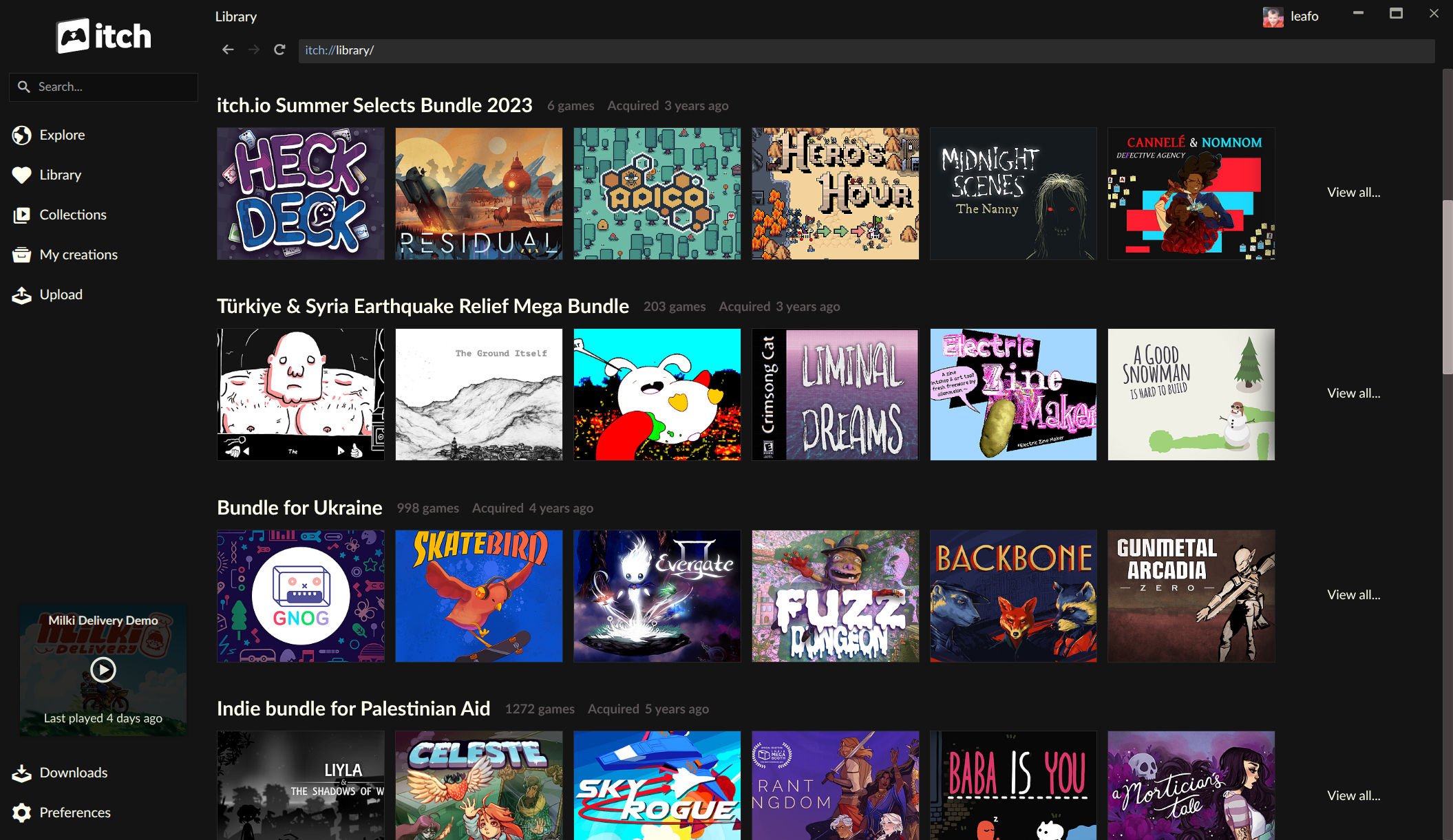
One of the most impactful features introduced in these updates is the comprehensive support for game bundles directly within the app’s library. Historically, itch.io has been a pioneer in hosting colossal charity bundles, which, while incredibly successful in fundraising, posed significant challenges for user library management. The "Bundle for Racial Justice and Equality" in 2020, for instance, amassed an astonishing 1,741 items and was purchased over 800,000 times. Similarly, the "Bundle for Ukraine" in 2022 featured nearly 1,000 items and attracted over 400,000 buyers.
The sheer scale of these bundles created an unprecedented technical hurdle. If individual ownership records had been generated for every single item within these bundles for every buyer, the database load would have been astronomical. For the Racial Justice bundle alone, this would have translated into over 1.3 billion individual download key entries, posing immense logistical and computational challenges for storage, retrieval, and maintenance. To circumvent this, itch.io implemented a system where ownership for these massive bundles was recorded as a single entry. Individual game download keys were then only generated on demand, typically when a user explicitly claimed a game through the website.
The consequence of this system for app users was a significant friction point: games from these monumental bundles would not automatically appear in the itch.io app. Users were forced to navigate to the website, manually claim each desired game, and then wait for it to populate in their app library. This process was cumbersome and often deterred users from fully exploring the vast content they had purchased, leading to a phenomenon of "digital clutter" where valuable games lay undiscovered.
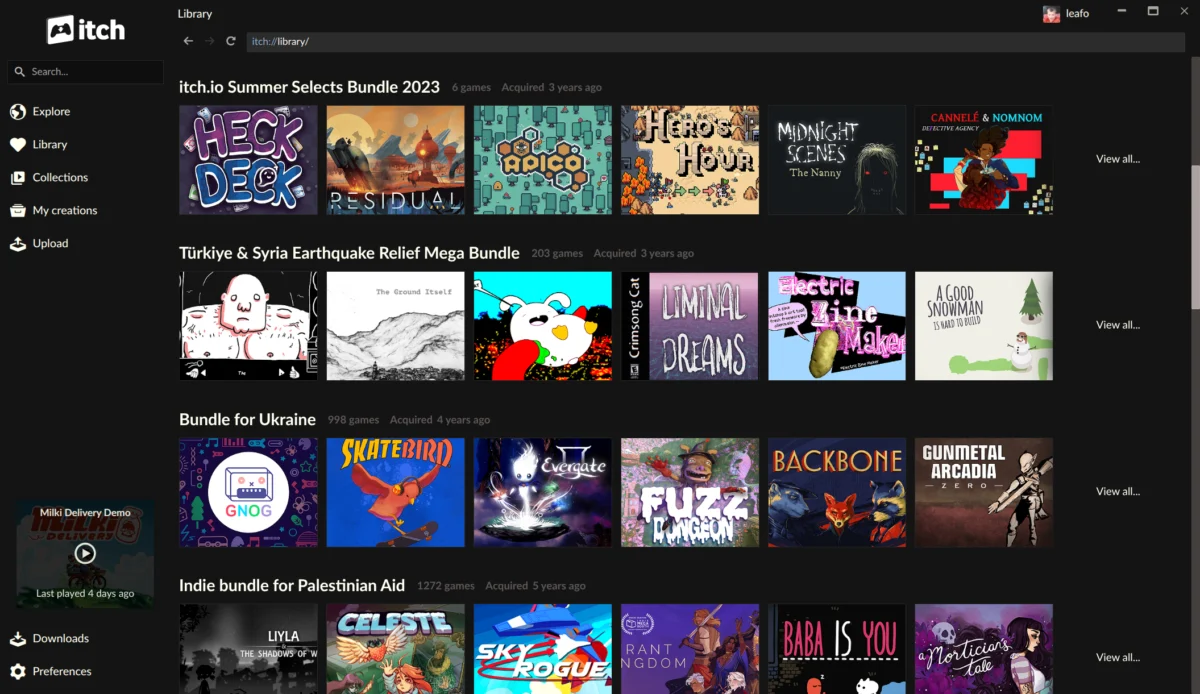
The v26.15.0 and v26.17.0 updates fundamentally alter this experience. The itch.io app now possesses a native understanding of bundle ownership, directly interpreting a user’s purchase of an entire bundle and dynamically displaying all included games within the app’s library. Each bundle now boasts its own dedicated page within the app, functioning as a sub-library. On these pages, users can efficiently browse their purchased collections, employing robust sorting options, searching by title, and filtering by platform, game classification (e.g., action, RPG, visual novel), and installation status. Crucially, games can now be installed directly from these bundle pages, eliminating the previously necessary detour to the website.
This enhancement significantly improves discoverability and accessibility for hundreds of thousands of users who have supported these philanthropic initiatives. It transforms potentially overwhelming collections into manageable, browsable digital libraries, reducing user frustration and ensuring that content purchased is truly playable. This comprehensive approach to bundle integration also aligns with recent improvements on the developer side, as itch.io recently revamped its bundle hosting tools, ensuring a consistent and enhanced experience across the entire platform ecosystem.
Granular Control with Enhanced Launch Settings
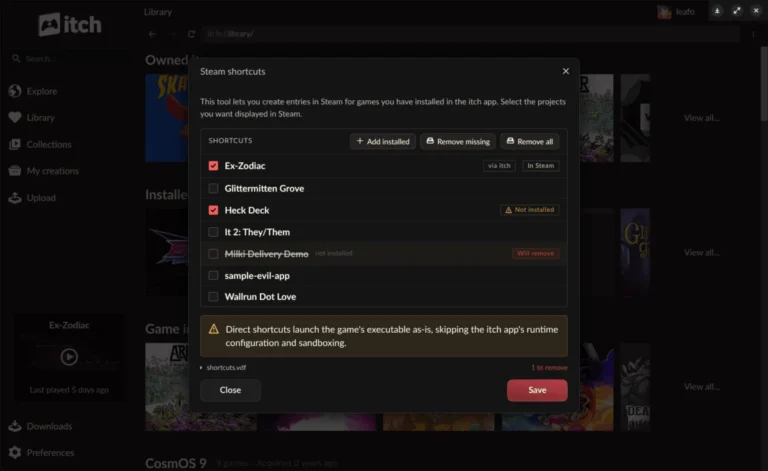
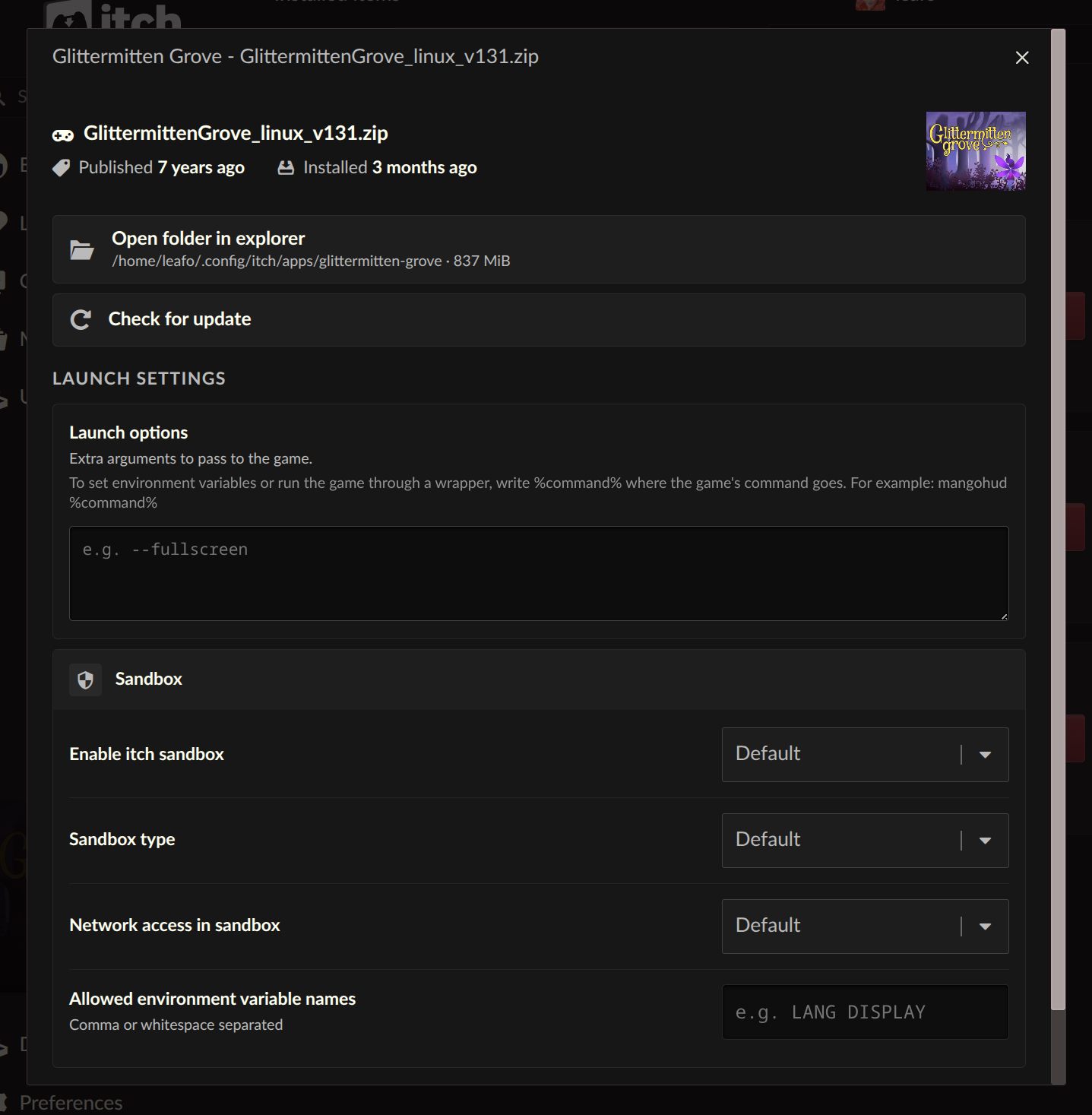
Another highly anticipated feature integrated into the latest updates is the introduction of per-game launch settings. Recognizing the diverse technical requirements of indie games and the advanced customization desires of its user base, itch.io has empowered players with unprecedented control over how their games are launched. Each installed game now features a dedicated "Launch settings" area, accessible from its manage dialog within the app.
Within this new interface, users can configure a range of parameters on a game-by-game basis:
- Sandbox Restrictions: Users can now specify security sandbox restrictions, controlling a game’s access to the file system, network, and other sensitive system resources. This is particularly valuable for privacy-conscious individuals or when playing games from smaller, less-known developers, providing an additional layer of security and control.
- Network Access: This option allows users to explicitly define whether a specific game is permitted to access the internet. This is useful for games with optional online components, ensuring offline-only play when desired, or for isolating games from external connections.
- Environment Variables: For advanced users and developers, the ability to set custom environment variables is a powerful addition. Many games and development tools rely on environment variables to modify behavior, enable debugging modes, or specify resource paths. This feature centralizes such configurations within the app.
Perhaps the most significant addition within the launch settings is the new "Command pattern" option for launch arguments. This has been a long-standing request from the community. Previously, users could only pass plain arguments directly to a game executable. The new command pattern allows for a much more flexible approach. Users can still provide straightforward arguments, but now they can also use a %command% pattern to wrap the game launch within another command.
This functionality unlocks a myriad of possibilities. For instance, Linux users who wish to run Windows games via compatibility layers like Wine or Proton can now configure the app to launch the game through these tools directly. Similarly, developers or power users can integrate debugging tools, performance monitors, custom scripts, or even alternative launchers and modding frameworks directly into the game’s launch sequence. This level of customization dramatically expands the playability of games across different operating systems, empowers modding communities, and reduces the reliance on external scripts or manual command-line interventions, centralizing complex game management within the itch.io app.
Breaking Down Platform Barriers: Enhanced Cross-Platform Accessibility
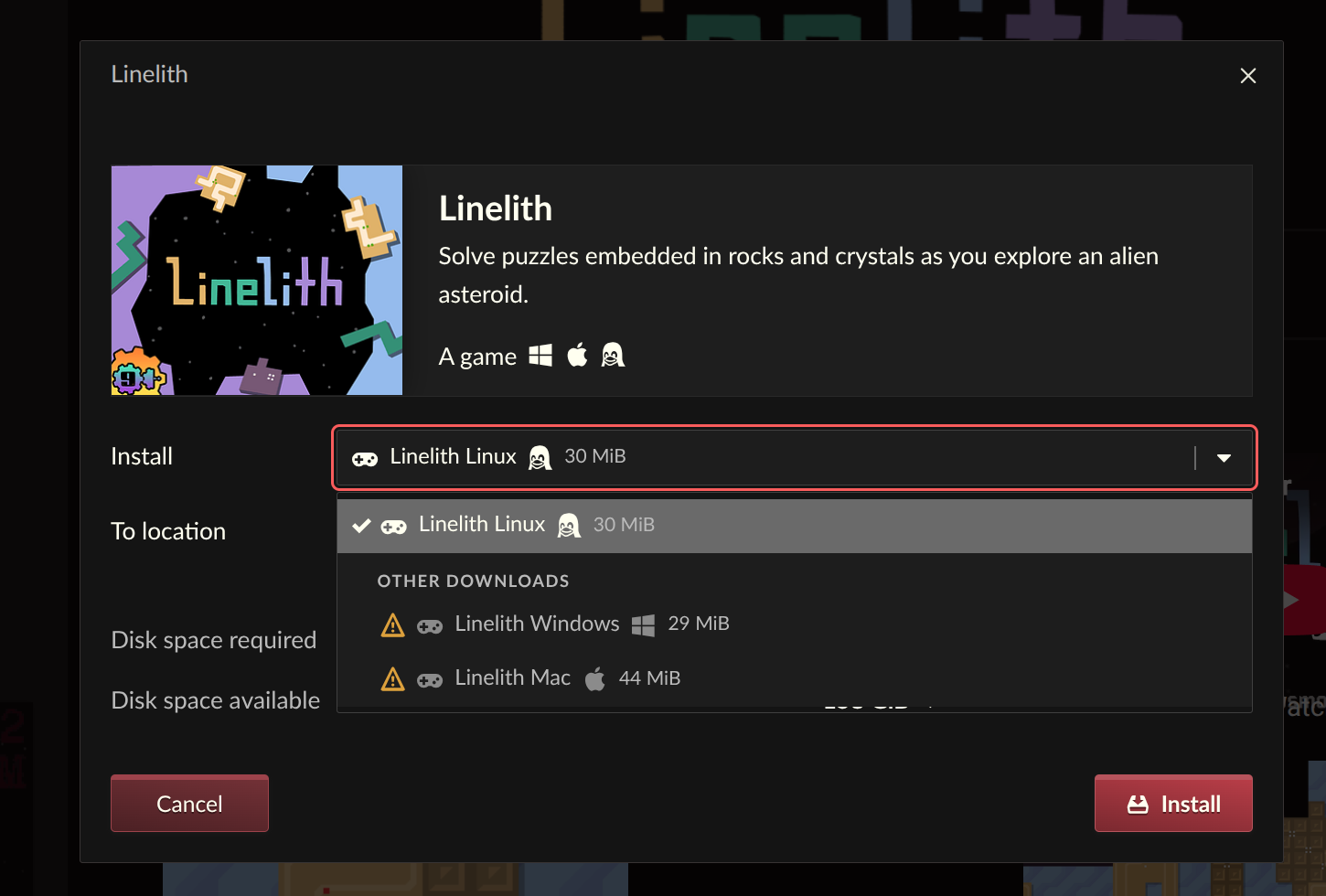
In the diverse world of indie game development, it is not uncommon for developers to sometimes overlook tagging their uploads for every compatible platform, or for users to desire installing a version of a game not natively supported by their current operating system. For example, a Linux user might want to download a Windows build to run it through a compatibility layer like Proton or Wine. Previously, the itch.io app would only display and allow installation of files explicitly tagged for the user’s detected operating system, forcing users to resort to the website to manually download untagged content.
The latest updates address this friction point by allowing downloads that aren’t tagged for the user’s specific platform to now be revealed and installed directly from within the app. The install dialog now includes an option to show all available downloads, regardless of platform tags. This seemingly minor change has significant implications for cross-platform accessibility and user agency.
A Linux user, for example, can now effortlessly browse and install a Windows executable for a game, knowing they can then leverage the new launch settings to run it through their preferred compatibility layer. This eliminates the need to navigate to the website, locate the correct download, and manually transfer files, streamlining the process and reducing potential frustration. This feature underscores itch.io’s commitment to flexibility and acknowledges the varied ways its global user base interacts with digital content, further supporting a "play anywhere" ethos within its unique ecosystem.
Streamlined Search Experience and Library Page Enhancements
Effective navigation and discovery are paramount in a marketplace as vast as itch.io, which hosts hundreds of thousands of titles. The previous sidebar search within the app relied on an API autocomplete function that often presented search results in a confusing or less-than-optimal order, making it difficult for users to quickly find what they were looking for, whether within their own library or across the broader platform.
Recognizing this limitation, the sidebar search has been completely revamped. The old autocomplete-driven system has been replaced with a more robust integration that channels search queries through the site’s full, comprehensive search experience. This change ensures that users receive more relevant, accurate, and logically ordered search results, significantly improving the efficiency of finding specific titles or discovering new content. The developers noted that autocomplete functions are best suited for items users already possess, while broader discovery benefits from a full search engine. This improvement enhances the overall user experience and reinforces the importance of intuitive navigation in a rich digital library.
Beyond the search function, the updates also included general improvements to the library page interface, though specific details were not exhaustively listed, implying a series of smaller quality-of-life adjustments aimed at enhancing overall readability and functionality within the core library view.
Responsive Development and Community Feedback: The MacOS Hotfix
The iterative nature of software development often means addressing unforeseen issues that arise post-release. Following the deployment of v26.15.0 and v26.17.0, a critical bug emerged, specifically affecting users on MacOS systems. This issue caused the itch.io app to crash unexpectedly, trapping some users in a persistent crash loop, rendering the application unusable.
Demonstrating a rapid response to critical community feedback, the itch.io development team promptly released a hotfix, v26.18.0. This urgent update was specifically designed to address and resolve the MacOS crashing issue, restoring stability for affected users. Users who found their installations stuck in a crash loop were advised that a complete reinstallation of the app from the official setup program (available at itch.io/app) might be necessary to ensure a clean application of the patch and to break out of the crash loop. This swift action highlights itch.io’s commitment to maintaining a stable user experience and its responsive approach to critical bug reports, often facilitated by its transparent use of public issue trackers.
Broader Implications and The Road Ahead
Collectively, these updates mark a significant milestone in the ongoing development of the itch.io desktop application. By tackling some of the platform’s most intricate technical challenges, particularly around the management of massive game bundles, and by empowering users with advanced configuration options, itch.io has substantially elevated the functionality and user-friendliness of its app. Players now possess unprecedented control over their digital libraries and game launch environments, while access to content, especially from the platform’s philanthropic bundles, is vastly simplified.
These enhancements reinforce itch.io’s unique position in the digital games market as a platform that prioritizes creator freedom and player flexibility. The commitment to addressing community feedback, as evidenced by the focus on "commonly requested problems and requests" from the issues tracker, fosters a strong sense of trust and engagement within its user base. As the itch.io ecosystem continues to grow and evolve, these updates lay a robust foundation for future innovations, promising an even more seamless and customizable experience for independent game enthusiasts worldwide. Users can obtain the latest version of the app from itch.io/app, and existing installations will automatically update to ensure they benefit from these crucial improvements. The full changelogs for v26.15.0 and v26.17.0 are available on GitHub for those interested in the technical details of each release.
About the Author