Itch.io, a prominent open marketplace for independent video games, has rolled out a significant update to its desktop application, version v26.20.0, introducing a suite of features designed to streamline game management and enhance interoperability with other gaming ecosystems. The update, launched today, addresses long-standing community requests by enabling direct integration with Steam, facilitating headless game launches, and simplifying the process of linking pre-existing game folders. These advancements mark a crucial step in itch.io’s ongoing commitment to providing a robust and user-friendly platform for both indie developers and players.
Seamless Integration: Bridging Itch.io and Steam
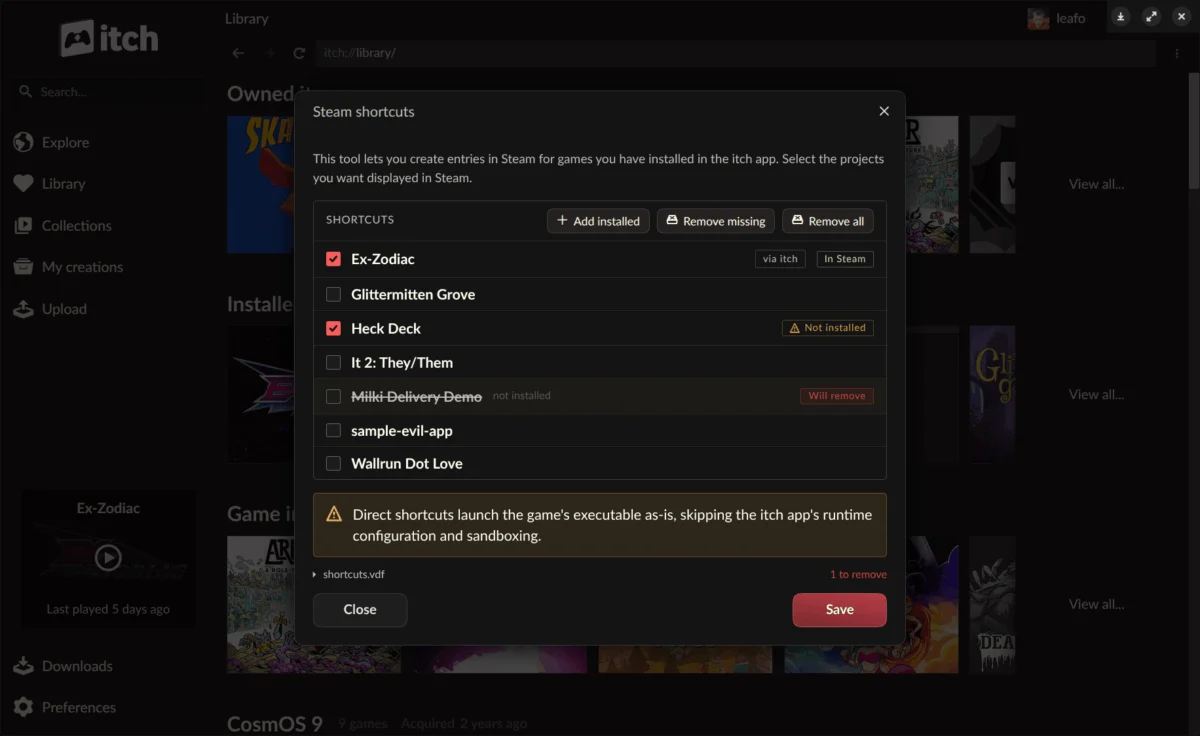
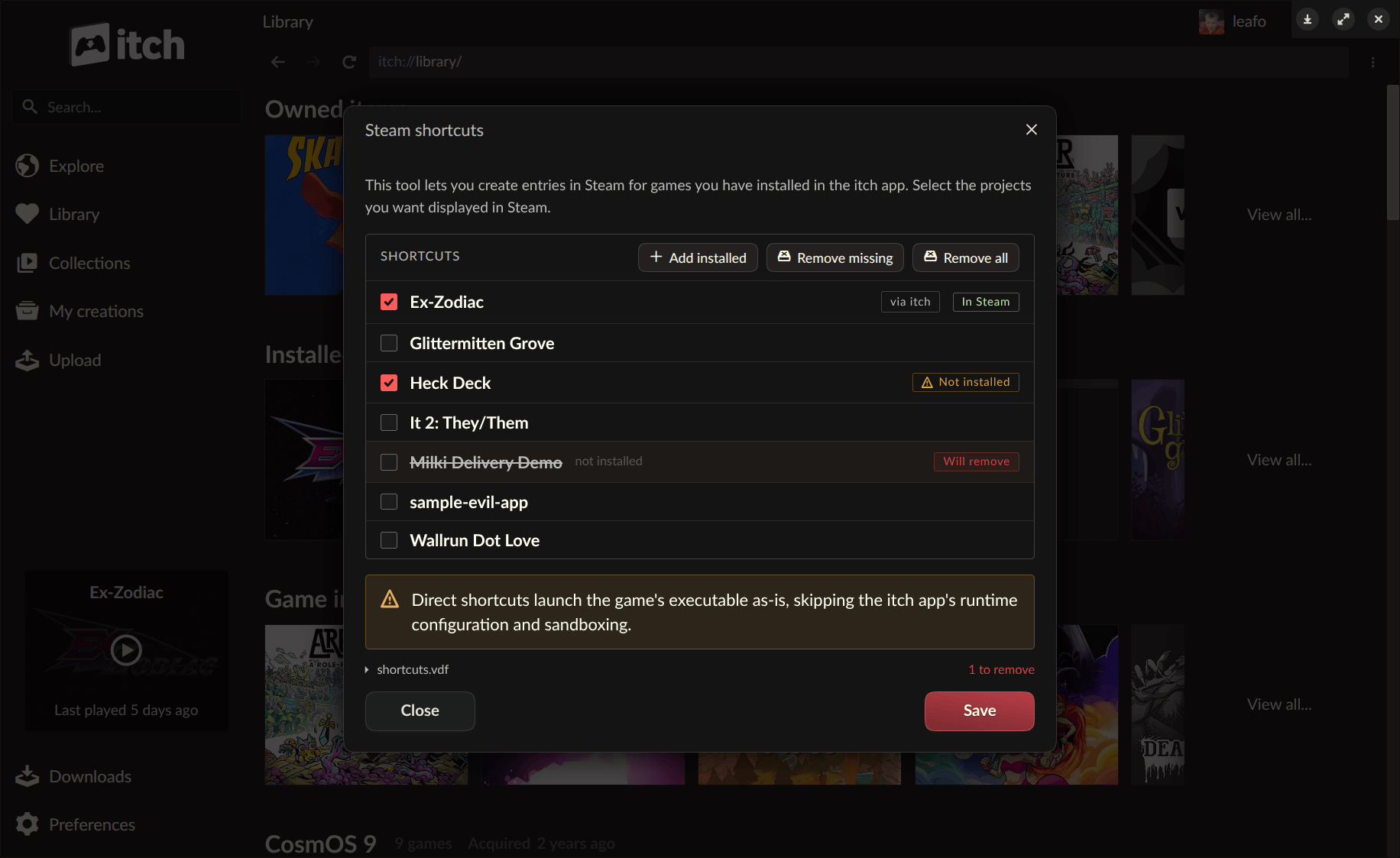
The most anticipated feature in the v26.20.0 update is undoubtedly the introduction of Steam shortcuts. This functionality allows users to add games installed via the itch.io app directly to their Steam library, a significant boon for players deeply embedded in the Steam ecosystem. The primary beneficiaries of this integration are users of devices like the Steam Deck or those who frequently utilize Steam’s Big Picture mode, where a unified game library dramatically improves convenience. By consolidating their game collections, players can now launch their favorite itch.io titles directly from Steam without the need to switch between applications, creating a more cohesive gaming experience.
This integration is made possible through a newly developed headless runner mode for itch.io games. Traditionally, launching an itch.io game required the full itch.io desktop application to be running in the background. The headless runner circumvents this requirement, allowing games to execute with the full support and benefits of the itch.io app’s underlying infrastructure—such as sandboxing, prerequisite checks, and play time tracking—without the app’s graphical user interface needing to be active. This innovation is foundational to the Steam shortcut feature, ensuring that games launched through Steam still operate within the secure and managed environment provided by itch.io.
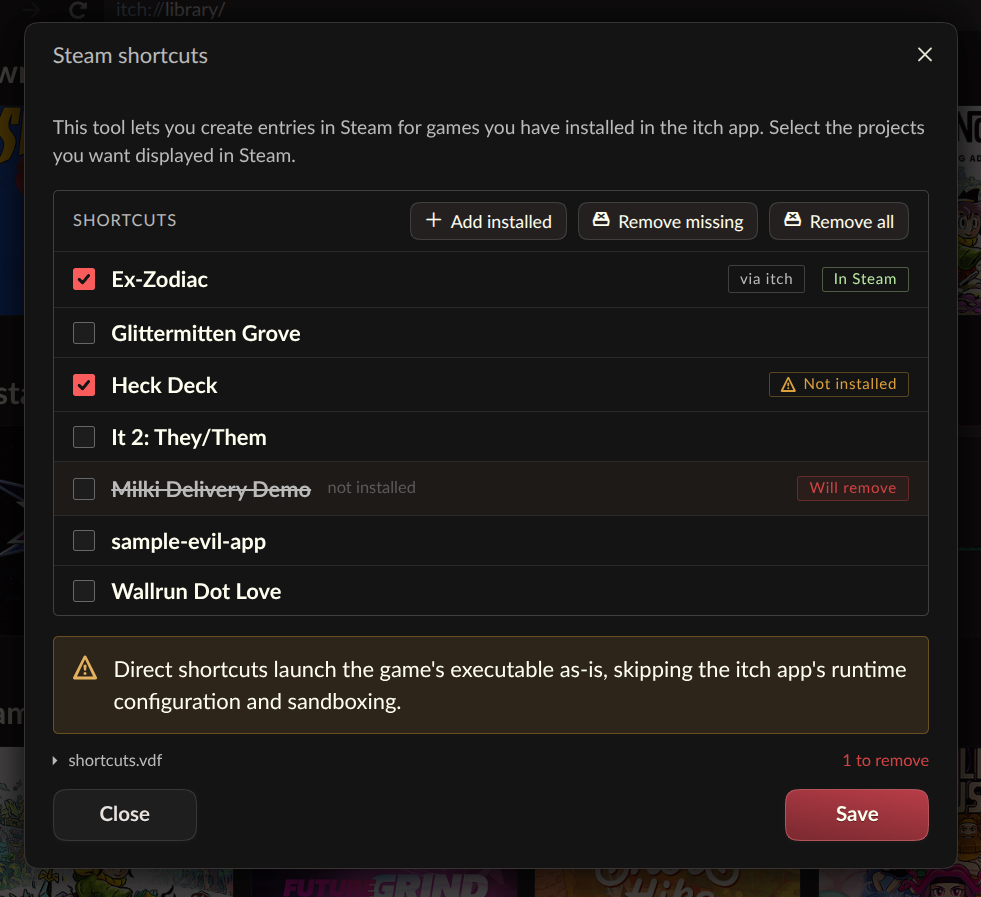
Users can access the Steam Shortcuts tool either through the itch.io app’s preferences page or by right-clicking on any installed game within their itch.io library and selecting the "Steam Shortcuts" option. Upon synchronization, all linked itch.io titles are automatically organized into a dedicated "itch.io" collection within the Steam library, ensuring easy identification and management. While the feature is currently described as "somewhat experimental," the development team encourages users to test it thoroughly and report any bugs via GitHub issues, underscoring their iterative development approach. The ability to configure each shortcut with two different launch modes further highlights the team’s attention to compatibility and user preference.
The integration with Steam reflects a broader trend in the digital gaming landscape, where players often juggle libraries across multiple platforms. While Steam maintains a dominant market share, platforms like itch.io carve out their niche by fostering a vibrant indie community and offering unique features, often with a more open and developer-friendly approach. This move by itch.io is not about competing directly with Steam but rather about creating a symbiotic relationship, making itch.io content more accessible to a wider audience without compromising its distinct identity. The rise of portable gaming devices, particularly the Steam Deck, has amplified the demand for such cross-platform compatibility, as users seek a consolidated experience on their handhelds.
Empowering Customization: The Headless Launch Mode
Beyond its immediate application for Steam shortcuts, the new headless launch mode represents a significant architectural enhancement for the itch.io app. The command-line interface, itch-setup --run-game <gameId> [--profile-id <profileId>], allows for an installed game to be launched directly without invoking the full graphical application. This capability extends far beyond Steam, offering immense flexibility for power users, third-party launchers, custom shortcut systems, or scripting enthusiasts who wish to integrate itch.io games into their personalized workflows.
The technical elegance of the headless launch lies in its ability to maintain all the robust features of the full itch.io app. When a game is launched in headless mode, it still respects configured settings such as sandboxing, which isolates games from the main system to enhance security; prerequisite checks, ensuring necessary software components are present; per-game launch settings, allowing for specific configurations for individual titles; play time tracking, for monitoring user engagement; and the secure API key passed to the game, facilitating in-game interactions with itch.io services. Under the hood, this functionality leverages a new butler launch subcommand, which directly interacts with the existing app database to manage the launch machinery.
This level of granular control and programmatic access positions itch.io as a platform that not only serves casual players but also caters to a more technical audience and potentially to other developers looking to build integrations. Itch.io has even provided a dedicated guide for interfacing with the itch.io app to build custom launchers, signaling their commitment to an open and extensible ecosystem. This approach fosters innovation and allows the community to extend the utility of the itch.io platform in ways the core team might not have anticipated.
It is important to note a specific limitation: HTML5 games, which inherently require a web browser environment, cannot be launched in headless mode. If a user attempts to use run-game on an HTML5 title, the full itch.io app will automatically launch to provide the necessary browser environment for the game to run. This practical consideration ensures broad compatibility while acknowledging the technical constraints of certain game formats.
Streamlined Management: Linking Existing Game Folders
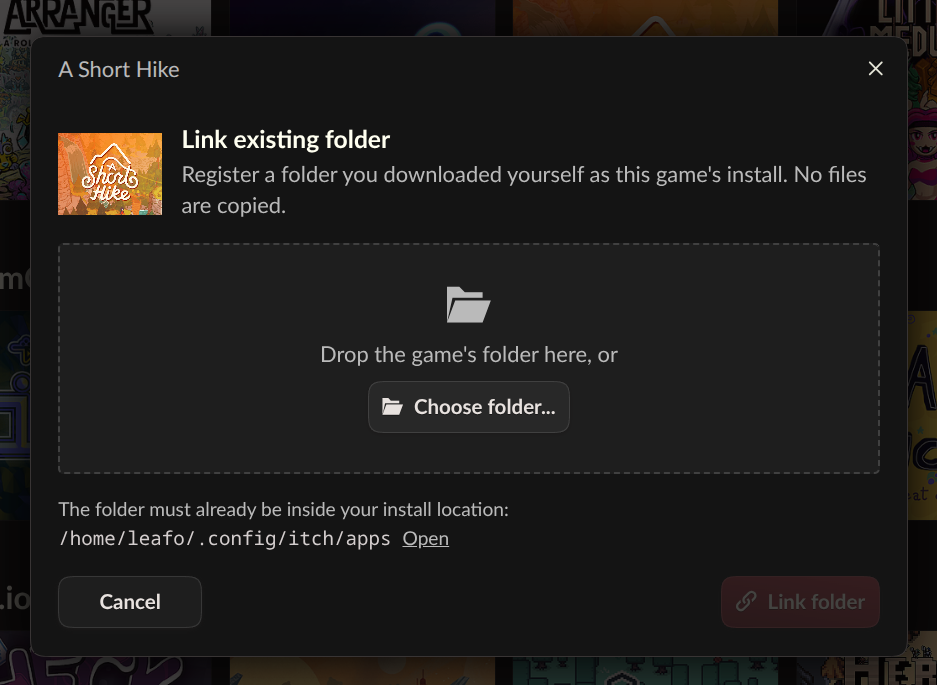
Another practical and highly requested feature introduced in v26.20.0 is the ability to link an existing game folder to a game within the itch.io app. Previously, if a user had downloaded a game from itch.io outside of the official app—perhaps directly from a developer’s website, via a manual download link, or through an external distribution method—they would typically have to re-download the game through the app to have it registered in their library. This often led to redundant downloads, consumed unnecessary bandwidth, and was particularly cumbersome for larger game files.
The new "Link existing folder…" option, found within a game’s install dialog alongside the standard download options, directly addresses this pain point. Users can now simply point the itch.io app to a folder containing a previously downloaded game. Once linked, the game appears in the user’s library as installed and can be launched like any other game managed by the app. This feature significantly enhances user convenience and resource efficiency.
The development team describes this as an "escape hatch," emphasizing its deliberate simplicity. Unlike typical installations through the app, when a folder is linked, no files are verified. The app effectively "takes your word" that the specified folder contains the correct game files. This design choice prioritizes flexibility and speed over rigorous validation, making it ideal for situations where a re-download is impractical, or for projects that offer downloads through external links or unique methods that the app might not natively process. While this approach places more responsibility on the user to ensure the integrity of their linked files, it provides an invaluable tool for managing diverse and manually acquired game collections. This feature demonstrates itch.io’s responsiveness to the varied ways its community acquires and manages indie games.
Broader Implications for the Indie Gaming Ecosystem
These updates carry significant implications for the broader indie gaming ecosystem. For developers, the improved interoperability with Steam means their games hosted on itch.io can potentially reach a wider audience who prefer the convenience of a unified library. Reduced friction in accessing and playing games translates to increased player engagement, which is vital for the visibility and success of independent titles. The headless launch mode also opens doors for more sophisticated integrations by streamers, content creators, or even other game launchers, further expanding the potential reach and utility of itch.io content.
From a player’s perspective, the update represents a considerable enhancement in quality of life. The ability to centralize game management, whether through Steam integration or by linking existing folders, reduces the administrative overhead of maintaining a diverse game library. This is particularly relevant in an era where digital game ownership often means fragmented collections across various storefronts and platforms. Itch.io, by embracing interoperability, positions itself as a more versatile and player-friendly platform, without sacrificing its core values of supporting independent creators.
The community’s reaction to the update has been overwhelmingly positive, as evidenced by comments on the official announcement. Users lauded the features as "amazing," "fantastic," and "incredible," with many highlighting the practical benefits for their own gaming setups, especially for Steam Deck users. The discussion also revealed a keen interest in future developments, with requests for mobile support, particularly for Android handhelds, and even GOG integration. In response to inquiries about mobile support, an itch.io developer teased a "not so secret project for Linux based handhelds," hinting at continued expansion into the portable gaming market, a segment that has seen significant growth with devices like the Steam Deck. This suggests a strategic alignment with the evolving hardware landscape, recognizing the increasing demand for seamless gaming experiences across various devices.
Availability and Community Engagement
The v26.20.0 update is readily available to all itch.io app users. Existing installations will automatically update to the latest version. Users can also manually check for updates through the Preferences screen within the app or download the latest version directly from https://itch.io/app. For those interested in the granular details of the update, including a full list of changes, fixes, and security enhancements, comprehensive release notes are provided on GitHub.
Itch.io continues to foster a strong community-driven development model. The team extended gratitude to all contributors who helped with translations for this version, emphasizing the platform’s global reach and inclusivity. Users interested in contributing to the app’s localization efforts are encouraged to participate via Weblate. This collaborative approach, coupled with transparent communication channels like GitHub issues for bug reporting, underscores itch.io’s commitment to building a platform that genuinely serves its community.
The latest update to the itch.io app is a testament to the platform’s dynamic evolution. By introducing Steam shortcuts, empowering headless game launches, and simplifying existing folder linking, itch.io has significantly enhanced its user experience, catering to both the convenience of casual players and the advanced needs of power users. These features not only streamline game management but also reinforce itch.io’s position as a forward-thinking platform that champions indie developers while embracing the interconnected nature of modern digital gaming. As the platform continues to grow and adapt, these innovations lay the groundwork for an even more integrated and accessible future for independent games.
About the Author