The integration of artificial intelligence (AI) into interactive entertainment stands as a cornerstone of modern game development, profoundly shaping player experiences through dynamic characters, immersive environments, and sophisticated gameplay mechanics. In the robust ecosystem of Unreal Engine 5 (UE5), developers are equipped with powerful tools to craft these intelligent systems, with the NavMesh (Navigation Mesh) serving as the fundamental backbone for character movement and pathfinding. This guide delves into the essential processes of establishing a NavMesh and configuring basic AI character navigation within UE5, providing a foundational understanding for aspiring and experienced developers alike.
The Foundation of Movement: Understanding NavMeshes in Unreal Engine 5
At its core, a NavMesh is a data structure used by game engines to define traversable areas for AI agents. Unlike simpler waypoint systems or grid-based pathfinding, a NavMesh represents the navigable world as a series of convex polygons, offering a more efficient and flexible solution for complex environments. This geometric representation allows AI characters to calculate paths around obstacles, navigate varied terrain, and interact realistically with the game world. In Unreal Engine 5, the implementation of NavMeshes is streamlined, yet requires precise configuration to ensure optimal performance and accurate AI behavior.
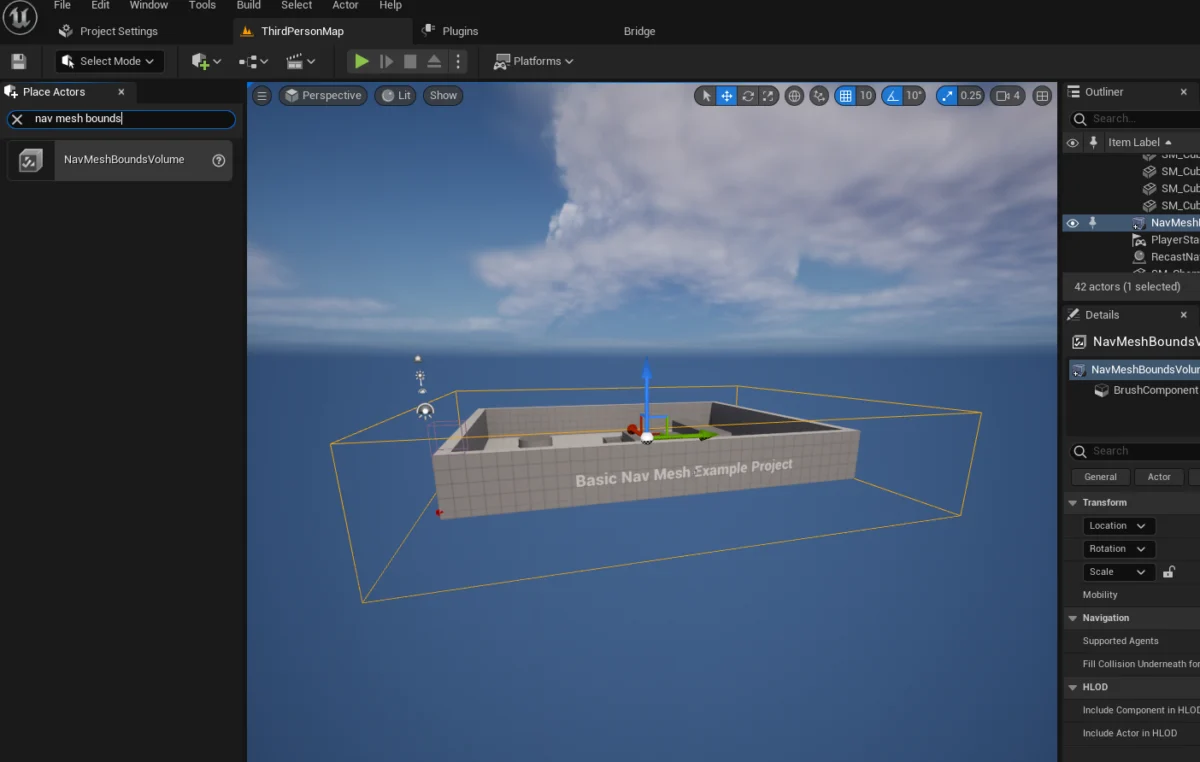
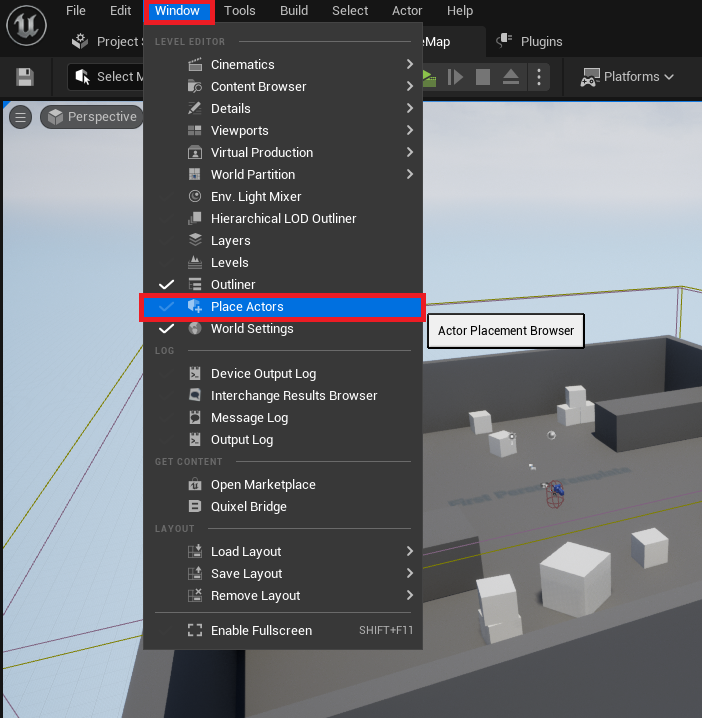
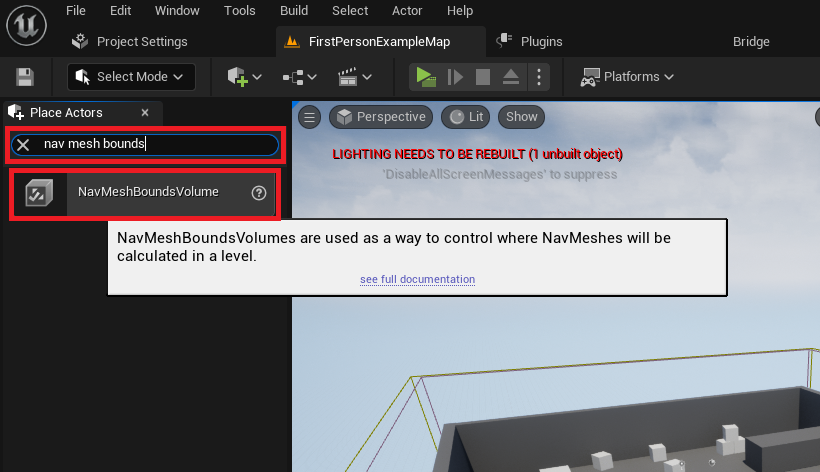
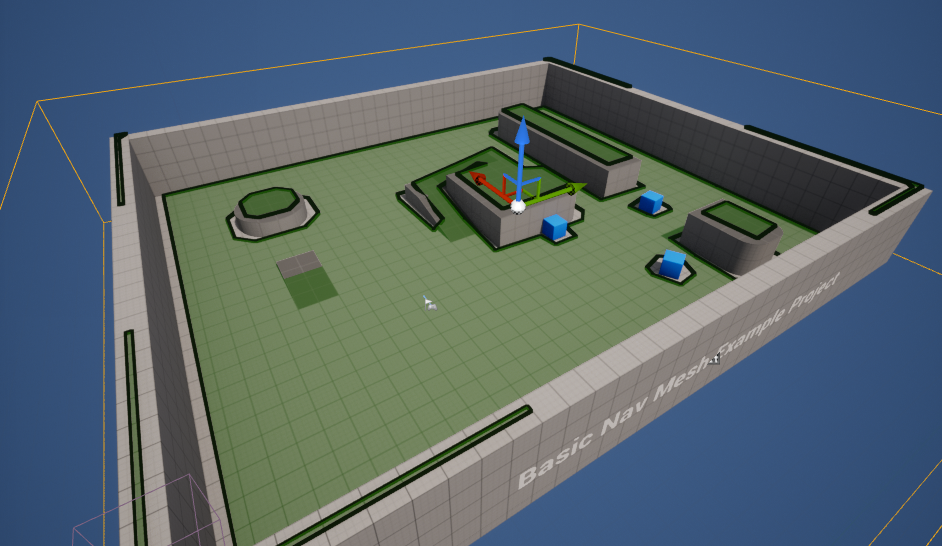
The initial step in establishing AI navigation in an Unreal Engine 5 project involves the creation and precise placement of a NavMeshBoundsVolume. This specialized volume acts as a computational boundary, instructing the engine where to generate the navigation mesh. To initiate this, developers access the "Place Actors" window, typically found under the "Window" menu in the Unreal Editor. This comprehensive panel is the gateway to spawning a myriad of fundamental objects, including various volumes crucial for gameplay logic and environmental interactions. Once the "Place Actors" window is open, the NavMeshBoundsVolume can be located within the "Volumes" category, a logical grouping for spatial actors that define areas with specific properties or functionalities.
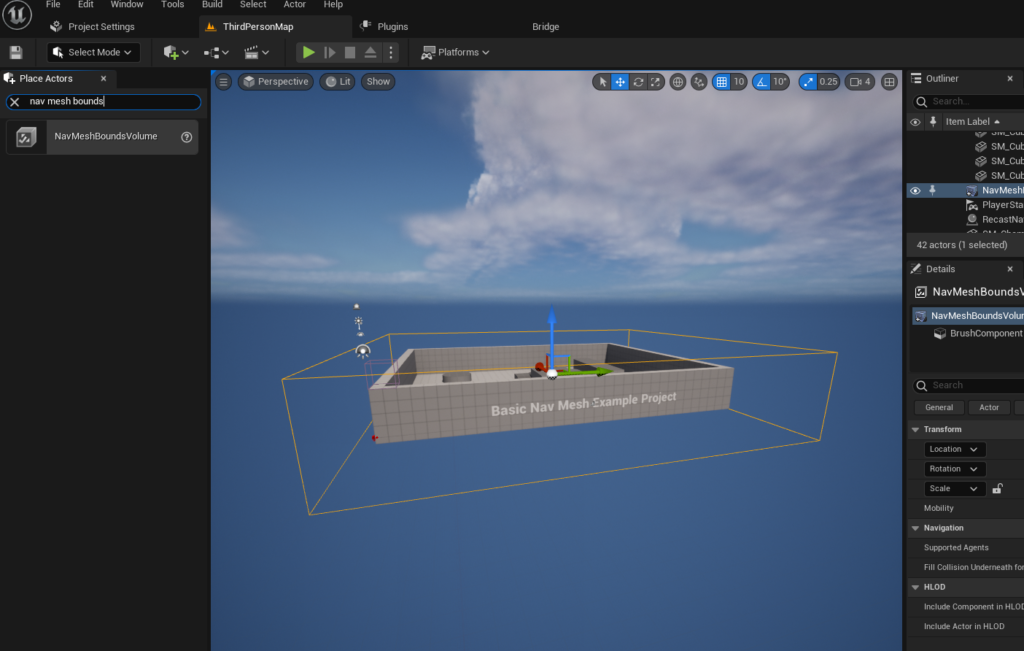
Upon adding the NavMeshBoundsVolume to the level, its dimensions and position become paramount. The volume must encapsulate the entire area where AI characters are expected to move. Scaling and positioning this volume precisely are critical tasks, as any region outside its bounds will not have a generated NavMesh, effectively becoming an impassable barrier for AI. The size of the NavMeshBoundsVolume directly influences the generation time; larger volumes, particularly in complex levels, will naturally take longer to compute. However, Unreal Engine offers dynamic NavMesh generation capabilities, which can significantly mitigate these performance concerns in expansive or constantly changing environments, allowing for real-time updates to the navigation data. This dynamic approach is particularly beneficial for open-world games or scenarios where level geometry might be altered during gameplay.
To confirm the successful generation and accuracy of the NavMesh, Unreal Engine 5 provides a powerful visualization tool. By pressing the ‘P’ key on the keyboard, developers can toggle a debug view that renders the generated navigation mesh directly within the editor viewport. This visualization typically appears as a green overlay, highlighting all areas where AI characters can traverse. This immediate feedback mechanism is invaluable for identifying areas where the NavMesh might be missing, incorrectly generated, or obstructed, allowing for rapid iteration and correction. Common issues include gaps in the mesh due to overly steep slopes, small gaps, or areas where the NavMeshBoundsVolume does not fully encompass the desired navigable space. Adjusting parameters within the NavMeshBoundsVolume details panel, such as "Agent Radius," "Agent Height," "Agent Max Slope," and "Cell Size," can significantly influence the granularity and accuracy of the generated mesh, ensuring it accurately reflects the physical constraints and movement capabilities of the AI characters.
Crafting Intelligent Movement: Implementing Basic AI Behavior
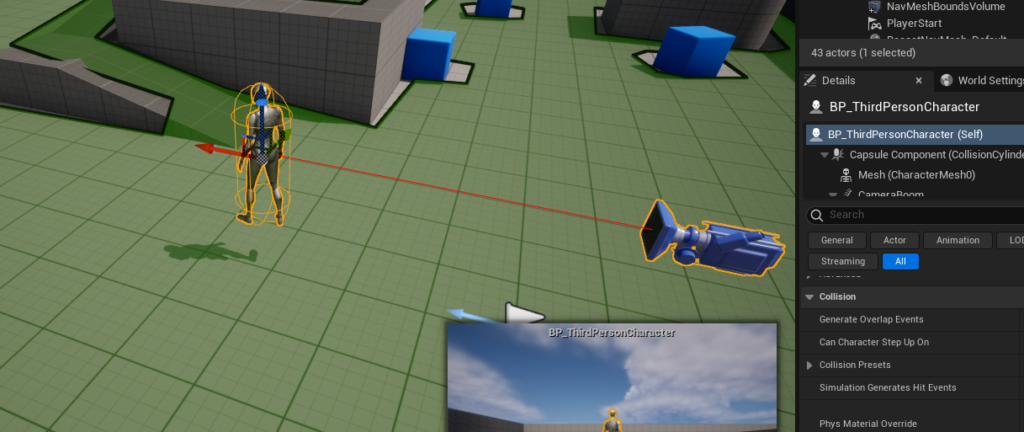
With a functional NavMesh in place, the next phase involves imbuing AI characters with the ability to utilize this navigational data for intelligent movement. For illustrative purposes, the Unreal Engine 5 Third Person Template project provides an ideal starting point, offering a pre-animated character blueprint (BP_ThirdPersonCharacter) that can be readily adapted for AI control. This character, often featuring a skeletal mesh and basic animation states, allows developers to visualize AI movement with immediate context.
The initial step in enabling AI navigation for a specific character involves dragging its blueprint, typically found within the ThirdPerson/Blueprints folder if using the standard template, directly into the level viewport. This instantiates an instance of the character, placing it within the game world. The core logic for AI movement is then constructed within the character’s blueprint editor, leveraging Unreal Engine’s visual scripting system, Blueprints.
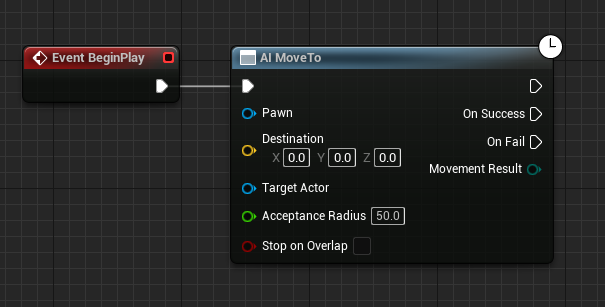
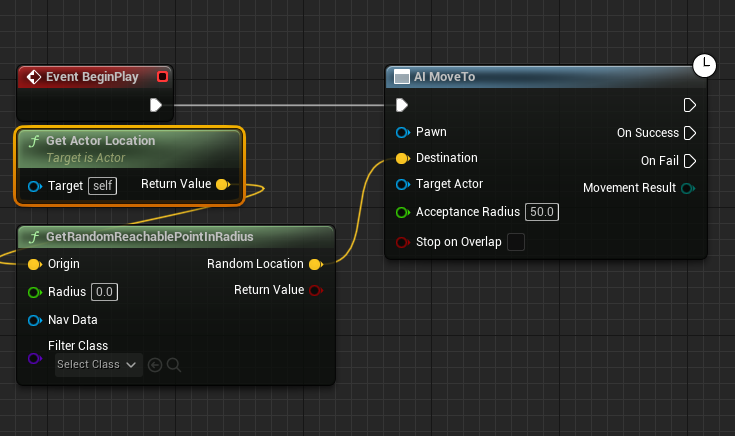
The fundamental control flow for basic AI movement often begins with the "Event Begin Play" node. This event executes once when the game starts or when the actor is spawned, making it a suitable entry point for initial AI behaviors. Connected directly to "Event Begin Play" is the "AI MoveTo" node, which serves as the primary instruction for the AI character to move to a specified destination. This node is a high-level function that leverages the underlying NavMesh to calculate an optimal path.
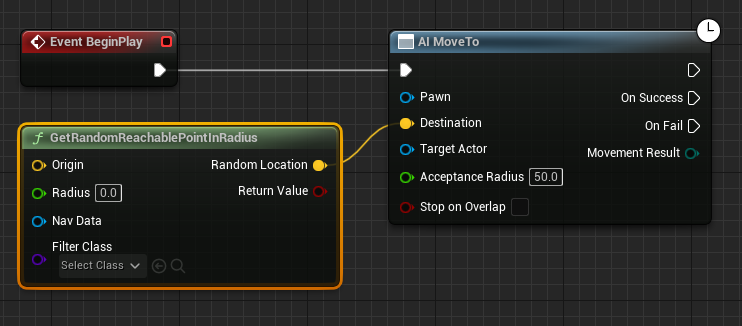
To provide a destination for the "AI MoveTo" node, a "GetRandomReachablePointInRadius" node is employed. This node is instrumental for creating patrolling or roaming AI behaviors. It queries the NavMesh within a defined radius around a specified origin point and returns a valid, traversable location. The output (a yellow vector pin) from this node is then connected to the "Destination" input (also a yellow vector pin) of the "AI MoveTo" node, effectively telling the AI character where to go.
The "Origin" input for the "GetRandomReachablePointInRadius" node typically requires the current location of the AI character itself. This is achieved by connecting a "Get Actor Location" node to the "Origin" pin. This ensures that the random destination is calculated relative to the character’s current position, preventing the AI from attempting to move to unreachable points outside its general vicinity. The "Radius" input of the "GetRandomReachablePointInRadius" node, represented by a green float pin, determines the maximum distance from the origin within which a random point can be chosen. Setting this value, for example, to 2000 Unreal Units (centimeters) allows the AI to roam within a substantial area. Careful consideration of this radius is important; too small a radius can lead to repetitive, constrained movement, while too large a radius might cause the AI to attempt paths across vast distances, potentially highlighting level design inconsistencies or NavMesh generation issues.
Crucially, the "AI MoveTo" node requires a "Pawn" reference, indicating which character should perform the movement. This is satisfied by connecting a "Reference to Self" node (a blue object pin) to the "Pawn" input of the "AI MoveTo" node. The "Reference to Self" node simply points back to the current blueprint instance, ensuring the movement instruction is applied to the character itself.
To create continuous, autonomous movement, a looping mechanism is necessary. After the "AI MoveTo" node successfully completes its pathfinding and movement, it triggers an "On Success" execution pin. Connecting a "Delay" node to this "On Success" pin introduces a brief pause before the AI is instructed to move again. The duration of this delay, specified in seconds, controls the interval between movements. Finally, the output of the "Delay" node is connected back to the input of the "AI MoveTo" node, creating a self-perpetuating loop. This configuration instructs the AI character to continuously find a random reachable point within its radius, move to it, pause briefly upon arrival, and then repeat the process indefinitely. Once this Blueprint logic is compiled and the game is played, the character will begin navigating the level, demonstrating basic autonomous movement.
Beyond Basic Roaming: Advanced AI Considerations
While the described setup provides a fundamental framework for AI movement, real-world game AI often demands far greater complexity. The simple "Begin Play" loop for random roaming serves as an excellent starting point, but it lacks the decision-making capabilities required for sophisticated behaviors such as engaging enemies, interacting with objects, or following complex objectives.
This is where more advanced AI frameworks within Unreal Engine, primarily Behavior Trees and Blackboards, come into play. Behavior Trees offer a hierarchical, visual structure for defining complex AI decision logic, allowing developers to create intricate sequences of actions, conditions, and selectors. A Blackboard, on the other hand, acts as a centralized data repository for AI, storing variables, target locations, enemy references, and other critical information that different parts of the Behavior Tree can access and modify. Together, these tools enable the creation of highly dynamic and believable AI agents that can react intelligently to their environment, player input, and game state changes. For instance, instead of a simple "Delay" loop, a Behavior Tree might have branches for "Patrol," "Detect Enemy," "Attack Enemy," "Flee," or "Interact with Object," with the AI dynamically choosing which branch to execute based on Blackboard data and sensory input.
Furthermore, AI Controllers play a vital role. Every AI-controlled character in Unreal Engine should have an AI Controller assigned to it. While the BP_ThirdPersonCharacter often defaults to using a basic AI Controller, custom AI Controllers can be created to house specific AI logic, manage perception components (e.g., sight, hearing), and orchestrate complex Behavior Trees. This separation of concerns—character blueprint handling physical representation and animation, and AI Controller managing intelligence—promotes cleaner code and more scalable AI systems.
Performance and Optimization in AI Pathfinding
The efficiency of AI navigation is critical for maintaining game performance, especially in titles featuring numerous AI characters or expansive open worlds. The generation and runtime utilization of NavMeshes come with inherent computational costs. Static NavMeshes, generated once during level build, are highly optimized for performance at runtime as pathfinding queries only need to consult pre-computed data. However, they are inflexible for dynamic environments. Dynamic NavMeshes, which can update in real-time to reflect changes in the environment (e.g., opening doors, moving platforms, destructible terrain), offer greater flexibility but demand more CPU resources for continuous regeneration.
Developers must strike a balance between NavMesh size, generation method, and the complexity of AI behavior. Optimizing NavMesh parameters, such as "Cell Size" (which dictates the resolution of the mesh), "Agent Radius," and "Agent Height" (which define the minimum traversable space for characters), can significantly impact both generation time and runtime performance. A larger cell size will result in a coarser, less accurate mesh but will be faster to generate and query. Conversely, a smaller cell size yields a more precise mesh but increases computational overhead. Techniques like NavMesh Streaming, where portions of the NavMesh are loaded and unloaded based on player proximity, are employed in large-scale games to manage memory and performance effectively.
The Broader Impact: AI’s Role in Modern Game Development
The advancements in AI tools within engines like Unreal Engine 5 have had a profound impact on game design and the accessibility of complex development. What once required extensive programming expertise can now be achieved through intuitive visual scripting and pre-built components, democratizing game development for a wider audience of designers and artists.
From a game design perspective, robust AI capabilities enable the creation of more believable and engaging virtual worlds. Non-player characters (NPCs) can exhibit intelligent behaviors, contributing to world immersion, offering challenging encounters, and driving narrative progression. This leads to more dynamic gameplay, where AI opponents adapt to player strategies, allies provide meaningful support, and ambient characters bring life to bustling cities or desolate landscapes. The ability for AI to navigate complex environments reliably is fundamental to all these experiences.
The ongoing evolution of game AI continues to push the boundaries of what is possible in interactive entertainment. Industry reports consistently highlight AI as a key area of investment and innovation, with developers continually seeking new ways to enhance realism and interaction.
Challenges and the Future of AI in Interactive Entertainment
Despite significant progress, challenges in game AI persist. Scaling AI for massive open worlds, ensuring emergent AI behaviors remain within design parameters, and preventing "unintelligent" moments (e.g., AI getting stuck or exhibiting repetitive patterns) are ongoing hurdles. Debugging complex AI systems can also be time-consuming, requiring sophisticated profiling and visualization tools.
Looking ahead, the future of AI in games is poised for even greater transformation. The integration of machine learning (ML) techniques is beginning to revolutionize AI development, enabling characters to learn and adapt from player interactions or through reinforcement learning. This could lead to truly adaptive AI opponents that evolve with the player, or NPCs that develop unique personalities and behaviors over time. Procedural AI generation, where AI logic and behaviors are generated dynamically based on game context, could further enhance replayability and reduce manual development effort.
Unreal Engine 5, with its continuous updates and robust feature set, remains at the forefront of providing developers with the necessary tools to navigate these complexities and harness the full potential of AI. From foundational NavMesh setup to advanced Behavior Trees and emerging ML integrations, the platform empowers creators to craft increasingly sophisticated and immersive interactive experiences that captivate audiences worldwide. The journey of mastering AI in game development is an ongoing one, continually pushing the boundaries of creativity and technical innovation.
About the Author