The process of enabling AI-controlled characters to intelligently traverse game environments hinges primarily on the generation of a navigation mesh, or NavMesh. This crucial component acts as a blueprint for AI, delineating traversable areas and facilitating efficient pathfinding. Without a properly configured NavMesh, AI characters would be unable to understand the geometry of the level, leading to unpredictable movements, collisions with obstacles, or an inability to reach designated targets. The first step in establishing this foundational element within Unreal Engine 5 involves accessing the editor’s comprehensive suite of actor placement tools.
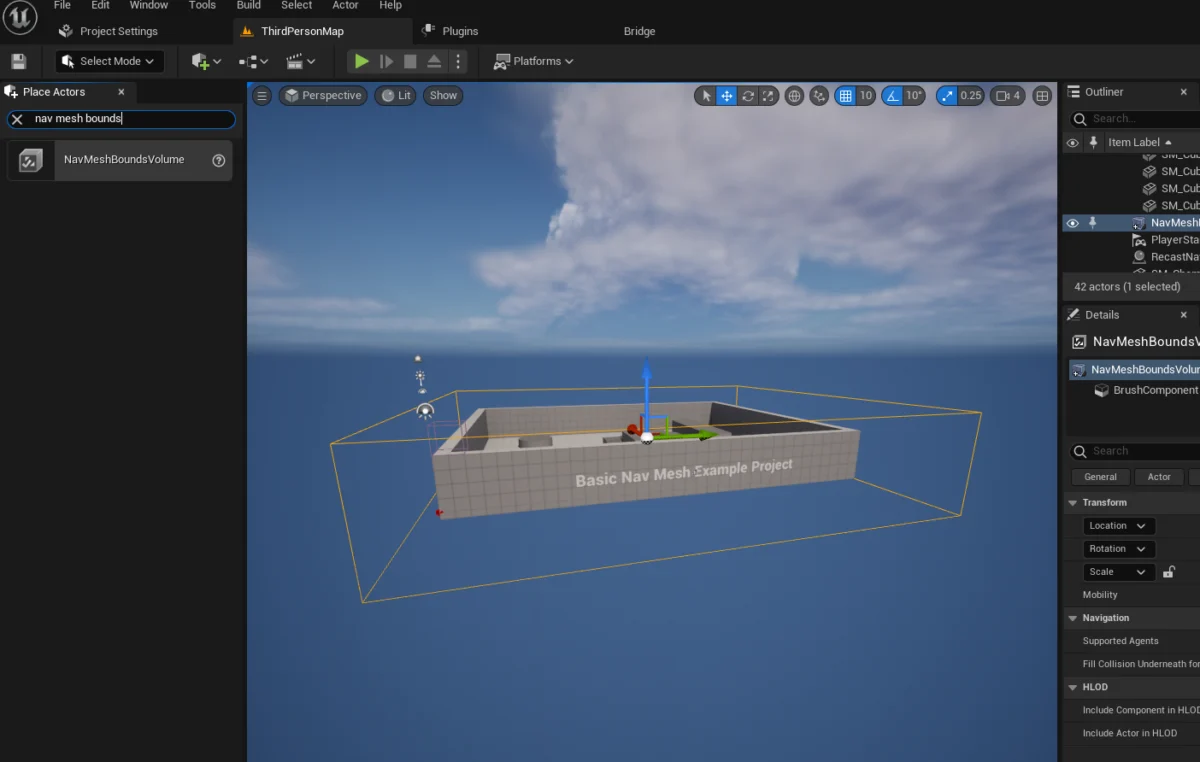
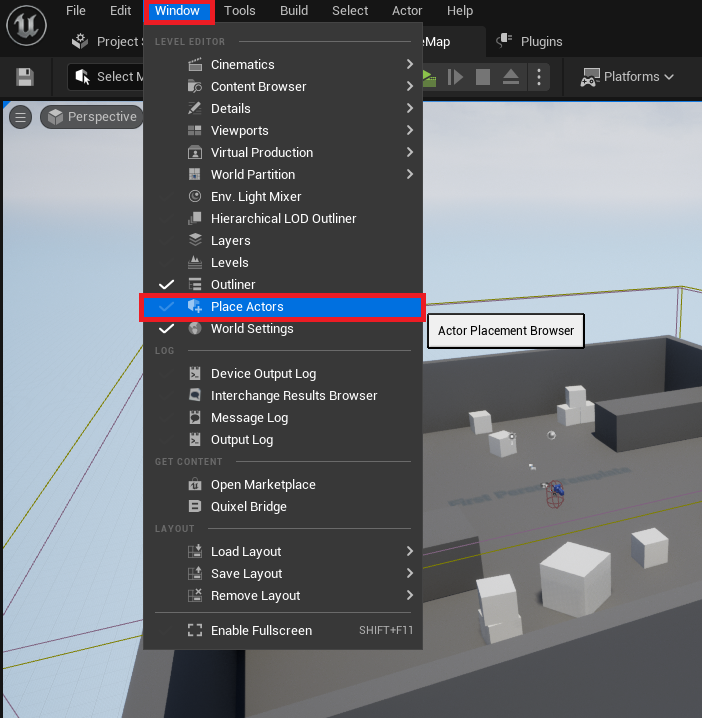
To begin, developers must navigate to the "Window" menu within the Unreal Engine 5 editor, then select "Place Actors." This action reveals the "Place Actors" window, a central hub for spawning a wide array of fundamental objects and volumes directly into the active level. This window serves as the gateway to injecting various functional entities, including the critical NavMeshBoundsVolume, which is instrumental in defining the AI navigation space.
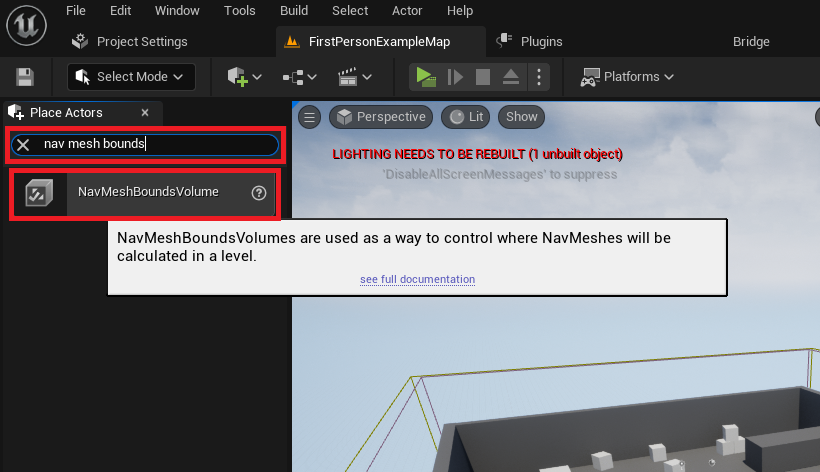
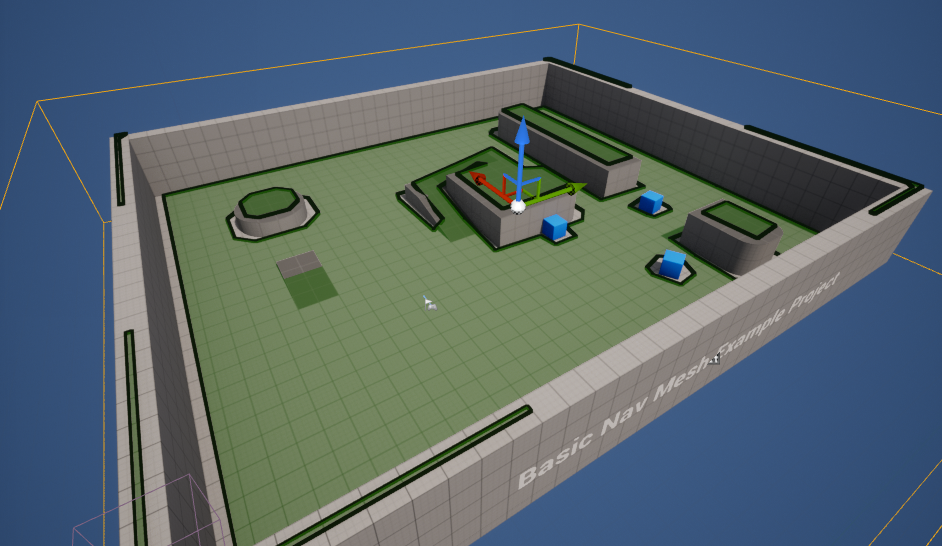
Subsequently, the "NavMeshBoundsVolume" actor needs to be introduced into the level. This specialized volume is conveniently located within the "Modes" panel, nestled under the "Volumes" category. Its function is pivotal: it acts as a container, within which the engine computes and generates the actual NavMesh. The size and position of this volume directly dictate the area where AI characters will be able to navigate. Incorrect placement or inadequate scaling can result in AI characters being confined to unintended zones or failing to move altogether.
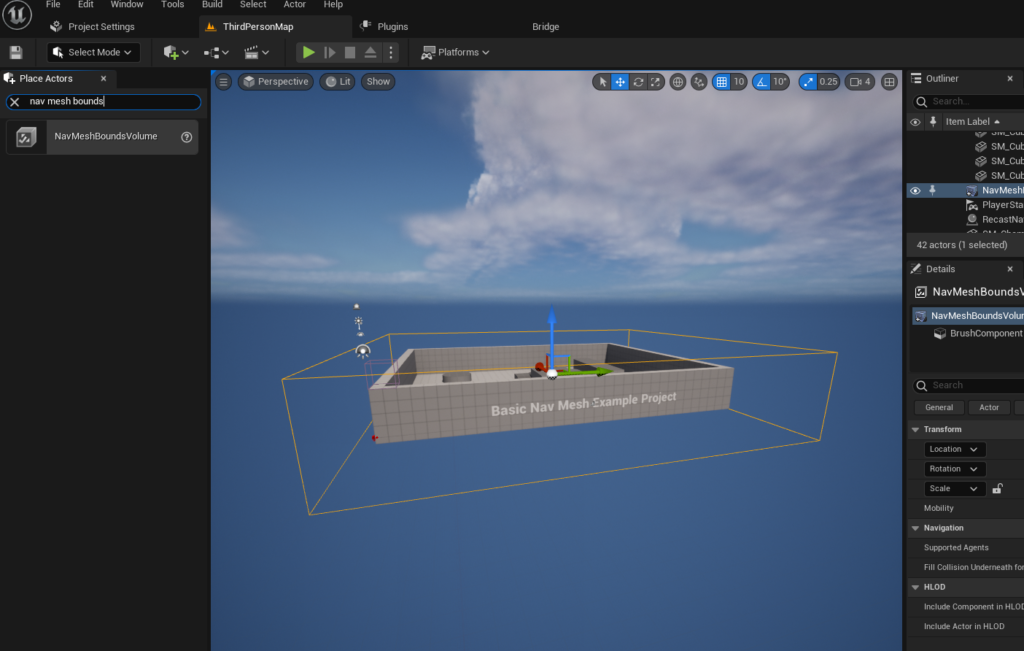
Once the NavMeshBoundsVolume has been added, the next critical phase involves meticulously scaling and positioning it to encompass the entirety of the desired AI navigation area. This adjustment is paramount; the volume must precisely fit around the geometry where AI characters are expected to roam, pursue, or interact. The flexibility of this tool allows for volumes of varying dimensions, from small, confined spaces to expansive open-world segments. It is important to note that the computational overhead associated with generating a NavMesh increases proportionally with its size. Larger volumes demand more processing power and time for generation, unless dynamic generation techniques are employed. For scenarios requiring highly adaptive navigation in constantly changing environments, Unreal Engine offers advanced options for dynamic NavMesh generation, which can significantly optimize performance by regenerating only necessary portions of the mesh in real-time.
After the NavMeshBoundsVolume is correctly scaled and positioned, developers can visually verify its proper setup by pressing the ‘P’ key on the keyboard. This keyboard shortcut toggles a debug visualization mode, rendering the generated NavMesh directly within the editor viewport. A correctly generated NavMesh will appear as a green overlay on all traversable surfaces within the bounds volume, clearly indicating the paths AI characters can follow. Any areas within the volume that are not highlighted in green signify untraversable obstacles or gaps, providing immediate feedback for necessary adjustments to the volume’s size, position, or the underlying level geometry. This visualization step is crucial for troubleshooting and ensuring that the AI has a logical and complete path to follow.
With the NavMesh foundation securely in place, the focus shifts to imbuing AI characters with the ability to leverage this navigation data. For demonstration purposes, this guide utilizes the Third Person Template provided by Unreal Engine 5. This template offers a pre-animated character blueprint, streamlining the testing process for AI navigation without the need for custom character rigging or animation. The Third Person Template is widely adopted for its rapid prototyping capabilities, allowing developers to quickly iterate on core gameplay mechanics.
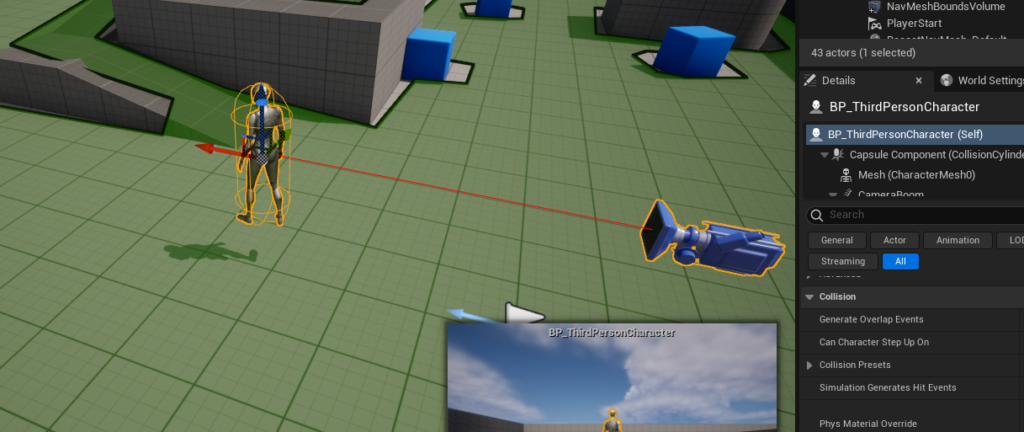
The first step in activating the AI character’s movement is to drag the character’s blueprint into the level from the Content Drawer. Typically, in projects initiated with the Third Person Template, this blueprint can be located within the "Third Person / Blueprints" folder. Placing the character in the level provides an instance of the AI agent that will utilize the generated NavMesh for its autonomous movements.
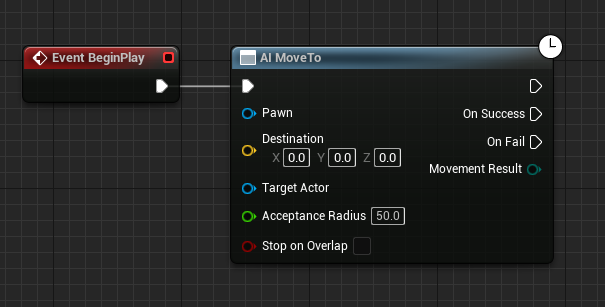
Within the character’s blueprint editor, the core logic for AI movement is assembled using Unreal Engine’s visual scripting system. The process begins with creating a "Begin Play" event node. This node serves as the entry point for script execution when the game starts or when the actor is spawned into the world. Connected to this event is the "AI MoveTo" node, a high-level AI command specifically designed for pathfinding and movement. The "AI MoveTo" node abstracts away the complexities of low-level movement, allowing developers to simply specify a destination, and the AI system handles the intricate task of calculating a path along the NavMesh and moving the character.
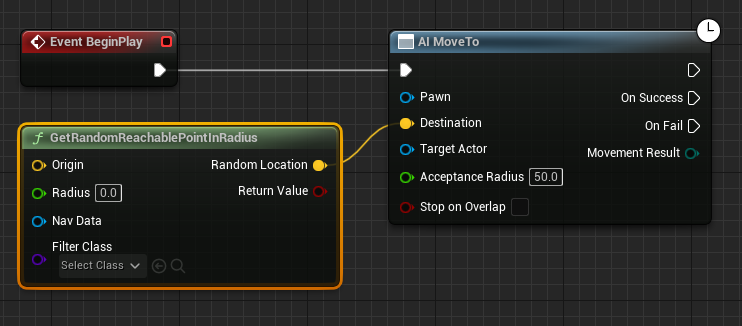
To provide the "AI MoveTo" node with a dynamic target, a "GetRandomReachablePointInRadius" node is introduced. This node is instrumental in enabling emergent, non-linear AI behavior, allowing characters to explore an area rather than follow a fixed path. Its output, a yellow vector pin representing a reachable point, is connected directly to the "Destination" yellow vector pin of the "AI MoveTo" node. This connection ensures that the AI character will always attempt to move towards a valid, NavMesh-aware location within its designated operational zone.
The "GetRandomReachablePointInRadius" node requires an "Origin" from which to calculate the random point. To fulfill this, a "Get Actor Location" node is created and connected to the "Origin" yellow vector pin. This ensures that the random target point is always generated relative to the AI character’s current position, facilitating a localized roaming behavior. The "Radius" input of the "GetRandomReachablePointInRadius" node is a crucial parameter, defining the maximum distance from the "Origin" within which a random reachable point will be sought. For instance, setting this green "Radius" pin value to "2000" (Unreal units, typically centimeters) instructs the AI to find a random destination within a 20-meter sphere around its current location. This parameter allows developers to control the scope of the AI’s wandering, from subtle shifts to extensive patrols.
Furthermore, the "AI MoveTo" node requires a "Pawn" input to specify which character should execute the movement command. A "Reference to Self" node is generated and connected to the blue "Pawn" pin of the "AI MoveTo" node. This ensures that the blueprint script explicitly targets the character instance it is attached to, correctly assigning the movement task. This self-referential approach is standard practice in object-oriented programming within Unreal Engine blueprints.
Finally, to establish continuous, autonomous movement, a "Delay" node is integrated into the blueprint logic. This node is connected to the "On Success" execution pin of the "AI MoveTo" node. Upon successful arrival at a destination, the "Delay" node pauses the execution for a specified duration, typically a few seconds. After this delay, the execution flow is looped back into the "AI MoveTo" node, initiating a new movement command to another random reachable point. This creates a perpetual cycle of movement, simulating an AI character that continuously navigates its environment, embodying a basic patrol or idle wandering behavior. This continuous loop ensures that the AI remains active and reactive within the game world, contributing to a more dynamic and believable atmosphere.
Upon clicking "Play" in the editor, the configured AI character will immediately begin executing its programmed logic, navigating autonomously towards random locations within the boundaries defined by the NavMesh. This functional demonstration underscores the efficiency and power of Unreal Engine 5’s AI tools, allowing developers to bring dynamic character behavior to life with a relatively straightforward setup.
The increasing sophistication of AI in games is not merely a technical achievement but a significant driver of player engagement and immersion. According to market research, the global AI in gaming market is projected to grow substantially, driven by demand for more realistic NPC behaviors, adaptive challenges, and personalized experiences. Unreal Engine 5, with its advanced rendering capabilities like Nanite and Lumen, coupled with accessible AI tools, positions itself as a leader in facilitating this evolution. The engine’s visual scripting system, Blueprints, significantly lowers the barrier to entry for developers who may not have extensive C++ programming experience, empowering a broader spectrum of creators, from indie studios to large AAA developers, to implement complex features like NavMesh-based AI.
Industry analysts consistently point to Epic Games’ philosophy of providing robust, performance-optimized, and artist-friendly tools as a key factor in Unreal Engine’s widespread adoption. The simplified NavMesh and AI character setup are prime examples of this commitment, allowing developers to focus more on creative game design and less on intricate underlying code. While this guide covers basic random roaming, the foundation laid by a correctly configured NavMesh opens the door to far more complex AI behaviors, including advanced pathfinding, tactical decision-making through Behavior Trees, utility AI systems, and even machine learning-driven agents.
The implications of such streamlined AI development are profound. For players, it translates into more believable game worlds populated by characters that react intelligently to their environment and actions, enhancing replayability and fostering deeper connections with the game narrative. For developers, it means reduced development cycles, the ability to prototype AI systems rapidly, and a greater capacity to innovate within the AI domain. Epic Games continues to invest heavily in its developer ecosystem, ensuring that tools like NavMesh remain at the forefront of game development technology, pushing the boundaries of what is possible in interactive entertainment. This continuous evolution promises a future where AI characters are not just functional elements but integral, intelligent components of rich, vibrant virtual worlds.
About the Author