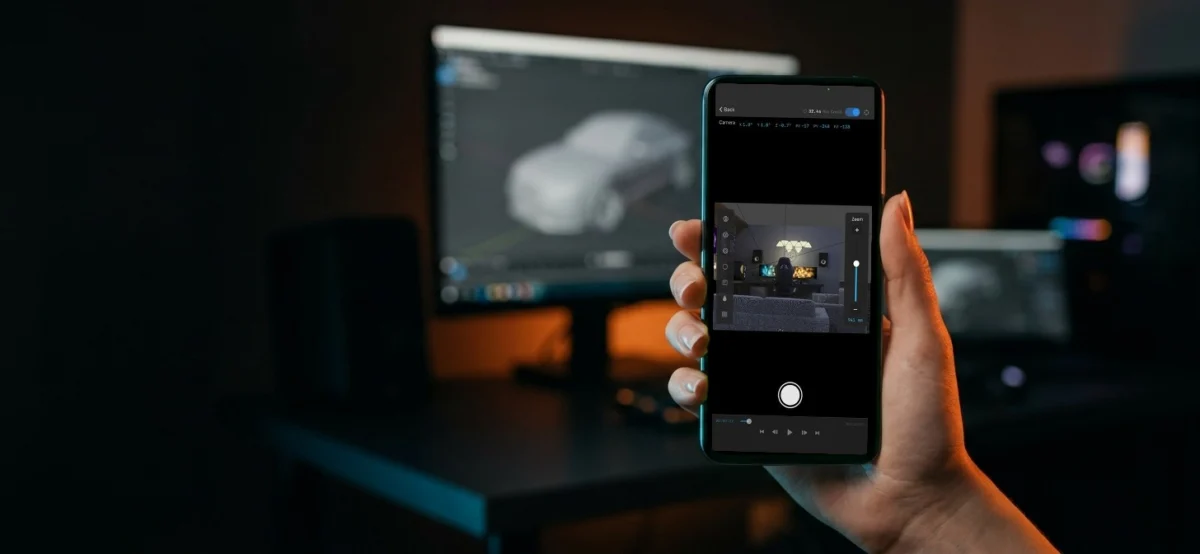
Motionist.studio has officially launched Phone Cam Controller, a groundbreaking free add-on for Blender that empowers users to transform their iPhones into fully functional, handheld virtual cameras. This innovative tool promises to revolutionize the way 3D artists and animators approach camera work within the popular open-source 3D creation suite, offering a more intuitive and hands-on method for capturing dynamic camera movements and intricate focus pulls. While currently available for iOS, the studio has indicated that an Android version is in development, signaling a broad commitment to accessibility across mobile platforms.
The core functionality of Phone Cam Controller hinges on a seamless real-time streaming connection between the Blender viewport and the user’s iPhone. This live feed allows creators to visualize their 3D scenes directly on their mobile device, mirroring the experience of using a physical camera on set. Once the connection is established, the active camera within Blender dynamically follows the six-degrees-of-freedom (6DoF) movements of the iPhone. This means that any tilt, pan, zoom, or spatial translation of the phone is accurately translated into corresponding camera movements within the 3D environment.
A particularly compelling feature is the add-on’s approach to animation. Users can initiate recording directly from their phone. By physically walking through their virtual scene while holding the phone, they can directly "key" the camera’s movement frame by frame. This process offers an unprecedented level of direct manipulation, allowing for the creation of organic, fluid camera paths that are often challenging to achieve through traditional keyframing techniques alone. This method bypasses the often laborious process of meticulously placing and adjusting keyframes in the timeline, instead opting for a more embodied and intuitive workflow.
Beyond positional tracking, Phone Cam Controller also extends its real-time control to essential camera parameters. Focal length, focus distance, and aperture can all be adjusted directly from the iPhone interface. Crucially, these parameters can also be keyed while recording. This enables the precise and fluid execution of focus pulls – a sophisticated cinematic technique where the point of focus shifts during a shot. The ability to perform these focus adjustments by hand, in sync with the camera’s movement, adds a significant layer of realism and professional polish to animated sequences. This feature alone addresses a common pain point for animators seeking to emulate the nuanced control of a cinematographer operating a physical camera.
The release of Phone Cam Controller arrives at a time when the demand for accessible and powerful creative tools within the 3D animation and visual effects (VFX) industries is at an all-time high. Blender, as an open-source software, has consistently democratized access to professional-grade 3D creation, attracting a vast and growing community of artists, independent filmmakers, and hobbyists. The introduction of an add-on that bridges the gap between the tactile experience of mobile device interaction and the complexities of 3D camera animation aligns perfectly with this ethos.
Background and Context: The Evolution of 3D Camera Control
The development of intuitive camera control systems in 3D animation has been a long-standing pursuit. Early 3D software often relied on complex numerical inputs and timeline-based keyframing, which, while powerful, could feel detached from the natural way humans perceive and move cameras in the real world. The advent of motion capture technology offered a more direct approach, but its associated costs and infrastructure requirements placed it out of reach for many.
In recent years, advancements in mobile technology, particularly the proliferation of sophisticated sensors like gyroscopes and accelerometers, have opened new avenues for real-time control. Developers have begun to explore how these sensors can be leveraged to drive virtual environments. Early attempts often involved clunky desktop applications or limited wireless protocols. Phone Cam Controller represents a significant leap forward by integrating these mobile capabilities directly into the Blender workflow via a dedicated add-on, streamlining the process and reducing the technical barriers to entry.
The real-time streaming aspect of the add-on is also noteworthy. Maintaining a stable and low-latency connection between the iPhone and Blender is critical for a responsive user experience. This suggests that Motionist.studio has invested considerable effort in optimizing the data transfer protocols and the add-on’s integration with Blender’s rendering pipeline. The ability to see the Blender viewport on the phone screen in real time, with minimal delay, is essential for accurate camera placement and framing.
Chronology of Development and Release
While specific details regarding the exact development timeline for Phone Cam Controller are not publicly available, the announcement marks the culmination of what is likely a significant period of research, development, and testing by Motionist.studio. The fact that they are releasing a fully functional iOS version, with an Android version in the pipeline, indicates a structured approach to product development.
- Pre-Announcement Phase: This period would have involved conceptualization, feasibility studies, prototyping, and the core development of the add-on’s streaming and control mechanisms. This likely included extensive testing of different iPhone models and Blender versions to ensure broad compatibility.
- Beta Testing (Inferred): It is highly probable that Motionist.studio engaged in a beta testing phase with a select group of users. This would have been crucial for identifying bugs, gathering user feedback, and refining the user interface and overall functionality before the public release.
- Official Release (Present): The public announcement and availability of the free add-on represent the official launch. This is a key milestone, making the tool accessible to the wider Blender community.
- Future Development (Android Version): The explicit mention of an upcoming Android version signifies a commitment to expanding the add-on’s reach and catering to a larger user base. The timeline for this release has not yet been specified.
Supporting Data and Technical Considerations
The performance and reliability of Phone Cam Controller are intrinsically linked to several technical factors:
- Network Connectivity: A strong and stable Wi-Fi connection is paramount for real-time streaming. Users with unreliable or slow networks may experience latency or disconnections, impacting the fluidity of the camera control.
- Device Capabilities: The performance of the iPhone’s sensors and processing power will influence the accuracy and responsiveness of the 6DoF tracking. Newer iPhone models with advanced sensor technology are likely to provide the most seamless experience.
- Blender Version Compatibility: The add-on’s compatibility with specific versions of Blender is a crucial data point for users. Motionist.studio will likely provide clear guidelines on which Blender versions are supported.
- Real-time Rendering Performance: While the add-on controls the camera, the actual rendering of the Blender viewport on the iPhone screen will depend on the user’s system hardware and the complexity of the 3D scene. Optimizing scene complexity may be necessary for smoother real-time feedback.
The free nature of the add-on is a significant factor in its potential adoption. By removing the financial barrier, Motionist.studio is enabling a vast number of Blender users to experiment with and integrate this powerful new tool into their workflows. This approach is common among developers who aim to build a strong community around their software or as a lead-in to potential future premium offerings or complementary services.
Reactions and Potential Impact on the 3D Industry
While official statements from prominent figures within the Blender community or related industries have not yet been published, the initial reaction to the announcement on platforms like BlenderNation and social media has been overwhelmingly positive. Users have expressed excitement about the intuitive workflow and the potential for more dynamic and naturalistic camera animations.
Inferred Statements/Reactions:
- Independent Filmmakers: "This is a game-changer for my short films. I can finally achieve those sweeping crane shots and handheld tracking sequences without needing expensive equipment or complex motion capture rigs. It feels like I have a virtual Steadicam in my pocket."
- Game Developers: "The ability to quickly block out camera paths and experiment with different perspectives in real-time is invaluable for game cinematics and pre-visualization. It significantly speeds up the iteration process."
- VFX Artists: "For pre-visualization and layout work, this add-on offers an incredibly direct way to guide the virtual camera. The hand-keyed focus pulls are a particularly welcome addition for adding that cinematic touch."
Analysis of Implications:
The release of Phone Cam Controller has several significant implications for the 3D animation and VFX industries:
- Democratization of Advanced Camera Techniques: Complex cinematic camera movements and focus pulls, once the domain of specialized equipment and experienced cinematographers, are now more accessible to a broader range of creators. This could lead to a surge in the quality and stylistic diversity of animated content.
- Accelerated Pre-visualization and Layout: For film, television, and game development, the ability to quickly and intuitively define camera shots can dramatically speed up the pre-visualization and layout stages. This allows directors and animators to make creative decisions faster and with greater confidence.
- Enhanced Workflow Efficiency: By reducing the need for manual keyframing of complex camera paths, Phone Cam Controller can free up artists’ time to focus on other aspects of their work, such as character animation, texturing, or lighting.
- Rise of Embodied Animation: This tool contributes to a growing trend in creative software where physical interaction and embodied actions are leveraged to control digital elements. This approach can lead to more natural and expressive results.
- Potential for New Creative Possibilities: With more accessible and intuitive camera tools, creators may be inspired to experiment with camera styles and movements that were previously too time-consuming or technically challenging to implement.
The development of an Android version will further amplify these impacts, making the tool accessible to an even larger global audience. As the technology matures and is integrated into more workflows, it is likely to become an indispensable part of the 3D artist’s toolkit. The free distribution model employed by Motionist.studio ensures that its adoption will be driven by its utility and effectiveness, rather than market penetration strategies. This user-centric approach is a hallmark of successful open-source inspired development and bodes well for the future of this innovative add-on.
About the Author