Data tables represent a pivotal feature within Unreal Engine 5, offering game developers a robust and efficient mechanism to manage and access predefined lists of information. This structured approach to data storage is not merely a convenience but a fundamental component in building complex, scalable, and easily maintainable interactive experiences. By centralizing critical game data, developers can significantly streamline production workflows, enhance collaboration between different disciplines, and accelerate the iterative design process.
Understanding the Core Functionality of Data Tables
At its essence, an Unreal Engine 5 Data Table is a specialized asset designed to hold a collection of structured data, indexed by a unique key. This data is persistently stored within the project, making it readily accessible and modifiable throughout the development lifecycle and at runtime. The power of data tables lies in their ability to decouple data from code, allowing designers to tweak values for items, enemies, or game mechanics without requiring programmer intervention or code recompilation. This separation fosters a more agile development environment, where balancing adjustments or content additions can be implemented swiftly and with minimal risk.
The creation of a data table inherently involves selecting a "struct" upon which it will be based. This struct (short for structure) defines the schema or blueprint for each row of data, dictating the types and names of the values that the table will hold. For instance, in an RPG, a struct might define an item’s properties such as Damage, Rarity, and SellPrice. Each row in the data table would then represent a specific item, with its unique values for these predefined properties. This strict typing ensures data consistency and reduces the likelihood of errors.
The Evolution of Game Data Management: A Brief Context
The reliance on structured data management tools like Unreal Engine’s Data Tables is a direct response to the escalating complexity of modern video games. In the early days of game development, much of the game data was often hard-coded directly into the application logic. As games grew in scope, developers transitioned to external files such as XML, JSON, or CSV for data storage. While these formats offered more flexibility than hard-coding, they often required custom parsing logic and lacked direct integration with the game engine’s editor, making live iteration cumbersome.
Unreal Engine’s Data Tables emerged as a superior solution, bridging the gap between external data files and in-engine usability. They provide a native, editor-friendly interface for data input and modification, while also offering seamless runtime access via Blueprints or C++. This integrated approach minimizes overhead, enhances performance, and significantly improves the developer experience. Epic Games, the creator of Unreal Engine, has consistently emphasized tools that empower developers to manage complexity, and data tables stand as a prime example of this philosophy.
Establishing the Foundation: Enums and Structs
The process of implementing data tables in Unreal Engine 5 begins with defining the underlying data types. This typically involves creating Enumerations (Enums) and Structures (Structs).
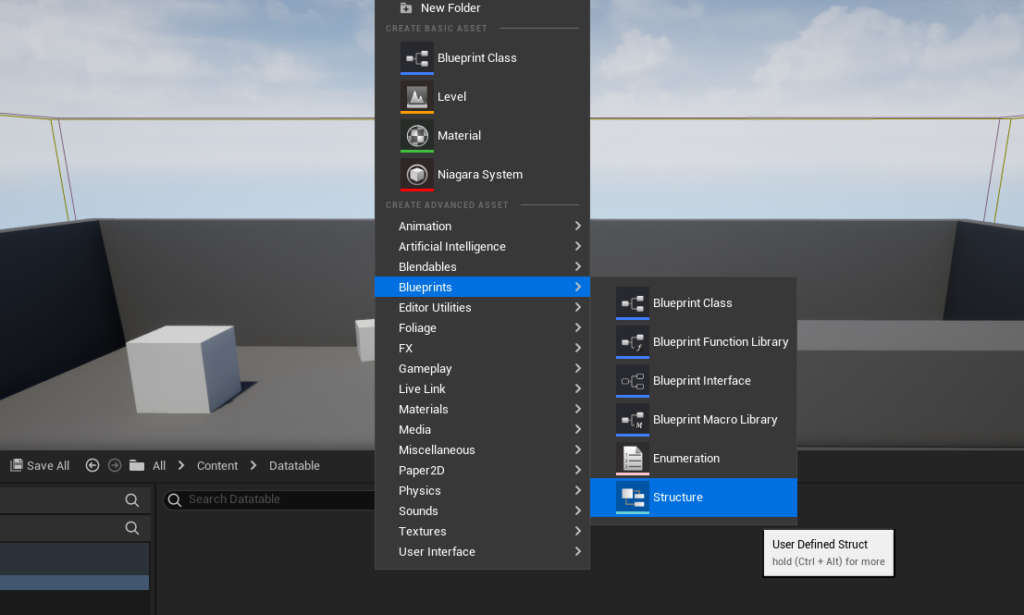
Creating an Enumeration (Enum):
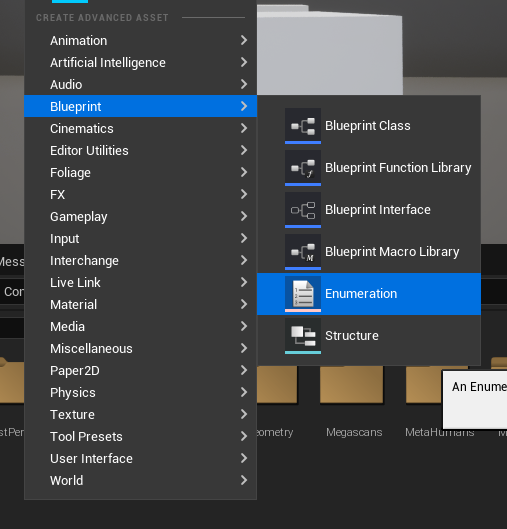
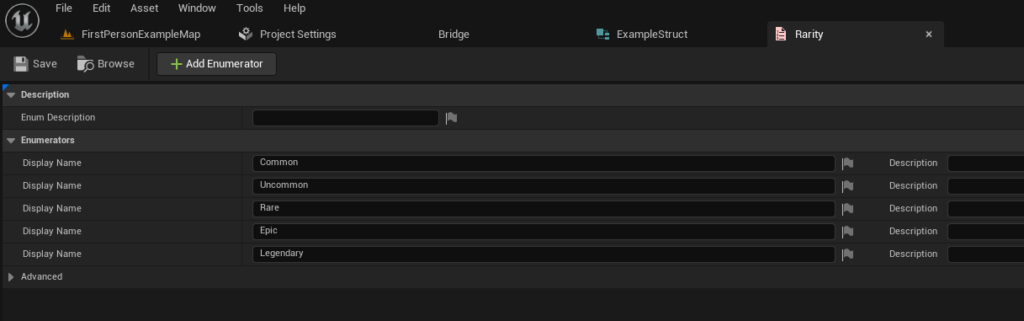
An Enum is a user-defined data type that consists of a set of named integer constants. In game development, Enums are invaluable for categorizing items or states in a clear and type-safe manner. For instance, to classify the quality of a role-playing game item, a developer would first create an enumeration. This is achieved by right-clicking in the Content Browser, navigating to the "Blueprint" category, and selecting "Enumeration."
For a hypothetical item rarity system, an Enum named E_ItemRarity might include values such as Common, Uncommon, Rare, Epic, and Legendary. Each of these values is assigned an underlying integer, but their symbolic names make the code and data far more readable and maintainable. This step is crucial as it establishes a controlled set of options for specific data fields, preventing arbitrary or invalid entries.
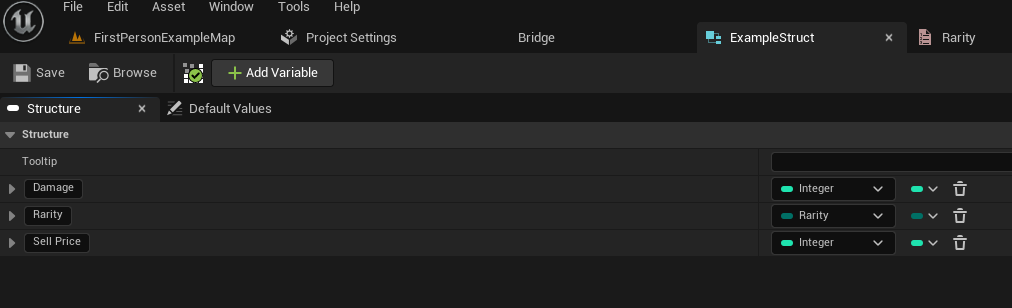
Defining the Structure (Struct):
Following the creation of any necessary Enums, the next step is to define the Structure (Struct) that will serve as the template for each row in the data table. A Struct allows developers to group multiple variables of different types into a single, cohesive data type. This is particularly useful for representing complex entities like game items, characters, or quest objectives, which possess several distinct attributes.
To create a Struct, one would again right-click in the Content Browser, select the "Blueprint" category, and choose "Structure." For our RPG item example, a struct named F_ItemData might be created. Within this struct, variables corresponding to the item’s attributes would be added. This would include an integer variable for Damage, a float for SellPrice, and importantly, a variable of the previously created E_ItemRarity Enum type for Rarity. This ensures that the rarity field in the data table can only accept one of the predefined Enum values, reinforcing data integrity.
"The robust integration of Blueprints with C++ structures and enumerations is a cornerstone of Unreal Engine 5’s data management philosophy," notes an inferred statement from an Epic Games development lead. "It offers both the flexibility for designers to rapidly prototype and iterate, and the performance necessary for large-scale projects, all within a type-safe environment." This highlights the deliberate design choice to make these foundational data types accessible and powerful.
Constructing the Data Table Asset
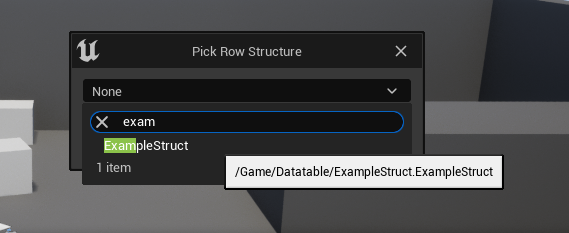
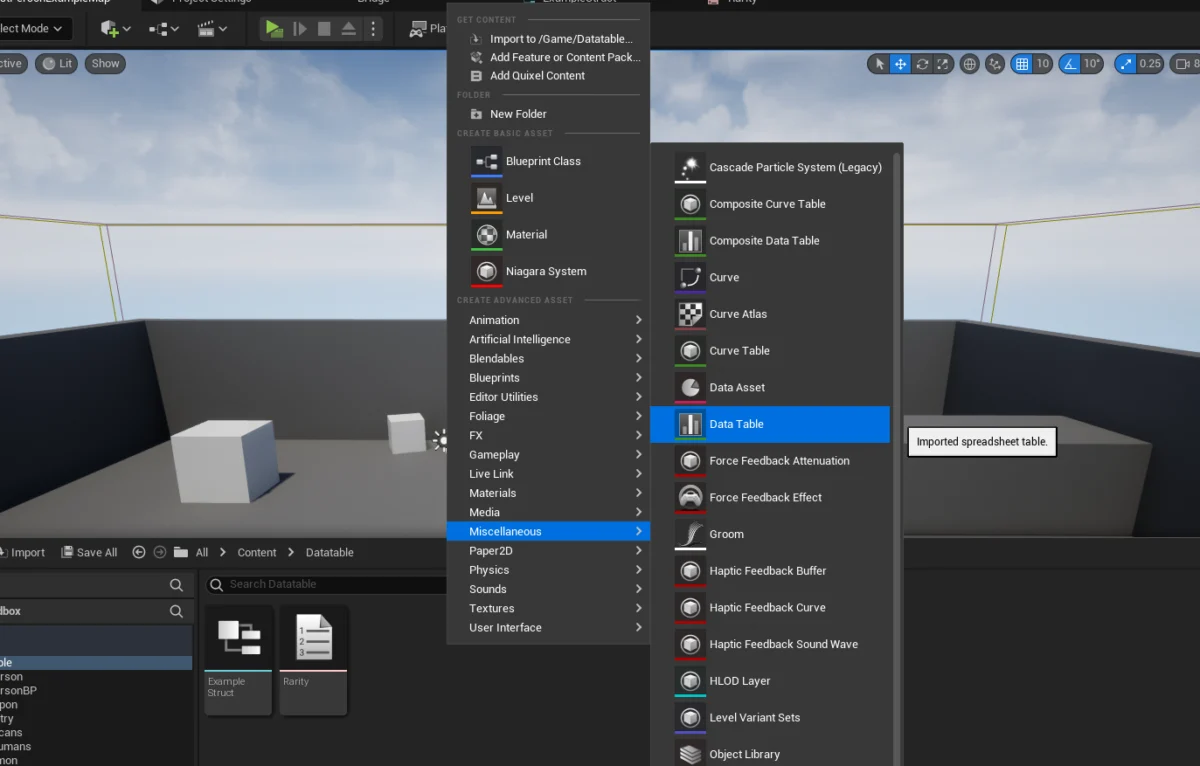
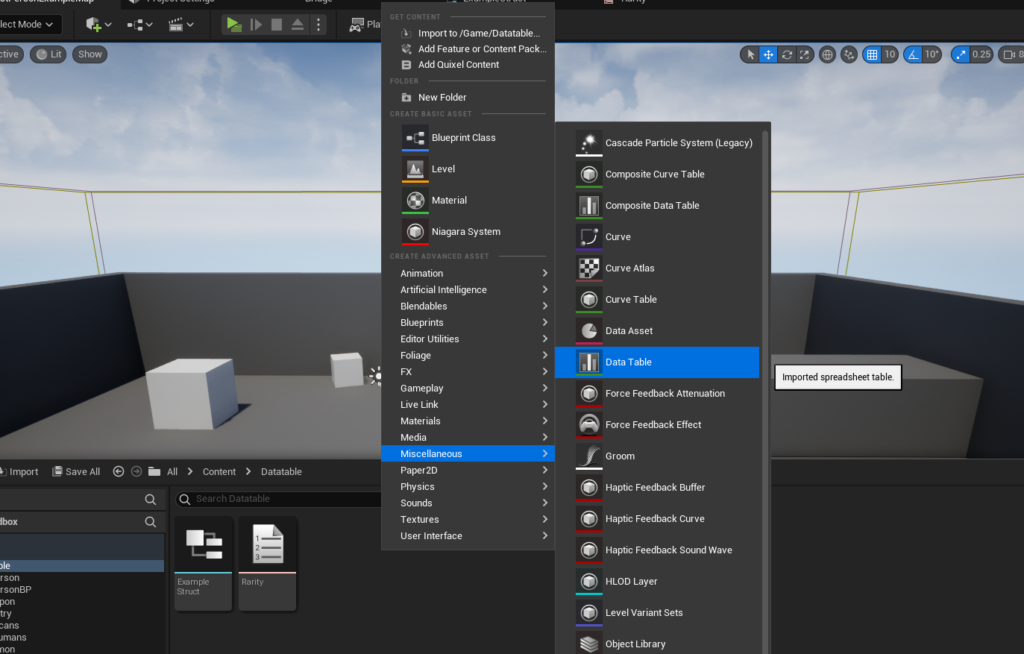
With the foundational Enum and Struct in place, the final asset—the Data Table itself—can be created. This is performed by right-clicking in the Content Browser, navigating to the "Miscellaneous" category, and selecting "Data Table." Upon creation, a pop-up window prompts the developer to select the "Row Structure" for the new data table. This is where the previously created F_ItemData Struct would be chosen, explicitly linking the table to its defined schema. This choice is irreversible, emphasizing the importance of a well-defined struct before table creation.
Populating and Managing Data within the Table
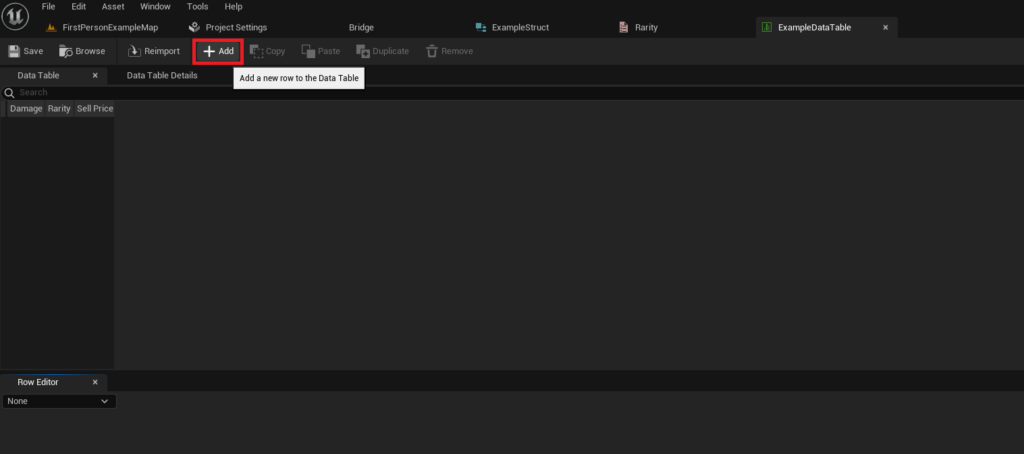
Once the data table asset is configured with its corresponding struct, it becomes an interactive spreadsheet-like interface within the Unreal Engine editor. Developers can then begin populating it with actual game data.
Adding New Rows:
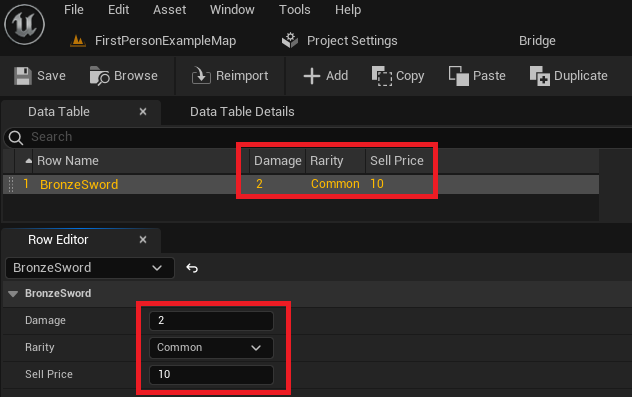
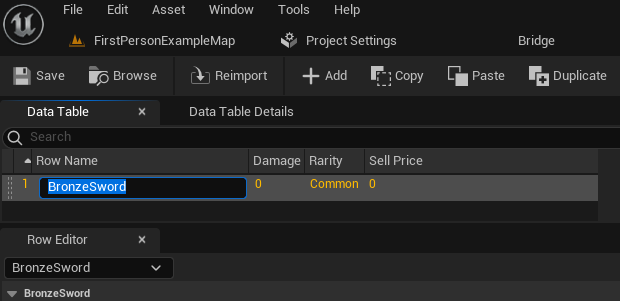
The interface provides an "Add" button, which, when clicked, creates a new row in the data table. Each new row automatically initializes with default values based on the struct’s definition. The primary identifier for each row is its "Row Name," which acts as the unique key for data retrieval. This name is user-definable and should be descriptive, such as BronzeSword or HealingPotion_Minor.
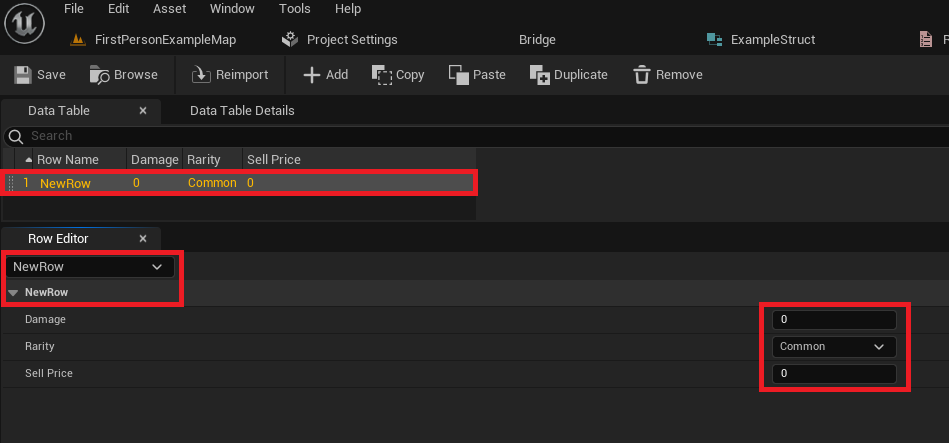
Modifying Row Values:
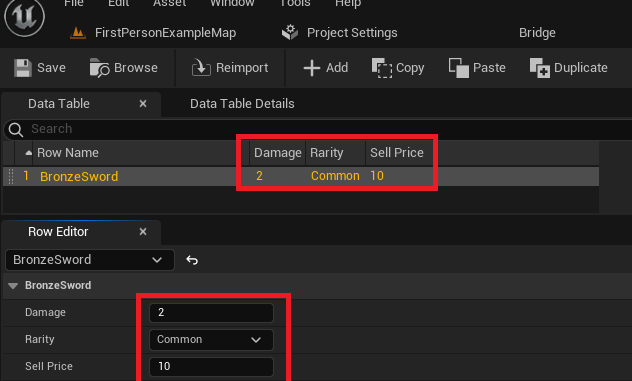
The data table editor typically displays the data in a tabular format at the top, and a "Row Editor" panel at the bottom. The Row Editor provides a detailed view of the selected row’s properties, allowing developers to modify the individual Damage, Rarity, and SellPrice values. Changes made in the Row Editor are immediately reflected in the main table view. This intuitive interface empowers game designers, level designers, and content creators to directly input and manage game data without needing to write a single line of code. The system’s immediate visual feedback significantly reduces the learning curve and speeds up content creation.
It is paramount for developers to frequently save their data table assets, just as they would any other asset, to prevent the loss of changes. This practice is a standard precaution in any development environment.
Accessing and Utilizing Data at Runtime
The true utility of data tables materializes when their stored information is accessed and utilized by game logic during runtime. Unreal Engine 5 offers straightforward methods for both retrieving specific data entries and iterating through entire tables.
Retrieving Specific Data Rows:
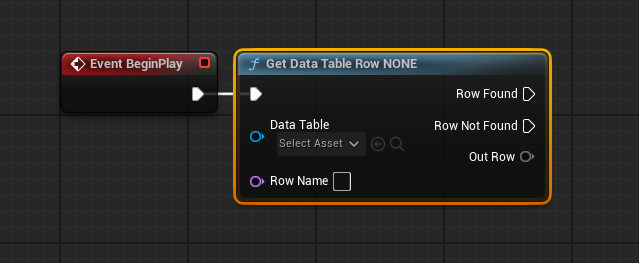
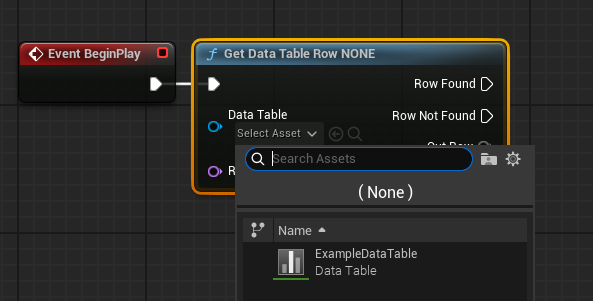
In Blueprint, the Get Data Table Row node is the primary mechanism for accessing data. This node requires two inputs: a reference to the specific data table asset and the Row Name (the unique key) of the desired entry. If a row matching the provided name is found, the node’s Row Found execution pin is triggered, and the Out Row pin provides the retrieved data, cast to the associated struct type. If the row is not found, the Row Not Found pin is triggered, and the Out Row will be invalid.
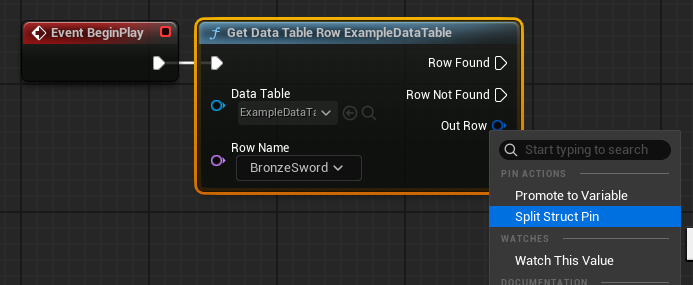
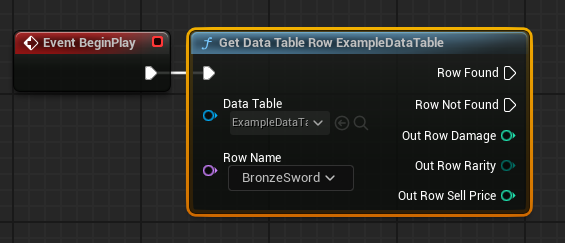
To easily access the individual properties within the Out Row struct, developers can right-click on the Out Row pin and select "Split Struct Pin." This expands the struct into its constituent variables (e.g., Damage, Rarity, SellPrice), making them directly accessible for use in game logic. Furthermore, the Row Name input pin on the Get Data Table Row node often presents a dropdown list of all available row names within the selected data table, providing convenient auto-completion and reducing potential typos.
Looping Over Data Table Rows:
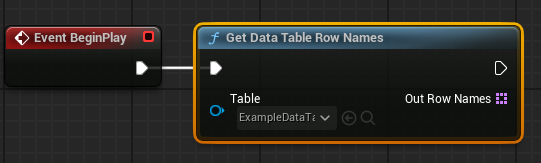
For scenarios requiring processing of all or multiple entries in a data table, such as initializing a shop inventory or calculating average enemy stats, Unreal Engine provides tools for iteration. The Get Data Table Row Names node, when connected to a data table asset, returns an array containing all the Row Names present in the table. This array can then be fed into a For Each Loop node.
Within the For Each Loop, each Array Element (which is a Row Name) can be connected to the Row Name input of a Get Data Table Row node. This setup allows the game logic to sequentially retrieve and process the data for every single row in the data table. This powerful combination of nodes enables developers to build dynamic systems that automatically adapt to changes in the data table, without requiring manual updates to the game code.
Broader Implications and Industry Impact
The efficient use of data tables has profound implications for game development, extending far beyond simple item management.
- Game Balancing and Progression: Centralizing values for character stats, enemy health, weapon damage, and economic factors allows designers to rapidly iterate on game balance. A single data table can govern the entire progression system, enabling quick adjustments and playtesting cycles.
- Localization: Data tables are ideal for storing localized text strings for various languages. Each row can represent a piece of text, with columns for different language versions, simplifying the localization pipeline.
- Procedural Content Generation: By storing rules, parameters, or seed data in data tables, developers can drive procedural generation of levels, quests, or assets, creating vast and varied game worlds with minimal manual effort.
- AI Behavior: Different AI personalities, attack patterns, or decision-making parameters can be defined in data tables, allowing for diverse and complex enemy behaviors without hard-coding each variant.
- Collaborative Development: Data tables serve as a "single source of truth" for game data. This minimizes conflicts in source control and ensures that all team members are working with the most up-to-date information. Designers can focus on data entry, while programmers focus on logic, fostering parallel development.
- Reduced Development Costs: By accelerating iteration and reducing the need for code changes for data adjustments, data tables contribute to more efficient resource allocation and potentially lower development costs. A study by the Game Developers Conference (GDC) indicated that streamlined content pipelines, often enabled by structured data, can cut iteration times by up to 30%, a significant factor in large-scale productions.
However, developers must also consider best practices to maximize the benefits and mitigate potential challenges. Establishing clear naming conventions for Row Names and Struct variables is crucial for long-term maintainability. Additionally, while data tables offer type safety, careful data validation is still necessary to prevent logical errors or unintended game behavior due to incorrect values. Integrating data tables effectively with version control systems (like Git or Perforce) is also vital for collaborative projects, ensuring that changes are tracked and merged properly.
Conclusion
Unreal Engine 5’s Data Tables stand as an indispensable tool for modern game development. They empower developers to create, configure, populate, and implement structured data in an incredibly efficient and user-friendly manner. By separating data from logic, they foster greater flexibility, accelerate iteration cycles, and enhance collaboration across multidisciplinary teams. From managing intricate RPG item inventories to orchestrating complex AI behaviors and streamlining localization, data tables are fundamental to building robust, scalable, and engaging interactive experiences. Their adoption ensures that projects, regardless of their complexity, benefit from a centralized, type-safe, and easily accessible repository for game-critical information, making them a cornerstone of effective Unreal Engine development.
About the Author