In the dynamic landscape of modern game development, projects within Unreal Engine 5 inevitably encounter a critical juncture where the visual scripting power of Blueprints, while excellent for rapid prototyping and accessibility, begins to strain under the weight of performance demands. While writing code entirely in C++ inherently offers superior execution speed and access to low-level engine features, a complete architectural overhaul to transition an existing Blueprint-heavy project to C++ is often impractical and resource-intensive. This challenge highlights a persistent need for developers to strategically integrate the best of both worlds, a necessity elegantly addressed by the C++ Blueprint Function Library – a powerful, built-in Unreal Engine mechanism designed to seamlessly blend the efficiency of C++ with the flexibility of Blueprints. This guide delves into the utility, creation, and application of these libraries, demonstrating how they provide a crucial bridge for performance optimization and extended functionality without compromising project integrity.
The Blueprint-C++ Dynamic: A Foundational Context
Unreal Engine’s architectural philosophy champions a hybrid development approach, leveraging Blueprints for their unparalleled ease of use, visual clarity, and rapid iteration cycles. Designers and less code-proficient developers can craft complex gameplay systems, UI logic, and environmental interactions with remarkable speed, fostering a highly iterative and collaborative workflow. However, Blueprints, being an interpreted visual scripting language, carry inherent overheads. Intensive calculations, extensive loops, complex data manipulations, or operations requiring direct memory access can lead to performance bottlenecks, manifesting as frame rate drops, stuttering, or increased loading times, particularly in highly interactive or graphically demanding titles.
Conversely, C++ stands as the engine’s foundational language, offering maximum control, deterministic performance, and direct access to the Unreal Engine API. It is the language of choice for performance-critical systems like physics simulations, AI pathfinding, rendering pipelines, and complex networking. Yet, its steeper learning curve, longer compilation times, and more verbose syntax can slow down iteration for non-performance-critical logic. The traditional solution to performance issues often involved rewriting entire systems in C++, a daunting prospect for projects with significant Blueprint investment. The C++ Blueprint Function Library emerges as Epic Games’ sophisticated answer to this dilemma, allowing developers to cherry-pick performance-sensitive sections of their Blueprint code and migrate them to optimized C++ functions, which remain fully accessible within the Blueprint environment. This capability is paramount for balancing development velocity with runtime efficiency, a cornerstone of successful game production.
Understanding C++ Blueprint Function Libraries: A Technical Deep Dive
At its core, a C++ Blueprint Function Library in Unreal Engine 5 is a static C++ class specifically designed to expose a collection of utility functions to the Blueprint editor. Unlike regular C++ classes that might require instantiating an object or inheriting from a specific base class, functions within a Blueprint Function Library are typically static, meaning they can be called directly without any object reference. This makes them ideal for global utility operations that don’t depend on the state of a particular actor or component.
The superiority of this approach for specific tasks stems from several factors. C++ code compiles directly to machine code, offering significantly faster execution compared to interpreted Blueprints. This is particularly noticeable in scenarios involving:
- Intensive Mathematical Operations: Complex vector math, matrix transformations, or procedural generation algorithms.
- Large Data Set Processing: Iterating over thousands of elements in an array or map, filtering, and sorting.
- File I/O and System-Level Access: Efficiently reading from or writing to the disk, interacting with operating system APIs, or managing external data.
- Integration with External Libraries: Leveraging third-party C++ libraries that offer specialized functionality not readily available or performant in Blueprints.
- Multithreading: While Blueprints can interact with certain asynchronous operations, truly custom, performance-critical multithreaded logic is best implemented in C++.
By encapsulating these operations within a C++ Blueprint Function Library, developers gain the full performance advantages of C++ while maintaining the ease of integration and visual clarity that Blueprints provide for orchestrating high-level game logic. This method stands apart from other integration strategies, such as creating C++ base classes for Blueprint children, as it focuses on standalone, reusable functions rather than object-oriented hierarchy, making it exceptionally versatile for utility purposes.
Implementation Pathway: A Structured Chronology for Integration
The process of establishing and utilizing a C++ Blueprint Function Library in Unreal Engine 5 follows a clear, methodical sequence, emphasizing both preparation and precise execution.
Phase 1: Project Preparation and Development Environment Setup
The foundational step involves ensuring the Unreal Engine 5 project is C++ enabled. For Blueprint-only projects, this typically means adding a new C++ class, which prompts the engine to generate the necessary project files and solution structure. A crucial prerequisite is the installation of a suitable Integrated Development Environment (IDE) capable of compiling C++ code. Popular choices include:
- Visual Studio (Windows): The most common choice for Windows-based Unreal Engine development, offering robust debugging and project management features.
- Xcode (macOS): Essential for C++ development on Apple platforms, required for compiling C++ projects on macOS.
- JetBrains Rider (Cross-Platform): A highly regarded, cross-platform IDE known for its excellent Unreal Engine integration, intelligent code completion, and refactoring tools.
If an IDE is not detected, Unreal Engine will intelligently prompt the developer to install a recommended option, streamlining the initial setup.
Phase 2: Class Creation within the Unreal Editor
With the development environment configured, the next step is to initiate the creation of the C++ Blueprint Function Library directly from within the Unreal Editor.
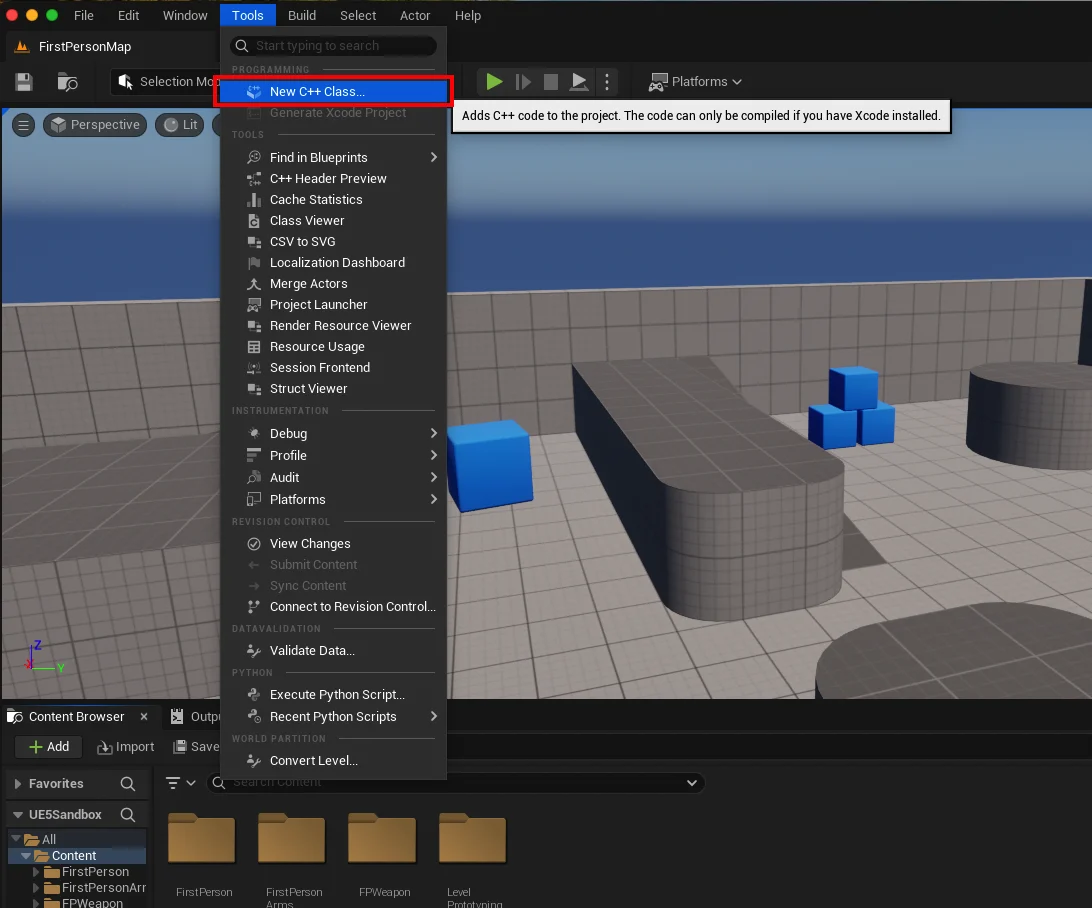
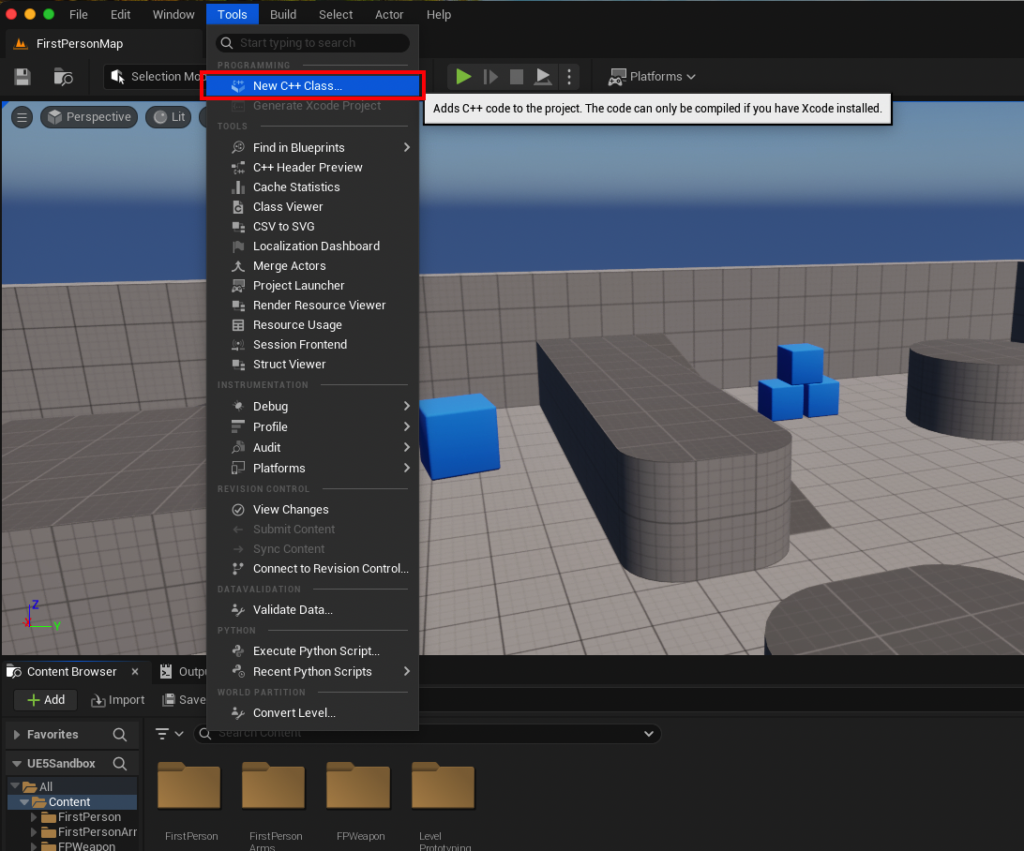
- Accessing the C++ Class Wizard: Navigate to the "Tools" dropdown menu at the top of the Unreal Editor and select "New C++ Class." This action opens a wizard that guides the developer through the class creation process.
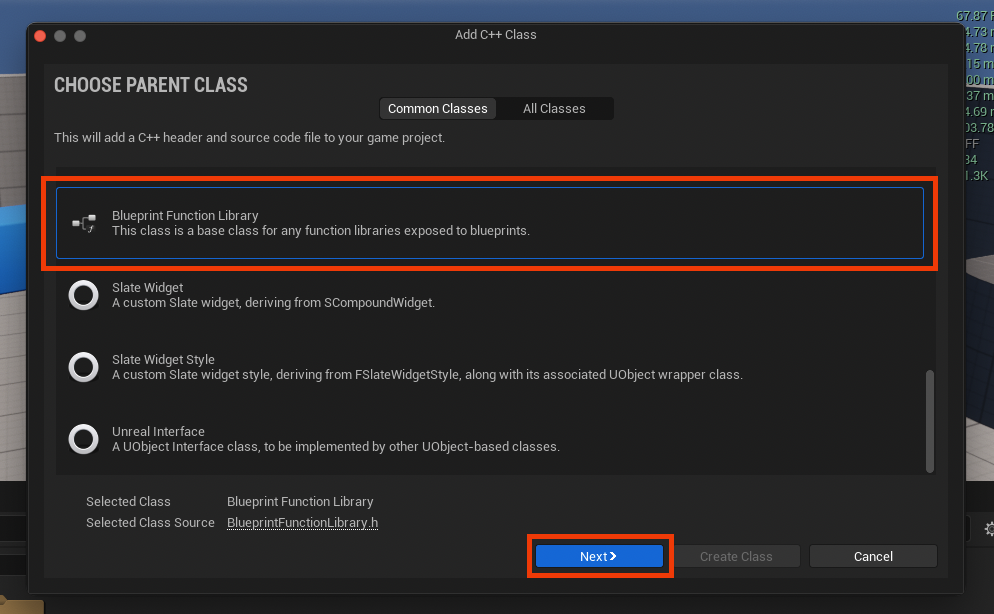
- Parent Class Selection: The wizard will present a list of potential parent classes. For a Blueprint Function Library, it is imperative to scroll down and select "Blueprint Function Library." This choice dictates the foundational structure and capabilities of the new class, ensuring it inherits the necessary Unreal Engine boilerplate for exposing static functions to Blueprints. Proceed by clicking the "Next" button.
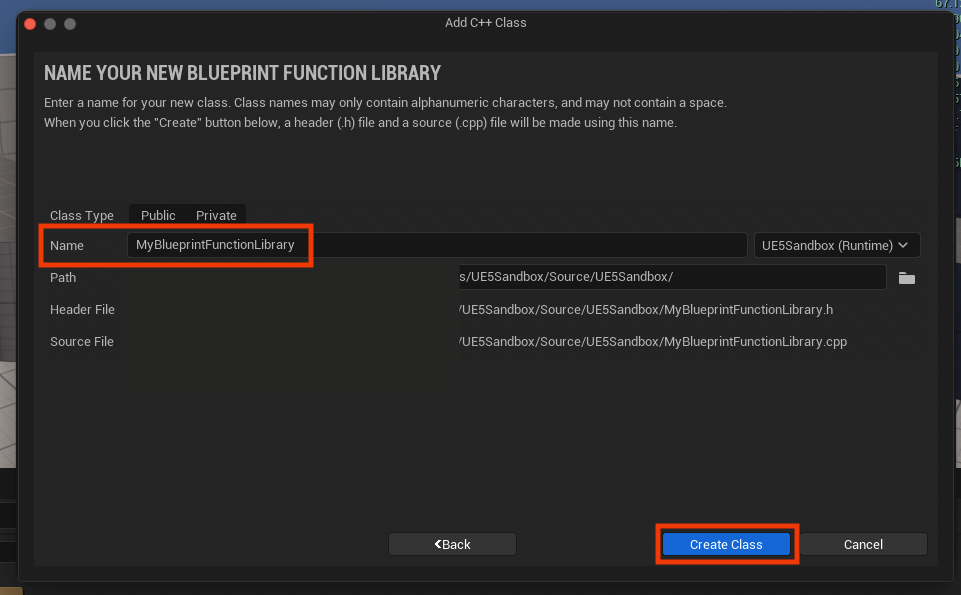
- Naming the Class: Developers are then prompted to assign a name to their new class. Adhering to Unreal Engine’s naming conventions, which typically involve camel case with an initial capital letter (e.g.,
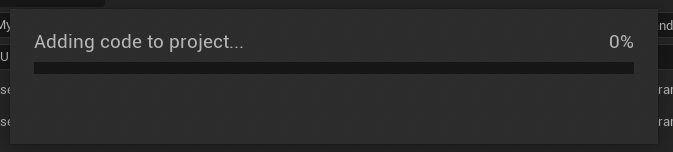
MyBlueprintFunctionLibrary,GameUtilityFunctions), is highly recommended for clarity and consistency. The wizard will then generate the corresponding.h(header) and.cpp(source) files within the project’s source directory. - Initial Compilation: Upon naming and creating the class, the Unreal Engine automatically initiates a compilation process. This step integrates the newly generated C++ files into the project’s build system. It is critical to allow this compilation to complete successfully before attempting any further modifications or accessing the new class.
Phase 3: C++ Code Authoring and Exposure within the IDE
Once the initial compilation is successful, developers shift to their chosen IDE to implement the desired C++ functionality.

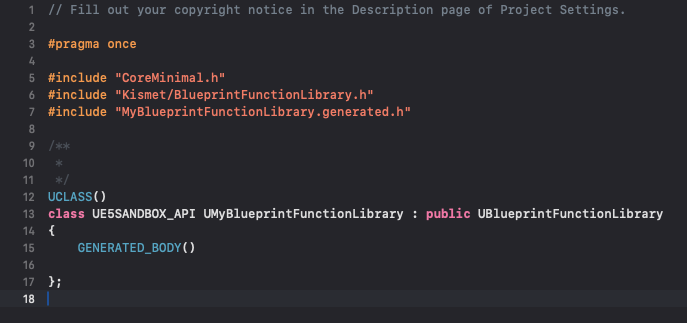
- Locating the Files: The IDE will display the newly created
.hand.cppfiles (e.g.,MyBlueprintFunctionLibrary.handMyBlueprintFunctionLibrary.cpp). The header file (.h) is where function declarations reside, while the source file (.cpp) contains their definitions. -
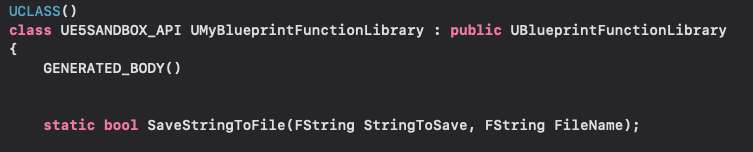
Function Declaration and Keywords: Within the header file, functions intended for Blueprint exposure must be declared with specific keywords and macros:
static: This crucial keyword ensures that the function can be called without needing an instance of the class. It signifies a utility function that operates independently of any specific object’s state, making it perfectly suited for a Blueprint Function Library.UFUNCTION()Macro: This Unreal Engine-specific macro is fundamental for the engine’s Reflection System to recognize and expose the C++ function to the Blueprint environment. It can include specifiers likeBlueprintCallableto explicitly mark the function as usable in Blueprints, andCategory="MyCustomCategory"to organize the function within the Blueprint editor’s context menu.-
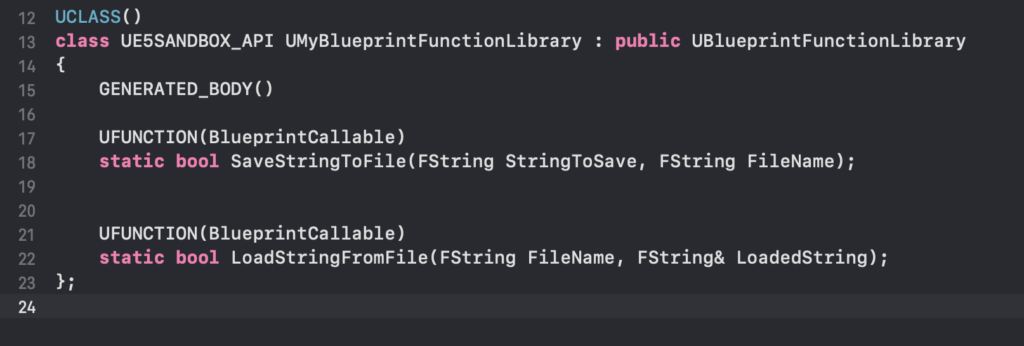
Example Implementation: For a string read/write system, the header might include:
UCLASS()
class MYPROJECT_API UMyBlueprintFunctionLibrary : public UBlueprintFunctionLibrary

    GENERATED_BODY()
public:
    UFUNCTION(BlueprintCallable, Category = "File I/O")
    static bool SaveStringToFile(const FString& InString, const FString& FileName);

    UFUNCTION(BlueprintCallable, Category = "File I/O")
    static FString LoadStringFromFile(const FString& FileName);
;
-
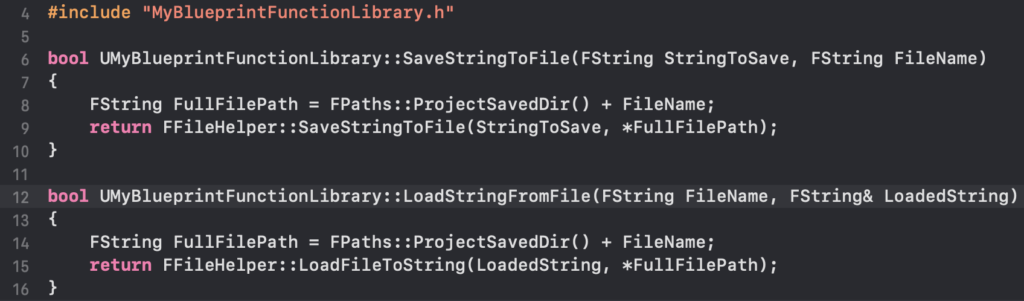
Function Definition: In the
.cppfile, the actual logic for these functions is implemented. Leveraging Unreal Engine’s robust libraries, such asFFileHelperfor file operations, simplifies common tasks. For instance,FFileHelper::SaveStringToFileandFFileHelper::LoadFileToStringprovide efficient ways to handle text file interactions.#include "MyBlueprintFunctionLibrary.h" #include "Misc/FileHelper.h" #include "Misc/Paths.h" bool UMyBlueprintFunctionLibrary::SaveStringToFile(const FString& InString, const FString& FileName) // Example: Save to the project's Saved directory FString AbsoluteFilePath = FPaths::ProjectSavedDir() / FileName; return FFileHelper::SaveStringToFile(InString, *AbsoluteFilePath); FString UMyBlueprintFunctionLibrary::LoadStringFromFile(const FString& FileName) FString ResultString; FString AbsoluteFilePath = FPaths::ProjectSavedDir() / FileName; FFileHelper::LoadFileToString(ResultString, *AbsoluteFilePath); return ResultString;This example demonstrates how to integrate powerful C++ file handling directly into a Blueprint-accessible function, addressing a common need for persistent data storage.
Phase 4: Final Compilation and Editor Integration
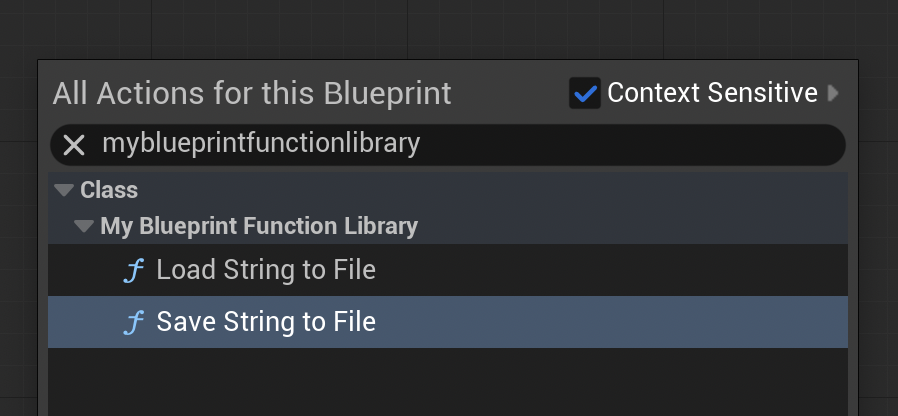
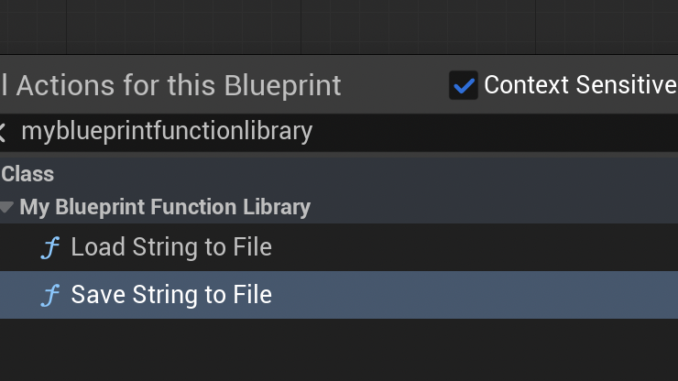
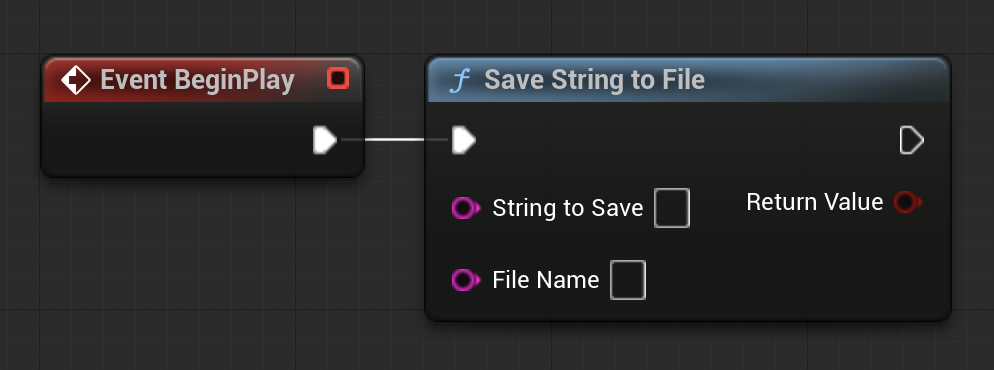
After implementing the C++ functions, the project must be recompiled. This crucial step processes the new C++ code, linking it into the engine’s runtime and making the declared UFUNCTIONs available for the Blueprint editor. Upon successful compilation and a potential editor restart, the newly created C++ functions will appear in the Blueprint context menu when searching by their name or category. This seamless integration allows developers to drag and drop these high-performance C++ nodes directly into their Blueprint graphs, connecting them with existing Blueprint logic.
Case Study & Performance Implications: The String I/O Example
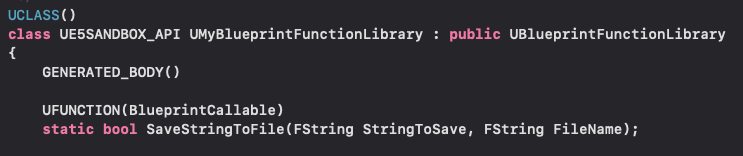
The simple string read/write example, while illustrative, underscores the profound performance implications of this approach. While Blueprints offer basic file handling capabilities, direct C++ implementations often yield significant speed improvements, especially when dealing with larger files or frequent I/O operations. For instance, a Blueprint-only solution for parsing a complex configuration file line-by-line might involve numerous string manipulations and array operations, each incurring a performance cost. A C++ counterpart, leveraging optimized string algorithms and efficient file stream operations, can process the same data orders of magnitude faster.
Developers routinely report performance gains ranging from 2x to 10x or even more when migrating critical, computationally intensive Blueprint graphs to C++ Function Libraries. This is not mere anecdotal evidence; it’s a direct consequence of C++’s compiled nature and its ability to interact more directly with system resources. Unreal Engine’s profiling tools, such as Unreal Insights, can quantitatively demonstrate these improvements, allowing developers to identify specific bottlenecks and measure the impact of their C++ optimizations. Common performance-critical scenarios where C++ Blueprint Function Libraries excel include:
- Pathfinding Algorithms: Complex A* or Dijkstra implementations.
- Procedural Content Generation: Generating meshes, textures, or levels at runtime.
- Custom Physics or Collision Logic: Highly specialized interactions not covered by default engine features.
- Large-Scale Data Processing: Inventory systems with thousands of items, complex statistical calculations.
- Real-time AI Decision Making: Advanced behavior trees or neural network inferences.
Developer Community and Official Stance
Epic Games, the creator of Unreal Engine, has consistently emphasized empowering developers with flexible and robust tools. The C++ Blueprint Function Library is a testament to this philosophy, bridging the gap between high-level design and low-level optimization. Official documentation from Epic Games explicitly details the creation and usage of these libraries, signaling their full support as a standard practice for professional Unreal Engine development. The developer community widely embraces this hybrid approach, recognizing it as an indispensable technique for building production-ready games that demand both rapid iteration and uncompromising performance. Forums, tutorials, and community projects frequently showcase the integration of custom C++ functionality through these libraries, highlighting their versatility and effectiveness across diverse game genres and complexities.
Broader Impact and Future Outlook: A Hybrid Development Paradigm
The strategic use of C++ Blueprint Function Libraries has a far-reaching impact on the Unreal Engine development ecosystem:
- Democratization of Power: It allows teams with a strong Blueprint foundation to selectively inject C++ performance where it matters most, without requiring every developer to be a C++ expert or necessitating a full-scale C++ project from the outset. This empowers smaller studios and independent developers to achieve higher fidelity and complexity in their games.
- Enhanced Project Scalability: As games grow in scope and ambition, performance requirements naturally increase. Function libraries provide a clear pathway for scaling performance-critical systems, ensuring that projects can evolve without hitting insurmountable technical ceilings.
- Improved Maintainability: By encapsulating complex or performance-sensitive logic in well-defined C++ functions, projects can improve overall maintainability. These functions can be rigorously tested and optimized, while the Blueprint graphs that call them remain cleaner and easier to understand, focusing on high-level orchestration.
- Fostering Hybrid Development: This feature reinforces the notion that the most effective Unreal Engine projects often adopt a synergistic development model, where Blueprints handle the majority of game logic for flexibility and rapid iteration, and C++ is strategically deployed for performance-critical components or extending engine functionality. This balanced approach is becoming the de facto standard for maximizing efficiency and output.
In conclusion, the C++ Blueprint Function Library is more than just a technical feature; it is a cornerstone of modern, efficient game development within Unreal Engine 5. By understanding and leveraging this powerful integration mechanism, developers can unlock significant performance improvements, access a broader range of C++ features, and ultimately deliver more robust, performant, and engaging interactive experiences, ensuring their projects remain competitive and cutting-edge in an ever-evolving industry.
About the Author