A new, free, and open-source Blender extension named "Click Joints" is poised to significantly simplify the creation of articulated 3D printable models by enabling users to seamlessly integrate ball and socket or pin joints directly into their meshes. Developed by Thijs (Dortus), the add-on addresses a common hurdle in 3D printing: achieving precise, functional joints with appropriate clearances for smooth movement and assembly. This innovative tool, available under the GPL-3.0-or-later license, promises to empower hobbyists, designers, and engineers alike to bring their articulated creations to life with unprecedented ease.
Genesis of Click Joints: Addressing a Gap in 3D Printing Workflows
The creation of functional, moving parts in 3D printing often involves complex modeling techniques or reliance on external software. Designers frequently encounter challenges in accurately simulating the physical interactions of joints within their digital models, leading to trial-and-error printing processes. This can result in parts that are too tight, too loose, or simply do not fit together as intended. The genesis of Click Joints stems from a desire to bridge this gap, offering a direct, in-Blender solution for integrating pre-designed, adjustable joints.
Thijs (Dortus), the creator of the extension, highlights the core functionality: "Click Joints is a free extension that cuts a ball and socket or a pin joint into a mesh for 3D printing, with the clearance you set in millimeters." This straightforward description belies the sophisticated calculations and user-friendly interface that the add-on provides. The extension aims to streamline the design-to-print workflow, reducing the time and resources typically spent on joint design and iteration.
Core Functionality: Precision, Clearance, and Visual Feedback
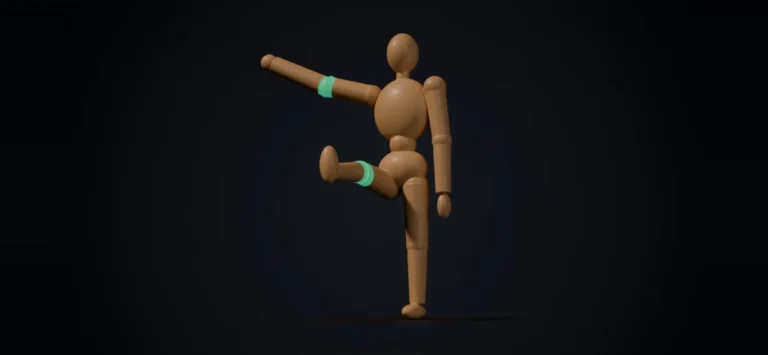
At the heart of Click Joints lies its intelligent measurement and visualization system. For ball joints, the extension meticulously calculates how far the joint can bend in eight distinct directions before any parts collide. This range of motion is then visually represented directly on the 3D model. Crucially, if a user attempts to bend the joint beyond its calculated physical limits, the colliding areas are highlighted in red, providing immediate visual feedback and preventing design flaws before printing.
Beyond collision detection, Click Joints also incorporates a vital feature for 3D printing success: wall thickness analysis. A ring integrated into the joint design indicates whether the material thickness is sufficient for structural integrity and successful printing. This feature is particularly important for smaller or more intricate joints, where insufficient wall thickness can lead to print failures or weakened components.
The extension supports exporting the generated joints in industry-standard formats, STL and 3MF, with each part of the joint exported as a separate file. This ensures compatibility with a wide range of 3D slicer software and printing workflows. The add-on has been rigorously tested on both Blender 4.2 LTS (Long Term Support) and 5.2 LTS versions, ensuring stability and compatibility with current and future Blender releases.
Development and Testing: A Commitment to Open Source and Reliability
The commitment to open-source principles is evident in Click Joints’ licensing under GPL-3.0-or-later, fostering collaboration and community contribution. This licensing ensures that the software remains freely accessible and modifiable, allowing for continuous improvement and adaptation to user needs.
A key aspect of the development process is the emphasis on automated testing. Thijs (Dortus) states, "Every version is tested automatically in real Blender." This practice of continuous integration and automated testing is a hallmark of robust software development, guaranteeing that new releases are stable and perform as expected across different Blender environments. This level of quality assurance is particularly valuable for a tool designed for a precise task like 3D printing joint creation.
While the creator has not yet personally printed joints made with the extension, the internal measurements and bend simulations are conducted within Blender. The accompanying visual assets, including images and videos, are renders created within Blender, showcasing the add-on’s capabilities in a digital environment. This internal validation process, combined with automated testing, provides a strong foundation for the extension’s functionality.
Potential Applications and Broader Impact
The implications of Click Joints extend across various domains of 3D printing. For hobbyists and makers, it simplifies the creation of articulated toys, customizable robots, and functional prototypes. Artists and sculptors can now more easily integrate movable elements into their 3D printed artwork.
In the realm of engineering and product design, the add-on can accelerate the prototyping phase for products requiring articulated components, such as mechanical arms, modular assemblies, or even prosthetic devices. The ability to quickly design and test joint clearances digitally can significantly reduce the number of physical prototypes needed, saving both time and material costs.
The integration of clearance settings directly into the modeling process is a significant advantage. Traditional methods often require manual adjustment of dimensions or rely on printer calibration and slicer settings to achieve the desired fit. Click Joints centralizes this control within the 3D modeling software, offering a more predictable and repeatable outcome.
Furthermore, the visual feedback mechanism, particularly the red highlighting of collision points, empowers designers to understand the mechanical limitations of their designs in real-time. This interactive approach to design validation is a powerful pedagogical tool, helping users learn about the principles of joint mechanics and their implications for 3D printing.
Supporting Data and Analogous Technologies
While specific quantitative data on Click Joints’ performance is still emerging as users begin to integrate it into their workflows, the underlying principles it employs are well-established in mechanical design. The concept of clearance in mechanical assemblies is critical for ensuring proper function. For instance, in injection molding or precision machining, clearances are meticulously calculated to account for material tolerances, thermal expansion, and intended movement. A typical clearance for 3D printed parts designed for easy assembly might range from 0.1mm to 0.5mm, depending on the printer’s accuracy and the desired fit. Click Joints’ ability to directly set and visualize these clearances in millimeters provides a tangible and user-friendly approach to this critical design parameter.
The 3MF file format, which Click Joints supports, is itself an important piece of supporting technology. Developed as a successor to STL, 3MF offers a more robust and feature-rich way to describe 3D models, including support for color, materials, and metadata. Its adoption by Click Joints indicates a forward-thinking approach to file interoperability in the 3D printing ecosystem.
Future Outlook and Community Engagement
As an open-source project, the future development of Click Joints will likely be shaped by community feedback and contributions. Potential enhancements could include support for more complex joint types, advanced simulation capabilities, or integration with other Blender add-ons. The automated testing infrastructure already in place provides a solid foundation for rapid iteration and improvement.
The extension’s release marks a significant step forward for 3D printing workflow efficiency. By democratizing access to advanced joint design tools and making them readily available within a popular and powerful 3D modeling software, Click Joints has the potential to unlock new levels of creativity and functionality for a wide spectrum of users. The commitment to free and open access ensures that this innovation will benefit the entire 3D printing community.
About the Author