The independent game development platform itch.io has rolled out a significant update to its desktop application, introducing a graphical user interface (GUI) for its powerful command-line upload tool, Butler. This integration marks a pivotal enhancement for developers, enabling them to push game builds and updates directly through the itch.io app without the need for terminal commands, thereby broadening accessibility and streamlining the development workflow for a diverse range of creators. The update, available in app version 26.12.0 and later, represents a strategic move by itch.io to further solidify its position as a developer-friendly ecosystem, catering to both seasoned programmers and those less familiar with command-line interfaces.
The Evolution of Developer Tools on Itch.io
Itch.io has long been celebrated as a haven for indie game developers, fostering a vibrant community centered around experimental, niche, and independently produced digital content. Since its inception, the platform has prioritized empowering creators by offering flexible distribution models, robust analytics, and a direct line of communication between developers and their audiences. Initially, developers primarily uploaded their game files via web browsers, a straightforward method suitable for smaller projects or less frequent updates. However, as the platform grew and games became more complex, requiring frequent patches and larger file sizes, the need for a more sophisticated and efficient upload mechanism became apparent.
This necessity led to the development and introduction of Butler, itch.io’s proprietary command-line interface (CLI) tool. Butler was engineered to revolutionize the build upload process by leveraging delta patching technology. Instead of re-uploading entire game builds with every minor change, Butler intelligently identifies and transmits only the modified data, significantly reducing upload times and bandwidth consumption. For players using the itch.io desktop app, this translates directly into faster, smaller updates, improving the overall user experience and encouraging more frequent engagement with their downloaded games. While Butler proved immensely powerful and efficient for developers comfortable with command-line environments, its text-based interface presented a barrier for others, particularly those new to development or preferring a visual workflow. The latest update addresses this challenge head-on, bridging the gap between powerful functionality and user-friendly design.
Understanding Butler’s Delta Patching Technology
At the core of Butler’s efficiency is its advanced delta patching system, a technology crucial for modern software distribution. When a developer uses Butler to upload a new version of their game to an existing channel (e.g., windows-beta, linux-arm64), the tool does not simply overwrite the previous build. Instead, it performs a byte-level comparison between the new build and the last one uploaded to that specific channel. This comparison generates a "patch" file, which contains only the differences (the "delta") between the two versions.
The first upload of a game to a new channel necessarily involves transmitting the entire build. However, every subsequent upload to that same channel utilizes delta patching. For instance, if a game’s total size is 500MB, but an update only changes 5MB of assets or code, Butler will only upload approximately 5MB of data, plus some metadata, rather than the full 500MB. This process dramatically cuts down on upload times, especially for developers with slower internet connections or those making frequent, small iterations. Once uploaded, itch.io’s servers further process and optimize these patches through re-compression algorithms, ensuring they are as small as possible before being delivered to end-users.
The benefits extend equally to players. When a player updates a game via the itch.io app, their client downloads only the small patch file. The app then applies this patch to their existing game installation, reconstructing the new version locally. This approach is vastly superior to downloading full game updates, which can be bandwidth-intensive and time-consuming, especially for large games or users with data caps. It fosters a smoother update experience, encouraging players to keep their games current and reducing friction in accessing new content or bug fixes. This dual benefit — efficiency for developers and convenience for players — underscores why the integration of Butler’s functionality into a user-friendly GUI is such a significant milestone for the platform.
The New GUI: A Closer Look at Features
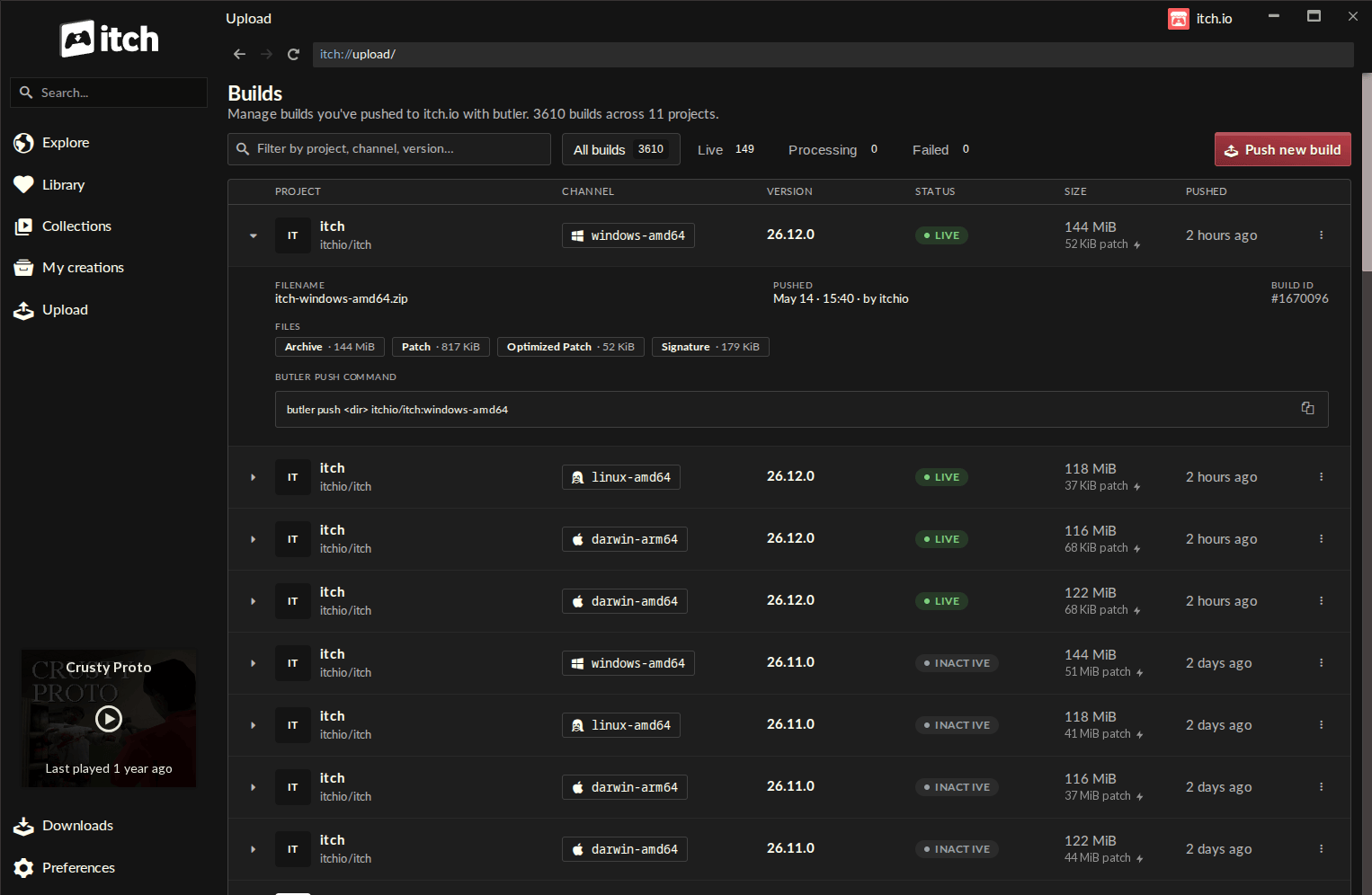
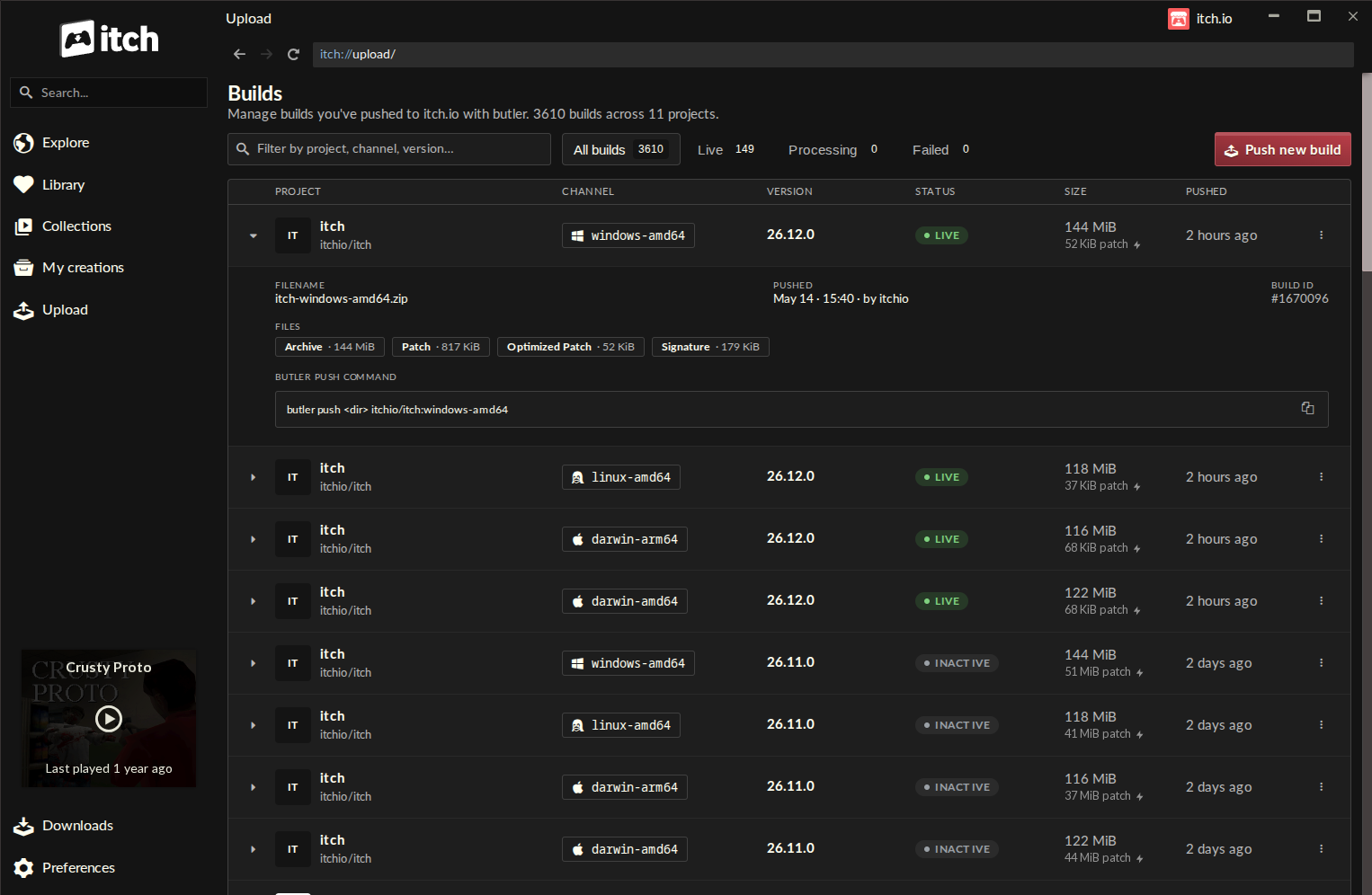
The newly introduced GUI for Butler within the itch.io app is accessible via a dedicated "Upload" section in the sidebar, leading to a comprehensive "Builds" page. This centralized hub offers developers an at-a-glance overview of all builds associated with any project their account has editing privileges for. Each entry on the Builds page provides critical information: the project name, the specific channel it was pushed to, its version number, current status, file size, and the exact timestamp of its upload. This organized display empowers developers with better version control and transparency over their release history.
To initiate a new build upload, developers can click the "Push new build" button, which opens an intuitive push dialog. This dialog guides users through the process with simple selections:
- Project Selection: A dropdown menu allows developers to easily choose the specific game project they intend to update.
- Channel Management: Developers can either select an existing channel (like
windows-main,mac-alpha) or type a new name to create a fresh channel on the fly. This flexibility is crucial for managing different release tracks, such as public releases, beta tests, or platform-specific builds. - Version Tagging: An optional field for setting a version number helps in clear identification and tracking of builds, an essential practice for robust software development.
- File Input: The core of the upload process involves a drag-and-drop interface where developers can place a folder containing their game build or a compressed
.zipfile. A "recent folders" list further enhances convenience by providing quick access to previously used directories.
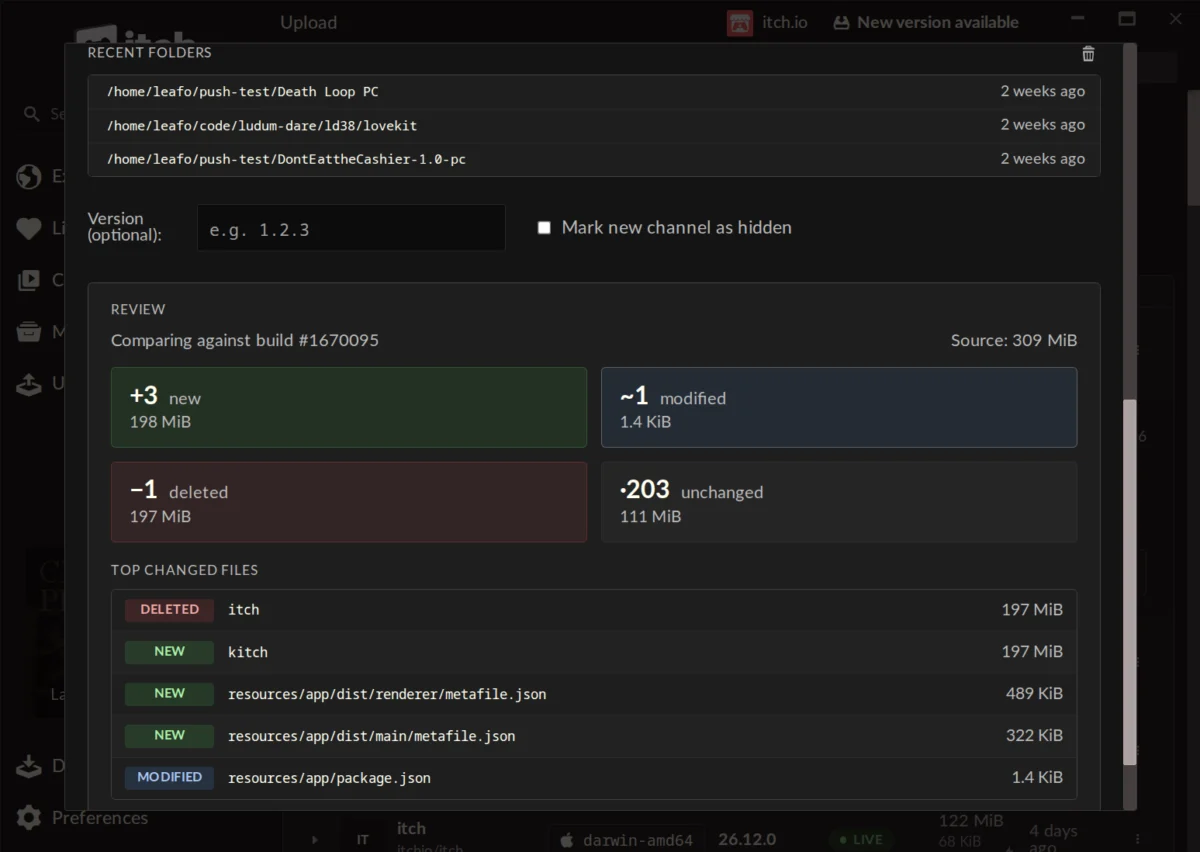
One of the most powerful additions is the build preview feature. Before committing to an upload, developers can generate a detailed report showing precisely what has changed since their last build. This preview categorizes files into "new," "modified," "deleted," and "unchanged," providing size breakdowns for each group and highlighting the largest changed files. This transparent overview is invaluable for catching potential errors, verifying intended changes, and gaining a deeper understanding of the update’s composition and efficiency. For instance, a developer might notice an unexpectedly large "modified" file, prompting them to investigate if an unneeded asset was included or if a compression setting was overlooked.
Furthermore, the Butler instance embedded within the itch.io app benefits from automatic updates. Developers no longer need to manually download or update the command-line tool, ensuring they always have the latest, most optimized version. The system also leverages the credentials of the logged-in itch.io account, simplifying authentication. Crucially, for developers managing multiple projects or collaborating across different accounts, the app’s ability to support multiple profiles and quick switching between them makes the new Butler GUI an exceptionally versatile tool.
Broader Impact and Implications for the Indie Ecosystem
This GUI integration for Butler is poised to have a multifaceted impact on the indie game development ecosystem.
For Developers:
The most immediate benefit is the lowered barrier to entry. Developers who were previously intimidated by the command line can now leverage Butler’s powerful patching capabilities without a steep learning curve. This inclusivity means a wider array of creators, including those focused on art, design, or less technical roles, can directly participate in the build deployment process. This can empower smaller teams and solo developers by simplifying a crucial part of their release cycle.
Increased efficiency is another key outcome. Even for developers comfortable with the CLI, a visual interface can expedite the process, reduce the likelihood of typos, and provide clearer feedback. The preview feature, in particular, acts as a crucial quality control step, helping developers ensure that only intended changes are pushed, saving time and potential headaches from erroneous uploads. This streamlined workflow can translate into more frequent updates for games, fostering continuous improvement and stronger community engagement.
For Players:
The direct beneficiaries of developer efficiency are the players. Faster and smaller updates mean less waiting and less bandwidth consumption. This can significantly improve the player experience, especially for those with limited internet access or data plans. A seamless update process encourages players to keep their games current, ensuring they always have access to the latest content, bug fixes, and performance improvements. This in turn can lead to higher player retention and satisfaction, benefiting the developers in the long run. The underlying technology also contributes to a more reliable distribution network, reducing the load on itch.io’s servers by transmitting less data overall, which ultimately benefits all users of the platform.
For Itch.io as a Platform:
Strategically, this update strengthens itch.io’s value proposition as a developer-first platform. By investing in tools that directly address developer pain points and enhance their productivity, itch.io reinforces its commitment to supporting independent creators. This move can attract a broader talent pool, including developers who might have previously opted for platforms with more visually intuitive tools. In an increasingly competitive digital distribution landscape, features that simplify and optimize the developer experience are critical differentiators.
The integration also signifies itch.io’s ongoing commitment to iterative improvement and community responsiveness. The demand for a GUI for Butler has been a recurring theme in developer feedback, and this release demonstrates the platform’s dedication to evolving its services based on user needs. This continuous refinement helps foster a loyal and engaged developer community, which is vital for the platform’s sustained growth and innovation.
Community Reactions and Future Outlook
Initial reactions from the developer community have been overwhelmingly positive. Developers have lauded the ease of use and the intuitive nature of the new GUI, noting its speed compared to manual webpage updates. Comments highlight the "self-enforcing nature" of the compare step, which significantly reduces the chance of errors for even novice users. The update is seen by many as making the itch.io app "a lot more useful" and potentially prompting shifts of software distribution to the platform. While questions have arisen regarding the possibility of converting existing games not originally uploaded with Butler to the new system – a current limitation due to specific metadata requirements – itch.io has acknowledged this as a potential future consideration, indicating a willingness to explore further enhancements.
Looking ahead, this update positions itch.io for continued growth and innovation in its developer toolset. As the digital landscape evolves, the demand for efficient, user-friendly, and powerful tools will only intensify. This integration of Butler’s advanced functionality within a welcoming GUI represents a significant step towards a more accessible and streamlined future for independent game development and distribution on the platform. It suggests a future where itch.io continues to empower creators to focus more on game development and less on the technical complexities of deployment, fostering a more vibrant and diverse catalog of independent games for players worldwide. This move is not merely an incremental feature addition; it is a foundational upgrade that redefines the interaction between developers and the itch.io platform, setting a new standard for ease of use in independent game distribution.
About the Author