Unreal Engine 5 (UE5), Epic Games’ flagship real-time 3D creation tool, has revolutionized game development and interactive experiences, offering unparalleled visual fidelity and powerful toolsets like Nanite and Lumen. However, a significant portion of its advanced functionalities remains inherently tied to C++ programming, presenting a potential barrier for developers primarily utilizing its visual scripting system, Blueprints. This inherent dichotomy has catalyzed the burgeoning ecosystem of third-party plugins, which act as crucial bridges, democratizing access to complex C++ features and significantly expanding the capabilities of Blueprint-driven projects. The ability to seamlessly integrate these community-developed and official extensions is pivotal for maximizing productivity, fostering innovation, and tailoring the engine to highly specific project requirements. This article delves into the critical role of plugins in the UE5 development landscape, outlining the primary installation methodologies—via the Epic Games Marketplace and through manual integration—and analyzing their profound implications for the global developer community.
The evolution of game development tools has consistently highlighted the importance of extensibility. From early modding communities to today’s sophisticated plugin architectures, the capacity for users to augment and customize their development environments has been a driving force behind innovation. Unreal Engine, in particular, has always embraced this philosophy, with its open architecture encouraging a vibrant ecosystem of creators. With UE5, this principle is more relevant than ever. While Blueprints offer an intuitive, node-based visual scripting interface that empowers designers and artists to create complex game logic without writing traditional code, certain low-level optimizations, performance-critical operations, and highly specialized functionalities are often implemented directly in C++. Plugins address this by encapsulating C++ code into callable Blueprint nodes or adding new editor features, effectively expanding the Blueprint palette and bringing advanced capabilities within reach of a broader user base. This significantly lowers the barrier to entry for indie developers and small studios, allowing them to leverage sophisticated features that might otherwise require dedicated C++ programmers or extensive custom development. The economic impact is tangible; by utilizing pre-built, tested plugin solutions, developers can drastically reduce development time and costs, focusing their resources on unique gameplay elements rather than foundational engineering.
Navigating the Epic Games Marketplace: The Primary Conduit for Plugin Acquisition
The Epic Games Marketplace stands as the official and most secure portal for acquiring and installing Unreal Engine plugins. It functions as a centralized hub, offering a curated selection of assets, including code plugins, meticulously vetted for compatibility and quality by Epic Games. This method is generally recommended for its ease of use, automated installation processes, and the inherent trust associated with an official distribution platform. The marketplace has seen exponential growth since its inception, reflecting the ever-increasing demand for specialized tools and content within the Unreal Engine ecosystem. According to Epic Games’ own reports, the marketplace consistently processes millions of transactions annually, with a significant portion attributed to code plugins that extend engine functionality.
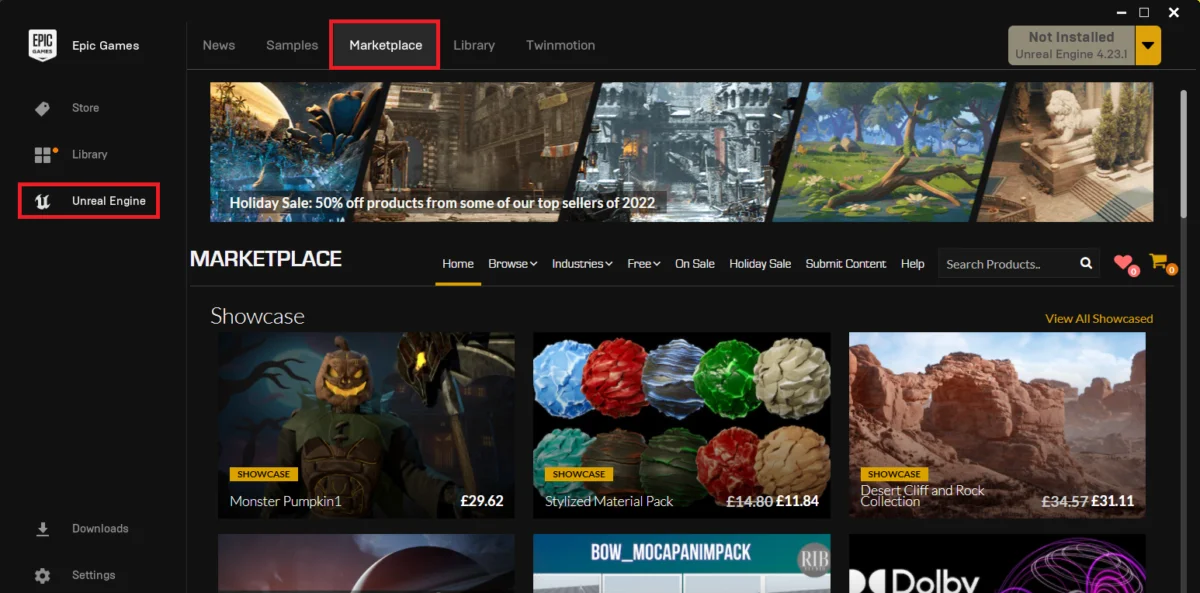
The process of acquiring a plugin through the Epic Games Marketplace begins with the Epic Games Launcher, the central application for managing all Epic Games products, including various versions of Unreal Engine. Within the launcher, developers navigate to the "Unreal Marketplace" section. This dedicated storefront is organized to facilitate discovery, allowing users to browse categories, filter by engine version, and search for specific functionalities. To streamline the search for functional extensions, users are directed to the "Browse" tab, where they select the "Code Plugins" option. This filter narrows the vast marketplace offerings to only those items that provide executable code and new functionalities, differentiating them from visual assets or templates.
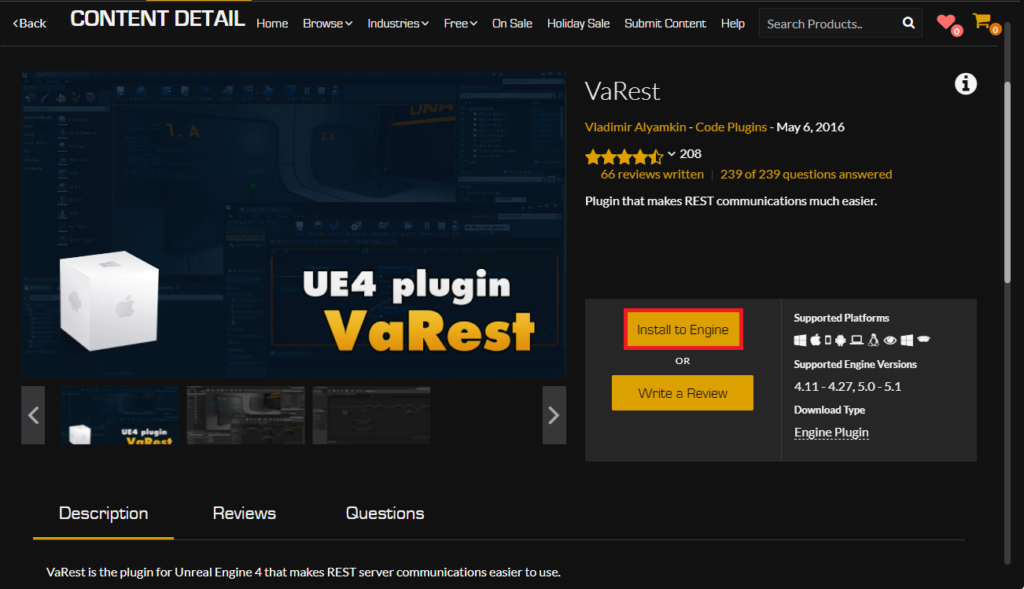
Once the "Code Plugins" category is selected, developers can explore available options. For instance, a developer might seek a networking solution like the VaRest plugin, which simplifies interactions with RESTful APIs, a common requirement for games needing to communicate with web services for leaderboards, user data, or dynamic content. After identifying a desired plugin, developers proceed to its dedicated page. If the plugin is not already owned, it must be "purchased" or "acquired." Notably, many valuable plugins are offered free of charge, yet they still require the user to go through the "add to cart" and "checkout" process, albeit with a zero balance, to officially register ownership and enable installation. This system ensures proper licensing and tracking for all assets, regardless of cost.
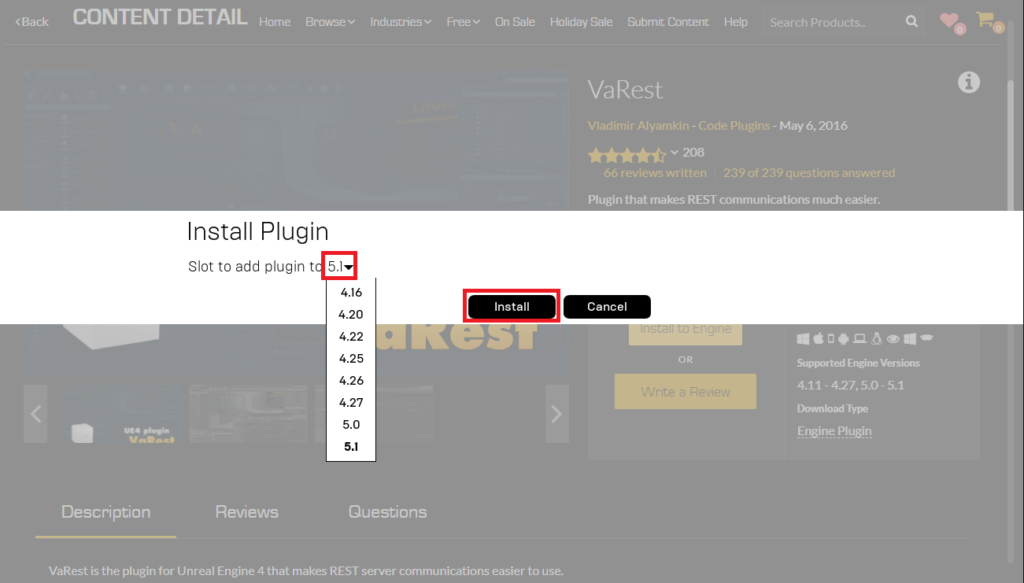
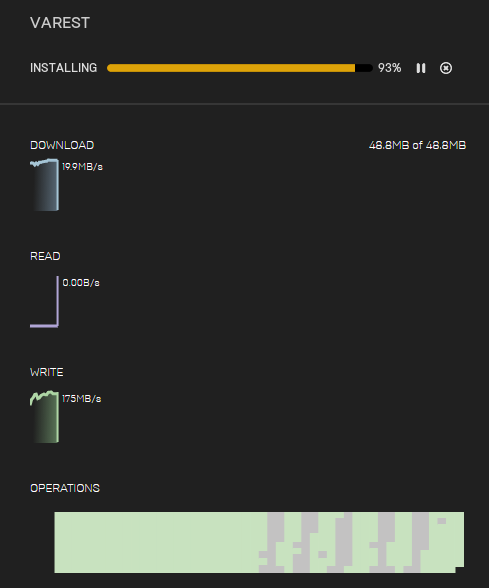
Upon successful acquisition, the crucial step of installation begins. Unlike asset packs that are often added directly to a project, many code plugins are designed to integrate directly with the Unreal Engine installation itself. This is why the "Install to Engine" button is prominently featured. Clicking this initiates a prompt for the user to select the specific Unreal Engine version they wish to install the plugin to. This flexibility is vital, as many developers work with multiple engine versions simultaneously, perhaps maintaining older projects while experimenting with newer iterations. Ensuring compatibility between the plugin and the chosen engine version is paramount to avoid potential conflicts or crashes. Once the engine version is selected, the installation process commences, with progress typically displayed in the "Downloads" tab of the Epic Games Launcher. This streamlined approach minimizes manual file handling and reduces the potential for user error, reinforcing the marketplace as the preferred method for plugin integration.

Activating Plugins within an Unreal Engine Project
Regardless of whether a plugin is acquired via the Marketplace or installed manually, a critical final step is enabling it within the specific Unreal Engine project where its functionality is required. This project-specific activation is a deliberate design choice by Epic Games, preventing unnecessary code from being compiled into every project, which would otherwise inflate executable sizes and increase build times. This modular approach ensures that projects only carry the overhead of the functionalities they actively utilize, maintaining efficiency and performance.
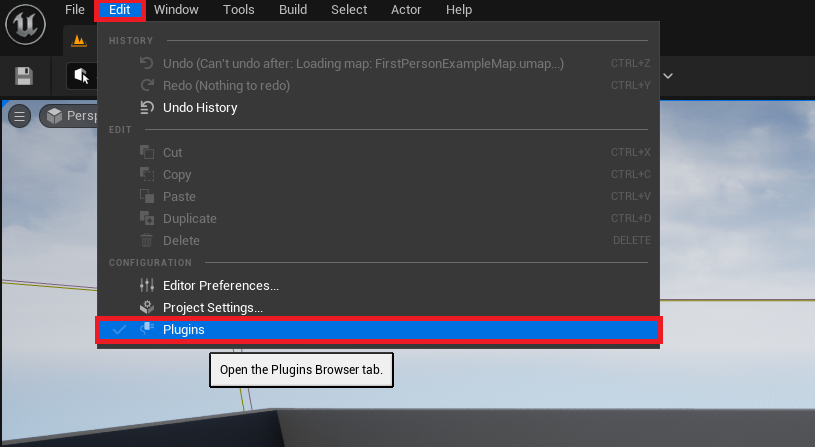
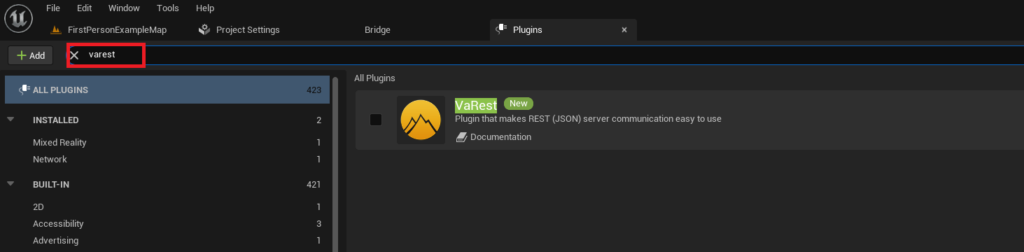
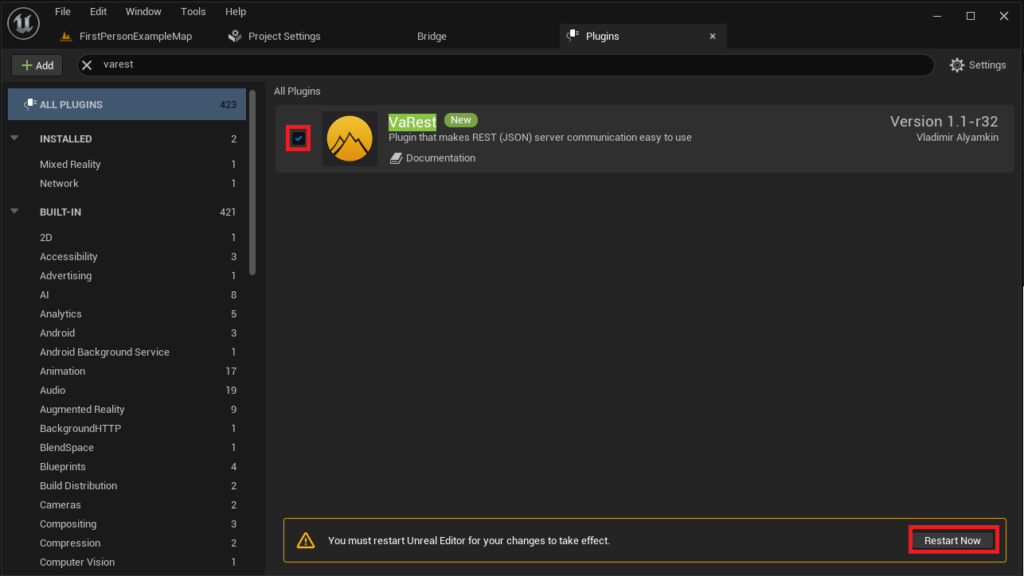
To enable a newly installed plugin, developers must open their Unreal Engine project. Within the editor’s interface, they navigate to the "Edit" menu and then select "Plugins." This action opens the "Plugins" browser, a comprehensive management interface that lists all installed plugins, both active and inactive. The browser features a search bar, allowing developers to quickly locate their desired plugin by typing its name. Upon finding the plugin, a checkbox next to its entry indicates its current activation status. Ticking this checkbox initiates the activation process. The Unreal Engine editor will then typically prompt for a restart, a necessary step for the engine to properly compile and load the new plugin’s modules into the current project. This restart ensures that all new Blueprint nodes, C++ classes, and editor extensions provided by the plugin are correctly initialized and available for use within the development environment. Once the editor restarts, the plugin’s functionalities are fully integrated and accessible to the developer, ready to enhance the project.
Manual Plugin Installation: An Advanced Pathway with Caveats
While the Epic Games Marketplace offers a convenient and secure method, there are scenarios where manual plugin installation becomes necessary. This often applies to experimental plugins, highly specialized internal tools, or community contributions distributed directly by their creators outside of the official marketplace ecosystem. For example, some developers might distribute pre-compiled binaries or source code for their plugins on platforms like GitHub, private forums, or personal websites. A notable example of such a community-driven offering is the "Victory BP Plugin" by Rama, which provides an extensive collection of utility Blueprint nodes. This method offers greater flexibility and direct access to bleeding-edge or niche functionalities but comes with a crucial disclaimer: the responsibility for verifying the plugin’s source, integrity, and compatibility rests entirely with the developer.
Disclaimer and Best Practices for Manual Installation:
The importance of caution cannot be overstated when opting for manual plugin installation. Developers must exercise extreme vigilance against downloading untrusted files or code from unverified sources. Malicious plugins could potentially introduce security vulnerabilities, compromise project files, or even harm the development environment. CouchLearn, and indeed the broader development community, strongly advises downloading Unreal Engine plugins only from reputable sources known for their contributions and trustworthiness. Furthermore, strict compatibility checks are essential. An improperly versioned plugin, designed for a different Unreal Engine iteration, can lead to compilation errors, crashes, or unpredictable behavior within the project. It is imperative to confirm that the downloaded plugin is explicitly compatible with the exact version of Unreal Engine 5 installed on the developer’s system.
The Manual Installation Workflow:
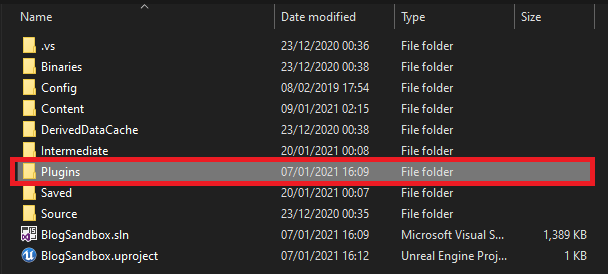
The manual installation process begins by ensuring the target Unreal Engine project has a designated "Plugins" folder within its root directory. If this folder does not exist—which can be the case for new projects or those not yet utilizing local plugins—the developer must create it manually, ensuring it is correctly named "Plugins." This folder serves as the repository for all locally installed extensions.
Next, the downloaded plugin’s folder, which typically contains its source code, binaries, and descriptor files (e.g., .uplugin), is copied directly into this newly created or existing "Plugins" directory. For instance, if installing Rama’s Victory Plugin, the VictoryPlugin folder, specifically tailored for Unreal Engine 5.0, would be placed inside the project’s Plugins folder. This physical placement makes the plugin discoverable by the Unreal Engine editor. The contents of this plugin folder are critical, encompassing all necessary files for the plugin to function correctly, including its module definitions, resources, and any associated C++ or Blueprint assets.
Once the plugin files are correctly placed in the project’s Plugins folder, the subsequent steps mirror the activation process for Marketplace plugins. The developer must open the Unreal Engine project, navigate to "Edit" then "Plugins," and use the search bar to locate the manually installed plugin. After checking the box to enable it, the editor will prompt for a restart to integrate the plugin’s functionalities. This restart ensures that the engine re-scans for available modules, compiles any necessary C++ components (if it’s a source-based plugin and the project is a C++ project), and makes the new features accessible within the Blueprint editor and C++ codebase.
Broader Impact and Implications for the Unreal Ecosystem
The robust plugin ecosystem in Unreal Engine 5 has far-reaching implications, extending beyond mere functional enhancement. It represents a cornerstone of Epic Games’ strategy to foster a dynamic, inclusive, and highly productive development environment.
Innovation and Accessibility: Plugins significantly accelerate innovation by providing developers with pre-built solutions for common and complex tasks. This allows creators to focus on novel gameplay mechanics, unique artistic visions, and experimental interactions rather than reinventing foundational systems. For example, plugins offering advanced UI frameworks, complex AI behaviors, or specialized physics simulations free up developers to explore new genres and experiences. This also directly contributes to greater accessibility, enabling smaller teams and individual creators to compete with larger studios by leveraging sophisticated tools that would otherwise be beyond their resource capabilities. The growth of the marketplace, housing tens of thousands of assets and hundreds of code plugins, is a testament to this democratizing effect.
Efficiency and Workflow Optimization: The availability of well-designed plugins dramatically improves development efficiency. Reusable components reduce redundant work, streamline pipelines, and allow for faster prototyping and iteration. A developer needing to integrate a specific online service, for instance, can utilize a dedicated networking plugin rather than spending weeks coding the integration from scratch. This translates to shorter development cycles and more agile project management. The impact on project timelines can be substantial, often measured in weeks or even months saved for complex integrations.
Community Empowerment and Collaboration: The plugin ecosystem is a powerful expression of community empowerment. Developers who create and share plugins contribute directly to the collective strength of the Unreal Engine community. This symbiotic relationship encourages collaboration, knowledge sharing, and the continuous improvement of the engine’s capabilities. Forums, Discord channels, and dedicated websites often host vibrant discussions around plugin development, offering support and fostering new ideas. Epic Games actively supports this by providing resources, documentation, and a platform for distribution, understanding that a thriving third-party ecosystem enhances the engine’s overall value proposition.
Future Trends and Challenges: As Unreal Engine 5 continues to evolve, so too will its plugin landscape. We can anticipate an increasing number of AI-driven plugins, procedural generation tools, and deeper integrations with external software and hardware. However, challenges remain, particularly concerning plugin compatibility across engine versions and the ongoing need for robust security measures, especially for manually installed components. Epic Games’ commitment to maintaining a stable API for plugins and providing clear migration paths will be crucial for the continued health of this vital ecosystem.
In conclusion, plugins are not merely optional add-ons for Unreal Engine 5; they are integral components that unlock the engine’s full potential, bridging the gap between C++ and Blueprint capabilities, and empowering a diverse global community of creators. Whether acquired through the secure Epic Games Marketplace or integrated manually with due diligence, these extensions are fundamental to accelerating development, fostering innovation, and democratizing access to cutting-edge game creation tools. As the industry continues to push the boundaries of real-time interactive experiences, the role of a dynamic and accessible plugin ecosystem will only grow in importance, solidifying Unreal Engine 5’s position as a leading platform for creative development.
About the Author