The concept of functions, fundamental to all programming paradigms, has found a powerful and accessible implementation within Unreal Engine 5’s Blueprint visual scripting system. These self-contained blocks of logic are not merely a convenience but represent a critical component in the pursuit of efficient, scalable, and maintainable game development, enabling developers to abstract complex operations into reusable units. Their integration within Unreal Engine 5 empowers designers and programmers alike to construct sophisticated game mechanics with enhanced clarity and reduced redundancy, directly addressing the escalating demands of contemporary interactive experiences.
The Foundation of Modular Development: Understanding Blueprint Functions
At its core, a function in programming is a sequence of instructions designed to perform a specific task, which can then be invoked, or "called," from various points within a larger program. This principle of modularity is paramount in managing complexity, ensuring that logic is encapsulated and easily understood. Unreal Engine 5 Blueprints translate this universal concept into a visual language, offering developers a robust framework for creating self-contained pieces of logic that can be executed multiple times from different locations within a Blueprint actor.
Blueprint Functions distinguish themselves by their capacity for both input and output parameters, significantly enhancing their flexibility. This design allows functions to receive specific data, process it according to their internal logic, and then return a computed result. For instance, instead of duplicating intricate damage calculation logic across numerous combat scenarios, a developer can create a single CalculateDamage function. This function would accept parameters such as baseDamage and targetArmor, perform the necessary computations, and return the finalDamage value. Any future adjustments to the damage formula would only require modification within this single function, propagating the changes throughout the entire project instantaneously. This adherence to the "Don’t Repeat Yourself" (DRY) principle is a cornerstone of professional software engineering and is seamlessly facilitated by Blueprint Functions. It is important to note that, by design, a function is typically scoped to a specific Blueprint actor, meaning it primarily operates within the context of that actor.
Historical Context and Evolution of Visual Scripting in Unreal Engine
The journey of visual scripting in Unreal Engine dates back to Kismet in Unreal Engine 3, a pioneering system that allowed designers to string together actions and events visually. While powerful for its time, Kismet had limitations in terms of reusability and complex data handling. The introduction of Blueprints in Unreal Engine 4 marked a significant leap forward, offering a full-fledged visual scripting language that mirrored the capabilities of C++ more closely, including support for classes, inheritance, and, crucially, functions.
With Unreal Engine 5, Blueprints, including their function capabilities, have been further refined to support larger, more intricate projects and leverage the engine’s next-generation features. The increasing complexity of modern video games, characterized by expansive open worlds, intricate AI systems, and dynamic gameplay mechanics, necessitates tools that can handle this complexity without sacrificing development speed or maintainability. Visual scripting, particularly through robust function implementation, has played a pivotal role in democratizing game development, enabling technical artists, designers, and even non-programmers to contribute directly to gameplay logic without delving into C++ code. This broadens team capabilities and fosters a more collaborative development environment.
Implementing Core Logic: The Process of Function Creation
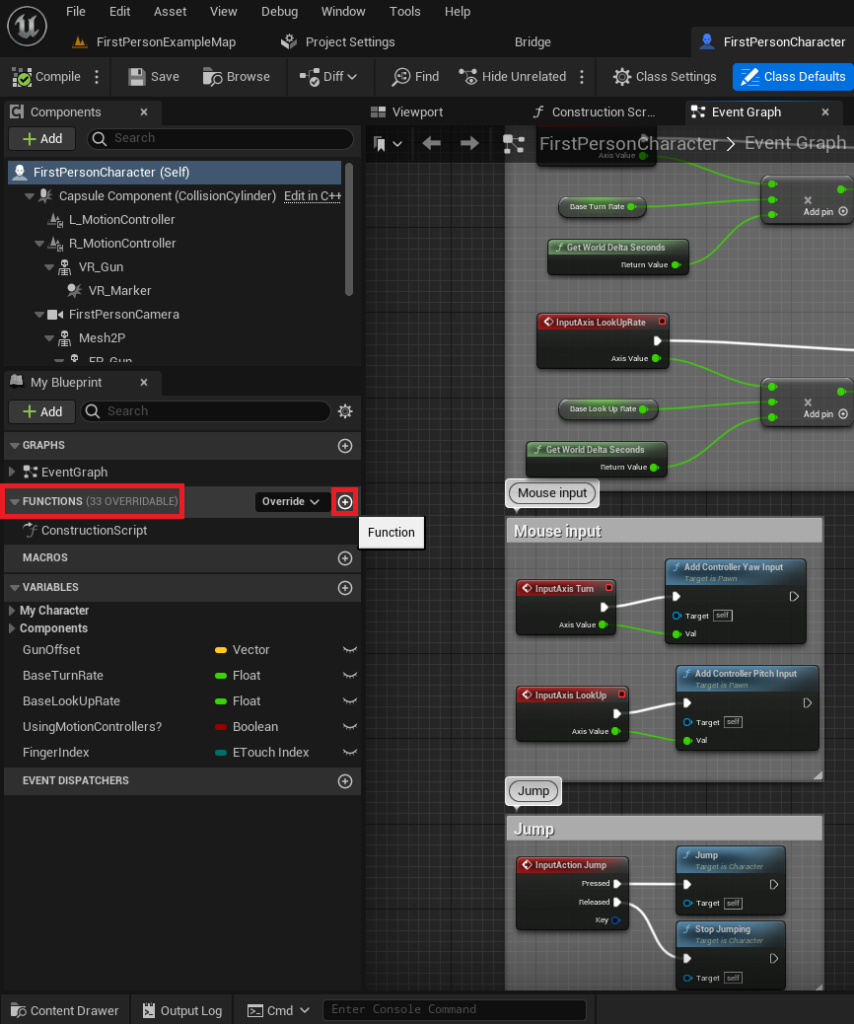
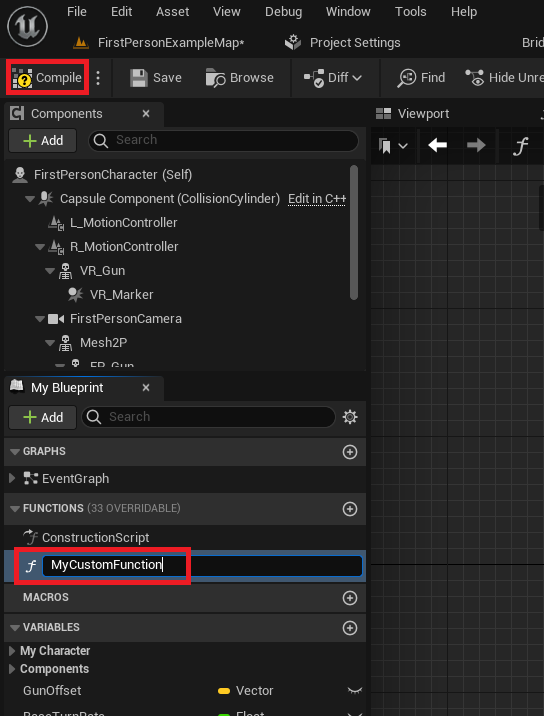
The process of establishing a Blueprint Function within Unreal Engine 5 is designed to be intuitive, commencing within the Blueprint Editor of a chosen actor. For illustrative purposes, consider the FirstPersonCharacter Blueprint from the First Person Shooter template, a common starting point for many projects. Within the editor’s left-hand panel, a dedicated "Functions" section serves as the repository for all functions associated with that specific Blueprint. A new function is initiated by a simple click on a designated "plus" icon, prompting the developer to assign a name. Adhering to clear and descriptive naming conventions is strongly advised to maintain project clarity and facilitate collaboration, especially in large-scale productions where dozens or hundreds of functions might be present. Upon naming and compiling the Blueprint, the new function is formally integrated, ready for logical construction.
- Initializing Functionality: The "Print String" Example
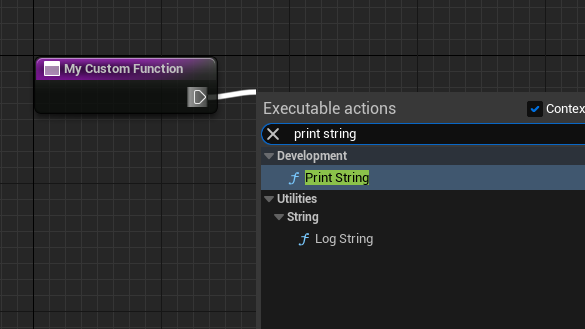
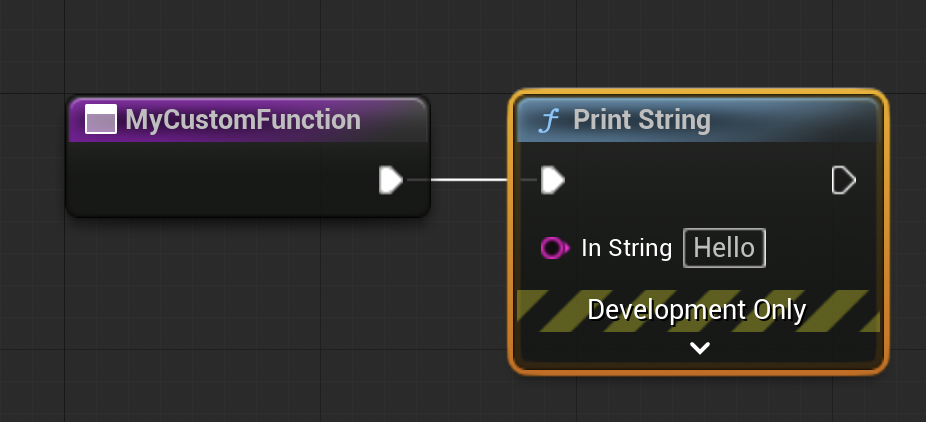
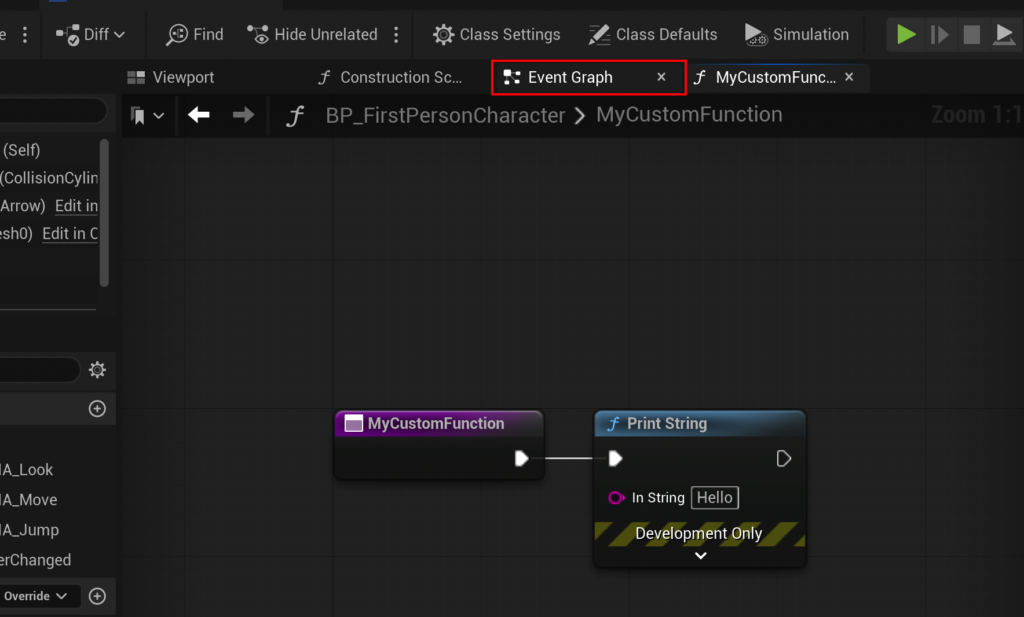
To demonstrate basic functionality, a common introductory step involves configuring a function to print a string to the screen or output log. This is achieved by dragging an "exec pin" (a white, sideways triangle) from the function’s entry node into the graph area. This action opens a contextual menu, allowing developers to select from a vast library of existing Blueprint nodes (many of which are themselves functions). Selecting "Print String" automatically connects this node, ensuring sequential execution. When the custom function is "called," it will then execute thePrint Stringnode, providing immediate feedback in the game’s output log, a valuable tool for debugging and verification. The terminology "calling" or "running" a function is used interchangeably in development circles, both referring to the act of initiating its encapsulated logic.
Orchestrating Execution: Integrating Functions into the Event Graph
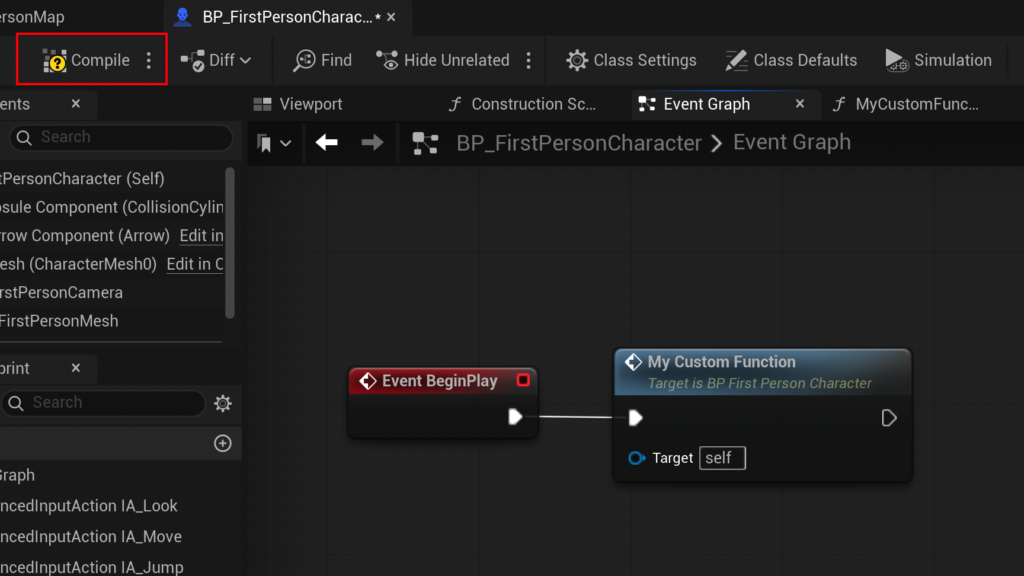
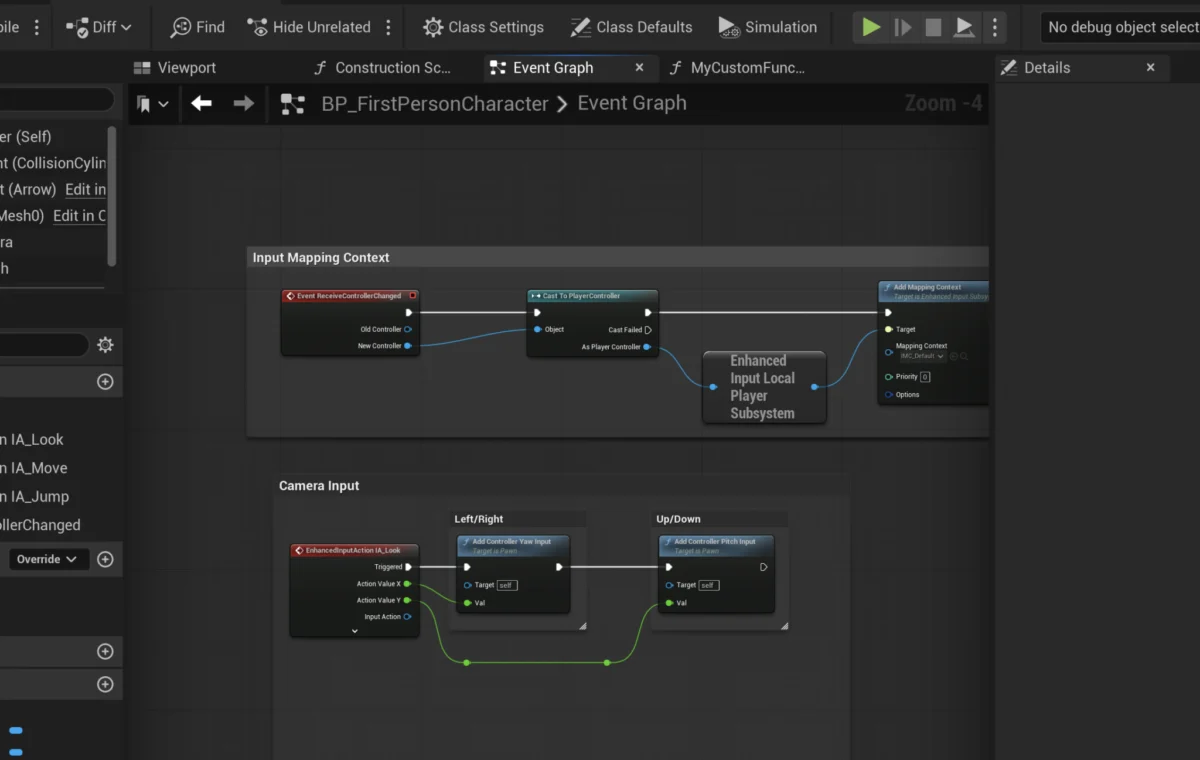
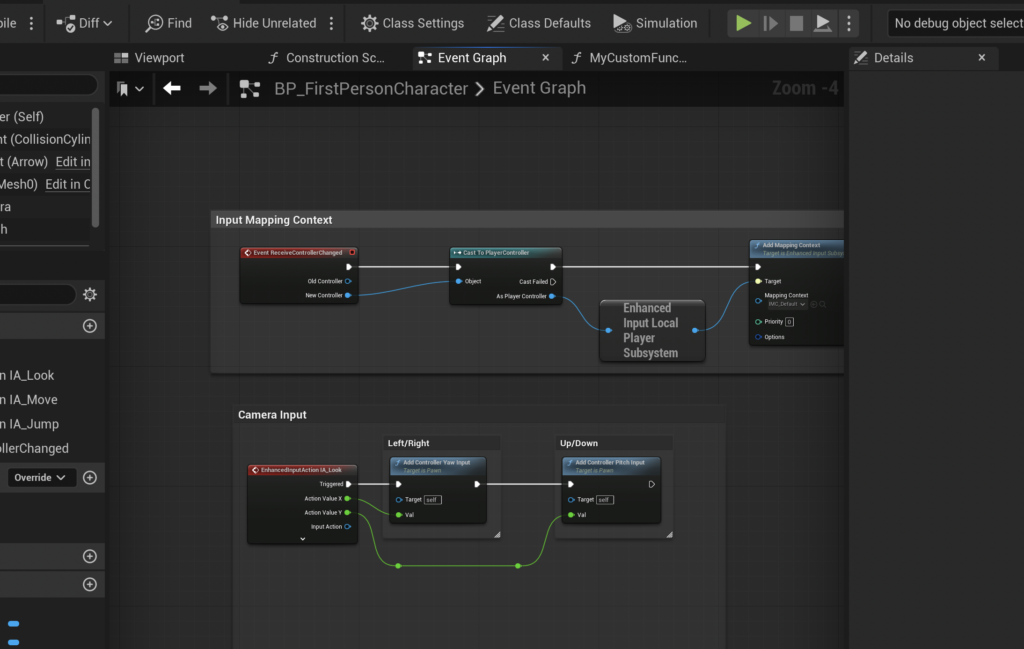
Once a function is defined, its utility is realized when it is called from the Blueprint’s Event Graph, the primary canvas for event-driven logic. The Event Graph differs from functions in that it typically reacts to external stimuli (events) and cannot return values directly, though it can execute special asynchronous nodes that functions cannot, such as Delay nodes. A common trigger for initial game logic is the Event BeginPlay, which is automatically invoked when an actor is spawned into the game world or when the game level begins.
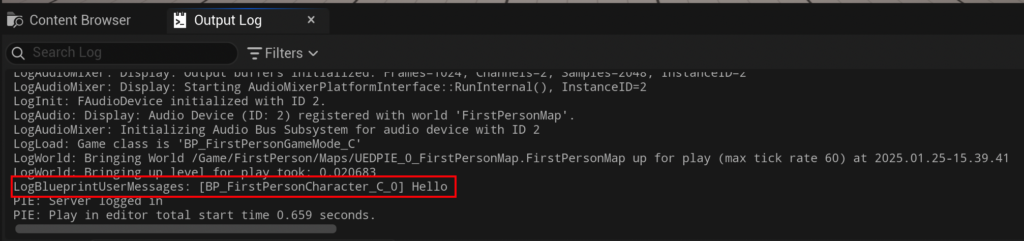
- Event-Driven Execution: Triggering Functions via
BeginPlay
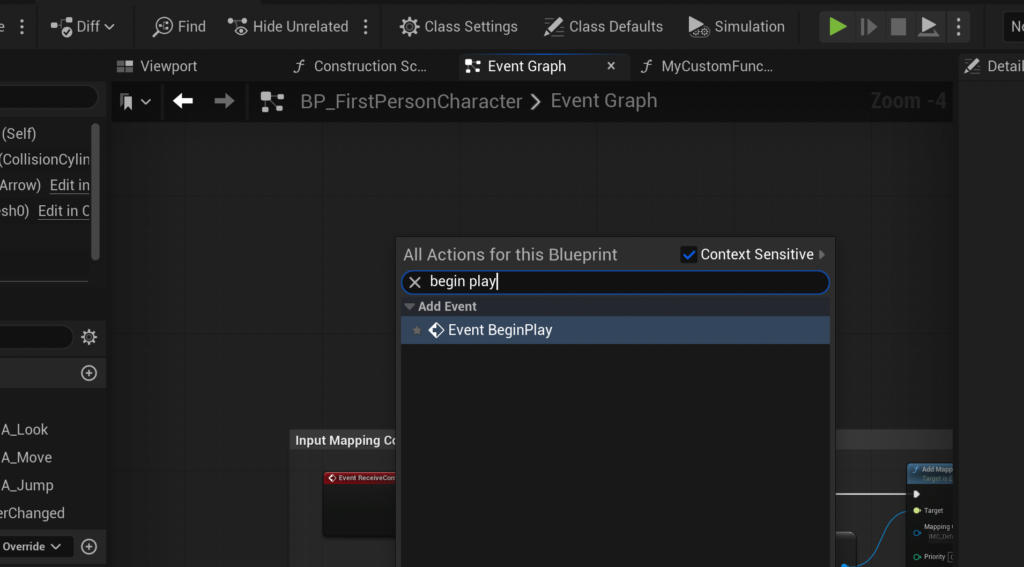
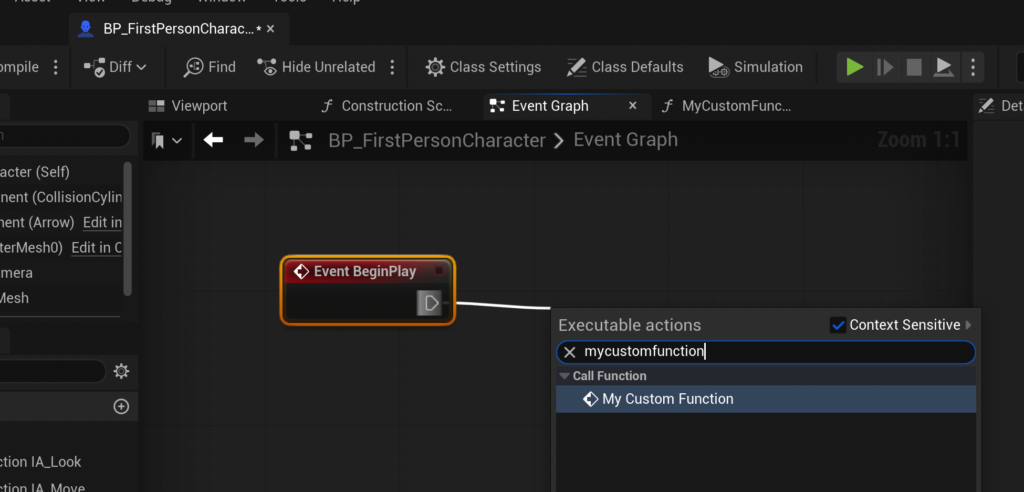
To integrate a newly created function, developers navigate to the Blueprint’s Event Graph. Here, anEvent BeginPlaynode can be placed. From theexec pinof theEvent BeginPlaynode, a connection is dragged into the graph, and the custom function (e.g.,MyCustomFunction) is searched for and selected. This establishes a direct link: whenEvent BeginPlayfires, it triggers the custom function. The final step involves compiling and saving the Blueprint, making the changes active. Upon launching the game, the output log will display the string defined within the function, confirming successful execution. This simple setup illustrates the power of events to initiate complex, modularized processes.
Advanced Functionality: Parameters, Returns, and Complex Logic
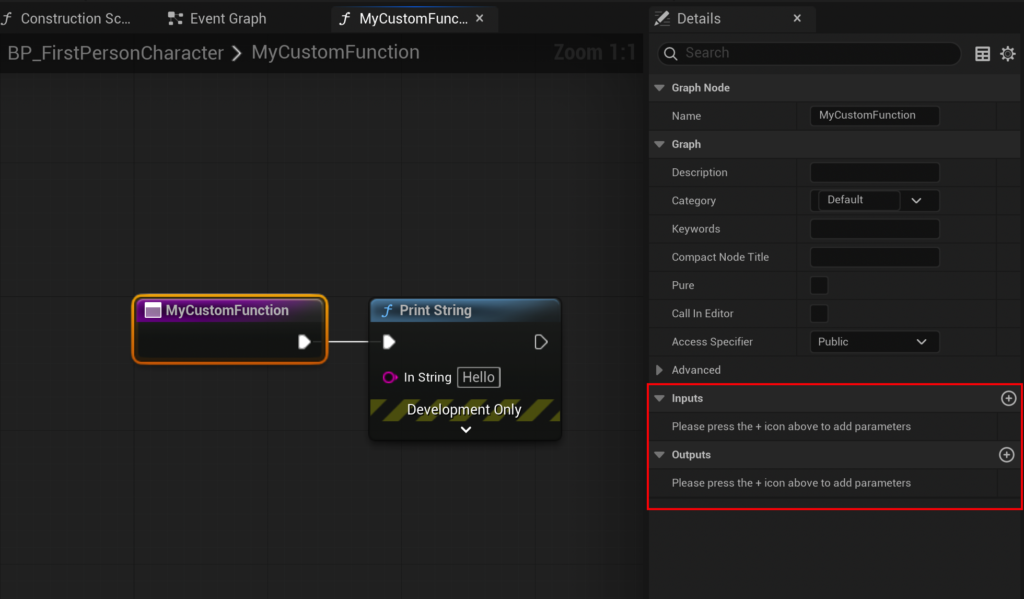
Beyond simple execution, the true power of Blueprint Functions lies in their ability to process and return data, making them indispensable for complex gameplay systems.
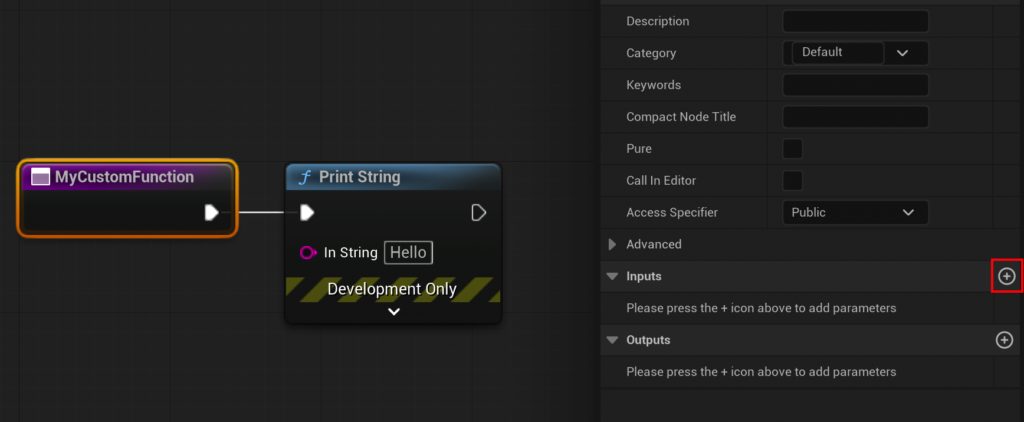
-
Enhancing Flexibility: Input and Output Parameters
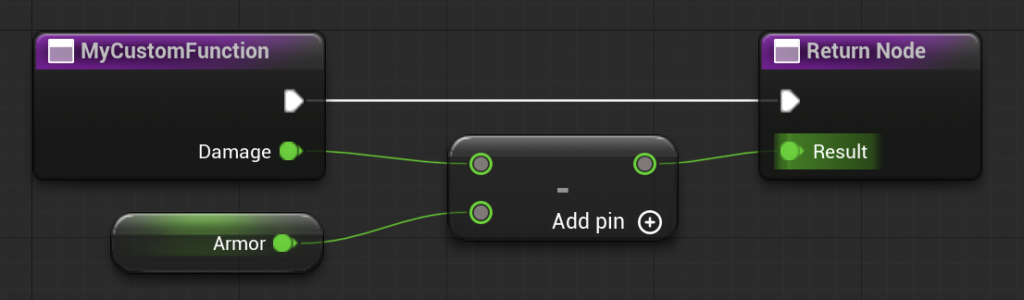
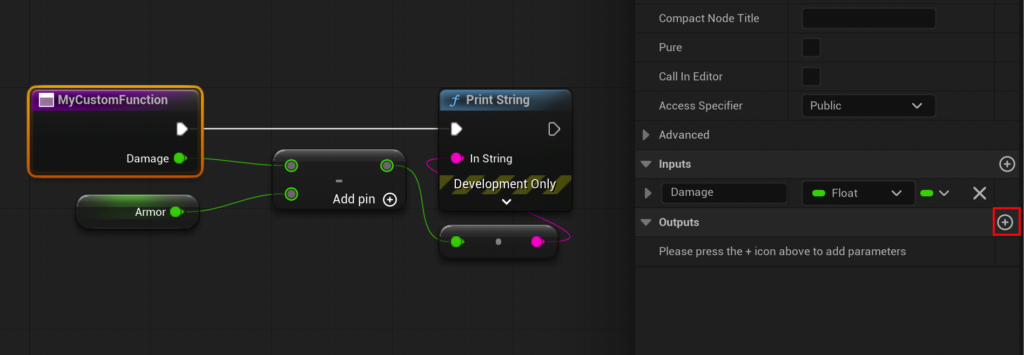
To enable a function to perform calculations based on dynamic data, input parameters are essential. By selecting the function’s entry node within its graph, the "Details" panel reveals "Inputs" and "Outputs" sections. Adding an input parameter, such as a "Float" variable named "Damage," allows the function to receive numerical data when called. Similarly, an output parameter, also a "Float" named "Result," configures the function to return a value. The creation of an output parameter automatically generates a "Return Node" in the function graph, serving as the egress point for computed values. This structural design ensures that functions are not isolated operations but integral parts of data flow within a Blueprint.
-
Building Robust Systems: The
CalculateDamageParadigm
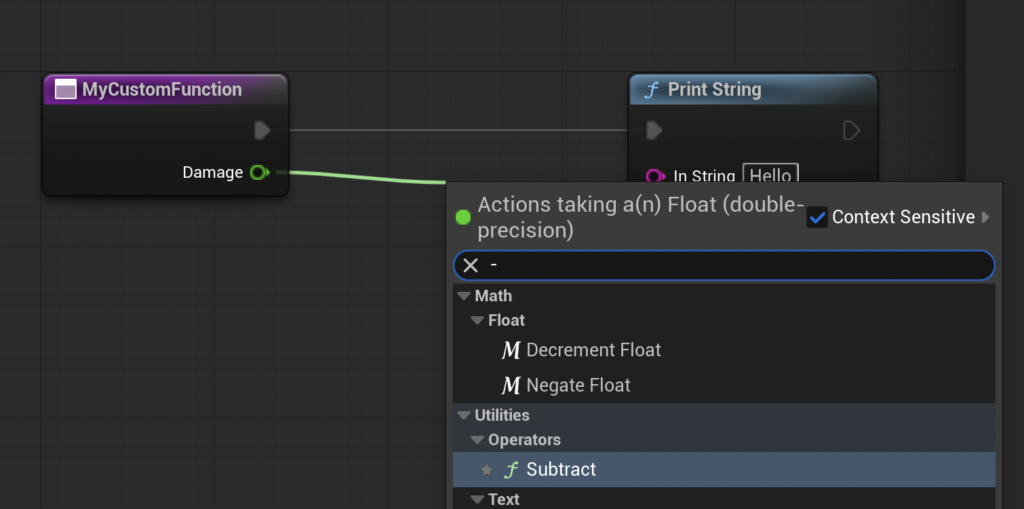
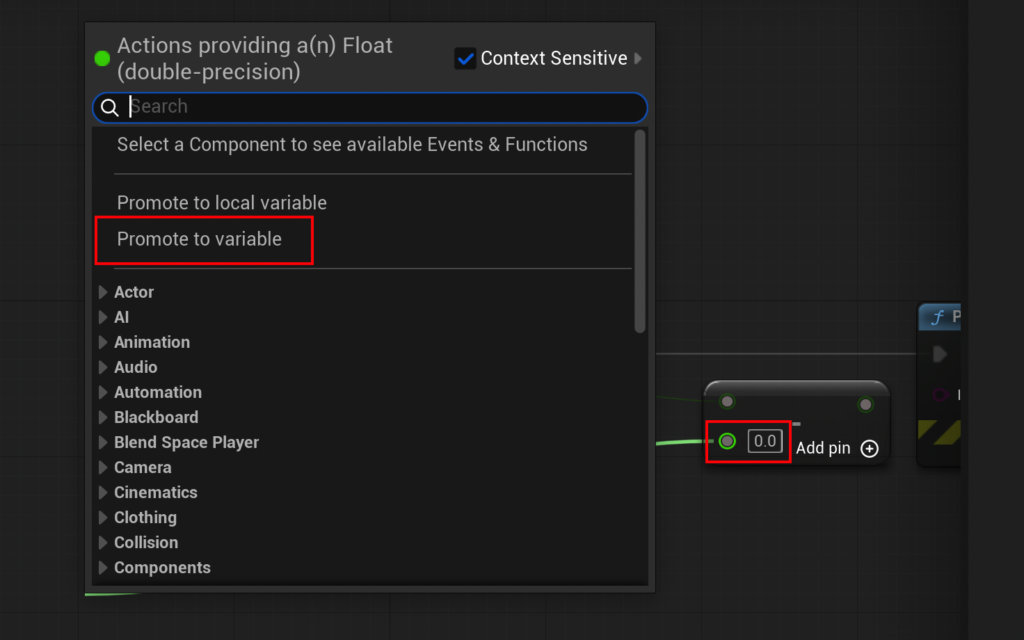
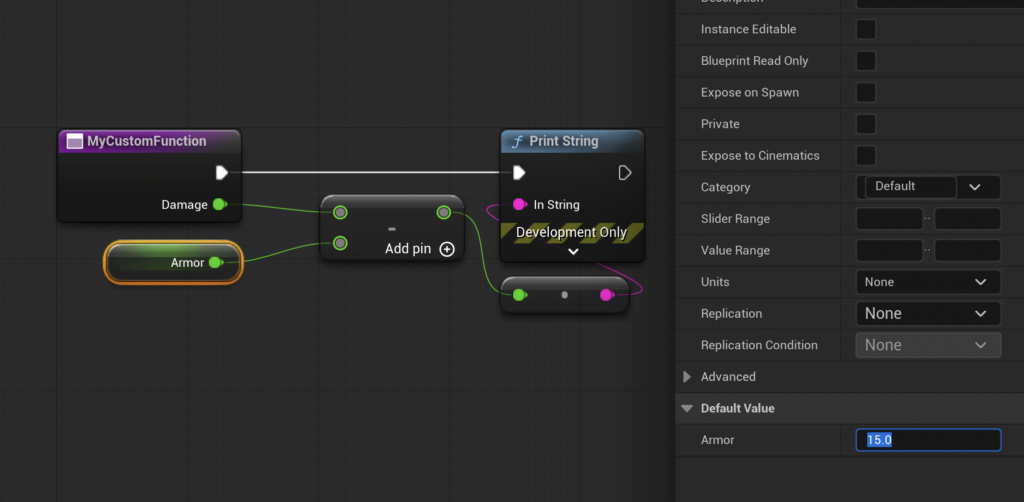
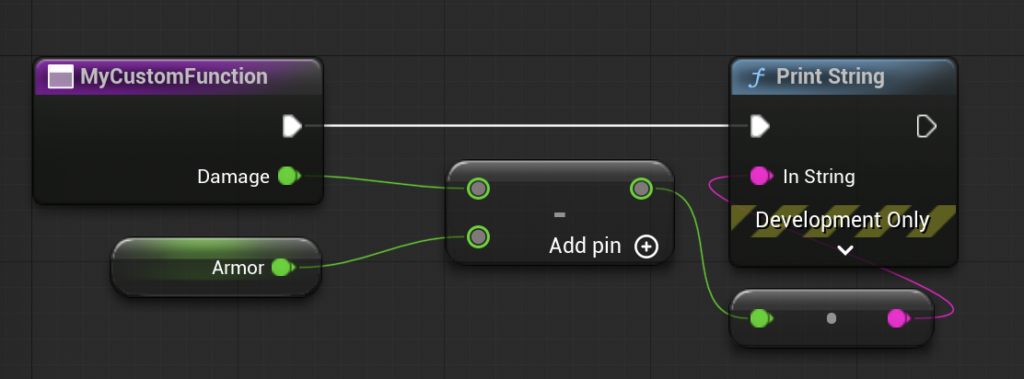
Expanding on theCalculateDamageexample, the function can be refined to subtract anArmorvalue from the incomingDamage. This involves connecting the "Damage" input pin to a "Float – Float" (subtract) node. A new variable, "Armor," can be promoted directly from the second input of the subtract node, allowing developers to set a default or dynamic armor value (e.g., 15.0). The output of this subtraction is then connected to the "Result" pin of the "Return Node." This sequence of operations defines a clear, self-contained calculation.
When thisCalculateDamagefunction is subsequently called from the Event Graph, it will appear as a single node with visible input and output pins. ADamagevalue can be provided (e.g., 20.0), and theResultoutput pin can be connected to aPrint Stringnode for verification. Upon execution, the game’s output log will display the calculated final damage (20 – 15 = 5), demonstrating the function’s capacity to process inputs and return meaningful outputs.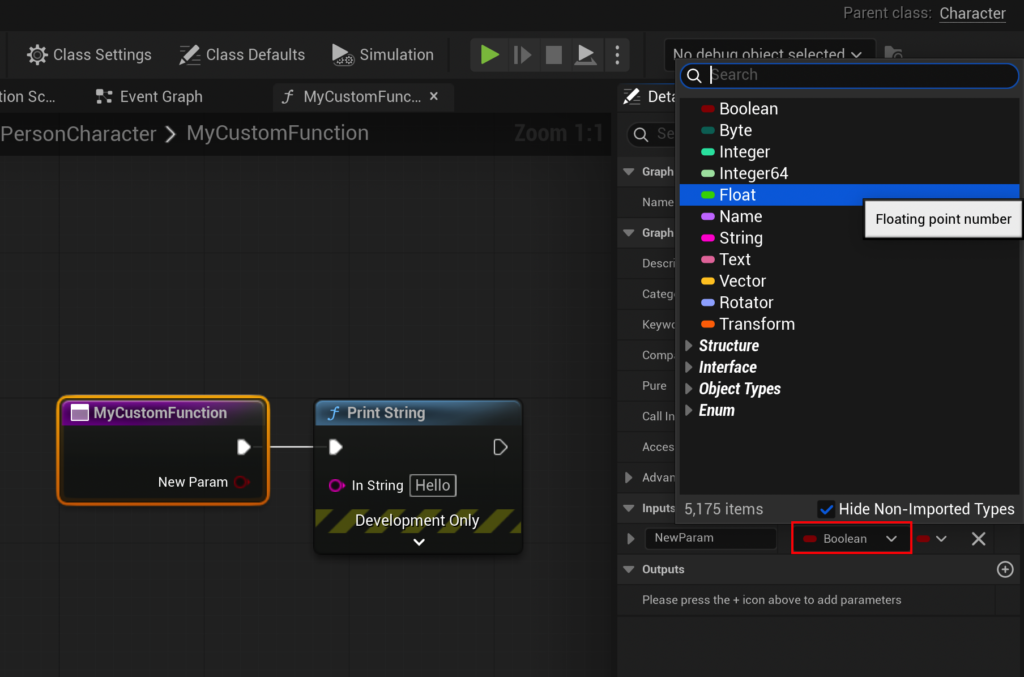
-
Important Note on Advanced Functionality: It is crucial for developers to understand the distinction between Blueprint Functions and Custom Events, particularly regarding asynchronous operations. Blueprint Functions are inherently synchronous; they execute their entire logic immediately upon being called. Consequently, they do not support nodes that introduce delays or asynchronous behavior, such as
Delaynodes. For scenarios requiring timed operations or pausing execution, Custom Events are the appropriate choice. This architectural design ensures that Blueprint Functions remain predictable and performant for pure computational or sequential logic, while Custom Events handle more complex, time-dependent workflows. Understanding this limitation is key to designing robust and efficient Blueprint logic in Unreal Engine.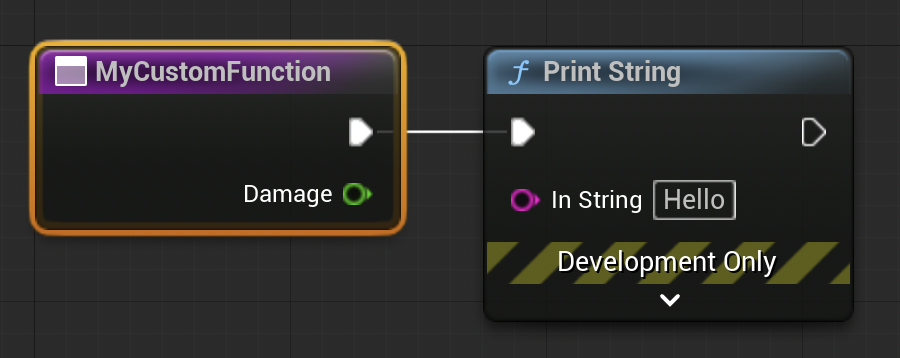
Industry Impact and Developer Perspectives
The widespread adoption and continuous refinement of Blueprint Functions in Unreal Engine 5 underscore their significant impact on the game development industry. Developers widely acknowledge that these modular units drastically improve code readability and maintainability. In large projects, where multiple team members contribute to a single Blueprint, well-defined functions prevent spaghetti code and ensure that logic is encapsulated, making it easier to debug, update, and understand. This leads to faster iteration times and reduced development costs.
Industry analysts and development teams frequently highlight how Blueprint Functions foster better collaboration. Designers can often leverage pre-built functions without needing deep programming knowledge, while programmers can create robust, tested functions that designers can then integrate into gameplay systems. This separation of concerns allows each discipline to work more effectively within their area of expertise. Furthermore, the reusability offered by functions is a powerful antidote to technical debt, ensuring that foundational mechanics, once perfected, can be deployed consistently across various parts of a game. This is particularly vital in the context of live service games or titles with extensive post-launch content, where continuous updates and expansions are the norm. The visual nature of Blueprints, coupled with the modularity of functions, also serves as an excellent prototyping tool, allowing ideas to be rapidly tested and refined before committing to more performance-intensive C++ implementations.
The Future of Game Development with Modular Blueprints
As game development continues its trajectory toward greater fidelity, complexity, and scale, the role of efficient and accessible development tools becomes ever more critical. Unreal Engine 5’s Blueprint Functions stand as a testament to the power of modular programming adapted for visual scripting environments. They are not merely a feature but an essential methodology for structuring game logic, ensuring that projects remain manageable, collaborative, and adaptable in the face of evolving design requirements and technological advancements.
The ongoing emphasis on creating reusable components and clear logical structures, heavily supported by Blueprint Functions, will continue to shape the workflows of studios ranging from independent developers to AAA powerhouses. By providing a clear, visual path to encapsulate, manage, and execute complex logic, Blueprint Functions empower a broader spectrum of creators to realize their visions within the Unreal Engine ecosystem, solidifying their status as a cornerstone of modern game development efficiency and scalability. The foundation laid by understanding and utilizing these functions correctly prepares developers to tackle the most ambitious projects and contribute to the vibrant future of interactive entertainment.
About the Author