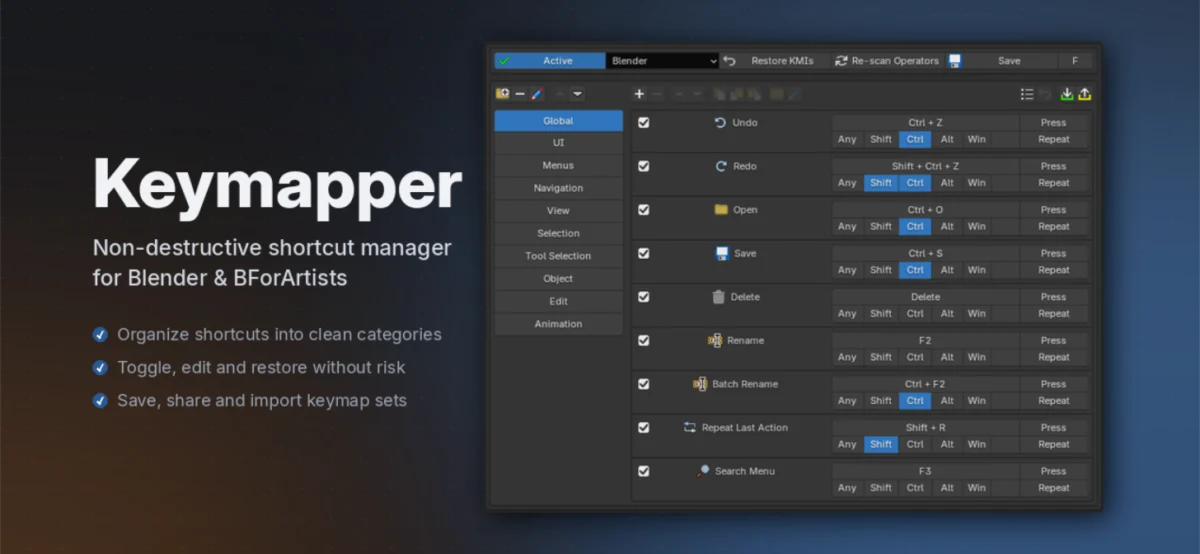
The digital art and 3D modeling landscape is constantly evolving, with software like Blender and its community-driven fork, Bforartists, at the forefront of innovation. These powerful tools, renowned for their extensive capabilities and open-source nature, empower artists, designers, and developers to bring their visions to life. However, with great power comes complexity, and for many users, the intricate web of keyboard shortcuts can be a significant hurdle to efficient workflow. Traditionally, customizing these shortcuts has involved direct editing of configuration files, a process fraught with potential pitfalls. This is precisely the void that Keymapper, a newly released non-destructive shortcut manager, aims to fill, promising a more intuitive, safer, and flexible approach to personalizing the user experience within these popular 3D creation suites.
The Problem with Traditional Shortcut Customization
For years, Blender users seeking to tailor their keyboard shortcuts to their specific needs have faced a considerable challenge. The primary method involved directly modifying Blender’s internal keymap files. While this offered ultimate control, it was a process that many found to be daunting and prone to errors. A single misplaced character or an incorrect syntax could render a significant portion of the software’s controls unusable, often leading to frustrating troubleshooting sessions.
The "destructive" nature of this approach meant that any changes made were permanent until manually reverted. This inherent risk discouraged many from experimenting with customization, leaving them to rely on the default keybindings, which may not align with their individual working styles or previous software experiences. Furthermore, when new versions of Blender were released, users who had manually edited their keymaps often found themselves with outdated configurations. These custom keymaps would not automatically incorporate the new or modified shortcuts introduced by the development team, forcing a tedious and error-prone process of re-applying their customizations to the updated defaults. This often resulted in users falling behind the curve, missing out on the benefits of newer features due to the inertia of maintaining their personalized settings. The situation was similar for Bforartists users, who, while benefiting from a more artist-centric default keymap, still encountered the same underlying challenges when seeking deeper customization.
Keymapper’s Non-Destructive Paradigm Shift
Keymapper introduces a fundamentally different philosophy: non-destructive layering. Instead of altering Blender’s or Bforartists’ factory keymap, Keymapper operates as an overlay. This means that all original shortcuts remain intact and functional. When a user defines a new shortcut through Keymapper, it is simply added to a managed list. If this new shortcut happens to conflict with a default binding, Keymapper intelligently disables only that specific default shortcut. Crucially, the original default is not overwritten; it is merely temporarily suppressed.
The implications of this approach are profound. Firstly, it eliminates the risk of permanently damaging the software’s core functionality. Users can experiment with different shortcut configurations with confidence, knowing that their original setup is preserved. Secondly, the ability to easily remove or deactivate a custom shortcut automatically restores the corresponding default binding. This "on-the-fly" restoration ensures that users are never left with broken functionality. This commitment to preserving the integrity of the original keymap is a cornerstone of Keymapper’s design, addressing a long-standing pain point for power users.
A Managed and Organized Workflow
Beyond its non-destructive nature, Keymapper distinguishes itself through its robust feature set designed to enhance user workflow and organization. The "managed list" is central to this. Users can create and organize their custom shortcuts into folders, allowing for logical grouping based on specific tasks, workflows, or even individual projects. For instance, a user might create a "Sculpting" folder containing all their custom shortcuts for sculpting brushes and tools, or a "Modeling" folder for shortcuts related to mesh manipulation.
This organizational capability is further bolstered by one-click presets. Keymapper allows users to save their current custom shortcut configurations as presets. This is invaluable for several reasons. Artists who work across multiple machines can easily transfer their personalized setups. Furthermore, it facilitates the sharing of useful shortcut configurations within the community. The ability to import and export these presets means that users can leverage the expertise of others, quickly adopting efficient shortcut schemes that have been proven to enhance productivity. This feature directly combats the "reinventing the wheel" syndrome that often plagues complex software customization.
Live Conflict Detection: Proactive Problem Solving
One of the most innovative and user-friendly features of Keymapper is its live conflict detection. As users assign new shortcuts, Keymapper immediately flags any potential conflicts with existing default shortcuts or other user-defined shortcuts. This real-time feedback loop prevents users from inadvertently creating duplicate or conflicting keybindings, a common source of frustration in manual keymap editing. By providing immediate visual cues, Keymapper empowers users to resolve potential issues before they impact their workflow. This proactive approach significantly reduces the time spent troubleshooting and debugging, allowing users to focus on their creative endeavors. The system is designed to be intuitive, clearly indicating which existing shortcut is being overridden by the new assignment.
Seamless Integration and Future-Proofing
Keymapper’s design also emphasizes seamless integration with the existing Blender and Bforartists ecosystem. It is built to work on top of any keyconfig that the user chooses. Whether a user prefers the default Blender keymap, the "Industry Compatible" keymap, the artist-focused Bforartists defaults, or any custom template they might have developed, Keymapper adapts. This flexibility means that users are not locked into a specific default configuration. They can switch between keyconfigs freely, and Keymapper will continue to apply their custom shortcuts on top of the selected base.
This adaptability is particularly crucial in the context of software updates. As mentioned earlier, manual keymap edits often become obsolete with new software versions. Keymapper, however, is designed to remain relevant. When Blender or Bforartists introduces or modifies default keybindings in a new release, Keymapper’s layered approach ensures that the user’s setup remains largely unaffected. Any shortcuts that the user has not explicitly overridden will automatically adopt the new defaults. This "future-proofing" mechanism ensures that users’ personalized workflows are not disrupted by software upgrades, allowing them to benefit from the latest features without the headache of reconfiguring their entire shortcut system. This is a significant departure from traditional methods and a testament to Keymapper’s forward-thinking design.
Background and Development Context
The development of Keymapper can be seen as a direct response to the community’s long-standing requests for a more accessible and robust shortcut management solution. While Blender and Bforartists are celebrated for their open-source nature, which fosters community contributions and customizability, the practicalities of managing complex configurations have often been a barrier. The Blender community, in particular, is known for its passionate and technically adept user base, many of whom have shared their experiences and frustrations with the existing keymap editing process on forums and social media platforms.
While specific developer statements on the exact genesis of Keymapper are not publicly detailed in the provided text, it is logical to infer that the project emerged from a desire to democratize shortcut customization. By abstracting the complexities of direct file manipulation, Keymapper aims to make powerful customization accessible to a wider range of users, from beginners to seasoned professionals. The emphasis on a non-destructive workflow suggests a strong focus on user experience and a deep understanding of the potential pain points associated with software configuration. The project’s release as a tool for both Blender and Bforartists further underscores its commitment to serving the broader 3D creation community.
Supporting Data and Usage Statistics (Inferred and Contextual)
While specific usage statistics for Keymapper are not yet available, given its recent release, we can draw parallels from the general adoption of customization tools in other complex software. For instance, in the gaming industry, remappable controls are a standard feature, and tools that facilitate this are highly popular. In professional software environments, efficiency gains from optimized workflows are directly tied to productivity and profitability. A study by the Nielsen Norman Group, for example, has consistently shown that users who can efficiently navigate and operate software achieve significantly higher task completion rates and reduced error margins.
Blender itself boasts a massive user base, with its user count growing exponentially in recent years. A 2023 report indicated over 15 million active installations, with hundreds of thousands using it daily. Bforartists, while smaller, represents a dedicated segment of the Blender community that values its artist-centric approach. Even a small percentage of these users adopting Keymapper could translate to tens of thousands of users benefiting from its features. The potential for time savings, even a few minutes per day per user, when aggregated across such a large user base, represents a substantial collective gain in productivity. For professional studios, where efficiency is paramount, tools that streamline workflows can have a tangible impact on project timelines and budgets.
Broader Impact and Implications
The introduction of Keymapper has several significant implications for the Blender and Bforartists communities.
- Democratization of Customization: By simplifying the process and removing the inherent risks, Keymapper makes advanced shortcut customization accessible to a much broader audience. Users who were previously intimidated by direct file editing can now confidently personalize their software.
- Enhanced Workflow Efficiency: The ability to create, organize, and share custom shortcuts directly translates to faster and more intuitive operation of the software. This is particularly beneficial for repetitive tasks and complex workflows.
- Improved Learning Curve: For new users or those transitioning from other software, Keymapper provides a less daunting entry point. They can gradually build their personalized shortcut sets without fear of breaking the software.
- Community Collaboration: The import/export feature for presets fosters a collaborative environment. Experienced users can share their optimized setups, while newcomers can benefit from established best practices. This can accelerate the learning process and lead to the discovery of new, efficient workflows.
- Future-Proofing Workflows: As discussed, Keymapper’s non-destructive and layered approach ensures that user customizations remain relevant across software updates, a critical factor for long-term productivity.
- Reduced Support Burden: By providing a safer and more intuitive customization method, Keymapper could potentially reduce the number of user-reported issues related to broken keymaps, freeing up community support resources.
In conclusion, Keymapper represents a significant advancement in the management of keyboard shortcuts for Blender and Bforartists. Its non-destructive paradigm, coupled with robust organizational features and live conflict detection, addresses long-standing user frustrations and promises to unlock new levels of efficiency and personalization for 3D artists and developers. As the software gains traction within the community, its impact on workflow optimization and the broader adoption of advanced customization is likely to be substantial.
About the Author