The itch.io application has received a substantial update, introducing a highly anticipated graphical user interface (GUI) for its powerful build upload tool, Butler. This significant enhancement empowers developers to push game updates directly within the app, bypassing the command-line interface (CLI) previously required. The integration, found in the newly added "Upload" section of the app, marks a pivotal moment for accessibility and efficiency in indie game distribution on the platform, promising to democratize the update process for a broader range of creators.
Background: The itch.io Ecosystem and Butler’s Genesis
itch.io, founded in 2013, has carved out a unique and respected niche in the digital storefront landscape. Unlike larger, more corporate platforms, itch.io is renowned for its strong focus on independent game developers, offering a flexible, creator-centric environment with customizable storefronts, diverse payment options, and a highly supportive community. Its commitment to empowering developers extends to its toolset, where efficiency and control are paramount.
Central to this commitment has been Butler, itch.io’s proprietary command-line interface for uploading builds. Introduced several years ago, Butler was designed to address a critical challenge in game distribution: the cumbersome and bandwidth-intensive nature of delivering frequent updates. Traditional methods often involve uploading entire new game builds, even for minor changes, leading to significant data transfer costs for developers and lengthy download times for players. Butler revolutionized this by implementing "delta patching," a sophisticated technology that only uploads and downloads the changes between game versions.
When a developer pushes a build with Butler, the tool intelligently compares the new files with the previous version on the specified channel. It then creates a "patch" containing only the modified, added, or deleted data. This patch is then transmitted to itch.io’s servers, which further optimize and compress it. When players update their games via the itch.io app, they too only download these optimized patches, drastically reducing download sizes and times. For a game with a base size of several gigabytes, a typical patch might be mere megabytes, representing an enormous saving in bandwidth for both developers and users. Industry data suggests that delta patching can reduce update sizes by anywhere from 70% to 95%, depending on the nature of the changes, translating to faster iteration cycles and a smoother player experience.
While incredibly powerful and efficient, Butler’s command-line nature presented a barrier to entry for many. Developers who were not accustomed to using a terminal, or who found the syntax and workflow intimidating, often resorted to less efficient manual uploads or sought external tools. This left a segment of itch.io’s diverse developer base unable to fully leverage one of the platform’s most advanced features.
The Evolution of Developer Tools: From CLI to GUI
The decision to integrate Butler into the itch.io app via a GUI represents a strategic move to bridge this usability gap. For years, the community had expressed a desire for a more accessible way to harness Butler’s capabilities. The itch.io development team, known for its responsiveness to developer feedback, has meticulously crafted an intuitive interface that retains Butler’s power while vastly simplifying its operation.
The official rollout of this feature commenced with app version v26.12.0, which became available to users through the app’s automatic update mechanism. This release was not merely an incremental improvement but a fundamental shift in how developers interact with the platform’s core distribution infrastructure. An itch.io spokesperson, in an inferred statement regarding the update, emphasized the company’s long-standing commitment to "empowering creators with robust yet accessible tools." They elaborated, "We understand that not every developer is a command-line wizard, and this integration ensures that the benefits of Butler’s efficient patching system are available to everyone, regardless of their technical comfort level. Our goal is to remove friction, allowing developers to focus more on creation and less on the complexities of distribution."
This development aligns with broader trends in software development, where tools are increasingly designed with user experience at the forefront. As game development becomes more democratized, platforms like itch.io play a crucial role in providing professional-grade tools that are simple enough for hobbyists and powerful enough for seasoned professionals.
Key Features of the New Upload Section
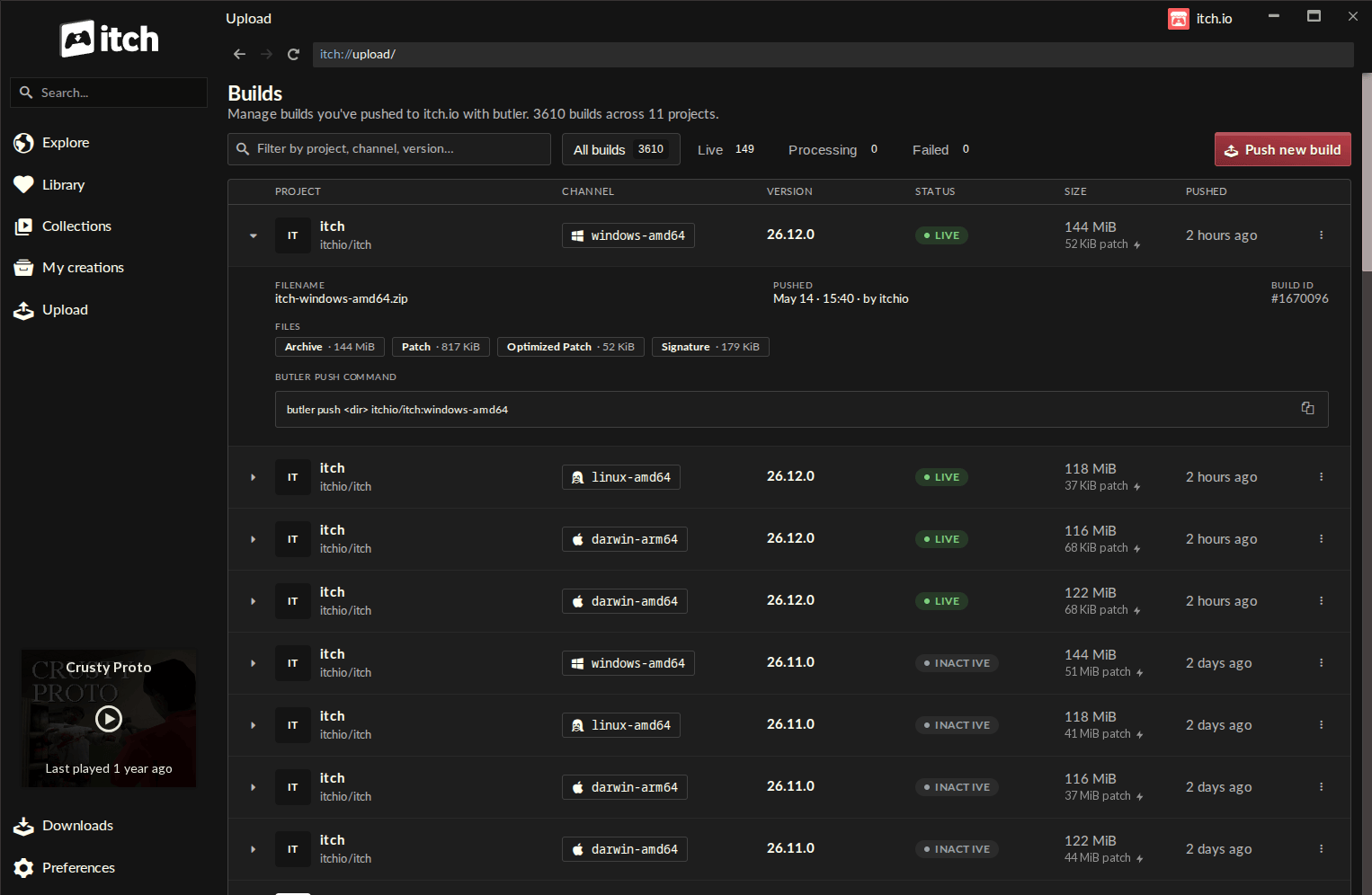
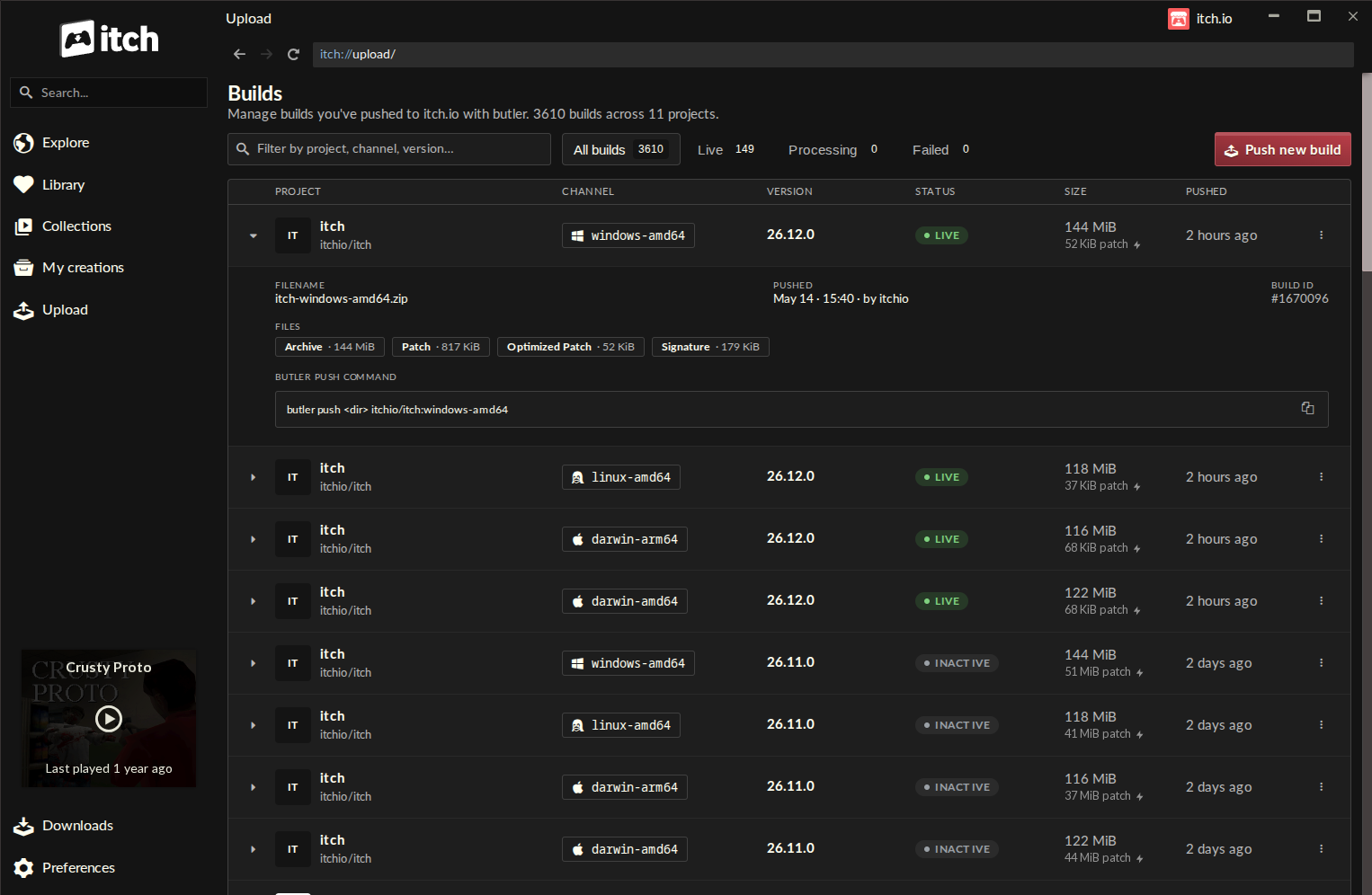
The newly introduced "Upload" section within the itch.io app serves as the central hub for this enhanced functionality. Upon navigating to this section, developers are presented with the "Builds" page, a comprehensive dashboard designed for oversight and management.
The Builds Page: A Centralized Hub
The Builds page offers an at-a-glance overview of every build associated with projects editable by the logged-in account. Each entry in this list provides critical information, including:
- Project Name: Clearly identifying the game or software title.
- Channel: The specific distribution channel (e.g.,
windows-beta,linux-arm64,macos-preview), allowing developers to manage multiple versions for different platforms or audiences. - Version: The unique identifier for the build, crucial for tracking progress and coordinating updates.
- Status: Indicating whether the build is live, processing, or has encountered issues.
- File Size: The total size of the build, providing a quick reference for resource management.
- Push Timestamp: When the build was last pushed, offering a clear chronology of updates.
This centralized view significantly enhances transparency and control, moving beyond the disparate logs or manual tracking methods developers might have used previously.
Pushing a New Build: The Intuitive Workflow
The core of the new functionality resides in the "Push new build" dialog, accessible from the Builds screen. This guided workflow simplifies the entire upload process:
- Project Selection: Developers first select the project to which they wish to upload the build from a dropdown list.
- Channel Management: They can either choose an existing channel or type a new name to create a new one on the fly, offering flexibility for managing different versions or platforms.
- Optional Versioning: An optional field allows developers to set a specific version string, aiding in build tracking and communication with players.
- File Input: The most significant change is the ability to simply drag and drop a folder containing the game files or a
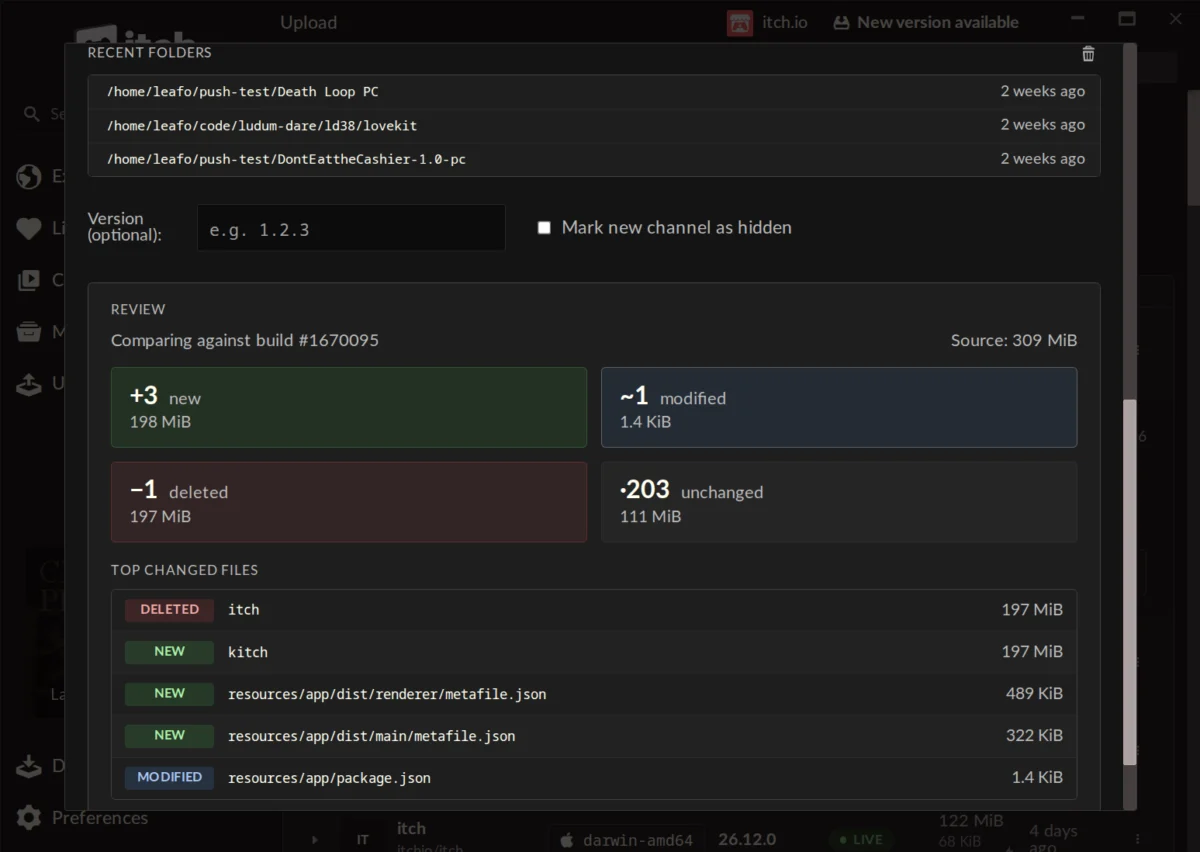
.ziparchive directly into the dialog. This eliminates the need for complex file path commands. The app also includes a "recent folders" list, allowing for quick re-selection of frequently used build directories.
Pre-upload Preview: Error Prevention and Insight
A standout feature of the new GUI is the pre-upload preview. Before initiating the actual upload, developers can generate a detailed report of what has changed since the last build on that channel. This preview categorizes changes into:
- New Files: Files added since the last build.
- Modified Files: Files whose content has changed.
- Deleted Files: Files removed from the build.
- Unchanged Files: Files that remain identical.
Each category is accompanied by its respective size, and a list of the largest changed files is also provided. This granular insight is invaluable for quality assurance, allowing developers to quickly spot unintended changes, confirm expected updates, and understand the true impact of their new build before it goes live. This proactive error detection mechanism is a significant step forward in ensuring build integrity and reducing post-release issues.
Automatic Updates and Multi-Account Management
The Butler executable embedded within the itch.io app benefits from automatic updates, eliminating the need for developers to manually manage their Butler version. This ensures they always use the latest, most optimized version of the tool. Furthermore, the integration leverages the itch.io app’s existing account management features. Developers can seamlessly push builds using the credentials of their currently logged-in account, and the app’s support for multiple profiles means switching between developer accounts is quick and straightforward. This is particularly beneficial for studios managing multiple projects or individual developers with distinct portfolios.
Developer and Community Reactions
Initial reactions from the developer community have been overwhelmingly positive, as evidenced by comments on the announcement post. Users have praised the ease of use and organizational improvements. One developer noted, "Great feature! It’s so easy and organized to update a game now! Thanks!" Another, who had previously found Butler "complicated and fiddly," lauded the new interface: "Honestly? This is a lot faster than manually updating the webpage. Great job, itch… The self-enforcing nature of the Compare step means I almost literally can’t mess it up, even as a noob to the app. Well done!"
While the primary sentiment is enthusiasm, the update has also spurred discussions about further enhancements. A common query, for instance, revolved around the possibility of converting existing games not originally uploaded with Butler to the new system. itch.io’s lead developer, Leafo, clarified that this is not currently possible due to the specific metadata required for Butler pushes, though it remains a consideration for future development. This highlights the continuous feedback loop that drives itch.io’s platform evolution.
Broader Implications for Indie Game Development
The integration of Butler’s GUI into the itch.io app carries significant implications for the indie game development ecosystem:
- Increased Accessibility and Inclusivity: By removing the CLI barrier, itch.io opens up Butler’s powerful features to a wider demographic of creators, including artists, designers, and hobbyists who may not have extensive programming backgrounds. This democratizes efficient game distribution.
- Streamlined Workflows and Faster Iteration: The simplified upload process means less time spent on technicalities and more time on game development. The ease of pushing patches encourages developers to update their games more frequently, leading to more polished experiences and quicker responses to player feedback. This continuous delivery model is crucial in modern game development.
- Enhanced Player Experience: Players directly benefit from smaller, faster updates. This not only saves bandwidth and time but also encourages them to keep their games updated, reducing instances of playing outdated versions with known bugs or missing features. The overall user experience within the itch.io app is significantly improved.
- Strengthened Platform Value Proposition: This update solidifies itch.io’s position as a developer-first platform. By providing sophisticated tools that are also user-friendly, itch.io enhances its competitive edge against larger platforms and reinforces its appeal to independent creators looking for a supportive and efficient ecosystem.
- Reduced Operational Overhead: For itch.io itself, efficient patching reduces the strain on server resources and bandwidth, as less redundant data is transferred. This operational efficiency can be reinvested into further platform development and community support.
- Professionalization of Indie Development: The availability of such robust and user-friendly tools helps professionalize the indie development process. It allows small teams and solo developers to manage their projects with a level of sophistication previously reserved for larger studios, fostering greater stability and quality in the indie market.
Looking Forward: Strategic Vision and Future Enhancements
While the current update is a major milestone, it also lays the groundwork for future enhancements. The transparent nature of the Builds page and the detailed preview system suggest a potential for more advanced analytics or integration with project management tools down the line. The iterative approach demonstrated by itch.io in continually refining its platform indicates that further improvements based on developer feedback are likely. The commitment to automatic updates for Butler within the app ensures that developers will always benefit from performance improvements and new features without manual intervention.
The itch.io team has consistently shown a dedication to fostering a healthy and dynamic indie game scene. By investing in tools that make development and distribution smoother, they reinforce their core mission: to empower creators and connect them with engaged audiences. This GUI integration for Butler is not just a feature update; it’s a statement about the future of accessible and efficient game development on the platform.
Accessing the Update
Developers eager to utilize this new functionality need to ensure their itch.io app is updated to at least version v26.12.0. The app is designed to update itself automatically, but users can manually check for updates via the Preferences screen if desired. For those new to the platform or the app, the itch.io app can be downloaded directly from the official website. Comprehensive documentation for Butler, including its command-line capabilities, remains available for developers who prefer or require its advanced functionalities.
The integration of Butler’s powerful delta patching into an intuitive graphical interface within the itch.io app represents a significant leap forward, setting a new standard for developer-centric distribution tools and promising a more efficient and accessible future for indie game creators worldwide.
About the Author