The integration of artificial intelligence (AI) within video games has become a cornerstone of modern interactive entertainment, enriching virtual worlds with dynamic characters, challenging adversaries, and believable ambient life. These AI-controlled entities are crucial not only for providing engaging gameplay experiences but also for enhancing the overall atmosphere and realism of a digital environment. Unreal Engine 5 (UE5), Epic Games’ flagship development platform, offers a robust suite of tools designed to streamline the creation of sophisticated AI behaviors, with foundational navigation systems playing a paramount role. This article delves into the essential process of setting up a NavMesh and configuring basic AI character movement within UE5, illustrating how developers can lay the groundwork for intelligent agents that seamlessly interact with their virtual landscapes.
The Foundation of Movement: Understanding Unreal Engine 5’s NavMesh System

At the heart of any effective AI navigation system in a 3D environment lies the Navigation Mesh, or NavMesh. Unlike simpler grid-based pathfinding algorithms that can be computationally expensive and less adaptable to complex geometry, a NavMesh provides a highly optimized, polygonal representation of the walkable areas within a game level. This mesh acts as a ‘road map’ for AI characters, allowing them to efficiently calculate paths around obstacles, navigate varied terrain, and avoid non-traversable regions. The efficiency and flexibility of NavMeshes are critical for maintaining performance in games featuring numerous AI agents, from bustling cityscapes filled with non-player characters (NPCs) to expansive battlefields teeming with combatants. In Unreal Engine 5, generating and configuring this navigation mesh is a straightforward yet crucial initial step for any developer aiming to implement autonomous characters.
-
Initializing the Navigation Environment
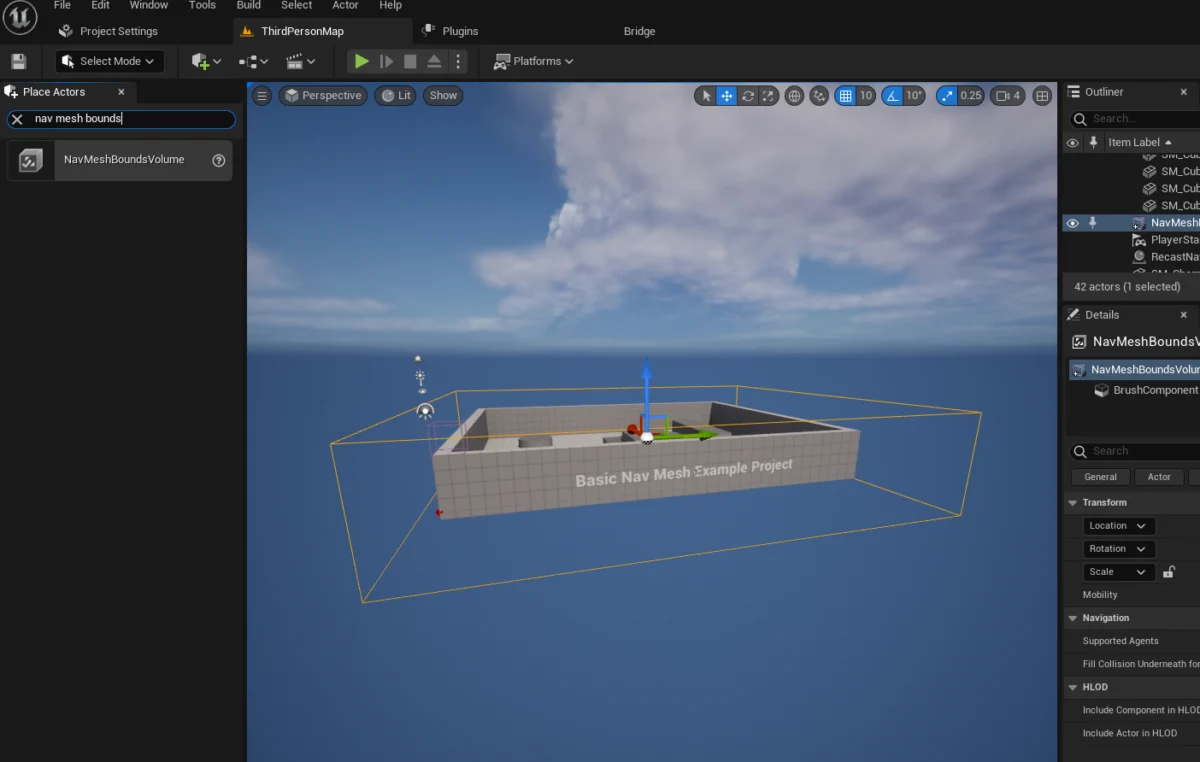
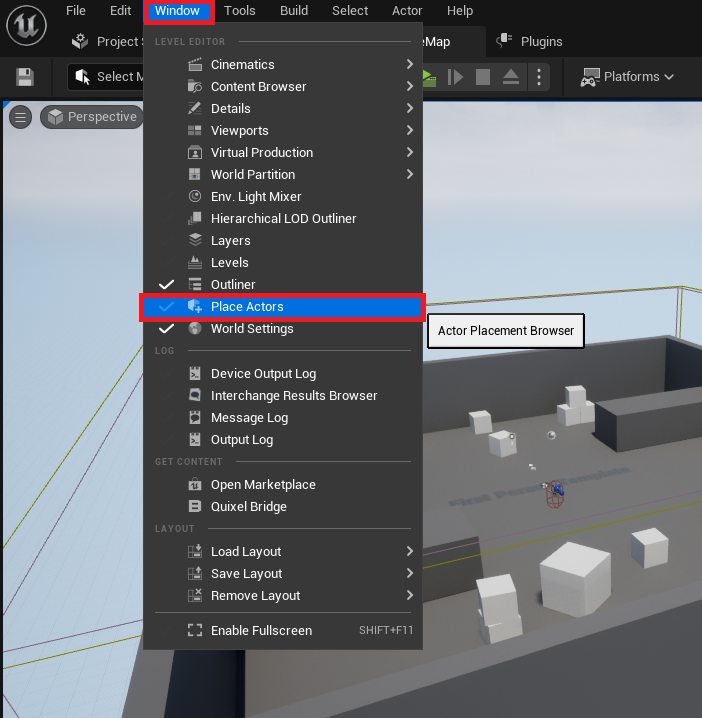
The process begins within the Unreal Engine 5 editor, a comprehensive integrated development environment. Developers first need to access the ‘Place Actors’ window, a fundamental panel that provides access to a wide array of basic objects, volumes, and assets crucial for constructing game levels. This window serves as the primary interface for spawning pre-defined entities into the scene, ranging from static meshes and lighting elements to the very volumes that dictate AI behavior. To open this panel, developers navigate to the ‘Window’ menu in the editor’s top bar and select ‘Place Actors.’ This action reveals a dockable window, typically positioned on the left side of the screen, providing quick access to various asset categories. The emphasis on user-friendly interfaces like ‘Place Actors’ underscores Epic Games’ commitment to empowering developers with intuitive tools, allowing them to rapidly prototype and iterate on their designs without diving deep into complex code from the outset. -
Defining Navigable Zones with NavMeshBoundsVolume
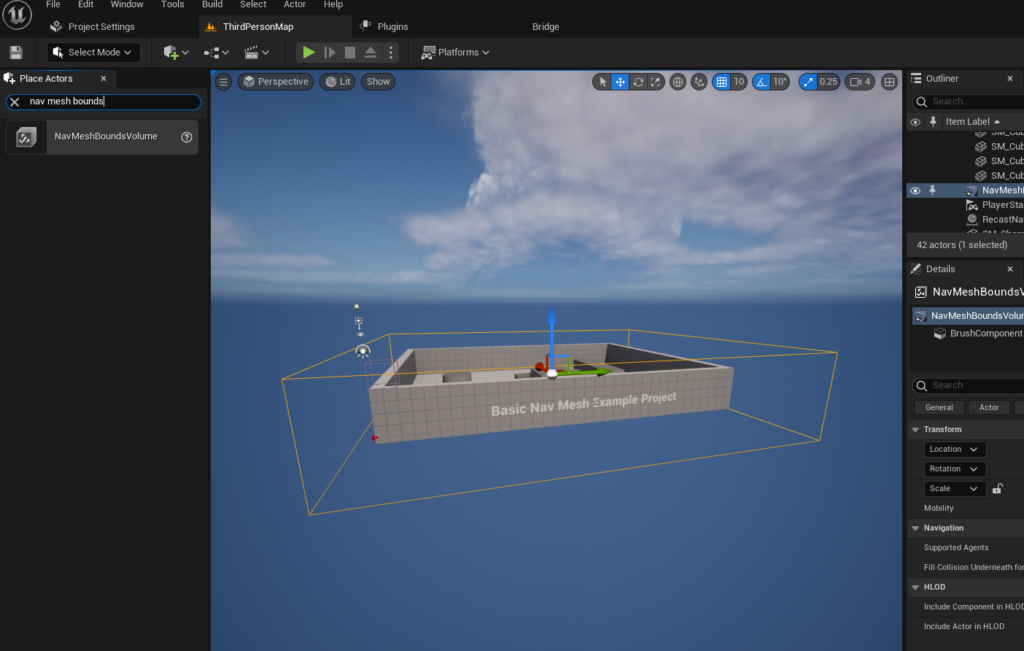
Once the ‘Place Actors’ window is accessible, the next critical step involves introducing aNavMeshBoundsVolumeactor into the level. This specialized volume is the component that instructs Unreal Engine where to generate the navigation mesh. Found within the ‘Volumes’ category of the ‘Place Actors’ panel, theNavMeshBoundsVolumeis a bounding box that defines the spatial extent within which AI pathfinding calculations will occur. After dragging and dropping this volume into the active level, developers must carefully scale and position it to encapsulate all areas where AI characters are expected to move. This spatial definition is paramount; any area outside the bounds of this volume will not have a generated NavMesh, rendering it inaccessible to AI navigation. The size and complexity of the NavMeshBoundsVolume directly influence the generation time of the navigation mesh. Larger, more intricate environments naturally require more processing power and time for the engine to compute the walkable surfaces. For highly dynamic environments or extremely large worlds, Unreal Engine offers advanced solutions, such as dynamic NavMesh generation, which allows the navigation mesh to be updated in real-time as the level changes, thereby optimizing performance and adaptability. This flexibility highlights UE5’s capacity to cater to a broad spectrum of game design requirements, from static, enclosed spaces to expansive, procedurally generated landscapes.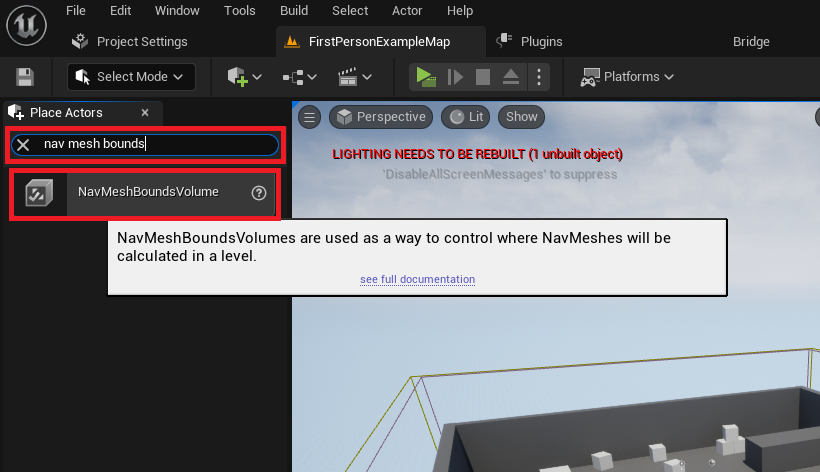
-
Visualizing and Verifying the Navigation Mesh
After positioning and scaling theNavMeshBoundsVolumeto encompass the desired navigable areas, it is imperative to verify that the navigation mesh has been correctly generated. Unreal Engine 5 provides a powerful debug visualization tool for this purpose. By simply pressing the ‘P’ key on the keyboard, developers can toggle a visual overlay that displays the generated NavMesh directly within the editor viewport. This visualization typically appears as a green, translucent mesh covering all walkable surfaces defined by theNavMeshBoundsVolume. This immediate feedback is invaluable for identifying potential issues, such as gaps in the mesh, areas unexpectedly deemed non-walkable, or regions where the mesh extends beyond intended boundaries. Debugging tools like this are vital in game development, allowing for quick iteration and problem-solving, thereby saving significant development time and ensuring the reliability of AI systems. The ability to visually inspect the NavMesh ensures that AI characters will indeed have a complete and accurate "map" to follow, preventing unforeseen navigation errors during gameplay.
Bringing Characters to Life: Blueprinting Basic AI Navigation
With the foundational NavMesh in place, the focus shifts to imbuing AI characters with the ability to traverse this generated navigation network. Unreal Engine’s Blueprint visual scripting system offers an accessible and powerful way to define complex AI behaviors without writing a single line of C++ code, democratizing game development for a wider audience. For demonstrative purposes, leveraging the Third Person Template provided by Unreal Engine 5 is often an ideal starting point, as it includes a pre-animated character blueprint, significantly reducing the initial setup time for testing AI navigation. This template provides a fully rigged and animated character, ready to be controlled by AI logic, offering a visual representation of the AI’s movement and interaction with the environment.
-
Integrating the AI Character into the Level
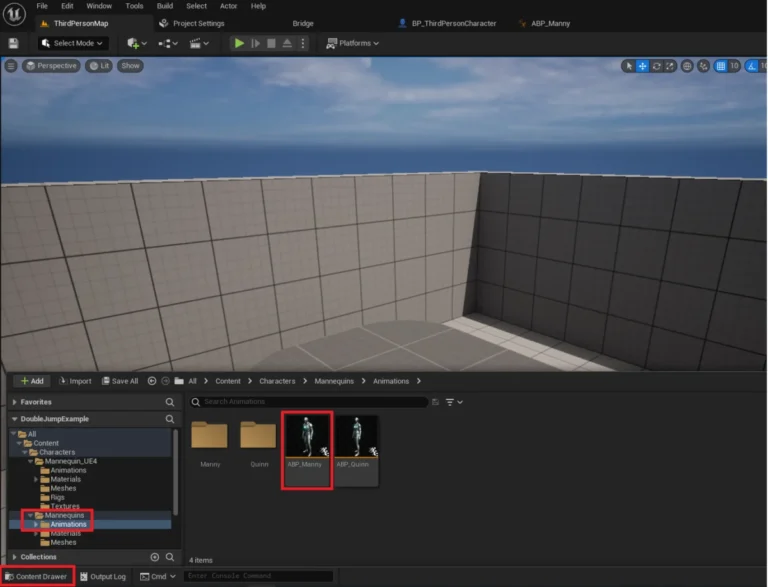
The first step in animating an AI character is to place an instance of its blueprint into the game level. If using the Third Person Template, the character blueprint, typically namedBP_ThirdPersonCharacter, can be located within the ‘Third Person / Blueprints’ folder in the Content Drawer. Developers simply drag this blueprint from the Content Drawer directly into the viewport. This action instantiates the character at the specified location, making it an active participant in the level. While initial placement can be arbitrary, its starting position within the NavMesh bounds is important for the AI’sBegin Playbehavior. This simple act of instantiation is a gateway to defining complex AI interactions, highlighting the component-based architecture of Unreal Engine, where individual actors can be easily placed and then programmed to exhibit intricate behaviors.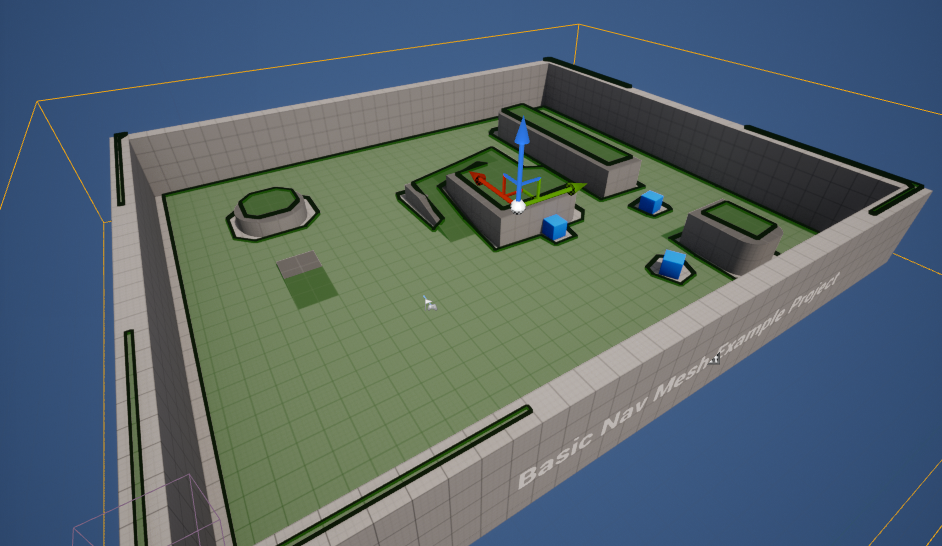
-
Crafting the AI’s Movement Logic with Blueprints
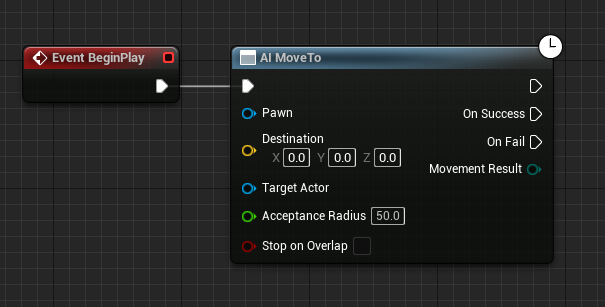
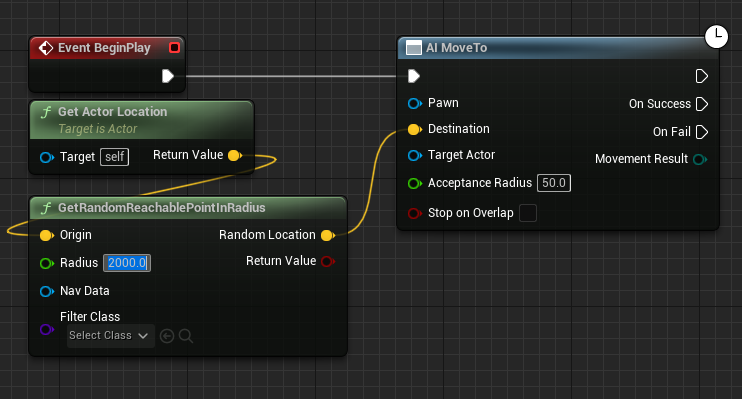
The core of the AI’s movement logic is constructed within the character’s Blueprint editor. This visual scripting interface allows developers to define events, functions, and variables that govern the character’s behavior. TheBegin Playevent serves as the entry point for all initial AI logic, triggering actions as soon as the game starts or the character is spawned into the world. Connected to this event is theAI MoveTonode, a high-level AI function specifically designed to command an AI Pawn to navigate to a specified destination. This node abstracts away the complexities of pathfinding, leveraging the underlying NavMesh to calculate an optimal route.To provide a destination for the
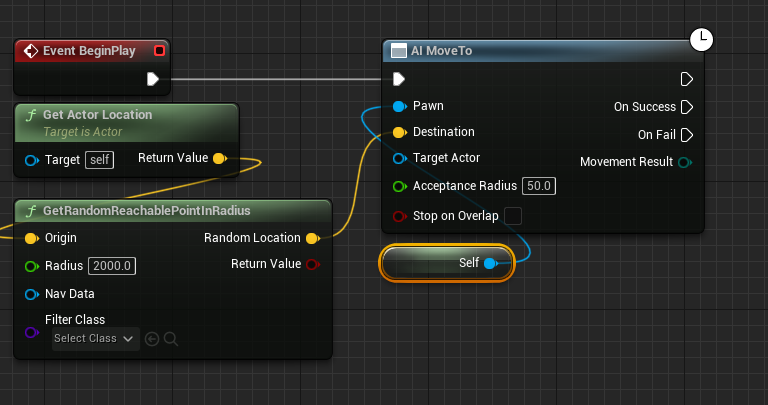
AI MoveTonode, developers utilize theGetRandomReachablePointInRadiusnode. This function is instrumental in creating dynamic and unpredictable AI movement patterns, as it queries the NavMesh for a valid, walkable point within a specified radius from an origin point. The output (a yellow vector pin representing the destination coordinates) is then connected to theDestinationinput of theAI MoveTonode. TheOriginfor this random point generation is typically set to the AI character’s current location, achieved by connecting aGet Actor Locationnode to theOrigininput. This ensures that the random movement is calculated relative to the AI’s immediate surroundings, rather than a fixed global point. Furthermore, theRadiusparameter of theGetRandomReachablePointInRadiusnode defines the maximum distance from the origin that the AI will consider for its random destination. For instance, setting this value to2000units allows the AI to roam within a 20-meter sphere around its current position, creating a convincing sense of exploration or patrol.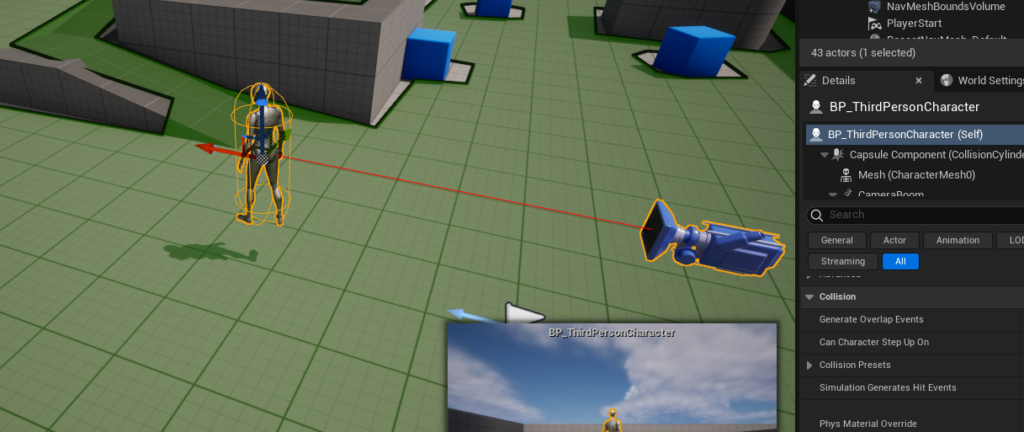
-
Orchestrating Autonomous Patrols
To complete the AI setup and enable continuous, autonomous movement, two additional nodes are incorporated. AReference to Selfnode is connected to thePawninput of theAI MoveTonode. This ensures that theAI MoveTocommand is specifically issued to the character blueprint currently being edited. Without this explicit reference, the engine would not know which character to command. Finally, to create a continuous patrol or exploration loop, aDelaynode is connected to theOn Successoutput pin of theAI MoveTonode. TheOn Successpin fires once the AI character successfully reaches its designated destination. After a brief delay (e.g., 2-3 seconds, allowing the character to momentarily pause at its destination), the output of theDelaynode is then reconnected back to theAI MoveTonode. This creates a feedback loop: once the AI reaches a random point, it waits for a moment, then calculates a new random reachable point and moves towards it. This simple yet effective Blueprint sequence transforms a static character into an autonomously patrolling agent, enhancing the realism and activity within the game level. This cyclical behavior demonstrates a fundamental principle of AI programming: reactive behaviors driven by success conditions, leading to continuous emergent actions.
The Broader Landscape: AI’s Integral Role in Modern Game Development
The foundational AI navigation techniques demonstrated in Unreal Engine 5 are far more than mere technical exercises; they represent the bedrock upon which sophisticated game worlds are built. The global video game market, projected to exceed $200 billion in revenue by 2023, is continually driven by advancements in technology and player expectations for increasingly immersive and dynamic experiences. AI, particularly in its role in character behavior and world simulation, is a significant contributor to this growth.
-
Industry Trends and the Demand for Intelligent NPCs
Industry reports consistently highlight that player engagement is directly correlated with the perceived intelligence and responsiveness of in-game characters. From the complex enemy formations in competitive multiplayer titles to the subtle ambient behaviors of NPCs in open-world adventures, AI is expected to deliver believable and challenging interactions. Simple NavMesh-based pathfinding, as shown, is the initial step towards achieving this. Data from developer surveys often indicate that a significant portion of development cycles in AAA titles is dedicated to AI systems, underscoring its strategic importance. The ease of implementing basic AI in UE5 therefore serves as a critical advantage for studios of all sizes, allowing them to allocate more resources to refining complex behaviors built upon this solid foundation.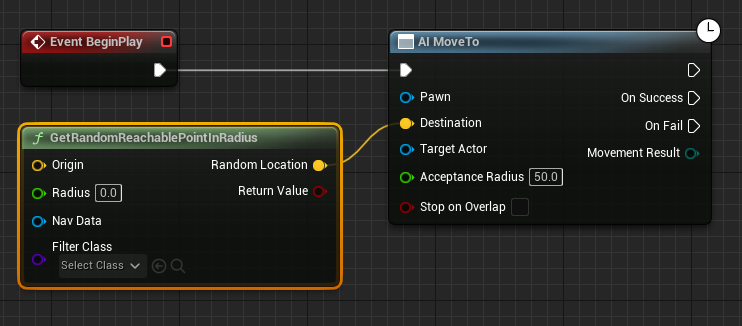
-
Unreal Engine 5’s Empowerment of Developers
Epic Games, through Unreal Engine 5, has positioned itself as a leader in providing accessible yet powerful development tools. The engine’s visual scripting system, Blueprints, has been particularly praised for lowering the barrier to entry for aspiring developers and enabling rapid prototyping for experienced teams. This democratic approach to game creation means that even small indie studios can implement robust AI systems that once required extensive coding knowledge. The integrated nature of the NavMesh and AI movement nodes within Blueprints exemplifies this philosophy, allowing developers to focus on creative design rather than getting bogged down in low-level programming details. Furthermore, UE5’s advancements like Lumen (global illumination) and Nanite (virtualized geometry) enhance the visual fidelity of game worlds, creating environments that are visually compelling for AI characters to navigate, further blurring the lines between virtual and reality. -
Scaling AI: From Basic Patrols to Complex Behaviors
While the demonstrated NavMesh and basicAI MoveTologic provide a robust starting point, Unreal Engine 5’s AI toolkit extends far beyond simple random patrols. Developers can layer increasingly complex behaviors using systems like Behavior Trees, Utility AI, and even machine learning integrations. Behavior Trees, for instance, allow for the creation of hierarchical decision-making structures, enabling AI to react to diverse stimuli, make tactical choices, and pursue specific objectives. The NavMesh remains the underlying pathfinding mechanism for all these advanced systems, ensuring that even the most intelligent AI agents can efficiently move through the environment. This modularity and scalability mean that a foundational understanding of NavMeshes is not just for basic implementation but is crucial for building the most sophisticated AI systems imaginable in modern games.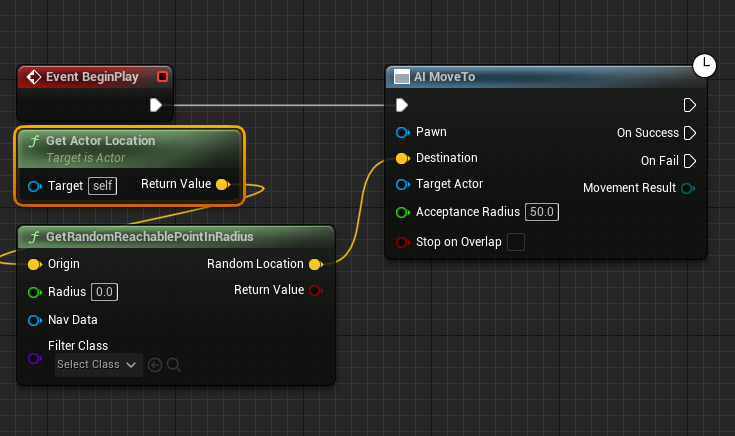
Implications for Game Design and Player Immersion
The ability to easily implement functional AI navigation has profound implications for game design. It allows designers to populate worlds with more dynamic elements, creating a sense of life and unpredictability that significantly enhances player immersion. Consider an open-world RPG: ambient NPCs using NavMeshes to wander market squares or patrol city walls contribute to a living, breathing world. In a survival horror game, an antagonist meticulously pathfinding through a labyrinthine environment can heighten tension and provide genuinely challenging encounters.
Moreover, effective AI navigation contributes directly to the playability and longevity of a game. Players expect AI characters to behave intelligently and realistically, avoiding frustrating instances where NPCs get stuck on geometry or exhibit illogical movement patterns. By providing reliable pathfinding, Unreal Engine 5 empowers designers to create credible challenges and engaging narrative opportunities, where AI actions directly influence the player’s experience. This technical capability, therefore, is not just about moving pixels; it’s about crafting compelling narratives and believable simulations.
Conclusion: Paving the Way for Dynamic Virtual Experiences
The process of setting up a NavMesh and configuring basic AI character movement in Unreal Engine 5, while seemingly a series of technical steps, is a fundamental act of world-building. It transforms static environments into dynamic spaces where virtual entities can move, interact, and contribute to a believable reality. From the meticulous definition of walkable areas with the NavMeshBoundsVolume to the intuitive Blueprint scripting that orchestrates autonomous patrols, UE5 provides a powerful and accessible pathway for developers to infuse their games with intelligent life. As the demands for sophisticated AI in video games continue to grow, these foundational techniques become increasingly vital, enabling creators to build more immersive, challenging, and ultimately, more captivating interactive experiences for players worldwide. The ongoing evolution of tools within Unreal Engine promises even more advanced AI capabilities, further blurring the lines between player and simulated reality, and paving the way for the next generation of truly dynamic virtual worlds.
About the Author