In the rapidly evolving landscape of video game development, the ability to reliably save and load game progress is not merely a feature but a foundational necessity. Modern titles, often characterized by expansive open worlds, intricate narrative arcs, and deep progression systems, demand mechanisms that allow players to seamlessly pick up where they left off. Without such capabilities, player engagement plummets, leading to frustration and abandonment. Industry reports consistently highlight that robust save systems are a critical factor in player retention, with some surveys indicating that over 70% of players consider reliable progress saving essential for their engagement in long-form games. Unreal Engine 5, a leading platform for interactive experiences, has integrated a sophisticated yet user-friendly SaveGame system, empowering developers to implement this crucial functionality with unprecedented ease and efficiency.
The Evolution and Importance of Game Data Persistence
The concept of saving game progress has evolved significantly since the early days of gaming. From password systems and limited save slots on memory cards to today’s cloud-synced, auto-saving mechanisms, the industry has continuously sought ways to enhance player convenience and preserve the integrity of their invested time. In the current era, where games can offer hundreds of hours of content, a reliable save system is paramount. It underpins player trust, allows for exploration without fear of irreversible mistakes, and facilitates the narrative flow of complex storylines. For developers, a well-designed save system mitigates potential support issues related to lost progress and contributes directly to the overall quality perception of their product.
Historically, implementing persistent data solutions could be a complex and time-consuming endeavor, often requiring bespoke code and intricate data serialization techniques. This challenge was particularly pronounced for smaller studios and independent developers with limited resources. Unreal Engine 5’s approach simplifies this, abstracting much of the underlying complexity and providing a high-level, blueprint-friendly interface that accelerates development cycles. This strategic decision by Epic Games, the creators of Unreal Engine, aligns with their broader mission to democratize game development and enable creators of all scales to realize their visions.
Understanding Unreal Engine 5’s SaveGame Architecture
At the core of Unreal Engine 5’s data persistence solution lies the SaveGame class. This is a specialized blueprintable object designed specifically for encapsulating and managing the data intended for saving and loading. Unlike other actors or components, a SaveGame object exists purely to hold variables that need to persist beyond a single play session or level transition. When a developer creates a custom class inheriting from SaveGame, they are essentially defining the structure of their game’s save file.
The beauty of this system lies in its flexibility: almost any variable type supported within Unreal Engine’s blueprint system can be integrated into a SaveGame class. This includes primitive types like integers, booleans, and strings, as well as more complex structures such as Vectors, Rotators, custom structs, arrays, and even references to other game objects (though handling object references requires careful consideration during serialization). This versatility ensures that developers can store a wide array of game states, from player position and inventory to quest progress, character statistics, and world-specific conditions.
Once data is assigned to the variables within a SaveGame object, the system handles the serialization and deserialization processes. The data is written to a physical file on the user’s machine, ensuring it remains intact even after the game application is closed. The default storage locations are platform-specific, adhering to standard operating system guidelines:
- Windows: Typically located within the user’s Local AppData folder, ensuring separation from core game installation files.
- MacOS: Resides in the Library/Application Support directory.
- Linux: Found in
/home/username/.local/share.
These standardized locations simplify data management for both developers and users, though developers can often customize these paths if specific project requirements dictate. While the system primarily focuses on data persistence, security considerations regarding save file tampering or corruption are generally handled at a higher application level or through additional encryption/validation layers implemented by the developer, rather than being an inherent feature of the basic SaveGame class.
Streamlining Implementation: Creating a Custom Save Class

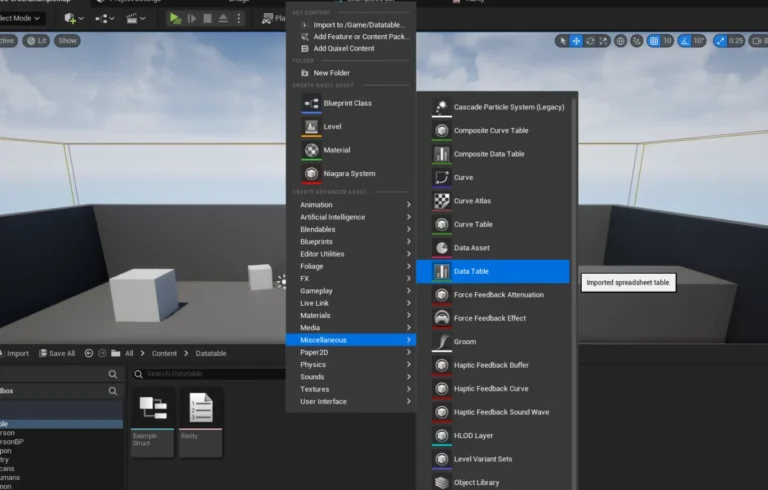
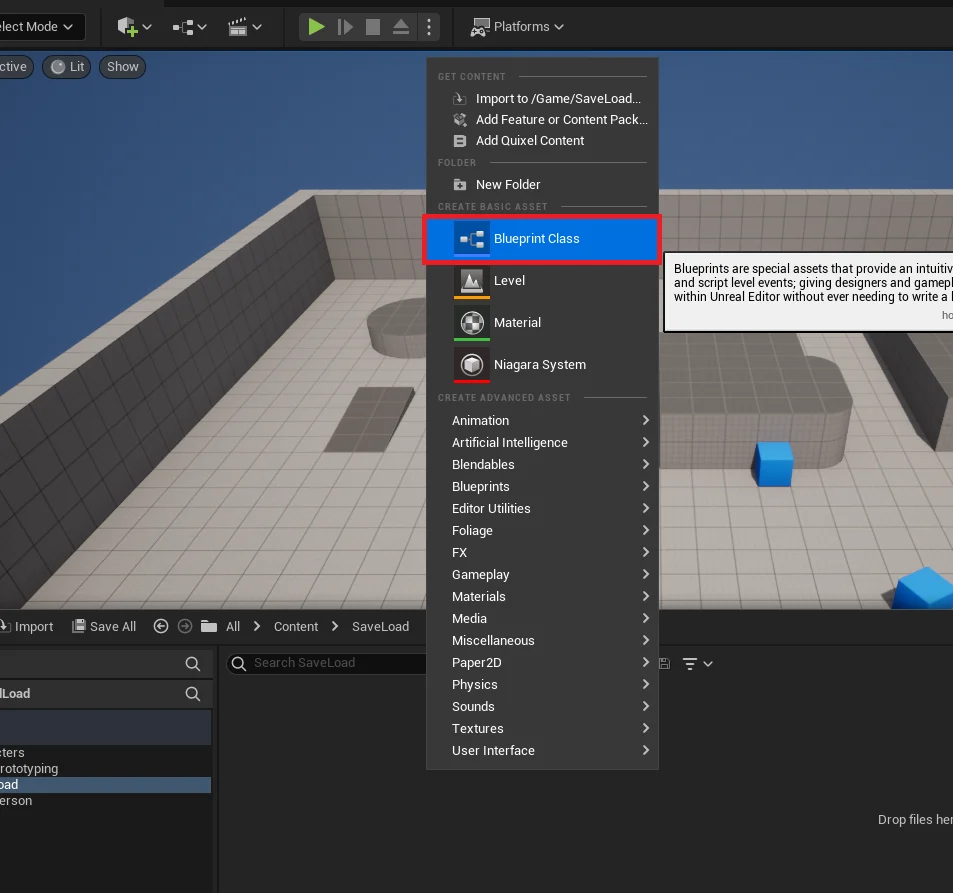
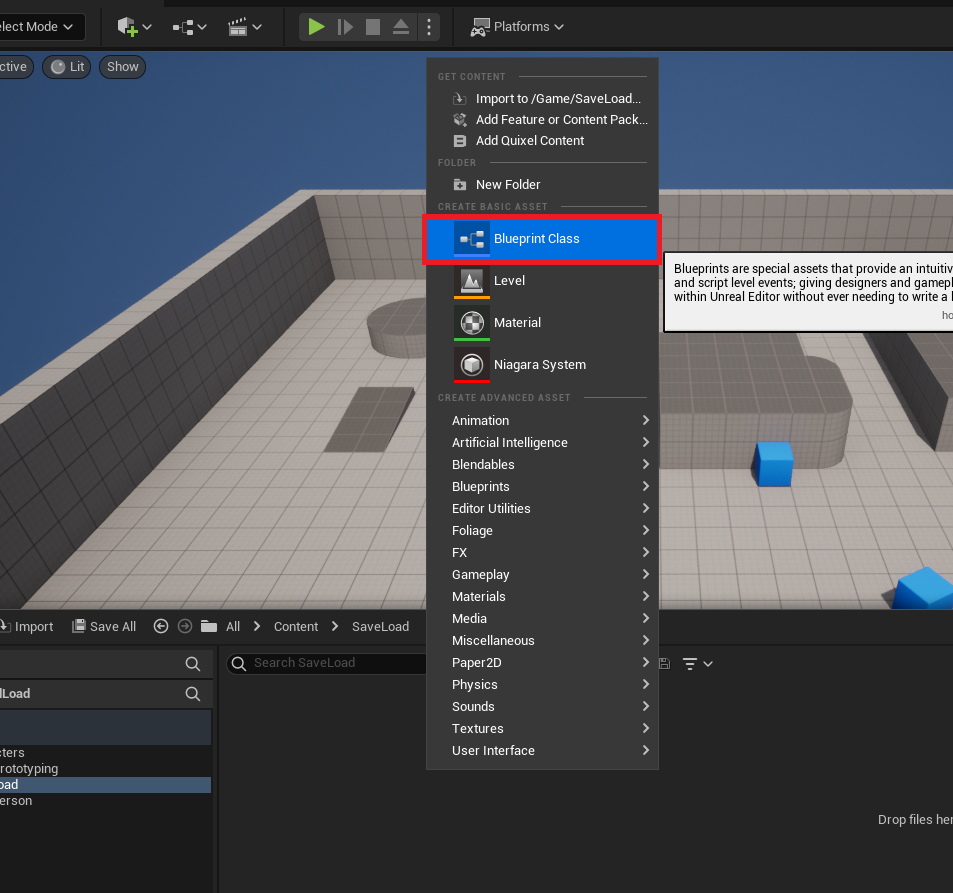
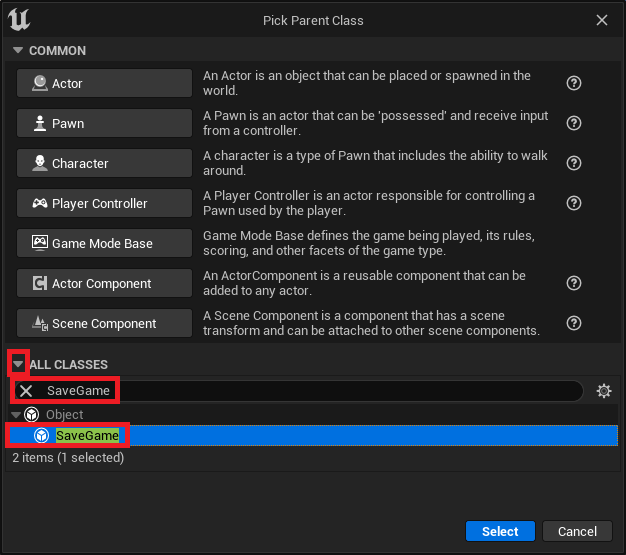
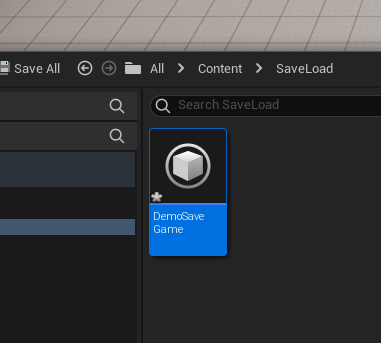
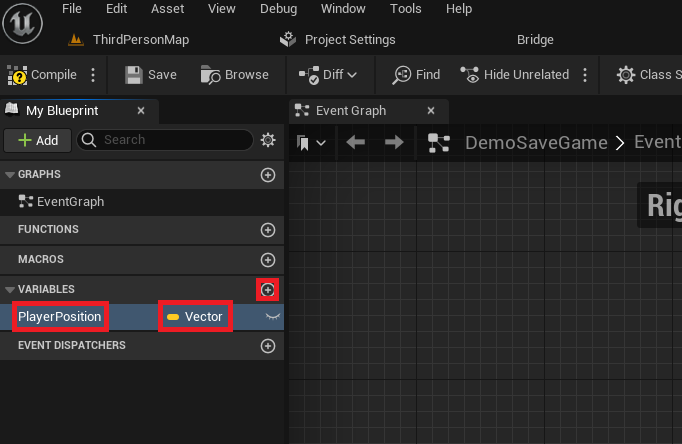
The initial step for developers leveraging this system involves defining their custom save data structure. This is achieved by creating a new Blueprint Class that inherits directly from the SaveGame class. This foundational step is critical, as it establishes the blueprint where all persistent game variables will reside. For instance, a common scenario involves saving a player’s last known position. A developer would define a Vector variable, perhaps named "PlayerPosition," within their custom SaveGame blueprint (e.g., BP_DemoSaveGame). This variable would then be responsible for storing the player’s 3D coordinates in the game world.

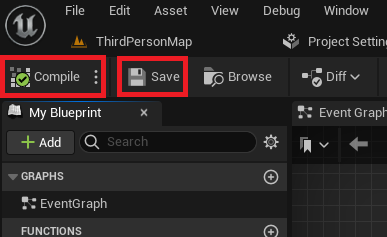
The process is remarkably straightforward: from the Content Browser, developers initiate the creation of a new Blueprint Class, then select SaveGame as the parent class. Naming conventions are important here, as this custom class name will be referenced throughout the save/load logic. After defining all necessary variables, the class is compiled and saved, making its structure ready for integration into the game’s runtime logic. This modular approach allows for clear organization of save data, making it easier to manage and extend as a game project grows in complexity.
Integrating Save/Load Logic within the Game Instance
To manage the lifecycle of save data effectively, developers typically integrate the saving and loading functionality within a custom Game Instance blueprint. The Game Instance is a unique object in Unreal Engine because it persists throughout the entire lifespan of the game application, even across different levels or maps. This makes it an ideal central hub for managing global game states and persistent data, including the SaveGame object itself.
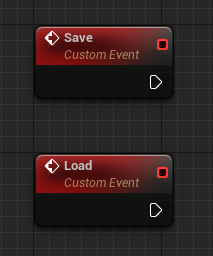
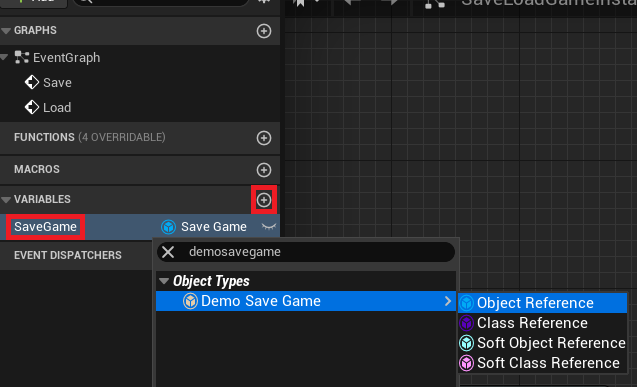
Within the Game Instance, developers establish custom events, commonly named "Save" and "Load," to encapsulate the respective operations. A crucial component of this setup is a reference variable, also within the Game Instance, that stores an instance of the custom SaveGame class created earlier. This variable acts as the primary interface through which game logic interacts with the persistent data.
The Loading Mechanism: Ensuring Data Integrity and Seamless Resumption
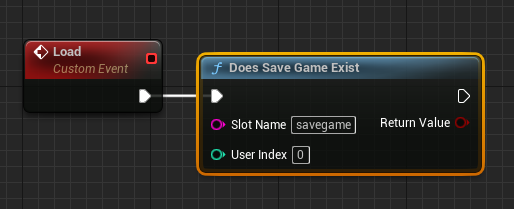
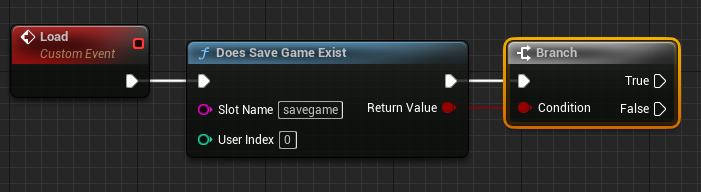
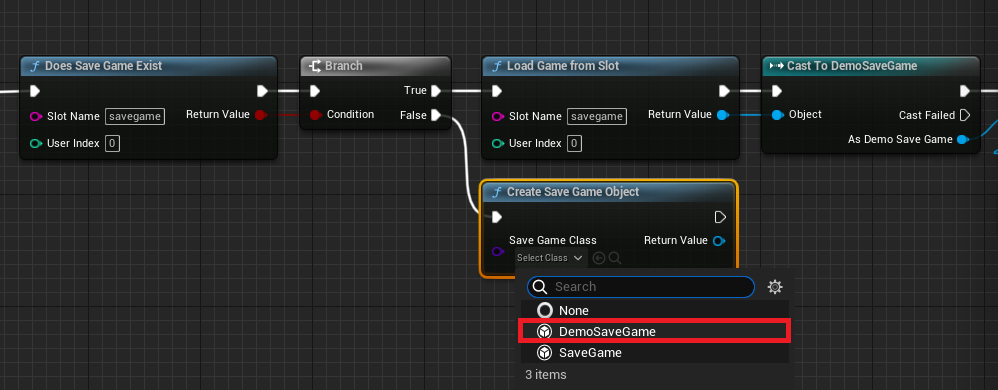
The "Load" event within the Game Instance is designed to intelligently retrieve previously saved data or initialize a new save state if none exists. The process begins with a Does Save Game Exist node. This node performs a critical check, verifying if a save file with a specified "Slot Name" already exists on the user’s machine. The "Slot Name" is an arbitrary string chosen by the developer (e.g., "MainSaveSlot") that acts as a unique identifier for a particular save file. Using different slot names allows for multiple independent save files, supporting features like multiple player profiles or different game difficulty saves.
Following this check, a Branch node directs the execution flow based on the existence of the save file.
-
If the Save File Exists (True):
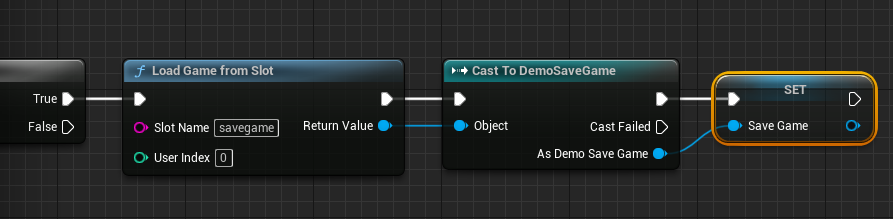
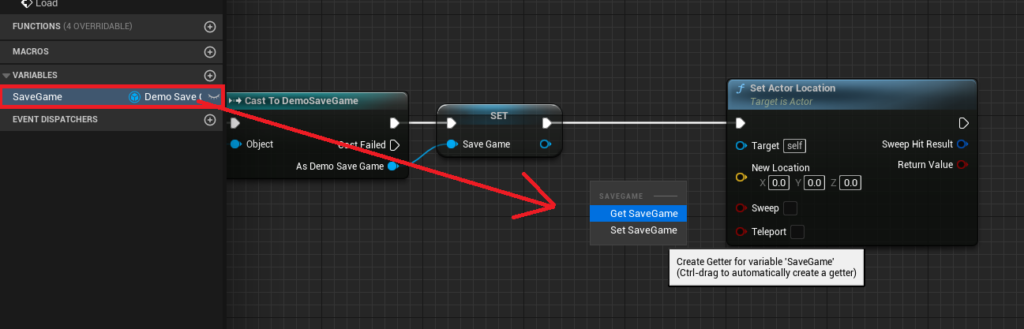
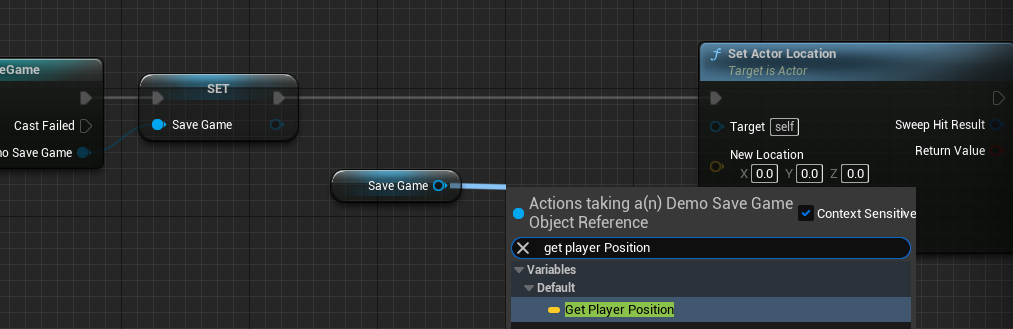
The system proceeds to load the existing data using theLoad Game From Slotnode, specifying the same "Slot Name." The output of this node is a genericUSaveGameobject, which then needs to beCast Tothe specific customSaveGameclass (e.g.,Cast To BP_DemoSaveGame). This casting step is vital for type safety, ensuring that the loaded data is correctly interpreted according to the custom structure defined by the developer. Upon successful casting, theGame Instance‘s internalSaveGamevariable is updated with this loaded object, making all saved variables (like "PlayerPosition") accessible.
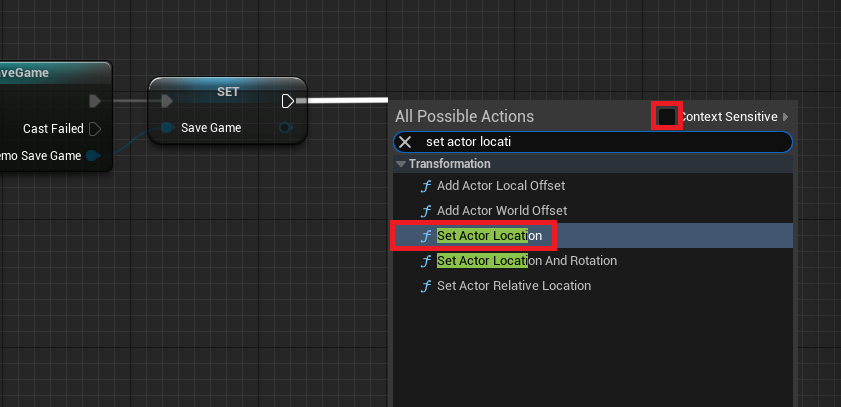
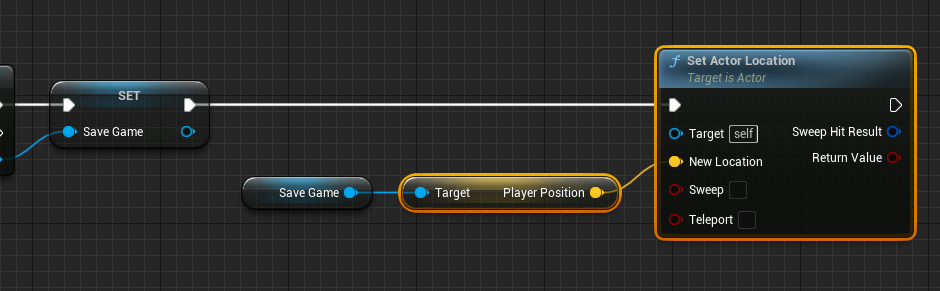
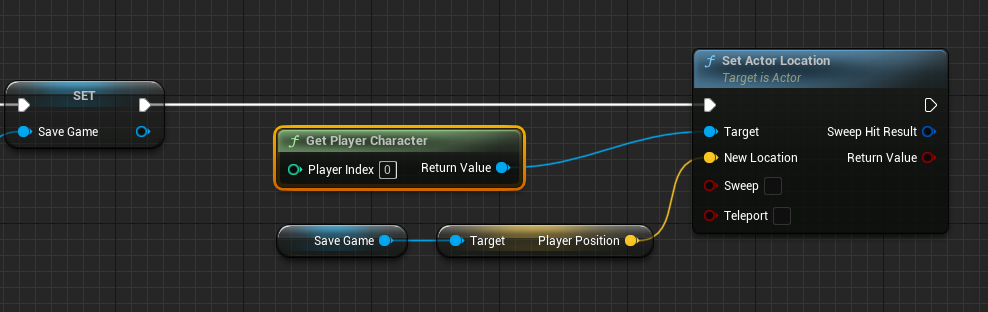
Once theSaveGameobject is loaded, its data can be applied to the game world. For instance, the "PlayerPosition" variable would be extracted, and aSet Actor Locationnode would be used in conjunction with aGet Player Characternode to teleport the player character to their last saved coordinates. This seamless transition is crucial for player immersion and continuity.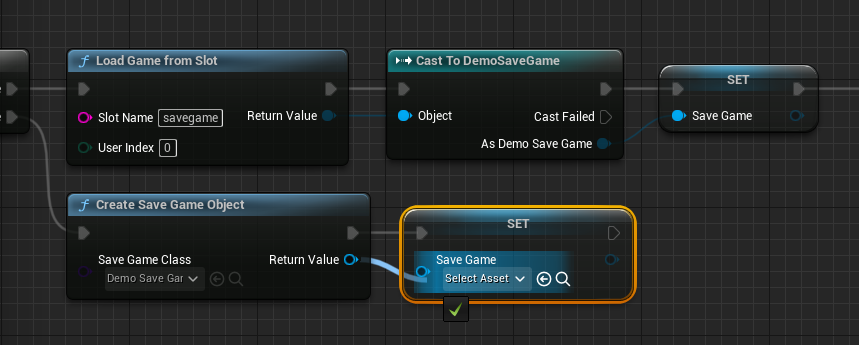
-
If the Save File Does Not Exist (False):
In scenarios where no save file is found (e.g., a player starting a new game for the first time), the system creates a fresh instance of the customSaveGameclass using theCreate Save Game Objectnode. This new, emptySaveGameobject is then assigned to theGame Instance‘sSaveGamevariable, effectively initializing a new save state. This ensures that even on a fresh start, the game has a validSaveGameobject ready to store data as the player progresses. The logic is carefully constructed to prevent errors that might arise from attempting to load data from a non-existent file.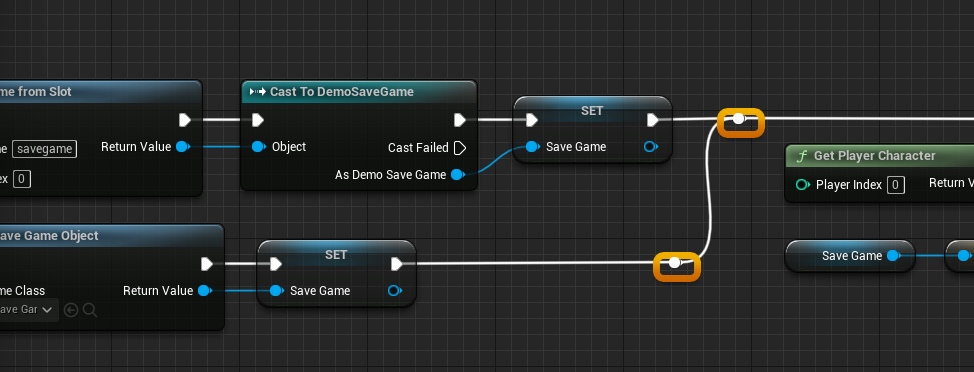
The Saving Mechanism: Persisting Game Progress to Disk
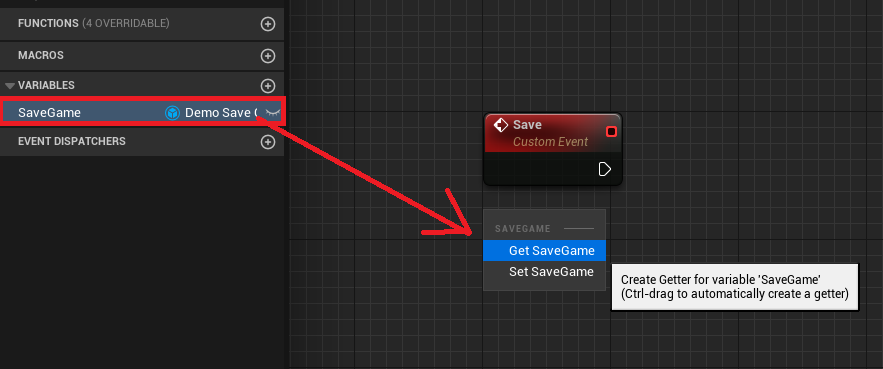
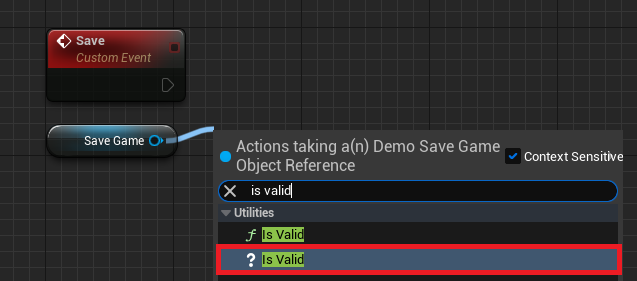
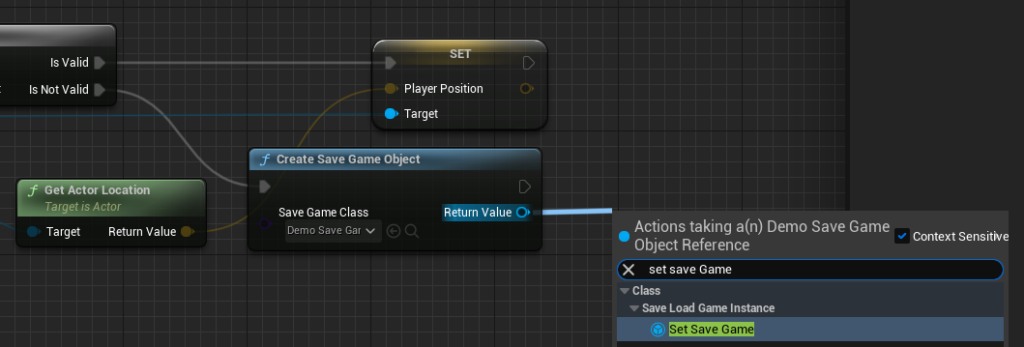
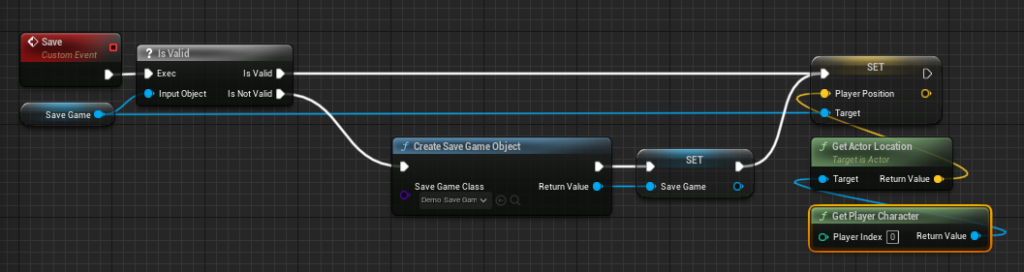
The "Save" event within the Game Instance is responsible for capturing the current state of relevant game variables and writing them to disk. The process initiates by retrieving the current SaveGame object from the Game Instance‘s variable. A critical ? Is Valid check is then performed on this SaveGame object. This ensures that there is a valid SaveGame instance to work with, preventing null reference errors if, for some reason, the load process failed or wasn’t initiated correctly.
-
If the Save File is Valid (True):
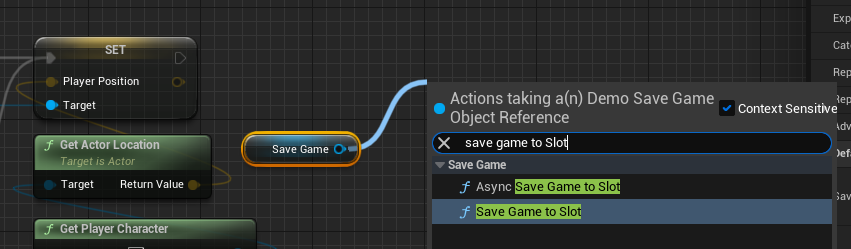
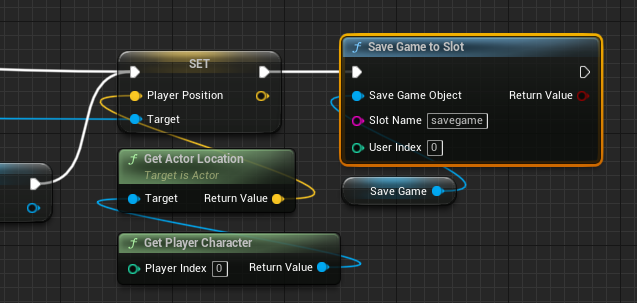
The system proceeds to update the variables within theSaveGameobject with current game data. For the player position example, aGet Player Characternode would retrieve the active player, and aGet Actor Locationnode would capture its current world coordinates. ThisVectorvalue is then used toSet Player Positionon theSaveGameobject. After all desired variables have been updated, the crucialSave Game to SlotorAsync Save Game to Slotnode is called. This node takes the updatedSaveGameobject and the designated "Slot Name" and writes the data to the specified file on disk.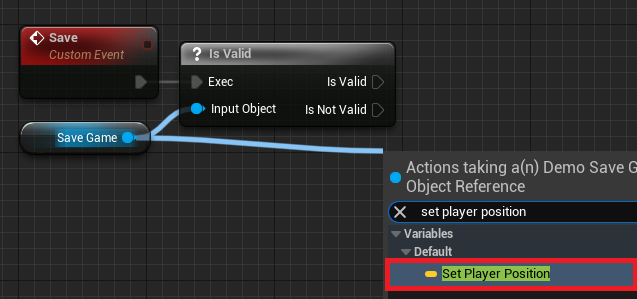
The choice between
Save Game to SlotandAsync Save Game to Slotis a performance-driven decision.Save Game to Slotis a synchronous operation, meaning the game thread will pause until the save operation is complete. This is suitable for saving small amounts of data where the delay is negligible. However, for games saving large volumes of data (e.g., extensive world states, complex inventories), a synchronous save can cause noticeable hitches or freezes, negatively impacting the player experience. In such cases,Async Save Game to Slotis the preferred option. It performs the save operation on a separate thread, allowing the game thread to continue rendering and processing gameplay without interruption, thereby maintaining a smooth frame rate. This asynchronous approach is particularly beneficial for modern games with continuous saving requirements.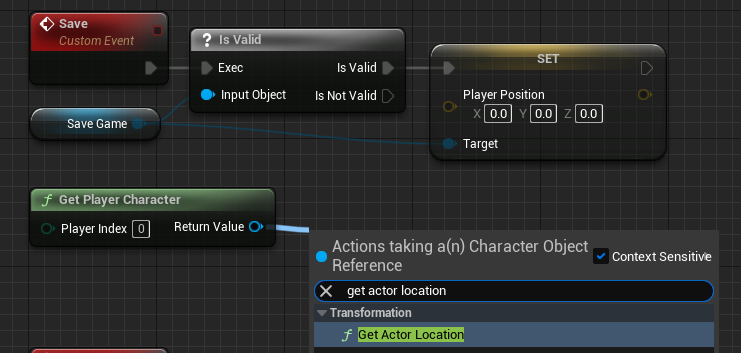
-
If the Save File is Not Valid (False):
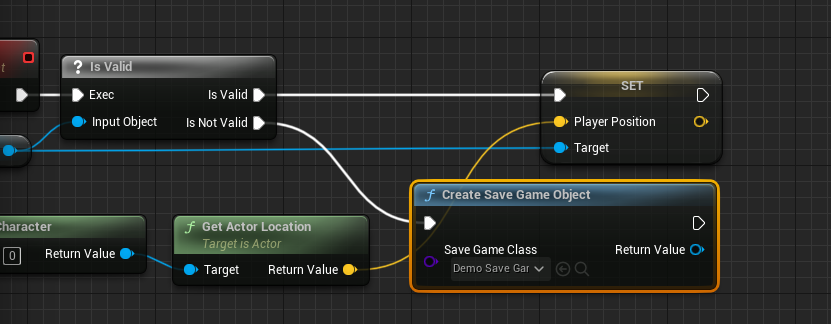
Should theSaveGameobject be invalid, the system first creates a newSaveGameobject (similar to the "false" branch in the loading process) and assigns it to theGame Instance‘s variable. Only then does it proceed to update its variables and save the data to disk. This ensures that even if theSaveGameobject somehow becomes invalid during runtime, the system can gracefully recover and create a new save file, preventing total data loss.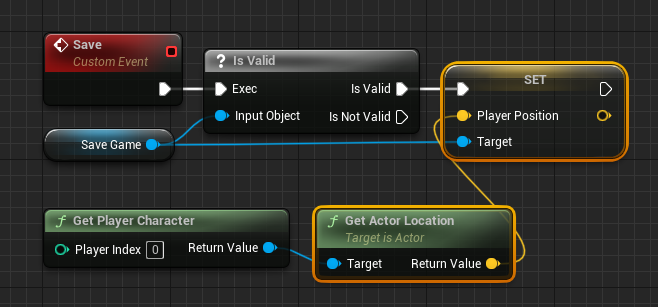
Integrating Save/Load Triggers into Gameplay
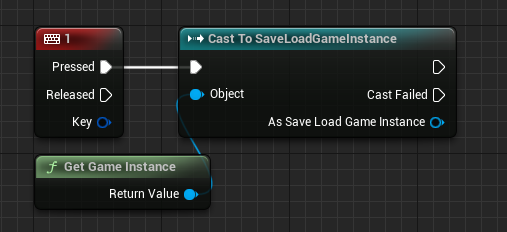
The final step in establishing a functional save/load system is to connect these Game Instance events to player input or other game logic triggers. In a typical player character blueprint (e.g., ThirdPersonCharacterBP), developers would add Key Press Events (e.g., "Number 1" for Save, "Number 2" for Load). When these keys are pressed, the player character blueprint would first Get Game Instance, then Cast To the custom Game Instance class. From the cast output, the "Save" or "Load" custom events defined earlier would be called. This establishes a direct link between player action and the underlying data persistence system, making the functionality readily available during gameplay. This modular design ensures that the core save/load logic remains centralized in the Game Instance, while various game elements can trigger these operations as needed.
Broader Implications and Industry Impact
Unreal Engine 5’s integrated SaveGame system has profound implications for the game development community.
- Democratization of Development: By simplifying a traditionally complex task, it significantly lowers the barrier to entry for aspiring game developers and small indie studios. They can focus more on innovative gameplay and less on boilerplate systems.
- Enhanced Developer Workflow: The blueprint-centric approach and clear structure reduce development time and debugging efforts, allowing teams to iterate faster and bring games to market more efficiently.
- Improved Player Experience: The robust and flexible nature of the system ensures a higher quality of life for players, with reliable progress saving contributing to greater satisfaction and longer engagement with titles.
- Scalability for Complex Projects: While straightforward for basic saves, the underlying architecture supports expansion for highly complex game states, making it suitable for ambitious AAA titles as well.
The provision of such powerful and accessible tools reinforces Unreal Engine 5’s position as a leading engine in the industry. It empowers creators to deliver rich, persistent, and engaging experiences, ultimately benefiting the entire ecosystem of game development and consumption.
Conclusion
The Unreal Engine 5 SaveGame system stands as a testament to the engine’s commitment to developer empowerment and robust game design. By offering an intuitive, integrated solution for managing persistent game data, it effectively addresses one of the most fundamental requirements of modern gaming. From defining custom save data structures to implementing intelligent loading and efficient saving mechanisms, the system streamlines a critical aspect of game development. This advancement not only enhances developer productivity but also directly contributes to a superior player experience, ensuring that every moment invested in a virtual world is securely preserved for future adventures. As games continue to grow in scope and complexity, the foundational strength and accessibility of features like the SaveGame system will remain pivotal in shaping the future of interactive entertainment.
About the Author