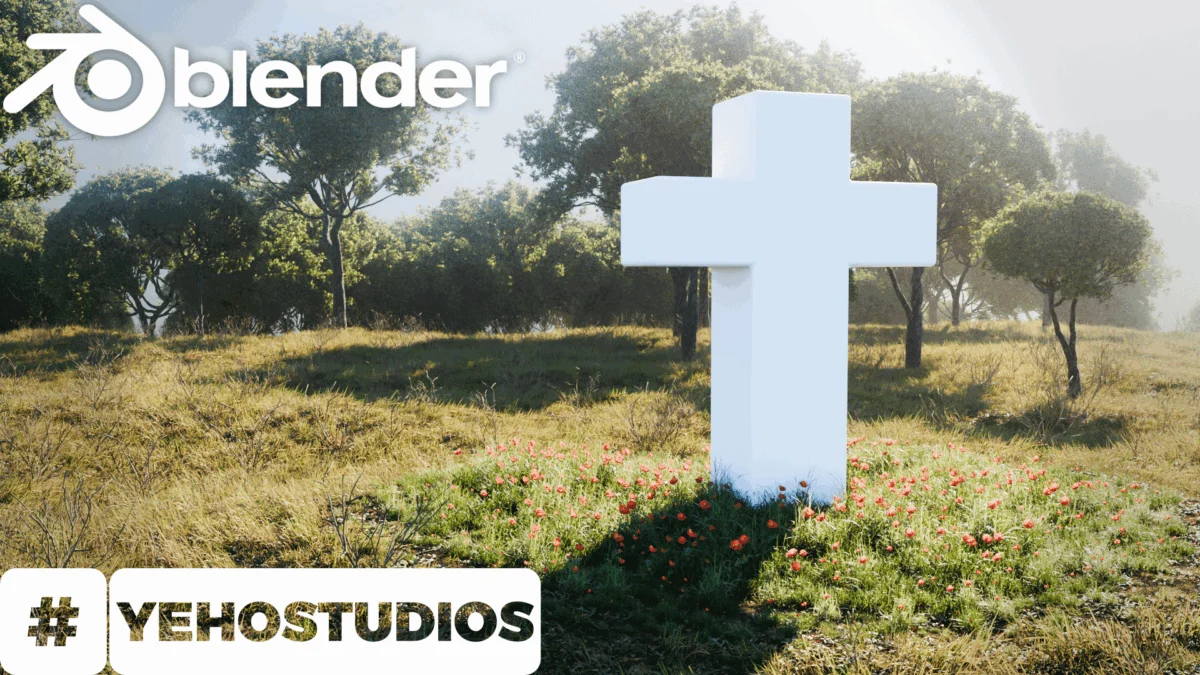
Blender, a powerful and versatile open-source 3D creation suite, continues to democratize advanced digital art, and a recent tutorial from Yeho Studios is making waves within the community for its accessible approach to creating realistic natural landscapes. Released on September 24, 2026, this instructional video aims to demystify the process for aspiring 3D artists, particularly those new to the software and its capabilities in generating environmental scenes. The tutorial, embedded within a broader announcement on BlenderNation, targets a common pain point for beginners: the perceived difficulty of achieving naturalistic results in digital environments.
The Challenge of Digital Nature Creation
The creation of believable natural environments in 3D software has historically been a complex undertaking, often requiring a deep understanding of procedural generation, intricate texturing, and sophisticated lighting techniques. For newcomers to platforms like Blender, the sheer breadth of tools and parameters can be overwhelming. Issues such as achieving realistic terrain deformation, scattering vegetation convincingly, and simulating the subtle nuances of atmospheric effects have often served as significant barriers to entry. Yeho Studios’ tutorial directly addresses this by offering a "step-by-step" guide, promising to take users "from absolute scratch" to a finished, realistic landscape. This approach suggests a focus on fundamental principles and a streamlined workflow, designed to build confidence and provide a solid foundation for more advanced projects.
Yeho Studios: A Focus on Accessibility
While specific biographical details about "Yeho Studios" are not extensively provided in the initial announcement, their commitment to offering tutorials for a wide range of Blender users is evident. The emphasis on "simple" and "beginner-friendly" in the tutorial’s description indicates a pedagogical philosophy centered on breaking down complex processes into manageable steps. This aligns with a broader trend in online education, where creators strive to make sophisticated software accessible to a wider audience. The studio’s choice to focus on landscape generation taps into a popular genre within 3D art, encompassing applications from architectural visualization and game development to animation and still image creation.
Tutorial Breakdown and Technical Insights
The core of the tutorial, as indicated by its title and description, lies in guiding users through the process of setting up a landscape within Blender. While the exact techniques employed are best understood by viewing the full video, typical workflows for creating realistic landscapes in Blender often involve several key stages:
- Terrain Generation: This can be achieved through various methods, including sculpting, displacement modifiers using procedural textures (like noise or Voronoi), or even importing heightmap data from real-world geographical sources. The "simple" approach suggested by the tutorial likely focuses on accessible, procedural methods that do not require external data.
- Texturing and Shading: Applying realistic materials to the terrain is crucial. This involves using image textures, procedural shaders, or a combination of both to simulate elements like grass, soil, rock, and water. Node-based shading in Blender offers immense flexibility for creating complex material properties.
- Vegetation Scattering: Populating the landscape with trees, grass, and other flora is a critical step. Blender’s particle systems or dedicated scattering add-ons (such as the built-in "Geometry Nodes" or third-party options) are commonly used for this purpose. Achieving a natural distribution and variety of plants is key to realism.
- Lighting and Atmosphere: The mood and realism of a landscape are heavily influenced by its lighting and atmospheric conditions. This involves setting up sun lamps, ambient occlusion, and potentially using volumetric shaders to simulate fog or haze.
- Camera Setup and Rendering: Finally, positioning the camera and configuring render settings are essential for producing a high-quality final image. Blender’s Cycles and Eevee render engines offer different approaches to achieving photorealistic results.
Given the tutorial’s emphasis on simplicity, it’s likely that Yeho Studios employs techniques that balance visual fidelity with computational efficiency, making it suitable for users with varying hardware capabilities. The use of readily available Blender features, rather than requiring numerous external assets or complex add-ons, would further enhance its beginner-friendliness.
Supporting Data and Industry Trends
The demand for realistic digital environments in various industries underscores the relevance of tutorials like this. The global 3D modeling software market is projected to experience significant growth, driven by the expanding applications in gaming, virtual reality, augmented reality, film and television, and architectural visualization. According to market research reports from firms like Grand View Research, the market size was valued at USD 6.10 billion in 2022 and is expected to grow at a compound annual growth rate (CAGR) of 7.8% from 2023 to 2030.

Within this broader market, open-source solutions like Blender have carved out a substantial niche. Its free and open-source nature has made it an attractive option for individuals, small studios, and educational institutions worldwide, fostering a vibrant and active community. The growth of Blender’s user base directly correlates with the proliferation of accessible tutorials that lower the barrier to entry. The continuous development of Blender, with regular updates introducing new features and improving existing ones (such as the ongoing enhancements to Geometry Nodes, which have revolutionized procedural asset creation), further fuels its adoption.
Community Reception and Future Implications
The announcement on BlenderNation, a prominent platform for Blender news and community engagement, suggests that Yeho Studios’ tutorial is poised to reach a significant audience. While direct statements from "related parties" like Yeho Studios are not immediately available beyond the tutorial’s description, the very act of releasing such a guide implies a desire to contribute to the educational resources available to the Blender community. The positive reception of such tutorials often translates into increased user engagement, project sharing, and skill development within the community.
The implications of this tutorial extend beyond individual learning. By empowering more users to create realistic landscapes, it contributes to a richer ecosystem of digital art and content. This can lead to:
- Increased amateur and independent content creation: More artists will be able to produce high-quality visuals for personal projects, online portfolios, and independent game development.
- Enhanced educational tools: Educators can incorporate this tutorial into their curricula, providing students with practical, hands-on experience in 3D environment design.
- Potential for professional development: While basic, the foundational skills learned can serve as a stepping stone for aspiring professionals aiming to specialize in environment art.
- Democratization of visual effects: As more individuals gain proficiency in creating realistic scenes, the barrier to entry for visual effects work in independent filmmaking and other media is lowered.
Chronology of Development and Dissemination
The release date of September 24, 2026, positions this tutorial within the current landscape of Blender development and user education. It is likely that the creation of the tutorial itself followed a period of development by Yeho Studios, where they refined their techniques and workflow to ensure clarity and effectiveness for a beginner audience. The process would typically involve:
- Concept and Planning: Identifying the need for a beginner-friendly landscape tutorial and outlining the core steps.
- Asset Creation/Selection: Gathering or creating necessary assets (e.g., basic terrain models, simple textures, placeholder vegetation).
- Workflow Development: Testing and optimizing the sequence of operations within Blender to achieve the desired results efficiently.
- Filming and Editing: Recording the screen capture of the Blender interface, adding voiceover explanations, and editing the footage into a coherent instructional video.
- Platform Submission: Uploading the video to platforms like YouTube and creating accompanying promotional material.
- Publication and Promotion: Sharing the tutorial through relevant channels, such as BlenderNation, to reach the target audience.
The timing of its release on BlenderNation—a platform known for its timely dissemination of Blender-related news—ensures that the tutorial gains visibility among an active and engaged community of users.
Broader Impact and Analysis
The continuous stream of high-quality, accessible tutorials for powerful software like Blender is a testament to the evolving nature of digital creation. Yeho Studios’ contribution, by focusing on a visually appealing and commonly desired outcome – realistic landscapes – addresses a persistent area of interest for 3D artists. In an era where immersive digital experiences are becoming increasingly prevalent, the ability to craft believable environments is a valuable skill.
The success of such tutorials also highlights the power of community-driven knowledge sharing. Blender’s open-source model has fostered a culture where users are not only consumers of the software but also active contributors to its ecosystem through tutorials, add-ons, and shared knowledge. This collaborative spirit is crucial for the platform’s continued growth and innovation. As Blender itself evolves, with significant advancements in areas like real-time rendering, AI-assisted tools, and procedural generation capabilities, the demand for tutorials that explain these new features in an understandable way will only increase. Yeho Studios’ tutorial, by focusing on fundamental principles with a modern toolset, serves as a vital entry point for a new generation of digital artists looking to shape virtual worlds.
About the Author