The integration of artificial intelligence (AI) into modern video games is paramount, serving to enrich game atmospheres, provide challenging gameplay, and foster deeper player immersion. In the sophisticated landscape of game development, Unreal Engine 5 stands out as a powerful platform offering intuitive tools for crafting intelligent non-player characters (NPCs). A fundamental component in achieving this intelligence is the Navigation Mesh, or NavMesh, which provides AI-controlled entities with a robust understanding of their traversable environment. This article delves into the essential process of setting up a NavMesh and configuring basic AI character navigation within Unreal Engine 5, highlighting its significance in contemporary game design.
The Crucial Role of AI in Modern Gaming Environments
The evolution of video game AI has transitioned from simplistic, pre-scripted movements to complex, dynamic behaviors that adapt to player actions and environmental changes. Today, AI characters are not merely obstacles or background dressing; they are integral to the narrative, gameplay mechanics, and overall realism of a virtual world. From intricate enemy tactics in action games to bustling crowds in open-world simulations, AI drives the dynamism and credibility of interactive experiences. According to recent market analyses, the global game AI market size was valued at approximately USD 1.2 billion in 2022 and is projected to grow significantly, underscoring the increasing demand for sophisticated AI solutions in game development. This growth is fueled by advancements in AI algorithms, processing power, and accessible development tools provided by engines like Unreal.
Unreal Engine 5’s Framework for Intelligent Agents
Unreal Engine 5, Epic Games’ flagship development platform, offers a comprehensive suite of tools designed to streamline the creation of advanced game AI. At the heart of its navigation system is the NavMesh, a polygonal mesh that overlays the playable areas of a level, delineating where AI characters can walk, run, or otherwise traverse. This approach is superior to older methods like waypoint systems, as NavMeshes dynamically adapt to complex geometry and offer efficient pathfinding calculations, even in large and intricate environments. The engine’s architecture empowers developers to implement complex AI behaviors, from basic movement to sophisticated decision-making processes, ensuring that NPCs behave in believable and engaging ways.
Establishing the NavMesh: The Foundation of AI Movement
The initial and arguably most critical step in enabling AI navigation within an Unreal Engine 5 level is the meticulous generation of a NavMesh. This process ensures that AI characters possess a spatial awareness of their surroundings, allowing them to navigate obstacles, avoid hazards, and reach designated points effectively.
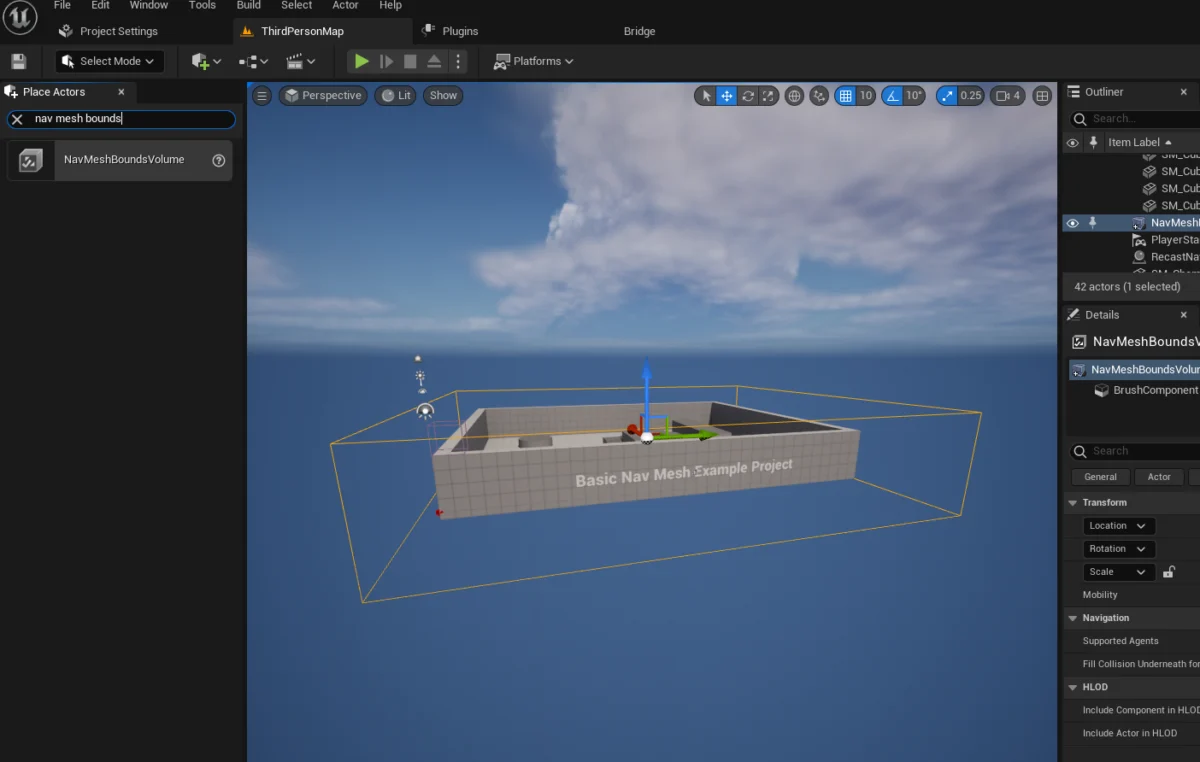
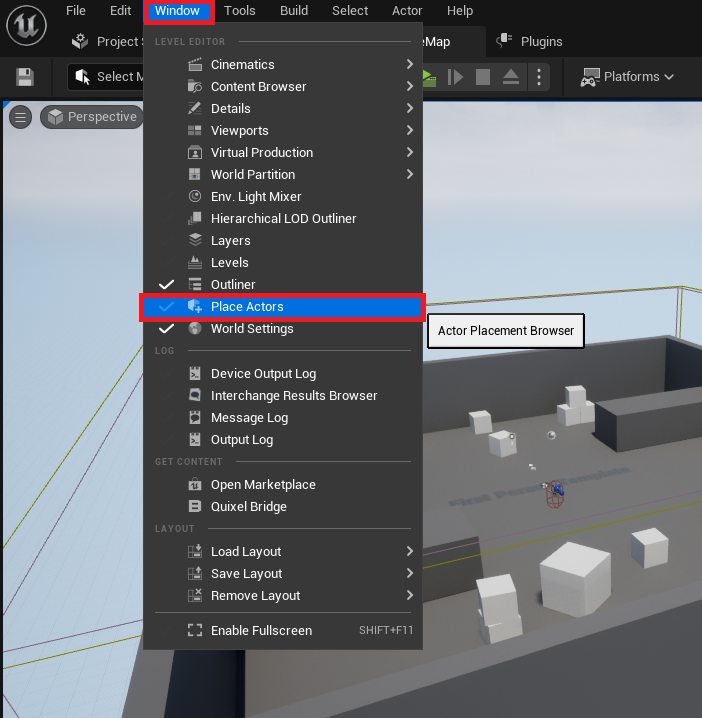
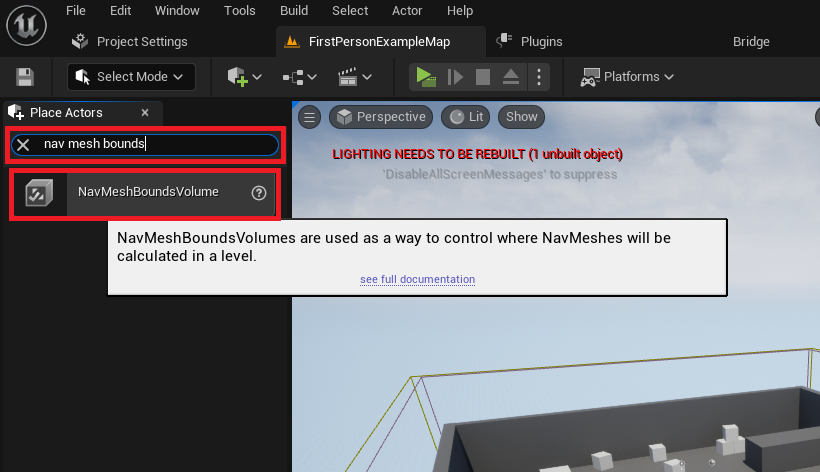
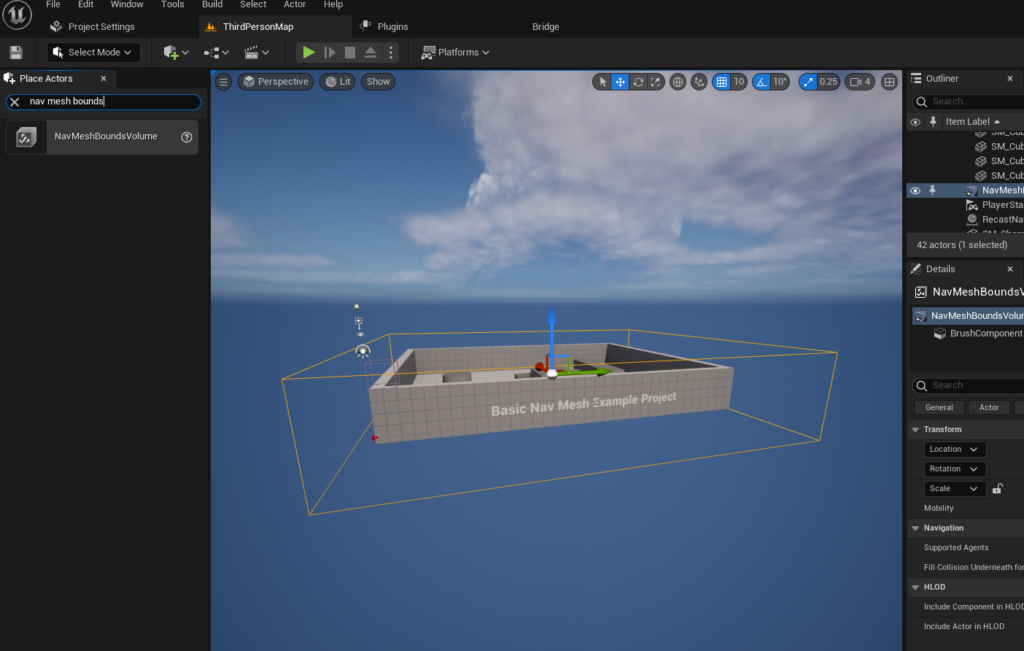
The procedure begins by accessing the "Place Actors" window within the Unreal Engine 5 editor, typically found under the "Window" menu. This window serves as a gateway for developers to introduce fundamental objects and volumes into their game world. Within the "Modes" panel, under the "Volumes" category, developers locate and add a NavMeshBoundsVolume actor to their level. This specific volume acts as a container, defining the spatial boundaries within which the NavMesh will be generated.
Once the NavMeshBoundsVolume is placed, its dimensions must be carefully scaled and positioned to encompass all areas where AI navigation is desired. This step is crucial; any part of the level outside this volume will not be considered traversable by AI agents. The flexibility of this volume allows for precise control, whether it’s a small room or an expansive open-world map. Developers must weigh the size of the NavMesh against performance considerations; larger, more complex NavMeshes require more computational resources and generation time, although Unreal Engine offers options for dynamic generation to mitigate this in large-scale or destructible environments. For instance, dynamic NavMesh generation allows for real-time updates to the navigation data, which is essential for games featuring destructible environments or procedurally generated levels, ensuring AI agents can always find valid paths even as the world changes around them.
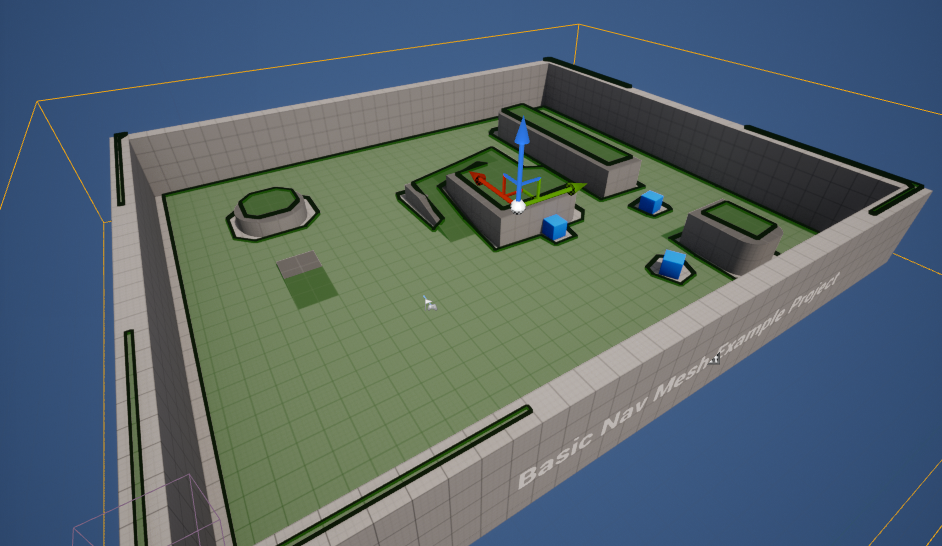
To confirm the accurate setup and generation of the NavMesh, developers can press the ‘P’ key on their keyboard. This action toggles a debug visualization, rendering the NavMesh as a series of interconnected green polygons directly within the editor viewport. This visual feedback is invaluable for identifying any gaps, inaccessible areas, or erroneous generation, allowing for immediate adjustments to the NavMeshBoundsVolume or underlying level geometry. A correctly visualized NavMesh appears as a continuous, navigable surface, representing all areas where AI characters can logically move.
Programming Basic AI Character Movement: The Blueprint Approach
With the NavMesh established, the next phase involves configuring an AI character to utilize this navigation data for autonomous movement. Unreal Engine 5’s Blueprint visual scripting system provides an accessible and powerful method for implementing such behaviors without writing a single line of code. For demonstration purposes, leveraging the engine’s default Third Person Template provides an animated character blueprint, ideal for rapid prototyping and testing AI navigation.
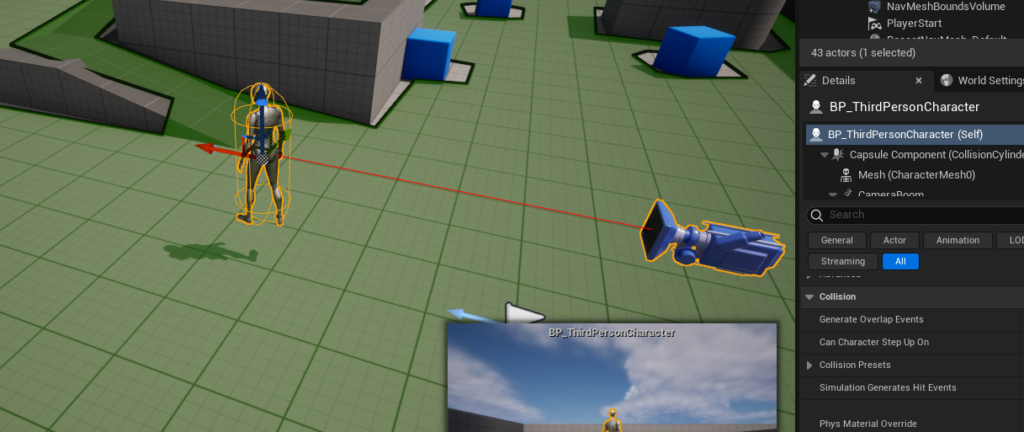
The process begins by dragging an instance of the chosen character blueprint (e.g., the BP_ThirdPersonCharacter found in the "Third Person / Blueprints" folder) into the level. This places the AI pawn within the environment, ready to receive instructions.
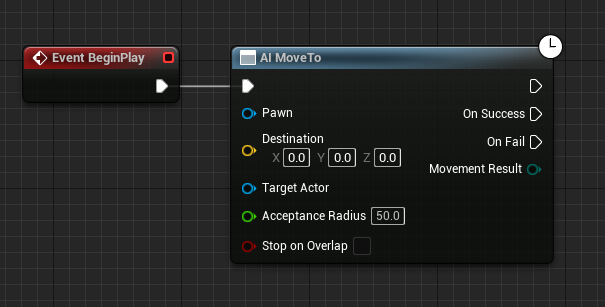
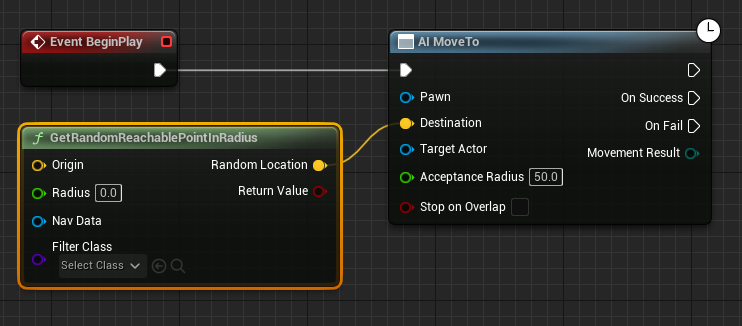
Within the character’s Blueprint editor, the core logic for AI movement is constructed. The Event Begin Play node serves as the entry point, triggering the AI’s behavior as soon as the game starts. Connected to this event is the AI MoveTo node, a fundamental AI behavior node that instructs a specified pawn to move to a particular destination. This node is the cornerstone for all pathfinding operations, relying entirely on the underlying NavMesh to calculate an efficient route.
To provide the AI MoveTo node with a target, the GetRandomReachablePointInRadius node is introduced. This node is crucial for simulating emergent, non-linear AI movement, such as patrolling or wandering. It queries the NavMesh to find a valid, traversable point within a specified radial distance from an origin point. The output (yellow vector pin) of this node, representing the random destination, is then connected to the Destination pin of the AI MoveTo node.
The Origin for GetRandomReachablePointInRadius is typically the AI character’s current location, ensuring that the random movement is calculated relative to the character itself. This is achieved by connecting a Get Actor Location node to the Origin pin. This setup dynamically defines the center of the AI’s roaming area. The Radius pin of the GetRandomReachablePointInRadius node then dictates the maximum distance the AI will consider for its random destination. A value of "2000" units, for example, allows the AI to roam within a significant area, contributing to more natural and less predictable movement patterns.
To specify which character is performing the movement, a Reference to Self node is connected to the Pawn pin of the AI MoveTo node. This ensures that the AI logic correctly targets the blueprint instance itself, preventing potential conflicts or misdirection if multiple AI agents are present in the scene.
Finally, to create a continuous, autonomous roaming behavior, a Delay node is incorporated into the Blueprint logic. This Delay node is connected to the On Success output pin of the AI MoveTo node. Upon successfully reaching its random destination, the AI character will pause for a specified duration (e.g., 1-2 seconds, configured within the Delay node) before the execution flow loops back to the AI MoveTo node. This creates a perpetual cycle: the AI moves to a random point, waits, then finds another random point, thus continuously navigating the level. This loop ensures persistent, lifelike movement, transforming a static character into an active participant in the game world.
Implications and Broader Impact on Game Development
The streamlined implementation of NavMesh and basic AI movement in Unreal Engine 5 carries significant implications for game developers. Firstly, it democratizes advanced AI capabilities, making it accessible not only to large studios with dedicated AI programmers but also to indie developers and smaller teams. This accessibility fosters innovation, allowing creators to focus on unique AI behaviors and gameplay mechanics rather than wrestling with foundational pathfinding algorithms.
Secondly, robust AI navigation enhances player experience by providing believable and challenging encounters. AI characters that can intelligently navigate complex environments, rather than getting stuck on obstacles or following rigid paths, contribute significantly to immersion and gameplay satisfaction. This is particularly vital in genres like action-adventure, stealth, and simulation games, where AI behavior directly impacts strategic depth and player engagement.
Moreover, the modular nature of Unreal Engine’s AI framework, combining NavMesh with Blueprint-driven behaviors, allows for rapid iteration and prototyping. Developers can quickly test different AI personalities, movement patterns, and responses to environmental stimuli, refining the AI’s intelligence efficiently. As the industry moves towards increasingly dynamic and procedural content, the ability to quickly generate and adapt navigation data is paramount. Features like dynamic NavMesh generation will become even more critical for games that feature real-time environmental changes or user-generated content.
However, the implementation is not without its considerations. Performance optimization, especially in games with hundreds or thousands of AI agents, requires careful management of NavMesh complexity and AI behavior trees. Debugging complex AI interactions can also be challenging, necessitating robust visualization tools and logging systems. Epic Games continues to enhance these tools, providing developers with more control and insight into AI decision-making processes.
Conclusion
The ability to implement robust AI navigation is a cornerstone of modern game development, and Unreal Engine 5 provides an exceptionally powerful and intuitive framework for achieving this. By understanding and correctly configuring the NavMesh and leveraging the engine’s Blueprint system for AI character movement, developers can imbue their virtual worlds with intelligent, believable, and engaging non-player characters. These foundational steps are not just about making characters move; they are about crafting richer, more immersive game experiences that resonate with players. As AI technology continues to advance, Unreal Engine 5 stands poised to remain at the forefront, empowering creators to push the boundaries of interactive entertainment with increasingly sophisticated and lifelike AI agents.
About the Author