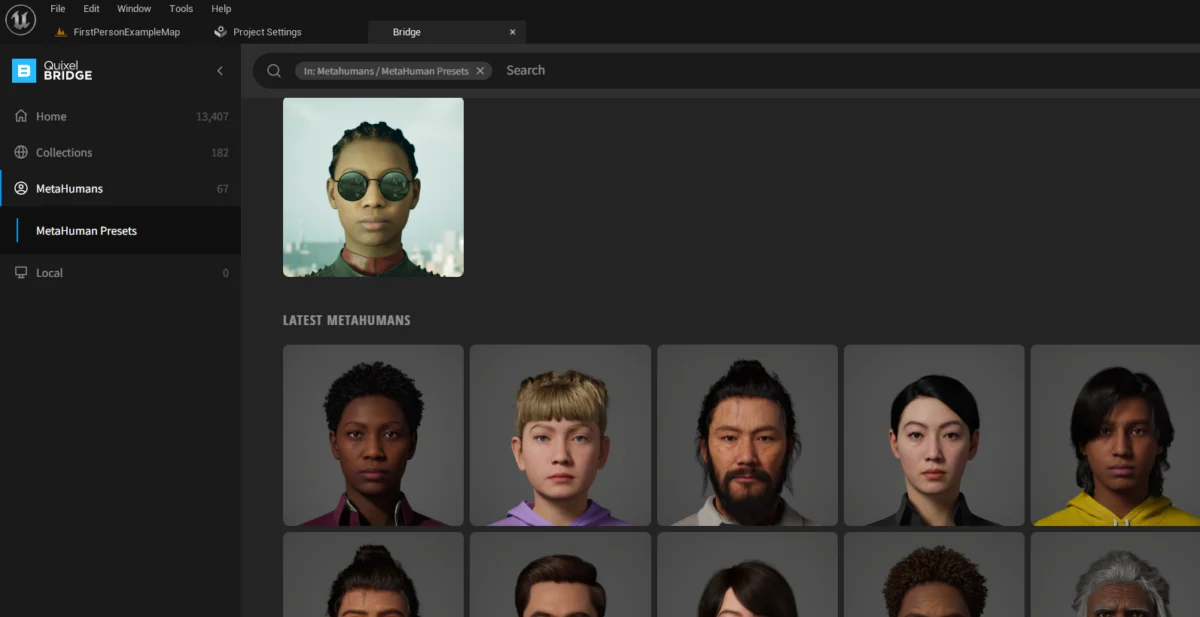
The advent of Unreal Engine 5 (UE5) has marked a significant paradigm shift in real-time content creation, particularly with the introduction of the MetaHuman character library. These remarkably high-fidelity digital humans, offered free for use in various projects, represent a pivotal advancement in democratizing access to photorealistic virtual characters for developers across industries. This guide outlines the essential steps for integrating these sophisticated assets into a UE5 project, enabling creators to harness their potential for immersive experiences.
The Dawn of Digital Realism: Understanding MetaHumans
MetaHumans are a product of Epic Games’ relentless pursuit of photorealism and efficiency in digital production. Launched as part of the broader Unreal Engine 5 ecosystem, they offer a vast library of pre-configured, fully rigged, and animation-ready digital characters. Each MetaHuman is meticulously crafted, featuring intricate details such as pore-level skin texture, realistic hair rendered with strand-based technology, and dynamic clothing physics. This level of detail, previously achievable only through extensive and costly bespoke character pipelines, is now readily accessible, fundamentally altering the landscape for character generation in games, film, and virtual production.

The core philosophy behind MetaHumans is to drastically reduce the time and effort traditionally associated with creating believable digital characters. By providing a robust framework that blends cutting-edge scanning technology with procedural generation, Epic Games and Quixel (an Epic subsidiary renowned for its Megascans library of 3D assets) have managed to distill a complex process into an intuitive workflow. This initiative is deeply rooted in Epic Games’ overarching vision to empower creators, from individual developers to large studios, to build stunningly realistic virtual worlds and experiences with unprecedented ease.
The Foundation: Unreal Engine 5 and Quixel Bridge
Unreal Engine 5 itself, with its revolutionary Lumen global illumination and Nanite virtualized micropolygon geometry systems, provides the perfect canvas for MetaHumans. These rendering technologies allow MetaHumans to maintain their extraordinary fidelity without imposing prohibitive performance costs, dynamically scaling detail based on distance and importance. The integration of MetaHumans into UE5 is primarily managed through Quixel Bridge, a robust content management application that acts as a central hub for accessing Epic’s vast asset libraries, including the expansive Megascans collection and, crucially, the MetaHuman library.
Quixel Bridge’s integration within the Unreal Engine editor streamlines the process of browsing, downloading, and importing high-quality assets. This seamless workflow is a testament to Epic Games’ strategic acquisition of Quixel in 2019, which brought together industry-leading photogrammetry assets with a powerful real-time engine. The synergy between Quixel’s meticulously scanned data and Unreal Engine’s rendering capabilities is what makes MetaHumans not just visually impressive, but also technically viable for real-time applications.
Accessing the MetaHuman Library: A Step-by-Step Guide
To begin the integration process, developers must first access the MetaHuman library within the Unreal Engine 5 editor. This involves a straightforward navigation through the editor’s interface:
-
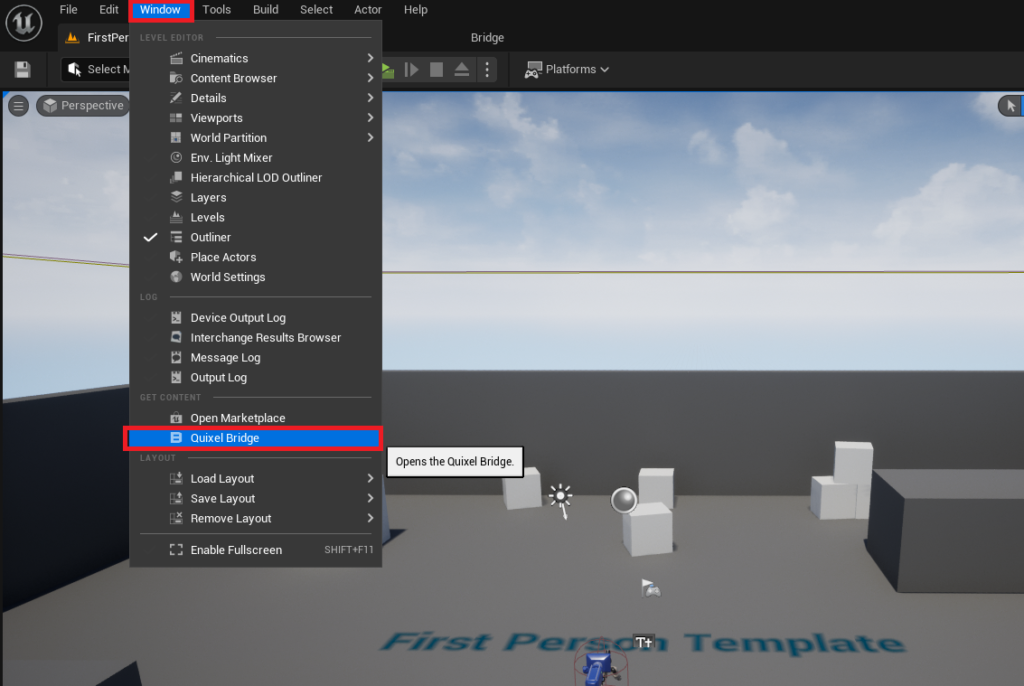
Opening Quixel Bridge: The journey commences by navigating to the "Window" tab within the Unreal Engine editor’s top menu bar. From the dropdown options, selecting "Quixel Bridge" will launch the dedicated Bridge panel directly within the editor environment. This integration ensures a unified experience, eliminating the need to toggle between separate applications.
-
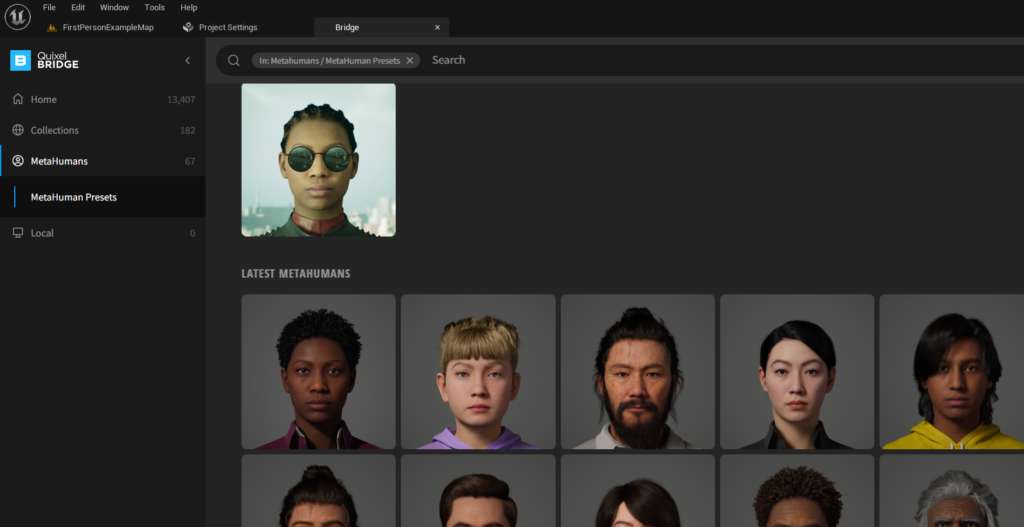
Locating the MetaHumans Tab: Once Quixel Bridge has successfully initialized and opened within the editor, users will observe several categorical tabs. To specifically browse the digital human assets, the "MetaHumans" tab must be clicked. This action filters the vast Quixel library to display only the pre-configured MetaHuman characters available for download.
-
Browsing the Extensive Collection: Upon entering the MetaHumans section, a diverse grid of pre-configured MetaHuman avatars will be presented. This library is designed to offer a wide array of choices, encompassing various ages, ethnicities, body types, and stylistic appearances, complete with distinct hairstyles and clothing options. Developers can scroll through this extensive collection to find characters that best suit the aesthetic and narrative requirements of their specific project. Each MetaHuman is a complete asset, ready for immediate deployment and animation.
-
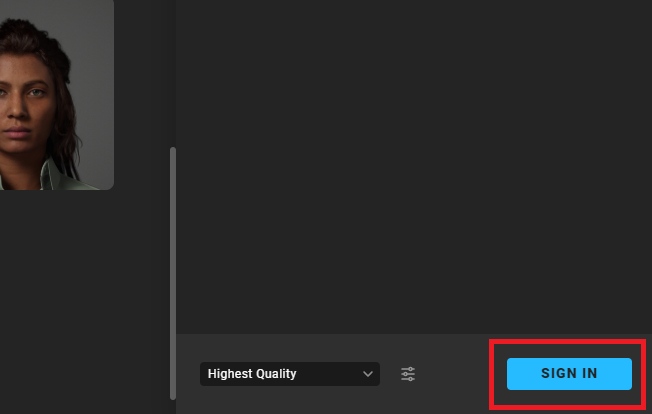
Epic Games Account Authentication: Before any MetaHuman can be downloaded and added to a project, user authentication is required. Selecting any avatar in the browsing grid will prompt the appearance of a "Sign In" button, typically located at the bottom right of the Quixel Bridge window. This step necessitates logging in with an active Epic Games account. This authentication serves multiple purposes, including licensing verification for the free-to-use assets and tracking content usage within the Epic Games ecosystem. It also grants full access not only to the MetaHuman library but also to the broader Quixel Megascans library, which contains thousands of high-quality 3D assets, surfaces, and environments.
Adding a MetaHuman Character to Your Project
Once authenticated, the process of integrating a chosen MetaHuman into the active Unreal Engine project becomes seamless. This phase involves downloading the character data and configuring the project settings to correctly support MetaHuman assets.

-
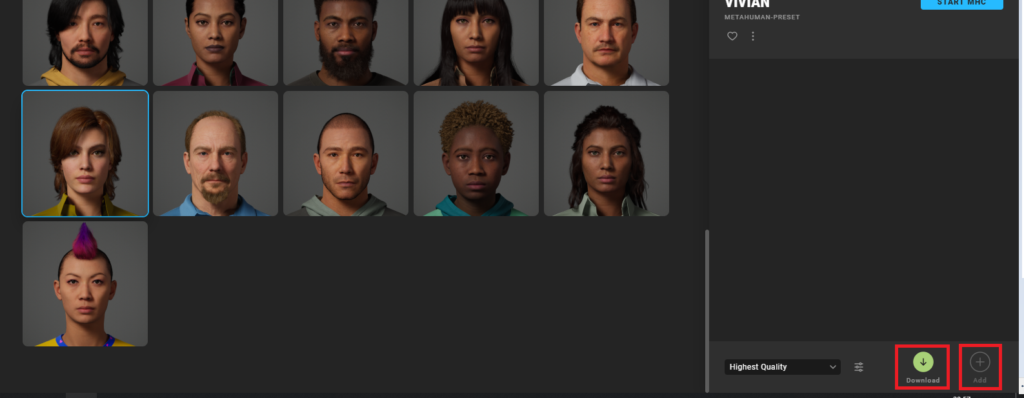
Downloading and Adding the Asset: With successful login, developers can now select their desired MetaHuman avatar from the grid. Upon selection, a "Download" button will become active. Clicking this button initiates the download of the MetaHuman’s extensive asset files, which include high-resolution meshes, textures, animation rigs, and associated blueprints. Due to the high fidelity of these characters, download sizes can be substantial, requiring a stable internet connection. Once the download is complete, the "Download" button will transform into an "Add" button. Clicking "Add" will then automatically import the MetaHuman’s assets into the currently open Unreal Engine project.
-
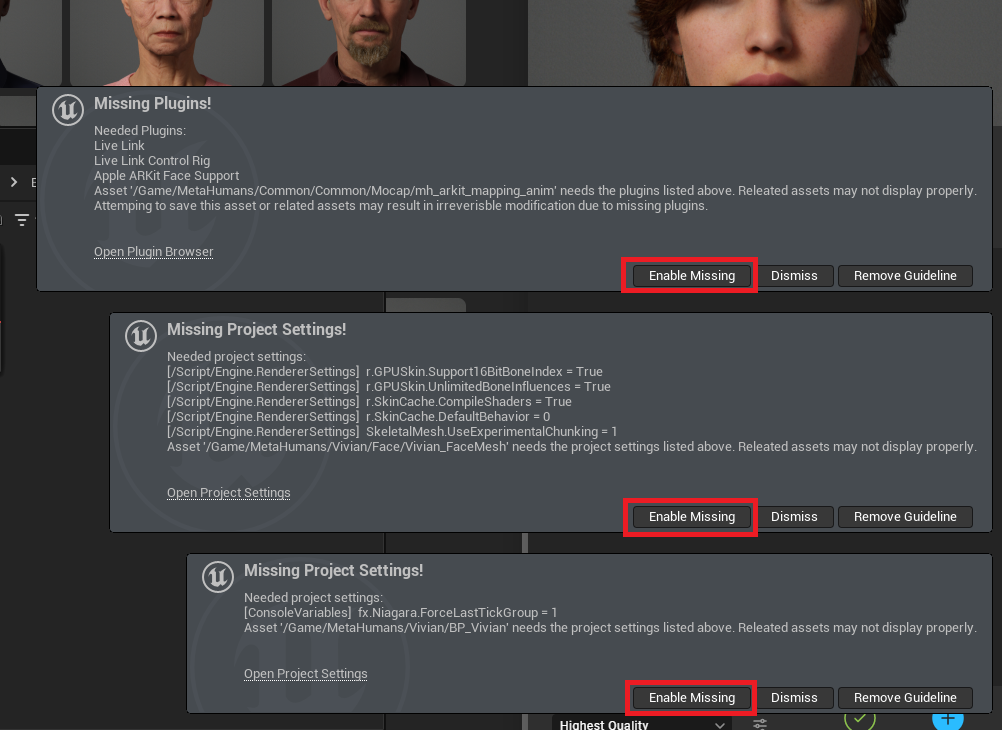
Enabling Essential Plugins and Project Settings: The integration of MetaHumans often requires specific Unreal Engine plugins and project settings to be enabled for optimal functionality. As the MetaHuman assets are imported, the editor will typically detect any missing prerequisites. Notifications may appear in the bottom-left corner of the editor, prompting the user to "Enable Missing" plugins and settings. It is crucial to accept these prompts. These necessary configurations often include:
- MetaHuman Plugin: The core plugin required for MetaHuman functionality, enabling their unique rigging and rendering features.
- Control Rig Plugin: Essential for advanced animation control and manipulation of the MetaHuman’s skeletal structure.
- Alembic Plugin: Often used for importing complex animated geometry, which MetaHumans might leverage for certain elements.
- Live Link Plugin: Important for connecting to external animation sources or facial capture systems.
- Various project settings related to rendering, such as Virtual Textures and High-Quality Translucency, which are vital for MetaHumans’ visual integrity.
Enabling these settings ensures that the MetaHuman character can be rendered correctly, animated effectively, and interact seamlessly within the UE5 environment.
-
Restarting the Editor: After enabling the required plugins and adjusting project settings, the Unreal Engine editor will prompt a "Restart Now" action. This restart is a mandatory step, as it allows the newly enabled plugins and changed settings to be fully initialized and applied across the engine. Failing to restart will result in incomplete integration and potential errors when attempting to use the MetaHuman.
Locating and Utilizing Your MetaHuman Blueprint
Following the editor restart, the imported MetaHuman assets will be fully integrated into the project and ready for use.
-
Navigating the Content Drawer: To locate the newly added MetaHuman, open the "Content Drawer" (or "Content Browser"). Within the Content Drawer, a new folder named "MetaHumans" will have been created. Double-clicking this folder will reveal subfolders, each corresponding to the name of the MetaHuman characters that have been downloaded.
-
Identifying the Blueprint Asset: Inside the specific MetaHuman’s folder, developers will find several assets. The primary asset representing the fully assembled and ready-to-use character is a Blueprint, typically identifiable by its name starting with "BP_" (e.g., "BP_Ada" or "BP_Malcolm"). This Blueprint encapsulates all the necessary components of the MetaHuman, including its various meshes (head, body, hair, clothing), skeletal rig, materials, and default animation logic.
-
Deploying the MetaHuman: With the "BP_" asset located, developers can simply drag and drop this Blueprint into their scene viewport. The MetaHuman character will instantly appear, fully rigged and ready for interaction, animation, or integration into game logic. From this point, developers can manipulate the character, apply custom animations, set up facial expressions, and integrate it into cinematics or gameplay scenarios.
Broader Impact and Implications of MetaHumans
The introduction of MetaHumans is not merely a technical update; it represents a significant shift in the digital content creation paradigm with far-reaching implications across multiple sectors.
- Democratization of High-End Production: Historically, achieving photorealistic digital humans was the exclusive domain of large AAA game studios and high-budget film productions. MetaHumans drastically lower this barrier, enabling indie developers, educational institutions, and smaller creative agencies to produce characters of comparable quality, thereby fostering greater innovation and diversity in content.
- Accelerated Production Workflows: The time-saving aspect is immense. What once took weeks or months for character artists, modelers, texture artists, and riggers can now be accomplished in a fraction of the time, allowing teams to focus more on narrative, gameplay, and overall experience rather than foundational asset creation.
- Future of Virtual Production: In film and television, MetaHumans are poised to revolutionize virtual production. They can serve as highly realistic stand-ins for actors during pre-visualization, populate virtual sets, or even be used for final-pixel shots, offering unprecedented flexibility and creative control.
- The Metaverse and Digital Identity: As the concept of the metaverse gains traction, MetaHumans provide a robust framework for creating highly personalized and expressive digital avatars. Their high fidelity makes them ideal candidates for representing users in persistent virtual worlds, blurring the lines between physical and digital identities and enabling richer social interactions.
- Ethical Considerations: While the technology is transformative, it also raises discussions around the "uncanny valley"—the phenomenon where digital characters that are almost, but not quite, human can evoke feelings of unease. Furthermore, the ease of creating realistic digital humans prompts conversations about deepfakes and the ethical use of such powerful tools, necessitating responsible development and deployment.
The Horizon: MetaHuman Creator and Beyond
While the pre-configured library offers substantial value, Epic Games has also unveiled the MetaHuman Creator, a cloud-streamed application designed to allow users to build unique, custom MetaHumans from scratch or by blending existing presets. This tool provides granular control over facial features, body proportions, skin tone, hair, clothing, and accessories, offering billions of potential variations. The custom MetaHumans created in this application can then be seamlessly exported to Unreal Engine 5, providing an unparalleled level of personalization.
The MetaHuman Creator solidifies Epic’s commitment to empowering creators with tools that push the boundaries of realism and efficiency. Future developments are expected to further enhance the MetaHuman ecosystem, potentially including more diverse body types, advanced AI-driven animation solutions, and even integration with real-time performance capture technologies to bring characters to life with even greater authenticity.
Conclusion
The integration of MetaHumans into Unreal Engine 5 projects represents a monumental leap forward for digital content creation. By providing free access to a library of exceptionally high-fidelity, fully rigged, and animation-ready characters, Epic Games has effectively democratized a crucial and often challenging aspect of game and film development. The straightforward process, facilitated by Quixel Bridge and the robust UE5 editor, ensures that creators can quickly bring these stunning digital humans into their projects, ready to imbue their virtual worlds with unparalleled realism and narrative depth. As the technology continues to evolve with tools like the MetaHuman Creator, the potential for immersive and believable digital experiences will only continue to expand, shaping the future of interactive entertainment and virtual production.
About the Author