The strategic deployment of dedicated servers for games developed using Unreal Engine 5 (UE5) represents a foundational step for studios aiming to deliver robust, scalable, and secure multiplayer experiences. In an increasingly competitive gaming landscape where player expectations for seamless online interactions are at an all-time high, transitioning from peer-to-peer hosting to a centralized, dedicated server infrastructure is not merely an option but a critical necessity for ambitious multiplayer titles. This shift is vital for maintaining game integrity, ensuring consistent performance, and fostering engaging communities across diverse genres, from high-stakes competitive shooters to expansive cooperative survival adventures and dynamic social sandboxes.
The Imperative of Dedicated Servers in Modern Gaming
The evolution of online gaming has highlighted the distinct advantages of dedicated servers over traditional peer-to-peer (P2P) models. While P2P, often implemented via "listen servers" where one player’s machine hosts the game, offers ease of initial setup and lower immediate infrastructure costs for developers, it introduces inherent limitations that can significantly degrade the player experience and compromise game integrity. Issues such as host advantage, inconsistent latency due to varying host internet connections, susceptibility to cheating, and the inability to scale for larger player counts or maintain uptime independently of a player’s session are common pitfalls.
Industry data consistently shows a strong correlation between game quality, particularly in multiplayer stability, and player retention. A 2023 report from Newzoo indicated that multiplayer games continue to dominate engagement metrics, with titles offering reliable online experiences seeing significantly higher average session times and longer lifespans. This underscores the economic and reputational imperative for developers to invest in robust server solutions. Dedicated servers, by contrast, operate as independent, powerful machines solely responsible for running the game world and its logic. They do not render graphics, process player input, or depend on any single player’s device, thus providing a neutral, authoritative environment. This centralization translates directly into enhanced performance, minimized latency discrepancies, superior security against common exploits, and unparalleled reliability, offering a consistent and fair gameplay experience for all participants. Furthermore, a dedicated server acts as a persistent game instance, capable of running 24/7, allowing players to join and leave without disrupting the game state for others, a crucial feature for persistent world games or those with dynamic player populations.
Unreal Engine 5: A Platform for Scalable Multiplayer
Unreal Engine 5, renowned for its cutting-edge graphics capabilities and powerful development tools, also provides a comprehensive framework for network programming and multiplayer game development. Its robust C++ backend, coupled with visual scripting through Blueprints, offers developers the flexibility and control needed to implement sophisticated server-side logic. The engine’s architecture is designed to support high-performance applications, making it an ideal choice for games that require dedicated server infrastructure to handle complex physics, large numbers of synchronized entities, and high player concurrency.
The guide in question focuses on leveraging UE5’s inherent capabilities to build and configure a dedicated server from the ground up. This process encompasses preparing project settings, compiling the server, and running it locally for testing, effectively covering the entire lifecycle from development to initial deployment. This approach is rooted in the engine’s capacity to differentiate between a client build and a server build, optimizing each for its specific role.
A Developer’s Roadmap: Building a UE5 Dedicated Server
The journey to deploying a functional dedicated server in Unreal Engine 5 involves several critical technical stages, each requiring meticulous attention to detail to ensure optimal performance and stability.
Prerequisites for Deployment: Before embarking on the server build process, developers must ensure their project environment meets specific criteria. Firstly, a fully functional multiplayer Unreal Engine 5 project is essential. This foundational project should already incorporate multiplayer sessions, allowing clients to connect and interact within a shared game space. This guide specifically references a prerequisite of having followed a separate guide on Unreal Engine 5 Multiplayer Sessions, highlighting the modular nature of game development processes.
Secondly, and crucially, developers are mandated to use a source build of Unreal Engine 5, rather than a version downloaded directly from the Epic Games Launcher. This requirement stems from the need for specific compiler configurations and access to engine source code that are typically unavailable in the pre-compiled binary versions. Building from source grants developers the necessary control to compile server-specific modules and dependencies, a step vital for generating a lightweight, optimized server executable. Epic Games provides detailed documentation on how to build a source version of the engine, emphasizing its importance for advanced deployment scenarios.
Finally, for the server to correctly advertise and manage game sessions, the Advanced Sessions plugin must be installed and integrated into the project. This third-party plugin extends Unreal Engine’s native session management capabilities, providing more granular control and reliable session browsing for players. Without it, servers may struggle to appear correctly in session lists, hindering player connectivity.
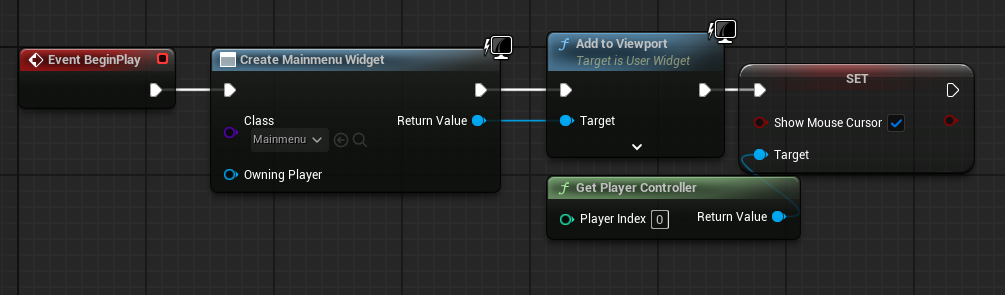
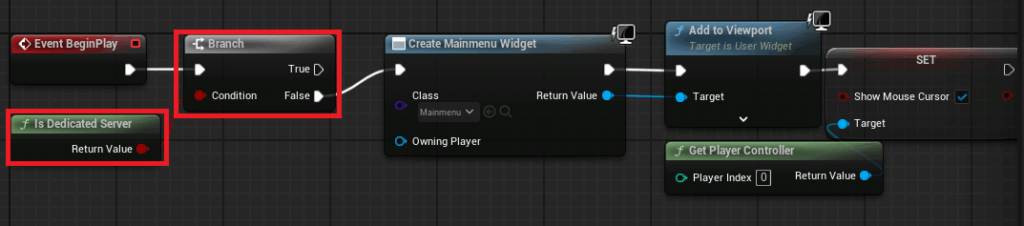
Automating Server Initialization: A key distinction of a dedicated server is its headless operation; it doesn’t require a graphical interface or player input to function. Therefore, the server must be configured to automatically create a game session and load the appropriate map upon launch. In a typical client-side application, the game might start by displaying a main menu widget. For a dedicated server, this menu is superfluous and must be bypassed.
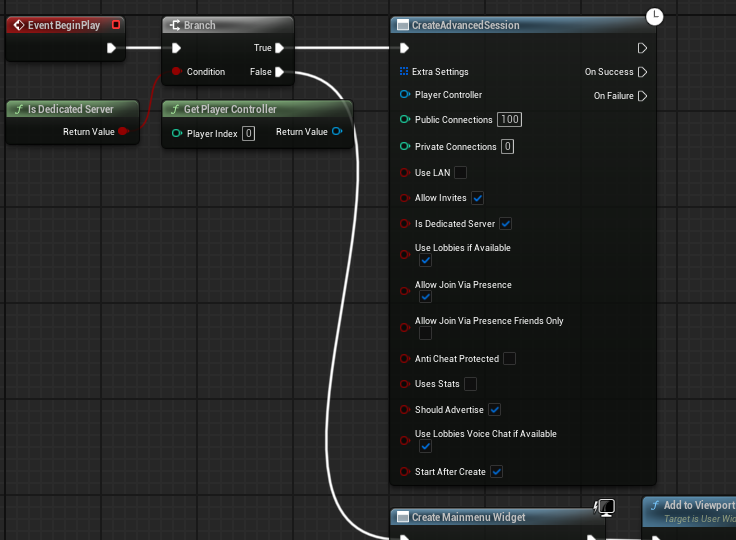
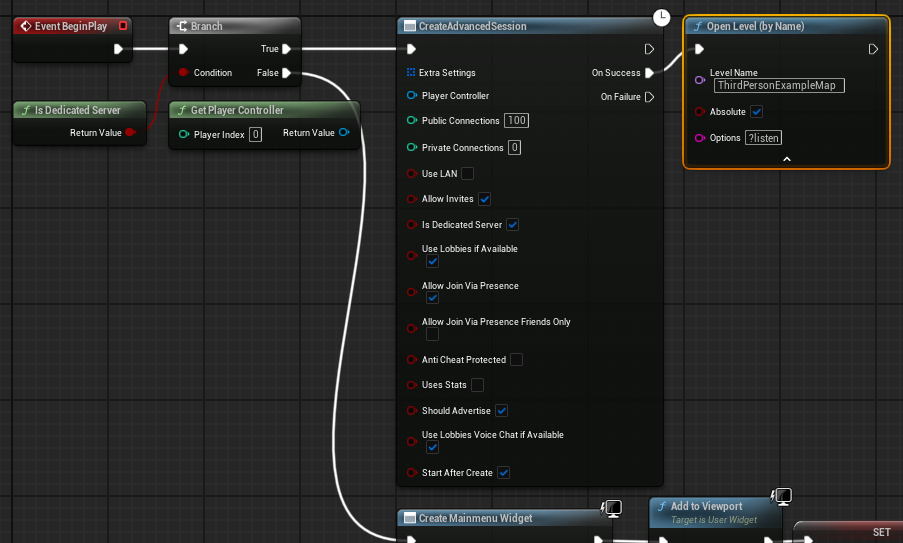
To achieve this, developers integrate an "Is Dedicated Server" check within their main menu level blueprint. This node evaluates whether the current executable is running as a dedicated server. If the condition is false (i.e., it’s a client application), the main menu widget is created as usual. However, if the condition is true, the code flow diverts, bypassing the UI creation entirely. Instead, a "Create Advanced Session" node is executed with predefined settings, initiating a multiplayer session. Upon successful session creation, the server then loads the designated game level with the ?listen option appended to the map name. This option explicitly instructs the server to listen for incoming client connections, making the game instance accessible to players. This streamlined, automated startup sequence is critical for efficient server deployment and management, eliminating the need for manual intervention post-launch.
Configuring Default Server Maps: By default, Unreal Engine servers might attempt to load an internal engine map (often referred to as "Entry"). This default behavior is unsuitable for a custom game, as it would prevent players from connecting to the intended gameplay environment. Developers must explicitly set their desired starting map for the dedicated server.
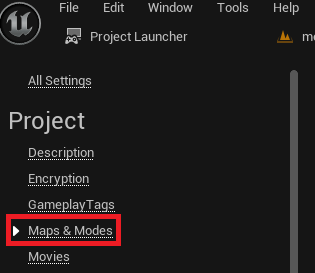
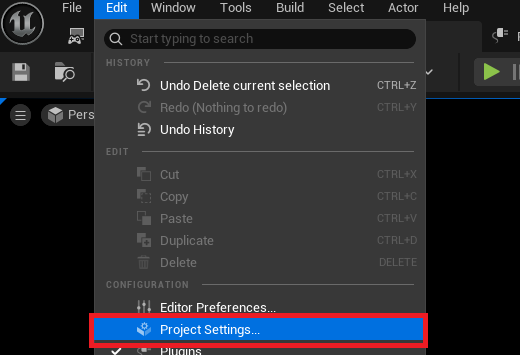
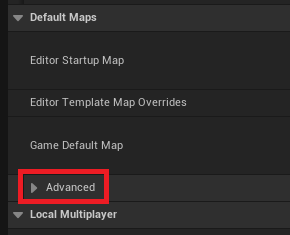
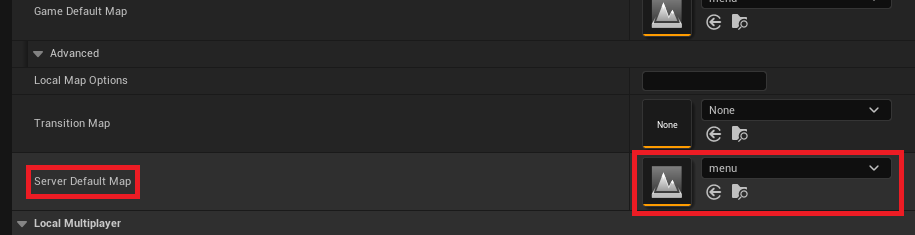
This configuration is performed within the Unreal Engine’s Project Settings, under the "Maps & Modes" section. Within this area, an "Advanced" dropdown reveals the "Server Default Map" option. Here, developers specify the exact path to the map they wish the dedicated server to load first. For instance, if the game’s primary lobby or starting area is named "MainMenuMap," this map would be selected. This ensures that when the dedicated server executable is launched, it immediately initializes the correct game world, preparing it for player connections without any further manual map loading commands.
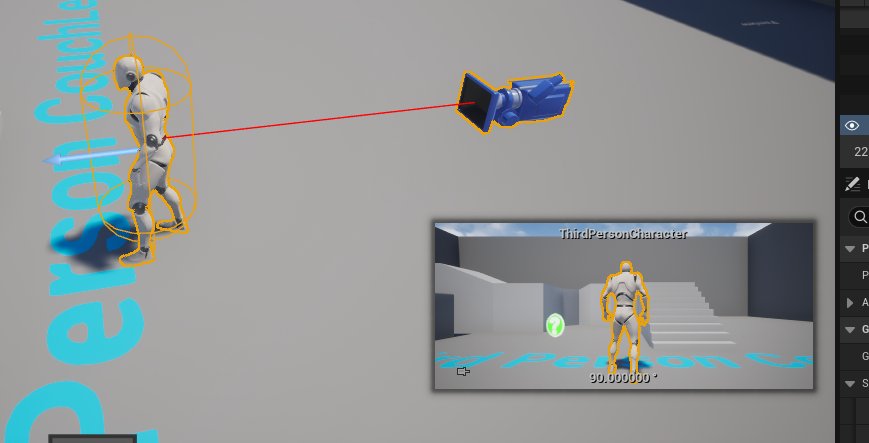
Optimizing for Server-Side Operations: Given that a dedicated server does not involve a player character or local player input, it is unnecessary and inefficient for it to spawn a default character or player pawn into the game world. In many multiplayer projects, a default character blueprint might exist within the level, controlled by the first connected player. On a dedicated server, this would result in an idle character consuming resources without serving any functional purpose.
To optimize performance and eliminate redundant entities, developers should remove any default character spawns or player starts that are hardcoded into the server’s initial loading map. This ensures that the server’s resources are exclusively dedicated to processing game logic, network replication, and maintaining the authoritative game state, rather than rendering or simulating an unneeded character. This optimization is a small but significant step towards a lean and efficient server build.
Leveraging the Project Launcher for Deployment
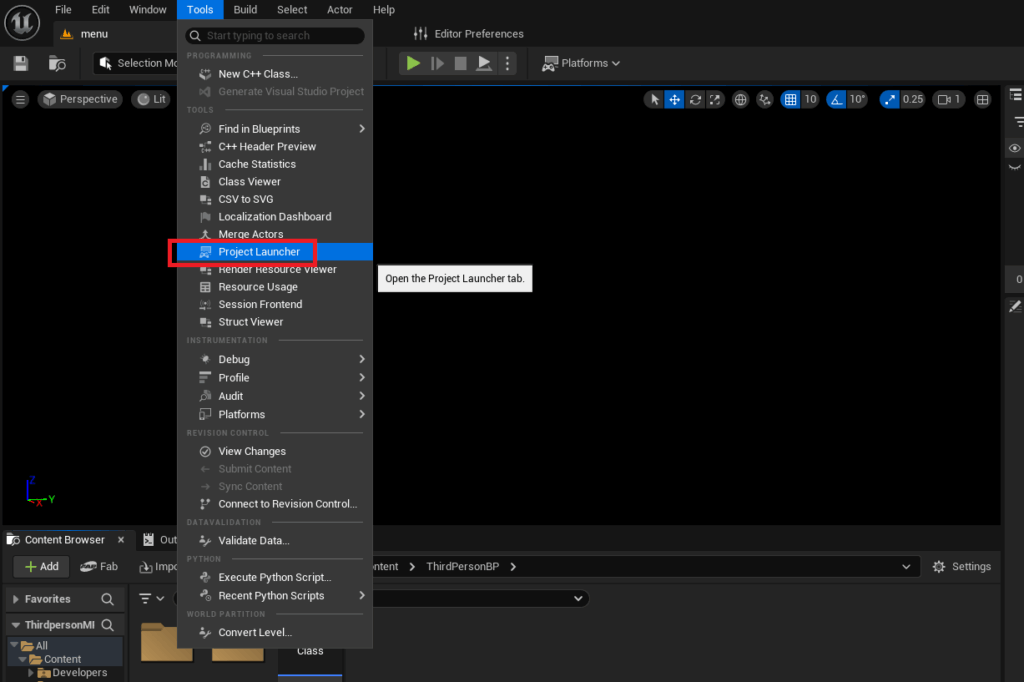
The Unreal Engine Project Launcher is an indispensable tool for packaging and deploying various versions of a game, including dedicated server builds. It provides a centralized interface for creating custom profiles that define specific build configurations, streamlining an otherwise complex compilation process.
The Project Launcher’s Role: Accessing the Project Launcher via the "Tools" menu in the Unreal Editor reveals an interface designed for managing build profiles. This tool automates the "cooking" (preparing assets for specific platforms), packaging (bundling cooked assets into an executable), and optionally, deploying of game builds. Its ability to create custom profiles is particularly powerful for dedicated server deployment, allowing developers to define precisely what assets and platforms are targeted.
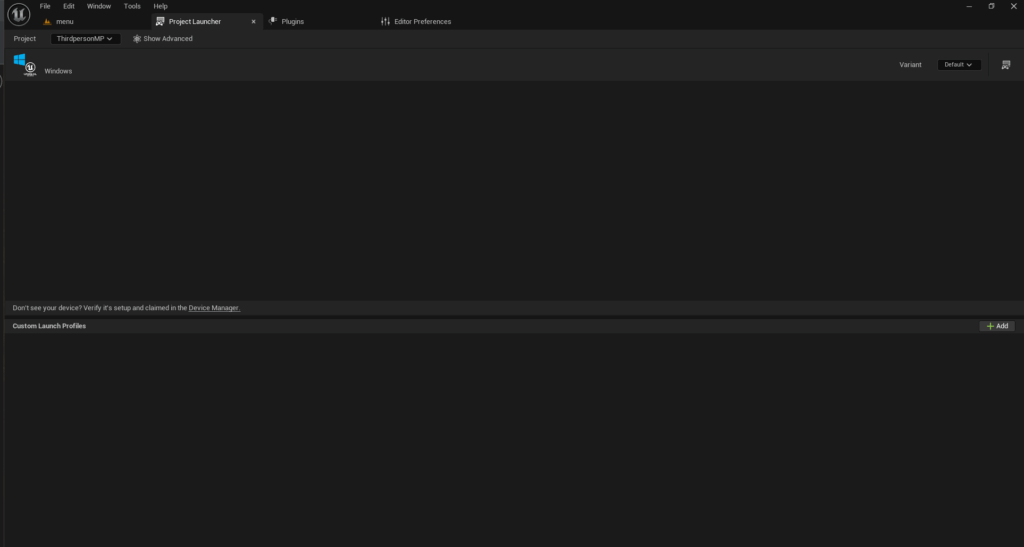
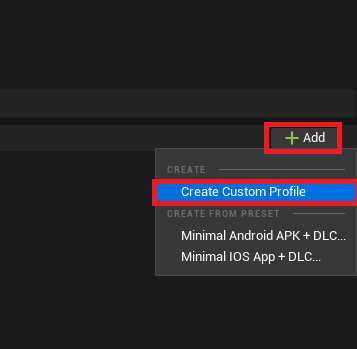
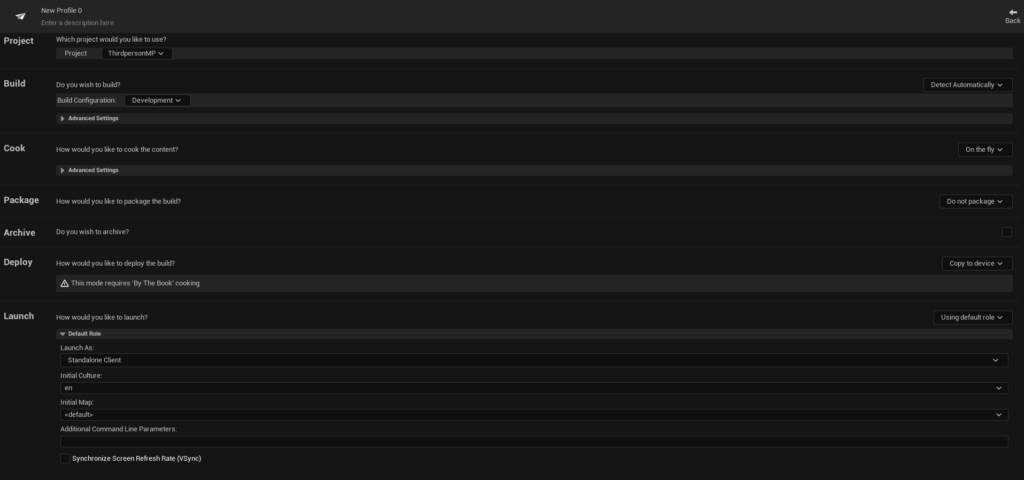
Creating the Custom Profile: The first step within the Project Launcher is to create a "Custom Profile." This profile acts as a blueprint for the dedicated server build.
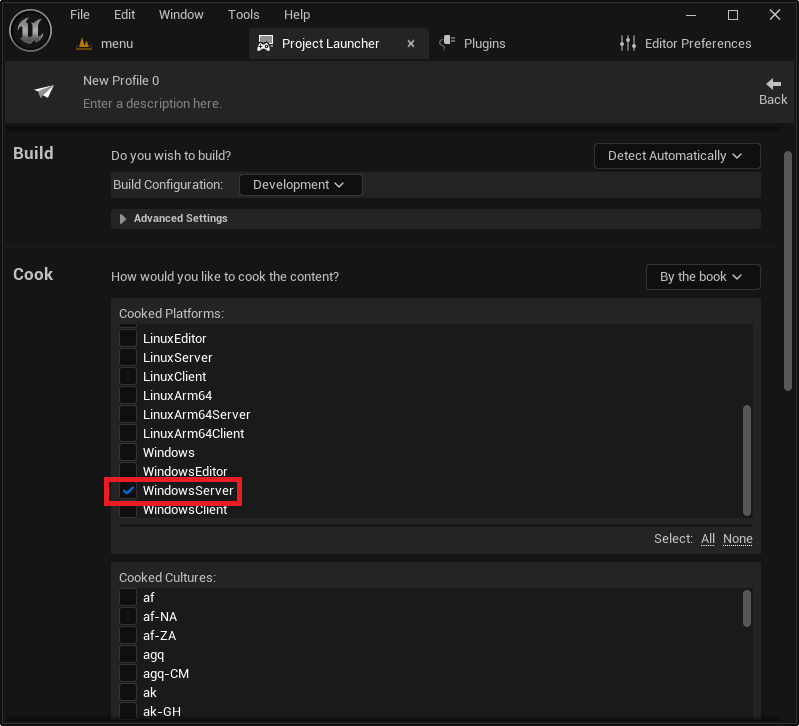
- Cook Settings: The "Cook" section is crucial. The "Cook content" option must be changed from "On the fly" to "By the book." "By the book" cooking pre-processes all content, ensuring that the server executable includes only the necessary, optimized assets, which is vital for performance and package size.
- Cooked Platforms: Developers then select the target server platform. For Windows-based hosting, "WindowsServer" is chosen. For Linux environments, "LinuxServer" (for x86/64 architectures) or "LinuxArm64" (for ARM-based servers) would be selected. This choice dictates the architecture and operating system compatibility of the compiled server.
- Maps to Cook: All maps intended for use on the server must be explicitly added to the "Maps to Cook" list. This ensures that the server build contains all the necessary level data for various game modes or transitions.
- Package Settings: The "Package" section determines how the cooked content is bundled. The option must be changed from "Do not package" to "Package & store locally." This command instructs the Project Launcher to create the final executable and associated files in a specified local directory. The default path is usually within the project’s
Saved/StagedBuildsfolder, organized by platform, but developers can customize this output location. - Deploy Settings: For dedicated servers, the "Deploy" option should typically be set to "Do not deploy." This is because dedicated servers are usually deployed manually to specific hosting environments or cloud platforms, rather than directly pushed to a device via the launcher.
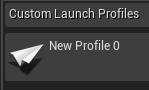
- Profile Naming: Finally, the profile is given a descriptive name (e.g., "Windows Dedicated Server Build") for easy identification and management.
Building and Verifying the Dedicated Server
With the custom profile configured, the actual build process can commence, followed by essential verification steps.
Initiating the Build Process: From the main Project Launcher menu, developers simply select their newly created custom profile and click the "Launch" button (represented by a controller and display icon). This action triggers the build process, which involves several stages: cooking content, packaging, and compiling the server executable. A progress window will display real-time logs and status updates. It is important to note that the initial build can be a time-consuming process, potentially taking several hours depending on project size and hardware specifications, as the engine compiles all necessary assets and code from scratch. Patience is key during this phase. Upon successful completion, the log will indicate that all tasks have finished with a "Success" status.
Post-Build Verification and Testing: Once the build process is complete, the dedicated server executable will be located in the specified output directory (e.g., [YourProject]/Saved/StagedBuilds/WindowsServer). This folder will contain the Server.exe (or equivalent for other platforms) along with other necessary game content and engine binaries.
To facilitate local testing and monitoring, a crucial step involves creating a Windows shortcut to the Server.exe. The properties of this shortcut are then modified to include the -log launch option at the end of the "Target" field. This argument forces the server to open in a console window, displaying real-time logging messages, including initialization status, session creation details, and client connection events. Without the -log argument, the server would run silently in the background, making debugging and monitoring exceedingly difficult.
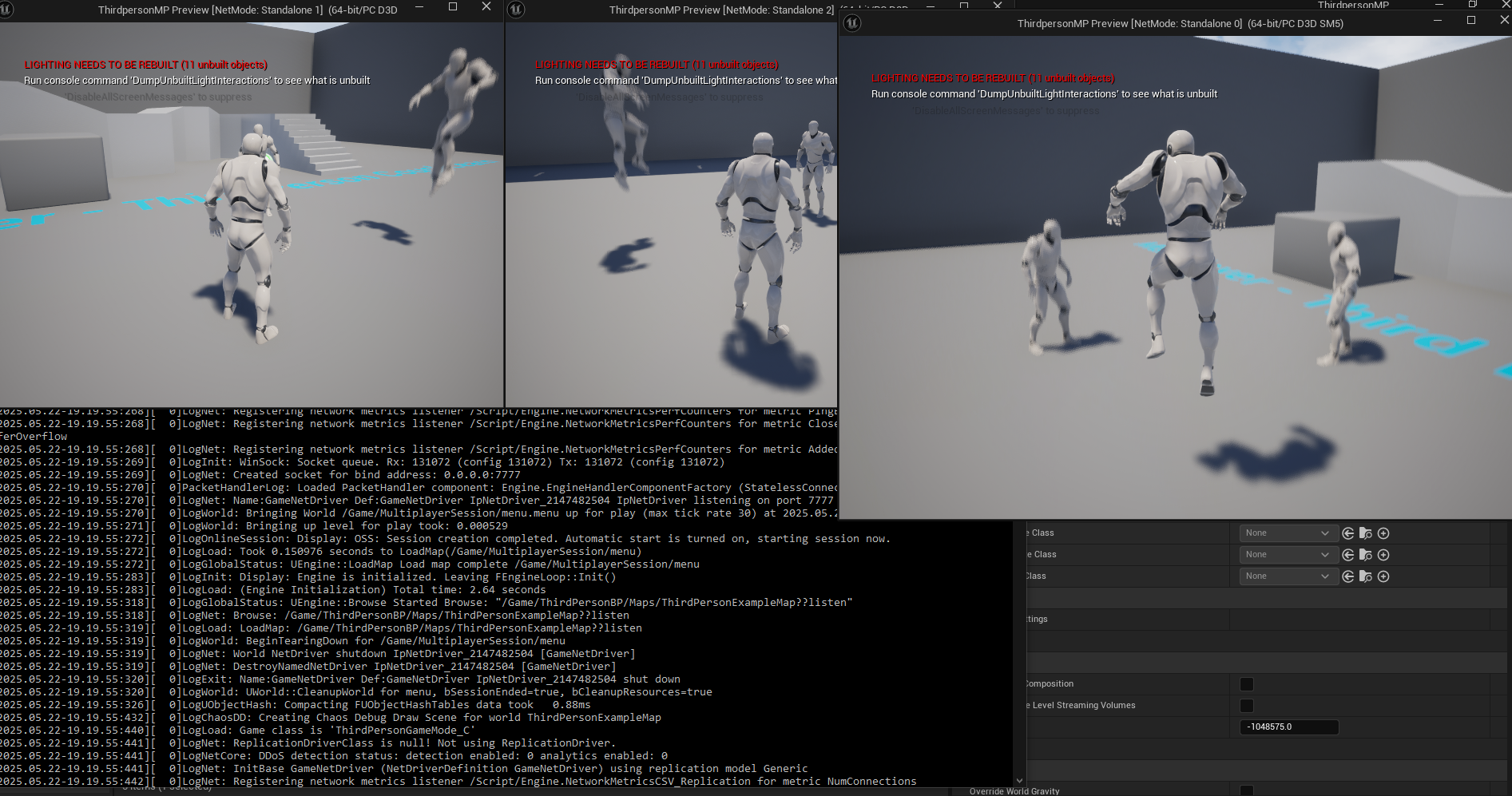
Launching the server shortcut with the -log argument will display a stream of text in a command prompt window, indicating the server’s initialization, map loading, and session advertisement. Once the server is active, client applications (either editor-launched clients or packaged game builds) can then connect to it. The client’s session browser should now display the dedicated server session, allowing players to join and experience the game in a controlled, authoritative environment. A successful demonstration involves multiple clients connecting to the single dedicated server, with all player movements and interactions seamlessly synchronized, proving the server’s operational integrity.
Industry Implications and Future Outlook
The ability to efficiently deploy dedicated servers for Unreal Engine 5 games carries profound implications for the gaming industry, affecting development practices, player experiences, and the overall competitive landscape.
Enhanced Player Experience: The most direct beneficiary is the player. Dedicated servers guarantee a more equitable and stable gameplay experience by minimizing latency, eliminating host advantage, and providing a consistent frame of reference for game logic. This is particularly critical for genres like esports titles, where split-second decisions and precise hit detection are paramount.
Security and Anti-Cheat: Dedicated servers significantly bolster a game’s security posture. By running the core game logic on a trusted server, developers can more effectively detect and mitigate cheating, as client-side manipulations are less likely to impact the authoritative server state. This fosters a fairer environment, which is crucial for retaining competitive players.
Scalability and Reach: With dedicated servers, games can support larger player counts and more complex game worlds than peer-to-peer models could ever achieve. Furthermore, these servers can be hosted globally on various cloud infrastructure providers, allowing developers to reach wider audiences and offer low-latency experiences to players across different geographical regions.

Developer Efficiency and Control: While requiring an initial investment in infrastructure and setup, dedicated servers offer developers unparalleled control over their game’s operational environment. They can implement custom server-side tools, perform real-time monitoring, and push updates without requiring players to host their own games. This level of control is essential for managing live-service games and responding quickly to emerging issues.
Market Trends: The consistent demand for high-quality, persistent, and competitive online multiplayer games ensures that dedicated server deployment will remain a cornerstone of modern game development. As cloud computing services become more accessible and powerful, the barrier to entry for deploying and managing dedicated servers is also decreasing, empowering more studios to adopt this robust infrastructure.
In conclusion, the detailed guide on building and configuring a dedicated server for Unreal Engine 5 projects provides developers with the essential knowledge and practical steps to move beyond basic multiplayer setups. By embracing dedicated server technology, studios can deliver a superior multiplayer experience characterized by enhanced performance, heightened security, and unwavering reliability. This capability is not just a technical feature but a strategic imperative, paving the way for the launch of fully-featured, high-performing multiplayer games that consistently meet and exceed player expectations in the dynamic world of interactive entertainment.
About the Author