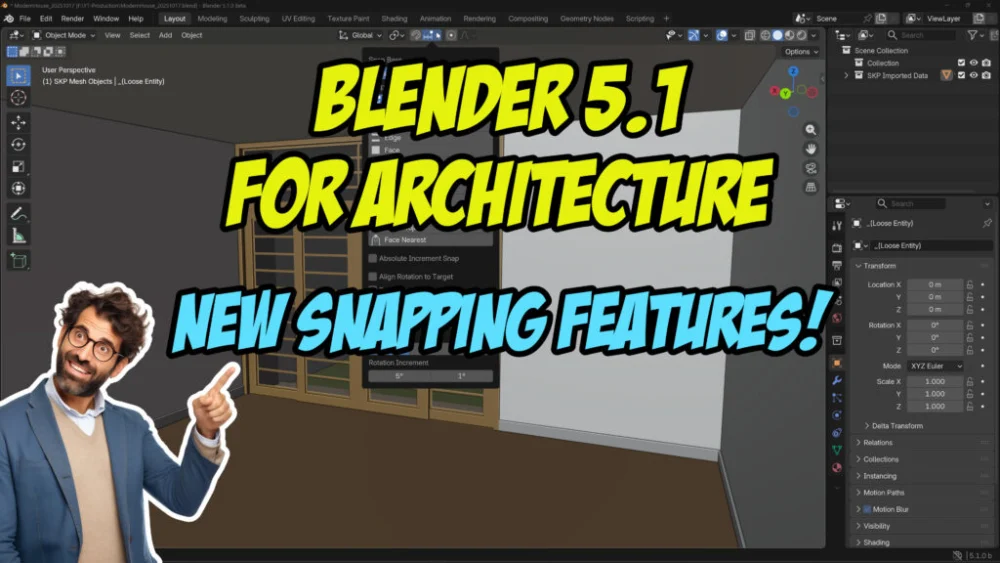
The impending release of Blender 5.1 is set to deliver a significant enhancement to the popular open-source 3D creation suite, particularly for professionals in the architecture and design sectors. A newly introduced "Face Center" snapping tool promises to streamline the precision modeling workflow, enabling users to instantly align objects and geometry to the exact center of any face. This development, detailed in a recent tutorial by Allan Brito, signifies a notable step forward in Blender’s ongoing evolution as a robust tool for architectural visualization and production.
Revolutionizing Precision in Architectural Design
For architects and 3D modelers working on detailed building designs, precise placement and alignment of elements are paramount. Traditional methods of snapping to vertices, edges, or faces can sometimes be cumbersome, requiring multiple steps or careful manipulation to achieve exact centering. The Face Center snapping feature in Blender 5.1 aims to eliminate these inefficiencies. By allowing users to directly snap to the geometric center of any polygonal face, the tool facilitates a more intuitive and rapid modeling process.
This feature is particularly beneficial for tasks such as placing windows, doors, furniture, or structural components onto surfaces with unparalleled accuracy. Instead of manually calculating the center or relying on intermediary geometry, users can now achieve this with a single, direct snapping action. This not only saves time but also reduces the potential for errors that can arise from manual adjustments, leading to cleaner and more reliable models.
Background and Development Context
The integration of specialized snapping tools into Blender has been an ongoing effort by the development team to cater to the diverse needs of its user base. While Blender has long supported a comprehensive array of snapping options, the focus on architectural workflows has intensified in recent years, recognizing the growing adoption of the software in this industry. The development of Blender 5.1 and its enhanced snapping capabilities can be viewed as a direct response to user feedback and a strategic move to solidify Blender’s position as a viable and competitive alternative to commercial CAD and BIM software for certain architectural applications.

The Face Center snapping feature is not an entirely novel concept in 3D modeling software, with similar functionalities present in other professional packages. However, its inclusion in Blender, an open-source platform, democratizes access to such advanced precision tools. This move is likely to be met with enthusiasm by independent architects, small design studios, and educational institutions that have embraced Blender due to its cost-effectiveness and powerful feature set.
Timeline of Introduction and Expected Impact
While the exact release date for Blender 5.1 has not been formally announced, the preview and demonstration of the Face Center snapping feature suggest its inclusion in the upcoming stable release. Typically, major updates like this are preceded by beta testing phases, allowing a broader community of users to test and provide feedback.
The impact of this new snapping tool is expected to be felt across various stages of the architectural design process. In the conceptualization phase, it can accelerate the creation of preliminary models and massing studies. During detailed design, it will enhance the accuracy of component placement and assembly. For architectural visualization, precise modeling is crucial for creating photorealistic renderings, and this feature will contribute to that accuracy. Furthermore, for architects involved in BIM (Building Information Modeling) workflows, accurate geometric data is foundational, and improved snapping directly supports this.
Demonstrating the Power: A Tutorial Overview
Allan Brito’s tutorial provides a clear and concise demonstration of the Face Center snapping feature in action. The video, embedded within the announcement, showcases how to activate and utilize the tool effectively. Key aspects likely covered in such a tutorial would include:
- Accessing the Snapping Tools: Demonstrating how to find and enable the Face Center snapping option within Blender’s interface.
- Workflow Integration: Illustrating how to seamlessly incorporate Face Center snapping into typical architectural modeling tasks, such as extruding elements, duplicating objects, and aligning components.
- Comparison with Existing Methods: Potentially highlighting the advantages of Face Center snapping over previous techniques for achieving similar results, emphasizing the time and effort saved.
- Practical Examples: Showcasing real-world architectural modeling scenarios where the feature proves most beneficial, such as aligning a series of identical windows on a facade or precisely positioning furniture within a room.
The emphasis on architectural applications underscores Blender’s growing maturity in this specialized field. By addressing fundamental modeling challenges with practical solutions, the Blender development team continues to demonstrate a commitment to serving professional users.

Expert Reactions and Industry Perspectives (Inferred)
While specific official statements from architectural firms or professional bodies regarding this particular Blender update may not yet be available, the general sentiment within the architectural visualization and design community is often one of cautious optimism and active exploration of new tools.
Industry experts have long recognized the potential of open-source software like Blender to disrupt traditional workflows by offering powerful alternatives at a lower cost. The introduction of advanced features specifically tailored for architectural precision is likely to be viewed positively. It signals Blender’s ongoing commitment to becoming a comprehensive solution for creative professionals, not just in entertainment but also in fields like architecture, engineering, and product design.
One might anticipate that discussions on architectural forums and within design communities will focus on how this feature integrates with existing BIM pipelines and how it can further enhance collaborative workflows. The ability to achieve precise results quickly is a significant advantage in project environments where deadlines are tight and accuracy is non-negotiable.
Analysis of Implications: Democratizing Precision
The implications of this enhancement extend beyond mere technical improvement. By making advanced precision modeling more accessible, Blender 5.1 contributes to the democratization of high-quality 3D design tools. Architects and designers who may have previously found the cost of specialized software prohibitive can now leverage Blender’s growing capabilities.
This could lead to a broader adoption of Blender in architectural education, equipping the next generation of professionals with a versatile and powerful skillset. It also empowers smaller firms and independent practitioners to compete with larger organizations by providing them with the tools necessary to produce professional-grade architectural models and visualizations.

Furthermore, the continuous development and refinement of Blender, driven by a vibrant community and dedicated development team, demonstrate the power of open-source collaboration. Innovations like the Face Center snapping feature are a testament to the platform’s ability to evolve and adapt to the evolving needs of its users.
Future Outlook and Continued Development
The introduction of Face Center snapping in Blender 5.1 is likely a precursor to further advancements in precision modeling tools. As Blender continues to mature, it is reasonable to expect more features tailored to specific industry needs, including enhanced BIM interoperability, advanced parametric modeling capabilities, and improved integration with real-world data.
The architectural community will be keenly watching how these developments unfold and how Blender continues to bridge the gap between artistic creativity and technical precision. The ongoing commitment to user-driven development ensures that Blender remains a dynamic and evolving platform, capable of meeting the increasingly complex demands of modern architectural design and visualization. The Face Center snapping feature is a clear indicator of this commitment, offering a tangible improvement that will undoubtedly be welcomed by architects worldwide.
About the Author