Itch.io, the popular digital storefront for independent games, has rolled out a significant update to its desktop application, version 26.20.0, introducing a suite of highly anticipated features designed to streamline game management and enhance user experience. The update, released recently, focuses on improving interoperability with other major gaming platforms, most notably Valve’s Steam, and empowering users with greater control over their game libraries. This strategic enhancement addresses long-standing community requests, aiming to bridge the gap between diverse gaming ecosystems and solidify itch.io’s position as a versatile and developer-friendly platform.
Bridging the Ecosystems: The Advent of Steam Shortcuts
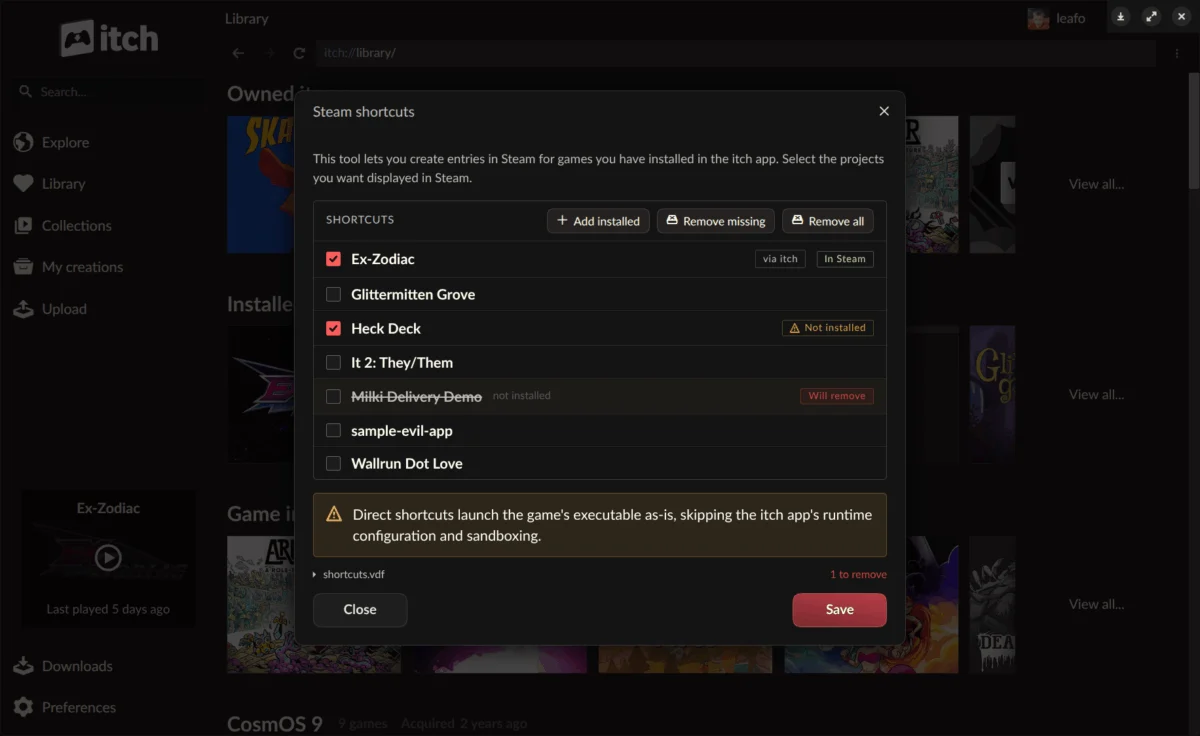
At the forefront of the v26.20.0 update is the groundbreaking introduction of Steam Shortcuts. This feature allows users to seamlessly add games installed via the itch.io app directly into their Steam library. For a significant segment of the gaming community, particularly those deeply embedded in the Steam ecosystem, this represents a monumental leap in convenience. The integration is especially beneficial for owners of the Steam Deck, Valve’s handheld gaming PC, and users who frequently utilize Steam’s Big Picture mode. Previously, playing an itch.io game often required launching the itch.io application separately, then initiating the game, or manually adding non-Steam games, which could be cumbersome and lacked proper integration.
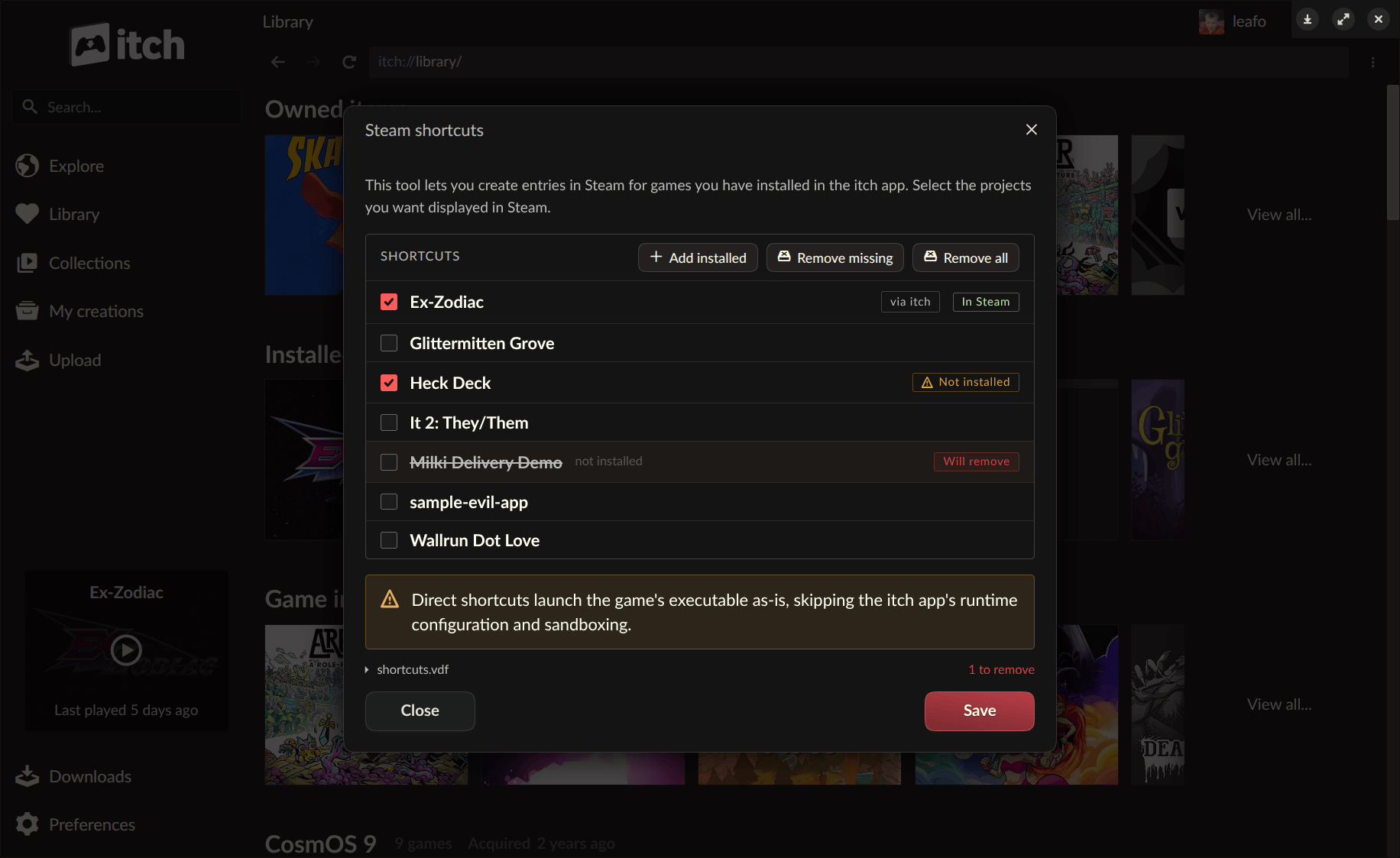
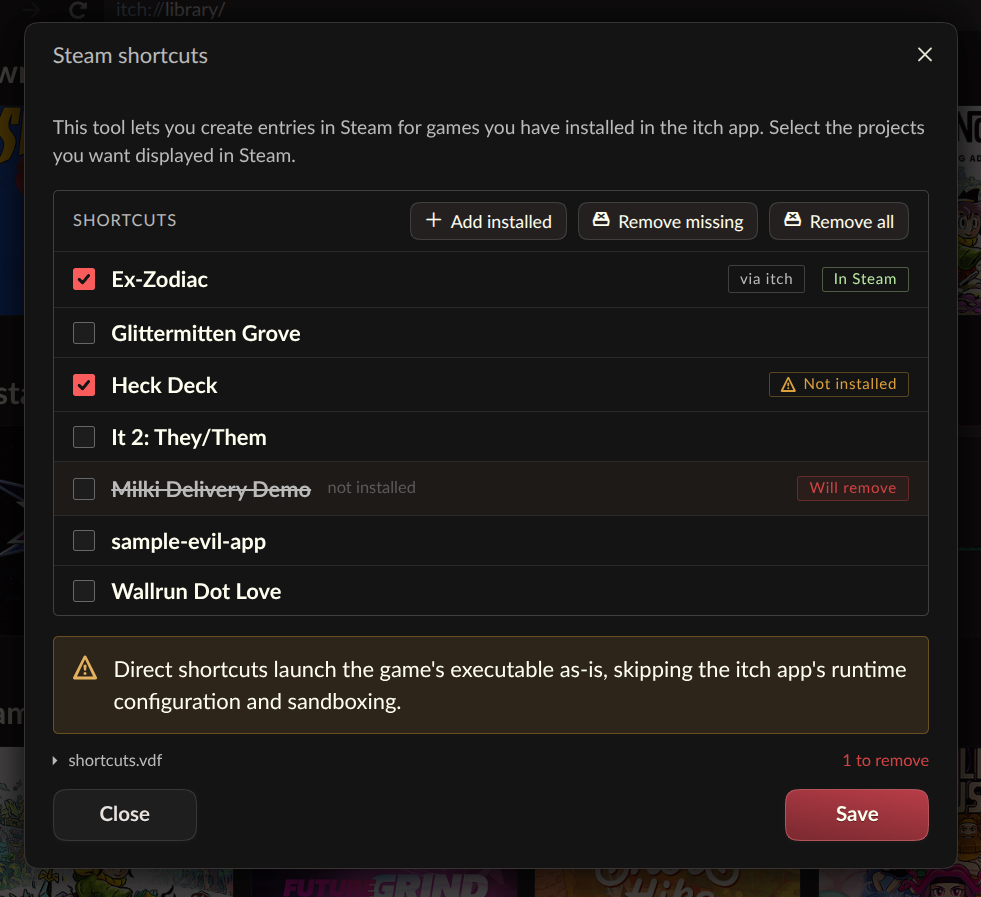
With the new functionality, itch.io games now appear alongside a user’s Steam-purchased titles, making it possible to launch them directly from the Steam client without the need to switch applications. This drastically reduces friction and creates a more unified gaming experience. The process is straightforward: users can access the Steam Shortcuts tool from the itch app’s preferences page or by right-clicking on any installed game within the itch.io client. All synchronized shortcuts are automatically organized into an ‘itch.io’ collection within Steam, ensuring tidy library management.
This feature is currently designated as "somewhat experimental," a common practice for itch.io as it often solicits community feedback during the initial rollout of new, complex functionalities. Users are encouraged to report any bugs or issues through the platform’s GitHub issue tracker, fostering a collaborative development environment that is characteristic of itch.io’s community-driven approach. The update also hints at the ability to configure each shortcut with "two different launch modes" for optimal compatibility, suggesting flexibility for various game types and system configurations, although specific details on these modes are yet to be fully elaborated. This iterative development model allows for rapid refinement based on real-world usage data and diverse hardware setups, ensuring robust performance and broad compatibility in subsequent iterations.
The Technical Backbone: Headless Launching Explained
The seamless Steam integration is made possible by another pivotal feature introduced in v26.20.0: the new headless launch mode. This innovative functionality allows itch.io games to be started without the full itch.io application running in the background. While primarily developed to facilitate Steam shortcuts, its utility extends far beyond. The headless mode empowers any external launcher, shortcut system, or custom script to initiate an installed itch.io game with a single command: itch-setup --run-game <gameId> [--profile-id <profileId>].
This capability significantly enhances the interoperability of itch.io with the broader PC gaming landscape. Third-party launchers, such as Heroic Games Launcher or Lutris, which often aggregate games from various storefronts, can now more easily integrate itch.io titles, offering users a truly centralized library experience. The technical implications are profound; a headless launch is not merely a shortcut to the game executable. Instead, it runs with the full support of the itch.io app’s underlying machinery. This means critical features like sandboxing (isolating game processes for security), prerequisite checks (ensuring necessary software or drivers are installed), per-game launch settings (custom configurations for specific titles), and play time tracking all function as if the game were launched directly from within the itch.io app. Crucially, the API key passed to the game also works identically, maintaining full functionality for games that utilize itch.io’s API for in-game features or statistics.
Under the hood, this is managed by a new butler launch subcommand, which directly interacts with the user’s existing itch.io app database. The itch-setup utility locates the installation and settings, then hands off the launch process to butler, ensuring consistency and robustness. Itch.io has even provided a dedicated guide for interfacing with the itch app to build custom launchers, signaling its commitment to open integration and community-driven innovation.
However, it’s important to note that not all game types are supported by the headless launch mode. For instance, HTML5 games, which typically require a web browser to run, will still trigger the full itch.io app to launch in order to provide the necessary environment. This limitation is a practical one, acknowledging the specific technical requirements of certain game formats while maximizing the headless mode’s applicability for standalone executables.
Enhanced Library Control: Linking Existing Folders
Beyond inter-platform integration, the v26.20.0 update also brings a highly practical quality-of-life improvement for managing personal game libraries: the ability to link an existing folder to a game. Prior to this update, if a user had downloaded an itch.io game manually outside of the app – perhaps from a web browser or a previous installation – integrating it into their itch.io app library would typically require re-downloading the entire game through the client. This was particularly inconvenient for large titles, users with limited bandwidth, or those who prefer to manage their downloads independently.
The new "Link existing folder…" option, found within a game’s install dialog, eliminates this redundancy. Users can now simply point the itch.io app to a folder containing an already downloaded game, and the app will register it as installed. Once linked, the game seamlessly appears in the user’s library and can be launched like any other app-installed title, benefiting from play time tracking and other app functionalities.
Itch.io describes this feature as an "escape hatch," deliberately designed for simplicity. Unlike its standard installation process, the app does not perform file verification when linking an existing folder. It takes the user’s word that the contents of the specified folder constitute the correct game. This approach caters to specific scenarios, such as when a re-download is impractical due to size or internet constraints, or when a project offers downloads via external links that the app cannot process automatically. While this places the responsibility for file integrity on the user, it provides a much-needed flexible solution for managing diverse acquisition methods of itch.io titles.
Background Context: Itch.io’s Evolution in the Indie Gaming Landscape
Itch.io has carved out a unique and vital niche in the digital distribution space since its inception in 2013. Founded by Leaf Corcoran, the platform distinguishes itself with a strong focus on independent developers, offering flexible revenue sharing models (including a 0% cut option), and empowering creators with extensive control over their storefronts. Unlike more curated platforms, itch.io embraces a vast array of experimental, niche, and traditional indie games, becoming a hub for game jams, bundles, and a diverse creative community.
The itch.io desktop app itself has evolved significantly since its initial release, transforming from a basic launcher into a robust client that handles downloads, updates, and library management. Its development has consistently aimed at improving accessibility and convenience for both players and developers. The introduction of features like headless launching and Steam shortcuts is a direct response to the growing complexity of modern PC gaming, where players often juggle multiple launchers and libraries. The rise of devices like the Steam Deck, which sold over one million units in its first year and continues to expand its user base, has further underscored the need for cross-platform compatibility and streamlined access to game collections. These new features are not merely technical improvements but strategic moves to ensure itch.io games remain easily accessible within the broader gaming ecosystem, potentially increasing visibility and engagement for the thousands of developers who publish on the platform.
Chronology of Development and Community Engagement
The v26.20.0 update is part of an ongoing, active development cycle for the itch.io app. Recent updates, such as v26.15 and v26.17, have already brought various improvements, demonstrating a continuous commitment to refining the user experience. The concept of integrating itch.io games with Steam has been a frequently requested feature for several years, reflecting a growing desire among users for a consolidated gaming library. Itch.io’s development team, known for its responsiveness to community feedback, has evidently prioritized these integrations, bringing them to fruition through dedicated engineering efforts.
The platform’s reliance on community contributions extends beyond bug reporting. The itch.io app supports multiple languages, and its translations are crowdsourced through Weblate. The release notes for v26.20.0 specifically thank contributors, highlighting the collaborative spirit that underpins itch.io’s development philosophy. This open approach not only enhances the app’s global reach but also fosters a sense of ownership and engagement within its user base.
Implications for Players, Developers, and the Gaming Ecosystem
The v26.20.0 update carries significant implications for various stakeholders within the gaming community.
For Players: The most immediate benefit is unparalleled convenience. Steam Deck users, in particular, will find their experience significantly improved, as they can now access their entire itch.io library directly from the Steam interface, enhancing the handheld’s versatility. For PC gamers, the ability to centralize their game collection, regardless of the storefront of origin, reduces the mental load and friction associated with managing multiple launchers. The "Link existing folder" feature further empowers users by providing flexibility in how they acquire and integrate games, respecting their existing download habits.
For Developers: While these features primarily benefit players, they indirectly offer substantial advantages to developers publishing on itch.io. By making their games more accessible within the dominant Steam ecosystem, the update potentially broadens the reach and discoverability of itch.io titles. A smoother player experience can translate to increased engagement, higher play times, and potentially more sales as the barrier to entry is lowered. This also reinforces itch.io’s reputation as a platform that actively seeks to integrate with, rather than compete against, other major players, fostering a more inclusive environment for indie games.
For the Broader Gaming Ecosystem: Itch.io’s move toward deeper integration with Steam could set a precedent for other independent launchers and storefronts. By demonstrating that interoperability is not only technically feasible but also highly beneficial for users, itch.io encourages a more open and user-centric approach to digital game distribution. This contrasts with a trend towards walled gardens, promoting a future where players have more control over their game libraries across different platforms. It solidifies the idea that indie games, often overlooked by mainstream channels, can thrive and be seamlessly integrated into the most popular gaming environments. Industry analysts suggest that this strategic enhancement positions itch.io as a forward-thinking platform, adept at adapting to evolving player needs and technological landscapes, particularly in the burgeoning market for portable PC gaming.
Accessing the Update and Future Outlook
Users can obtain the latest version of the itch.io app from the official website at https://itch.io/app. Existing installations are designed to auto-update, ensuring that users always have access to the newest features and improvements. For those who prefer manual control, an option to check for updates is available within the app’s Preferences screen. A comprehensive list of all changes, bug fixes, and security enhancements is available in the detailed release notes published on GitHub, maintaining transparency with the user and developer communities.
With these significant enhancements, itch.io continues to demonstrate its commitment to evolving its platform to meet the demands of modern gamers and developers. The v26.20.0 update marks a pivotal moment, pushing the boundaries of what a digital storefront can offer in terms of cross-platform integration and user empowerment, hinting at a future where the indie game experience is more fluid, accessible, and integrated than ever before.
About the Author