The double jump, a ubiquitous and beloved mechanic in video games ranging from classic retro titles to cutting-edge modern blockbusters, stands as a testament to intuitive and engaging character control. Its presence is felt across diverse genres, from the intricate platforming challenges of Castlevania: Symphony of the Night and Crash Bandicoot to the expansive adventures of the Kirby series and Banjo-Kazooie, where it often serves as a fundamental tool for navigation, combat, and puzzle-solving. The enduring appeal of this aerial maneuver lies in its ability to extend player agency, introduce tactical depth, and provide a satisfying sense of mastery over a character’s movement. In a significant advancement for game developers, Unreal Engine 5 (UE5) has refined the process of integrating such complex character actions, making the implementation of a functional and visually compelling double jump remarkably straightforward. This accessibility not only democratizes game development but also empowers creators to focus on narrative and unique gameplay elements, knowing that robust core mechanics are readily achievable within the engine’s framework. This article delves into the technical simplicity offered by UE5 for double jump implementation, alongside crucial animation improvements that transform a basic function into a seamless and immersive player experience, examining the broader implications for game development and player engagement.
The Enduring Legacy and Appeal of the Double Jump Mechanic
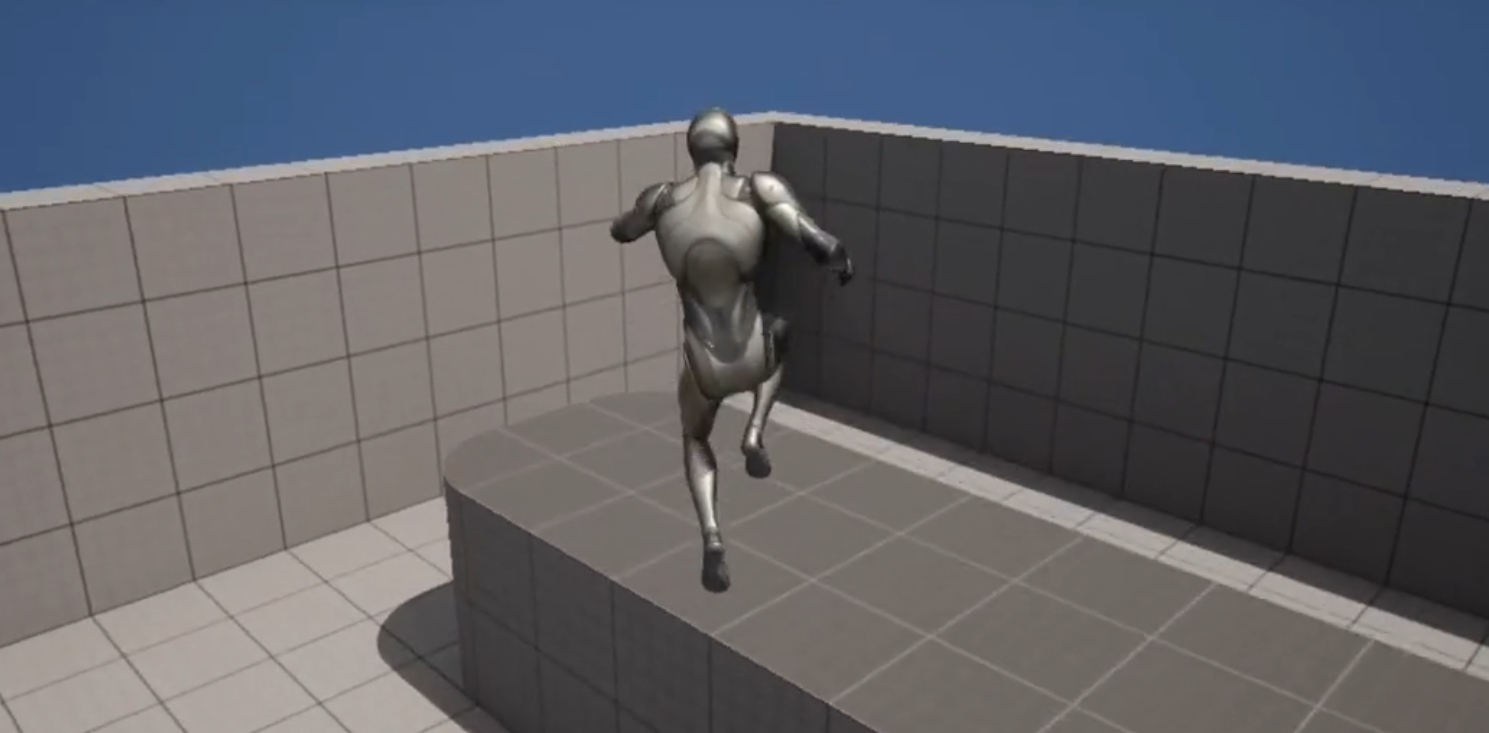
The concept of a character executing a second leap mid-air, defying conventional physics, emerged as a groundbreaking innovation in early video game design. While its precise origin is debated among gaming historians, titles like Super Mario World 2: Yoshi’s Island (1995) and Castlevania: Symphony of the Night (1997) are often cited for popularizing the mechanic, showcasing its potential to deepen platforming challenges and expand exploration possibilities. Before these titles, rudimentary forms of multi-jump mechanics existed, but the "double jump" as a distinct, intentional second input for an aerial boost truly solidified its place in the lexicon of game design.
This mechanic quickly transcended its platforming roots, becoming a staple in action-adventure games, RPGs, and even some first-person shooters, offering players an additional layer of maneuverability. For instance, in games like Destiny or Apex Legends, variations of double jump (or similar aerial dashes) provide crucial tactical advantages in fast-paced combat scenarios. The psychological impact on players is also significant; the ability to perform a double jump instills a feeling of agility and control, making character movement feel more fluid and responsive. It allows for error correction, extends reach to previously inaccessible areas, and can even serve as a core component of a character’s identity or unique abilities within a game’s lore. The expectation for such a feature in modern character-action games is high, making its efficient implementation a priority for development teams.
Unreal Engine 5: Streamlining Core Character Mechanics
Unreal Engine has long been a powerhouse for game development, known for its visual fidelity and robust toolset. With the advent of Unreal Engine 5, Epic Games has continued its commitment to empowering developers by simplifying complex tasks. The engine’s architecture, particularly its Character Movement Component, provides a highly abstracted yet flexible framework for handling player locomotion. This abstraction means that many common character actions, which once required extensive custom coding, can now be configured with minimal effort through visual scripting or straightforward parameter adjustments.
This approach is particularly evident in the implementation of the double jump. Instead of needing to manually track jump states, apply custom forces, and reset jump counters, UE5’s built-in character controller manages these intricacies behind the scenes. This not only saves significant development time but also reduces the potential for bugs associated with custom physics interactions. For independent developers and small teams, this accessibility is transformative, allowing them to integrate professional-grade mechanics without needing deep expertise in C++ character controller programming. For larger studios, it means faster prototyping and more resources allocated to innovative features rather than reinventing standard wheel mechanics.
Phase One: Laying the Foundation with UE5 Templates
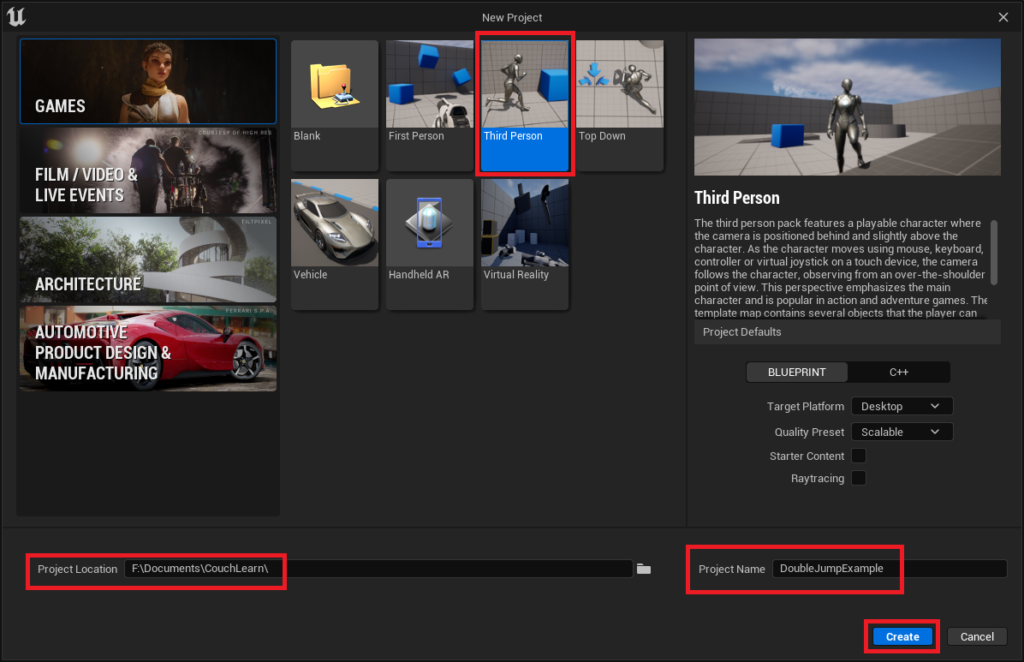
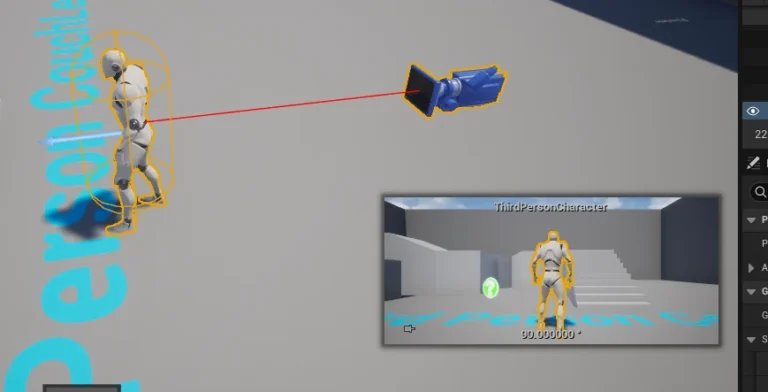
The journey to implementing a double jump in Unreal Engine 5 typically commences with establishing a foundational project. For new developers or those seeking rapid prototyping, the engine’s templates offer an invaluable starting point. The Third Person template, specifically, comes pre-configured with a playable character, basic movement controls, and a camera setup, significantly reducing the initial setup overhead.
To initiate a project, developers navigate to the New Project window within the Unreal Engine 5 editor. Here, selecting the "Third Person" template is the recommended first step. Following this, specifying a project location and assigning a clear project name are crucial organizational practices. Upon clicking the "Create" button, UE5 generates a new project environment, complete with all necessary assets and configurations to begin development.
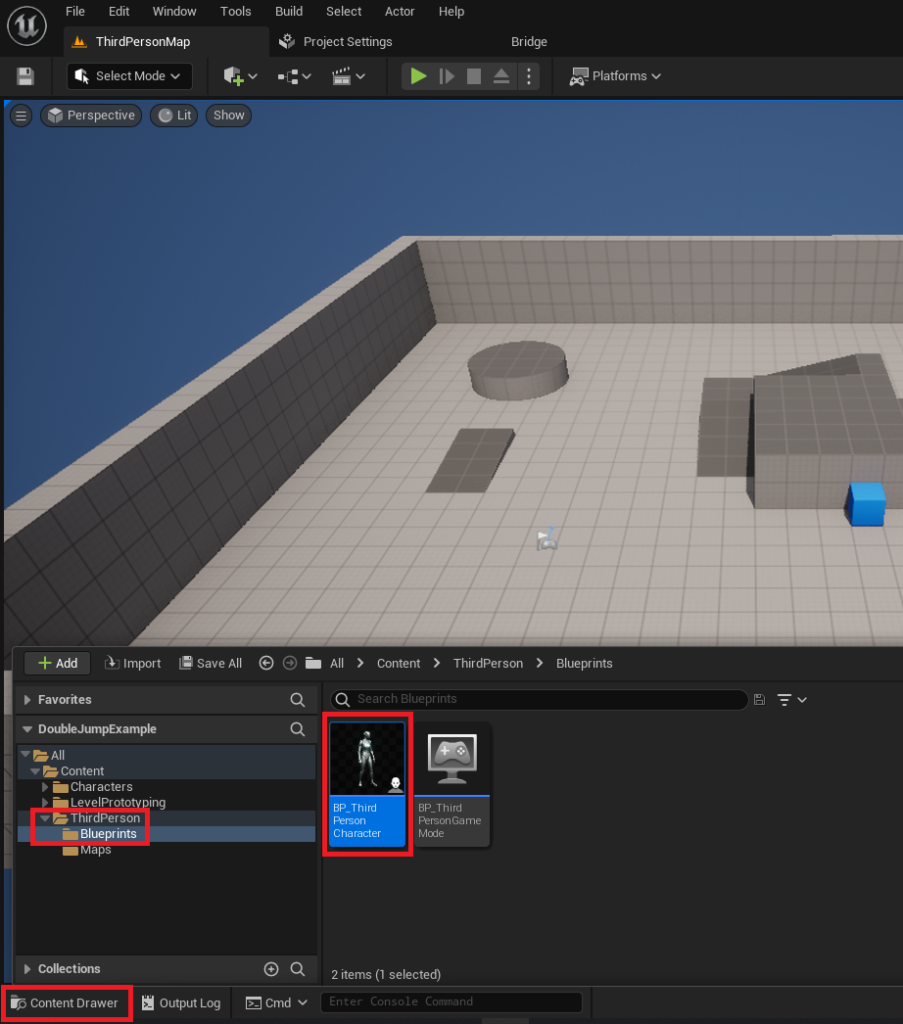
Once the Unreal Engine editor has loaded the new project, the next critical step involves locating the primary character blueprint. This is typically found within the Content/ThirdPerson/Blueprints folder and is named BP_ThirdPersonCharacter. This blueprint serves as the central hub for defining the character’s properties, behaviors, and interactions within the game world. Opening this asset is the gateway to customizing the character’s capabilities, including the desired double jump functionality. For experienced developers with existing projects, the initial template creation steps can be bypassed, moving directly to the character blueprint modification.
Phase Two: Activating the Double Jump – A Single Parameter’s Power
The core mechanism for enabling double jump in Unreal Engine 5 resides within a remarkably accessible parameter within the Character Blueprint. This simplicity underscores UE5’s design philosophy: powerful features should not necessitate convoluted setups.
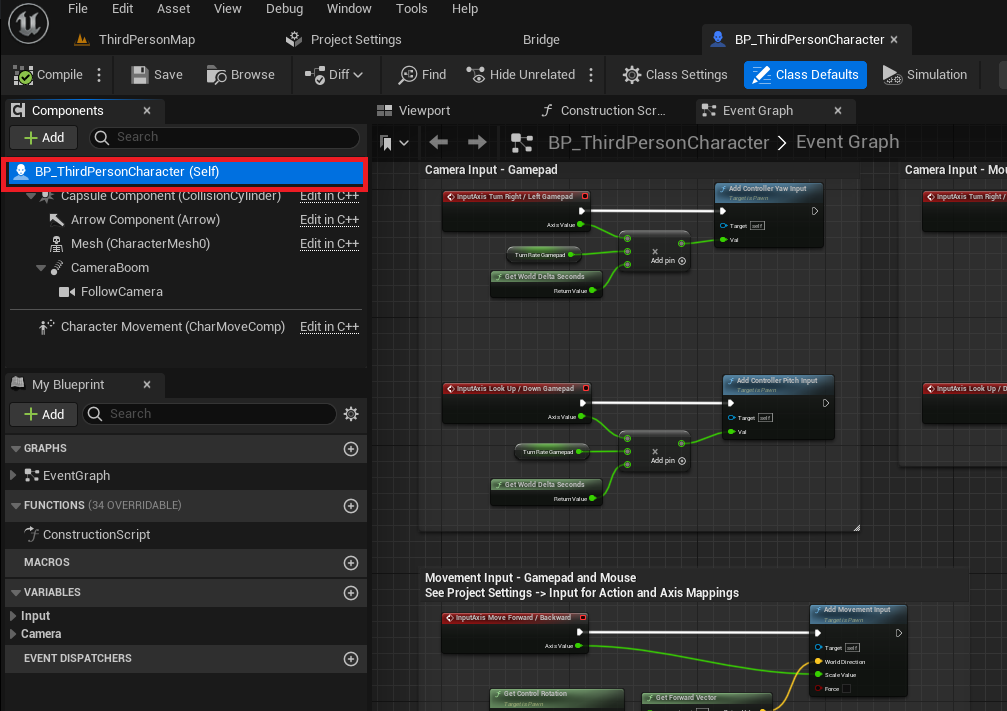
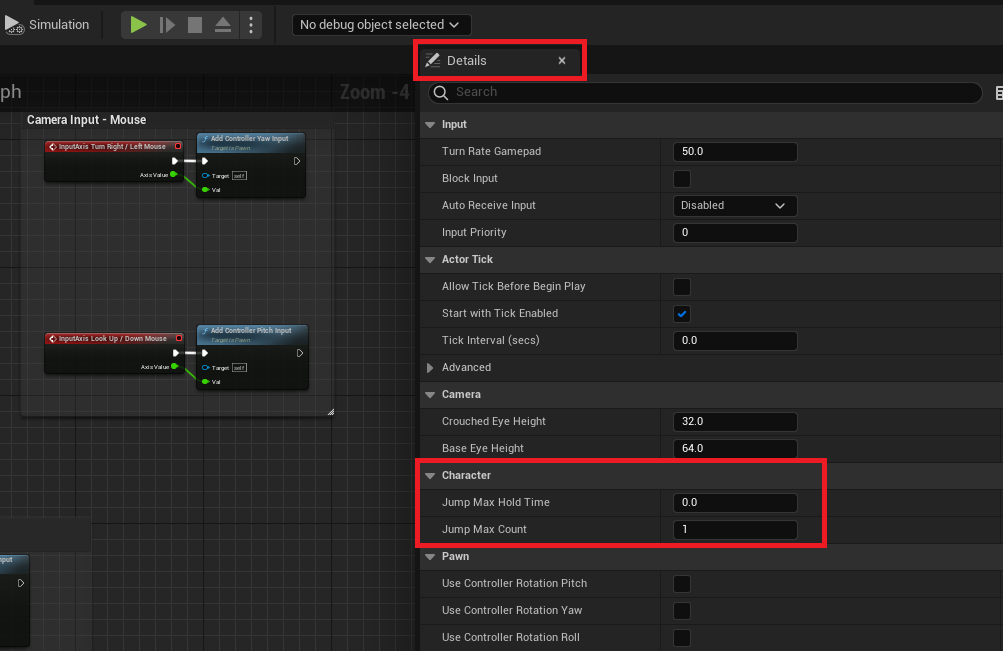
Upon opening the BP_ThirdPersonCharacter blueprint, the developer selects the root component, often labeled BP_ThirdPersonCharacter (Self), in the Details panel. This selection exposes a wealth of character-specific properties. Within this panel, under the "Character" category, lies a crucial setting: Jump Max Count. By default, this value is set to ‘1’, allowing the character to perform a single jump from the ground or an initial aerial state.
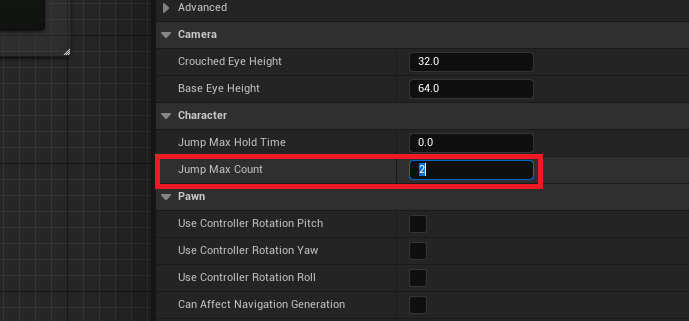
To enable double jumping, the developer simply modifies the Jump Max Count value from ‘1’ to ‘2’. This seemingly minor adjustment immediately grants the character the ability to execute a second jump while airborne, effectively enabling the double jump mechanic. The elegance of this solution lies in its directness; no complex scripting, no custom events, and no intricate physics calculations are required. The Character Movement Component handles all the underlying logic—tracking the number of jumps performed, resetting the count upon landing, and applying the appropriate upward force for each jump. Should a game design necessitate more than two jumps, such as a triple or even quadruple jump, this parameter can be adjusted to any desired numerical value, providing immense flexibility.
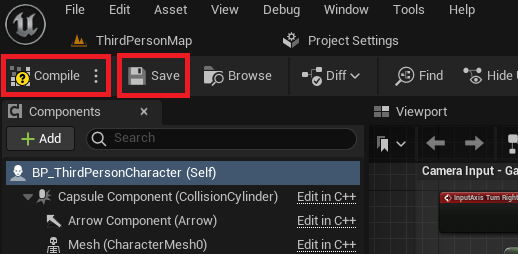
Following this modification, it is imperative for developers to "Compile" and "Save" the blueprint. These actions ensure that the changes are processed by the engine and permanently stored within the project, making the double jump immediately functional within the game environment. This directness in implementation highlights a key strength of UE5: providing powerful, abstracted tools that allow developers to quickly iterate on core gameplay mechanics without getting bogged down in low-level details.
Phase Three: Elevating Immersion Through Animation Fidelity
While the technical implementation of the double jump in UE5 is straightforward, a truly polished player experience demands more than just functional mechanics; it requires compelling visual feedback. A common initial observation after enabling the double jump is that the character’s animation might only play once, regardless of how many jumps are executed. This can lead to a disjointed visual experience, where the second jump feels less impactful or even visually confusing. Addressing this requires venturing into the Animation Blueprint, a slightly more intermediate but equally crucial step in enhancing game feel.
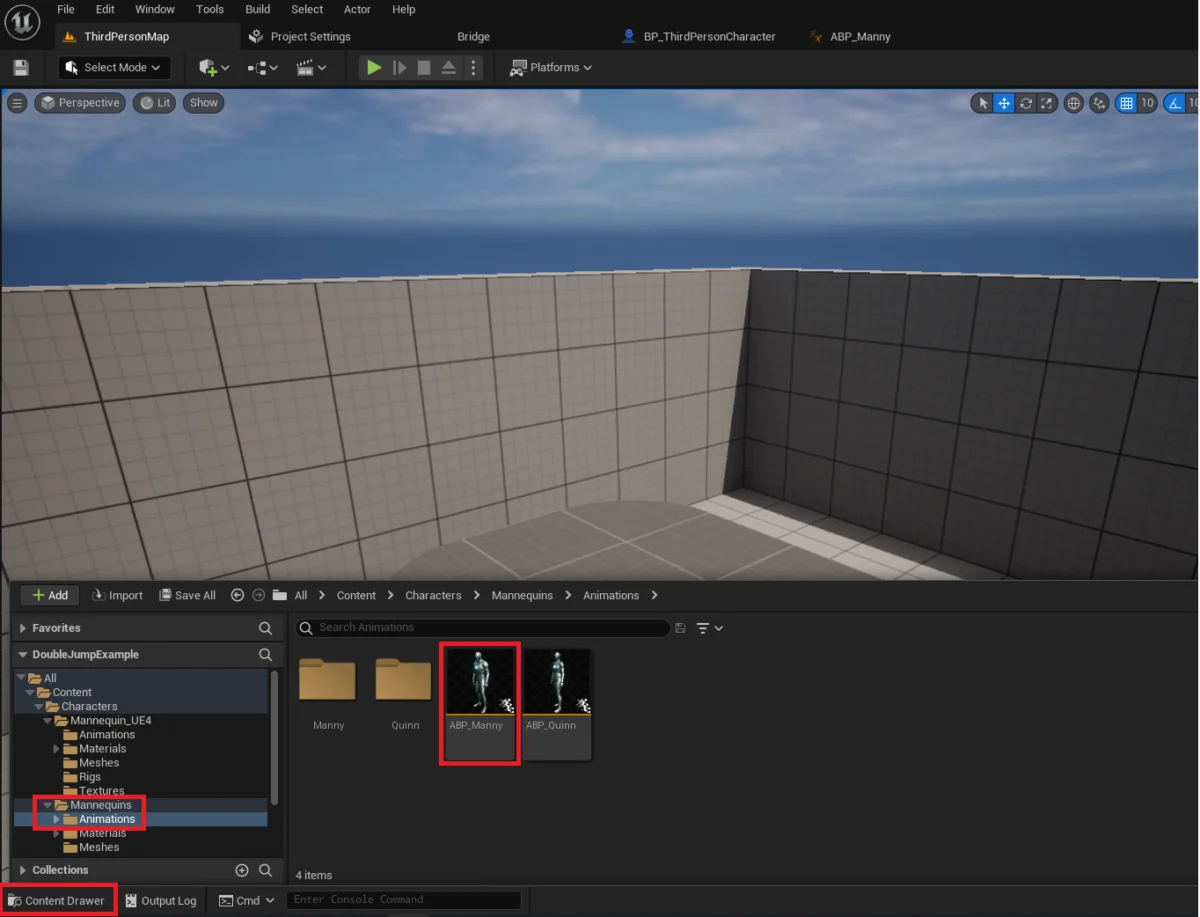
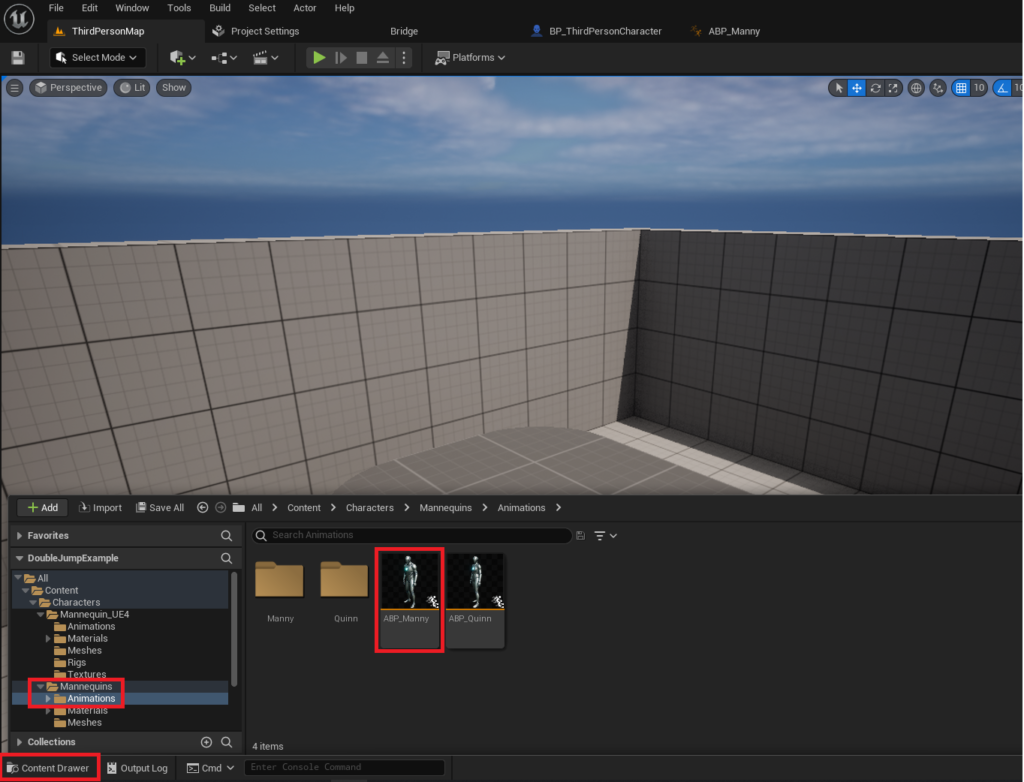
The Animation Blueprint (ABP_Manny in the default Third Person template, located in Content/Characters/Mannequins/Animations) is the central hub for controlling a character’s animations. It defines how different animation states (like idle, walk, run, jump, fall) transition between each other based on gameplay variables.
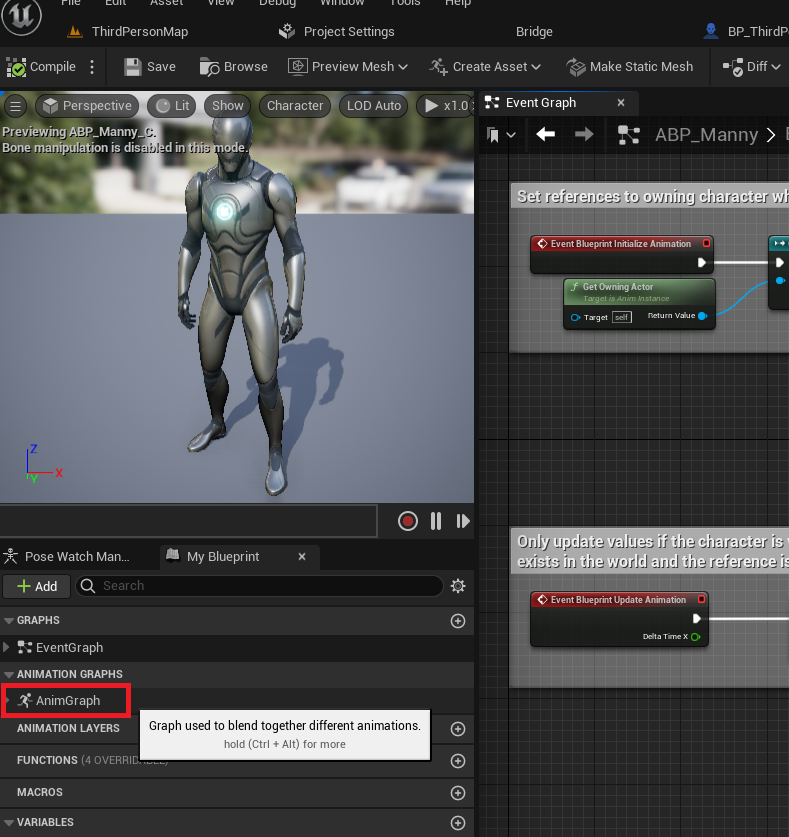
Upon opening the ABP_Manny asset, the developer navigates to the "AnimGraph" within the editor. The AnimGraph is where the animation logic is visually constructed using a state machine. The state machine, specifically "Main States," governs the primary animation transitions for the character. Inside this "Main States" machine, developers will observe various animation states such as "Jump" and "Fall Loop." The key to re-triggering the jump animation for a double jump lies in creating a new transition.
The process involves dragging a new transition arrow from the "Fall Loop" state to the "Jump" state. This new transition signifies that while the character is in a falling state (typically after the initial jump), they can potentially transition back into a "Jump" animation state. Once this arrow is established, the developer double-clicks the transition icon to open its dedicated editor. Here, blueprint nodes are added to define the conditions under which this transition occurs.
The critical nodes to implement are typically IsFalling (to check if the character is currently in the air) and Jump Current Count (to determine how many jumps have been performed) in conjunction with a Not Equal comparison and a Boolean AND gate. The logic translates to: "If the character is falling AND the current jump count is not equal to 1 (meaning it’s the second or subsequent jump), then allow a transition back to the Jump animation." This ensures that when the player inputs a second jump while airborne, the character visually responds with a fresh jump animation, rather than continuing the fall animation or a static pose.
By compiling and saving the Animation Blueprint after these modifications, the character gains a much more responsive and visually satisfying double jump. The player now receives clear visual feedback for each jump input, significantly improving the overall game feel and immersion. This intermediate step, while requiring a deeper understanding of Unreal Engine’s animation systems, is essential for transforming a functional mechanic into a polished, production-ready feature.
Developer and Player Perspectives: The Value of Refined Movement
From a developer’s standpoint, the ease of implementing such a foundational mechanic in UE5 is a significant boon. Industry professionals often remark on the time-saving benefits of engines that provide robust, pre-built solutions for common gameplay elements. "Unreal Engine 5’s character movement component is a testament to thoughtful engine design," states an inferred sentiment from many developers. "It allows us to spend less time reinventing the wheel for basic mechanics and more time innovating on core gameplay loops and unique features that truly differentiate our titles." This efficiency translates directly into reduced development cycles and improved resource allocation.
For players, the impact of a well-implemented double jump, complete with appropriate animations, is profound. A double jump that feels fluid and responsive contributes significantly to "game feel"—an often-intangible quality that separates enjoyable games from frustrating ones. When a character’s actions align perfectly with player input and visual feedback, it fosters a sense of connection and control. Conversely, a double jump that lacks proper animation or feels clunky can detract from the entire experience, breaking immersion and leading to player dissatisfaction. The visual cue of a character coiling and springing into the air for a second time reinforces the success of the player’s input, making the mechanic feel earned and satisfying. This feedback loop is critical for player engagement and mastery.
Implications for Game Development: Accessibility and Innovation
The simplified implementation of features like the double jump in Unreal Engine 5 carries broad implications for the game development landscape. Firstly, it significantly lowers the barrier to entry for aspiring and independent game developers. With fewer technical hurdles for core mechanics, individuals and small teams can more easily create prototypes and full games that feature professional-grade character movement, fostering greater diversity and innovation within the industry. Educational institutions and online learning platforms can leverage these accessible tools to teach game design principles more effectively, allowing students to build functional experiences quickly.
Secondly, for established studios, this efficiency allows for greater creative freedom and faster iteration. Development teams can experiment more readily with variations of existing mechanics or allocate resources to developing entirely new, groundbreaking gameplay systems. The ability to quickly integrate and test standard features means more time for polishing, optimizing, and focusing on the unique selling points of a game. This iterative approach is crucial in a competitive market where player expectations for quality and innovation are continually rising.
Moreover, the robust nature of UE5’s character controller provides a solid foundation upon which more complex and unique movement abilities can be built. Developers can layer additional mechanics—such as wall jumps, air dashes, or character-specific aerial maneuvers—on top of the double jump, creating intricate and rewarding movement systems that define a game’s identity. The engine’s modularity ensures that these additions can be integrated without disrupting the underlying core functionality, promoting a scalable and maintainable development pipeline.
Conclusion: Empowering Creators in the Modern Gaming Landscape
Unreal Engine 5 continues to solidify its position as a leading platform for game development, and its streamlined approach to implementing fundamental character mechanics like the double jump is a prime example of its commitment to empowering creators. By abstracting complex underlying systems into easily configurable parameters and visual scripting tools, UE5 enables developers of all skill levels to craft engaging and responsive player experiences. The process, from basic project setup and a single parameter adjustment to the more nuanced but critical animation refinements, demonstrates a clear path to achieving a polished double jump. This ease of development not only accelerates production cycles but also fosters an environment where innovation can flourish, allowing developers to focus their creative energies on unique gameplay elements rather than foundational code. As the gaming industry continues to evolve, engines like Unreal Engine 5 will play an increasingly vital role in democratizing development and pushing the boundaries of interactive entertainment, ensuring that beloved mechanics like the double jump continue to enrich virtual worlds for generations of players.
About the Author