Unreal Engine 5 (UE5) stands as a powerful and versatile platform for game development, continuously evolving to provide developers with tools that streamline workflows and enhance productivity. Among these indispensable features are Data Tables, a sophisticated mechanism designed to allow programmers and designers to efficiently create, manage, and access structured lists of information within their projects. This capability is pivotal in fostering a data-driven development environment, a cornerstone of modern game creation that prioritizes flexibility, scalability, and collaborative efficiency.
Understanding Unreal Engine 5 Data Tables: Core Concepts
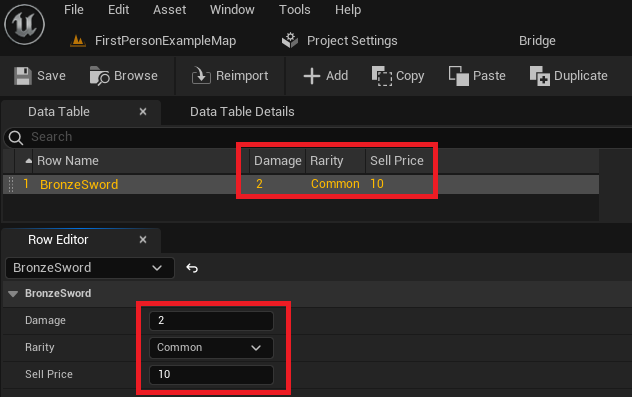
At its heart, an Unreal Engine 5 Data Table is an asset-based repository that enables developers to define a structured list of data and store various values for this list, uniquely identified by a key. This fundamental separation of data from game logic is a best practice, empowering faster iteration cycles and reducing the likelihood of errors inherent in hardcoding. The data, stored as a .uasset file within the project, benefits from Unreal Engine’s robust asset management system, making it incredibly straightforward to retrieve and update from any part of the game’s codebase, whether C++ or Blueprints.
A significant advantage of Data Tables is their persistence within the Unreal Editor. This means that designers can meticulously craft and refine their game’s data during development, and this data remains intact and readily available for use at runtime. Consider the intricacies of an expansive role-playing game (RPG) or a complex simulation. Data Tables become the central hub for defining item properties (damage, rarity, sell price, weight, icon paths), enemy statistics (health, attack power, unique abilities), quest parameters, localization strings, configuration settings, and even visual or audio effect properties. This structured approach not only organizes data but also ensures consistency across the project. The process of creating and utilizing Data Tables in Unreal Engine 5 is remarkably intuitive, requiring minimal setup and offering substantial returns in project management and game design flexibility.
The Foundational Steps: Structuring Your Data
Before a Data Table can be populated with meaningful information, a foundational structure must be established. This involves defining the schema that each row in the Data Table will adhere to. The process typically begins with creating enumerations (Enums) and then a structure (Struct) that encapsulates these and other data types.
Defining Enumerations for Categorization
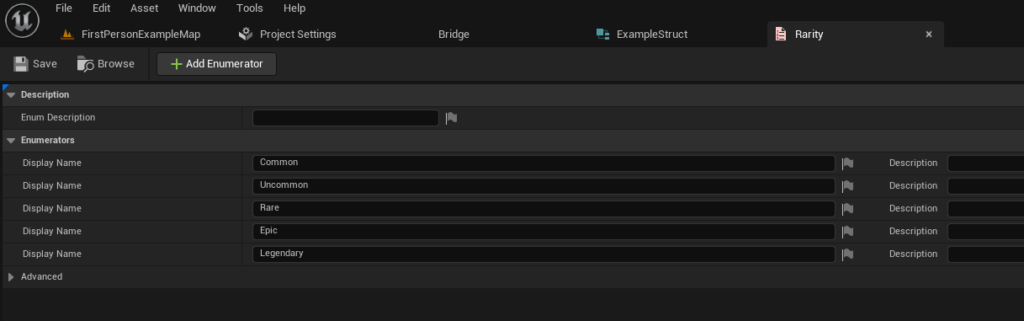
Enumerations are crucial for providing a predefined set of named constants, offering clarity and preventing data entry errors. For instance, in an RPG setting, item rarity is a perfect candidate for an Enum. Instead of manually typing "Common," "Uncommon," "Rare," etc., which can lead to inconsistencies, an Enum ensures that only valid, predefined categories are used.
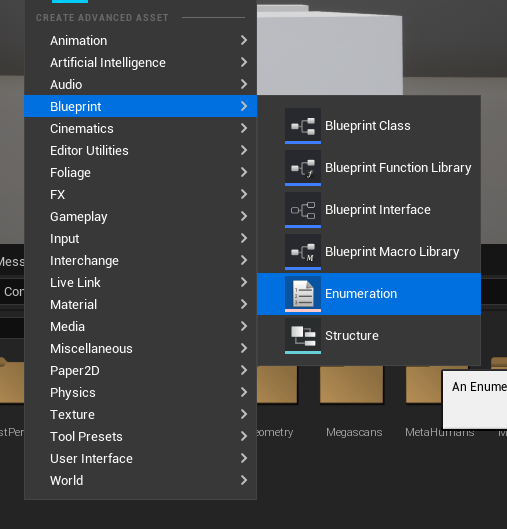
To create an Enum, developers navigate to the Content Browser, right-click, and select "Enumeration" under the Blueprint category. For an item rarity system, values such as Common, Uncommon, Rare, Epic, and Legendary would be defined. These named values provide immediate readability and enforce data integrity, allowing designers to categorize items consistently. This step is a prerequisite for creating the data structure that will define the actual content of the Data Table.
Crafting Data Structures for Data Integrity
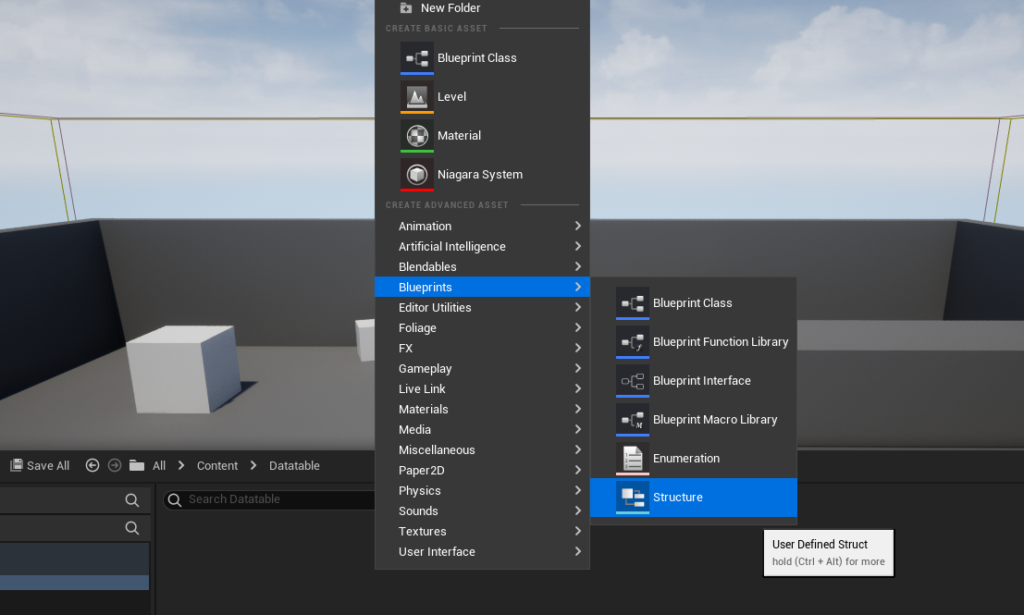
Following the creation of necessary Enums, the next critical step is to define a Structure (Struct). A Struct in Unreal Engine serves as a blueprint for grouping related variables into a single, custom data type. This structure will dictate the exact types and names of the columns that will appear in the Data Table. When creating a Data Table, Unreal Engine prompts the developer to choose a Struct upon which the table will be based, making this a pivotal decision for the table’s design.
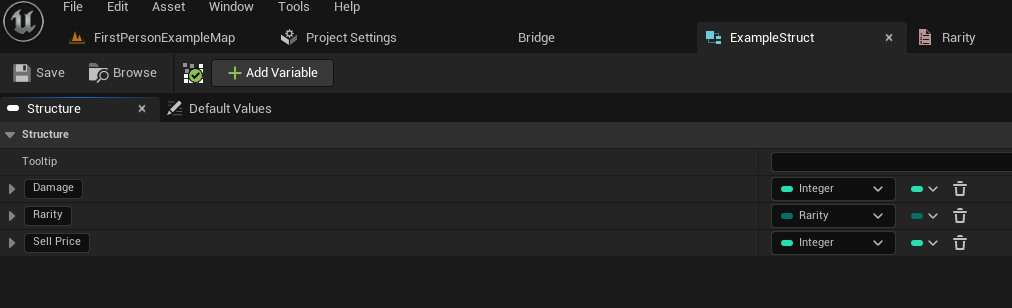
To create a Struct, developers again right-click in the Content Browser and select "Structure" from the Blueprints category. This new Struct will then be opened for editing, where variables can be added. For an item data table, relevant variables might include Damage (Float or Integer), Rarity (using the newly created Rarity Enum), and SellPrice (Integer). Additional fields could include ItemName (Text), Description (Text), IconTexture (Texture 2D Reference), Weight (Float), or even complex references to other assets like StaticMesh or SoundCue. Each variable added to the Struct defines a column in the eventual Data Table, ensuring that every entry conforms to a consistent data model. This structured approach is fundamental for maintaining data quality and facilitating efficient data retrieval.
Implementing Data Tables in Unreal Engine 5: A Step-by-Step Guide
With the foundational Enums and Structs in place, the actual creation and population of the Data Table can commence. This is where the abstract definitions take concrete form, ready to be used by game systems.
Initiating the Data Table Asset
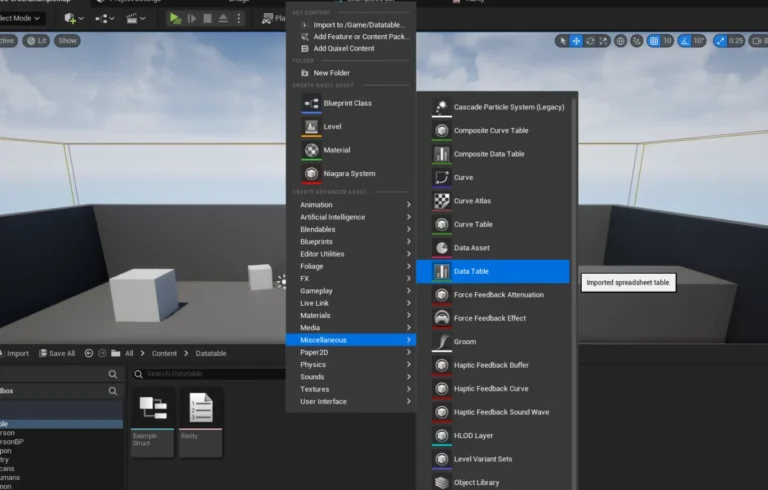
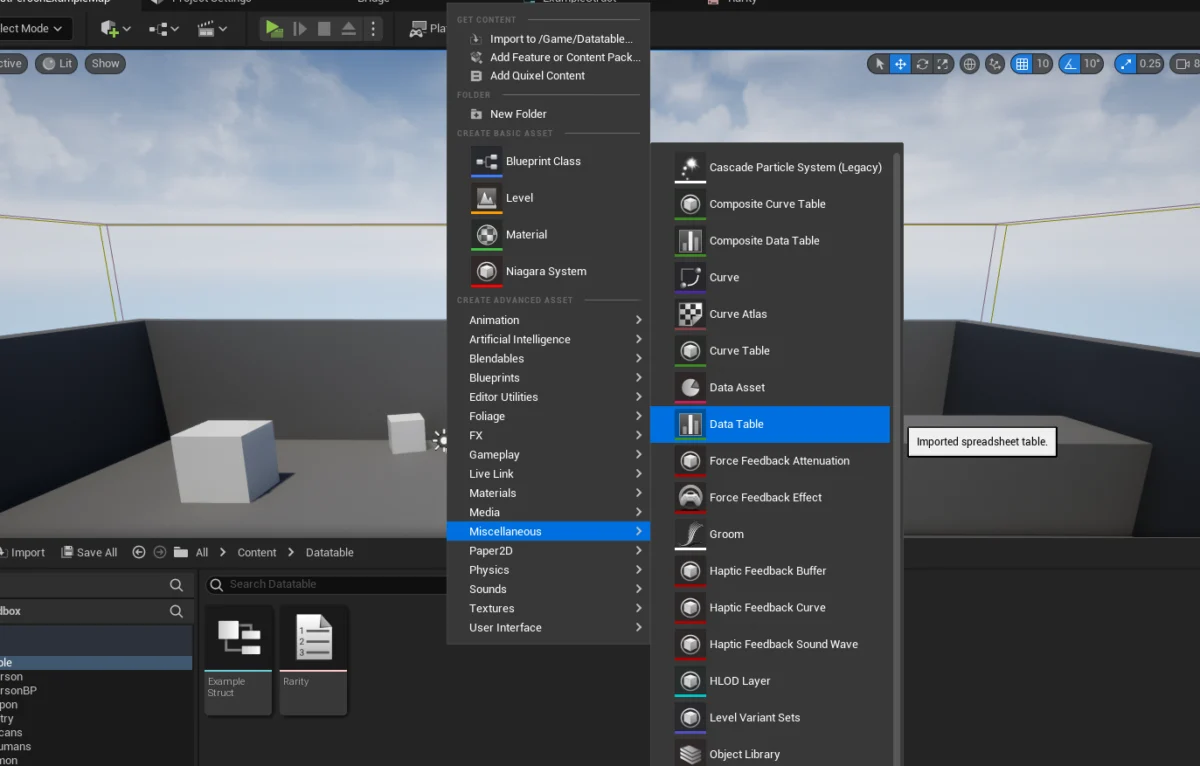
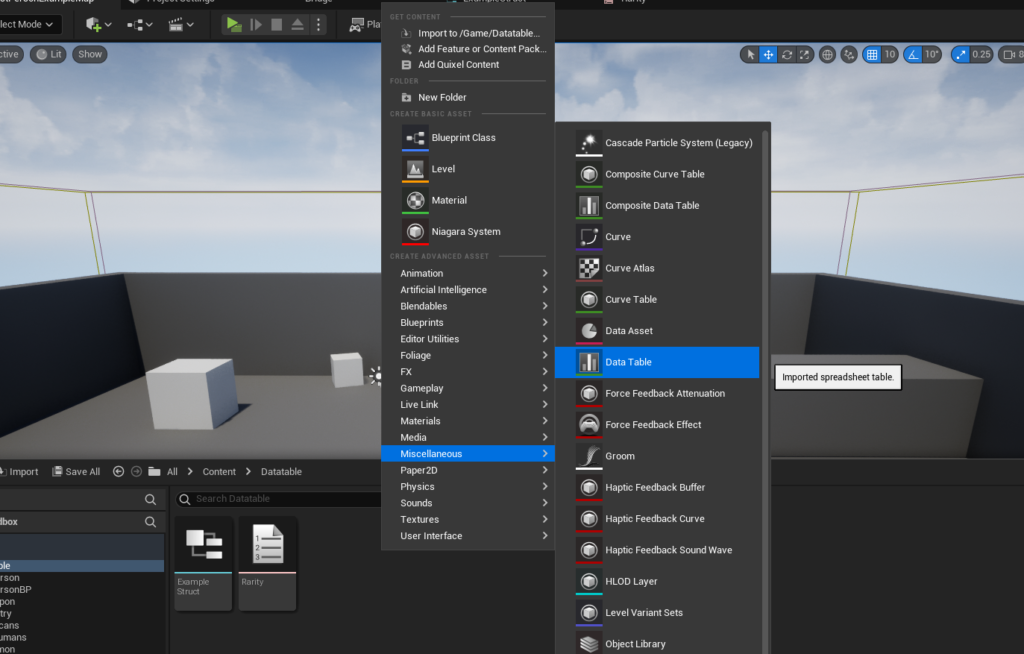
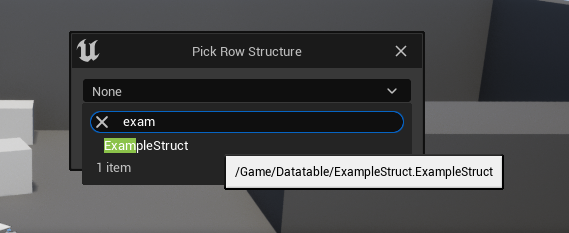
The creation of the Data Table itself mirrors the process for Enums and Structs. By right-clicking in the Content Browser, developers can find the "Data Table" option within the Miscellaneous category. Upon selection, a crucial prompt appears, asking which Struct will serve as the "Row Structure" for this Data Table. This is where the previously created custom Struct (e.g., ExampleStruct) is selected. This selection binds the Data Table to the defined schema, ensuring that all entries within it will adhere to the specified variables and their types. This step formalizes the Data Table as an independent asset, ready for data input.
Populating with Records: Adding and Configuring Rows
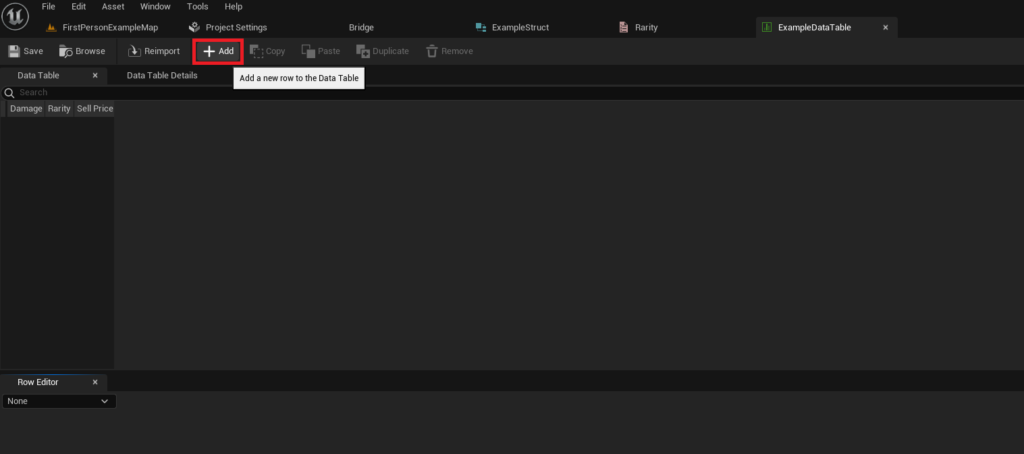
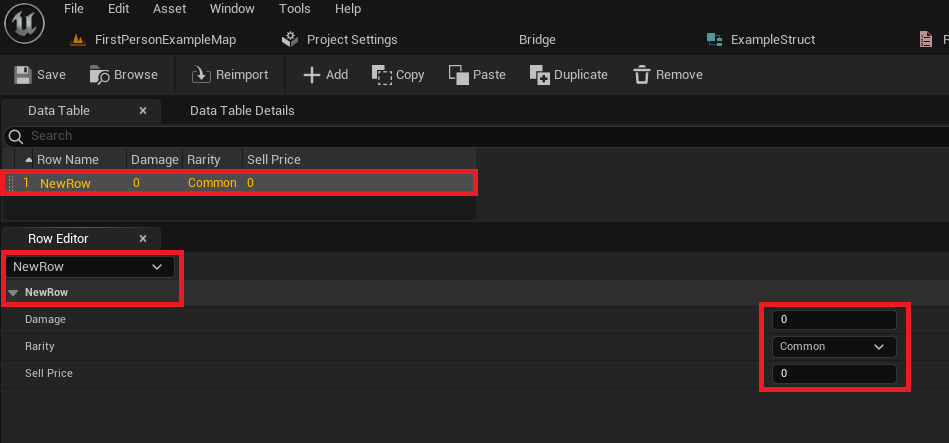
Once the Data Table asset is created and linked to its defining Struct, it can be opened in the editor for population. The Data Table editor provides a user-friendly interface for managing records. The primary interaction begins with the "Add" button, which inserts a new row into the table. Each new row automatically populates with default values derived from the Struct’s variable definitions.
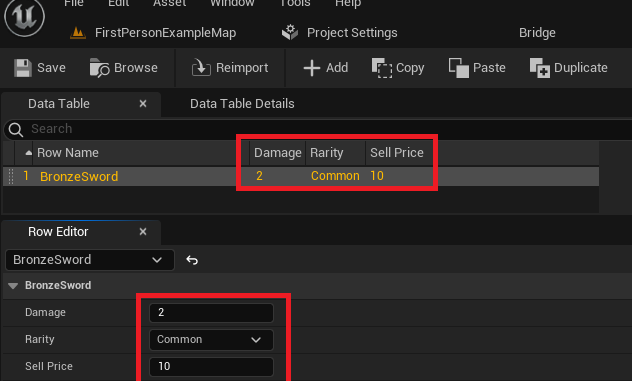
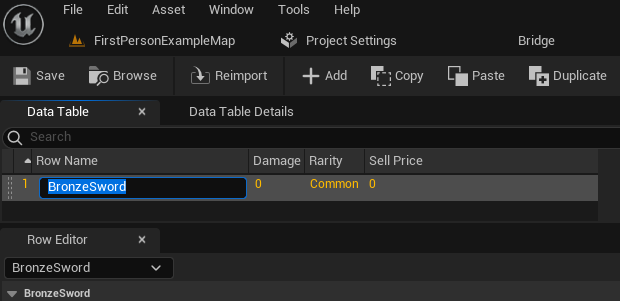
The Data Table editor is divided into two main areas: the table view displaying all rows and their values, and the "Row Editor" at the bottom, which allows for detailed modification of the currently selected row. Here, designers can input specific values for Damage, Rarity, Sell Price, and any other variables defined in the Struct. Crucially, each row requires a unique "Row Name." This name acts as the primary key for accessing specific data entries at runtime. For instance, an entry for a basic sword might be named BronzeSword, while a more powerful variant could be SilverSword. Adopting clear and consistent naming conventions for these row names is vital for ease of access and maintainability, especially in projects with hundreds or thousands of data entries. The ability to rapidly add, modify, and review data within this editor empowers designers to iterate on game balance, item progression, and other data-dependent systems without requiring direct programmer intervention for every tweak. It’s imperative to frequently save the Data Table asset to prevent loss of progress, as modifications made within the editor are not automatically saved to disk.
Dynamic Data Retrieval: Accessing Data Tables at Runtime
Populating a Data Table is only half the equation; the real power lies in dynamically accessing this data within the game’s logic. Unreal Engine 5 provides straightforward Blueprint nodes and C++ APIs to retrieve data efficiently, enabling responsive and flexible game mechanics.
Targeted Data Access: The Get Data Table Row Node
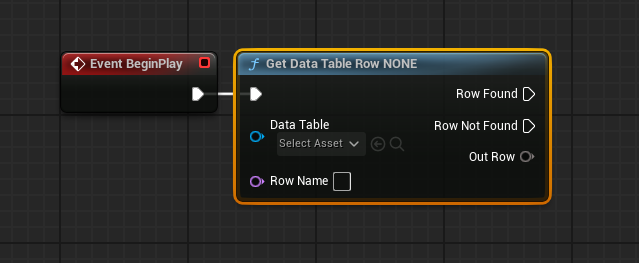
The most common method for accessing individual data entries is through the Get Data Table Row Blueprint node. This node requires two primary inputs: a reference to the specific Data Table asset and the Row Name of the entry to be retrieved. For example, if a player picks up an item, the game logic can use the item’s unique identifier (which might correspond to a Row Name) to query the Data Table for its stats.
The Get Data Table Row node has two execution pins: Row Found and Row Not Found. This built-in error handling is essential, allowing developers to define logic for both successful data retrieval and cases where a requested row name does not exist. If Row Found executes, an Out Row pin provides the data. This Out Row is a struct pin, representing the entire data structure of the retrieved row. By right-clicking on the Out Row pin and selecting "Split Struct Pin," developers can easily expose individual variables (e.g., Damage, Rarity, Sell Price) for direct use in Blueprints. This granular access allows for immediate application of the retrieved data to game mechanics, such as updating a character’s inventory display, calculating combat damage, or determining an item’s value. The Row Name input pin also becomes a dropdown menu populated with all available row names from the selected Data Table, offering convenient selection during development, although it can also be dynamically driven by a variable or other logic.
Iterating Through Data: Looping for Comprehensive Data Handling
While accessing a specific row is crucial, there are many scenarios where iterating through all or a subset of Data Table entries is necessary. For instance, generating a list of all available items in a shop, performing data validation across all entries, or processing data for procedural generation. Unreal Engine 5 facilitates this through a combination of the Get Data Table Row Names node and a For Each Loop.
The Get Data Table Row Names node, when provided with a Data Table asset reference, returns an Array containing all the Row Names defined within that table. This array can then be connected to a For Each Loop node. The For Each Loop will execute its Loop Body for each element (Row Name) in the array. Inside the Loop Body, the Array Element (which is the current Row Name being processed) can be fed into a Get Data Table Row node. This creates a powerful pattern: for every row name, the corresponding data is retrieved, allowing developers to perform operations on each entry systematically. For example, a game could iterate through an EnemyStats Data Table, spawning different enemies with their defined properties based on certain criteria, or dynamically constructing UI elements for all items available in a crafting system. This looping mechanism is incredibly versatile and fundamental for managing and utilizing large datasets within game logic, enabling dynamic content generation and robust system management.
Broader Implications and Industry Best Practices
The adoption of Data Tables and data-driven design principles extends far beyond mere convenience; it fundamentally reshapes game development workflows, leading to more robust, scalable, and collaborative projects.
Enhancing Collaboration and Workflow Efficiency
One of the most significant benefits of Data Tables is their impact on team collaboration. Game development is an inherently multidisciplinary effort, involving programmers, designers, artists, and quality assurance (QA) testers. By externalizing game data into Data Tables, designers can adjust game balance, item properties, character stats, and other numerical or categorical data without requiring a programmer to modify code or Blueprints. This autonomy accelerates the iteration process, allowing designers to experiment rapidly with different values and observe their effects in-game. Similarly, localization teams can directly manage text strings for multiple languages within Data Tables, simplifying the often-complex process of globalizing a game. This separation of concerns significantly reduces bottlenecks, allowing different team members to work concurrently and efficiently.
Scalability, Maintainability, and Performance Advantages
Data Tables are inherently scalable. Whether a game has a dozen items or thousands, the system handles data retrieval efficiently. As projects grow in complexity, managing data through well-structured tables becomes exponentially more maintainable than hardcoding values. Updates or balance changes only require modifying a few rows in a table rather than sifting through numerous code files or Blueprints. This centralized data management also simplifies debugging and error detection. From a performance perspective, retrieving data from Data Tables at runtime is generally very fast, as the data is loaded into memory, allowing for quick lookups using the row names as keys. This makes them suitable for systems that require frequent access to large amounts of static data.
Data-Driven Design: A Cornerstone of Modern Game Development
The philosophy of data-driven design, heavily supported by features like Data Tables, has become a cornerstone of modern game development. It encourages creating flexible systems that can be configured and extended through data rather than through rigid code changes. This approach not only makes games easier to develop and maintain but also allows for greater content velocity and adaptability to player feedback. Unreal Engine, through its robust implementation of Data Tables, empowers developers to build complex, dynamic, and highly configurable games that can evolve rapidly over their lifecycle. The integration with source control systems like Git or Perforce further ensures that changes to Data Tables are tracked and managed just like any other asset, providing version control and collaborative safety.
Conclusion: Empowering Developers with Data-Centric Design
In summary, Unreal Engine 5’s Data Tables represent an indispensable tool for efficient and organized game development. From the initial conceptualization of data types through Enums and Structs, to the creation and population of the Data Table asset, and finally to its dynamic access within game logic, developers are equipped with a powerful system. This guide has illuminated the process of creating, configuring, populating, and implementing Data Tables, demonstrating their utility for both targeted data retrieval and comprehensive iteration.
Virtually every Unreal Engine project, regardless of scale or genre, benefits immensely from leveraging Data Tables to store and manage game data efficiently and neatly. They provide a single source of truth for project data, simplifying collaboration across multidisciplinary teams and enabling rapid iteration without requiring extensive C++ knowledge for basic implementation. By embracing data-driven design through Data Tables, developers can build more robust, scalable, and adaptable games, ultimately enhancing the development process and the player experience.
About the Author