The itch.io application has received a substantial enhancement for its developer community, integrating the powerful butler command-line interface directly into its user-friendly graphical interface. This pivotal update, available in the latest version of the app (v26.12.0 and above), introduces a dedicated "Upload" section, enabling developers to push game builds to their projects without the necessity of interacting with a terminal. This move significantly democratizes access to butler‘s advanced build management capabilities, streamlining the deployment process for a broader spectrum of creators on the platform.
Butler: The Backbone of Efficient Build Management
For years, butler has served as itch.io’s robust command-line interface (CLI) for managing game builds. Its core functionality revolves around patch-based updates, a sophisticated method that distinguishes it sharply from traditional file uploads. When a developer first pushes a build to a designated channel (such as windows-beta, linux-arm64, or macos-preview), butler uploads the entire build. However, for every subsequent update to that same channel, butler intelligently compares the new build against the previous one. It then calculates and uploads only the differences, or "patches," between the two versions.
This delta compression approach offers profound advantages. For developers, it translates into significantly reduced upload times and bandwidth consumption, particularly for large projects that undergo frequent iterations. Instead of re-uploading gigabytes of data for a minor bug fix or content addition, only the modified megabytes are transmitted. On the user’s end, this efficiency is mirrored. Players utilizing the itch.io app benefit from faster, smaller updates, as they too download only the necessary patches, drastically cutting down on download times and conserving their own bandwidth. Post-upload, itch.io’s backend servers further optimize and re-compress these patches, ensuring maximum efficiency for distribution. Historically, this powerful system was exclusively accessible to developers comfortable with command-line environments, creating a potential barrier for those less technically inclined. The integration of butler into the app’s GUI directly addresses this disparity, making advanced build management universally accessible.
A New Era for Developers: The Integrated Upload Experience
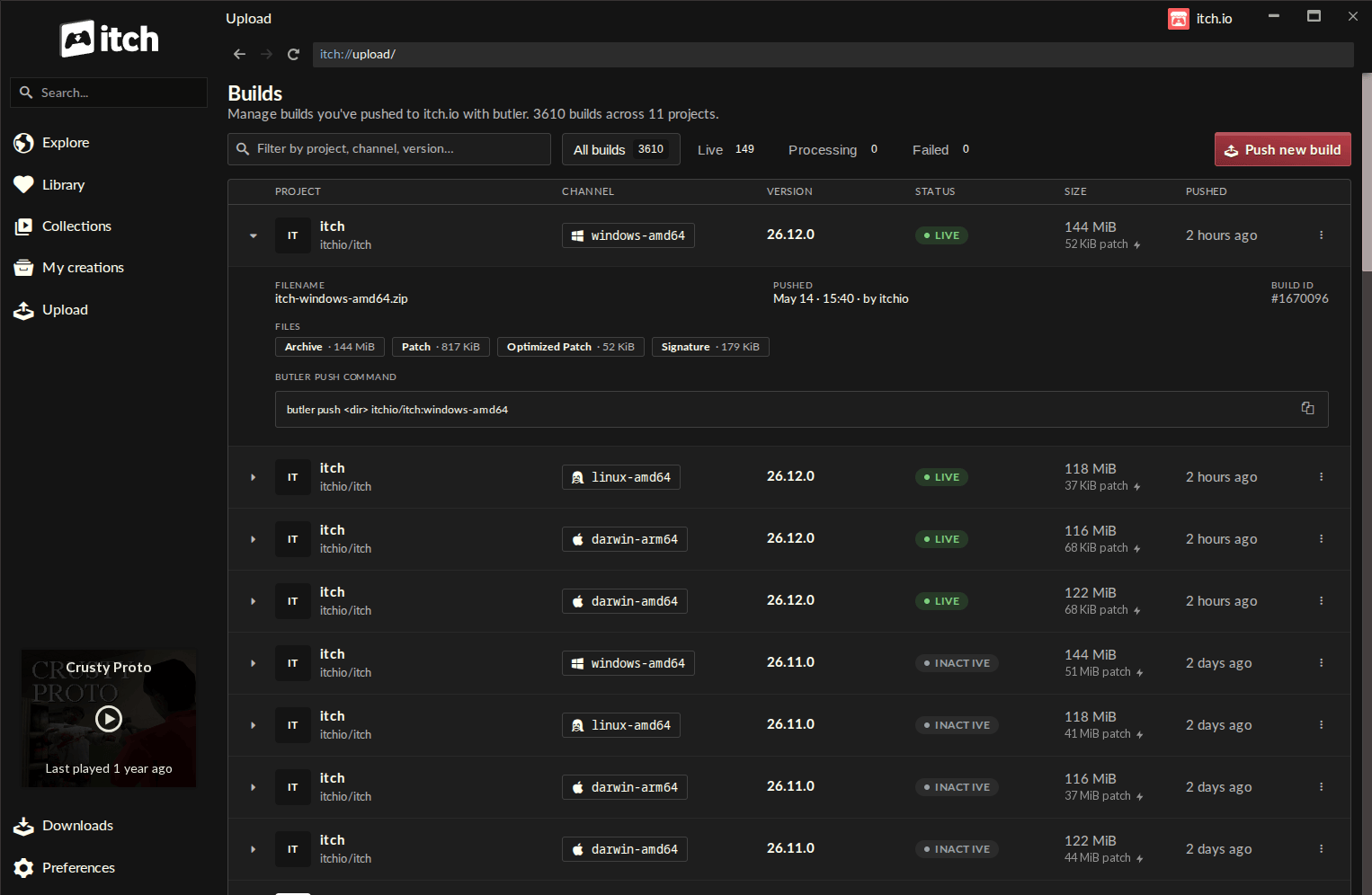
The cornerstone of this update is the introduction of a new "Upload" entry within the itch.io app’s sidebar, leading to the dedicated "Builds" page. This centralized hub offers an unprecedented level of visibility and control over project builds. The Builds page meticulously lists every build associated with any project the logged-in account has editing privileges for. Each entry provides crucial information at a glance: the project name, the specific channel it belongs to, its version, current status, file size, and the exact timestamp of its upload. This comprehensive overview empowers developers to monitor their project’s build history with ease, facilitating better version control and release management.
The process of pushing a new build has been transformed into an intuitive, guided experience. From the Builds screen, developers can initiate the process by clicking the "Push new build" button, which opens a streamlined push dialog. Here, they are prompted to select a project from their editable list, choose an existing channel, or effortlessly create a new one by simply typing its desired name. An optional field allows for the specification of a version number, aiding in clear release tracking. The actual build files can be easily supplied by dragging and dropping a folder or a .zip archive directly into the dialog. For added convenience, a "recent folders" list remembers previously used locations, accelerating subsequent uploads.
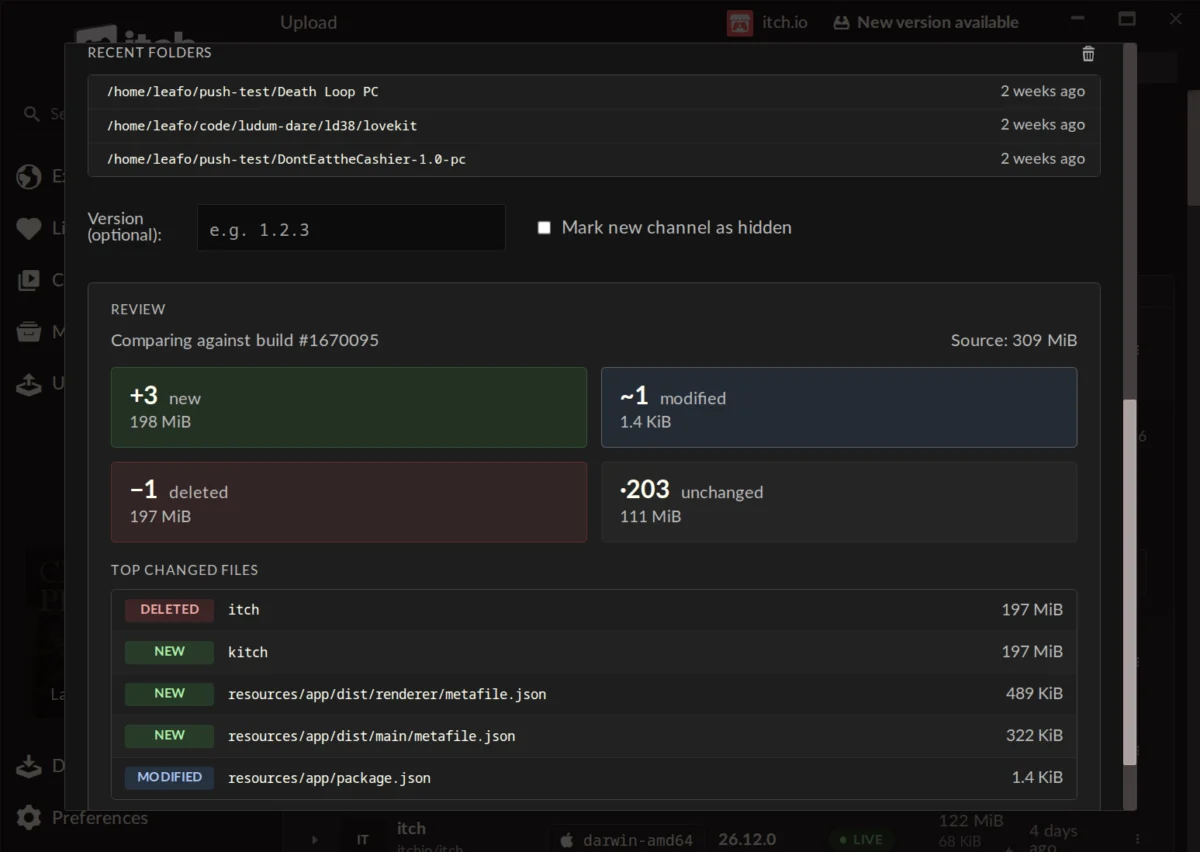
A particularly valuable feature integrated into this new workflow is the pre-upload preview functionality. Before committing to an upload, developers can generate a detailed summary of the changes between their prospective build and the last one pushed to that channel. This preview categorizes files as new, modified, deleted, or unchanged, providing size estimates for each group and highlighting the largest changed files. This transparent overview is critical for preventing accidental deployments, identifying unintended modifications, and ensuring that the build being pushed accurately reflects the intended update. It acts as a final quality control check, significantly reducing the potential for errors in the deployment pipeline.
Further enhancing developer convenience, the version of butler embedded within the itch.io app is automatically updated, eliminating the need for manual maintenance or version compatibility concerns. The system seamlessly utilizes the credentials of the logged-in itch.io account, simplifying authentication. This is particularly beneficial for developers managing multiple projects or collaborating across different accounts, as the app’s multi-profile support allows for quick switching and secure, context-aware build pushing.
Strategic Implications and Industry Impact
This significant update represents more than just a feature addition; it marks a strategic evolution for the itch.io platform. By abstracting the complexities of the command line, itch.io is actively lowering the barrier to entry for advanced build management. This move empowers a broader range of developers, including those who may lack extensive technical backgrounds or prefer a visual workflow, to leverage butler‘s efficiency. This democratization of tools is vital for fostering a more inclusive and productive independent game development ecosystem.
The benefits extend beyond individual developers to the overall health and vibrancy of the itch.io community. Streamlined deployment means developers can iterate faster, push updates more frequently, and respond to player feedback with greater agility. This improved efficiency directly contributes to higher quality games and more engaged player bases. For players, the promise of smaller, faster updates translates into a superior user experience, reducing frustration associated with large downloads and encouraging more frequent game updates. This symbiotic relationship strengthens the entire platform, making itch.io an even more attractive destination for both creators and consumers of independent games and software.
From a competitive standpoint, this integration positions itch.io as a leader in developer-centric platform design. While many digital storefronts offer developer tools, few provide such a tightly integrated, user-friendly solution for advanced, patch-based build management directly within their primary client application. This focus on simplifying complex workflows aligns with itch.io’s long-standing commitment to empowering creators and fostering innovation. The platform’s ability to evolve its tooling in response to developer needs, as evidenced by this update, reinforces its reputation as a flexible and responsive ecosystem.
Timeline and Community Reception
The butler CLI has been a foundational tool for many itch.io developers for several years, praised for its efficiency but often noted for its steep learning curve. The demand for a GUI-based solution has been a recurring theme within the developer community, with discussions spanning several years on forums and community channels. The development of this integrated GUI has been a direct response to this feedback, moving from conceptualization to implementation and finally to this public release.
Initial reactions from the developer community have been overwhelmingly positive. Early adopters have lauded the update for making the process "so easy and organized to update a game," and "a lot faster than manually updating the webpage." Developers who previously found the CLI "complicated and fiddly" now describe the app’s implementation as intuitive and "self-enforcing," praising the "great visibility" offered by the new features, particularly the pre-upload comparison step. Comments highlight the ease of use and the reduced anxiety around deployments, especially for those new to the app’s workflow. While some questions arose regarding the possibility of converting existing non-butler uploaded games to the new system (which, for technical reasons involving metadata, is not currently possible), the overall sentiment remains one of strong approval for this impactful quality-of-life improvement.
Accessing the Update
For existing users of the itch.io app, the update process is seamless and automatic. The application is designed to self-update, ensuring that users always have access to the latest features and improvements. Should an immediate update be desired, users can manually check for new versions via the Preferences screen within the app. New users interested in leveraging these powerful new features can download the itch.io app directly from the official website at itch.io/app. It is crucial to ensure that the installed version is at least v26.12.0 to access the new "Upload" tab and its functionalities. For developers who wish to explore the full breadth of butler‘s capabilities, including advanced command-line options, comprehensive documentation remains available at itch.io/docs/butler.
This integration marks a significant milestone in itch.io’s commitment to providing an unparalleled experience for independent game developers. By bridging the gap between powerful backend tools and accessible user interfaces, itch.io continues to empower creators, fostering innovation and facilitating the effortless distribution of their work to a global audience. The future of game deployment on itch.io is now more intuitive, efficient, and inclusive than ever before.
About the Author