The ability to save and load game data is not merely a feature but a foundational pillar of modern interactive experiences, profoundly influencing player engagement and game design paradigms. In today’s dynamic gaming landscape, where players expect seamless progression and the preservation of their digital journeys, robust data persistence systems are indispensable. Unreal Engine 5, a leading development platform, offers a sophisticated yet accessible built-in SaveGame system designed to empower developers with efficient mechanisms for managing game state. This system facilitates the easy serialization and deserialization of crucial game data to and from files, ensuring that player progress, world states, and other vital information can be effortlessly stored and retrieved with a minimal set of functions.
The Indispensable Role of Data Persistence in Gaming
The evolution of video games has consistently underscored the critical need for effective data persistence. Early arcade games had no save features, demanding players complete a game in a single sitting. The advent of home consoles introduced rudimentary systems like passwords and battery-backed cartridges. Today, with games spanning hundreds of hours and intricate open worlds, the expectation for comprehensive and reliable save systems is universal. A game that fails to adequately save player progress risks high attrition rates and negative player sentiment, directly impacting its commercial viability and long-term success. Studies by gaming analytics firms often highlight that unintuitive or unreliable save mechanics are significant contributors to player abandonment, emphasizing their direct link to player retention and overall game satisfaction. Unreal Engine’s SaveGame system directly addresses this by providing a developer-friendly framework that abstracts away much of the complexity associated with file I/O and data serialization.
Unreal Engine’s SaveGame System: An Architectural Overview
At its core, the Unreal Engine SaveGame system leverages a dedicated USaveGame class, which serves as a blueprint for data storage. This class is specifically designed to be easily configurable, allowing developers to define precisely which variables—ranging from simple integers and booleans to complex object references and custom structures—are to be saved. When a save operation is initiated, the values of these designated variables are serialized into a binary file on the user’s local machine. Conversely, during a load operation, this binary file is read, and the stored values are deserialized back into the game’s runtime variables, effectively restoring the game state to a previous point.
The file storage locations are platform-specific, ensuring adherence to operating system conventions and user expectations for application data:
- Windows: Typically found within the user’s Local AppData folder, often under a path like
C:Users[Username]AppDataLocal[YourGameName]SavedSaveGames. - MacOS: Stored in
~/Library/Application Support/[YourGameName]/Saved/SaveGames/. - Linux: Located in
~/.local/share/[YourGameName]/Saved/SaveGames/.
This standardized approach ensures cross-platform compatibility and simplifies the debugging and management of save files for both developers and users. Crucially, the SaveGame class boasts remarkable versatility, capable of serializing almost every common variable type supported within Unreal Engine, making it a powerful and flexible solution for diverse game data requirements.
Establishing the Data Persistence Framework: Creating the Save Class
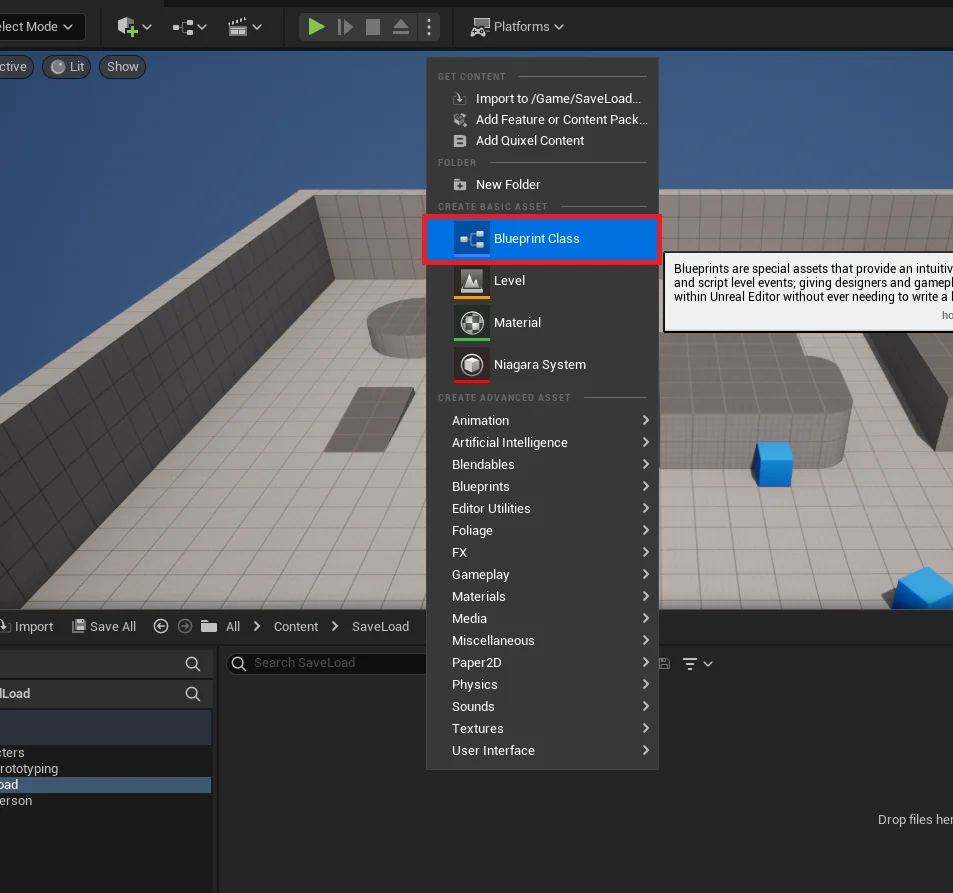
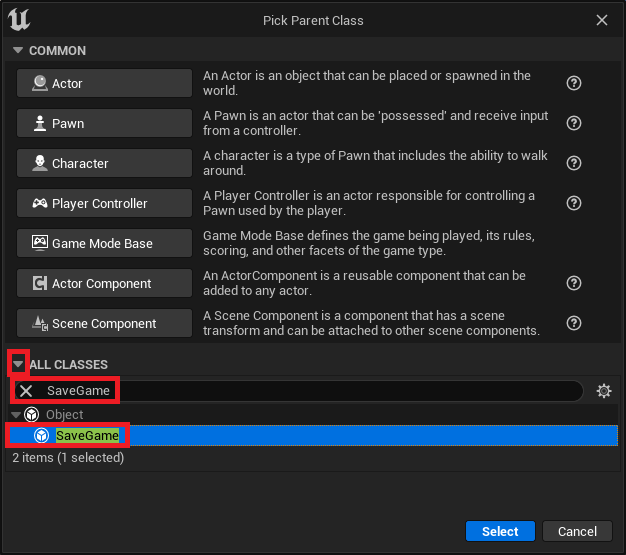
The initial step in implementing Unreal Engine’s save and load functionality involves defining the SaveGame blueprint class, which acts as the structured container for all persistent data. This process begins within the Unreal Editor’s Content Browser. Developers initiate a new Blueprint Class creation, and from the expanded list of available parent classes, SaveGame is selected. This choice is fundamental, as it designates the new blueprint as a specialized object intended solely for data serialization.
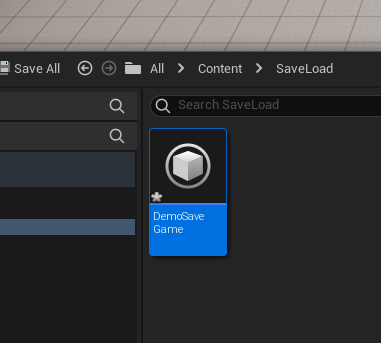
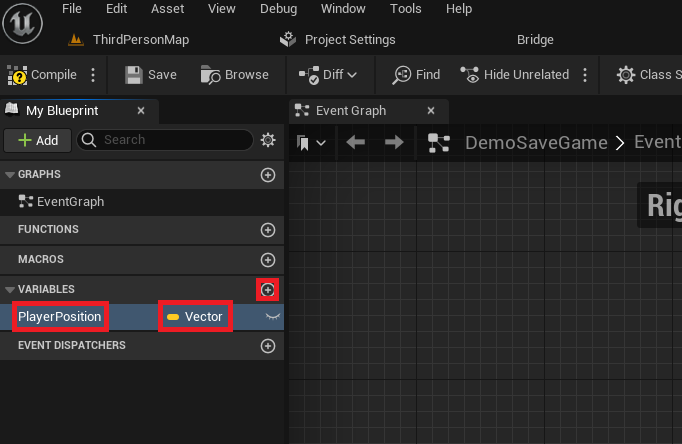
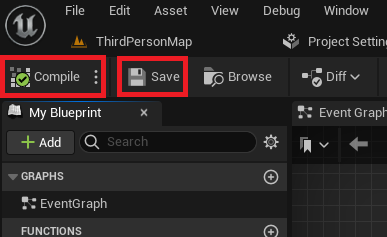
Upon creation, the new SaveGame blueprint is assigned a unique and descriptive name, such as DemoSaveGame or PlayerSaveData. This naming convention is vital for clarity and for referencing the class later in the game logic. Once the SaveGame blueprint is established, the next critical phase involves populating it with the specific variables that need to be preserved across game sessions. For instance, a common requirement in many games is to save the player’s position. In such a scenario, a Vector variable named PlayerPosition would be added to the DemoSaveGame blueprint. This variable would store the X, Y, and Z coordinates of the player’s location. The flexibility of this system allows for the inclusion of any number of variables, representing everything from player health and inventory items to quest progress, unlocked achievements, and world-state modifications. After defining these variables, the blueprint must be compiled and saved to ensure that all structural changes are applied and stored within the project.

Integrating Save and Load Functionality into Game Logic

With the SaveGame class defined, the next stage involves integrating the save and load operations into the game’s runtime logic. The Game Instance class in Unreal Engine is the ideal location for managing these operations. The Game Instance is a unique object that persists throughout the entire lifecycle of a game session, from the moment the game launches until it is completely shut down. This makes it an excellent central hub for global game logic, including data persistence.
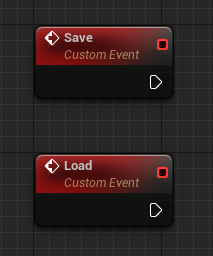
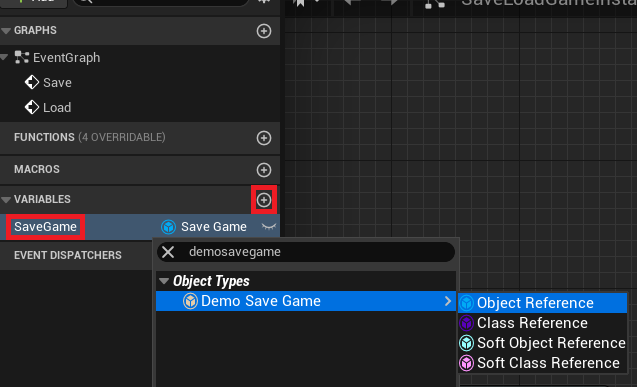
Within the custom Game Instance blueprint, developers typically create two custom events: Save and Load. These events serve as the entry points for initiating the respective data persistence operations. Furthermore, a new variable, often named SaveGame (or similar), is created within the Game Instance. This variable is set to reference the custom SaveGame class created previously (e.g., DemoSaveGame). This reference acts as a pointer to the active save game object in memory, allowing the Game Instance to interact with and modify the persistent data.
Orchestrating the Load Process: Retrieving Game State
The loading process is designed to intelligently handle two primary scenarios: either a save file already exists, or it does not. This conditional logic is crucial for gracefully initializing new game sessions versus resuming existing ones.
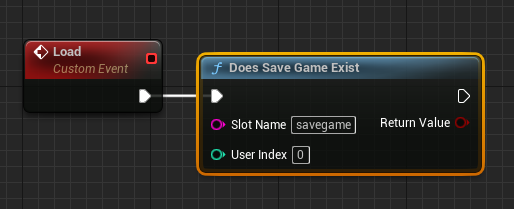
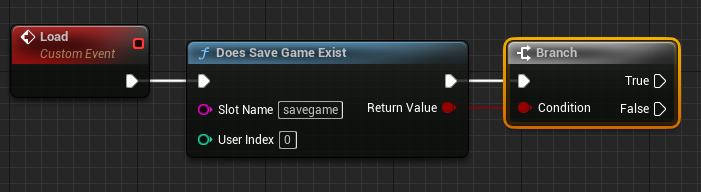
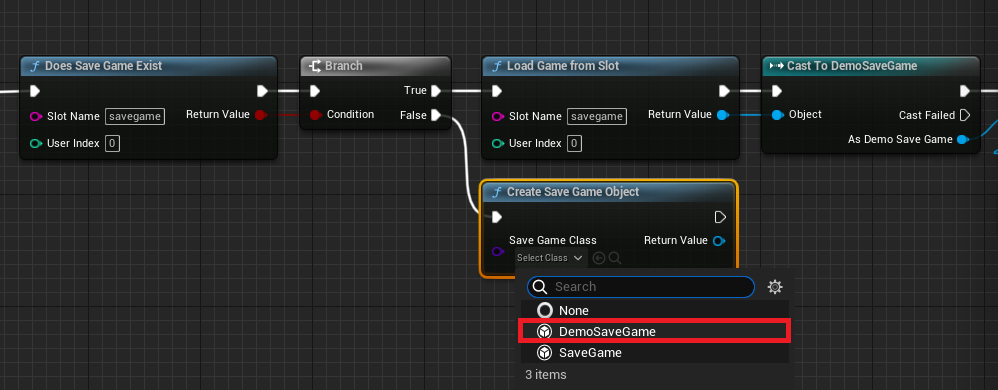
The Load event in the Game Instance typically begins with a Does Save Game Exist node. This node performs a check against a specified "Slot Name" (e.g., "savegame"). The slot name acts as a unique identifier for a particular save file, allowing games to support multiple save slots or profiles. The output of this node feeds into a Branch node, directing the execution flow based on the existence of the save file.
Scenario 1: The Save File Exists
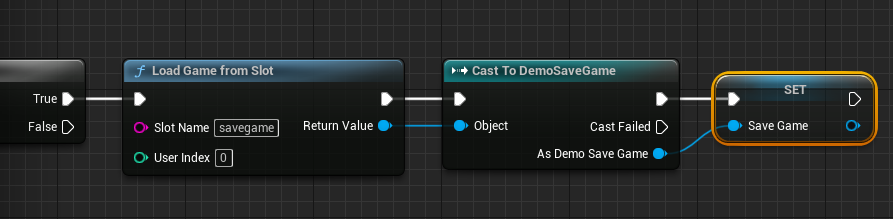
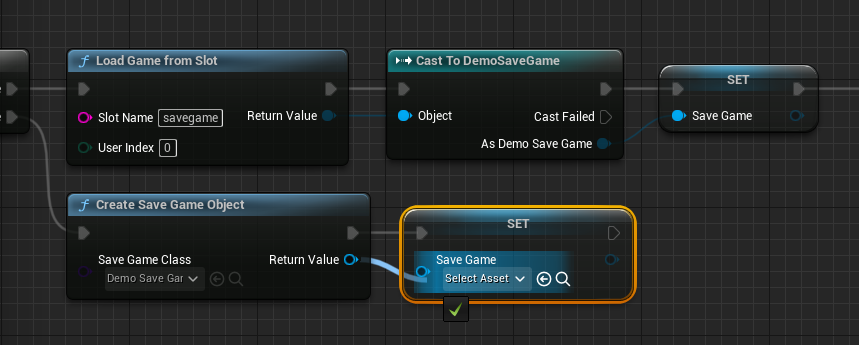
If Does Save Game Exist returns True, indicating an existing save file, the system proceeds to load it. A Load Game From Slot node is executed, again using the same "Slot Name." The output of this node is a generic USaveGame object. To access the specific variables defined in the custom SaveGame class (e.g., PlayerPosition), a Cast To node is essential. This node casts the generic USaveGame object to the custom class (e.g., Cast to DemoSaveGame).
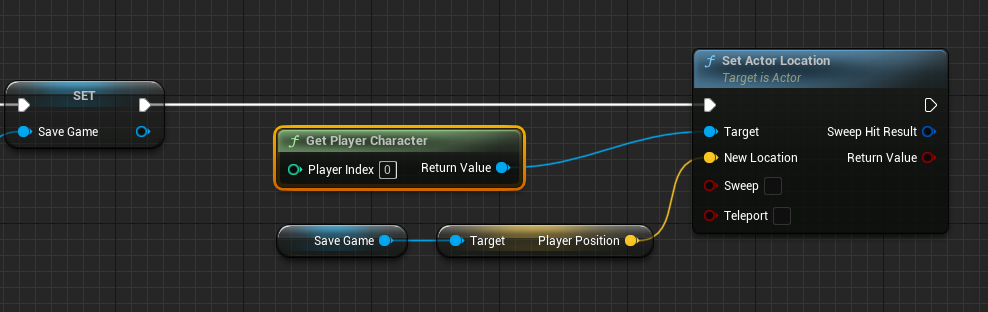
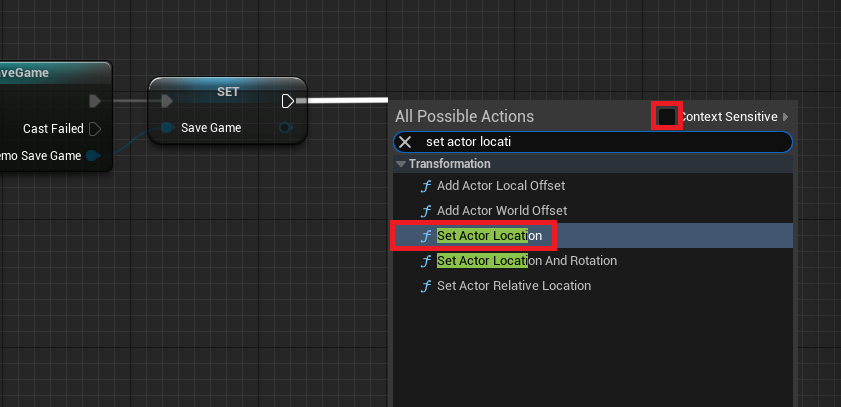
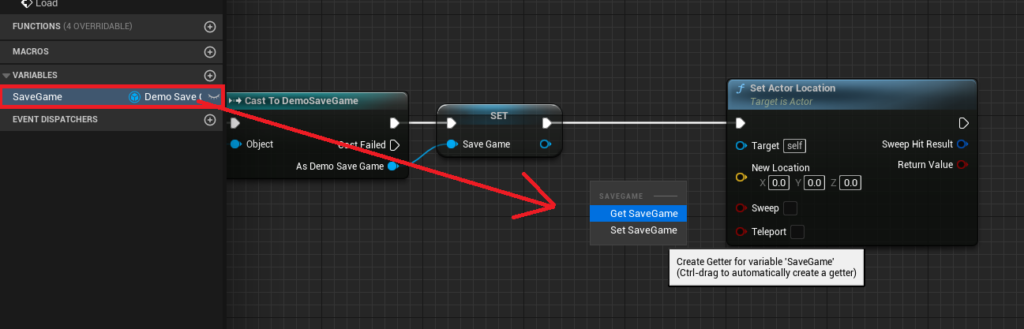
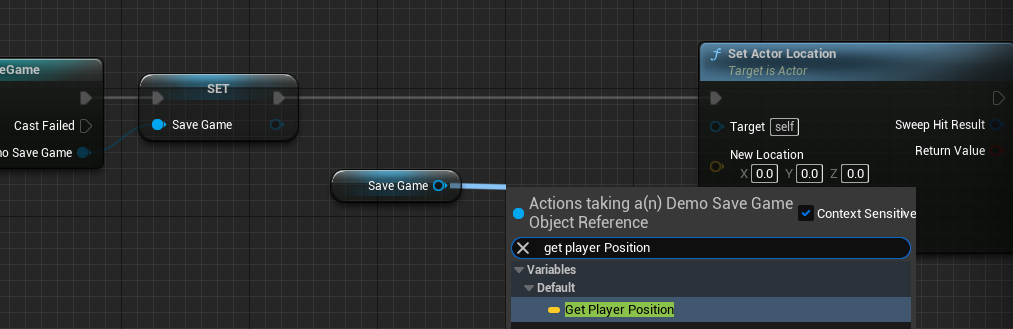
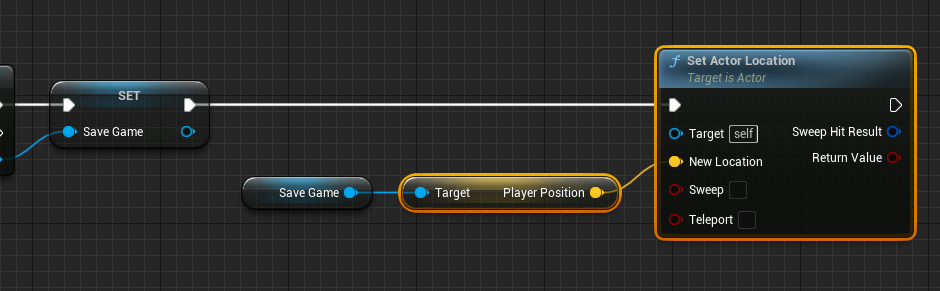
Once successfully cast, the retrieved custom SaveGame object is assigned to the SaveGame variable within the Game Instance. This ensures that the game’s runtime environment now holds a direct reference to the loaded persistent data. Subsequently, this data is used to re-establish the game state. For instance, the PlayerPosition variable from the loaded SaveGame object is retrieved using a Get Player Position node. This Vector value is then fed into a Set Actor Location node, targeting the Player Character (obtained via a Get Player Character node), effectively teleporting the player to their last saved location. This sequence of operations ensures a seamless continuation of the player’s journey.
Scenario 2: The Save File Does Not Exist
If Does Save Game Exist returns False, indicating that no save file exists for the specified slot, the system must initialize a new SaveGame object. This is achieved using a Create Save Game Object node, where the "Save Game Class" input is set to the custom SaveGame blueprint (e.g., DemoSaveGame). The newly created SaveGame object is then assigned to the SaveGame variable in the Game Instance. This ensures that a valid, albeit empty, SaveGame object is present in memory, ready to store data when the first save operation occurs. The execution flow from this point typically merges with the existing save game path, ensuring that a valid SaveGame object is always available for subsequent operations.
Orchestrating the Save Process: Preserving Game State
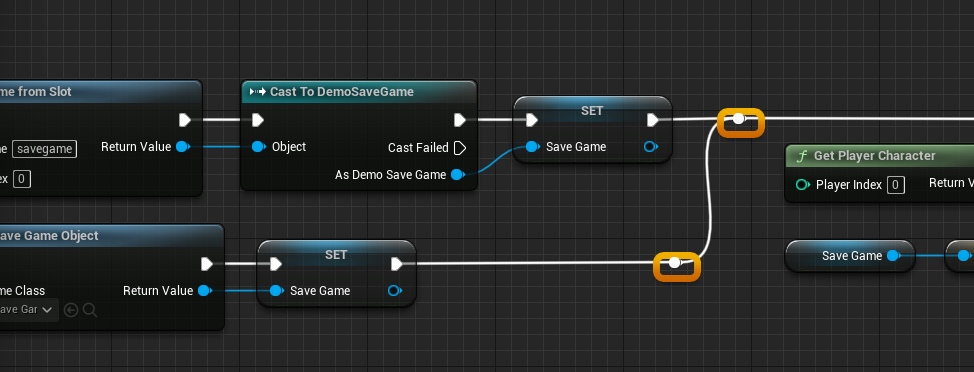
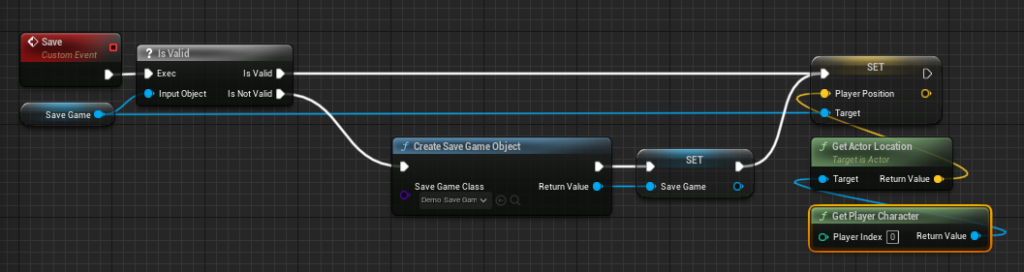
The saving process involves capturing the current state of relevant game variables and writing them to the designated save file. This operation is triggered by the Save event within the Game Instance.
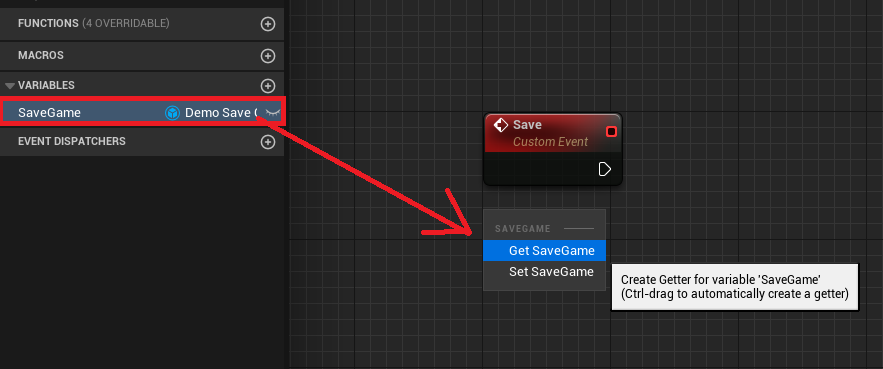
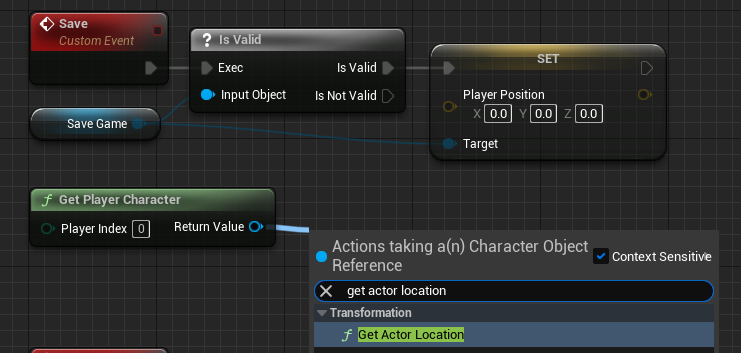
The process begins by retrieving the SaveGame object reference stored in the Game Instance via a Get SaveGame node. A crucial validation step follows using an Is Valid node, which checks if the SaveGame object reference is indeed valid (i.e., not null). This check prevents errors if a save operation is attempted before a SaveGame object has been properly loaded or created.
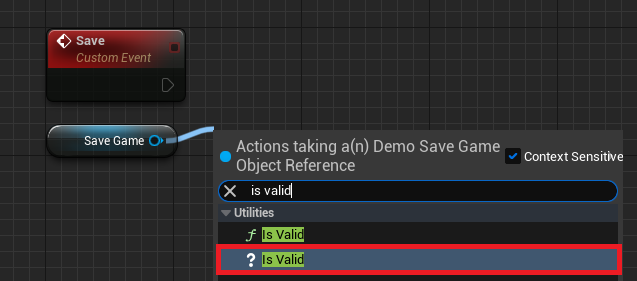
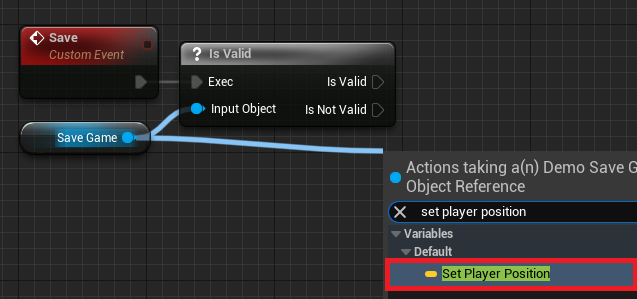
Scenario 1: The Save Game Object is Valid
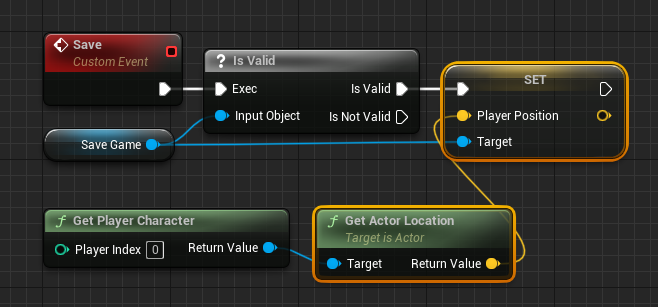
If the SaveGame object is valid, the system proceeds to update its variables with the current game state. For the PlayerPosition example, a Get Player Character node is used to obtain a reference to the active player. From this player character, a Get Actor Location node retrieves its current world position. This Vector value is then used to update the PlayerPosition variable within the SaveGame object via a Set Player Position node. This effectively stages the data for persistence.
Scenario 2: The Save Game Object is Not Valid
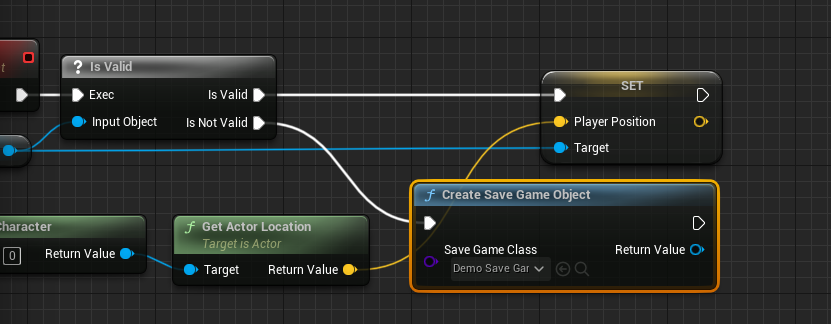
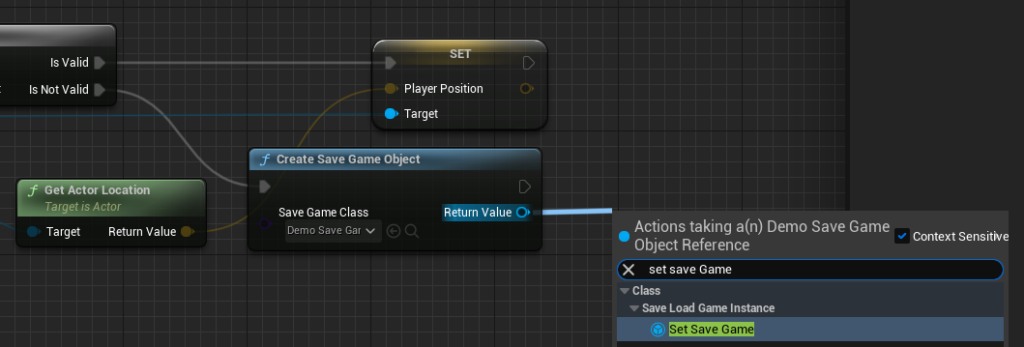
If the SaveGame object is Not Valid (which might occur if the game starts without a previous load and a save is attempted first), the system first creates a new SaveGame object using Create Save Game Object (referencing the custom SaveGame class). This newly created object is then assigned to the Game Instance‘s SaveGame variable. Once this initialization is complete, the execution flow converges with the "Is Valid" path, allowing the game state to be captured and stored in the now valid SaveGame object.
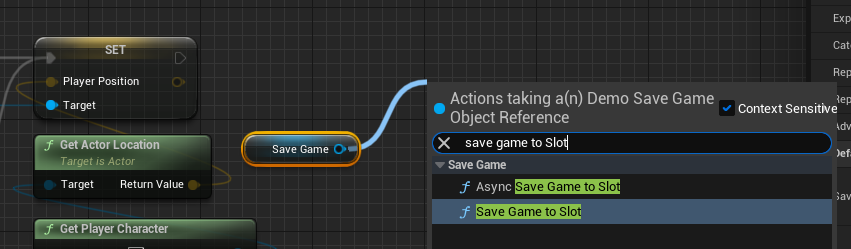
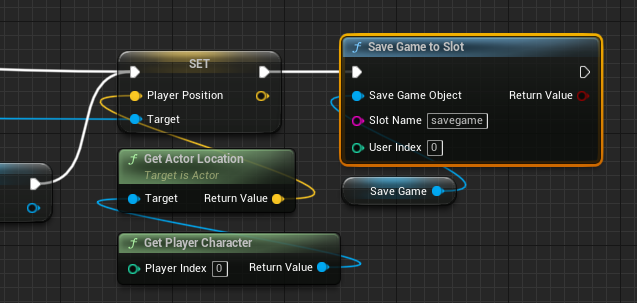
Finally, irrespective of whether the SaveGame object was initially valid or had to be created, the process culminates in writing the updated SaveGame object to disk. This is achieved using either a Save Game to Slot node or an Async Save Game to Slot node, both connected to the SaveGame variable. The choice between synchronous and asynchronous saving is a critical performance consideration:
Save Game to Slot(Synchronous): This node performs the save operation immediately on the main game thread. It is suitable for saving small amounts of data, as it can cause a brief hitch or frame rate drop if the data volume is substantial.Async Save Game to Slot(Asynchronous): This node performs the save operation on a separate thread, preventing the main game thread from being blocked. This is the recommended approach for saving large amounts of data, as it minimizes impact on game performance and user experience.
Both nodes require the "Slot Name" to be set to the same identifier used during the loading process (e.g., "savegame"), ensuring that data is consistently written to and read from the correct file.
Triggering Save and Load: Player Interaction
With the underlying save and load logic meticulously crafted within the Game Instance, the final step involves providing players with a means to trigger these functions. This is typically implemented through input events within the Player Character class or via UI elements in game menus.
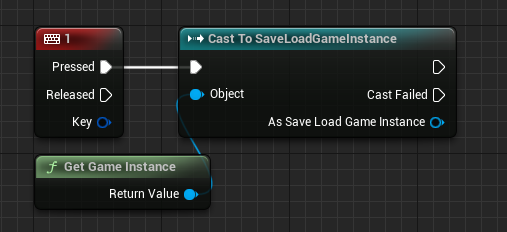
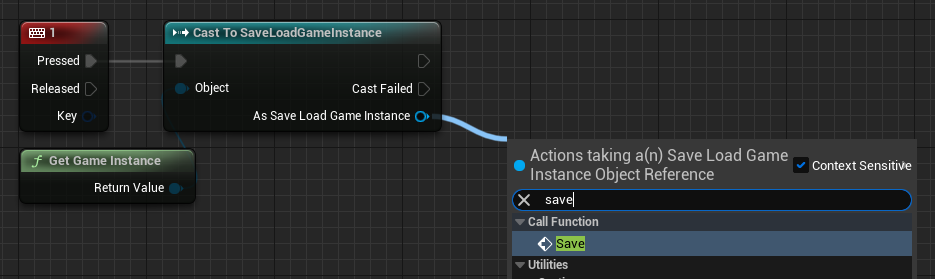
For demonstration purposes, developers might assign specific keyboard keys to trigger these events. In a common setup, a Key Press Event (e.g., for the ‘1’ key) in the ThirdPersonCharacterBP class would initiate a save. This event first retrieves a reference to the custom Game Instance via Get Game Instance and Cast To the specific Game Instance class. From the successfully cast Game Instance reference, the Save custom event is then called. Similarly, another Key Press Event (e.g., for the ‘2’ key) would be configured to call the Load custom event through the same Game Instance reference. This immediate feedback mechanism allows developers to quickly test the functionality and provides players with direct control over their game progression.
Implications and Best Practices for Robust Data Persistence
The Unreal Engine SaveGame system, while powerful, requires careful implementation and adherence to best practices to ensure a truly robust and player-friendly experience.
- Data Integrity and Corruption: Save files can become corrupted due to unexpected crashes, power outages, or even malicious tampering. Developers should consider implementing backup save systems (e.g., saving to multiple slots or creating rotating backups) to mitigate data loss. Error handling around
Load Game From SlotandSave Game to Slotis also crucial. - Performance Considerations: As highlighted, the choice between synchronous and asynchronous saving is paramount. For games with frequent saves or large datasets (e.g., complex open-world states, extensive inventories),
Async Save Game to Slotis non-negotiable to maintain smooth gameplay. Monitoring performance during save/load operations is essential. - Version Control for Save Files: Game updates can introduce changes to the
SaveGameclass (e.g., adding or removing variables). Handling these changes gracefully is vital to prevent older save files from becoming unreadable or causing crashes. Strategies include versioning save files and implementing upgrade/downgrade logic during the load process. - Security and Anti-Cheat: While the
SaveGamesystem stores data locally, it does not inherently provide robust security against save file manipulation. For competitive multiplayer games or those sensitive to cheating, additional measures like encryption, checksum validation, or server-side save validation may be necessary. - Scalability and Complexity: For games with highly complex and interconnected data, simply adding all variables to a single
SaveGameobject might become unwieldy. Consider structuring save data using multipleSaveGameobjects (e.g.,PlayerProgressSaveGame,WorldStateSaveGame) and managing them through a centralSaveGameManagerwithin theGame Instance. - User Feedback: Always provide clear visual and auditory feedback to the player when a save or load operation occurs. A simple "Game Saved" message or an animation can significantly enhance the user experience and instill confidence in the system.
- Cloud Save Integration: For distribution platforms like Steam, Epic Games Store, or console networks, integrating the local
SaveGamesystem with their respective cloud save APIs is a standard practice, offering players the convenience of accessing their progress across multiple devices.
Conclusion
The Unreal Engine 5 SaveGame system provides developers with a highly efficient and flexible framework for implementing data persistence. From defining the core SaveGame class and its variables to orchestrating the complex logic of loading existing data or creating new save files, and finally to saving current game states, the system streamlines a fundamental aspect of game development. By understanding its architecture, adhering to best practices, and considering the performance and integrity implications, developers can craft engaging and robust interactive experiences where players’ efforts and progress are reliably preserved, fostering deeper immersion and long-term enjoyment. The strategic implementation of this system is not just a technical task but a critical design decision that underpins the very fabric of a successful modern game.
About the Author