Unreal Engine 5 (UE5) offers a robust and highly efficient feature known as Data Tables, empowering developers to systematically organize, store, and access predefined lists of information within their projects. This capability is foundational for modern game development, enabling data-driven design paradigms that streamline workflows, enhance scalability, and foster collaborative environments. Data Tables, at their core, serve as structured repositories for game-related data, allowing designers and programmers to manage complex game mechanics and content outside of core code or Blueprints, thereby promoting agility and reducing development friction.
The Evolution of Data Management in Game Development
Historically, game development often involved hardcoding numerous values directly into game logic. This approach, while straightforward for small projects, quickly became unmanageable as games grew in complexity. Changing a single attribute for an item or enemy required recompiling code or re-editing Blueprints, a process that was time-consuming and prone to introducing errors. The advent of data-driven development methodologies sought to address these challenges by externalizing game data from program logic. Early solutions often involved custom parsers for XML, JSON, or CSV files, which provided flexibility but sometimes lacked native engine integration and editor support.
Unreal Engine’s Data Tables represent a sophisticated evolution of this concept, integrating data management directly into the engine’s asset pipeline. This integration ensures that data is treated as a first-class citizen, benefiting from the engine’s robust content management, version control capabilities, and intuitive editor interfaces. The ability to define a data schema once and then populate it with countless entries marks a significant leap in efficiency and maintainability, aligning with the demands of large-scale, iterative game production.
Understanding the Architecture of Data Tables in Unreal Engine 5
A Data Table in Unreal Engine 5 is fundamentally a collection of rows, where each row represents a unique entry of data. Each of these entries adheres to a predefined structure, known as a Struct (Structure). This design choice is critical for several reasons:
- Strong Typing and Consistency: By basing a Data Table on a
Struct, developers ensure that every row contains the exact same set of data types and variables. For instance, anItemDatastruct might contain variables forDamage(float),Rarity(enum), andSellPrice(integer). Every item entry in the Data Table will then consistently have these three attributes, preventing data inconsistencies and type-related errors. - Key-Value Pair Access: Each row in a Data Table is uniquely identified by a
Row Name, which acts as its key. This allows for rapid and precise retrieval of specific data entries at runtime, crucial for dynamic game systems like inventory management or enemy spawning based on specific identifiers. - Asset-Based Storage: Data Tables are stored as assets within the Unreal Engine project. This means they are managed by the engine’s content browser, can be easily referenced, and are subject to the same version control systems (like Perforce or Git) as other game assets. This centralized storage makes data incredibly easy to retrieve and update from anywhere in the codebase or Blueprint graphs.
- Editor Persistence: Data entered into Data Tables within the Unreal Editor is saved persistently. This allows designers to meticulously craft and balance game data during development, knowing that these values will be directly available and functional when the game runs. This "what you see is what you get" approach significantly accelerates the iteration process.
Practical Applications: Beyond Item and Enemy Data
While item and enemy data are classic examples, the utility of Data Tables extends to virtually every aspect of game development:
- Role-Playing Game (RPG) Systems:
- Items: Weapons, armor, consumables, quest items – storing stats (damage, defense, weight), descriptions, icon paths, rarity, elemental properties, and sell/buy prices.
- Enemies: Health, attack power, defense, unique abilities, movement speed, loot tables, and visual variations.
- Quests: Quest IDs, objectives, reward lists, dialogue lines, and prerequisite conditions.
- Character Progression: Experience curves, stat bonuses per level, unlockable skills.
- Game Configuration and Balancing:
- Difficulty Settings: Scaling enemy health, player damage, resource drop rates based on selected difficulty.
- Game Modes: Defining rulesets, objectives, and parameters for different gameplay experiences.
- UI/UX: Storing all UI text elements, tooltips, and dynamic content to be displayed.
- Localization: Managing translated strings for multiple languages, allowing the game to adapt to different regions.
- Procedural Content Generation:
- Defining rules, probabilities, and asset pools for generating levels, environments, or item variations.
- Audio Management:
- Mapping sound cues to specific events or conditions, defining volume, pitch, and spatialization parameters.
- Visual Effects (VFX):
- Configuring particle system parameters, material properties, and animation timings for various effects.
The flexibility of Data Tables means that any structured data that needs to be easily accessible and modifiable can benefit from this system.
Implementing Data Tables in Unreal Engine 5: A Step-by-Step Guide
Creating and utilizing Data Tables in UE5 is a straightforward process, primarily leveraging Blueprint assets. The following steps outline the typical workflow:
1. Prerequisites: Setting the Stage for Structured Data
Before diving into Data Table creation, it is essential to establish the foundational data types that will define your table’s rows. This typically involves creating an Enum and a Struct.
2. Creating an Enum (Enumeration)
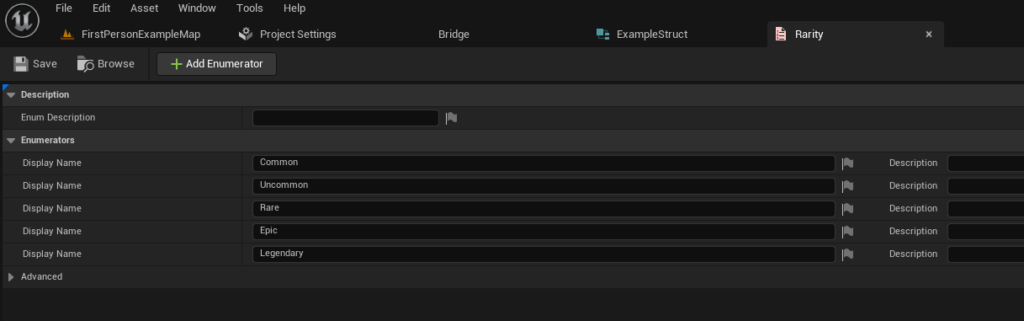
An Enum is a special data type that represents a fixed set of named constant values. It’s incredibly useful for categorizing data in a clear and type-safe manner. For instance, when defining items, an ERarity enum could categorize items into "Common," "Uncommon," "Rare," "Epic," and "Legendary."
To create an enum:
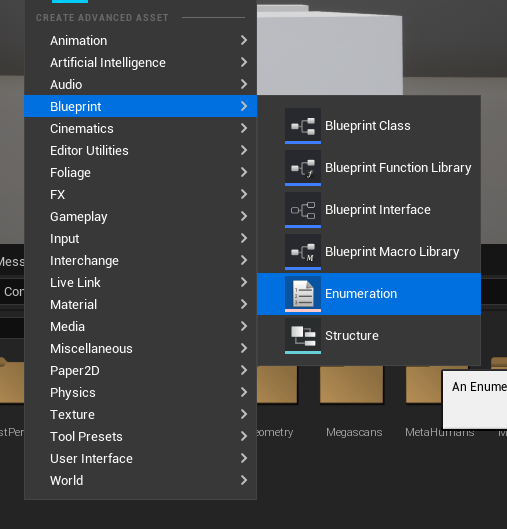
- Right-click in the Content Browser.
- Navigate to
Blueprintsand selectEnumeration. - Give it a descriptive name (e.g.,
ERarity). - Open the newly created enum and add the desired values. Each value should be self-explanatory, such as
Common,Uncommon,Rare,Epic, andLegendary. Enums enhance readability and prevent typos or invalid values, making your data more robust.
3. Creating Our Struct (Structure)
A Struct is a custom data type that groups together related variables into a single unit. It acts as the blueprint for each row in your Data Table, defining what kind of information each entry will hold.
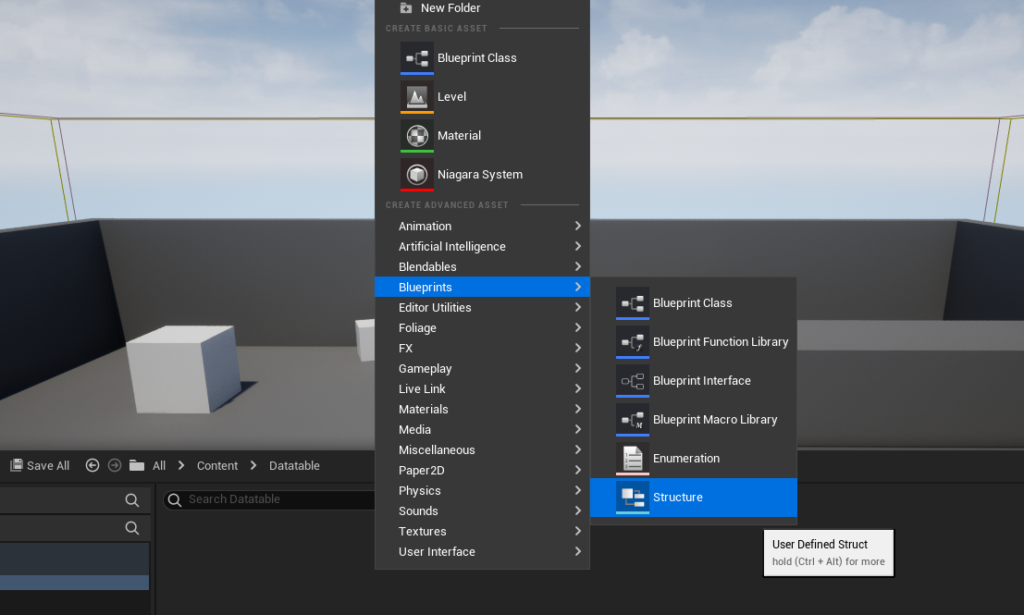
To create a struct:
- Right-click anywhere in the Content Browser.
- Navigate to
Blueprintsand selectStructure. - Name it appropriately (e.g.,
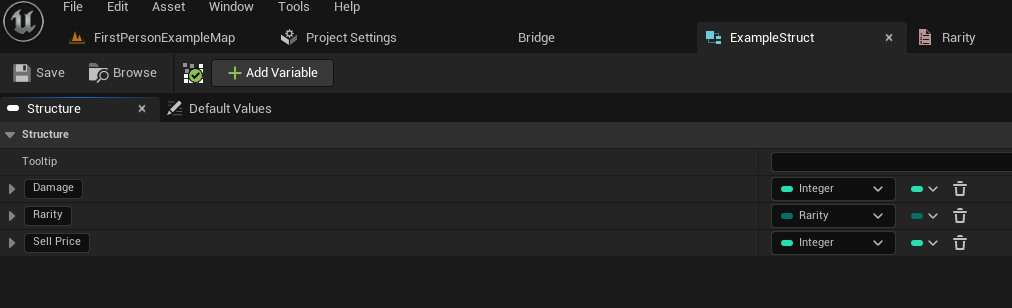
FItemData). - Open the struct and add the variables that define your data. For an
FItemDatastruct, you might include:Damage(Type: Float)Rarity(Type: ERarity – referencing the enum you just created)SellPrice(Type: Integer)
- These variables define the columns of your future Data Table, ensuring that every row conforms to this schema. The use of structs enforces data integrity and makes accessing related data highly organized.
4. Creating Our Data Table
With the foundational Enum and Struct in place, the Data Table itself can now be created.
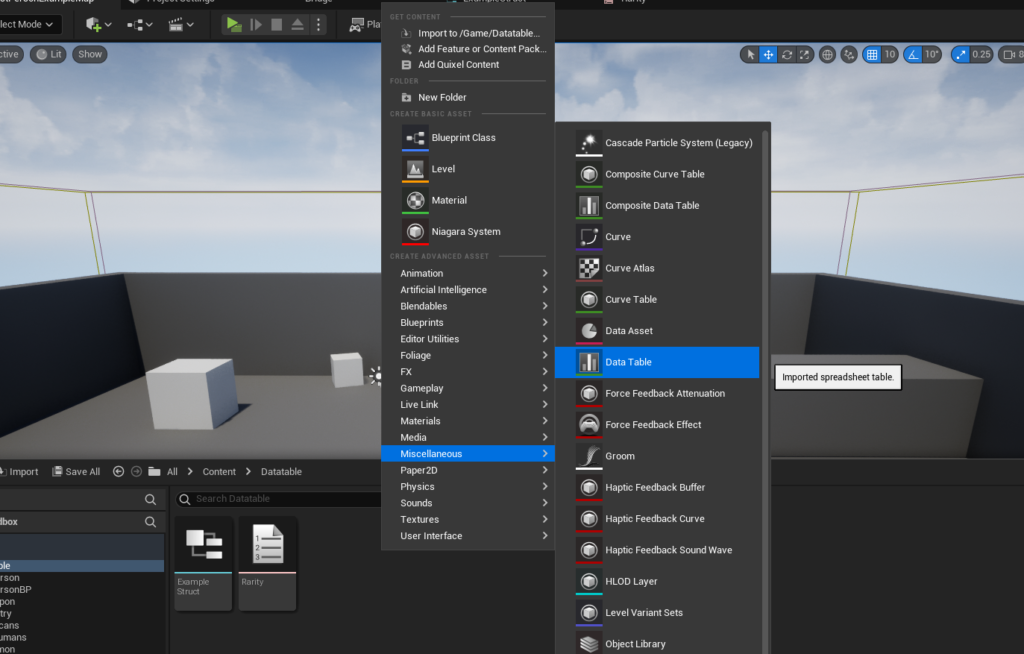
To create the Data Table:
- Right-click inside the Content Browser.
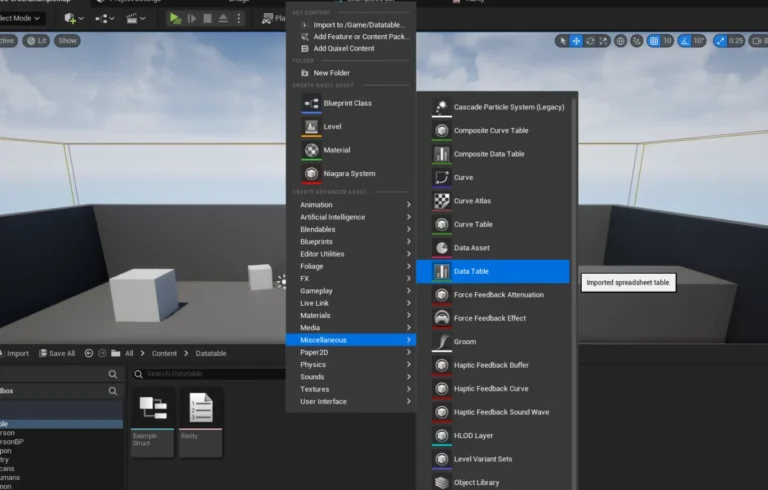
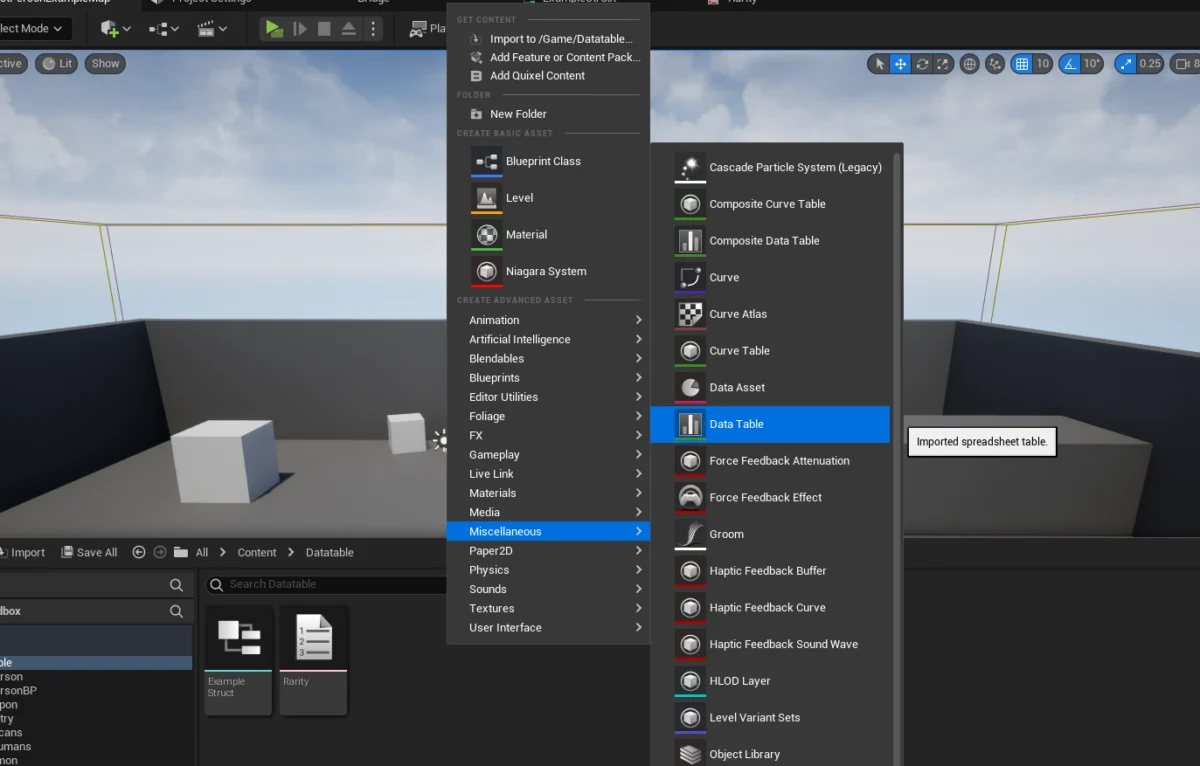
- Navigate to
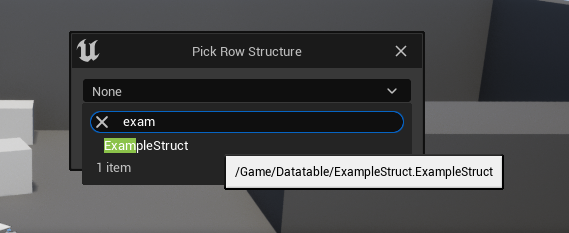
Miscellaneousand selectData Table. - A pop-up will appear, asking you to choose the
Row Structure. This is where you select theStructyou created earlier (e.g.,FItemData). This crucial step links the Data Table to its schema. - Name your Data Table (e.g.,
DT_ItemStats).
5. Adding Values to the Data Table
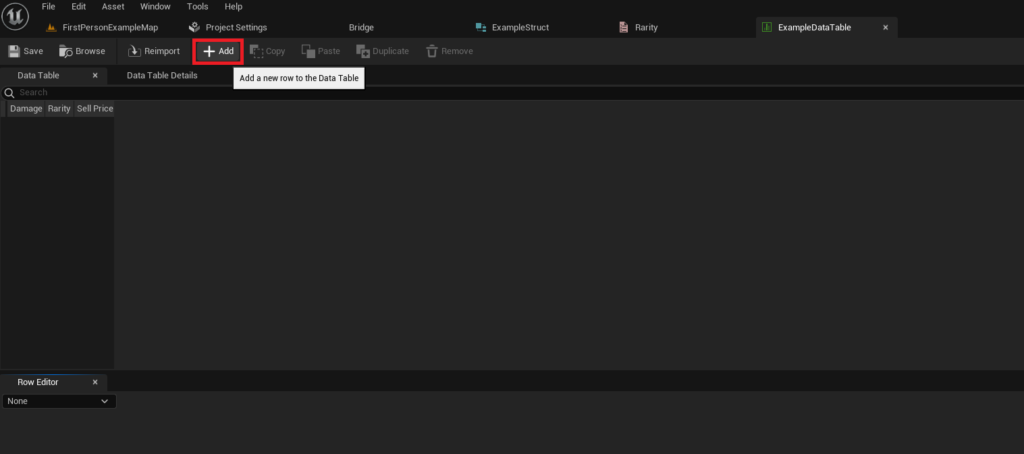
Once created, the Data Table can be opened and populated with data.
- Double-click the
DT_ItemStatsasset to open it. - The Data Table editor will display a grid. Click the
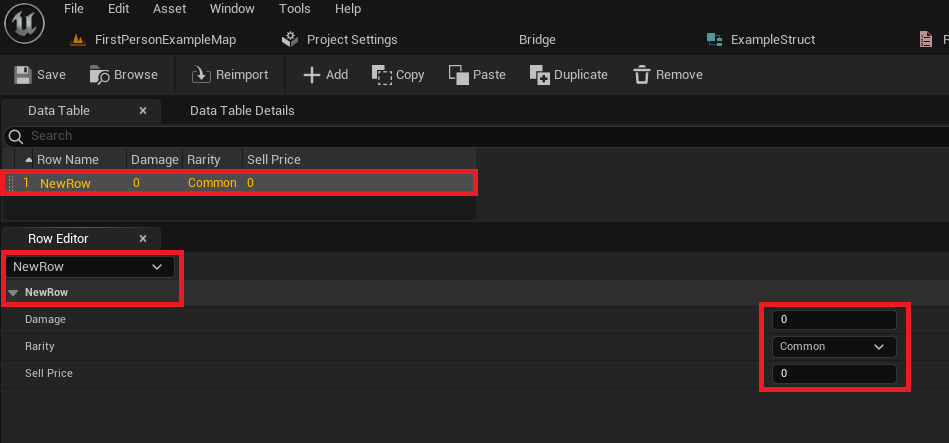
Addbutton to insert a new row. - Initially, the new row will have default values based on your
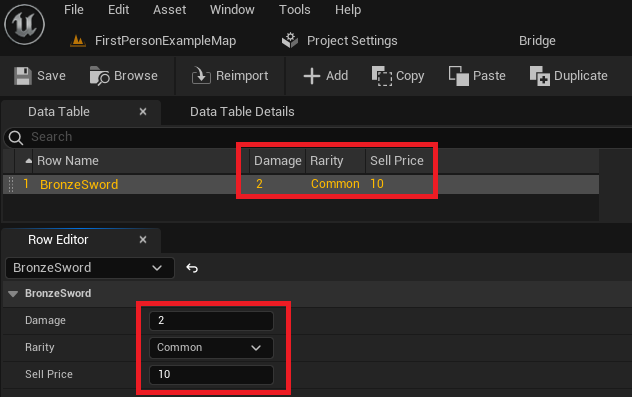
Struct. - Below the grid, the "Row Editor" panel provides a convenient interface to modify the values for the currently selected row.
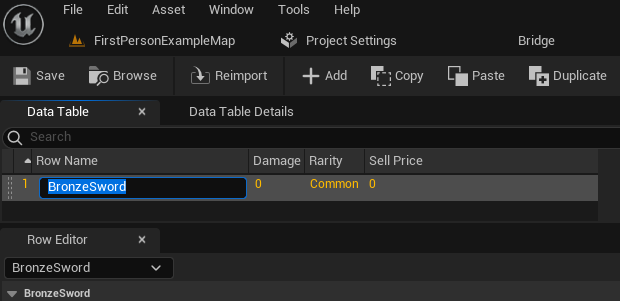
- Crucially, you can change the
Row Name(the key) by clicking on the default name (e.g., "NewRow") in the grid. This name should be unique and descriptive, such asBronzeSwordorSilverShield. - Enter the specific values for
Damage,Rarity, andSell Pricefor each item. For instance,BronzeSwordmight haveDamage: 10.0,Rarity: Common,SellPrice: 50. - Repeat this process for all desired items, creating new rows and assigning unique
Row Namesand corresponding values. - Always remember to save your Data Table frequently (
Ctrl+S) to prevent losing your progress.
Interacting with Data: Accessing and Looping in Blueprints
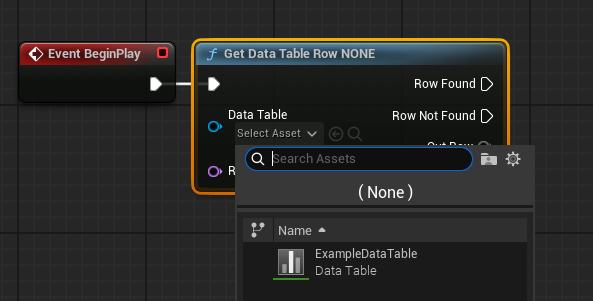
Populating the Data Table is only half the process; the data must be accessible and usable within your game’s logic. Unreal Engine 5 provides intuitive Blueprint nodes for this purpose.
1. Accessing a Specific Data Table Row
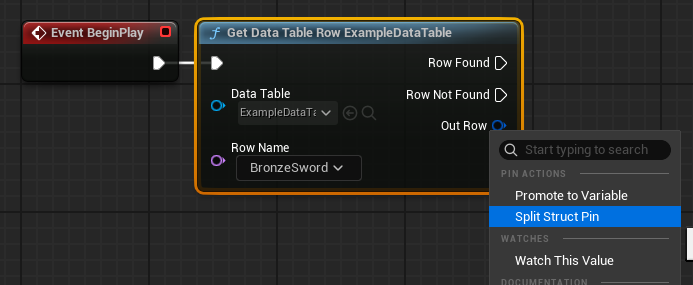
To retrieve data for a particular item (or any entry) by its Row Name:
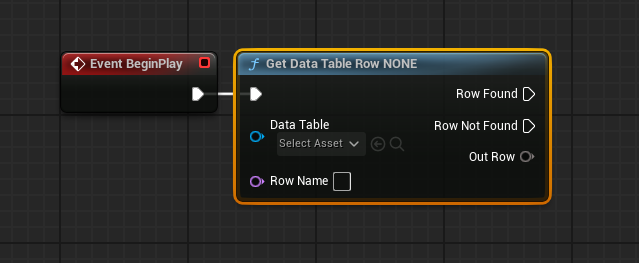
- In a Blueprint (e.g., a Level Blueprint or an Actor Blueprint), create an
Event BeginPlaynode or any event where you need to access the data. - Drag off an execution pin and search for
Get Data Table Row. - This node has two primary inputs:
Data Table: Select yourDT_ItemStatsasset from the dropdown menu.Row Name: Type in the exactRow Nameof the entry you wish to retrieve (e.g.,BronzeSword). This can also be dynamically fed from another variable.
- The
Get Data Table Rownode has two execution output pins:Row FoundandRow Not Found. This allows you to handle cases where the requested row might not exist. - The most important data output is
Out Row. This pin outputs the entireFItemDatastruct for the found row. - To easily access the individual members of the
Out Rowstruct (Damage, Rarity, Sell Price), right-click on theOut Rowpin and selectSplit Struct Pin. This will expand the struct into its constituent variables, making them directly usable in your Blueprint logic.
For example, you could connect the Damage pin to a Print String node to display the BronzeSword‘s damage value at game start.
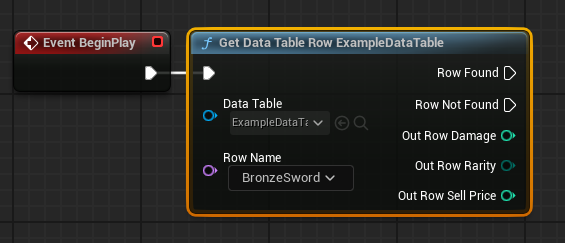
2. Looping Over Data Table Rows
Often, you’ll need to process or display information from all entries in a Data Table, such as populating an in-game shop or listing all possible enemy types. This requires iterating through all the rows.
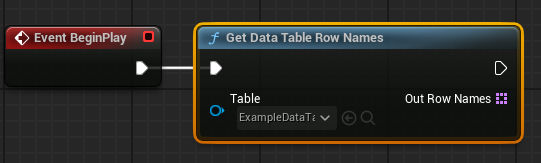
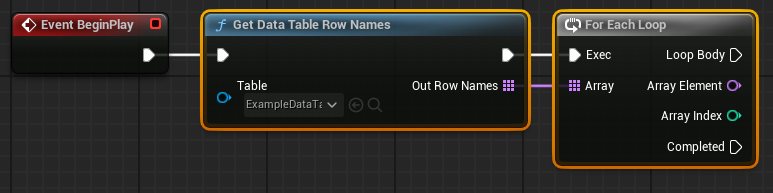
- To get a list of all
Row Namesin your Data Table, create aGet Data Table Row Namesnode. - Connect the
Data Tableinput to yourDT_ItemStatsasset. - The
Out Row Namespin will provide an array of allRow Names. - Connect this array to a
For Each Loopnode. TheFor Each Loopwill iterate through eachRow Namein the array. - Inside the loop’s
Loop Bodyexecution pin, you can now connect theArray Element(which is the currentRow Namebeing processed) to theRow Nameinput of aGet Data Table Rownode. - This setup allows you to retrieve the data for each row, one by one, and perform actions based on its values. For instance, you could dynamically spawn actors or update UI elements based on the attributes of each item.
Strategic Implications and Broader Impact
The adoption of Data Tables in Unreal Engine 5 projects carries significant strategic implications for development teams:
- Accelerated Iteration and Balancing: Game designers can modify numerical values, adjust rarities, or tweak enemy stats directly in the editor without requiring a programmer to write or compile code. This dramatically speeds up the iteration and balancing phases of game development.
- Enhanced Collaboration: Data Tables create a clear separation between data and logic. Designers and content creators can focus on populating and refining data, while programmers concentrate on building robust systems that consume that data. This reduces bottlenecks and allows parallel development.
- Scalability and Maintainability: As projects grow, Data Tables provide a centralized, organized, and easily searchable repository for game data. Adding new items or enemies simply involves adding new rows, rather than modifying complex code structures. This improves long-term maintainability.
- Robustness and Error Reduction: By enforcing a
Structschema, Data Tables reduce the likelihood of data entry errors and type mismatches. Enums further enhance this by providing predefined choices. - Localization Efficiency: For games targeting a global audience, Data Tables are invaluable for managing localized text. A single table can store all text strings, with
Row Namesacting as keys, allowing different language columns to be easily managed and switched at runtime. - Version Control Friendliness: While Data Tables are binary assets in UE, they can be easily imported from and exported to human-readable formats like CSV or JSON. This makes tracking changes via version control systems more manageable, especially for bulk data updates.
Conclusion
Unreal Engine 5’s Data Tables are an indispensable tool for modern game development, embodying the principles of efficient, data-driven design. By providing a structured, accessible, and highly integrated method for managing game data, they empower developers to build more scalable, maintainable, and robust interactive experiences. From defining the intricacies of an RPG’s item economy to streamlining complex game configurations, Data Tables serve as a "single source of truth," fostering greater collaboration and significantly accelerating the development lifecycle. Mastering their creation, configuration, population, and implementation is fundamental for any developer aiming to leverage the full potential of Unreal Engine 5.
About the Author