The strategic deployment of dedicated servers for Unreal Engine 5 (UE5) games marks a pivotal advancement for developers aiming to deliver robust, scalable, and fair multiplayer experiences. This sophisticated approach to hosting stands in stark contrast to traditional peer-to-peer methods, offering significant advantages in performance, security, and reliability. Whether a project envisions the intense competitive arenas of a shooter, the collaborative depths of a survival adventure, or the dynamic social ecosystems of a sandbox, a dedicated server infrastructure is often the bedrock upon which successful large-scale multiplayer gameplay is built. This guide explores the intricate process of building and configuring a dedicated server for an Unreal Engine 5 project, from the initial setup and project adjustments to the compilation and local deployment, underscoring its indispensable role in modern game development.
Understanding the Architectural Shift: Dedicated vs. Listen Servers
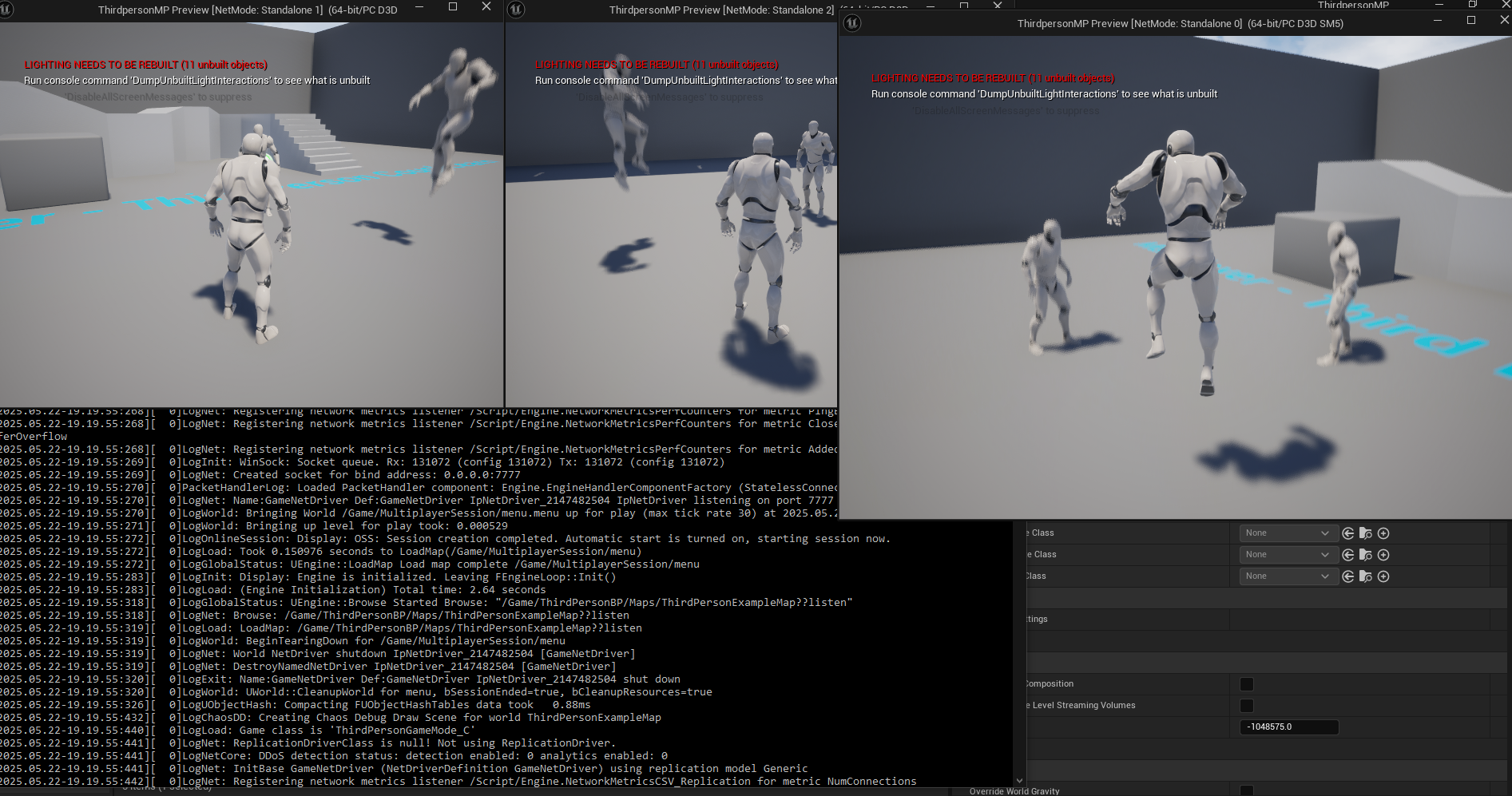
At its core, a dedicated server in game development is a specialized computer system running a standalone software instance solely responsible for managing the game world and its server-side logic. Crucially, it does not simulate a player character and is not counted as an active participant within the game session. This fundamental distinction sets it apart from a listen server, which operates on one of the player’s machines, simultaneously hosting the game and allowing that player to participate.
Listen servers, while convenient and cost-effective for smaller-scale multiplayer games (typically 2 to 16 players), present inherent limitations. They are susceptible to host machine performance bottlenecks, which can degrade the experience for all connected players, especially in resource-intensive scenarios. Furthermore, the host’s direct involvement in gameplay introduces potential security vulnerabilities, making games more prone to cheating or network manipulation. Synchronization inconsistencies, particularly in fast-paced or competitive genres like fighting games, can also arise due to varying host network conditions, leading to "desync" issues that severely impact gameplay integrity.
Dedicated servers are engineered to circumvent these challenges. By isolating the game world and its logic on an independent machine, they ensure consistent performance, unaffected by individual player hardware or network fluctuations. This centralized authority is paramount for maintaining game state integrity, preventing cheating through client-side manipulation, and resolving latency discrepancies efficiently. For developers, a dedicated server running 24/7, with correctly configured ports, becomes the unwavering anchor for their persistent game worlds, offering a superior foundation for any multiplayer ambition.
The Strategic Imperative for Modern Multiplayer Gaming
The demand for high-quality multiplayer experiences has never been greater. Industry reports consistently highlight that multiplayer features are a significant driver of player engagement, retention, and monetization in the video game market. Games like Fortnite, Apex Legends, and Valorant exemplify the success of titles built on robust dedicated server architectures, enabling millions of concurrent players and fostering vibrant competitive scenes. The absence of a dedicated server option can significantly limit a game’s potential reach and competitive viability, especially in the burgeoning esports sector where fair play and low latency are non-negotiable.
Developers, from indie studios to AAA behemoths, are increasingly recognizing the strategic necessity of investing in dedicated server infrastructure. While initial setup and ongoing maintenance costs can be higher than peer-to-peer, the long-term benefits in player satisfaction, game longevity, and reputation often outweigh these expenditures. Industry analysts often emphasize that a stable, cheat-free, and performant multiplayer environment is no longer a luxury but a fundamental expectation from players, particularly those accustomed to the polished experiences offered by leading online titles.
Unreal Engine 5’s Robust Ecosystem for Multiplayer Development
Unreal Engine 5 provides a powerful suite of tools and a flexible framework to facilitate the development of complex multiplayer games, including robust support for dedicated servers. Epic Games, the creator of UE5, has a vested interest in promoting scalable online experiences, given their own successes with games like Fortnite. The engine’s network replication system, combined with tools like the Project Launcher, empowers developers to build and manage server deployments efficiently.
However, leveraging these capabilities effectively requires adherence to specific prerequisites. A source build of Unreal Engine 5 is absolutely essential. Unlike the binary versions downloaded from the Epic Games Launcher, a source build provides access to the engine’s underlying code, allowing for the necessary server-specific optimizations and configurations that are not available in a standard client build. This ensures that the dedicated server executable is streamlined, containing only the components required to run the game logic without the overhead of client-side rendering or input processing. Additionally, for robust session management and discovery, plugins such as the AdvancedSessions plugin are highly recommended, enabling servers to correctly appear and interact within session browsers, a critical component for player matchmaking. These foundational requirements highlight the specialized nature of dedicated server development within the UE5 ecosystem.
Configuring Server-Side Logic for Autonomy
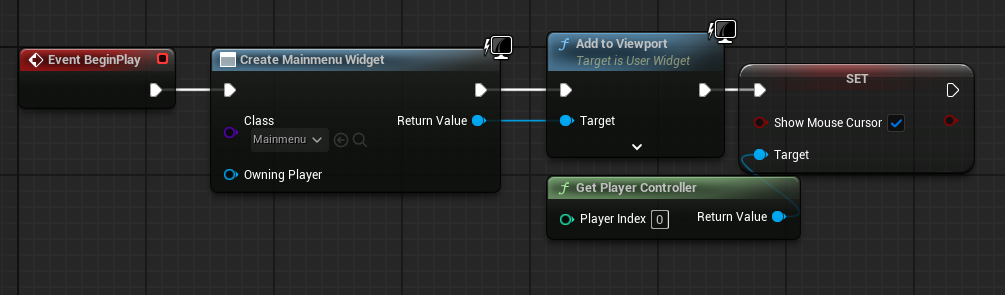
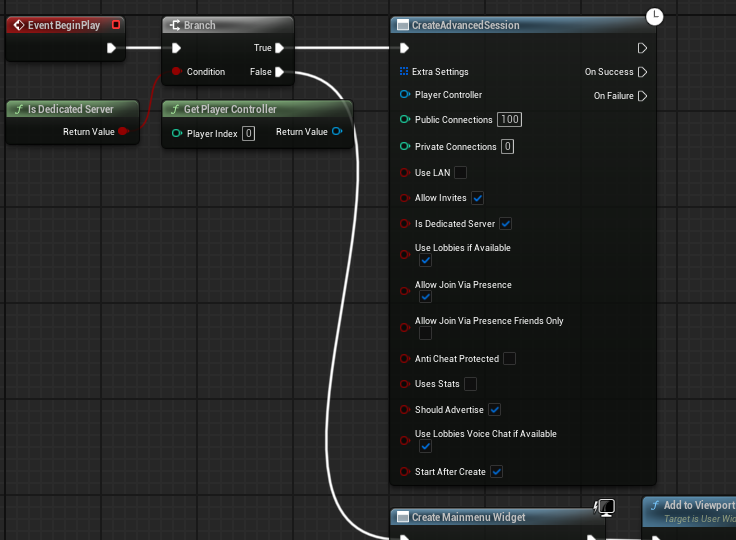
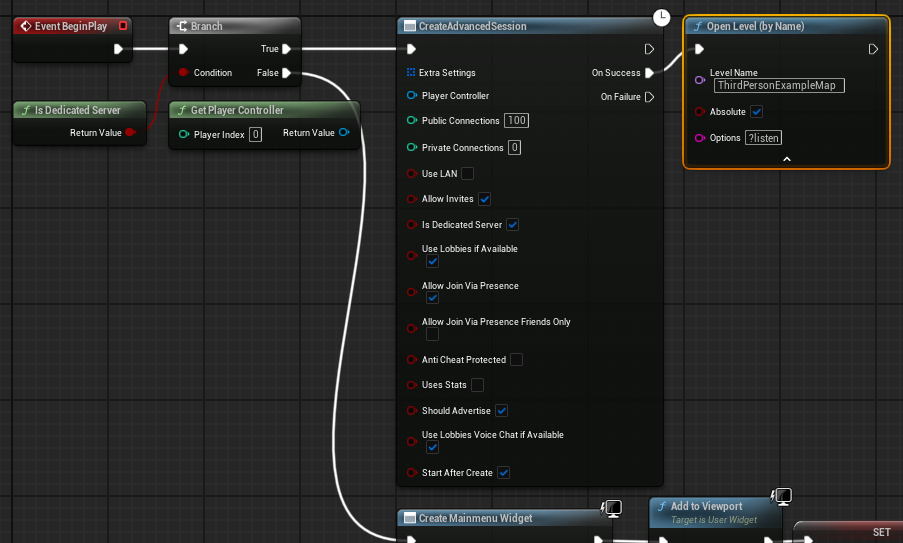
A core aspect of dedicated server functionality is its ability to operate autonomously, establishing game sessions and loading maps without direct player intervention. In a typical multiplayer project, the main menu widget might be the first element displayed to a player. For a dedicated server, this client-centric interface is unnecessary and, in fact, counterproductive.
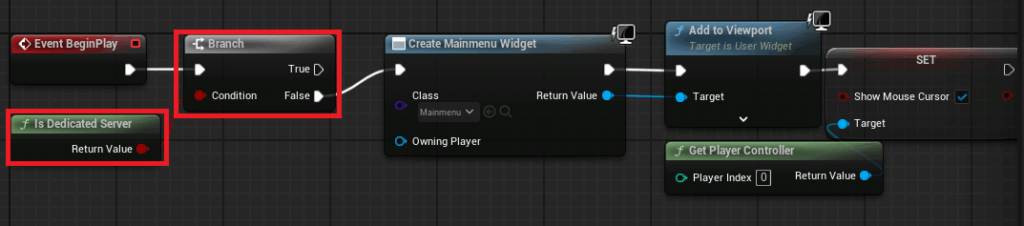
To enable this autonomy, modifications are required within the main menu level blueprint. A conditional check, utilizing the "Is Dedicated Server" node, is implemented at the very beginning of the level’s execution flow. If the platform is identified as a dedicated server, the code path that typically creates and displays the main menu widget is bypassed. Instead, the server proceeds directly to creating an Advanced Session with predefined settings, such as maximum players, session name, and other relevant metadata. Upon successful session creation, the server then initiates the target game level using the ?listen option. This crucial command instructs the server to open the specified map and actively listen for incoming client connections, effectively transforming it into a live game instance ready for players. This streamlined startup process ensures that the dedicated server efficiently transitions from launch to an active game state, optimizing resource utilization and minimizing setup delays.
Optimizing Server Performance: Choosing the Default Server Map
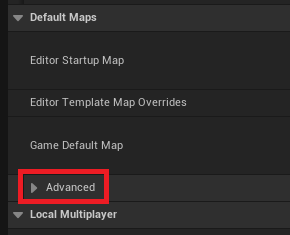
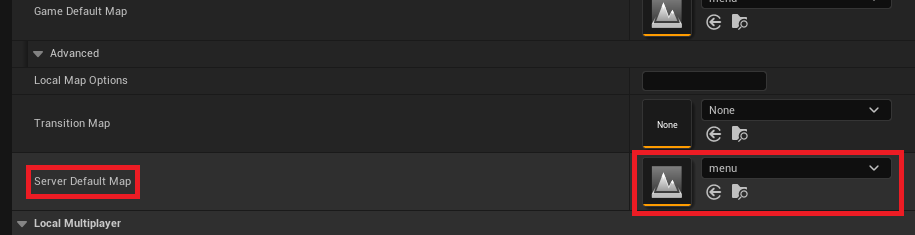
By default, an Unreal Engine server might attempt to load into a generic engine map, often named "Entry." This is unsuitable for a game, as it lacks specific game logic or assets. Therefore, defining a specific Server Default Map within the Project Settings is a critical configuration step. This ensures that when the dedicated server starts, it loads the appropriate game level where players are intended to join.
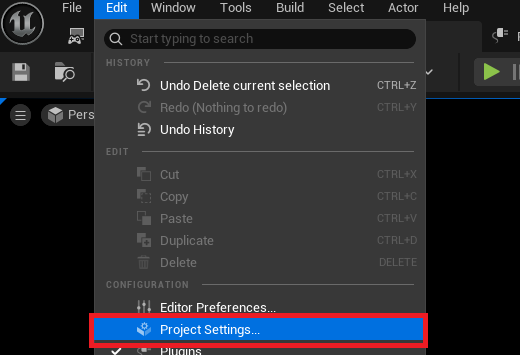
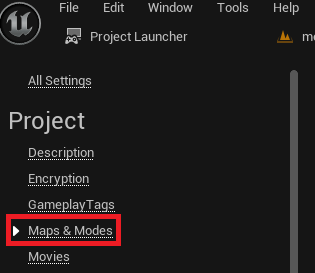
The process involves navigating to the "Edit" menu, selecting "Project Settings," and then accessing the "Maps & Modes" section. Within this area, under the "Default Maps" category, an "Advanced" dropdown reveals the "Server Default Map" option. Developers must carefully select the desired starting map for their dedicated server, often a main game level or a specific lobby map, ensuring that the server environment initializes correctly with all necessary game elements. This setting directly dictates the initial state of the game world that clients will connect to, making it a fundamental aspect of server configuration.
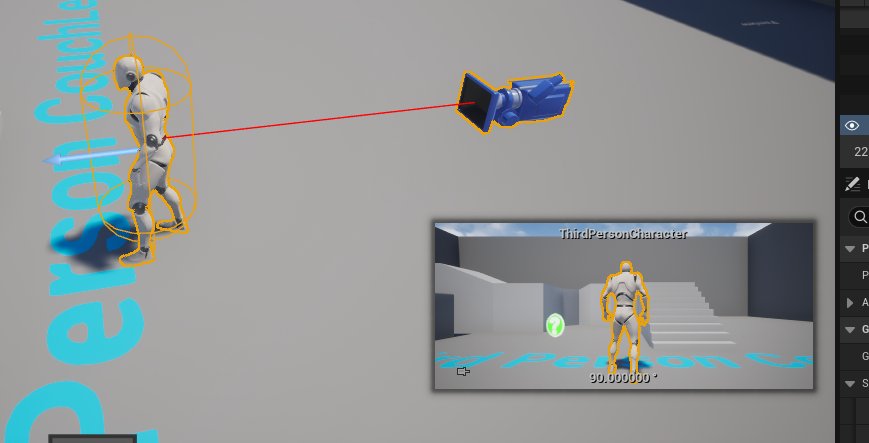
Furthermore, a dedicated server inherently does not require a player character to be spawned at launch for the "authority" (the server host), as it merely processes game logic. If a level blueprint or game mode is configured to automatically spawn a character, this can lead to an idle, un-controlled character existing in the game world, consuming resources unnecessarily. To prevent this, any default character spawns or character blueprints directly placed in the server’s default map that are intended for the host player must be removed or conditionally spawned only for clients. This optimization is vital for maintaining a lean and efficient server footprint, preventing superfluous game objects from consuming valuable server resources and potentially causing unforeseen game logic issues.
The Unreal Engine Project Launcher: Your Deployment Hub
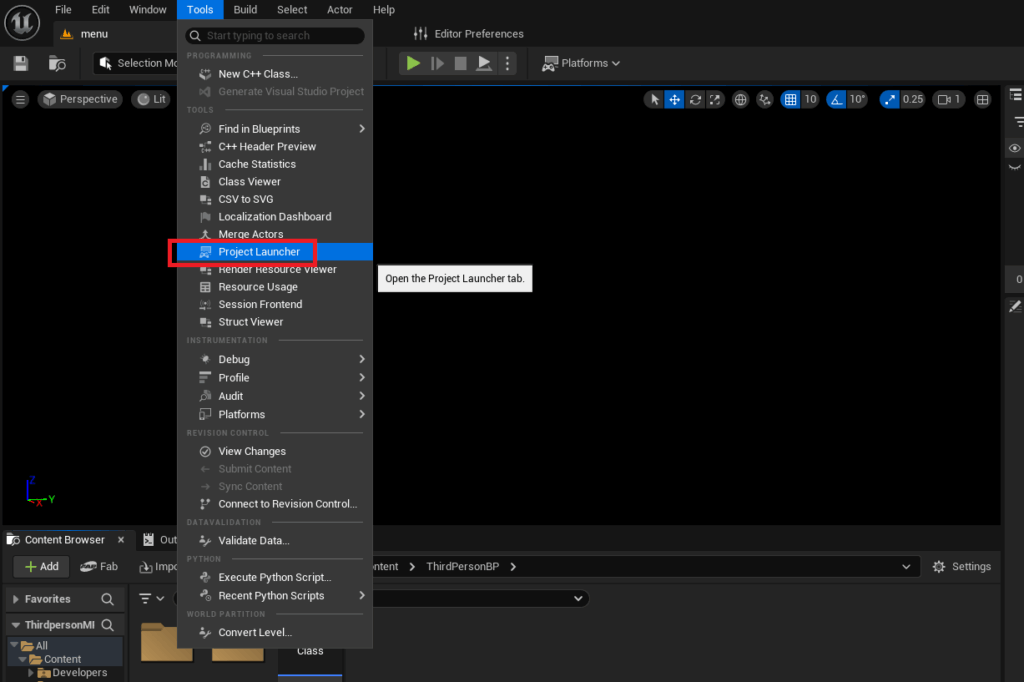
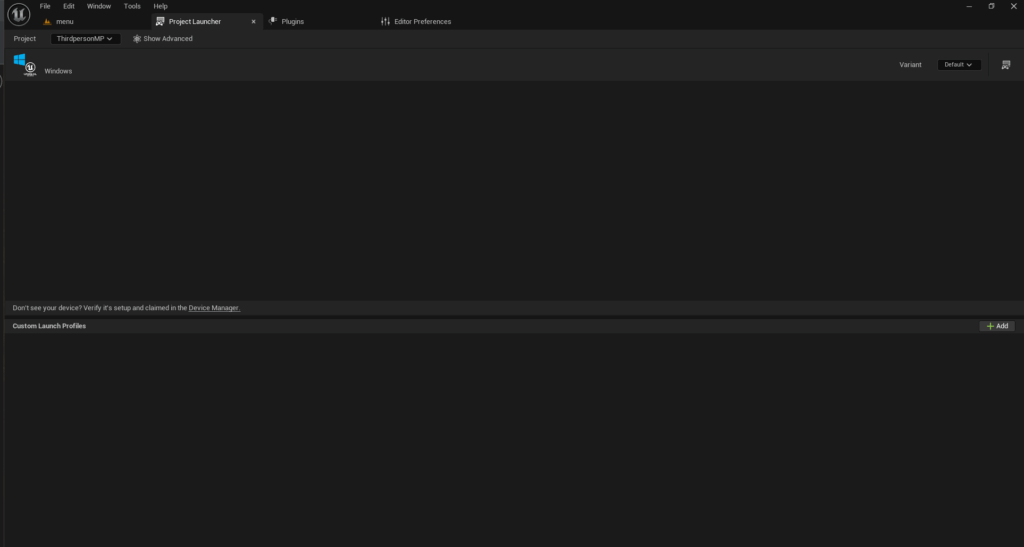
The Unreal Engine Project Launcher is an indispensable built-in tool that provides a centralized interface for building, packaging, and deploying game versions based on customizable profiles. Its capabilities extend to generating dedicated server builds, streamlining what would otherwise be a complex manual compilation process. Accessing the Project Launcher is straightforward: from the editor’s top menu, navigate to "Tools" and then select "Project Launcher."
Upon opening, the Project Launcher typically presents an empty interface, awaiting the creation of custom deployment profiles. These profiles are the blueprints for various game builds, allowing developers to define specific configurations for different platforms, build types (client, server), and content inclusions. The ability to create a custom profile for a dedicated server is where the Project Launcher truly shines, providing a systematic and repeatable method for generating server executables.
Crafting a Custom Build Profile for Dedicated Servers
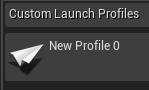
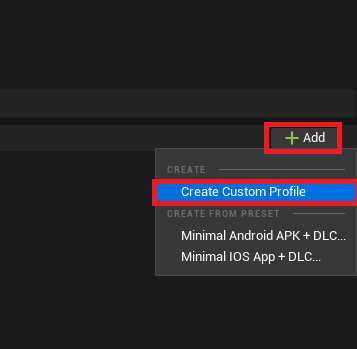
The creation of a custom profile begins by clicking the "Add" button and selecting "Create Custom Profile." This action unveils an extensive array of configuration options, allowing granular control over the build process.
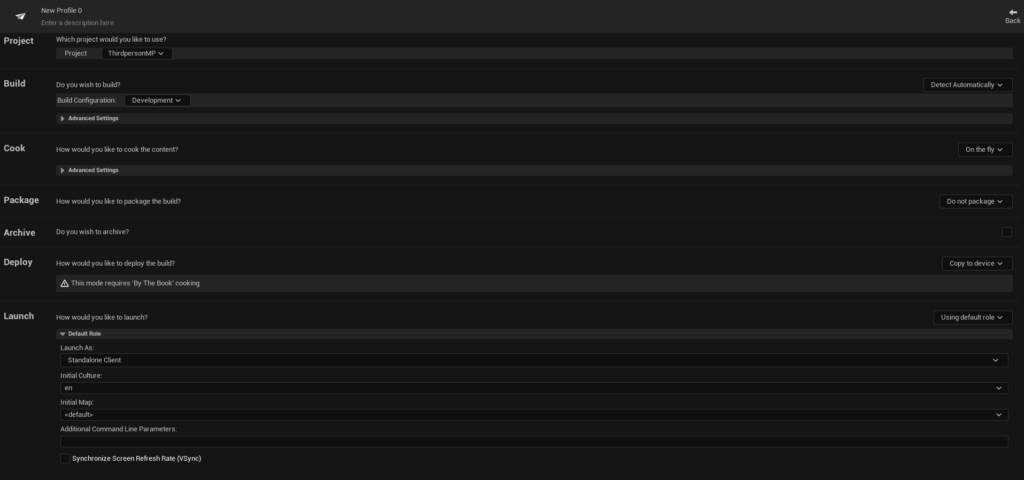
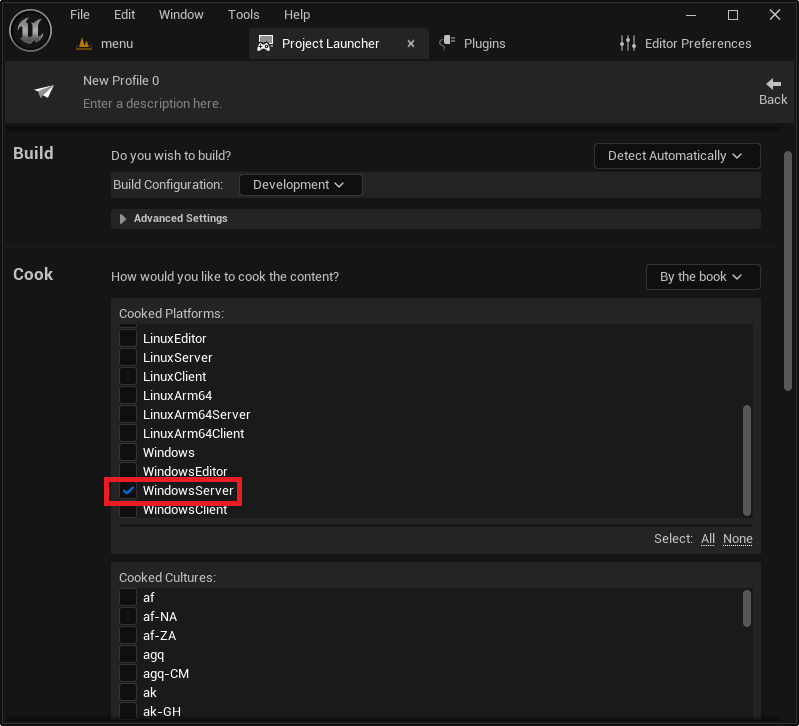
Within the "Cook" section, a critical adjustment is changing the default setting from "On the fly" to "By the book." This mandates that all content is pre-cooked and packaged systematically, ensuring that the server build contains all necessary assets in an optimized format, rather than attempting to cook them during runtime. Following this, developers must specify the target server platform. For Windows-based deployments, WindowsServer is selected. Alternatives like LinuxServer (for x86/64 Linux environments) or LinuxArm64 (for ARM-based Linux systems) are available for developers targeting different server operating systems, providing flexibility for various hosting solutions. The choice of platform directly influences the compiled binaries and dependencies included in the final server package.
Further down, developers must meticulously select all maps intended to be included in the server build. This ensures that the server has access to every level required for gameplay, from the initial lobby to various game maps. In the "Package" section, the "Do not package" default is changed to "Package & store locally." This instructs the Project Launcher to compile and package the server application into a self-contained directory on the local machine. The output path is initially set to a default location within the project’s Saved/StagedBuilds directory but can be customized using the "Browse" button, allowing developers to specify a preferred deployment folder.
Finally, in the "Deploy" section, the default "Copy to device" option is changed to "Do not deploy." Since the goal is to build the server locally, automatic deployment to an external device is typically not desired at this stage. A descriptive name for the profile, such as "MyGame_DedicatedServer," is then assigned to facilitate easy identification and management within the Project Launcher interface. This comprehensive configuration ensures that the server build process is tailored precisely to the project’s requirements, producing a lean, efficient, and deployable dedicated server executable.
The Server Build Process and Validation
With the custom profile meticulously configured, the next step is to initiate the build process. Returning to the main Project Launcher menu, the newly created profile will be visible in the list of custom launch profiles. To commence the server build, the "Launch" button (often represented by a controller and display icon) associated with the profile is pressed.
This action triggers an automated sequence of tasks, including cooking content, compiling code, and packaging the server executable. The Project Launcher displays a progress log, detailing each step of the build process. The initial build, particularly for larger projects or the first time a profile is run, can be time-consuming, sometimes extending for hours depending on project complexity and hardware specifications. It is crucial to allow this process to complete fully without interruption, as any premature termination could result in an incomplete or corrupted server build. Upon successful completion, the log will indicate that all tasks have finished, signifying that the dedicated server files are ready.
Testing the Dedicated Server
Once the build process has successfully concluded, the compiled dedicated server executable can be found in the designated output folder, typically [YourProjectFolder]/Saved/StagedBuilds/[PlatformName] (e.g., WindowsServer). Inside this directory, the server executable (e.g., MyGameServer.exe) will be present.
To facilitate testing and monitoring, it is highly recommended to create a shortcut to the server executable. By right-clicking the shortcut and accessing its properties, the "Target" field can be modified. Appending the launch option -log to the end of the target path (e.g., ".../MyGameServer.exe" -log) forces the server to open in a console window, displaying real-time logging messages. This provides invaluable feedback on the server’s initialization, session creation, and any potential errors, making debugging and operational monitoring significantly easier than running the server silently in the background.
Launching the server shortcut with the -log argument will open a command-line window that rapidly fills with text, indicating the server’s initialization sequence, the creation of the game session, and its readiness to accept client connections. Concurrently, when clients (either editor instances or separate game builds) search for multiplayer sessions, the newly launched dedicated server session should be discoverable. Players can then connect to this session, experiencing a multiplayer environment hosted independently of any single player’s machine. The demonstration of multiple clients smoothly connecting and interacting within the server’s game world, all managed by the dedicated server without a host client, vividly illustrates the efficacy and benefits of this robust hosting model.

Broader Implications and Future Outlook
The successful implementation of a dedicated server marks a significant milestone in game development, paving the way for truly scalable and professional multiplayer titles. This approach empowers developers to offer a superior player experience, characterized by minimal latency, enhanced security, and consistent gameplay performance. For players, it translates into fairer competition, reduced instances of "lag switching" or host-advantage exploits, and a more enjoyable, stable online environment.
Beyond the immediate technical benefits, dedicated servers enable developers to build games with long-term aspirations, including competitive esports integration, persistent online worlds, and community-driven content. While the operational costs associated with hosting dedicated servers (whether self-managed or via cloud providers like AWS, Azure, or Google Cloud) are a consideration, the value proposition in terms of player retention and game reputation is substantial. The future of online gaming, particularly in the realm of massively multiplayer experiences and competitive play, is inextricably linked to the continued evolution and adoption of robust dedicated server architectures. Developers armed with the knowledge to implement these systems in Unreal Engine 5 are well-positioned to create the next generation of captivating and enduring online worlds.
About the Author