The implementation of sophisticated artificial intelligence (AI) behaviors is a cornerstone of modern video game development, significantly contributing to player immersion and gameplay dynamism. Among these behaviors, the ability for non-player characters (NPCs) or enemies to effectively chase or follow the player character stands out as a fundamental and ubiquitous feature. From relentless pursuers in horror titles to loyal companions in role-playing games, this mechanic underpins a vast array of interactive experiences. Fortunately, with the advent of robust visual scripting tools like Unreal Engine 5’s Blueprint system, integrating such complex functionality has become remarkably accessible, requiring only a handful of interconnected nodes to achieve powerful results. This guide details the precise steps for establishing AI player following capabilities within Unreal Engine 5, building upon foundational navigation mesh (NavMesh) principles.
The Foundation: Unreal Engine 5’s Blueprint System and NavMesh
Before delving into the specific blueprint configurations, it is crucial to understand the underlying technologies that enable this functionality. Unreal Engine 5’s Blueprint system is a visual scripting interface that empowers developers—including designers and artists without extensive coding backgrounds—to create game logic, interactions, and complex systems without writing a single line of C++ code. It operates by connecting nodes, each representing a specific function or event, into logical flows. This visual approach accelerates prototyping and iteration, making advanced game development more approachable.
Central to any AI movement system within a 3D environment is the navigation mesh, or NavMesh. As outlined in previous foundational guides, establishing a NavMesh is a prerequisite for any intelligent character movement. The NavMesh is an abstract representation of the navigable areas within a game level, essentially a traversable surface that AI characters can walk or run on while avoiding obstacles. It provides the pathfinding data that AI systems use to calculate routes from one point to another. Without a properly configured NavMesh, AI characters would lack the spatial awareness necessary to navigate the environment, often getting stuck on geometry or failing to find valid paths. The AI MoveTo node, which forms the core of our AI following logic, relies heavily on this NavMesh data to function correctly, ensuring that the AI character can efficiently and realistically reach its target destination.
Deconstructing AI Player Following: A Step-by-Step Guide
The process of transitioning an AI character from random movement to player-centric following involves a precise modification of existing blueprint logic. Assuming a basic AI movement setup was already in place, typically involving nodes for random patrol or simple pathfinding, the following steps streamline the AI’s objective to actively pursue the player.
Initializing Movement Logic
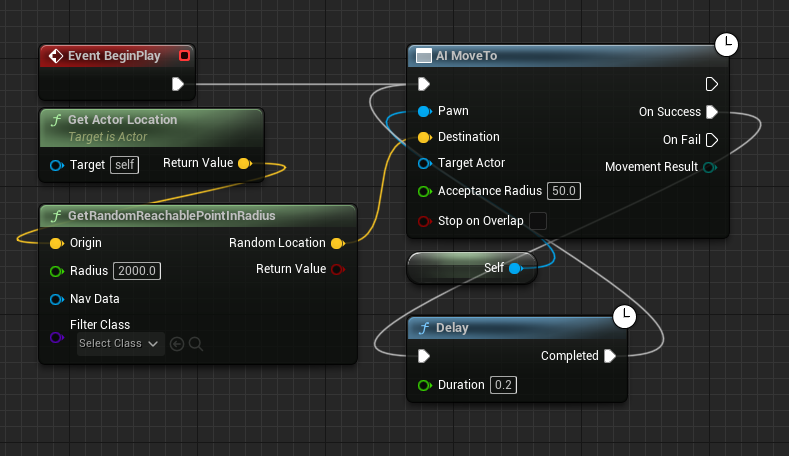
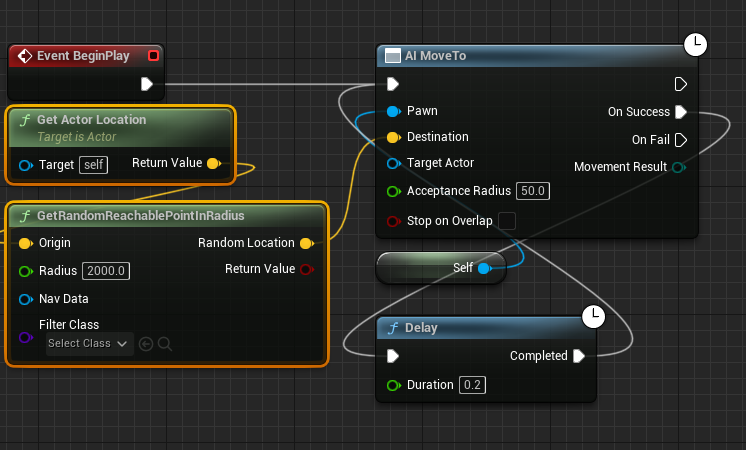
The starting point for this transformation involves an existing blueprint graph that dictates the AI character’s movement. In many preliminary setups, this graph might include nodes like Get Actor Location and GetRandomReachablePointInRadius, designed to instruct the AI to move to arbitrary points within a defined radius around itself. These nodes, while useful for initial AI testing or simple patrol behaviors, are antithetical to the goal of player following. Their function is to determine a random, reachable destination, not a specific, dynamic target like the player. Therefore, the first critical step is to identify and remove these specific nodes from the blueprint graph. This action clears the previous movement directive, preparing the AI MoveTo node to receive new, player-specific target information. The visual representation of the blueprint after this deletion would show the AI MoveTo node disconnected from its target input, awaiting a new instruction. This removal is not merely cosmetic; it fundamentally alters the AI’s objective from self-directed random movement to an externally defined target.
Directing AI Towards the Player
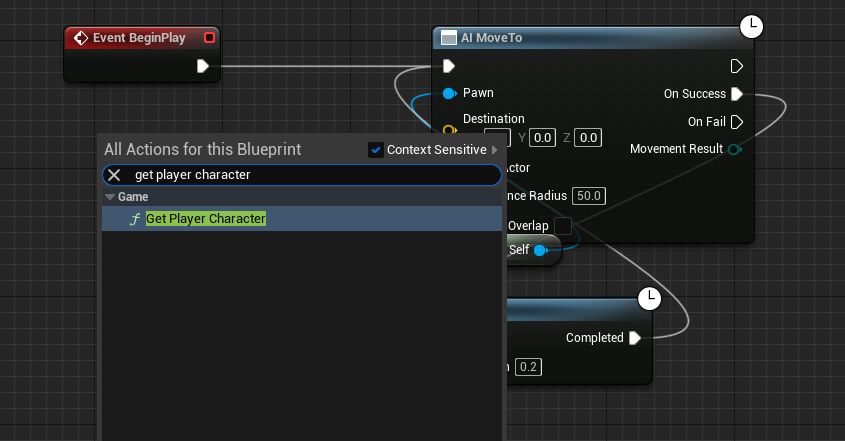
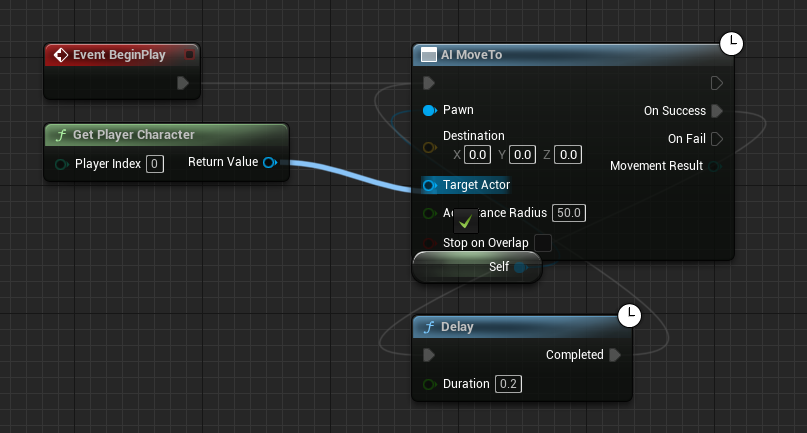
With the random movement logic excised, the next phase focuses on establishing a direct link to the player character’s location. This is achieved by introducing the Get Player Character node into the blueprint graph. The Get Player Character node is a fundamental utility in Unreal Engine, designed to retrieve a reference to the primary player-controlled character in the game. It is a robust and reliable way to identify the player’s presence within the game world, irrespective of specific character classes or instances. Once added, the Return Value pin (an output pin, typically colored blue, representing the object reference to the player character) of the Get Player Character node must be connected to the Target Actor pin (an input pin, also blue, expecting an actor reference as the destination) on the AI MoveTo node. This connection is the lynchpin of the entire player-following system. By linking these two nodes, the AI MoveTo node is now instructed to continuously obtain the current location of the Get Player Character and set it as its movement target. This means that as the player moves, the AI MoveTo node will dynamically update its target, ensuring the AI character always attempts to pathfind directly towards the player’s real-time position. This dynamic targeting is what creates the sensation of an AI character actively chasing or following.
Ensuring Persistent Tracking
A critical consideration in AI pathfinding is the potential for failure. Even with a well-constructed NavMesh, situations can arise where the AI character might temporarily fail to reach its intended destination. This could be due to the player moving into an area not covered by the NavMesh, transient environmental obstructions, complex geometry that the NavMesh struggles to interpret perfectly, or even temporary physics interactions. If an AI MoveTo operation fails, and no subsequent logic is in place, the AI character could simply stop, breaking the immersion and the intended gameplay loop. To counteract this, a robust retry mechanism is essential. The AI MoveTo node features an On Fail execution pin (typically red, indicating an event trigger upon failure). To ensure persistent tracking, this On Fail pin is connected to a Delay node. The Delay node pauses the execution flow for a specified duration, preventing the system from spamming movement attempts and consuming excessive resources. After the delay, the execution flow is then routed back to the initial trigger point of the AI MoveTo sequence (e.g., the Event BeginPlay or Event Tick where the AI MoveTo is first called, or a custom event that initiates the movement). This creates a self-correcting loop: if the AI fails to reach the player, it waits for a brief moment, then attempts the movement again. This continuous retrying ensures that the AI will resume following the player as soon as a valid path becomes available, regardless of temporary obstacles or player actions that might momentarily render them unreachable. This iterative approach is vital for maintaining consistent AI behavior and player engagement.
Finalizing the Implementation
The final step in this blueprint modification process is to ensure that all changes are officially registered within the Unreal Engine editor. This is accomplished by clicking the "Compile" and "Save" buttons within the blueprint editor. Compiling the blueprint translates the visual script into executable code that the engine can understand and run. Saving the blueprint then commits these compiled changes to the project files. Failing to compile and save will result in the changes not being applied when the game is played in the editor or when compiled for a standalone build, meaning the AI will revert to its previous, non-player-following behavior. This seemingly simple step is a fundamental aspect of any blueprint development workflow, guaranteeing that the modifications take effect as intended. Once compiled and saved, testing the game in the editor will demonstrate the AI character actively and persistently chasing or following the player, showcasing the successful implementation of this core mechanic.
Transformative Applications in Game Design
While the underlying blueprint logic for AI player following is straightforward, its implications for game design are profound and far-reaching. This fundamental mechanic serves as the backbone for a multitude of AI behaviors across diverse game genres, enriching gameplay and character interactions significantly.
Dynamic Enemy Encounters
In action, adventure, and horror games, AI following is critical for creating compelling enemy encounters. It transforms static enemies into dynamic threats that react directly to the player’s presence and movement. A basic AI following system can be enhanced to allow enemies to relentlessly pursue the player through complex environments, leading to tense chase sequences or strategic combat scenarios. This forms the basis for enemies that can track the player’s last known position in stealth games, or intelligently close distances to engage in melee combat in action RPGs. When combined with other AI modules, such as attack patterns, path prediction, or flanking logic, this core following behavior allows for highly adaptive and challenging adversaries. Imagine a horror game where a creature consistently tracks your position, forcing you to constantly re-evaluate your escape routes, or an open-world RPG where a pack of wolves will chase you across plains until you escape their aggression range.
Intelligent Companion Systems
Beyond adversaries, AI following is equally vital for friendly characters, such as companions, escorts, or pets. A well-implemented companion AI can significantly enhance the player experience, providing support in combat, assisting with puzzles, or simply adding a sense of camaraderie. The AI MoveTo node, targeting the player, ensures that companions remain close, ready to engage in pre-defined support actions like healing, attacking nearby enemies, or interacting with environmental elements. This prevents companions from getting lost or stuck, maintaining the illusion of a cohesive team. In games like Fallout or The Elder Scrolls, the ability for companions to follow the player through vast landscapes, navigate challenging terrain, and remain by their side through countless encounters is a testament to the effectiveness of this core mechanic.
Enhancing Narrative and Quest Flow
The ability for AI to follow the player also plays a crucial role in narrative progression and quest design. Escort missions, where an NPC must be safely guided to a specific location, rely entirely on this functionality. Similarly, characters that need to lead the player to a hidden objective, provide context-sensitive dialogue, or trigger events upon reaching certain proximity to the player, all benefit from robust following logic. This allows for dynamic storytelling where NPCs are active participants in the player’s journey, rather than static quest givers. For example, an NPC might lead the player through a dangerous dungeon, providing crucial lore or tactical advice along the way, with their continuous movement guided by the player’s position. This fosters a more immersive and interactive narrative experience.
The Broader Impact: Democratizing AI Development
The accessibility of implementing core AI behaviors like player following within Unreal Engine 5 via Blueprints represents a significant step forward in game development. Traditionally, AI programming required specialized knowledge of C++ and complex algorithms. Blueprints democratize this process, allowing game designers, artists, and even hobbyists to craft sophisticated gameplay systems without needing to delve into low-level code. This fosters greater creativity and iterative design, as developers can quickly prototype, test, and refine AI behaviors. The speed and ease with which such a foundational AI mechanic can be established enable teams to allocate more resources to developing nuanced behaviors, intricate decision-making processes (e.g., using Behavior Trees or Environment Query Systems), and unique character personalities, rather than wrestling with basic movement. This democratizing effect accelerates game development cycles and lowers the barrier to entry for aspiring creators.
Considerations and Future Iterations
While the described blueprint configuration provides a robust foundation for AI player following, it is important to acknowledge its inherent limitations and consider avenues for future enhancement. The basic AI MoveTo functionality, even with the On Fail retry loop, primarily focuses on direct pathfinding. It does not inherently incorporate advanced decision-making, such as:
- Tactical Movement: The AI won’t automatically take cover, flank the player, or predict player movement. These require additional layers of AI logic, often implemented through Behavior Trees or Utility AI systems.
- Collision Avoidance (Player-to-AI): While the NavMesh handles AI-to-world collision, preventing AI from overlapping with the player character might require additional logic or character movement component settings, such as
bStopOnOverlap. - Performance at Scale: While efficient for a few AI agents, a large number of constantly moving AI characters, each running a
DelayandAI MoveToloop, could impact performance. Optimization strategies, such as reducing the frequency ofAI MoveTocalls for distant AI, or using Unreal’s AI perception system to only activate following when the player is within range, become crucial. - Contextual Behavior: The AI simply follows. It doesn’t know why it’s following. Integrating this basic movement with other AI components, like perception (sight, hearing), threat assessment, and state machines, allows for context-sensitive behaviors (e.g., stopping to fight, fleeing, or waiting).
Future iterations of this system would typically involve integrating it with Unreal Engine’s more advanced AI frameworks. Behavior Trees allow for complex decision-making processes, enabling AI to switch between states like "Patrol," "Chase," "Attack," and "Flee." The Environment Query System (EQS) empowers AI to query the environment for optimal locations (e.g., finding cover, a good vantage point, or a healing spot). AI Perception components provide the AI with senses, allowing them to detect the player based on sight, sound, or even smell, triggering the chase behavior only when appropriate. These advanced systems build upon the fundamental AI MoveTo node, adding layers of intelligence and believability to character actions.
Conclusion: A Cornerstone for Interactive Worlds
The ability to implement intelligent AI player following mechanics with just a few blueprint nodes in Unreal Engine 5 underscores the power and accessibility of modern game development tools. This seemingly simple functionality is, in reality, a foundational pillar upon which countless interactive experiences are built. From the relentless pursuit of an enemy to the unwavering loyalty of a companion, the AI MoveTo node, when correctly configured with player targeting and robust error handling, unlocks a vast spectrum of dynamic gameplay possibilities. By democratizing the creation of such core AI behaviors, Unreal Engine 5 continues to empower developers worldwide, enabling them to craft more immersive, responsive, and engaging virtual worlds for players to explore and interact with. This essential technique remains a cornerstone for developers aiming to bring their virtual characters to life with compelling and believable intelligence.
About the Author