The digital storefront itch.io has rolled out a significant update to its desktop application, version 26.20.0, introducing a suite of highly anticipated features designed to enhance user experience, particularly for players operating within the broader PC gaming ecosystem and those utilizing portable gaming devices like the Steam Deck. This latest iteration focuses on improving interoperability with other platforms, streamlining game management, and offering greater flexibility in how users access their extensive libraries of independent titles. The update addresses several long-standing community requests, reflecting itch.io’s ongoing commitment to evolving its platform while maintaining its core identity as a haven for indie game developers and players.
Seamless Integration with the Steam Ecosystem
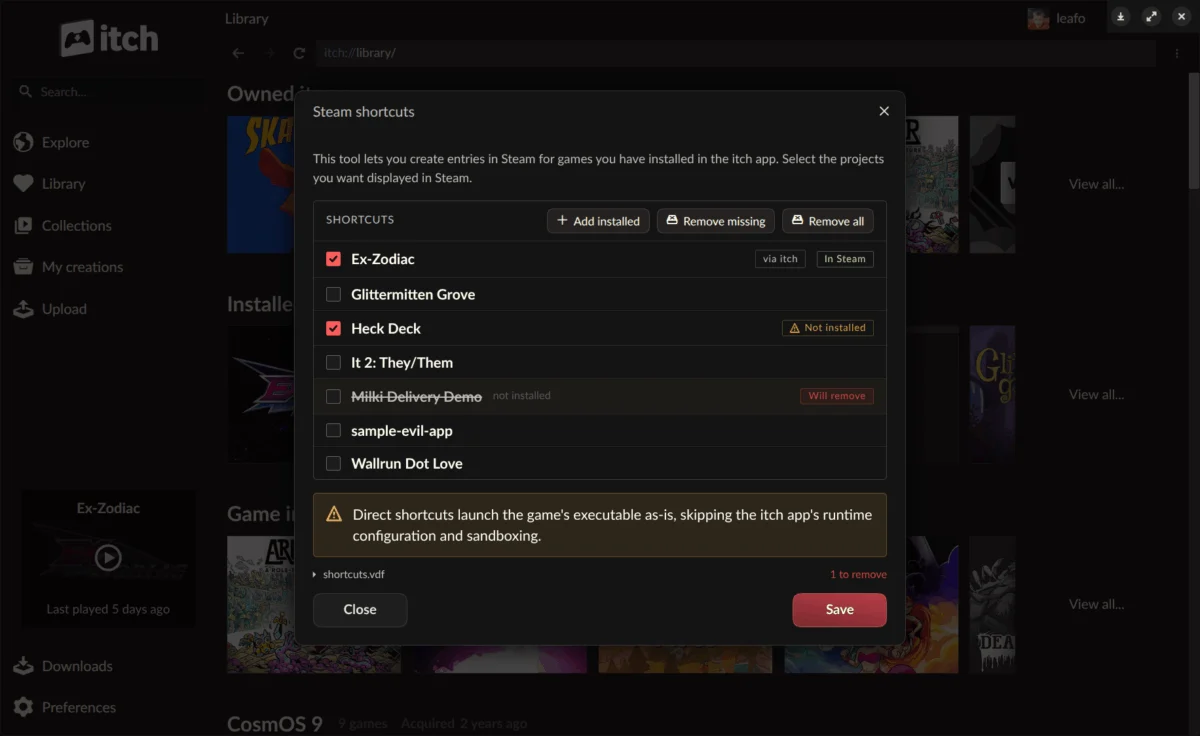
One of the most impactful features introduced in v26.20.0 is the ability to integrate itch.io games directly into Steam. This functionality allows users to add titles installed via the itch.io app as shortcuts within their Steam library, a development poised to significantly benefit Steam Deck owners and those who frequently use Steam’s Big Picture mode. The motivation behind this integration stems from the growing prevalence of hybrid gaming setups where users prefer a centralized launcher for all their digital titles. By enabling itch.io games to appear and launch directly from Steam, the update eliminates the need to switch between applications, offering a more unified and streamlined gaming experience.
The integration is facilitated by a newly developed "headless runner mode" for itch.io games. This innovative technical solution allows games to launch with the full backing and support of the itch.io app’s infrastructure – including features like sandboxing, prerequisite checks, per-game launch settings, and playtime tracking – without requiring the full graphical user interface of the itch.io application itself to be actively running. This behind-the-scenes operation ensures that the integrity and functionality of the itch.io game environment are preserved, even when initiated from an external launcher like Steam.
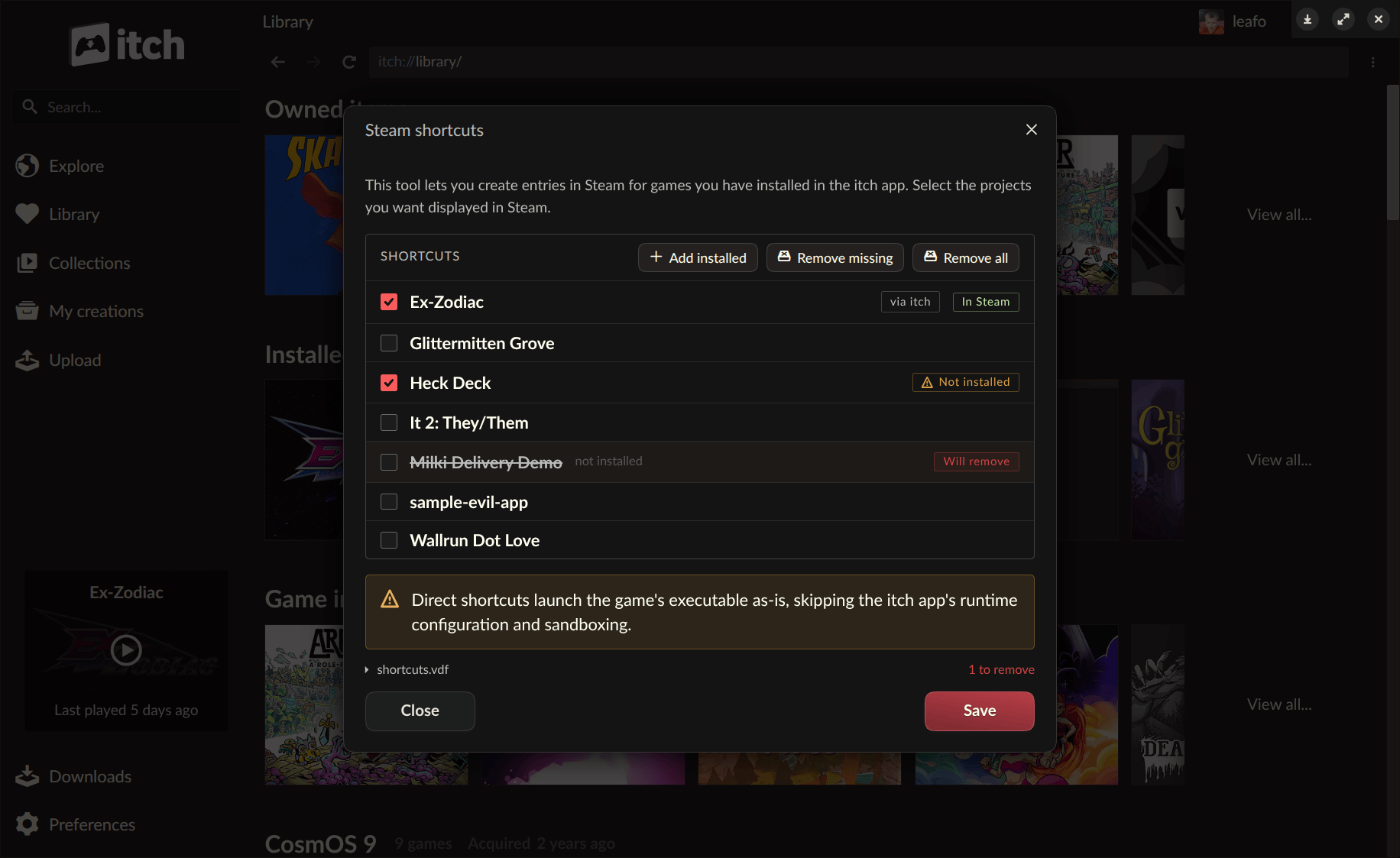
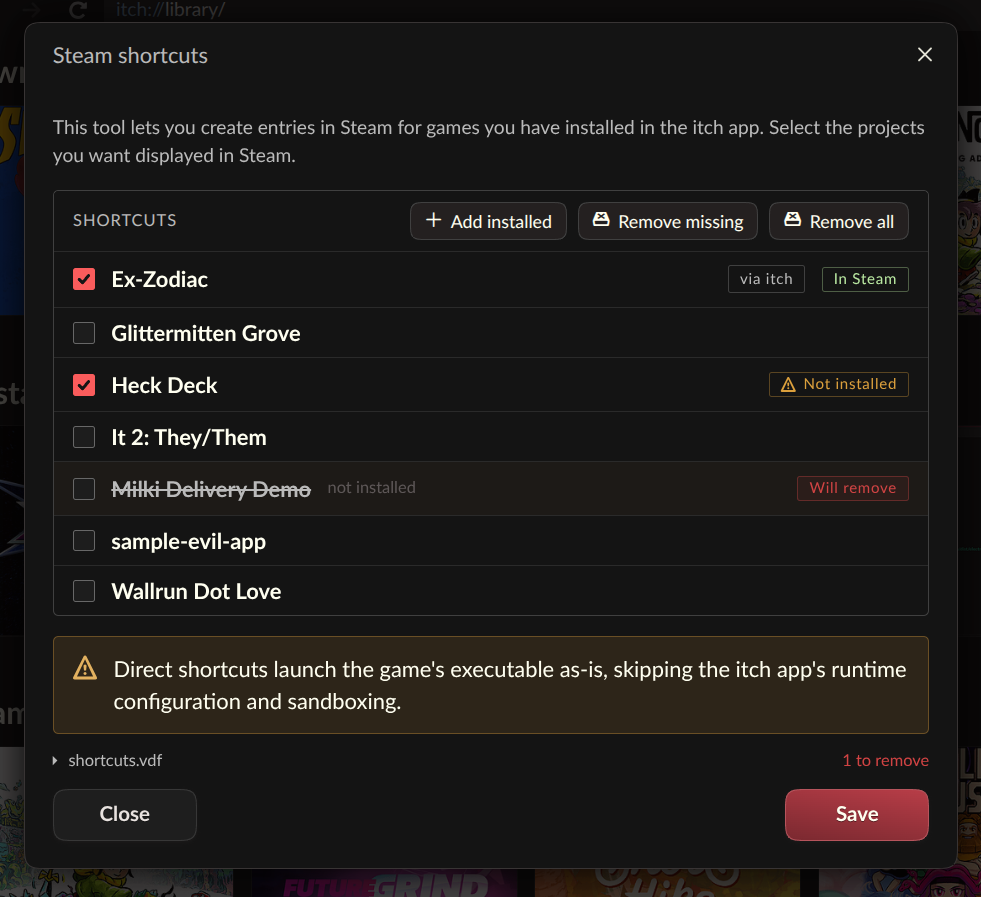
Users can access the Steam Shortcuts tool either through the itch.io app’s preferences page or by right-clicking on any installed game within their itch.io library and selecting the "Steam Shortcuts" option. Upon synchronization, all added itch.io titles are automatically organized into a dedicated "itch.io collection" within the Steam library, providing a clean and easily navigable structure. Recognizing the experimental nature of such a complex cross-platform feature, itch.io has encouraged its community to actively report any bugs or issues encountered, emphasizing a collaborative approach to refining the functionality. To ensure broad compatibility across various game configurations, each synchronized shortcut can be configured with two distinct launch modes, allowing users to select the optimal method for their specific hardware and software setup, further enhancing the feature’s robustness.
The Power of Headless Game Launching
Beyond its immediate application for Steam integration, the introduction of the headless launch mode represents a significant architectural enhancement for the itch.io app. This mode allows for an installed game to be started with a simple command-line instruction: itch-setup --run-game <gameId> [--profile-id <profileId>]. While initially conceived to support Steam shortcuts, the functionality is not exclusive to Valve’s platform. This open-ended approach means that any third-party launcher, custom shortcut system, or automated script can now leverage this command to initiate itch.io games. This opens up a myriad of possibilities for advanced users, system integrators, and developers looking to build custom frontends or integrate itch.io titles into broader gaming management tools.
The technical underpinnings of the headless launch mode are robust. It functions as a new butler launch subcommand, which directly interacts with the user’s existing itch.io app database. This design ensures that all configurations previously set within the full itch.io application are respected. Critical features such as sandboxing, which isolates games from the main system to enhance security; automatic installation of prerequisites, ensuring games have the necessary runtime environments; customized per-game launch settings; accurate play time tracking; and the secure passing of API keys to games all operate seamlessly in headless mode. This level of comprehensive support underscores that headless launching is not a stripped-down experience but a fully functional, albeit silently executed, launch process.
It is important to note that not all game types are fully supported by the headless launch mode. Specifically, HTML5-based games, which require a web browser environment to run, will still necessitate the full itch.io app to launch. In such instances, attempting to use the --run-game command on an HTML5 title will automatically trigger the launch of the itch.io application to facilitate the game’s execution. To further empower developers and enthusiasts interested in building custom integrations, itch.io has provided a comprehensive guide detailing how to interface with the itch.io app, located at https://itch.io/docs/butler/launcher-integration.html. This documentation is a testament to itch.io’s commitment to fostering an open and extensible platform, encouraging innovation within its community.
Streamlined Library Management: Linking Existing Game Folders
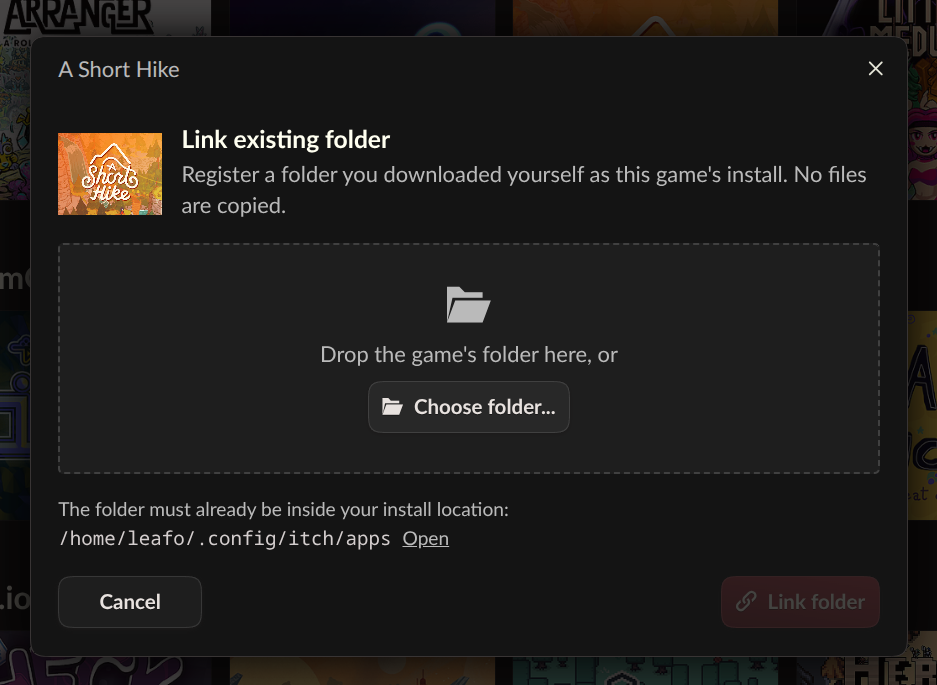
Another valuable addition in v26.20.0 is the "Link existing folder…" option, which significantly improves how users manage games downloaded outside of the itch.io app. Previously, if a user acquired an itch.io game directly from the website, as part of a bundle, or through an external download link, and later wished to integrate it into their itch.io app library, they would often have to re-download the entire game through the app. This could be a cumbersome process, especially for large game files or users with slower internet connections.
The new feature addresses this pain point directly. Users can now register an existing game folder with the itch.io app, bypassing the need for a redundant download. This option is conveniently located within the game’s install dialog, appearing alongside the standard download choices. Once linked, the game is recognized by the app as installed, appearing in the user’s library and becoming fully launchable through the application, just like any other app-installed title.
itch.io describes this feature as an "escape hatch," designed for specific scenarios where re-downloading is impractical or when a project offers downloads that the app cannot process automatically, such as external links to large game files or specific versions. The implementation is deliberately kept simple: when a folder is linked, the app takes the user’s word that the contents constitute the intended game. There is no automated file verification process. While this approach places responsibility on the user to ensure the integrity of the linked files, it offers unparalleled flexibility and convenience for managing diverse game acquisition methods, further solidifying the itch.io app as a central hub for all indie game experiences.
Context and Broader Implications for the Indie Gaming Landscape
This update from itch.io arrives at a pivotal moment in the gaming industry, characterized by the increasing popularity of portable PC gaming devices and a growing demand for seamless cross-platform experiences. The Steam Deck, in particular, has catalyzed a movement towards greater interoperability, as users seek to consolidate their diverse game libraries onto a single, powerful handheld system. itch.io, with its extensive catalog of independent games, many of which are Linux-compatible or can run via compatibility layers like Proton, naturally aligns with this trend. By embracing Steam integration, itch.io not only caters to its existing user base but also potentially opens its vast library to a wider audience of Steam Deck owners who might otherwise overlook games not natively available on Steam.
Founded in 2013, itch.io has carved a unique niche in the digital distribution space by championing independent game developers, offering flexible revenue sharing models, and promoting a diverse array of experimental and innovative titles. Unlike more traditional storefronts, itch.io has consistently fostered a developer-friendly ecosystem, often hosting game jams and providing tools like ‘butler’ for easy publishing and updating. The platform’s emphasis on DRM-free distribution options also resonates strongly with a segment of the gaming community that values ownership and freedom from restrictive digital rights management.
The v26.20.0 update reinforces itch.io’s position as a forward-thinking platform that prioritizes user convenience and developer reach. The headless launch mode, in particular, demonstrates a strategic vision beyond mere feature parity, empowering a more open and integrated future for indie game distribution. This move towards greater interoperability could be seen as a response to the evolving competitive landscape, where platforms are increasingly expected to coexist and complement each other rather than operate in isolated silos. For developers, this means their games, once published on itch.io, gain potential for broader discoverability through integration into popular launchers, without sacrificing the benefits of itch.io’s platform.
Community Reception and Future Outlook
Initial reactions from the itch.io community have been overwhelmingly positive. Users have lauded the update for significantly enhancing accessibility and convenience, particularly for those utilizing Steam Deck. Comments on the official announcement post highlight the excitement for playing itch.io games directly on their handhelds, praising the team for "fantastic work." The ability to link existing game folders was also met with enthusiasm, solving a common frustration for users who often acquire games through various channels.
The update has also spurred discussions about further integrations. While some users expressed a desire for GOG integration, others engaged in a nuanced debate about DRM-free gaming on Steam, underscoring the community’s passion for open platforms. Notably, the itch.io team has acknowledged the burgeoning interest in mobile support, particularly for Linux-based handhelds. In a direct response to a user query, a representative from itch.io hinted at a "not so secret project for Linux based handhelds," with potential future expansion to Android devices. This indicates a strategic roadmap that continues to explore new frontiers in gaming accessibility, catering to the diverse hardware preferences of its community.
Availability and Contributing to the Platform
Users can acquire the latest version of the itch.io app from the official website at https://itch.io/app. For those who already have the application installed, the update process is automatic. Users can also manually check for updates via the Preferences screen within the app. A comprehensive list of all changes, bug fixes, and security enhancements introduced in v26.20.0 is available in the detailed release notes on GitHub, offering transparency into the development process.
Furthermore, itch.io actively encourages community involvement in its localization efforts. The platform extends its gratitude to all contributors who have assisted with translations for this version, inviting new volunteers to help translate the app through Weblate, the platform’s translation management system. This collaborative approach to development and localization underscores itch.io’s community-centric philosophy, ensuring the app remains accessible and user-friendly for a global audience. The v26.20.0 update marks another significant milestone in the evolution of the itch.io app, solidifying its role as a versatile and indispensable tool for indie game enthusiasts and developers alike.
About the Author