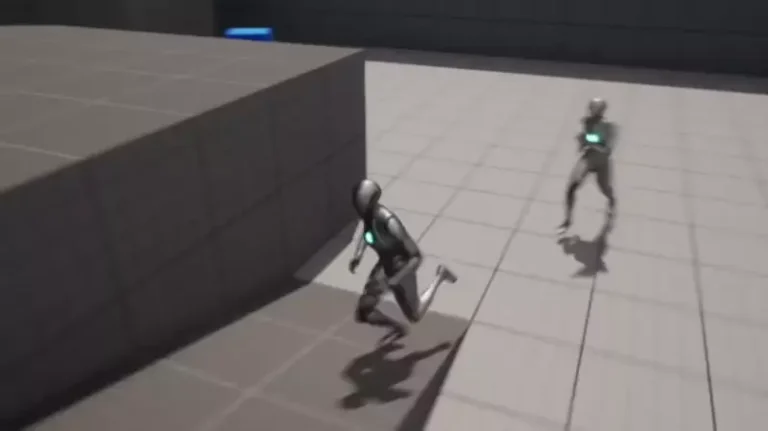
The landscape of modern game development continues to evolve, with artificial intelligence (AI) playing an increasingly pivotal role in crafting immersive and dynamic player experiences. From populating vast open worlds with believable non-player characters (NPCs) to engineering complex enemy behaviors, effective AI navigation is a foundational element. Unreal Engine 5 (UE5), Epic Games’ flagship development platform, is making significant strides in democratizing this intricate process, offering developers a streamlined approach to implementing AI pathfinding through its sophisticated NavMesh system and integrated character movement tools. This commitment to accessibility is empowering studios of all sizes to create more intelligent and reactive game worlds, directly impacting both atmospheric depth and core gameplay mechanics.
The Indispensable Role of AI in Contemporary Gaming
In today’s gaming ecosystem, AI-controlled characters are no longer mere static backdrops but active participants that enhance atmosphere, provide challenges, and contribute to narrative progression. The demand for realistic and responsive NPC behavior has escalated, pushing game engines to deliver robust yet intuitive AI navigation solutions. Historically, implementing sophisticated AI movement could be a complex and time-consuming endeavor, often requiring extensive coding and intricate algorithm design. This presented a significant barrier for many developers, particularly those with limited resources or specialized AI programming expertise. Unreal Engine 5 addresses this challenge head-on by providing a comprehensive, visual scripting-friendly framework that simplifies the creation of intelligent agents capable of traversing diverse game environments. Industry experts frequently highlight that the efficiency of AI implementation directly correlates with project timelines and budgetary constraints, making accessible tools like UE5’s NavMesh system critical for timely and cost-effective game production.
Understanding the NavMesh: The Blueprint for AI Movement
At the heart of UE5’s AI navigation system lies the Navigation Mesh, or NavMesh. This is not merely a conceptual idea but a tangible, generated mesh that defines the traversable areas for AI characters within a game level. Unlike simple waypoint systems that rely on predefined paths, a NavMesh provides a flexible, intelligent map that AI agents can use to dynamically calculate routes, avoid obstacles, and find optimal paths to a given destination. The precision and adaptability of the NavMesh are paramount for believable AI behavior, preventing characters from getting stuck, walking through walls, or navigating impassable terrain. The process within UE5 is designed to be intuitive, ensuring that even developers new to AI implementation can quickly establish a functional navigation system.
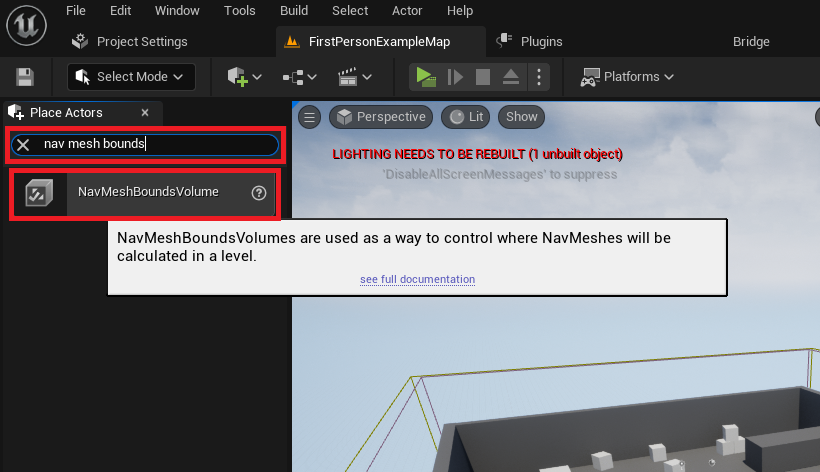
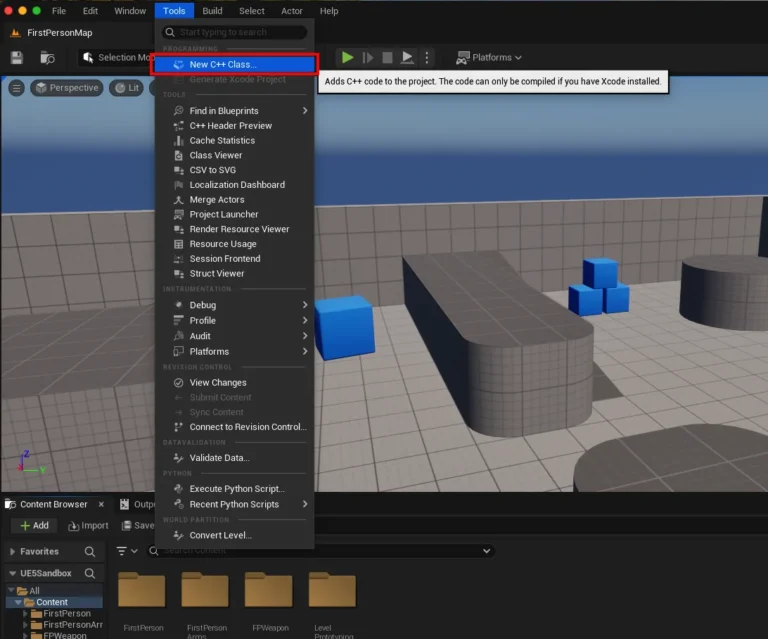
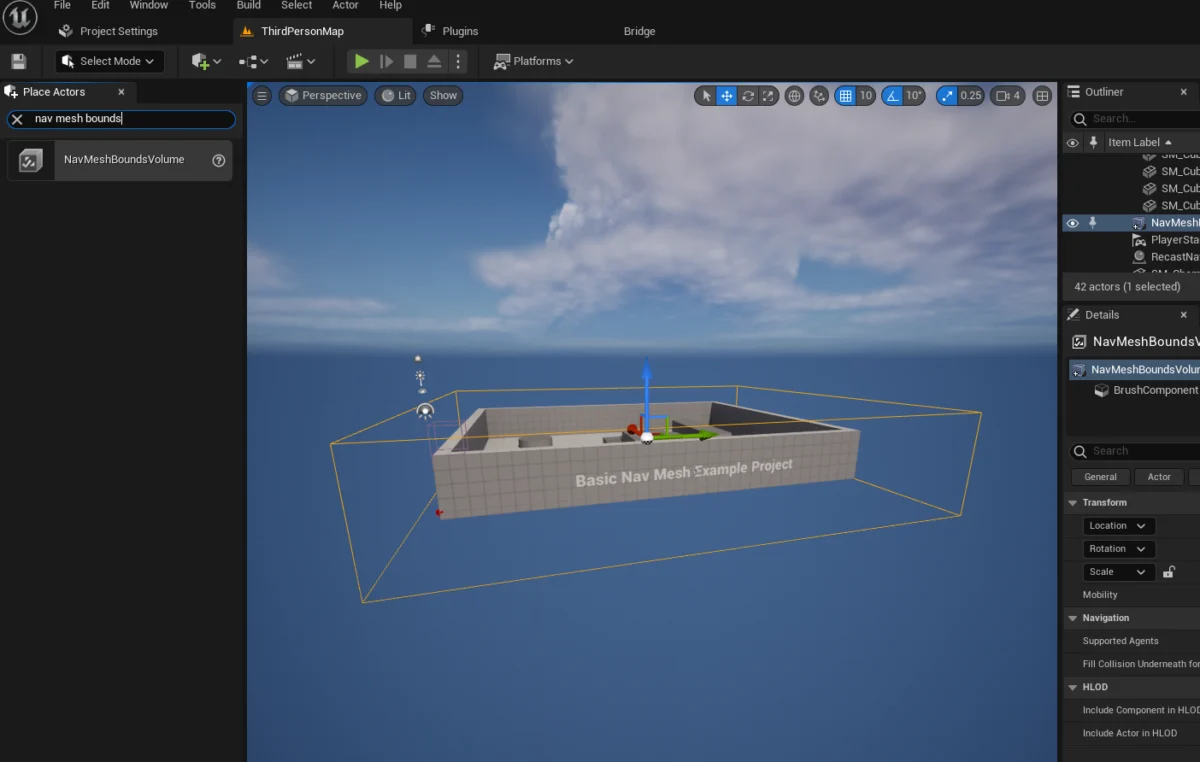
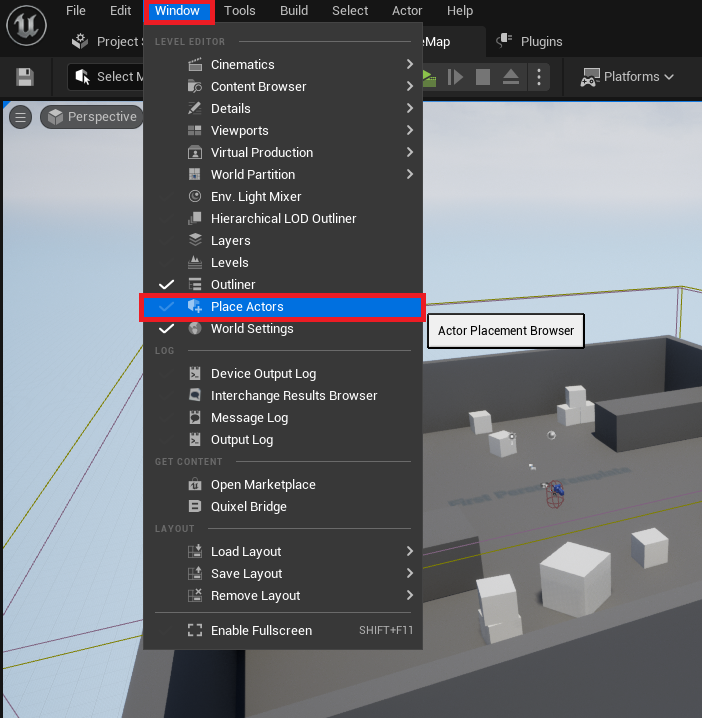
The initial step in establishing this foundational element involves accessing the "Place Actors" window within the Unreal Engine 5 editor. This window serves as the primary interface for developers to spawn a wide array of basic objects, environmental elements, and crucial functional volumes into their levels. Its straightforward design underscores UE5’s philosophy of providing readily available tools for scene construction and gameplay logic. Once accessed, developers navigate to the "Volumes" category within the Modes panel to locate and add a "NavMeshBoundsVolume" actor to their scene. This specific volume is the lynchpin for defining the navigable space.
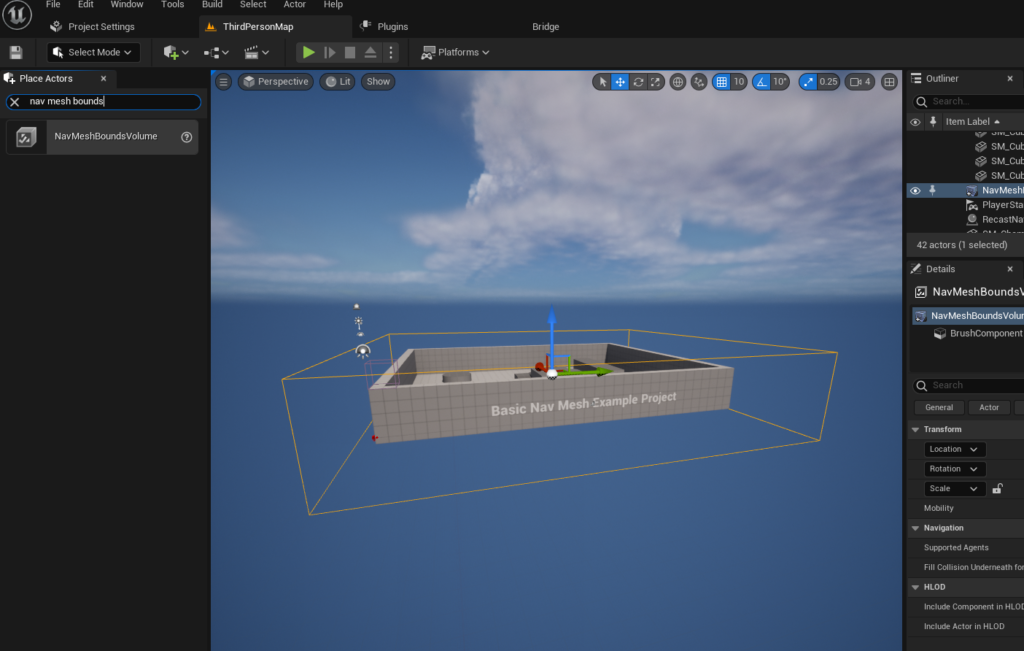
The strategic placement and scaling of the NavMeshBoundsVolume are critical. Developers must carefully adjust its size and position to encompass the entirety of the area where AI characters are expected to move. This can range from a confined interior space to an expansive outdoor environment, depending on the game’s requirements. The dimensions of this volume directly influence the computational resources required for NavMesh generation; larger volumes naturally demand more processing power and time. However, UE5 offers advanced configurations, including dynamic NavMesh generation, which allows for the real-time adaptation of the navigation mesh in environments that undergo frequent changes, such as destructible terrain or dynamically spawned obstacles. This flexibility ensures that the engine can cater to a broad spectrum of game design needs, from static puzzle rooms to highly interactive open worlds.
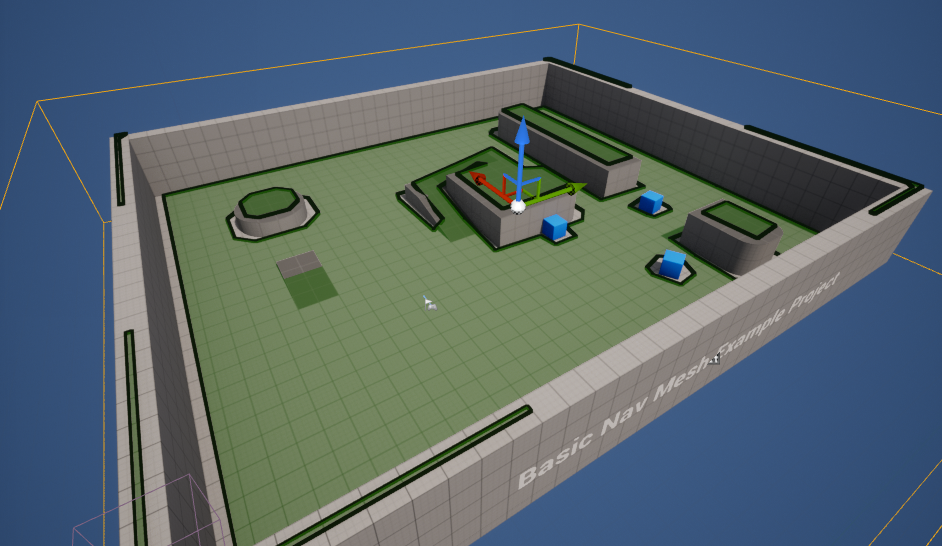
To confirm the accurate setup and generation of the NavMesh, Unreal Engine 5 provides a convenient visualization toggle. By pressing the ‘P’ key on the keyboard, developers can instantly view the generated mesh overlaid on their level geometry. This debug view, typically rendered as a green, translucent surface, highlights all areas that AI characters can traverse. It serves as an invaluable diagnostic tool, allowing developers to immediately identify any gaps, obstructed zones, or unintended navigable areas, facilitating rapid iteration and refinement of the navigation space. This immediate visual feedback is a testament to UE5’s focus on developer efficiency, minimizing guesswork and accelerating the debugging process.
Empowering AI Character Movement: A Blueprint Approach
Once the NavMesh is established, the next phase involves enabling AI characters to actually utilize this pathfinding data. For demonstration purposes and ease of implementation, many developers leverage the readily available character blueprints provided with Unreal Engine 5’s project templates, such as the Third Person Template. These templates offer pre-rigged and animated character models, allowing developers to focus on AI logic rather than character setup.
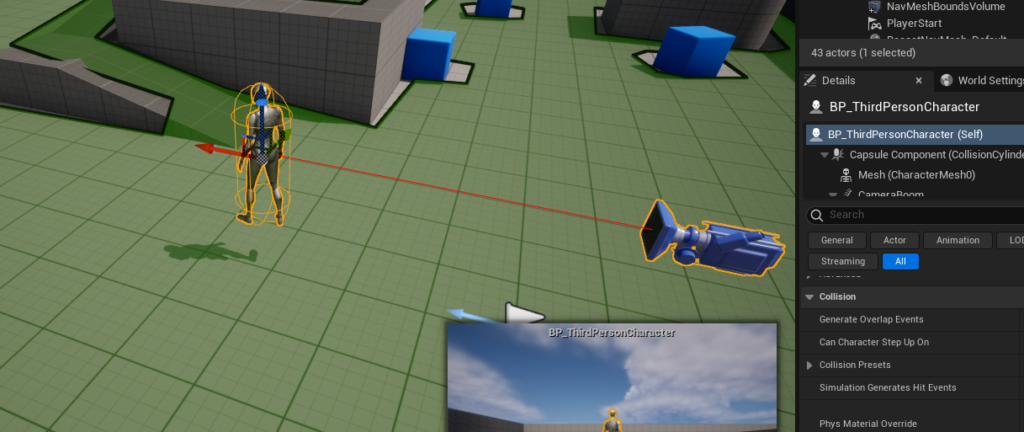
The integration of AI navigation into a character blueprint is achieved through UE5’s visual scripting system, Blueprints, which allows for complex logic to be built without writing C++ code. The process begins by dragging an instance of the chosen character blueprint, for example, the BP_ThirdPersonCharacter found in the "Third Person / Blueprints" folder, directly into the game level. This places the AI character into the environment where it will operate.
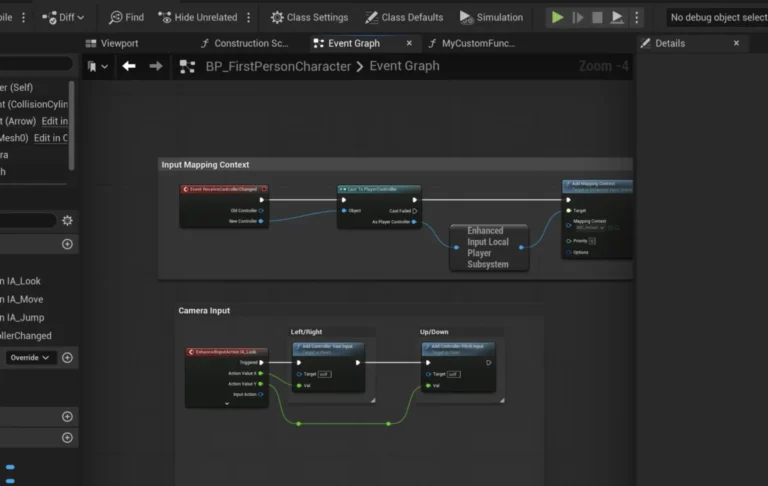
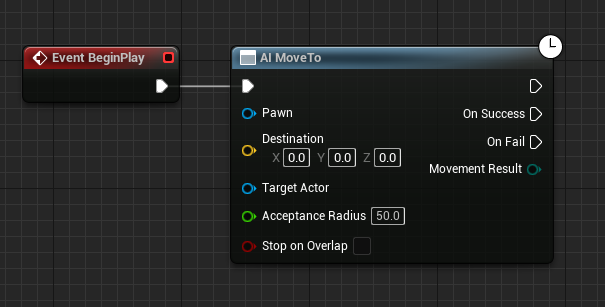
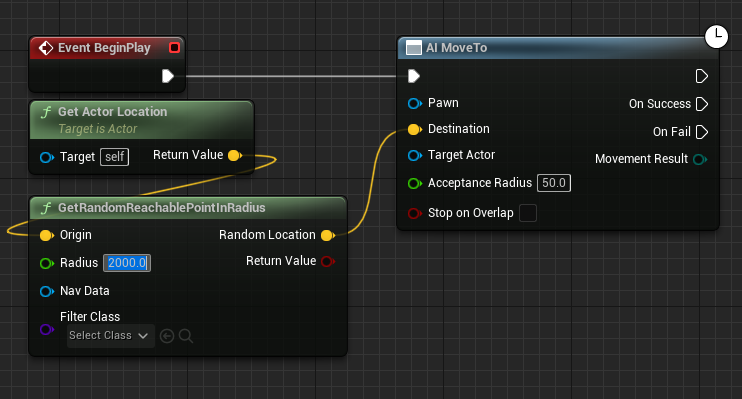
Within the character’s blueprint editor, the core AI movement logic is orchestrated. The sequence typically starts with a "Begin Play" event, which triggers the AI’s initial actions as soon as the game begins. Connected to this event is the crucial "AI MoveTo" node. This node is the fundamental command that instructs an AI pawn to navigate to a specified destination using the available NavMesh. Its effectiveness lies in abstracting the complex pathfinding algorithms, allowing developers to simply define a target point.
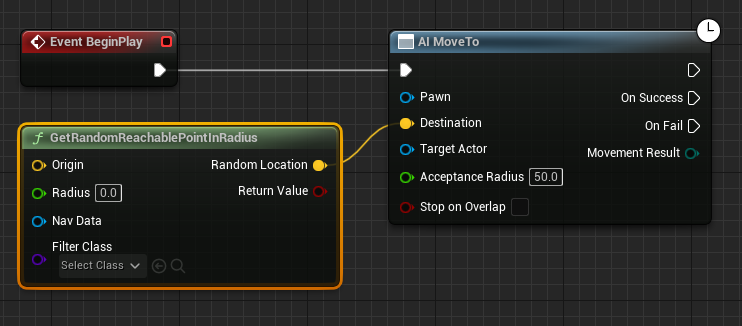
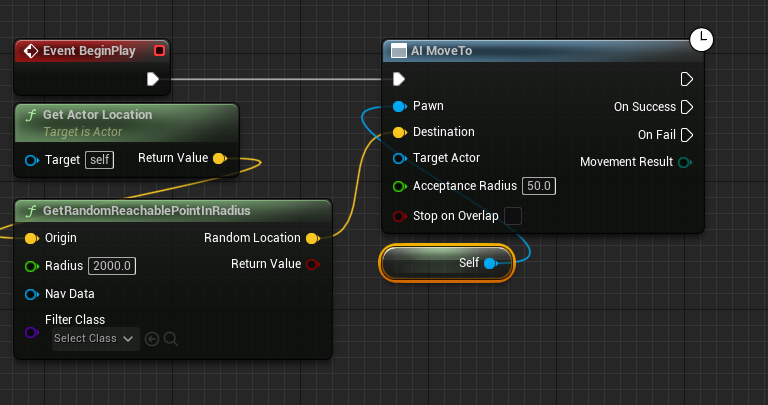
To enable dynamic and autonomous movement, the "AI MoveTo" node is often paired with a "GetRandomReachablePointInRadius" node. This powerful node queries the NavMesh to find a valid, traversable location within a specified radius from a given origin point. The output, a yellow vector pin representing the calculated destination, is then fed directly into the "Destination" pin of the "AI MoveTo" node. This programmatic coupling ensures that the AI character is always directed towards a valid point on the NavMesh, preventing attempts to move to unreachable or invalid locations.
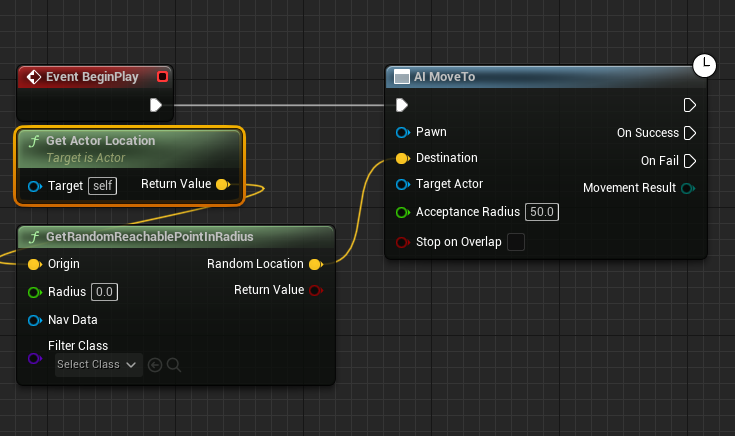
The "Origin" for this random point calculation is typically derived from the AI character’s current position. A "Get Actor Location" node is used to retrieve the character’s world coordinates, which then connects to the "Origin" input of the "GetRandomReachablePointInRadius" node. This setup ensures that the AI’s random roaming behavior is centered around its current vicinity, creating localized movement patterns. The "Radius" parameter, often set to a value like "2000" units (Unreal units, typically centimeters), dictates the maximum distance the AI will consider for its next random destination. Adjusting this value allows developers to control the scope of the AI’s exploration, from subtle ambient movement to wide-ranging patrols.
Crucially, the "Pawn" input of the "AI MoveTo" node must be populated with a reference to the AI character itself. This is achieved by creating a "Reference to Self" node, which provides a direct link to the character’s blueprint instance executing the logic. Connecting this "Reference to Self" to the "Pawn" pin explicitly tells the "AI MoveTo" node which character should perform the navigation.
Finally, to create continuous, looping AI movement, a "Delay" node is integrated. This node is connected to the "On Success" output pin of the "AI MoveTo" node. The "On Success" pin fires once the AI character has successfully reached its designated destination. After a specified delay (e.g., a few seconds to simulate pauses in movement), the output of the "Delay" node loops back into the "AI MoveTo" node, triggering a new random destination calculation and subsequent movement. This creates an endless cycle of autonomous navigation, allowing AI characters to continuously roam the defined NavMesh space without further manual intervention. This simple yet effective loop forms the backbone of many ambient AI behaviors seen in games.
Technical Nuances and Best Practices
While the basic setup is straightforward, optimizing NavMesh and AI navigation involves several considerations. Performance is a key factor, particularly in large, complex levels. Developers must balance the size and detail of the NavMesh with the computational cost of its generation and runtime queries. Dynamic NavMesh generation, while powerful for changing environments, can introduce performance overhead if not managed carefully. UE5 provides various navigation settings within the Project Settings, allowing fine-tuning of parameters such as agent radius, height, and step height, which dictate how the NavMesh is generated around obstacles and slopes. These parameters are crucial for ensuring that the NavMesh accurately reflects the physical capabilities of the AI characters. For instance, an AI character that can jump over small obstacles will require different NavMesh generation settings than one that cannot.
Furthermore, advanced AI behaviors often extend beyond simple random movement. UE5’s AI system supports Behavior Trees and Environment Queries (EQS), which provide more sophisticated methods for decision-making and target selection. Behavior Trees allow developers to construct complex decision-making processes visually, enabling AI characters to react to environmental stimuli, engage in combat, or follow specific patrol routes. EQS, on the other hand, allows AI to intelligently query their surroundings to find optimal locations for cover, attack positions, or resource gathering, further enhancing the realism and challenge of AI encounters. These tools build upon the fundamental NavMesh foundation, transforming simple movement into intelligent, goal-oriented behavior.
Broader Implications and Future Trends
The ease with which Unreal Engine 5 facilitates AI navigation has profound implications for the game development industry. It significantly lowers the barrier to entry for aspiring developers and small independent studios, enabling them to implement sophisticated AI behaviors without requiring extensive specialized programming knowledge. This democratization of AI tools fosters greater innovation, allowing creators to focus on unique gameplay mechanics and narrative experiences rather than wrestling with low-level engine complexities. For larger studios, these streamlined workflows translate into faster prototyping, reduced development cycles, and more efficient resource allocation, ultimately contributing to higher quality and more polished final products.
The increasing sophistication of readily available AI navigation systems also paves the way for more dynamic and emergent gameplay. Games can feature more intelligent enemies, believable civilian populations, and reactive ecosystems, leading to richer, less predictable player experiences. As hardware capabilities continue to advance, coupled with engines like UE5 offering optimized AI solutions, the future of AI in gaming promises even more immersive and lifelike interactions, further blurring the lines between virtual worlds and reality. The ongoing commitment from Epic Games to refine and expand these AI tools ensures that Unreal Engine 5 will remain at the forefront of driving innovation in character intelligence and environmental interaction within the interactive entertainment sector.
About the Author